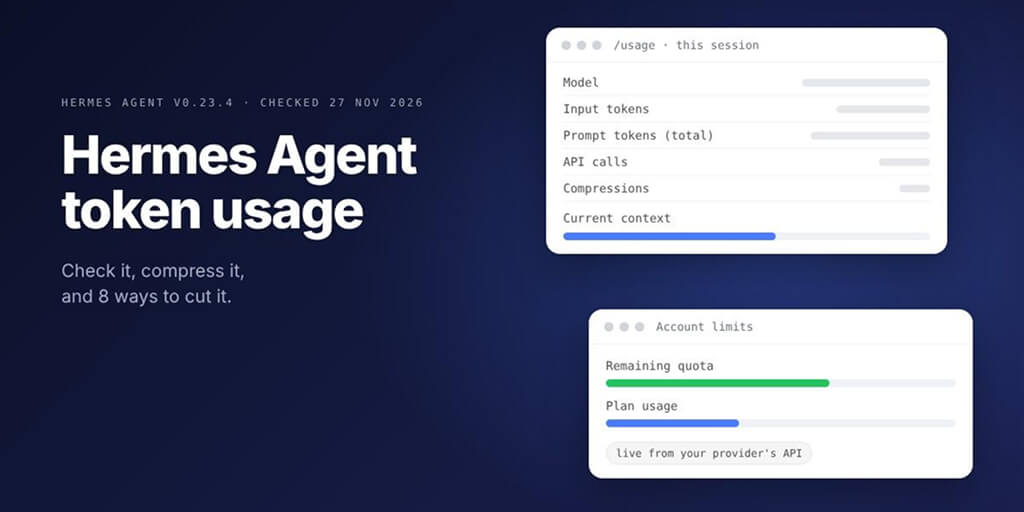
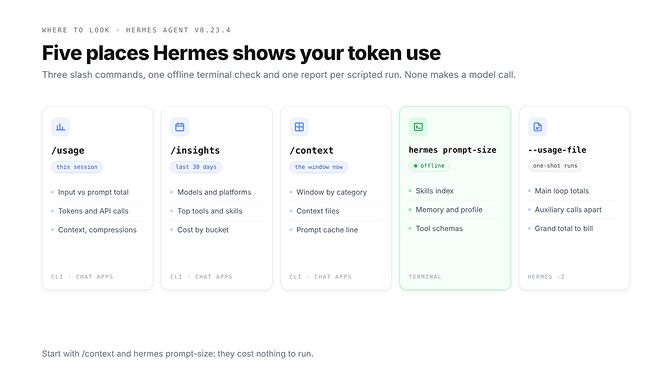
Run /usage to see Hermes Agent token usage and your provider's remaining quota; /context shows what fills the window, and hermes prompt-size shows your fixed per-message cost before any conversation. Hermes compresses at 50% of the context window, 75% on windows under 512K, and its gateway steps in at 85%.
Prompt caching, which the docs say cuts input cost by about 75% on multi-turn chats, holds until you switch models. Below: how to read the numbers, and eight fixes checked on v0.23.4 (published 24 November 2026).
| You want to | Run | Where |
|---|---|---|
| See this session's tokens and context | /usage | CLI and chat apps |
| See what fills the window, and the cache | /context | CLI and chat apps |
| See the last 30 days, with estimated cost | /insights | CLI and chat apps |
| See the fixed cost of every message | hermes prompt-size | Terminal, offline |
Checked: 27 November 2026 (Hermes Agent v0.23.4)
Picture this: your Hermes bot answered forty short questions in Telegram this week, and the invoice looks like you ran a research lab.
Where did all those tokens go?
Mostly into things you never typed. This guide is Hermes-only; for tools that work across agents, see our tested roundup of the skills that reduce token usage.
How to check Hermes Agent token usage
All of these are free to run: none makes a model call.
/usage
The reference says /usage shows token usage, a cost breakdown, session duration and "an Account limits section with remaining quota / credits / plan usage pulled live from the provider's API." In the terminal that means input, output, prompt (total), completion and total tokens, API calls, duration, context, messages and compressions; chat apps show a shorter list plus an estimated breakdown by category.
Two details from the v0.23.4 source: "Input tokens" counts only uncached input while "Prompt tokens (total)" adds cache reads and writes, so a wide gap means the cache is working (the CLI status bar shows a cache-hit percentage). And neither version prints a cost line; for money, use /insights.
/context (alias /ctx)
In the CLI, /context draws a 5 by 20 grid (each cell about 1% of the window) plus an estimated table: system prompt, tool definitions, rules, skills index, MCP, subagents, memory and conversation. Chat apps get a gauge with the auto-compression threshold and headroom.
Both list each context file (.hermes.md, the AGENTS.md chain, CLAUDE.md, .cursorrules, SOUL.md) with a token estimate, plus a cache line such as "Prompt cache: expired 15m ago (5m, declared); the next message re-processes the full prompt."
/insights
/insights covers the last 30 days (/insights 7 in a chat app, or hermes insights --days 7 --source telegram). It reports tokens, cost split into estimated, subscription-included and unknown, models, platforms, top tools and top skills; if terminal or read_file tops the tool list (it counts calls, not tokens), tool output is the likely culprit.
hermes prompt-size and hermes usage
hermes prompt-size breaks a fresh session's system prompt into the skills index, memory, profile, prompt tiers and tool schemas, offline (add --platform telegram for a chat app). hermes usage --provider openai-codex --json prints the Account limits block without a session; the reference lists openai-codex, anthropic and openrouter.
Why /usage can look lower than your bill
In the v0.23.4 source, /usage counts the main conversation loop plus Hermes's small cache keep-alives. Subagents keep their tokens in their own sessions (only their estimated cost reaches the parent), and compression summaries, background reviews, titles and vision calls are logged separately.
The CLI reference says the same of scripted runs, whose --usage-file counters "cover the main agent loop only". So trust your provider's dashboard for money, use /usage to compare sessions, and use /status for totals plus a local recap with "no LLM call, no prompt-cache impact".
If
/usagelooks small but the invoice doesn't, look at the work Hermes does around your chat.
A reply cut off mid-sentence is an output limit, not usage: see our guide to truncated Hermes responses.
Where Hermes tokens go
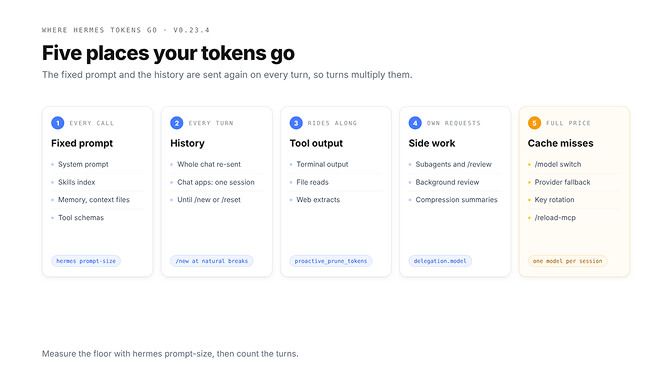
Five things fill a Hermes bill, and the first two repeat on every turn.
The fixed prompt. System prompt, skills index, memory snapshot, context files and tool schemas go out with every call. When we measured a fresh Hermes v0.23.1 install on 16 November 2026, about 10,800 tokens went out before the first word (up from about 10,400 on v0.22.5 in October), so treat that as a direction and run hermes prompt-size for today's figure.
History. Every turn re-sends the conversation, and in a chat app that's one session until /new or /reset; the memory docs warn that "a chat can run for weeks as a single session".
Tool output. Terminal output, file reads and web extracts stay in history until pruned or compacted, and on large windows compaction "rarely fires, so bulky tool outputs ... get re-sent on every subsequent turn".
Side work. Subagents run their own requests (a parallel batch "typically burns the large majority of a run's total tokens"), and so do /review, the background memory and skill review (every 10 user turns or 10 tool-calling iterations) and compression summaries, all on your main model by default.
Cache misses. A model switch, a provider fallback, a key rotation or /reload-mcp makes the next turn re-read the whole conversation at full input price.
That shape isn't unique to Hermes: The New Stack (27 August 2026) summarised a benchmark of twelve agent setups, Hermes among them, in which the startup prompt times the number of turns predicted tokens per solved task (R-squared 0.99). It's context, not a verdict on Hermes.
When Hermes compresses context, and how to change it
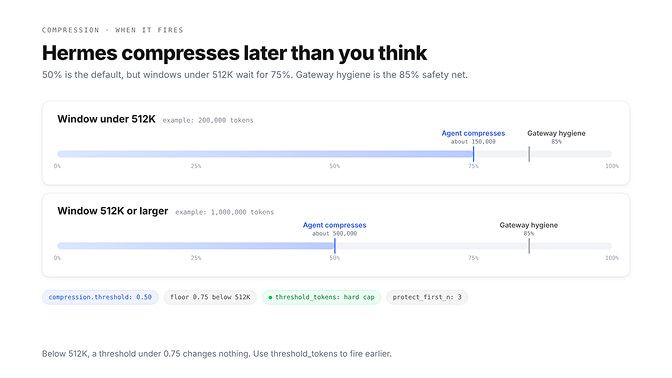
Hermes runs two layers. The developer guide calls them "Gateway Session Hygiene (85% threshold)", fixed and firing only once a session has at least 4 messages, and "Agent ContextCompressor (50% threshold, configurable)", which works from the token counts your provider reports.
The gateway's number is higher on purpose: "Setting it at 50% (same as the agent) caused premature compression on every turn in long gateway sessions." And 50% isn't the whole story, because windows under 512K are floored at 75%: a 200,000-token model compresses at about 150,000 tokens and a 1M model at about 500,000 (calculated).
Key under compression: | Default | What it does |
|---|---|---|
enabled | true | Automatic compression on or off |
threshold | 0.50 | Trigger share of the window; 0.75 floor below 512K |
threshold_tokens | null | Optional hard cap; the lower trigger wins |
model_thresholds | {} | Per-model ratios, such as "claude-sonnet": 0.35 |
tail_mode | lean | Tail of 2.5% of the window (10K to 25K tokens) |
target_ratio | 0.20 | Tail size in legacy mode only |
protect_last_n | 20 | "Minimum number of recent messages always preserved" |
min_tail_user_messages | 1 | User messages kept word for word |
protect_first_n | 3 | Opening messages pinned |
idle_compact_after_seconds | 0 | Compact after this long idle |
codex_gpt55_autoraise | true | 85% trigger on the ChatGPT Codex sign-in route |
in_place | true | Compact on the same session id |
prepare_ahead | false | Prepare the next summary early |
Checked: 27 November 2026 (Hermes v0.23.4 docs; the summary model lives under auxiliary.compression)
Nous reports lean mode kept about 49K tokens against about 162K in legacy mode on 500K-token sessions (author-claimed). Edits to compression.* apply on a running gateway from the next message.
Gotcha:
threshold_tokenscaps every model, per-model ratios included, and the cap survives model switches. If amodel_thresholdsentry never seems to fire, look for a leftoverthreshold_tokensline in your config.yaml.
There's no warning before a compaction, by design: Hermes removed intermediate context-pressure warnings because "they caused models to 'give up' prematurely on complex tasks". If compaction hangs or takes minutes, our Hermes compaction fix guide covers it.
/compress vs /clear
Hermes calls it compress, not compact. /compress will "Manually compress conversation context (flush memories + summarize)"; /compress here 4 keeps your last 4 exchanges word for word (2 if you give no number), and a topic narrows the summary.
Nothing is thrown away. In the default in-place mode, compacted turns are soft-archived and "still searchable via session_search and recoverable, never deleted", and a manual /compress also clears a failed compaction's cooldown and retries.
/clear does the opposite: "Clear screen and start a new session". It's CLI-only, so in Telegram, Discord or Slack you send /new or /reset.
| Situation | Use | Why |
|---|---|---|
| Switching to an unrelated task | /clear or /new | Nothing from the old chat is re-sent |
| Mid-task, replies slowing down or getting truncated | /compress | The tips page's trigger for it |
| Only one thread of a long chat still matters | /compress <topic> | The summary keeps that topic |
| A chat-app thread you never reset | /new at natural breaks | Chats can run for weeks as one session |
Checked: 27 November 2026 (Hermes v0.23.4 docs)
That last row matters most on an always-on gateway, where nothing ends a chat for you; our Hermes Agent hosting guide compares where to run one.
Compress when you'd be sorry to lose the thread. Start fresh when you wouldn't.
Why switching models breaks the cache
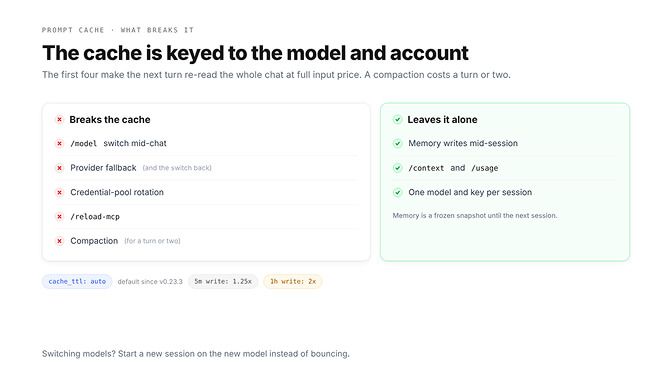
Hermes's tips page is blunt: "The cache is keyed to the model and account", so a /model switch, a provider fallback or a credential-pool rotation all "force the next turn to re-read the entire conversation at full input price." Its verdict: "Occasional switches are fine; frequent switching in a long session multiplies your cost."
On Claude, Hermes sets Anthropic cache_control breakpoints in a "system_and_3" layout (the system prompt plus the last three messages), which the developer guide says "Reduces input token costs by ~75% on multi-turn conversations". That's the design figure, not a measurement of your bill.
Since v0.23.3, prompt_caching.cache_ttl defaults to auto: 1-hour caching for human-paced chats (each starts on 5 minutes until its first pause) and 5 minutes for machine-paced work (subagents, cron, one-shots, webhooks, Kanban, the API server). 1-hour writes cost 2x base input and 5-minute writes 1.25x.
Memory is a frozen snapshot, so mid-session writes leave the prompt alone ("the prompt cache isn't invalidated mid-session"). /reload-mcp rebuilds the tool set and does invalidate it, and a fallback costs twice, because "that first request back on the primary is a full re-read too".
The fix is the tips page's: "on long sessions it's often cheaper to start a fresh session on the other model than to bounce back and forth." For cache prices and lifetimes across providers, see our guide to prompt caching for AI agents.
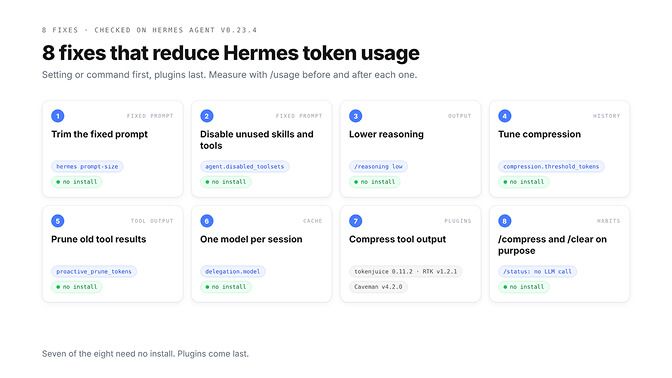
8 fixes that reduce Hermes Agent token usage
Each fix: what to change, what it saves, and the catch.
1. Measure the fixed cost and trim it
Run hermes prompt-size and shrink what dominates. Memory is capped at about 2,200 characters (MEMORY.md) and 1,375 (USER.md), but each context file such as SOUL.md or AGENTS.md may run to 20,000 to 500,000 characters, scaled to the model's window, unless you set context_file_max_chars; the tips page warns that "Every character counts against your token budget". Catch: edits apply from the next session.
2. Disable skills and tools you don't use
Tool schemas and the skills index go out with every call. Use hermes tools to pick tools per platform, hermes skills config to enable or disable skills per platform, and agent.disabled_toolsets to switch a toolset off everywhere:
agent:
  disabled_toolsets:
    - web        # no web_search / web_extract anywhere
MCP and plugin tools are already deferred by default (tools.tool_search.enabled: auto). Catch: tool schemas sit in the cached prefix, so change them between sessions.
3. Lower reasoning where it isn't needed
/reasoning low cuts thinking on routine turns (--global saves it), and side tasks have their own knob, auxiliary.compression.reasoning_effort: low, which the docs suggest "to cut side-task latency and cost". Catch: on hard multi-step work, less reasoning can mean more turns.
4. Tune compression
On a 1M-window model, set threshold_tokens (the docs' example, 256000, compacts "at 256K instead of 500K"); below 512K, use it instead of a threshold under 0.75. Turn on prepare_ahead if compaction pauses hurt, and use idle_compact_after_seconds for long-lived chats.
compression:
  threshold_tokens: 256000          # 1M-window models: compact at 256K, not 500K
  prepare_ahead: true               # write the next summary in the background
  idle_compact_after_seconds: 1800  # compact a chat idle for 30 minutes
auxiliary:
  compression:
    provider: openrouter
    model: google/gemini-3-flash-preview   # the docs' cheaper summariser example
Catch: the summary model's window must be at least as large as your main model's, or the middle turns are "dropped without a summary" (an undersized one also causes the 64,000-token error in our Hermes context length fix). And protect_last_n is weaker than it looks: the v0.23.4 code sizes the kept tail in tokens and guarantees only 3 to 8 messages.
5. Prune old tool results
compression.proactive_prune_tokens is off by default (0). Once re-sent history passes the size you set, Hermes dedupes identical tool results and summarises old oversized ones without calling a model, sparing the newest protect_last_n messages. Catch: each prune rewrites sent history and breaks the cache, which is why it only commits when it reclaims at least 4,096 tokens.
Since v0.23.3 a separate prune also runs once the prompt cache has expired, saving originals under ~/.hermes/cache/pruned/ with a pointer the agent can read back.
6. Don't switch models mid-session; pin a model per task
Change models only at a new session, and give cheaper models the work outside your main chat: subagents, the background review and /review.
delegation:
  model: google/gemini-3-flash-preview   # every delegate_task child runs on this
  provider: openrouter
  max_summary_chars: 8000                # our example; the default is 24000
auxiliary:
  background_review:
    provider: openrouter                 # or enabled: false to skip automatic reviews
    model: google/gemini-3-flash-preview
max_summary_chars caps each subagent summary at the lower of that ceiling and a budget sized to the parent's remaining context (it's in Hermes's config defaults, not yet the docs), and an output_schema lets you "require only the fields you will actually read". Catch: the delegation model applies to the whole batch, and the docs' 3 to 5 times saving for a cheaper review model is author-claimed.
7. Compress tool output with a plugin
tokenjuice (CLI 0.11.2, Hermes plugin 0.10.0) is a native Hermes plugin, listed as community in the Hermes catalog, that compacts successful terminal output through transform_terminal_output; its README claims no percentage. RTK (v1.2.1) installs a Hermes plugin with rtk init --agent hermes that rewrites terminal commands to compact versions, claiming "up to 90% less command output" (author-claimed) while adding that "a 90% cut in command output is not a 90% cut in cost." Caveman (v4.2.0) mainly shortens replies, its 4.2.0 notes say its engine now unwraps Hermes tool results, and its docs list Hermes subagents as "not verified".
npm install -g tokenjuice && hermes plugins install tokenjuice   # answer yes to "Enable now?"
brew install rtk && rtk init --agent hermes
npx @caveman-ai/cli@latest                                       # then start Hermes with:
caveman hermes
All three checked 27 November 2026. Pick one per layer, compare a matched task, and see the roundup linked at the top for independent tests.
8. Use /compress before a long new task and /clear between unrelated ones
Run /compress before a long new task in the same chat, and /clear or /new when the next task is unrelated. Check /status in between for totals without a model call.
The tokens worth chasing are the ones you never typed
Here's the thing about Hermes token usage: the expensive part is rarely the chat you see, but what Hermes carries, re-sends and runs around it.
Measure first, keep one model and one key per session, reset chats when a task ends, and add plugins last.
Want an always-on agent without tuning any of this?
BetterClaw is not hosted Hermes. It's our own managed agent platform: an always-on agent in Slack, Telegram, Discord or Gmail that uses tools, runs on a schedule and remembers context, with no server to maintain.
It runs on your own model keys across 28+ providers with zero markup. The free plan is 1 agent, 100 credits a month and 3 connectors with no expiry; paid plans start with Starter at $19 a month.
Start free · See plans and pricing
Frequently Asked Questions
How do I see my token usage in Hermes Agent?
Run /usage for this session's tokens, API calls and context, and /insights for the last 30 days with estimated cost; /context shows what fills the window. For money, trust your provider's dashboard, because /usage leaves out subagent and auxiliary calls.
Why does Hermes Agent use so many tokens?
Every turn re-sends the fixed prompt (system prompt, skills index, memory, tool schemas) and the whole conversation, and tool output rides along until pruned. Subagents, background reviews and compression summaries add calls, and model switches re-read everything at full price.
Does Hermes Agent support prompt caching?
Yes. On Claude it sets Anthropic cache breakpoints automatically (the docs say about 75% lower input cost on multi-turn chats), and cache_ttl: auto picks the tier. The cache is keyed to the model and account, so /model switches, fallbacks and key rotations break it.
What is the difference between /compress and /clear in Hermes?
/compress summarises the conversation, keeps recent turns and soft-archives the rest, so the task continues on a smaller context. /clear clears the screen and starts a new session with nothing carried over; it's CLI-only, and chat apps use /new or /reset.
How do I change when Hermes compresses context?
Set compression.threshold (default 0.50, floored at 0.75 on windows under 512K) or a hard cap with compression.threshold_tokens, and Hermes uses whichever is lower. compression.model_thresholds sets ratios per model, and changes apply on a running gateway from the next message.
Does Hermes or OpenClaw use fewer tokens?
Neither project publishes a like-for-like figure, and both re-send their prompt, tools and history every turn. Run the same task on both and compare billed usage; our OpenClaw vs Hermes comparison covers the rest.