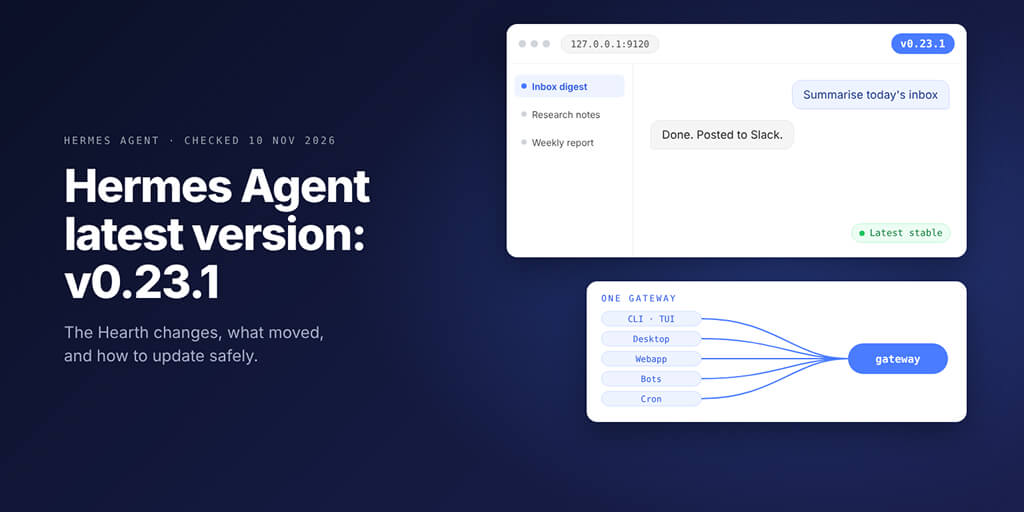
v0.23.1 landed on 9 November, four days after "The Hearth Release". Here's what changed, what moved into plugins, what breaks if you run several agents, and the update order we'd use.
| If you're on | Do this |
|---|---|
| v0.23.0 | Update now: v0.23.1 fixes plugin installs that ignored the live catalog |
| v0.22.6 or v0.22.7 | You already run most of v0.23; update for the fixes |
| v0.22.5 or older | Run hermes update --backup, then read the breaking changes below |
| Several profiles, each with its own gateway | Run hermes gateway migrate --multiplex --dry-run first |
Picture this: you follow an older tutorial and type hermes -p coder gateway start to bring your coding bot online. Hermes refuses with exit code 78: "Profile 'coder' does not get a gateway of its own."
Since when?
Since one gateway per machine became the rule, the change that trips up most people running several agents. We checked every release note from v0.22.5 to v0.23.1, plus the docs and repo at that tag, on 10 November 2026.
Hermes Agent latest version at a glance: v0.23.1 and the four releases before it
| Version | Released | What it brought |
|---|---|---|
| v0.23.1 (latest) | 9 Nov 2026 | ~618 PRs; plugin installs use the live catalog again |
| v0.23.0 "The Hearth Release" | 5 Nov 2026 | Full notes for everything since v0.22.0: Webapp, one gateway, /rewind |
| v0.22.7 | 3 Nov 2026 | ~174 PRs: Group Chat lead routing, cron jobs posting into rooms |
| v0.22.6 | 2 Nov 2026 | ~776 PRs: Webapp ships quietly, skills drop to 44, Camofox leaves core |
| v0.22.5 | 22 Oct 2026 | ~81 PRs: mcp serve, the importers and Singularity start moving to plugins |
Here's the part most changelogs skip. v0.23.0 rolls up and documents the v0.22.1 to v0.22.7 patches, whose own notes stayed short, so on v0.22.6 or v0.22.7 you already run most of what "Hearth" describes.
v0.23.1 has one headline fix: after the 9 November catalog deploy, the published catalog file outgrew the 2 MiB cap clients accepted, so hermes plugins install <name> quietly fell back to the catalog your release shipped with. On v0.23.0 or older, plugins added since your last update can't be found until you update. v0.23.1 raises the cap to 16 MiB.
What's new in v0.23: the Webapp, one gateway and /rewind
Your Desktop workspace in a browser tab
The Webapp serves the full Desktop workspace (chats, Group Chats, plugins, settings, the terminal rail) from your own gateway. It's off by default, and three commands turn it on:
hermes config set webapp.enabled true
hermes gateway restart
hermes webapp
It opens at http://127.0.0.1:9120 with a sign-in link that works once, within 60 seconds. In the Desktop app, Settings, Web Access does the same and can serve it on your network or at a public URL behind sign-in.
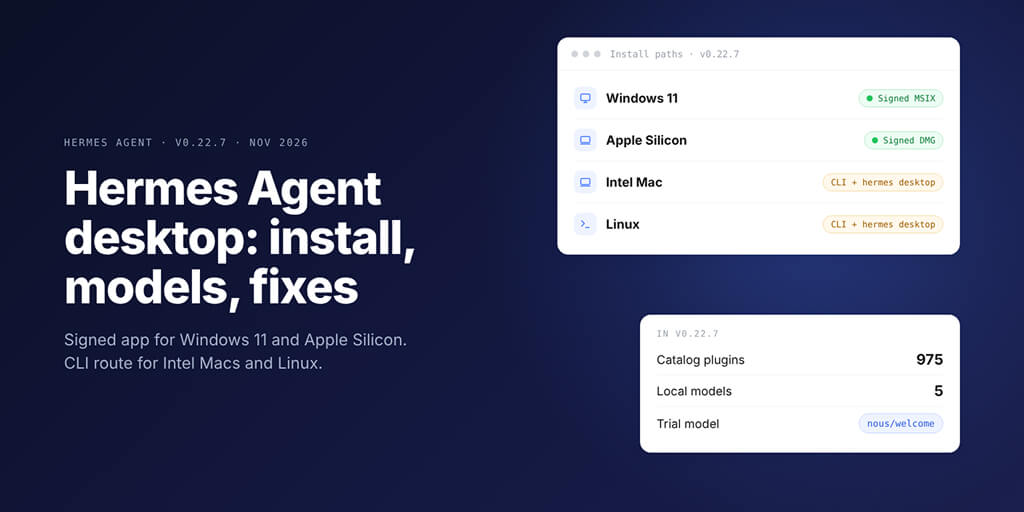
Prefer the native app? It now needs macOS 13 or later and 64-bit Windows (Electron 44). Our Hermes Agent desktop app guide covers installing it on each OS.
One gateway owns every conversation
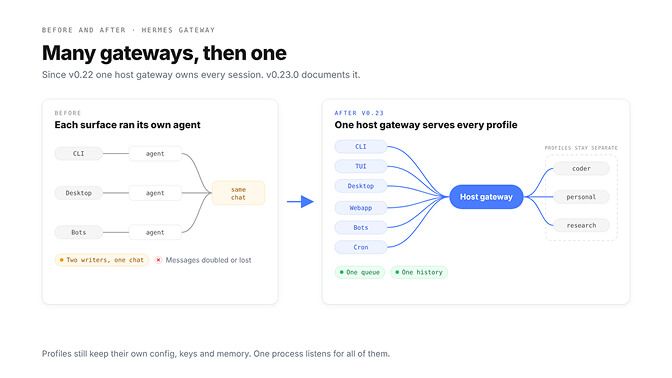
Before, the CLI, TUI, Desktop, editors, bots and cron could each run their own copy of the agent against the same chat, which Nous says is how messages got written twice or went missing. Now one gateway owns every session and every surface attaches to it as a client: one chat, one queue, one history.
/rewind: edit an earlier prompt, or fork from it
In the TUI or classic CLI, type /rewind or press Esc twice on an empty prompt. Pick an earlier prompt, then edit it and resend, or press f to fork a new session from just before it. In v0.23.1 the list picker became a transcript browser, and /rewind N or /rewind fork N jumps straight to prompt N.
Two catches. Sending an edit archives everything after that prompt, while a fork leaves the original untouched. And /rewind is terminal-only, so it won't work from Telegram, Slack or Desktop.
Smaller changes worth knowing:
hermes plugins updateupdates every plugin at once, with an opt-inplugins.auto_applyswitch./model resettakes a pinned session back to your default model without losing the chat.hermes cron cancelstops a running cron job.- One-shot runs send about 1,570 fewer prompt tokens per call.
If you're on v0.22.6 or later, much of v0.23.0 is already on your machine; its biggest job was writing it down. v0.23.1 is the one that changes something you'll notice today.
What moved to plugins, and how to get each one back
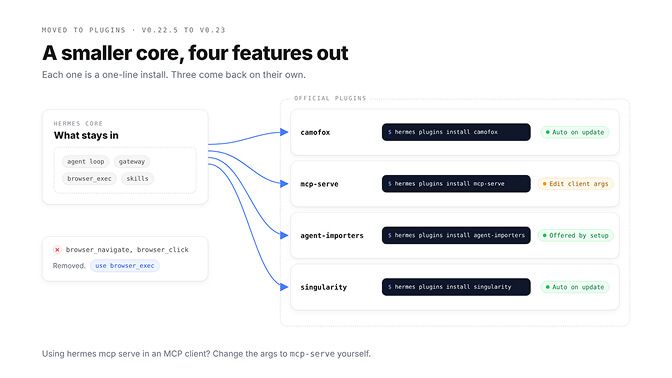
| What moved | Install it with | Installed for you on update? |
|---|---|---|
| Camofox browser | hermes plugins install camofox | Yes, if CAMOFOX_URL or browser.cloud_provider: camofox was set |
| Hermes as an MCP server | hermes plugins install mcp-serve | No: MCP clients must change their command |
| Agent importers (OpenClaw, Claude Code, Codex CLI, Cursor, Grok Bot, OpenBot) | hermes plugins install agent-importers | Yes for profiles that sync imports; hermes setup offers it |
| Singularity/Apptainer backend | hermes plugins install singularity | Yes, for profiles that use it |
| GitHub Copilot provider | github-copilot Hermes Labs plugin | Yes, for profiles that use Copilot |
The one that bites is mcp-serve. If Claude Code, Cursor or Codex launches Hermes as an MCP server, hermes mcp serve is now hermes mcp-serve, and nothing rewrites your client config. Change "args": ["mcp", "serve"] to this:
{
  "mcpServers": {
    "hermes": {
      "command": "hermes",
      "args": ["mcp-serve"]
    }
  }
}
Also gone: the old browser tools. Automation runs on browser_exec only, so prompts or skills that name browser_navigate or browser_click need updating. And hermes claw migrate still works once agent-importers is installed.
Built-in skills went from 58 to 44: which ones, and where they went
The cut happened earlier than most people think. We counted the skill folders at each tag: 58 at v0.22.5, 44 at v0.22.6, still 44 at v0.23.1. Fifteen built-ins left and one arrived:
| Where they went | Skills |
|---|---|
Merged into one microsoft-office skill | docx, powerpoint, xlsx |
| Optional installs, coding | opencode, node-inspect-debugger, python-debugpy, hermes-agent-skill-authoring, inspecting-hermes-desktop-dom |
| Optional installs, content, research and files | design-md, gif-search, songsee, llm-wiki, box |
| Optional, then removed by v0.23.0 | airtable, notion (now vendor taps in hermes skills browse) |
To get an optional skill back, install it by its path:
hermes skills install official/autonomous-ai-agents/opencode
That OpenCode skill matters if Hermes hands coding work to OpenCode; our three-way comparison of Hermes, Pi and OpenCode explains when that split makes sense.
Also new: hermes curator lock <skill> stops the agent from rewriting a skill you curated by hand, through any tool, even in YOLO mode.
Breaking changes in the Hermes Agent latest version
1. One gateway per host, even if you run ten agents
This is the one that matters. By default one host gateway serves every profile on the machine, and gateway.multiplex_profiles has a single valid value, true (Hermes rewrites a false, with a notice).
A named profile no longer gets a gateway of its own, which is why hermes -p coder gateway start refused in our opening. If you run ten isolated agents, here's what we'd do:
- Keep them as profiles. Config, keys, memory, skills and sessions stay separate per profile.
- Preview the fold with
hermes gateway migrate --multiplex --dry-run, then run it without--dry-run. - Let
hermes updatedo it: it folds per-profile gateways automatically when nothing blocks it. - Split across UNIX users or a
HERMES_HOMEoutsideprofiles/? Usehermes -p <name> gateway install --force. - Blocked by a known gap (the WhatsApp bridge and relay on secondary profiles, dashboard scoping)? Set
gateway.standalone: truein that profile's config.
That last option is a temporary shim the docs say will be removed once the gaps close, so don't build on it. And a bot token can belong to only one profile.
Profiles still isolate your agents. What changed is that one process now does the listening for all of them.
If ten always-on agents is the goal and gateway plumbing isn't, note that BetterClaw is not a Hermes host: it runs managed always-on agents with your own keys, on plans from $19 a month, and your first workspace starts with a 7-day free trial. See BetterClaw plans
2. The Webapp that shipped hidden in v0.22.6
The Webapp first appeared in v0.22.6, listed only under the notes' "undocumented here on purpose" line. v0.23.0 documents it, says it's off by default, and makes launch links private to the signed-in user.
If you switched it on early, run hermes webapp --status. A webapp.host of 0.0.0.0 or a public_url needs a dashboard sign-in provider, or the gateway serves native clients only.
3. Group bots that answered each other forever
Bots in shared chats used to ping each other in loops. v0.23.0 ends that on Bot Mode and the messaging platforms: bots never receive runtime notices, and a bot-to-bot exchange stops after max_hops bot messages (default 4) following your last message.
gateway:
  bot_loop_guard:
    max_hops: 4
    bot_replies_expect_reply: false
There's a flip side, reported by users rather than confirmed as fixed. A bug report filed against v0.23.0 (issue #151224 on GitHub) says the guard can drop a new, separate request from a bot peer that arrives soon after it was answered in the same Discord channel. If a multi-bot workflow loses messages, look for "Bot loop guard ended a bot exchange" in gateway.log.
Setting up a bot for the first time instead? Our Hermes Agent Telegram setup guide walks through tokens, pairing and groups.
How to update Hermes Agent to the latest version
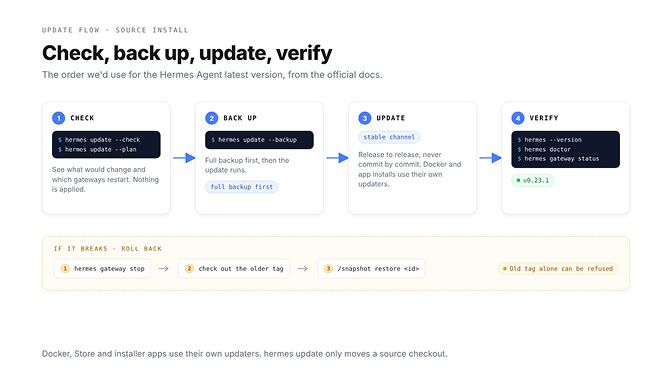
Every install type has its own updater, and hermes update only moves a source checkout, release to release on the stable channel.
| Install | How to update | Check or pin the version |
|---|---|---|
| CLI (install.sh or install.ps1) | hermes update, or re-run the installer | hermes --version |
| Docker | docker pull nousresearch/hermes-agent:latest, then recreate the container | Pin :v0.23.1 for an exact version |
| Microsoft Store app | Store updates | About page |
| Desktop from the installer (.exe or .dmg) | The app's Update control | About page |
| From a chat app | Send /update | hermes --version on the host |
For a source install, this is the order we'd use:
hermes update --check    # what would change; nothing applied
hermes update --plan     # which gateways restart, and how
hermes update --backup   # full backup, then update
hermes --version
hermes doctor
hermes gateway status
Two things surprise people. Inside a Docker image, hermes update refuses on purpose (exit code 2) and prints the docker pull command instead; our Hermes Agent Docker install guide covers volumes and recreating the container.
And the installer-based Desktop app can trail the CLI. The v0.23.1 notes say it gets "no change in this release" and updates with the next bundled release, so an About panel showing an older number isn't a failed update.
If the Hermes update fails
Start with ~/.hermes/logs/update.log. Every update mirrors its output there, so even a dropped SSH session leaves a record of how far it got.
Rolling back is code plus data. Hermes refuses to run a release older than the gateway runtime on a state.db that runtime has written, so follow the docs' order:
hermes gateway stop- Check out the older release.
- Restore the newest pre-update snapshot with
/snapshot restore <id>, or a full backup withhermes import <backup.zip>.
Sessions created after the update aren't in that snapshot, and quick snapshots skip a state.db larger than 1 GiB, so a big store needs the full backup.
If a plugin went missing instead, check hermes plugins list; an update that switches a plugin off keeps your memory provider, and hermes plugins enable <name> usually brings it back. For hangs, GitHub rate limits and Windows file locks, our guide to fixing a failed Hermes update has a fix for each.
Seeing "Hermes Agent was updated while WebUI was running"? We couldn't find that string anywhere in the Hermes repo at v0.23.1, which points to a separate web UI running beside Hermes. Restart that UI after the update.
Is the Hermes web UI obsolete now?
Not quite, because "web UI" now means three things.
| Name | How you open it | What it is | After v0.23 |
|---|---|---|---|
| Webapp | hermes webapp (port 9120) | The full Desktop workspace in a browser | New, off by default |
| Web Dashboard | hermes dashboard (port 9119) | Admin panel: config, keys, MCP, logs, cron | Still there |
| Third-party web UIs | Their own command | A separate front end | Depends how it connects |
The docs say the Webapp "is not the Web Dashboard": you manage settings in one and work in the other.
Third-party UIs split in two. One that talks to Hermes's OpenAI-compatible API server (Open WebUI, LobeChat or LibreChat) still works. One that runs its own copy of the agent fights the one-gateway rule, and the sessions it wrote stay read-only in the Webapp.
On a phone, the Webapp works in a mobile browser too, with opt-in browser notifications that open the right chat. If it loads blank or a surface stops answering, our Hermes Agent not working guide is the long checklist.
The Webapp didn't kill the dashboard. It killed the reason to run a second agent just to get a browser window.
One fire, many chairs
Nous named this release after the hearth, and the metaphor is exact. v0.23 puts one fire in the middle of your machine and asks every surface, every bot and every profile to sit around it.
It's a better design, and a different one, from a project that ships a patch every few days. So before your next hermes update, know which agents were sitting at their own fire, and move them on purpose rather than finding out from a refusal at 9 AM.
Our own rule is simple: read the upgrade notes, run hermes update --plan, and update one machine at a time. Ten minutes of reading beats a morning spent working out which bot went quiet, and why.
Frequently Asked Questions
What is the latest Hermes Agent version?
The latest stable version is v0.23.1, released on 9 November 2026. It's a patch on v0.23.0, "The Hearth Release" from 5 November, and its main fix lets plugin installs use the live catalog again. Run hermes --version to see yours.
What changed in Hermes v0.23.0?
v0.23.0 documents everything since v0.22.0. The headlines are the Webapp (the Desktop workspace in a browser tab, off by default), one gateway owning every session, /rewind in the terminal, Camofox, mcp-serve and the agent importers moving to plugins, and built-in skills cut from 58 to 44.
How do I update Hermes Agent?
On a source install, run hermes update, ideally after hermes update --check and hermes update --backup. Docker users pull nousresearch/hermes-agent:latest and recreate the container, Store apps update through the Store, and installer-based Desktop apps use their own Update control.
Where did Camofox go?
It moved out of core into an official plugin. Install it with hermes plugins install camofox. If you already used Camofox (CAMOFOX_URL set, or browser.cloud_provider: camofox), the update installs the plugin for you.
Can I still run several Hermes gateways?
Not by default. One host gateway now serves every profile, and starting a separate gateway for a named profile is refused with exit code 78. Profiles stay isolated; for hard separation across UNIX users use gateway install --force, and gateway.standalone: true is a temporary opt-out.
What is /rewind?
It's a TUI and classic CLI command (also Esc twice on an empty prompt) to edit and resend an earlier prompt, or fork a new session from just before it. It doesn't work from messaging apps or Desktop.