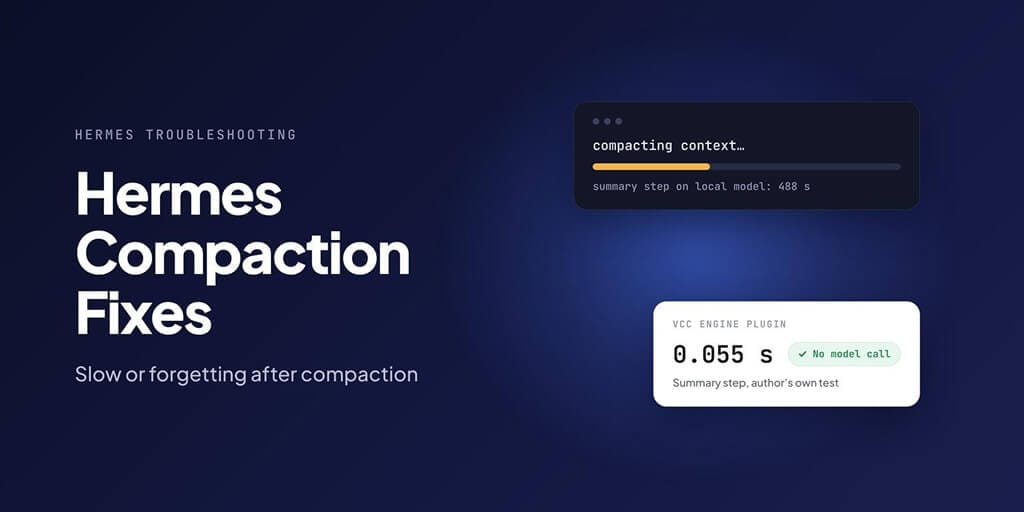
If Hermes Agent freezes for minutes when a conversation gets long, it's almost always compaction. Hermes is writing a summary of the older part of the session, and by default it writes that summary with your main model. On a cloud model that takes seconds. On a local model it's a different story: at 300 tokens per second, just reading an 80,000-token conversation takes about four and a half minutes, and one Hermes user measured a median of 488 seconds for the summary step alone.
The fix is to point compression at a faster model, prune old tool output before it piles up, or install a plugin that builds the summary without calling a model at all.
All config keys below are from Hermes's configuration docs and developer guide, checked against the main branch on 25 October 2026.
First, check that compaction is really the problem
A slow Hermes isn't always compaction. Before changing anything, spend two minutes confirming it. All of these are built into Hermes:
/contextshows a breakdown of your context window: system prompt, tool definitions, rules, conversation. If the conversation is near the trigger point (see below), the next message will compact./usageshows token totals and the context window state for the session./statusbarturns on the context bar in the CLI, so you can watch the window fill.- On Telegram, Discord or Slack, compaction is silent by default. Set
compression.progress_notices: trueto see when it runs. - On llama.cpp, the server log prints prompt processing speed for each request ("prompt eval time", in tokens per second). Note that number; you'll need it in a minute.
| What you see | Likely cause | Go to |
|---|---|---|
| Long pause, then normal speed again | Compaction on your main local model | Fix 1, Fix 4 |
| Pause on the first message of the morning in a chat app | The 85% gateway safety net on an overnight session | Fix 3 (idle compaction) |
| Every turn slow, not just one | Prompt too big for your hardware, not compaction | Fix 2, Fix 6 |
| Agent repeats work it already did | Summary lost exact details | Fix 1 (bigger summary model), Fix 4 |
| "Compression timed out" | Summary call slower than the timeout | Fix 1 (timeout), Fix 5 |
How Hermes compaction works (in 60 seconds)
Every model has a context window. When a session's prompt grows past a set share of it, Hermes compresses the conversation so the agent can keep going.
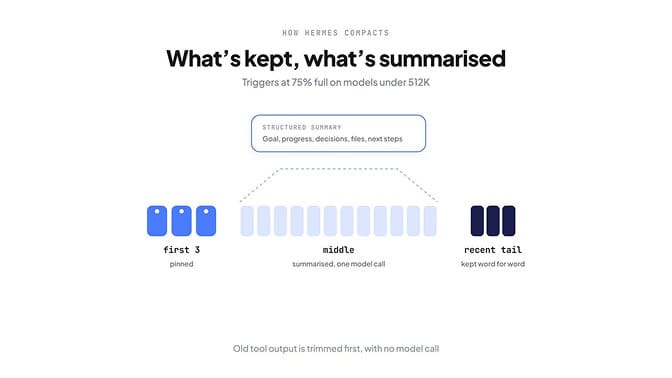
When it starts. The setting is compression.threshold, which defaults to 0.50 of the model's context. There's a catch: for models with a window under 512K tokens, Hermes raises that trigger to at least 75%. So on most models people actually run, compaction starts at three quarters full. You can also set compression.threshold_tokens as an absolute cap; Hermes uses whichever is lower.
What's protected. The first 3 messages (protect_first_n) are pinned. A recent tail is kept word for word. In the default lean mode, that tail is about 2.5% of the context window, between 10K and 25K tokens. Everything in between gets compressed.
What happens, in order:
- Old tool outputs over 200 characters, outside the protected tail, are replaced with a placeholder: Old tool output cleared to save context space. No model call.
- One call to the summary model turns the middle into a structured summary: goal, constraints and preferences, progress, key decisions, relevant files, next steps and critical context.
- On later compactions, the previous summary is passed back and updated, rather than rewritten from scratch.
Which model writes the summary. That's auxiliary.compression. If its model is empty, which is the default, Hermes uses your main chat model.
Why it's slow on local models
Three things stack up.
- The summary runs on your main model. By default, the same local model that's running your agent has to read the whole middle of the conversation, which can be tens of thousands of tokens, before it writes a word.
- Reading is the slow part. On a consumer GPU, processing a long prompt takes far longer than generating a short reply. That's the minutes-long pause.
- The cache resets afterwards. Hermes's developer guide says that after compression, "the cache is invalidated for the compressed region but the system prompt cache survives." The next turn or two have to re-read more than usual before caching catches up.
Long-running chat sessions add one more trigger. Gateway sessions, like Telegram or Discord, have a safety net that compacts at 85% of the context before the agent runs, so a session that grew overnight can pause the moment you send a message in the morning.
Why the pause lasts minutes
Here's a worked example. The numbers are illustrative, but the arithmetic is the same on any machine.
Say your local model has a 128K context window. Because that's under 512K, Hermes waits until the prompt reaches 75%, about 96,000 tokens. It pins the first 3 messages and keeps a recent tail; in lean mode the tail is 2.5% of the window with a 10,000-token floor, so here it's 10,000 tokens. Old tool output is trimmed first, but in a long coding session most of the middle is still there. Call it 80,000 tokens for the summary model to read.
Now divide by your prompt processing speed from the llama.cpp log:
| Prompt processing speed | Time just to read 80,000 tokens |
|---|---|
| 100 tokens per second | about 13 minutes |
| 300 tokens per second | about 4.5 minutes |
| 1,000 tokens per second | about 80 seconds |
| A fast cloud model | a few seconds |
Then the summary has to be written, and after compaction the next turn re-reads the new, shorter prompt, partly uncached. That re-read includes Hermes's fixed overhead: in our measurement of a fresh v0.22.5 install, the system prompt and tool definitions alone came to about 10,400 tokens before any conversation.
That's why the cheapest fix is almost always moving the summary call to something fast (Fix 1), or skipping it (Fix 4).
Why Hermes forgets things after compaction
Two separate causes.
Summaries paraphrase. A model summary keeps the gist and loses the exact strings: the command you ran, the exit code, the precise error. If the next step depends on those details, the agent has to rediscover them. In one user's test (more on it below), stock Hermes recalled 76.2% of the facts asked about after compaction.
The summary model is too small. Hermes's docs are emphatic: the summary model "must have a context window at least as large as your main agent model's." The developer guide calls a mismatch "the most common cause of degraded compaction quality." Older versions could drop the middle turns with no summary at all; current versions fall back to a simpler, rule-based summary when the summary call fails, which is better than nothing but still loses detail.
Fix 1: use a faster model for summaries
Point compression at a model that reads long prompts quickly. It can be a cheap cloud model even if your main model is local. These examples are from Hermes's configuration docs; add them to ~/.hermes/config.yaml:
auxiliary:
  compression:
    provider: nous
    model: gemini-3-flash
Or any OpenAI-compatible endpoint:
auxiliary:
  compression:
    model: glm-4.7
    base_url: https://api.z.ai/api/coding/paas/v4
Two rules for picking the model:
- Its context window must be at least as large as your main model's. Otherwise you're back to degraded summaries.
- If it's slow but good, give it time. The
auxiliary.compression.timeoutsetting defaults to 120 seconds, but Hermes never waits less than 300, so in practice the floor is five minutes. The docs' example for a slow reasoning model raises it to 600 withno_progress_timeout: 180.
Fix 2: prune old tool output earlier (no model call)
Tool output is usually the bulk of a long session: file contents, command logs, search results. Hermes can trim it before full compaction, with no model call:
compression:
  proactive_prune_tokens: 48000
  proactive_prune_min_result_chars: 8000
proactive_prune_tokens is off by default (0); the docs suggest trying 48000. proactive_prune_min_result_chars limits pruning to tool results larger than that size. Because pruning is free, it pushes the expensive summary call further away.
Fix 3: tune when compaction happens
Two levers, with trade-offs.
thresholdandthreshold_tokens. Compacting earlier means smaller, faster summaries more often; compacting later means fewer but bigger pauses. Remember the 75% floor on models under 512K: loweringthresholdbelow 0.75 won't make those compact sooner, so usethreshold_tokensand watch when compaction actually fires.idle_compact_after_seconds. Off by default. Set it (the docs' example is1800, 30 minutes) and Hermes compacts when you come back to an idle session, so the pause happens at a moment you choose rather than mid-task.
Your model's context also has to be big enough in the first place. Hermes needs at least 64,000 tokens of context and rejects smaller windows at startup. If you're hitting that, see our context length fix and the context length below minimum decoder entry.
Fix 4: install the VCC Engine plugin
VCC Engine is a community plugin that replaces Hermes's model-written summary with one built by rules. It keeps exact commands, exit codes, errors and files, each linked back to the original message, and makes no model call. It's Apache-2.0 licensed, needs Hermes 0.21.7 or later, and is listed in the Hermes plugin catalog.
Install and switch it on:
hermes plugins install danbiocchi/hermes-vcc-engine --enable
hermes config set context.engine vcc
To go back to the stock compressor:
hermes config set context.engine compressor
The author benchmarked it on their own machine: Qwen3.8-27B (IQ3_S, llama.cpp) on a GTX 1080 plus a GTX 1070, over 23 real compactions from 4 sessions.
| Measure (median) | Stock Hermes | VCC Engine |
|---|---|---|
| Summary step | 488 s | 0.055 s |
| Summary plus re-reading the prompt | 539 s | 70 s |
| Whole pause in day-to-day use (separate sample, indicative) | about 443 s | about 216 s |
| Facts recalled after compaction | 76.2% | 91.0% |
The first two rows come from the 23 benchmark compactions; the third from a different, smaller set of pauses the author timed in use (39 stock, 12 with VCC), which is why it doesn't line up with the rows above it. For comparison, the same test gave 87.1% recall with no compaction at all. The author calls VCC's small lead over that "about as good as the full transcript", not a real improvement.
Read the headline carefully. The viral "8 minutes to 0.055 seconds" figure is the summary step only. The whole pause roughly halved in real use, and this is one person's test on one model and one machine.
The limits, from the plugin's README:
- It quotes; it doesn't reason. There's no key decisions or rationale section.
- Summaries are capped (40 files, 25 commands, 12 fixes, 20 error names and so on).
- The message links only help if the agent actually searches the session.
- It relies on Hermes internals. If one is missing after an update, it runs as the stock compressor instead.
- The prompt cache still resets after compaction.
There's also a second VCC-based plugin in the catalog, hermes-vcc. VCC Engine's README compares the two; the other one scored 74.5% recall in the same test.
Fix 5: update to v0.22.2 or later
Hermes v0.22.2 (15 October 2026) targeted exactly this problem. Its release notes say long local-model turns now survive on laptops: local requests stream prompt-reading progress, stall timers skip time the machine was asleep, a recovered local server gets another try, and "compression no longer times out while the server is still reading a long conversation."
The current release is v0.22.5 (23 October 2026). Run hermes update if you're on anything older than v0.22.2.
Fix 6: start fresh sessions for separate tasks, or compact on your own schedule
A session that mixes three jobs compacts more often and remembers each job worse. Give each task its own session. It costs nothing, and it makes every other fix work better.
When a task is done, start the next one with /new. And if you can see compaction coming in /context, trigger it yourself at a quiet moment instead of mid-task: /compress runs it now, and /compress here 2 keeps your last 2 exchanges word for word and summarises everything before them.
If Hermes is still misbehaving after this, our Hermes Agent troubleshooting guide covers the other common failures. OpenClaw users hit a similar problem; see OpenClaw memory compaction.
A complete config for local-model users
If you run Hermes on a local model, this block combines the fixes above. Every key is from Hermes's configuration docs; adjust the values to your setup and add it to ~/.hermes/config.yaml:
compression:
  enabled: true
  proactive_prune_tokens: 48000        # trim old tool output early, no model call
  proactive_prune_min_result_chars: 8000
  idle_compact_after_seconds: 1800     # compact when you come back after 30 min idle
  progress_notices: true               # show compaction in Telegram/Discord/Slack

auxiliary:
  compression:
    provider: nous                     # any fast provider you have a key for
    model: gemini-3-flash              # needs a context window at least as large as your main model's
    timeout: 600                       # Hermes enforces a 300 s minimum anyway
Or, if you'd rather not send summaries to a cloud model at all, keep everything local and install VCC Engine (Fix 4) instead of setting auxiliary.compression.
When the fix is a different setup
If you're spending hours tuning compaction instead of using your agent, a managed agent may simply be less work. BetterClaw runs the agent for you on your own model key with zero markup, or on a local model through BetterClaw Desktop, which shares models from Ollama, LM Studio or llama.cpp on your computer, with no compaction settings to manage. Compare the two in our Hermes vs BetterClaw comparison, connect a local model to a BetterClaw agent, or build your agent in BetterClaw.
Frequently Asked Questions
Why is Hermes Agent so slow?
Usually because of compaction. When a session fills up, Hermes summarises the middle of the conversation, and by default it uses your main model to do it. On a local model that can take minutes. Use a faster summary model, prune tool output earlier, or try the VCC Engine plugin.
How do I change the Hermes compression threshold?
Set compression.threshold (default 0.50) or compression.threshold_tokens in ~/.hermes/config.yaml. Hermes uses the lower of the two. On models with a context window under 512K, Hermes raises the ratio trigger to at least 75%.
Why does Hermes forget things after compaction?
The summary paraphrases, so exact commands, errors and file names can be lost. It gets worse if the summary model has a smaller context window than your main model, which Hermes's docs call the most common cause of degraded compaction.
What is the Hermes VCC engine?
A community plugin that builds the compaction summary by rules instead of with a model. It keeps exact commands, errors and files linked to the original messages, and in its author's test cut the summary step from minutes to well under a second.
Which model should Hermes use for compression?
A fast model with a context window at least as large as your main model's. It can be a cheap cloud model even if your main agent runs locally. Set it under auxiliary.compression.
Does compaction break prompt caching?
Partly. After compaction, the cache for the compressed part of the conversation is invalidated, but the system prompt cache survives, and caching recovers within a turn or two.