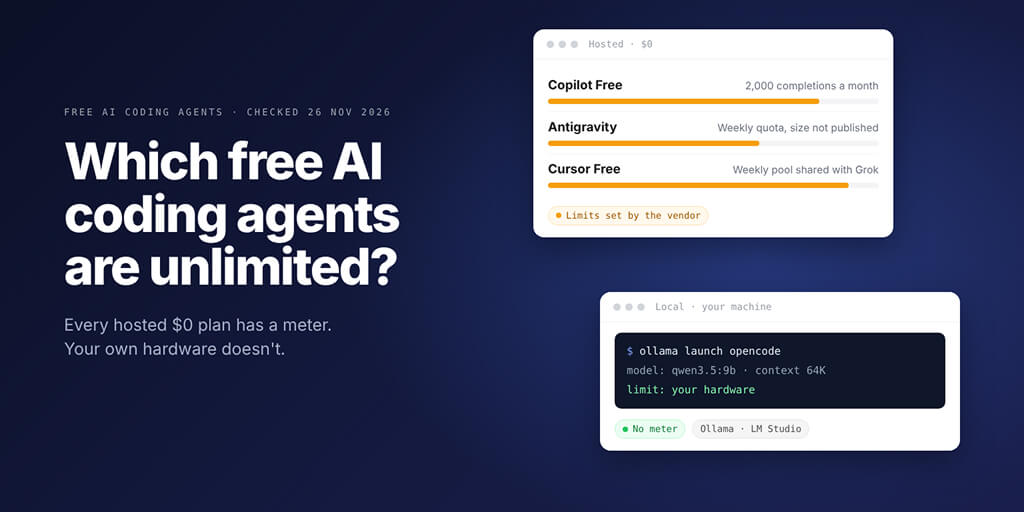
No hosted free AI coding agent is truly unlimited. GitHub Copilot Free, Google Antigravity, Cursor Free and Codex in ChatGPT Free all cap your usage, and none of them publishes the whole allowance. The closest thing to unlimited is an open-source agent such as OpenCode, Pi, Cline or Aider running an open-weight model on your own hardware.
| If you want... | Use |
|---|---|
| No meter at all | OpenCode, Pi, Cline or Aider on a local model through Ollama or LM Studio |
| Free help inside VS Code | Cline on a local model, or Copilot Free (2,000 completions a month) |
| Hosted models for $0, within limits | Antigravity's weekly quota, or OpenCode's limited-time free models |
| Repo chores on a schedule | A cron job: GitHub Actions, OpenCode automations or an always-on agent |
Checked: 26 November 2026
Picture this: it's the ninth of the month, you're halfway through a refactor, and the agent in your editor stops mid-task with a usage notice.
Wait, wasn't this free?
It was. Free just never meant unlimited, and every tool keeps its fine print in a different place.
Searches for a free unlimited AI coding agent assume one exists. It does, sort of, but not where most people look.
Free AI coding agents compared: what you get for $0 and where it stops
We checked each tool on its own pricing page, docs, package registry or release notes on 26 November 2026. Where a vendor doesn't publish a number, the table says so instead of guessing.
| Tool | Free what | Limit | Local model? | IDE / CLI |
|---|---|---|---|---|
| OpenCode | Open-source agent (MIT), plus twelve hosted models free "for a limited time" with no account | None on your own model; the free models work only inside OpenCode and can end | Yes: finds Ollama, LM Studio and vLLM on its own | Terminal, desktop, mobile, SDK |
| Pi | Open-source agent (MIT) | None; you pay for whatever model you connect | Yes: llama.cpp router built in, Ollama and LM Studio through models.json | Terminal, SDK |
| Cline | Open-source extension and CLI (Apache 2.0) | None with your own key; some models in Cline's own provider are tagged free | Yes: Ollama, LM Studio, Atomic Chat | VS Code extension, CLI |
| Aider | Open-source agent (Apache 2.0) | None; bring your own model | Yes: Ollama, LM Studio | Terminal |
| Antigravity (Google) | Desktop app, CLI and IDE extensions at $0 | Agent quota refreshed weekly, size not published; unlimited Tab completions | Not documented | App, CLI, VS Code, JetBrains, Zed and more |
| Gemini CLI | Open-source CLI (Apache 2.0) | Free Google sign-in stopped serving requests on 18 June 2026 | Not documented | Terminal |
| GitHub Copilot Free | Completions, chat, agent mode, Copilot CLI | 2,000 completions a month; chat and agent run on an AI-credit allowance GitHub doesn't publish | Not through Copilot; VS Code chat can use a local model with no plan | VS Code, Visual Studio, JetBrains, Xcode, Zed and more |
| Cursor Free (Hobby is now legacy) | Agent and Chat in the Cursor editor | "Limited" weekly pool shared with Grok | Not on Free (no third-party models) | Cursor editor |
| Codex in ChatGPT Free | Codex in the desktop app | GPT-6 Luna at standard speed, "subject to rollout"; no published cap | The open-source Codex CLI can, with codex --oss | Desktop app; CLI and IDE extension from Plus |
Checked: 26 November 2026
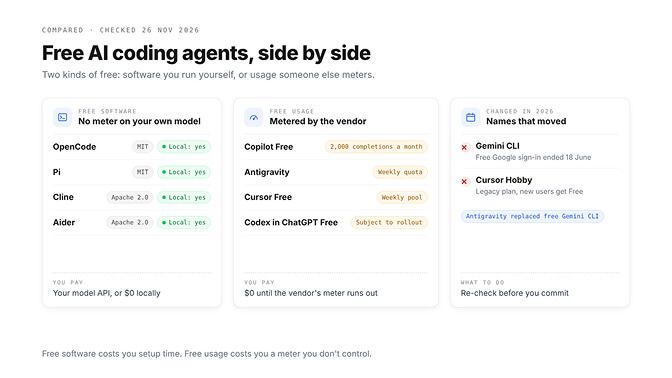
Read the table as two kinds of free.
The first four rows are free software. OpenCode, Pi, Cline and Aider cost nothing to install, and the model is whatever you connect: a paid API, a free model someone else hosts, or one running on your own machine.
The other rows are free usage. A company runs the models for you at its own expense, so it meters you, and it can change the meter whenever it likes.
Google showed how fast that can happen. On 19 May 2026 it announced that Gemini CLI would stop serving its free Gemini Code Assist users on 18 June, and it moved them to Antigravity.
OpenCode's hosted freebies work the same way. Its docs list twelve models, each free "for a limited time", several of them stealth models whose teams are "using this time to collect feedback", and they only work inside OpenCode.
Among the open-source four, OpenCode 2.4.2 and Pi 1.6.1 both shipped on 25 November. Aider is the quiet one: its latest release, 0.86.2, came out on 12 February 2026, and its main branch hasn't changed since 22 May.
If you're choosing between the two terminal agents, our Pi vs OpenCode comparison measures what each one sends to the model before you type. That number matters more on a local model than anywhere else.
Free software costs you hardware and setup time. Free usage costs you a meter that someone else controls.
Which free AI coding agents are actually unlimited
Only one setup has no meter: an open-source agent talking to an open-weight model on your own machine. Ollama's pricing page puts it in one line: "Running models on your own hardware is always unlimited."
That's the real answer to the 100% free coding agent question. There's no per-request fee, no weekly pool and no rollout schedule. You pay in hardware, electricity and setup time instead.
All four open-source agents in the table can do it. OpenCode finds Ollama, LM Studio and vLLM on their default ports without an account. Pi talks to the llama.cpp router directly and to Ollama or LM Studio through models.json, and Cline and Aider both ship Ollama and LM Studio providers.
Set it up in three commands
Ollama's launch command now wires a coding agent to a local model in one step. These commands come from Ollama's own docs, checked today:
# 1. Pull a model that fits your GPU (sizes in the hardware table below)
ollama pull qwen3.5:9b

# 2. Serve it with room to work: Ollama's docs ask for at least 64000 tokens
OLLAMA_CONTEXT_LENGTH=64000 ollama serve

# 3. In a second terminal, inside your repo, start an agent on that model
ollama launch opencode    # or: ollama launch pi, ollama launch codex, ollama launch claude
ollama launch pi even installs Pi for you if it's missing. Prefer an app to a terminal? LM Studio serves models at http://localhost:1234, and Cline, OpenCode, Pi and Aider can all point at it.
Raise the context, or your agent forgets what it just read
Here's the part that makes local agents look broken. Ollama picks a default context window from your GPU memory: 4K tokens under 24 GiB, 32K from 24 to 48 GiB, and 256K at 48 GiB or more.
Ollama's docs say agents and coding tools need at least 64000 tokens, and its pages for OpenCode, Codex and Claude Code each ask for 64K or more. On a 4K window, an agent reads one file, runs out of room and starts dropping what it read, which looks exactly like a bad model.
Set it once, with OLLAMA_CONTEXT_LENGTH as in step 2 above or the context slider in the Ollama app's settings. Then check it with ollama ps: the CONTEXT column should show your setting, and PROCESSOR should read 100% GPU; anything less means part of the model has spilled onto the CPU.
If you're still choosing a runner, our Ollama vs LM Studio comparison covers speed, Mac support and which one coding tools expect.
The hardware you need
The download size is the floor: a model needs that much GPU memory, plus room for its context. Here is what each common tier can run, with sizes from ollama.com today.
| GPU memory | What a local coding agent can run | Example Ollama tags (download size) |
|---|---|---|
| 8 GB | Small models for quick questions and single-file fixes | qwen3.5:4b (3.3 GB) |
| 12 GB | 9B to 12B models with the 64K context agents need | qwen3.5:9b (6.6 GB), gemma4:12b (7.7 GB) |
| 16 GB | OpenAI's open 20B model, or a 2-bit 27B with a 128K context | gpt-oss:20b (14 GB), bonsai-2:27b (8.3 GB) |
| 24 GB | A 27B model at 4-bit with a 64K context | qwen3.8:27b (18 GB) |
| 80 GB | 120B-class open models | gpt-oss:120b (65 GB) |
Checked: 26 November 2026. Sizes are from ollama.com. The gpt-oss lines follow Ollama's own statements (16 GB for the 20B, a single 80 GB GPU for the 120B); the context fits are our calculations.
On a Mac, the GPU shares unified memory with everything else, so count only what's left after macOS and your apps. LM Studio recommends 16 GB or more on Apple Silicon and says 8 GB Macs should stick to smaller models and modest context sizes.
For one file or one bug, a 12 GB setup is enough. Our guide to the best coding model for 12GB VRAM shows the memory working behind that row, model by model. For a sprawling refactor across a large repo, hosted frontier models still pull ahead, which is why it's worth keeping a hosted allowance on the side.
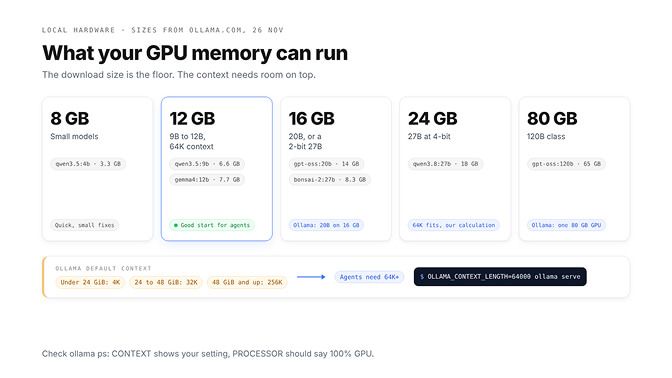
On a local model, the context setting decides more than the model does. Raise it before you blame the model.
Free tiers of paid tools, with their exact limits
Here's what each company gives away today, in its own words. Where it doesn't publish a number, we say so.
GitHub Copilot Free
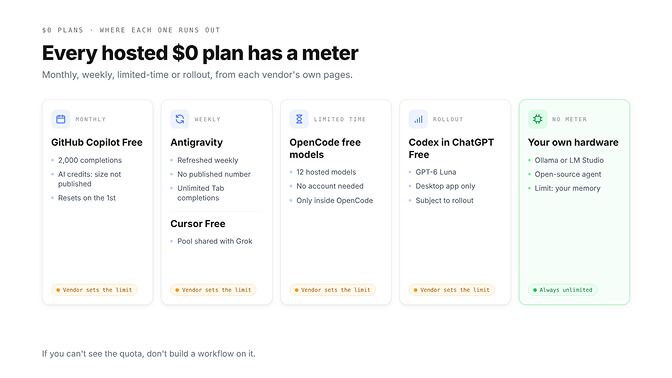
Copilot Free costs $0, and GitHub's plans page says you don't need a card. You get 2,000 code completions a month, plus chat, agent mode and Copilot CLI drawn from an allowance of GitHub AI Credits.
GitHub doesn't publish the size of that allowance; it publishes Pro's, 1,500 credits a month for $10. On Free you get auto model selection only, and the allowance resets at 00:00 UTC on the first of each month. Copilot in the cloud (assign an issue, get a pull request) and pull request reviews are paid features.
Students can get Copilot Student, which is free with unlimited completions. GitHub also says verified teachers and maintainers of popular open-source projects may qualify for Copilot Pro at no cost.
Antigravity, and what happened to free Gemini CLI
Google's free coding agent is now Antigravity. The $0 plan for individuals covers the desktop app, Antigravity CLI, the IDE extensions and the Python SDK, including background agents, subagents, browser use and scheduled tasks.
The limit is, in Google's words, "a meaningful quota, refreshed weekly" plus a weekly rate limit, with no number attached. Google says the quota tracks how much work the agent does, so simple tasks stretch further, and Tab completions are unlimited on every plan.
Watch the model list this week. Google's plans page gives free users Gemini 4 Hydrogen, plus Gemini 3.8 Flash only until 30 November 2026. Its pricing page marks the other free models, Claude Sonnet 4.6, Claude Opus 4.6 and GPT-OSS-120b, for removal the same day.
Gemini CLI itself is still open source, but a notice on its own site says unpaid-tier users were moved to Antigravity CLI on 18 June 2026. It still works with paid Gemini API keys and Gemini Code Assist licences, where Standard allows 1,500 requests a day and Enterprise 2,000.
Cursor Free, formerly Hobby
Cursor is now sold inside The X Subscription, which Cursor describes as one subscription for Grok, Cursor and X. New users start on Free: Agent and Chat in the Cursor editor, with "limited" usage from a pool shared with Grok that refreshes weekly.
Cursor doesn't publish the size of that pool. Free and Plus ($8 a month) don't include third-party models such as Claude, GPT or Gemini, which start on Premium ($30) at API list price. If that's a deal-breaker, our roundup of Cursor alternatives that still run Claude and GPT prices the options.
Hobby still works for people who already had it, with Agent, Chat and Tab. When its pool runs out, its AI features pause until the reset.
Codex in ChatGPT Free
OpenAI includes Codex in ChatGPT Free, as a way to "explore Codex capabilities on quick coding tasks". On Free it runs GPT-6 Luna at standard speed "in the desktop app, subject to rollout", and OpenAI doesn't publish a Free message count.
Codex in the CLI, on the web and in the IDE extension starts with Plus at $20 a month, or an API key billed at API prices. The Codex CLI is open source (Apache 2.0), though, and codex --oss points it at a local Ollama model, which moves it into the unlimited column.
Claude Code: paid plans only
Claude Code is the one big name with nothing at $0. Claude's pricing page lists it on Pro, Max and Ultra, and on Team seats, but not on Free; the FAQ below has the prices and the one workaround that costs nothing.
When an always-on agent fits better
Some coding work isn't typing. It's the chores around a repo: triaging new issues each morning, nudging pull requests that have waited three days for review, drafting a changelog from the week's merges.
Every tool above works while you're at the keyboard. A scheduled job needs something that wakes up without you, and these are the honest ways to get one.
| Option | What it costs | The catch |
|---|---|---|
A GitHub Actions workflow on a schedule trigger that runs opencode run or pi -p | Standard runners are free in public repos; GitHub Free includes $12 of compute a month for private ones, about 2,000 Linux minutes at $0.006 a minute (calculated) | Hosted runners don't have your local model, so you pay for a model API, unless you register your own machine as a self-hosted runner, which GitHub doesn't bill. GitHub also warns that scheduled runs can be delayed at busy times, and in public repos they switch off after 60 days without activity |
| OpenCode automations on your own machine | Nothing beyond your model | They run where OpenCode runs, so that machine has to stay on; missed slots aren't replayed, it runs once when the machine is back |
| A managed always-on agent, such as BetterClaw | Plans from $19 a month | Not a coding agent: it won't edit code in your editor |
Checked: 26 November 2026
That last row is ours, so here is exactly what it does. BetterClaw runs agents on our infrastructure and fires recurring tasks on a cron schedule, at most once a day on Starter and hourly on Pro and Business.
It connects to GitHub through GitHub's remote MCP server, which you add by URL, and MCP comes with every paid plan from Starter at $19 a month. You bring your own model key at zero markup. Picture a weekday job at 8:00 that lists pull requests still waiting for review after three days and sends you one summary to act on.
What it isn't: a coding agent. It won't refactor code in your editor, it isn't open source, and on Starter a schedule can't run more than once a day.
If you'd rather try a scheduled agent before paying, BetterClaw Free gives you 1 agent, 100 credits a month (a credit is one minute of the agent's machine running), 3 connectors and your own model key. Our notes on where BetterClaw Free fits for coding work set it next to the tools above.
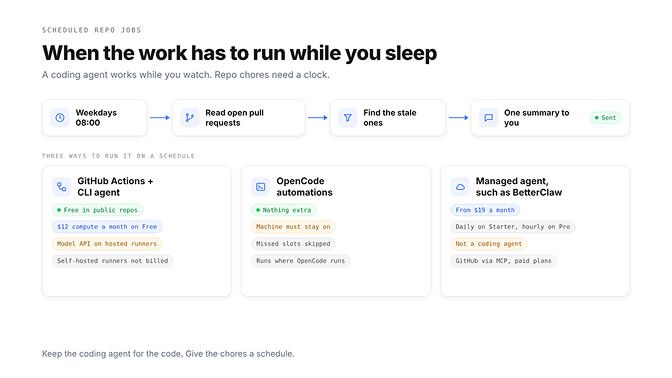
A coding agent works while you watch. A repo chore needs something that works while you sleep.
Free is a budget, not a promise
We went looking for an unlimited free AI coding agent and found a row of meters: monthly credits, weekly pools, limited-time models and a rollout that may or may not reach you.
None of that is a trick. Someone pays for every token, and a $0 plan is that company's marketing budget, which is why Google could close one with a month's notice.
The only meter you control is your own hardware. Put the daily grind on a local model, keep a hosted allowance for the hard problems, and never build a workflow on a quota you can't see.
Want the repo chores to run while you sleep?
If the scheduled half is the part you need, BetterClaw runs it with no server to keep alive and no runner to babysit. Plans are $19, $49 and $149 a month.
Your first workspace starts with a 7-day trial on any plan. You add a card, BetterClaw charges $5 to verify it and refunds it right away, and the plan is charged when the trial ends unless you cancel. Trial workspaces run on your own model key. See plans and start your trial
Frequently Asked Questions
Is there a free unlimited AI coding agent?
Not a hosted one. Every $0 plan we checked on 26 November 2026, from GitHub Copilot Free to Antigravity, Cursor and Codex, has a monthly or weekly limit, a limited-time offer or an unpublished cap. The closest thing to unlimited is an open-source agent such as OpenCode, Pi, Cline or Aider on a local model through Ollama or LM Studio, which Ollama says is always unlimited on your own hardware.
Is Claude Code free?
No. Claude Code isn't part of Claude Free; it comes with Pro ($17 a month billed annually, or $20 monthly), Max ($100), Ultra ($200), Team and Enterprise seats, and pay-as-you-go use through the Claude Console. Ollama documents a way to run the Claude Code tool on a local model with ollama launch claude, which costs nothing, but then a local model does the work, not Claude.
What is the best free coding agent for VS Code?
Cline, if you want no limits: it's a free, open-source VS Code extension that runs on your own key or a local model through Ollama or LM Studio. VS Code's own chat can also use a local Ollama model without a GitHub account or Copilot plan, though inline completions still need a GitHub account. For hosted models, Copilot Free gives you 2,000 completions a month plus an unpublished chat and agent allowance.
Is GitHub Copilot Free unlimited?
No. Copilot Free includes 2,000 code completions a month, and chat, agent mode and Copilot CLI draw from an allowance of GitHub AI Credits whose size GitHub doesn't publish. The allowance resets at 00:00 UTC on the first of each month, and Free users get auto model selection only.
Is Gemini CLI still free?
Not for individuals signing in with a Google account. Google stopped serving free Gemini Code Assist users in Gemini CLI on 18 June 2026 and moved them to Antigravity CLI, which has a weekly quota on its $0 plan. Gemini CLI is still open source and works with paid Gemini API keys and Code Assist Standard or Enterprise licences.
What hardware do I need to run a coding agent locally?
A GPU with 12 GB of memory is where local coding agents become useful: 9B to 12B models fit with the 64K context agents need, by our calculation. With 24 GB you can run a 27B model at 4-bit with 64K, and a single 80 GB GPU fits gpt-oss:120b. Whatever you have, raise Ollama's context to at least 64000 tokens, because its default is 4K on GPUs under 24 GiB.