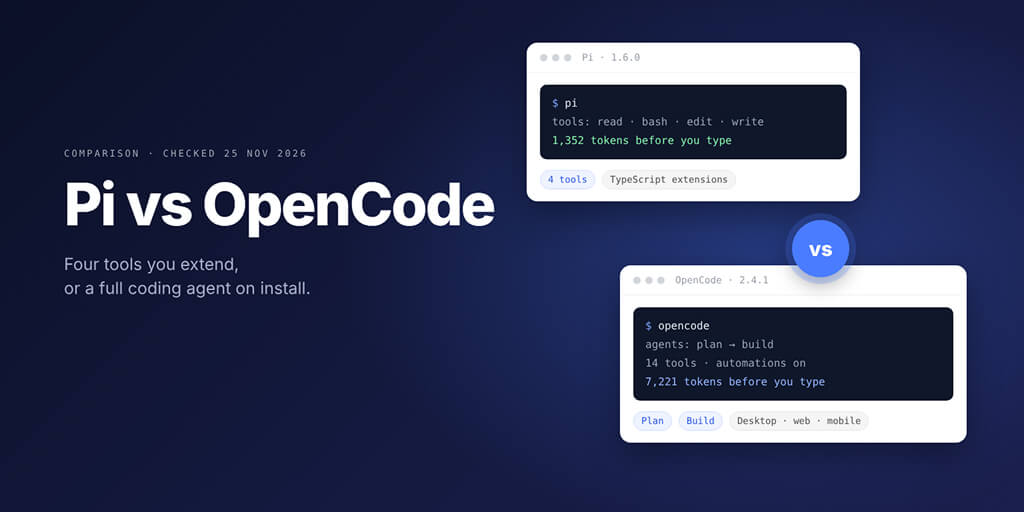
In the Pi vs OpenCode choice, pick Pi if you want a minimal agent you extend yourself: four tools, a prompt you can read, and about 1,350 tokens per turn in our test. Pick OpenCode if you want plan mode, background subagents and desktop, web and mobile apps from day one, at about 7,200 tokens per turn.
| If you want... | Pick |
|---|---|
| A small agent you shape, with nothing hidden from you | Pi |
| Plan mode, subagents and apps that work on install | OpenCode |
| The most room left in a small local context window | Pi |
| A coding agent that can also run jobs on a schedule | OpenCode |
| Guardrails you configure rather than build | OpenCode, after you tighten its defaults |
Checked: 25 November 2026
Picture this: you point a coding agent at a local model with a 32K window and type "Say OK".
Before it has read a single file, a fifth of the window is gone.
Did I misconfigure something?
No. That's OpenCode 2.4.1 on a fresh install, in our 25 November test, and Pi 1.6.0 used 4% of the same window. Neither number is a bug: they're two answers to one question, how much a coding agent should carry before you ask it anything.
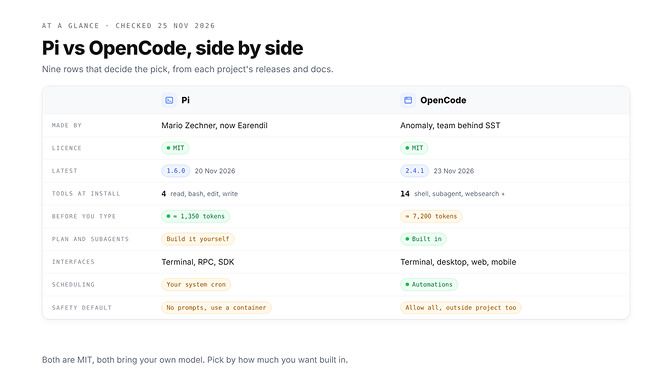
Pi vs OpenCode at a glance
We checked both projects' npm packages, GitHub releases, changelogs and docs on 25 November 2026.
Pi 1.6.0 is the latest release, published on 20 November. OpenCode's current line is V2, and its latest release is 2.4.1, published on 23 November, a few hours after 2.4.0.
Two naming traps first. Pi's npm package is now @earendil-works/pi-coding-agent, and the old @mariozechner/pi-coding-agent stopped at 0.73.1 with a note telling you to switch. OpenCode V2 is @opencode/cli, while the opencode-ai package is still the V1 line, at 1.19.6.
| Pi | OpenCode | |
|---|---|---|
| What it is | A minimal terminal coding agent you extend | A full coding agent with terminal, desktop, web and mobile apps |
| Made by | Started by Mario Zechner, now developed by Earendil | Anomaly, the team behind SST |
| Licence and language | MIT, TypeScript | MIT, mainly TypeScript |
| Latest release | 1.6.0, 20 November 2026 | 2.4.1, 23 November 2026 |
| npm package | @earendil-works/pi-coding-agent | @opencode/cli (opencode-ai is V1) |
| Tools on a fresh install | 4: read, bash, edit, write | 14, including shell, subagent, websearch and a Code Mode tool |
| Sent before you type (our test) | about 1,350 tokens | about 7,200 tokens |
| Plan mode and subagents | Not built in; extensions or packages | Build and Plan agents; General and Explore subagents run in the background |
| Interfaces | Terminal, print and JSON modes, RPC, TypeScript SDK | Terminal, desktop, web and mobile apps, SDK; ACP for editors such as Zed |
| Models | 1,668 models across 42 provider IDs in its catalog, plus any compatible endpoint | 200+ providers through models.dev; Ollama, LM Studio and vLLM found locally |
| Subscription sign-ins | Claude Pro and Max, ChatGPT, GitHub Copilot, Grok, Kimi Code and more | ChatGPT Plus or Pro, GitHub Copilot; Claude through the Claude Agent provider |
| MCP | Built in since 0.99.0; tools reached through codemode by default | Built in; tools reached through Code Mode by default |
| Project instructions | AGENTS.md and CLAUDE.md | AGENTS.md, with a CLAUDE.md fallback |
| Scheduling | None; drive print mode from your system's cron | Automations on a timer, a cron schedule or an MCP event, on by default since 2.4.0 |
| Safety default | No approval prompts; docs recommend a container | Allows almost everything, including paths outside the project; .env reads ask |
| Cost | Free software plus your model bill; optional Radius gateway | Free software plus your model bill; optional Go plans from $10 a month |
Checked: 25 November 2026
If Hermes Agent is on your list as well, our three-way comparison of Hermes, Pi and OpenCode adds it. This page sticks to the two coding agents.
Pi ships almost nothing and trusts you to add the rest. OpenCode ships almost everything and trusts you to switch off what you don't want.
What Pi and OpenCode send before you type (we re-measured)
Every turn, a coding agent sends the model its system prompt and the definitions of every tool it can use, on top of your message. That fixed overhead decides how much of the context window is left for your code, and how many input tokens you pay for before caching.
We first measured it on 25 October. Both tools have shipped several releases since, so we ran the same test again on 25 November 2026, on the current versions.
Here's the method, so you can repeat it. We installed Pi 1.6.0 and OpenCode 2.4.1 fresh from npm with default settings, in a clean environment with no other provider credentials, and pointed each at a local stand-in OpenAI-compatible endpoint that saves the requests it receives.
We opened an empty git repository and sent "Say OK" (pi -p for Pi, opencode run for OpenCode). Then we counted the system prompt and tool definitions of the first real request with OpenAI's o200k tokenizer, after swapping our long sandbox folder paths for typical home-folder paths.
| Pi 1.6.0 | OpenCode 2.4.1 | |
|---|---|---|
| System prompt | 638 tokens | 2,943 tokens |
| Tools offered | 4 | 14 |
| Tool definitions | 714 tokens | 4,278 tokens |
| Total before you type | about 1,350 tokens | about 7,200 tokens |
| Separate call to title the session | none | about 430 tokens |
| Share of a 32K window (calculated) | about 4% | about 22% |
| Share of a 64K window (calculated) | about 2% | about 11% |
| Our 25 October count | about 1,500 (Pi 1.4.0) | about 5,100 (OpenCode 2.1.4) |
Checked: 25 November 2026
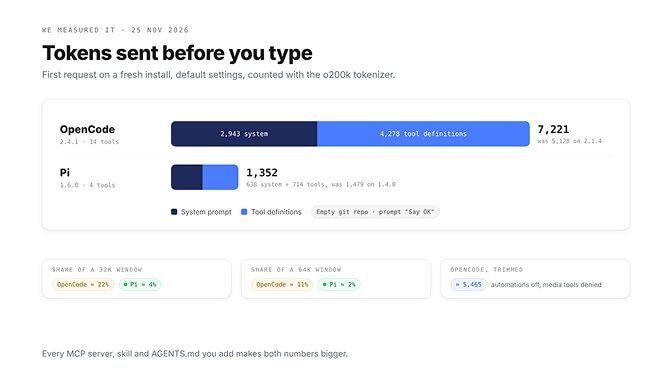
Pi's four tools are read, bash, edit and write. OpenCode's 14 are read, write, edit, glob, grep, shell, question, skill, subagent, webfetch, websearch, generate_image, generate_video and execute, which runs Code Mode scripts that call the rest of its tool catalog.
Here's the surprise: OpenCode's overhead grew by about 2,100 tokens in a month, while Pi's shrank a little. The two media tools, generate_image and generate_video, cost about 1,070 tokens together, and the automation tools that 2.4.0 switched on add about 680 to the Code Mode catalog in its system prompt.
OpenCode's number isn't fixed, though. In our test, these two settings took it from about 7,200 to about 5,500 tokens: "automations": false is documented in the 2.4.0 notes, and each deny rule removed its tool from the request.
{
  "$schema": "https://opencode.ai/config.json",
  "automations": false,
  "permissions": [
    { "action": "generate_image", "resource": "*", "effect": "deny" },
    { "action": "generate_video", "resource": "*", "effect": "deny" }
  ]
}
Pi trims the other way, by choosing tools at launch. With pi --tools read,grep,find,ls, our test request carried only those four read-only tools, at about 1,300 tokens.
On a big cloud model with prompt caching, the gap is mostly a cost question. On a local model with a 32K window, it's a fifth of your context against 4%, and you feel it on every long task.
What OpenCode V2 changed, and what it means next to Pi
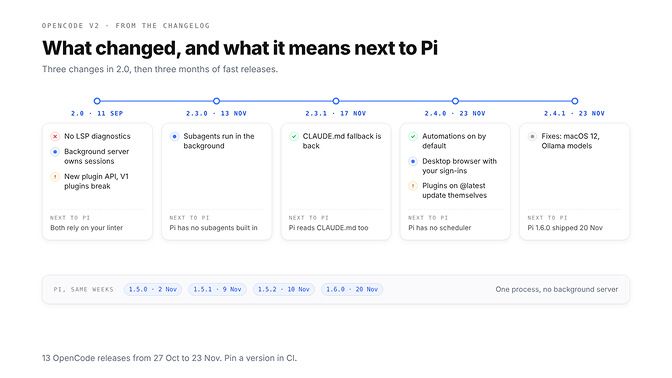
OpenCode 2.0 reached npm on 11 September 2026, and the V2 line has moved fast since: 13 releases between 27 October and 23 November alone. Pi shipped four in the same weeks.
Three V2 changes matter most when you set OpenCode beside Pi.
No language-server diagnostics
The V1 to V2 migration guide says V2 accepts and preserves your lsp config, but it "does not run language servers, expose LSP tools, or produce LSP diagnostics". Its advice is to run your project's lint, typecheck or compiler commands instead.
That's what Pi users already do through bash. On this point, the two now work the same way.
A background server that owns your sessions
V2 is client-server. OpenCode's docs say a background server owns sessions, plugins, permissions and other state, and that clients find or start the shared service automatically.
In our test, opencode models started opencode serve --service, and it kept running after the command returned, until we ran opencode service stop. For CI, opencode run --standalone gives the job a private server instead. Pi stays one process: when it exits, it's gone.
A new plugin API
V1 plugin code doesn't run in V2. A V2 plugin is one package with a server part, a terminal UI part, a desktop part or any mix, defined with Plugin.define, so older plugins have to be ported.
Pi extensions are TypeScript modules loaded straight into the Pi process. They can add tools, commands, shortcuts and providers, and /reload picks up changes without a restart.
What landed since
- 2.3.0 (13 November): subagents always run in the background and report back when they go idle.
- 2.3.1 (17 November): OpenCode reads
CLAUDE.mdagain in any folder without anAGENTS.md. - 2.4.0 (23 November): automations, a built-in desktop browser that can import your sign-ins, and video generation.
- 2.4.0: plugins written as
name@latestor a version range now update themselves on startup and every 24 hours. - 2.4.1 (23 November): fixes, including saving sessions on macOS 12 and showing models from config-only providers such as Ollama.
Safety defaults: who asks before it acts
This is where the Pi vs OpenCode choice stops being about taste. Neither one is locked down when you install it, but they leave the door open in different ways.
Pi: no prompts, by design
Pi's docs are blunt. Pi can read, change and execute files with the permissions of the account that started it, and it doesn't ask for approval before every tool call.
Project trust decides whether a folder's .pi settings and extensions load, but the docs say it doesn't limit what tool calls can do, and AGENTS.md and CLAUDE.md files load either way.
Pi's answer is a box around the agent. Its security page calls running the whole process in a container, VM or sandbox "usually the strongest practical option", and its docs walk through four ways to do it: plain Docker, Docker Sandboxes, OpenShell and a Gondolin micro-VM extension.
For a lighter seatbelt, our Pi coding agent setup guide builds a 12-line guard extension that blocks rm -rf. For a read-only run, pair --tools read,grep,find,ls with --no-mcp, because Pi's docs say --tools alone leaves MCP tools reachable.
OpenCode: a permission system with the defaults wide open
OpenCode V2 has a real permission system, but every agent starts from one rule that allows every action. The only prompts in that base policy are for reading .env files.
No default rule asks about external_directory, so reads and edits outside your project go ahead without a prompt. V1 asked first.
Plan mode is narrower than it sounds. In V2 its rules deny the edit tools except in its own plan folder, and a system note tells the model not to change files, but the shell stays on the default allow. In our test, the Plan agent's request still carried all 14 tools, shell included.
Here's the starting point we'd use, built from rules in OpenCode's permissions docs. The last matching rule wins, so the broad rule comes first and the exceptions follow:
{
  "$schema": "https://opencode.ai/config.json",
  "permissions": [
    { "action": "shell", "resource": "*", "effect": "ask" },
    { "action": "shell", "resource": "git status *", "effect": "allow" },
    { "action": "shell", "resource": "git diff *", "effect": "allow" },
    { "action": "shell", "resource": "git push *", "effect": "deny" },
    { "action": "external_directory", "resource": "*", "effect": "ask" }
  ]
}
Two newer defaults are worth a look too. In the desktop app, the 2.4.0 browser lets the agent read and drive your signed-in tabs unless a browser deny rule refuses it, and plugins that follow a version now update themselves, so pin exact versions if you want to review updates first.
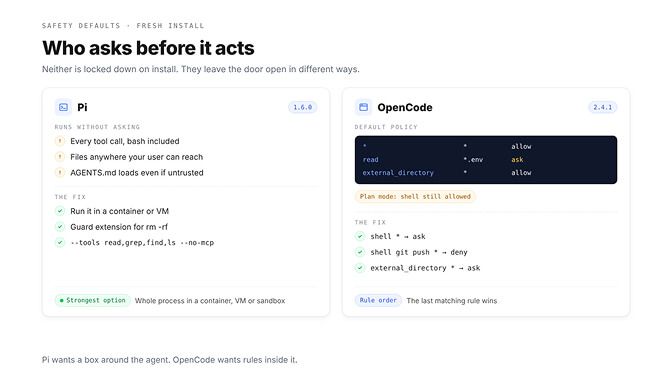
Pi gives you no door and tells you to build the room. OpenCode gives you a door with a lock, and leaves it open.
Models, subscriptions, MCP and AGENTS.md
Both bring your own model. The difference is how much comes in the box.
Pi's model catalog on pi.dev lists 1,668 models across 42 provider IDs (some are regional or plan variants of one company). Pi supports the llama.cpp router server directly, and Ollama, LM Studio, vLLM and other compatible servers go in models.json.
Pi's /login signs in to subscriptions including Claude Pro and Max, ChatGPT, GitHub Copilot, Grok and Kimi Code. One warning from Pi itself: its settings call out that Anthropic subscription sign-ins may use paid extra usage.
OpenCode pulls its catalog from models.dev and says it reaches 200+ providers. It finds Ollama, LM Studio and vLLM at their default local addresses, and it ships a rotating set of free models that need no account, with a daily request limit.
You can sign in with ChatGPT Plus or Pro or GitHub Copilot, and the Claude Agent provider uses your Claude plan by running Claude Code on your machine (version 2.1.248 or later).
Where the two meet
Pi has OpenCode's paid providers built in: opencode for OpenCode Console pay-as-you-go and opencode-go for a Go plan, both reading OPENCODE_API_KEY. OpenCode's own docs list Pi as a validated Go client.
So one OpenCode Go subscription can feed both tools. The exception is OpenCode's no-account models, which its docs say return HTTP 403 outside OpenCode.
MCP and project instructions
Both speak MCP, and both now keep MCP tool schemas out of the prompt by default. Pi reaches MCP tools through codemode scripts, and OpenCode groups them under its Code Mode execute tool unless you set codemode: false on a server. Our post on MCP vs direct API tools shows why that matters for context.
Both read AGENTS.md. Pi loads it from ~/.pi/agent/, parent folders and the current folder, alongside CLAUDE.md. OpenCode loads a global ~/.config/opencode/AGENTS.md and every AGENTS.md from your workspace up to your home folder, and since 2.3.1 it falls back to CLAUDE.md in any folder without one.
That means one instruction file can serve both tools while you try them.
What Pi vs OpenCode costs
Both are free, MIT-licensed software, so the real bill is the model. Each maker also sells an optional shortcut.
| Cost item | Pi | OpenCode |
|---|---|---|
| Software | Free, MIT | Free, MIT |
| Model usage | Your provider, at its price | Your provider, at its price |
| Maker's model plan | Radius, Earendil's gateway for Pi, in early alpha; its page lists no prices | Go $10 a month, Go Plus $40, Go Teams $20 per member (2-member minimum) |
| Maker's pay-as-you-go | Radius lists shared spending with automatic top-ups and limits you set | OpenCode Console credits, with a 4.6% + $0.31 processing fee on each top-up |
| Models with no account | None | A rotating set of free models, inside OpenCode only |
Checked: 25 November 2026
Radius's own page describes a model gateway with routing rules you define, organization spending controls, API keys, usage analytics by member and model, web search and artifact sharing. Pi signs in to it with pi auth login radius.
OpenCode Go covers 31 models on its page today, with limits counted over five-hour, weekly and monthly windows, and the page says it works in OpenCode, Claude Code, Codex and Pi. Our breakdown of what $10 of OpenCode Go buys compares it with OpenRouter and the DeepSeek API.
The bigger cost difference isn't a plan. It's the overhead. Over a 50-turn session, OpenCode's extra 5,900 or so tokens a turn add up to about 290,000 input tokens before caching (calculated from our measurement).
Prompt caching makes much of that repeated prefix cheaper on cloud APIs. On a local model, there's no discount: it's context you don't get back.
The Composio benchmark: one third-party data point
Composio, which builds tool integrations for agents, has published Pi and OpenCode results on its own task sets of 25 to 30 tasks. The tasks are business workflows across apps such as Gmail, Google Sheets, Slack, GitHub and Linear, run through Composio's hosted MCP tools and graded pass or fail. They aren't code changes in a repo.
| Composio test | Model | Tasks scored | Pi | OpenCode |
|---|---|---|---|---|
| Blog post, 4 Aug 2026 | Kimi K3 through OpenRouter | 25 | 18 passed (72%) | 18 passed (72%) |
| Blog post, 11 Aug 2026 | DeepSeek V4 Flash | 30 | 20 passed (66.7%) | 14 passed (46.7%) |
| Bench leaderboard, runs of 15 Oct 2026 | GPT-6 Astra | 29 | 20 passed (69%) | 20 passed (69%) |
| Bench leaderboard, runs of 15 Oct 2026 | DeepSeek V4 Pro | 30 | 17 passed (56.7%) | 15 passed (50%) |
Checked: 25 November 2026
In the 4 August test, where Composio kept the model, provider, reasoning level and tools the same, they tied. Pi got there faster (a 156-second median against 271), with fewer tool calls (223 against 299) and a lower estimated cost per success ($0.57 against $0.72).
The 11 August gap comes with Composio's own caveat: Pi ran with a different reasoning setting and two model providers in that test, which Composio says limits a direct comparison. Treat all four rows as one publisher's tests on its own task set.
A benchmark of business workflows tells you how an agent loop handles tools. It doesn't tell you which one writes better code in your repo.
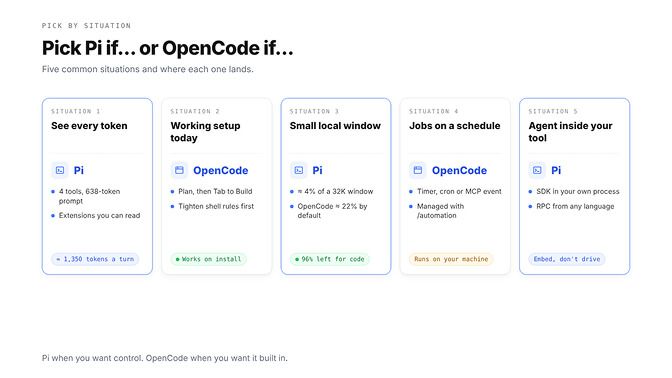
Pick Pi if... or OpenCode if...: five situations
Pick Pi if you want to read every token the model sees
Four tools, a 638-token system prompt and nothing loaded that you didn't ask for. Every behaviour you add is a TypeScript file you can read, and Pi can write that extension for you if you ask.
Pick OpenCode if you want a working setup today, with a plan step
Press Tab to switch from Build to Plan, read what it intends, then Tab back to Build. Add the shell and external-directory rules above before you point it at anything you care about, because Plan alone won't stop a shell command.
Pick Pi if you run local models with small context windows
At about 1,350 tokens, Pi leaves 96% of a 32K window for your code. OpenCode leaves about 78% by default, or about 83% with the two trims above (calculated).
Pick OpenCode if your coding agent should also run on a schedule
Automations let it run a prompt, a script or a shell command on a timer, on a cron schedule or when an MCP server sends an event, and /automation manages them. They run where OpenCode runs, on your machine, and its source notes that slots missed during downtime are skipped, so the job runs once when it comes back.
Pick Pi if you're building an agent into your own tool
Pi's SDK runs the agent inside your own Node.js or Bun process, and its RPC mode drives it over stdin and stdout from any language. OpenCode's SDK talks to an OpenCode server instead, which suits scripts and CI better than embedding.
Install both and give them the same task
The fastest way to settle opencode vs pi for your own work is one afternoon with both in the same repo. These commands are from each project's README and docs, checked on 25 November.
# Pi 1.6.0: installer on macOS or Linux, or npm on Node.js 22.19+
curl -fsSL https://pi.dev/install.sh | sh
npm install -g --ignore-scripts @earendil-works/pi-coding-agent

# OpenCode 2.4.1: installer, or npm
curl -fsSL https://opencode.ai/v2/install | bash
npm install -g @opencode/cli
In Pi, run /login and /model; in OpenCode, /connect and /models. Then give both the same small, real task with the same model, and compare the diffs, not the demos.
In our test, each npm install took about 15 seconds. Pi added 123 packages, about 170 MB on disk, while OpenCode's CLI is one native binary of about 275 MB, and on Linux x64 npm also pulled three other builds of it, about 1 GB in all.
On Windows, Pi has a PowerShell installer. OpenCode's docs say Windows package managers aren't supported and link standalone Windows binaries instead.
The honest answer to Pi vs OpenCode
We expected a lightweight and a heavyweight. What we found are two different bets about where the work should live.
Pi bets that an agent should carry as little as possible, so you can see everything the model sees, and that you'll build the parts you need. OpenCode bets that most people would rather have the parts already built, and will spend an afternoon turning a few off.
Both bets are reasonable. Pick the one that matches how you work, and whichever it is, draw its boundaries before you hand it a real repo.
Want agents that keep working when your laptop is closed?
Both tools run where you run them. Pi stops when its process stops, and OpenCode's automations live with its server on your machine.
If the job you're thinking about is a morning inbox summary or a weekly report rather than a repo, that's a different kind of agent. BetterClaw is a managed platform, not a Pi or OpenCode host: your agents run on our infrastructure, recurring tasks follow a cron schedule, and you bring your own key across 28+ providers at zero markup, with 500+ connectors plus any MCP server.
The trade-offs are real: it isn't open source, it won't edit your repo the way Pi and OpenCode do, and Starter runs schedules at most once a day. Plans are $19, $49 and $149 a month, and your first workspace starts with a 7-day trial on any plan: you add a card, which gets a $5 verification charge refunded right away, the plan is charged when the trial ends unless you cancel, and trial workspaces run on your own model key. See plans and start your trial
Frequently Asked Questions
Is Pi better than OpenCode?
Neither is better for everyone. Pi is better if you want a minimal agent with four tools and about 1,350 tokens of overhead per turn, and you're happy to add plan mode, subagents and guardrails yourself. OpenCode is better if you want Build and Plan agents, background subagents, automations and desktop, web and mobile apps working on install.
OpenCode vs Pi: which uses fewer tokens per turn?
Pi, by about five times. In our 25 November test on fresh installs, Pi 1.6.0 sent about 1,350 tokens of system prompt and tool definitions before the first message, and OpenCode 2.4.1 about 7,200, plus a separate 430-token call to name the session. Turning off automations and denying the two media tools brought OpenCode to about 5,500.
Does Pi or OpenCode ask before running commands?
Pi doesn't: its docs say it has no built-in permission system and recommend running it in a container, VM or sandbox. OpenCode has permission rules, but its V2 base policy allows almost everything, including reads and edits outside the project, and only asks before reading .env files. Add an "ask" rule for shell and external_directory on day one.
Does OpenCode V2 still have LSP?
No. OpenCode's V1 to V2 migration guide says V2 keeps your lsp config but does not run language servers, expose LSP tools or produce LSP diagnostics. It recommends running your project's lint, typecheck or compiler commands instead, which puts it on equal footing with Pi.
Can I use OpenCode Go with Pi?
Yes. Pi has OpenCode providers built in: opencode-go for a Go subscription and opencode for pay-as-you-go Console credits, both using OPENCODE_API_KEY. OpenCode lists Pi as a validated Go client, though its no-account models only work inside OpenCode.
Are Pi and OpenCode free?
Yes. Both are free, MIT-licensed software, and you pay the model provider you connect. OpenCode also sells optional Go plans ($10 a month, Go Plus $40, Go Teams $20 per member with a 2-member minimum), and Earendil runs Radius, a model gateway for Pi that is in early alpha.
Does Pi have plan mode and subagents like OpenCode?
Not built in. Pi's README says it skips sub-agents and plan mode on purpose, and suggests asking Pi to build them, writing an extension or installing a package. OpenCode ships Build and Plan agents plus General and Explore subagents, which run in the background since 2.3.0.