It's not a bug. It's OpenClaw summarizing your conversation to save tokens. But the log message makes it look like something broke.
I was 40 messages into a conversation with my OpenClaw agent when the responses started feeling... different. Less specific. Like the agent had forgotten the first half of our conversation.
I checked the logs. There it was: "compacting context." A few lines later: "compaction-safeguard: cancelling compaction, no real conversation messages."
Is my agent broken? Is it losing memory? What is compaction and why is it happening?
Turns out, OpenClaw memory compaction is a feature, not a bug. It's the framework's way of keeping your conversation within the model's context window without sending the entire chat history with every request. But the way it surfaces in logs makes it look like something went wrong, and the safeguard message is genuinely confusing if you've never seen it before.
Here's what compaction actually does, when it triggers, and how to control it.
What memory compaction actually is (in plain English)
Every time you send a message to your OpenClaw agent, the entire conversation history gets included in the API request to your model provider. Message 1 through message 40, plus the system prompt, plus the SOUL.md context, plus any tool results from previous interactions.
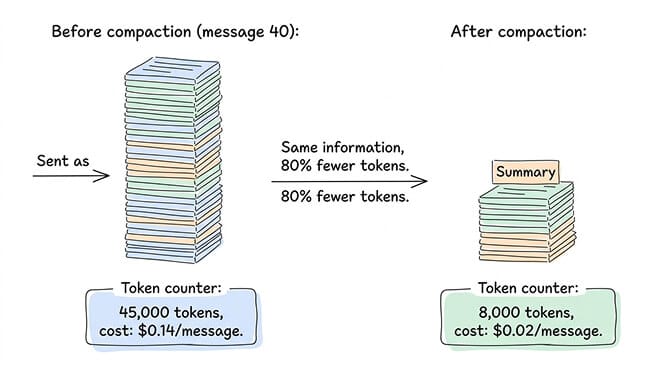
This works fine for the first 10-15 messages. But by message 40, you're sending 30,000-50,000 tokens of input with every single request. On Claude Sonnet at $3 per million input tokens, that's $0.09-0.15 per message just in input costs. The tokens add up fast. The viral "I Spent $178 on AI Agents in a Week" Medium post happened partly because of this exact phenomenon: unchecked context growth.
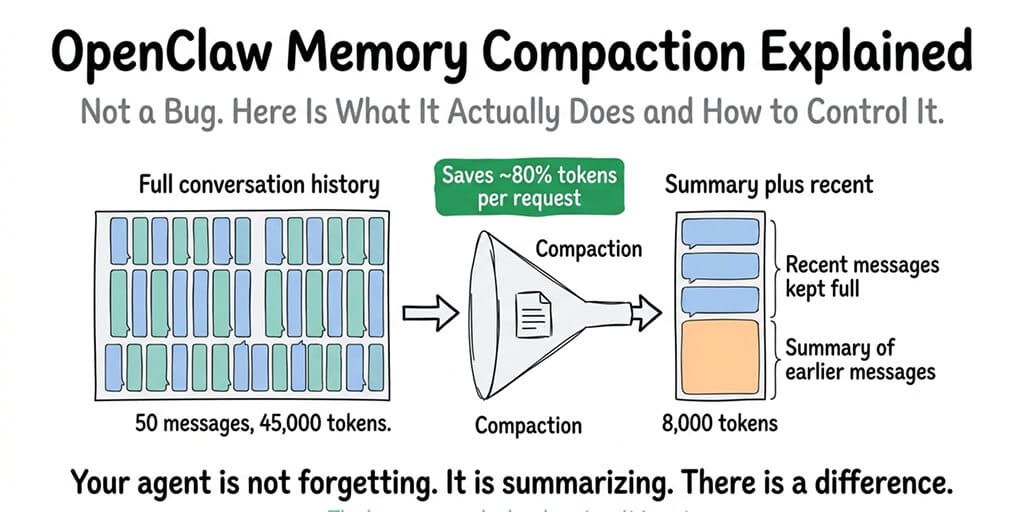
Memory compaction is OpenClaw's solution. When the conversation history approaches the model's context window limit, OpenClaw takes the older messages, summarizes them into a condensed version, and replaces the full history with the summary plus the most recent messages. Your agent doesn't lose the information. It gets a compressed version of it.
Think of it like meeting notes. You don't replay the entire two-hour meeting every time someone asks what was decided. You reference the summary. That's what compaction does for your agent's conversation history.
Memory compaction isn't your agent forgetting. It's your agent taking notes so it doesn't have to re-read the entire conversation every time you send a message.
When compaction triggers
Compaction doesn't happen on every message. It triggers when the conversation history approaches a threshold relative to your model's context window.
The exact trigger point depends on your maxContextTokens setting (if configured) or the model's default context window. When the accumulated tokens from all messages, system prompts, and tool results approach roughly 80% of the available window, OpenClaw initiates compaction.
For most configurations, this means compaction first fires somewhere between message 25 and message 50, depending on how verbose the conversations are. Short back-and-forth messages last longer before triggering compaction. Long, detailed exchanges with tool results hit the threshold faster.
You'll know compaction happened because the logs will show "compacting context" followed by the compaction process. The agent's next response will be based on the summarized history plus recent messages rather than the full conversation.
The "compaction-safeguard" log message everyone panics about
Here's the log line that confuses people: "compaction-safeguard: cancelling compaction, no real conversation messages."
This looks alarming. It looks like something failed. It didn't.
The safeguard exists to prevent compaction from running when there's nothing meaningful to compact. If the conversation buffer contains only system messages, tool calls, or internal processing (but no actual user messages), the safeguard cancels the compaction because summarizing zero real conversation would produce garbage output.
When you see this: It typically appears during agent startup, after a gateway restart, or during heartbeat processing when the agent's context contains system-level messages but no user conversations. It's the system saying "I was going to compact, but there's nothing worth summarizing, so I'm skipping it."
This is correct behavior. Not an error. Not a warning. Just a log entry that could really use better wording.
For the complete guide to OpenClaw memory issues and fixes, our memory troubleshooting guide covers corruption, leaks, and the other memory problems that actually are bugs.
How compaction affects your agent's behavior
Here's what nobody tells you about compaction: it changes how your agent responds, and not always for the better.
When the full conversation history is available, your agent has perfect recall of everything said. After compaction, it has a summary. Summaries lose nuance. If you mentioned a specific preference in message 3 and the summary didn't capture it, your agent might forget that preference after compaction runs.
The quality of the compaction depends on the model doing the summarizing. Better models produce better summaries. If your agent runs on a powerful model (Claude Sonnet, GPT-4o), the compaction summaries are usually accurate. On cheaper or smaller models, important details can get lost in summarization.
Practical impact: your agent might ask you to repeat information you already provided. It might lose track of a nuanced requirement you stated early in the conversation. It might give slightly different answers to the same question before and after compaction because the context changed.
For most conversations, this is barely noticeable. For complex, multi-step interactions where every detail matters, it can cause friction.
How to control compaction
You have three levers.
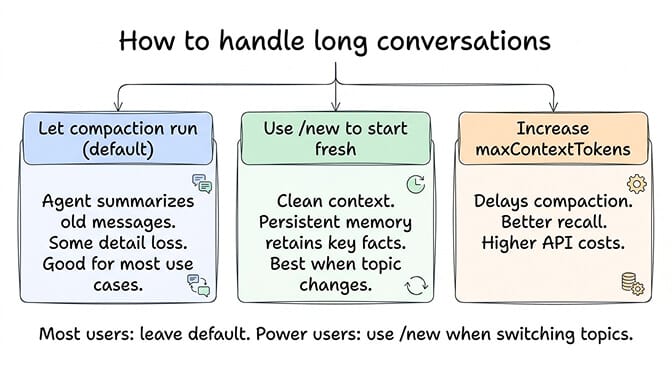
Lever 1: Set maxContextTokens. This is the most direct control. Setting maxContextTokens to a specific value (like 4,000-8,000) forces compaction to run earlier and more aggressively. This keeps your per-message token costs low but means the agent works with less conversation history. Setting it higher (16,000-32,000) delays compaction but increases input costs.
The trade-off is simple: lower maxContextTokens = cheaper API costs + more frequent compaction + more summarization loss. Higher maxContextTokens = more expensive + less compaction + better context retention.
For the detailed API cost optimization including context window settings, our cost guide covers how maxContextTokens affects your monthly bill.
Lever 2: Use the /new command. Instead of letting compaction summarize a long conversation, you can manually start a new conversation session. The /new command clears the active context entirely and starts fresh. Your agent's persistent memory (MEMORY.md) retains the important facts from previous conversations, but the active context resets.
This is often better than compaction for conversations that have genuinely shifted topics. If you spent 30 messages discussing your return policy and now want to talk about product recommendations, starting a new session gives the agent a clean context instead of a summary that's mostly about return policies.
Lever 3: Rely on persistent memory instead. OpenClaw's memory system (the daily log files and MEMORY.md) stores important facts independently of the conversation context. When compaction runs and loses a detail from the active context, the agent can still retrieve it from persistent memory through semantic search.
The catch: persistent memory retrieval isn't as reliable as having the information directly in context. The agent has to "remember" to search its memory, and the search has to return the right information. Direct context is always more accurate than retrieved memory.
If managing context windows, compaction settings, and memory systems sounds like more configuration than you want, BetterClaw includes optimized memory management with hybrid vector plus keyword search built into the platform. $49/month for Pro, BYOK. The context and memory layers are pre-tuned so your agent retains the right information without manual compaction management.
Compaction vs memory flush: they're different things
One more distinction that confuses people. Compaction and memory flush are separate processes.
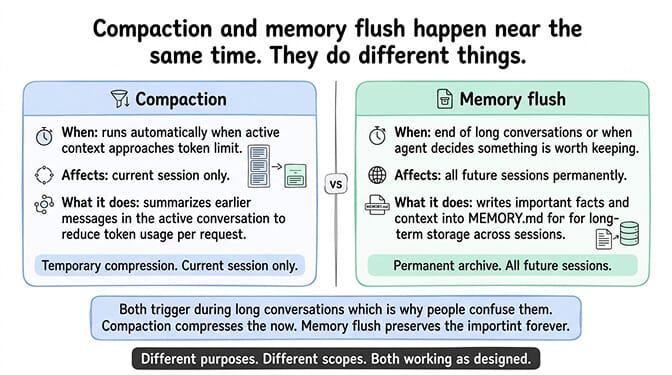
Compaction summarizes the active conversation context to reduce token usage. It affects the current session only. It runs automatically when context approaches the limit.
Memory flush is when OpenClaw writes important information from the conversation into MEMORY.md for long-term storage. This happens at the end of long conversations or when the agent decides something is worth remembering permanently. It affects all future sessions, not just the current one.
They often happen near the same time (both trigger during long conversations), which is why people confuse them. But compaction compresses the active context. Memory flush archives important facts. They serve different purposes.
For the broader context of how OpenClaw's memory architecture works, our explainer covers the daily logs, MEMORY.md, and how persistent memory interacts with the active context window.
The practical advice
For most users: leave compaction at its default settings. It works correctly. The log messages are confusing but not alarming. The agent will behave slightly differently after compaction, but for typical conversations (customer support, Q&A, scheduling), the difference is negligible.
For power users running long, complex sessions: use /new when you shift topics significantly. This gives your agent a clean context instead of a compacted summary that's weighted toward the old topic. Let persistent memory handle the carryover of important facts.
For cost-sensitive setups: set maxContextTokens to 4,000-8,000. This triggers compaction early and aggressively, keeping your per-message input costs low. You'll lose some conversational nuance, but for most agent tasks, the savings are worth it.
The managed vs self-hosted comparison covers how memory management differs across deployment options, including what BetterClaw optimizes by default versus what you configure yourself on a VPS.
If you want memory management that's pre-optimized without tuning compaction thresholds, give Better Claw a try. $49/month for Pro, BYOK with 28+ providers. Hybrid vector plus keyword memory search built in. Context management tuned for the right balance between cost and recall. Your agent remembers what matters without you managing the plumbing.
Frequently Asked Questions
What is OpenClaw memory compaction?
Memory compaction is OpenClaw's process of summarizing older conversation messages to keep the active context within the model's token limit. When a conversation grows long enough that sending the full history would exceed the context window, OpenClaw replaces older messages with a condensed summary and keeps only the most recent messages in full. This reduces per-message API costs by 60-80% while preserving the key information from earlier in the conversation.
How does compaction differ from memory flush in OpenClaw?
Compaction summarizes the active conversation context to reduce tokens in the current session. Memory flush writes important facts into MEMORY.md for long-term storage across all future sessions. They often happen near the same time during long conversations but serve different purposes. Compaction is about managing token costs right now. Memory flush is about remembering important information forever.
What does "compaction-safeguard: cancelling compaction, no real conversation messages" mean?
This log message means OpenClaw was about to compact the context but found no actual user conversation messages to summarize. This typically happens during agent startup, after gateway restarts, or during heartbeat processing when the context only contains system messages. It's normal behavior, not an error. The safeguard prevents the agent from trying to summarize an empty or system-only conversation, which would produce meaningless output.
Does compaction increase or decrease OpenClaw API costs?
Compaction decreases API costs. Without compaction, every message in a 40-message conversation sends all 40 messages as input tokens. With compaction, older messages are replaced by a short summary, reducing input from perhaps 45,000 tokens to 8,000 tokens per request. This can reduce per-message costs by 60-80%. Setting maxContextTokens lower triggers compaction earlier and saves even more. The trade-off is slightly reduced context accuracy.
Will compaction cause my OpenClaw agent to forget important information?
Partially. Compaction replaces full conversation history with a summary, and summaries can lose nuanced details. However, OpenClaw's persistent memory system (MEMORY.md and daily logs) stores important facts independently of the conversation context. Even if compaction loses a detail from the active session, the agent can retrieve it from persistent memory. For most interactions, the impact is minimal. For complex multi-step conversations, use /new to start fresh when switching topics rather than relying on compaction to summarize everything accurately.
Related Reading
- OpenClaw Memory Fix Guide — Memory loss, OOM crashes, and the actual bugs (not compaction)
- OpenClaw API Costs: What You'll Actually Pay — How
maxContextTokensaffects your monthly bill - How Does OpenClaw Work? — The full memory architecture: MEMORY.md, daily logs, and context
- OpenClaw OOM Errors: Complete Fix Guide — Memory crashes that often happen alongside compaction
- BetterClaw vs Self-Hosted OpenClaw — How memory management differs across deployment options