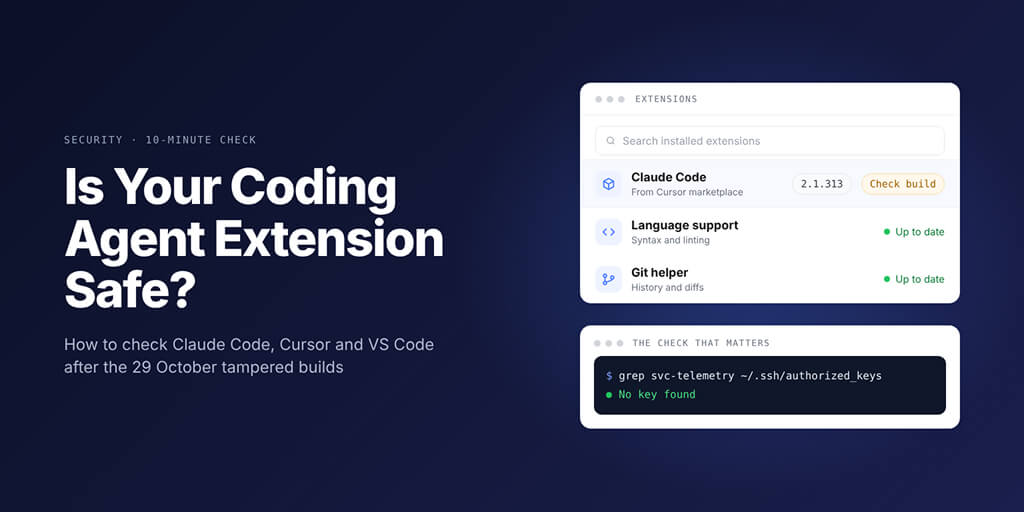
What the backdoored Claude Code extension did, how to check your installed versions, and the settings that limit damage next time.
Picture this. You open Cursor on 29 October and Claude Code has updated itself. Your editor looks exactly like it did yesterday.
That's what made this one tricky. A tampered build and a real one look the same from the outside, so the only way to know is to check. Here's the short version, from Cursor's notice and Microsoft's analysis.
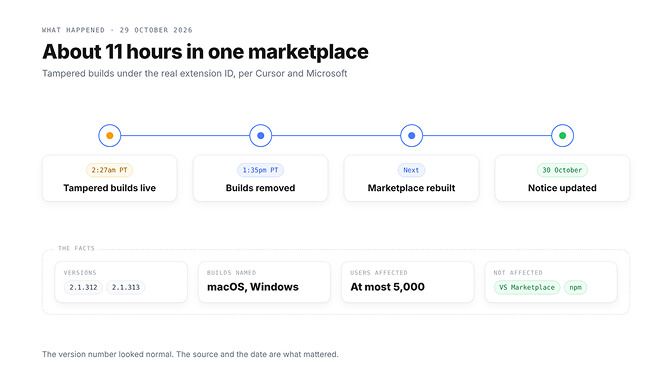
The Claude Code extension malware in one table
| Question | Answer (Cursor's notice and Microsoft's analysis) |
|---|---|
| Which extension | Anthropic.claude-code 2.1.312 and 2.1.313 |
| Where | Cursor's VS Code Extension Marketplace only |
| When | 29 October 2026, 2:27am to 1:35pm PT (about 11 hours) |
| Builds named | macOS and Windows |
| Users | "At most 5,000", Cursor told Reuters |
| Not affected | Visual Studio Marketplace and npm @anthropic-ai/claude-code |
If you use Claude Code in VS Code or installed it from npm, these builds never reached you. On Cursor, do three things, in this order:
- Run the
svc-telemetrycheck below on every machine that runs Cursor. - If the key is there, follow Cursor's clean-up steps. Uninstalling alone is not enough.
- Rotate the keys and tokens that machine could reach, from a trusted computer.
Extensions are one of several ways code ends up running as you. Our OpenClaw security guide for 2026 covers the others.
What the Claude Code extension malware actually did
Cursor found a modified copy of Anthropic's Claude Code extension in its marketplace, under the normal ID. Cursor says these versions "were not developed by Anthropic", and Anthropic told The Register that its official channels were not affected.
Here's the detail that trips people up. 2.1.312 is also a real release in Anthropic's changelog, so the number alone can't tell you which one you got.
A version number tells you what you installed. It doesn't tell you who built it.
According to Cursor, the tampered build tried to report host details, including environment variable names, add an unauthorized SSH key, turn on the local SSH service and keep a reverse tunnel running across restarts.
The calmer part? Turning on SSH needs admin rights the extension lacked on most macOS and Windows machines, so that step usually failed. The key, start-up files and host report could still land, which is why clean-up matters.
Cursor pulled the build, took its marketplace offline as a precaution, found no other tampered extensions, rotated its keys and rebuilt. How the package got in? Neither Cursor nor Microsoft has said.
The 10-minute check: did you install it?
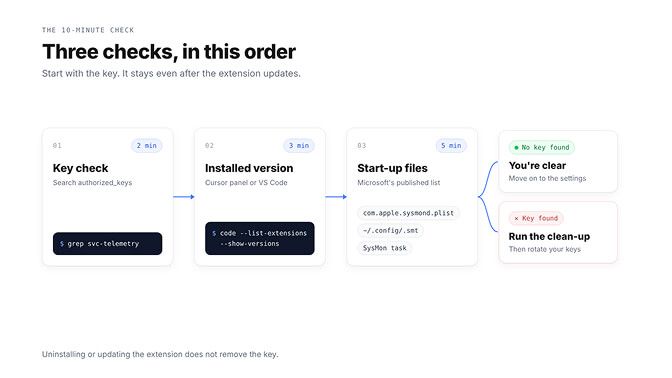
Do these in order.
Step 1: the key check (2 minutes)
This is Cursor's own check. It comes first because removing or updating the extension does not remove the key. On macOS (Microsoft lists the same file for Linux):
grep -qs svc-telemetry ~/.ssh/authorized_keys && echo "svc-telemetry key found" || echo "No key found; machine not impacted"
On Windows, in PowerShell:
$files = "$HOME\.ssh\authorized_keys", "C:\ProgramData\ssh\administrators_authorized_keys" | Where-Object { Test-Path $_ }
if ($files -and (Select-String svc-telemetry $files)) { "svc-telemetry key found" } else { "No key found; machine not impacted" }
Step 2: your installed version (3 minutes)
In Cursor, open Extensions (Cmd+Shift+X on Mac, Ctrl+Shift+X on Windows and Linux) and select Claude Code. In VS Code, run code --list-extensions --show-versions. A newer version today doesn't prove the old one never ran.
Step 3: start-up files (5 minutes)
Microsoft lists these items. Check what each one actually runs, because the names are chosen to look like system tools.
| Platform | Where to look |
|---|---|
| macOS | ~/Library/LaunchAgents/com.apple.sysmond.plist, ~/.config/.smt, ~/.config/.smtk |
| Linux | Crontab @reboot entry pointing at ~/.config/.smt, plus ~/.config/.smtk |
| Windows | Scheduled task SysMon, %USERPROFILE%\.config\smt.cmd and smtk |
| Windows fallback | Startup folder file sysmon.cmd |
No key and no start-up files? You're clear. Skills deserve the same scrutiny, and our ClawHub skills security audit shows what a bad one looks like.
Found the key? Here's the clean-up order
Uninstalling isn't enough. Work through Cursor's and Microsoft's published steps:
- Preserve evidence if you have a security team, then isolate the machine while you work.
- Run Cursor's remediation script:
bash remediate-macos.shas your normal user on macOS (not root), orpowershell -ExecutionPolicy Bypass -File .\remediate-windows.ps1from an Administrator PowerShell. Read it first, as Microsoft advises. - On Linux, use Microsoft's manual steps: delete only the
@rebootentry pointing at~/.config/.smt, remove~/.config/.smtand~/.config/.smtk, and stop matching SSH processes. - Remove only the bad key, after matching its fingerprint to the published indicator.
- Rotate credentials from a trusted computer: model API keys, SSH keys, cloud credentials, Git tokens and sessions.
Cursor describes the collection as limited to environment variable names. That doesn't rule out later access, so rotate anyway, and rebuild if you can't be sure the machine is clean.
Same week, different problem: browser escapes in coding tools
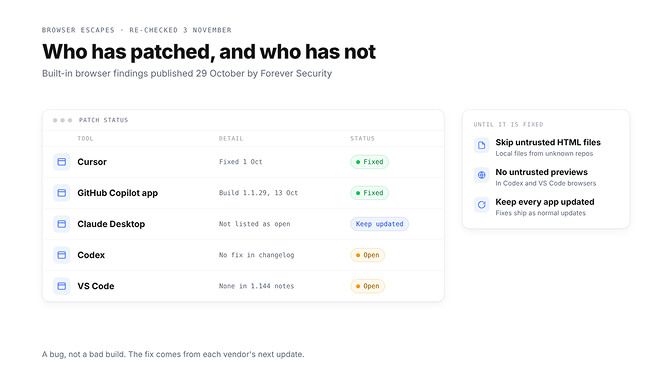
On 29 October, Forever Security showed that the built-in browsers in five coding tools could be pushed past their normal limits by a web page or a local file. This one is a bug, not a bad build, so the fix comes from the vendor:
| Tool | Researchers, 29 October | Re-checked 9 November |
|---|---|---|
| Cursor | Fixed 1 October | No change |
| GitHub Copilot app | Fixed in build 1.1.29, 13 October | No change |
| Claude Desktop | Not listed as open | Keep it updated |
| Codex | Open | No fix in changelog (latest: Codex CLI 0.167.0, 6 November) |
| VS Code | Open; Microsoft declined, citing Workspace Trust | No fix in 1.144 (28 October) or 1.145 (4 November) notes |
Until Codex and VS Code ship fixes, don't open local HTML files or previews from untrusted repos in their built-in browsers. For everything else, our OpenClaw security checklist turns these checks into a monthly routine.
Settings that make the next bad build reach you later
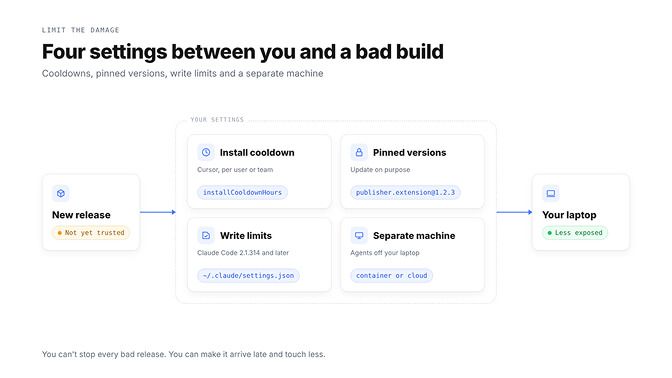
You can't stop every bad release. You can make it arrive late and touch less.
Limit where Claude Code writes. Claude Code 2.1.314 added permissions.blockWritesOutsideWorkingDirectories: Write, Edit and NotebookEdit refuse paths outside your working directories in every permission mode. In ~/.claude/settings.json:
{
  "permissions": {
    "blockWritesOutsideWorkingDirectories": true,
    "blockReadsOutsideWorkingDirectories": true
  }
}
The read key needs 2.1.257 or later. Anthropic's docs say the write key doesn't cover shell commands, MCP tools or hooks, and the read key doesn't refuse shell commands the same way, so add sandboxing for shell commands.
Slow down extension updates. In Cursor, set extensions.installCooldownHours so new versions wait before installing. Team admins can enforce a Marketplace Install Cooldown (off by default) and allow only approved publishers.
The bad builds were live for about 11 hours, so a longer cooldown lets the marketplace pull a bad release before it reaches you. VS Code's extensions.autoUpdateDelay already waits 12 hours by default, and extensions.autoUpdate set to false stops automatic updates.
Pin versions you trust. In VS Code, right-click an extension and choose Install Another Version, or run code --install-extension publisher.extension@1.2.3. Then update on purpose.
Give your agents their own machine. An extension runs as you. It can reach your SSH keys, cloud credentials and .env files, and an always-on agent on that laptop keeps its API keys right there too.
That's the one we built a product around. Keep your agent's keys off your laptop. BetterClaw runs your agent in the cloud with encrypted secrets. Start your agent in 60 seconds
The same checklist works for skills and MCP servers
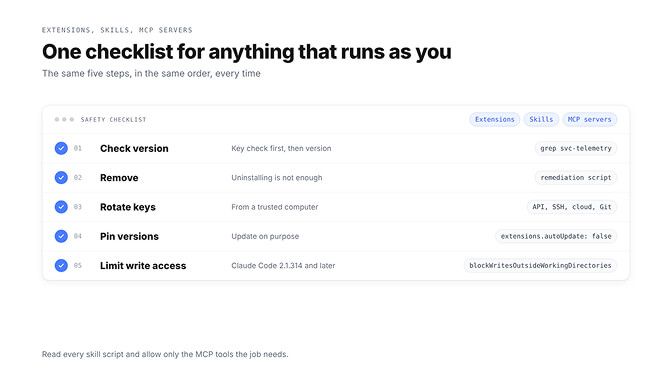
Skills and MCP servers run with your permissions too, so the same five steps apply. For skills, read the SKILL.md and every bundled script before installing. Our security vetting skill makes that a repeatable check before any new skill runs.
For MCP servers, allow only the tools the job needs. Cursor's hardening guide recommends an MCP allowlist with per-server tool limits, and Claude Code supports per-tool permission rules. Review that list every time you add a server.
Keep the host apps patched too. Two fixes from the same week:
- Jan v0.8.8 (28 October): MCP tools called through the Local API run only when you allow them in Settings, and agent file tools no longer follow a link out of their workspace.
- n8n 2.45.7 (30 October): workflow-scoped routes now need the
execution:readpermission before returning execution data.
Quiet fixes like these rarely make the news. If you run those tools, they matter just as much, and they only help once you update.
Where a hosted agent helps, and where it does not
Let's be straight about this. A hosted agent does not protect your local IDE. A tampered extension in Cursor or VS Code runs on your laptop, with your SSH keys and files, wherever your agents live.
Only the checks above protect the laptop itself. What hosting changes is where your agent's keys sit, and our security page explains how BetterClaw handles them.
Here's what stays with us from this week. The fix for the Claude Code extension malware wasn't clever. It was a grep command, a cooldown setting and a key rotation.
Coding agent security is mostly boring habits, done before you need them. Ten minutes today is the cheapest they'll ever be.
Frequently Asked Questions
What is the Claude Code extension malware?
Tampered copies of Anthropic's Claude Code extension, versions 2.1.312 and 2.1.313, served by Cursor's marketplace on 29 October 2026. Cursor told Reuters that at most 5,000 users were affected.
Was the Claude Code extension hacked?
Not Anthropic's own release. Cursor says the tampered versions were not developed by Anthropic, and copies from the Visual Studio Marketplace and npm were not affected.
How do I know if I installed it?
Search your SSH authorized_keys file for svc-telemetry with the commands in Cursor's notice. If the key is there, the machine is affected, even if the extension has since updated.
Is Cursor's marketplace safe now?
Cursor says it found no other tampered extensions and rebuilt the marketplace. No marketplace can rule out every risk, so set an install cooldown and pin the extensions you rely on.
Are VS Code and Codex patched for the browser escape?
Not as of 9 November 2026, according to their release notes. Cursor and the GitHub Copilot app fixed theirs in October.
Is a hosted agent worth paying for if it doesn't protect my IDE?
Yes, if your agent runs all day and holds API keys you'd rather keep off your laptop. It won't replace these checks. Plans start at $19 a month, and your first workspace starts with a 7-day free trial.