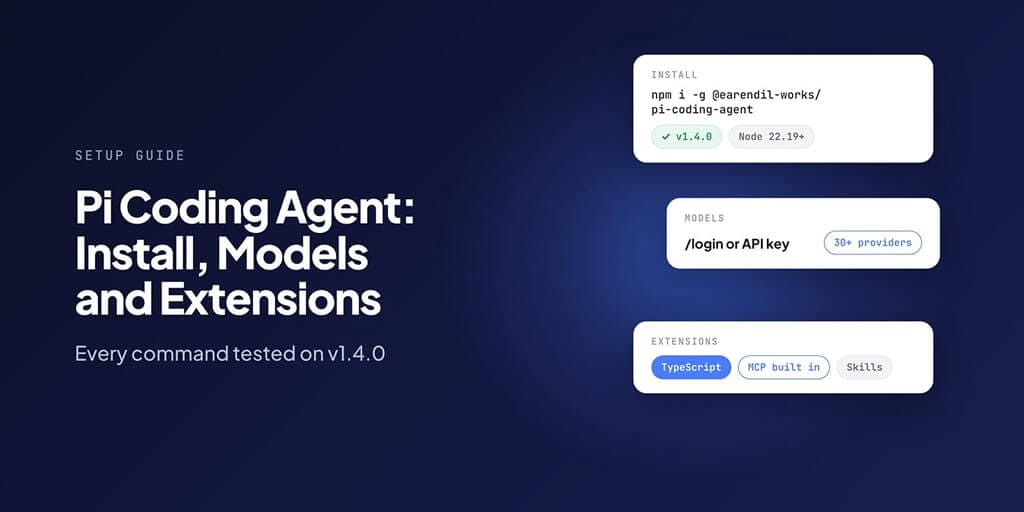
Pi is a small, fast terminal coding agent that you shape with extensions. Here's how to install it, connect any model, add MCP and extensions, and fix the errors you'll actually hit.
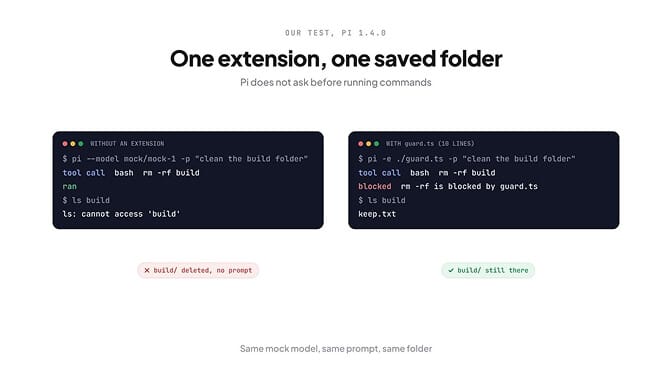
We pointed Pi at a test folder, gave it a fake model that asked to run rm -rf build, and pressed enter. The folder was gone before we could read the line.
That's not a bug. Pi doesn't ask before it runs commands, by design, and it's the first thing you should know before you install it. The second is that most guides online are now out of date: Pi changed its package name, moved its repo, and added MCP in the last few months.
Everything below was tested on Pi 1.4.0, released 21 October 2026.
What Pi is (and what it deliberately leaves out)
Pi is an open-source coding agent for your terminal, started by Mario Zechner and now developed by Earendil. It's MIT-licensed, has about 118,000 GitHub stars, and you bring your own model.
The idea is a small core you extend yourself. Out of the box it has four tools: read, write, edit and bash. Its own README says it "skips features like sub-agents and plan mode", and leaves those to extensions.
Three changes catch people out in 2026:
- The npm package is now
@earendil-works/pi-coding-agent. The old@mariozechner/pi-coding-agentis deprecated and stopped at 0.73.1. - The repo moved to github.com/earendil-works/pi.
- Pi now has MCP built in, since version 0.99.0 on 29 September 2026. Any guide that says "Pi has no MCP" predates that.
How to install Pi
Pi needs Node.js 22.19 or newer if you install it with npm. The official installer handles Node for you.
On macOS or Linux:
curl -fsSL https://pi.dev/install.sh | sh
On Windows (PowerShell):
powershell -c "irm https://pi.dev/install.ps1 | iex"
With npm, on any system:
npm install -g --ignore-scripts @earendil-works/pi-coding-agent
pi --version
Pi's docs recommend the installer, because it pins every dependency. The --ignore-scripts flag in the npm command is from the official docs too; Pi doesn't need install scripts to work.
To update later, run pi update. Use pi update --all to update Pi and every package you've installed at once.
If you have the old package installed, remove it first with npm uninstall -g @mariozechner/pi-coding-agent. Otherwise you'll keep running the old pi, and new extensions written for the @earendil-works package won't load.
Connect a model: subscription, API key or local
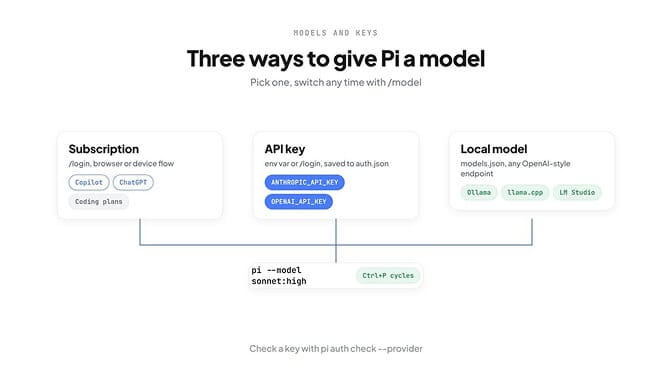
Pi works with more than 30 providers. There are three ways to give it a model.
Option 1: log in with a subscription
Start Pi and type /login. Pi lists the providers it can sign in to, including GitHub Copilot, ChatGPT plans, Claude Pro and Max, Grok and Kimi, and walks you through a browser or device login. The credential is saved in ~/.pi/agent/auth.json.
Before you use a subscription this way, check that provider's current terms for third-party tools. They change.
Option 2: use an API key
Set the key as an environment variable and start Pi:
export ANTHROPIC_API_KEY=sk-ant-...
pi
Other common ones are OPENAI_API_KEY, GEMINI_API_KEY, OPENROUTER_API_KEY, DEEPSEEK_API_KEY and GROQ_API_KEY. Run pi --help for the full list.
One thing we learned the hard way: pi auth check --provider anthropic printed "ready" for a key we made up. It confirms a key exists, not that it works. The real test is a one-line prompt:
pi -p "say hi"
Option 3: run a local model
Pi talks to any OpenAI-compatible endpoint through ~/.pi/agent/models.json. This is the example from Pi's docs for Ollama:
{
  "providers": {
    "ollama": {
      "baseUrl": "http://localhost:11434/v1",
      "api": "openai-completions",
      "apiKey": "ollama",
      "models": [{ "id": "qwen2.5-coder:7b" }]
    }
  }
}
The apiKey is a dummy; Ollama ignores it, but Pi needs something there. LM Studio, vLLM and similar servers work the same way. llama.cpp has its own built-in integration.
Switching models
/model(or Ctrl+L) opens the model picker.- Ctrl+P cycles through your favourite models mid-session.
--model provider/idpicks one at launch, and:highsets the thinking level, as inpi --model sonnet:high.
Add MCP servers
This is the part most guides get wrong. Pi used to say "No MCP" in its README, and suggested CLI tools instead. That changed in 0.99.0, and MCP is now a built-in extension.
We added the standard filesystem server:
pi mcp add files -- npx -y @modelcontextprotocol/server-filesystem .
pi mcp list
pi mcp list came back with "files: connected, 14 tools". The config lands in ~/.pi/agent/mcp.json, in the same mcpServers format Claude Desktop and Cursor use, so you can often copy an existing config across.
A few details worth knowing:
- Add
-lto save a server to the project's.pi/mcp.jsoninstead. Pi only reads project files after you trust the folder. - Remote servers use
--url, andpi mcp login <server>handles OAuth. - The old SSE transport isn't supported; use stdio or streamable HTTP.
pi --no-mcpstarts a session with MCP switched off.
If a server won't connect, the error is usually "MCP error -32000: Connection closed", which means the server process quit.
Extensions: the reason people pick Pi
An extension is a TypeScript file that adds tools, commands or rules to Pi. There's no build step; Pi loads .ts files directly.
Remember the deleted folder from the intro? Here's the extension that stopped it happening a second time. Save it as guard.ts:
import type { ExtensionAPI } from "@earendil-works/pi-coding-agent";

export default function (pi: ExtensionAPI) {
  pi.on("tool_call", async (event) => {
    const cmd = String((event.input as { command?: string })?.command ?? "");
    if (event.toolName === "bash" && /\brm\s+-rf\b/.test(cmd)) {
      return { block: true, reason: "rm -rf is blocked by guard.ts" };
    }
  });
}
Then run Pi with it:
pi -e ./guard.ts
We ran the same test twice: same mock model, same prompt, same folder. Without the extension, Pi ran rm -rf build and the folder was gone. With it, the tool call came back as "rm -rf is blocked by guard.ts", the model was told why, and build/ was still there.
To load an extension every time, put it in ~/.pi/agent/extensions/. For one project only, use .pi/extensions/.
This is a seatbelt, not a sandbox. A regex catches rm -rf, not every way to delete a file. Pi's own security docs say the strongest protection is running Pi inside a container or VM.
Packages, skills and prompt templates
Other people's extensions come as Pi packages. We installed one from npm:
pi install npm:@langchain/langsmith-pi-extension
pi list
It was added to ~/.pi/agent/settings.json and showed up in pi list straight away.
Packages can also come from git (pi install git:github.com/user/repo) or a local folder, and pi remove takes them out.
Packages run code with your permissions, so read the source before you install one.
Skills and prompt templates are lighter:
- Skills are folders with a
SKILL.md, in~/.pi/agent/skills/or.pi/skills/. - Prompt templates are Markdown files in
~/.pi/agent/prompts/. A file calledreview.mdbecomes the/reviewcommand.
Where Pi keeps its files
Everything personal lives in one folder, and every project can add its own.
| Path | What it holds |
|---|---|
~/.pi/agent/settings.json | Defaults and installed packages |
~/.pi/agent/auth.json | API keys and login tokens. Keep it private |
~/.pi/agent/models.json | Custom endpoints and local models |
~/.pi/agent/mcp.json | MCP servers for every project |
~/.pi/agent/AGENTS.md | Instructions for every project |
~/.pi/agent/SYSTEM.md | Replaces Pi's system prompt |
~/.pi/agent/sessions/ | Every conversation, as files |
.pi/ in a project | Project settings, MCP servers, extensions and skills |
Pi also reads AGENTS.md and CLAUDE.md from your project folder and its parents.
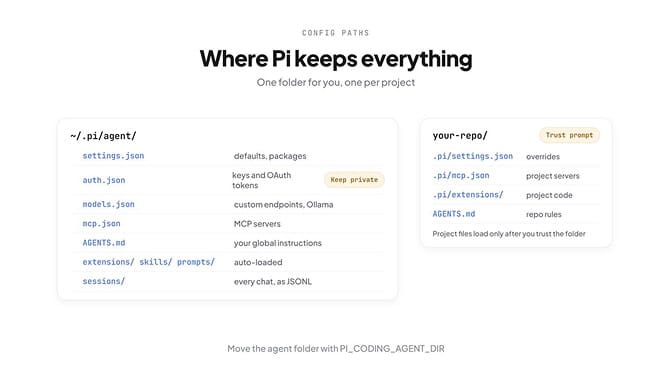
Two environment variables help on shared machines: PI_CODING_AGENT_DIR moves the whole agent folder, and PI_OFFLINE=1 stops Pi's startup network checks.
Common Pi errors and fixes
We triggered most of these ourselves on 1.4.0. The rest come from Pi's changelog and issue tracker.
| Error | What it means | Fix |
|---|---|---|
| "No API key found for the selected model." | Pi has no credential for that provider | Run /login, or export the provider's key variable |
| "No models available. Use /login to log into a provider via OAuth or API key." | No provider is set up at all | Same as above |
401 ... "authentication_error","message":"invalid x-api-key" | Anthropic rejected your key | Check for typos or a revoked key; don't trust pi auth check alone |
OpenAI API error (401): ... Incorrect API key provided | OpenAI rejected your key | Create a new key and re-export it |
| "API key not valid. Please pass a valid API key." (400) | Gemini rejected your key | Check the key comes from AI Studio with the API enabled |
Error: Model "..." not found. Use --list-models to see available models. | A typo, or a provider you haven't logged in to | Run pi --list-models and copy the ID |
Failed to load extension: Cannot find module '@earendil-works/pi-coding-agent' | An old Pi or a mixed install | Uninstall the old @mariozechner package and update |
Package subpath './node.js' is not defined by "exports" | A broken third-party extension | Start with pi -ne (no extensions), then remove it |
| "localhost refused to connect" during login | Windows had reserved the login port | Update to 1.1.0 or later |
| "Managed install marker is missing or invalid" | A Windows PowerShell 5.1 file encoding bug | Fixed in 1.4.0; run the installer again |
| Response truncated before completion | The model hit its output limit mid-answer | Switch to a model with a higher output limit, or break the task into smaller steps |
That last one also had a nasty follow-on: before 1.4.0, a session could break for good after a truncated tool call, because providers rejected the leftover tool results. If old sessions refuse every message, update.
Pi vs Claude Code vs OpenCode
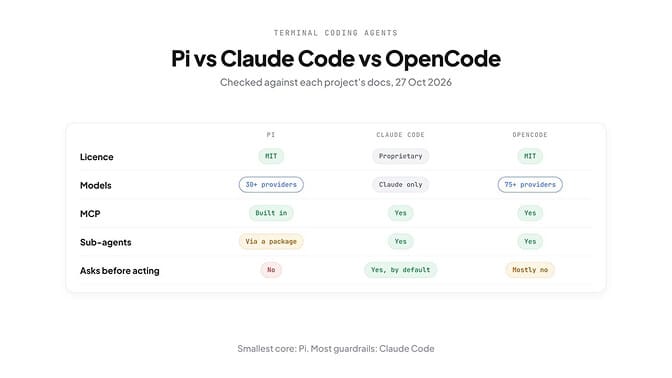
All three are terminal coding agents. They differ most in models, defaults and how much they do for you.
| Pi | Claude Code | OpenCode | |
|---|---|---|---|
| Licence | MIT, open source | Proprietary | MIT, open source |
| Models | 30+ providers, plus any compatible endpoint | Claude models only | 75+ providers, plus local models |
| MCP | Built in since September 2026 | Yes | Yes |
| Extending it | TypeScript extensions and packages | Plugins: skills, agents, hooks, MCP | JavaScript and TypeScript plugins |
| Sub-agents | Not built in; add with a package | Yes | Yes |
| Asks before acting | No | Yes, on first use of each tool by default | Mostly no; a few risky actions ask |
The short version: pick Claude Code if you want the most guardrails and only use Claude, OpenCode if you want the most built in, and Pi if you want the smallest core and plan to build your own.
Where BetterClaw fits
Pi is a coding agent that lives in your terminal, on your machine, while you watch it. That's exactly right for writing code.
It's not built for agents that should keep working when your laptop is closed, like a morning inbox summary, a weekly report or a support triage that runs every hour. That's what BetterClaw is for. Agents run in the cloud, connect to your apps, and keep a history of every run.
You bring your own key from any of 28+ providers with zero markup, the same way you do with Pi. Many people use both: Pi in the terminal for code, BetterClaw for the jobs that run on a schedule.
The takeaway
Pi gives you a small agent and the keys to everything else. That's its appeal and its main risk: it does what it's told, without asking, until you add the rules yourself.
Install it with the new package name, test your key with a real prompt, add MCP servers if you need them, and write a guard extension before you point it at anything you care about.
If any of this resonated and you want agents that run on their own, not just in your terminal, give BetterClaw a try. Starter is $19 a month for one agent, Pro is $49 a month for five, and every plan has a 7-day free trial. See full pricing.
Frequently Asked Questions
How do I install Pi coding agent? On macOS or Linux, run curl -fsSL https://pi.dev/install.sh | sh. On any system with Node.js 22.19 or newer, run npm install -g --ignore-scripts @earendil-works/pi-coding-agent. Check it worked with pi --version.
Does Pi support MCP? Yes, since version 0.99.0 (29 September 2026). Add a server with pi mcp add <name> -- <command>, check it with pi mcp list, and Pi saves it to ~/.pi/agent/mcp.json. Older guides that say Pi has no MCP are out of date.
What happened to @mariozechner/pi-coding-agent? It's deprecated. Pi moved to the @earendil-works/pi-coding-agent package in May 2026, and the old package stopped at 0.73.1. Uninstall the old one before installing the new one so you're not running two versions.
Which models can Pi use? More than 30 providers, including Anthropic, OpenAI, Google Gemini, OpenRouter, DeepSeek, Groq and xAI, plus subscription logins such as GitHub Copilot and ChatGPT. Local models work through any OpenAI-compatible endpoint in models.json.
Does Pi ask before running commands? No. Pi's docs say it "does not ask for approval before every tool call." Add an extension that blocks or confirms risky commands, and run Pi in a container or VM for real isolation.
Where is the Pi config file? Pi keeps everything in ~/.pi/agent/: settings.json, auth.json, models.json, mcp.json, plus extensions, skills, prompts and sessions. Projects can add a .pi/ folder, which loads after you trust it.