Hostinger sells OpenClaw two main ways. We read Hostinger's plan pages, its help centre and OpenClaw's own docs, so you can see what each option includes, what it costs after the first term, and how to fix the first things that break.
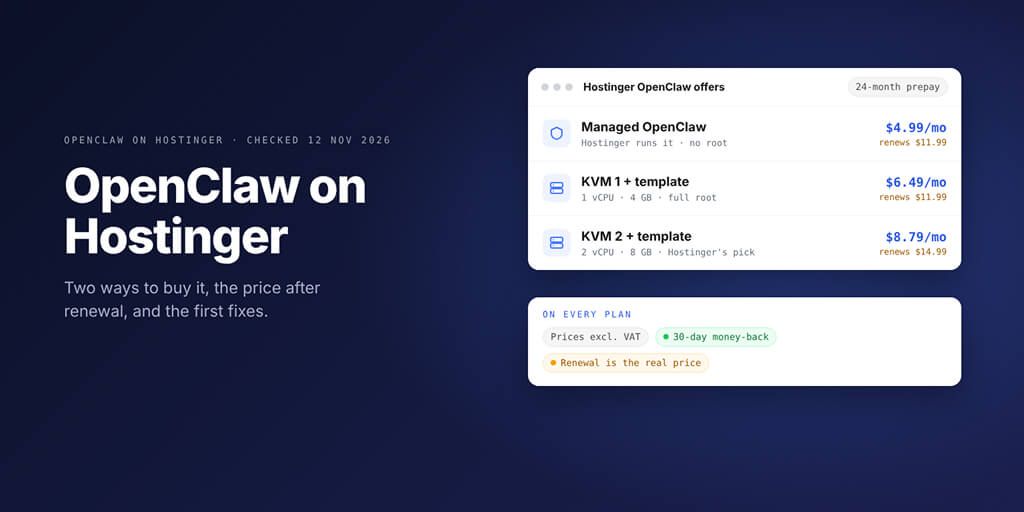
OpenClaw on Hostinger comes two main ways: Managed OpenClaw, where Hostinger runs the app from $4.99 a month on a 24-month prepay, and a 1-click OpenClaw template on a KVM VPS from $6.49 a month, where you run the server. Both renew at $11.99 a month or more. Pick managed for zero upkeep, the VPS for root access.
| If you want | Pick | Today (24-month prepay) | Renews at |
|---|---|---|---|
| OpenClaw with no server work | Managed OpenClaw | $4.99 a month ($119.76 upfront) | $11.99 a month |
| The cheapest server with root | KVM 1 with the OpenClaw template | $6.49 a month ($155.76 upfront) | $11.99 a month |
| Root plus headroom (Hostinger's recommendation) | KVM 2 with the OpenClaw template | $8.79 a month ($210.96 upfront) | $14.99 a month |
Checked: 12 November 2026, on Hostinger's own pages. US dollars, excluding VAT.
Picture this: the Black Friday banner says $4.99, you click through, and ten minutes later a bot on Telegram says hello.
Two years later, the renewal invoice for the next 24 months says $287.76.
Wait, that's not what I signed up for.
It is, actually. It's printed under the price on the plan card. So let's read that line first, then set OpenClaw up properly.
Hostinger OpenClaw plans and the real price
Hostinger's help centre lists three ways to run OpenClaw: Managed OpenClaw, Managed apps and a VPS. This post focuses on the first and the last.
| Plan | Who runs OpenClaw | Resources | Intro price | Paid today | Renews at |
|---|---|---|---|---|---|
| Managed OpenClaw | Hostinger | 25 GB disk, upgradable to 50 GB | $4.99 a month | $119.76 for 24 months | $11.99 a month |
| KVM 1 + OpenClaw template | You | 1 vCPU, 4 GB RAM, 50 GB NVMe | $6.49 a month | $155.76 for 24 months | $11.99 a month |
| KVM 2 + OpenClaw template | You | 2 vCPU, 8 GB RAM, 100 GB NVMe | $8.79 a month | $210.96 for 24 months | $14.99 a month |
| KVM 4 + OpenClaw template | You | 4 vCPU, 16 GB RAM, 200 GB NVMe | $12.99 a month | $311.76 for 24 months | $28.99 a month |
Checked: 12 November 2026. Hostinger labels these as Black Friday prices, lists them without VAT and says every plan is paid upfront.
The managed plan also comes on shorter terms: $7.99 a month for 12 months or $10.99 for one month. Hostinger's page shows the renewal rate only for the 24-month term, so check the shorter terms' renewal at checkout.
What each plan includes
Managed OpenClaw is sold as Hostinger's "AI automation apps" plan. Its card lists a visual interface, CLI access, Telegram pairing, pre-configured AI credits, ChatGPT sign-in, web search, an agentic mailbox and managed security.
The same plan also covers Hermes Agent, and you can switch between the two apps from the dashboard at any time. Hostinger notes the managed product is still rolling out by region.
The VPS plans list AMD EPYC processors, NVMe storage, free weekly backups, firewall management, an AI web terminal and the Docker Manager that installs the OpenClaw template. Every plan, managed or VPS, has a 30-day money-back guarantee.
The real price over four years
Here's what the plan cards add up to if you renew once for another 24 months at the listed rate.
| Plan | First 24 months | Next 24 months | Four-year total | Average a month |
|---|---|---|---|---|
| Managed OpenClaw | $119.76 | $287.76 | $407.52 | $8.49 |
| KVM 1 | $155.76 | $287.76 | $443.52 | $9.24 |
| KVM 2 | $210.96 | $359.76 | $570.72 | $11.89 |
Calculated from Hostinger's 24-month prices and renewal rates, checked 12 November 2026. AI usage comes on top on every plan: Hostinger credits, your own API key or, on the managed plan, your ChatGPT subscription.
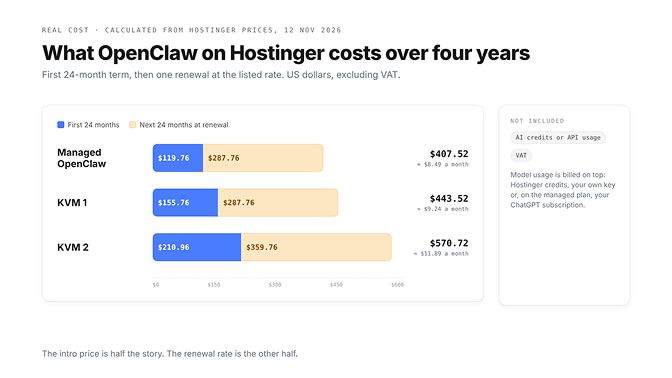
The $4.99 price is real. It's just the first half of the bill.
1-click VPS vs Managed OpenClaw on Hostinger
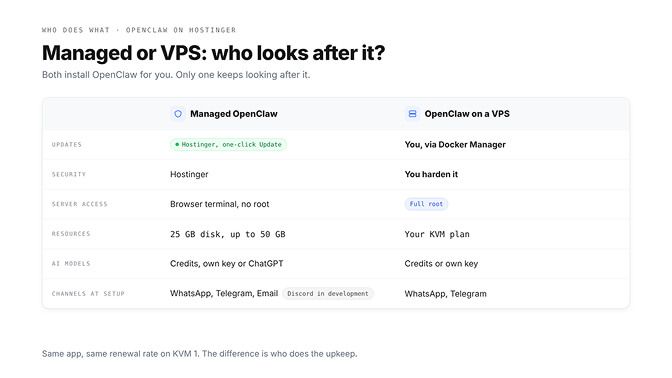
Both options deploy OpenClaw for you. The difference, per Hostinger's own comparison table, is who looks after it afterwards.
| Managed OpenClaw | OpenClaw on a VPS | |
|---|---|---|
| Best for, in Hostinger's words | Beginners and non-technical users | Developers and advanced users |
| Setup | Automated onboarding | Docker template plus a short form |
| Updates and security | Hostinger | You |
| Server access | No root; a browser terminal for the OpenClaw CLI | Full root |
| Resources | 25 GB disk, upgradable to 50 GB | Set by your KVM plan |
| AI models | Hostinger AI Router credits, your own key or your ChatGPT subscription | Hostinger credits or your own key |
| Chat channels at setup | WhatsApp, Telegram or Hostinger Email (Discord is in development) | WhatsApp number and Telegram token fields |
| Where you manage it | OpenClaw section of the Hostinger dashboard | VPS, then Docker Manager |
On the managed plan, Hostinger says it keeps OpenClaw on the latest stable version. The dashboard also shows your installed version with an Update button next to it.
On the VPS, the template is a starting point. Hostinger's hardening guide says a Catalog install already uses a random port and gateway token authentication, but DM policy, sandbox mode, network isolation and tool permissions are yours to set. Our OpenClaw VPS setup guide walks through those hardening steps.
Changed your mind? Hostinger offers one free migration from Managed OpenClaw to a KVM 1 VPS if you bought the plan within the last 30 days.
The third route, Managed apps, runs OpenClaw on its own server in APP 1 to APP 4 sizes, sold on Hostinger's Managed OpenClaw page. APP 1 (1 vCPU, 4 GB RAM, 25 GB NVMe) is $4.99 a month on a 24-month prepay and renews at $9.99. APP 2 (2 vCPU, 6 GB, 50 GB) is $6.99 and renews at $12.99, APP 3 (3 vCPU, 8 GB, 100 GB) is $9.99 and renews at $15.99, and APP 4 (4 vCPU, 10 GB, 150 GB) is $11.99 and renews at $18.99. Checked: 16 November 2026. Because that page is called Managed OpenClaw, some guides, including our OpenClaw hosting comparison, use the name for APP 1 rather than the AI automation apps plan, so check which plan a price refers to.
If you're weighing the VPS, our breakdown of what an OpenClaw VPS really costs in time is worth five minutes before you prepay two years.
How to set up OpenClaw on Hostinger (step by step)
These steps follow Hostinger's VPS install, getting-started and SSL guides and the Hostinger page in OpenClaw's docs. We didn't buy a plan for this post, so every step comes from those sources.
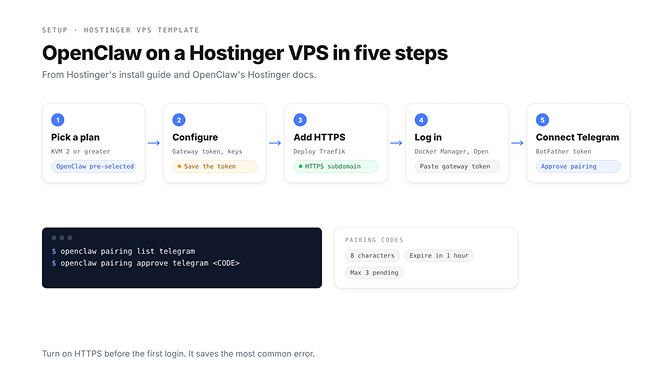
Step 1: Pick a plan with OpenClaw pre-selected
Choose a KVM plan on Hostinger's OpenClaw VPS page. Hostinger's install guide recommends KVM 2 or greater for OpenClaw.
At checkout OpenClaw is already selected. You can add Ready-to-Use AI credits, which work inside OpenClaw without an account at any model provider, and Oxylabs credits for web search.
Step 2: Fill in the configuration and deploy
After purchase, a configuration screen asks for a few values:
- Gateway token: generated for you. Save it, because it's your dashboard login.
- API keys: only needed if you skipped the AI credits. The form takes keys from OpenAI, Anthropic, Google Gemini or xAI.
- Telegram bot token and WhatsApp number: optional. You can add both later.
Click Deploy. Hostinger creates a Docker project, which can take several minutes.
Step 3: Turn on HTTPS before you log in
In Docker Manager, click Deploy Traefik, enter a valid email address and wait until it shows Running. The OpenClaw template ships with Traefik labels, so your dashboard moves to an HTTPS subdomain such as openclaw-xxxx.srv123456.hstgr.cloud.
Hostinger's SSL guide says to do this straight after deploying. Without it, you can hit errors like "Control UI requires device identity".
Step 4: Open the dashboard and log in
In Docker Manager, find your OpenClaw project and click Open in the Access column. Copy the token with the Gateway token button, paste it into the login field and click Login.
You can already talk to OpenClaw in Chat before any channel is connected.
Step 5: Connect Telegram and approve yourself
Create a bot with BotFather on Telegram (send /newbot) and copy the token. In the dashboard, open Channels, paste the token in the Telegram section and click Save; the gateway restarts.
Now message your bot. With DM pairing on, an unknown sender gets an 8-character code instead of a reply. Approve it under Settings, Channels, DM access requests, or from a shell in the container:
openclaw pairing list telegram
openclaw pairing approve telegram <CODE>
Codes expire after an hour, and each channel holds at most three pending requests. Once approved, send "Hi" and OpenClaw walks you through its first preferences.
The managed route in one paragraph
Buy the AI automation apps plan, pick a term and add-ons, then create a Hostinger AI Router key during setup (or paste your own key). Connect WhatsApp or Telegram from the Hostinger dashboard, click the OpenClaw button, log in with the access key and say "Hi".
Common problems with OpenClaw on Hostinger, and fixes
These come from Hostinger's help centre and OpenClaw's troubleshooting docs, roughly in setup order.
The dashboard won't load, or says "device identity required"
A fresh container needs a few minutes, so wait, then read the Docker Manager logs. For device identity or "device signature expired" errors, Hostinger's fix is HTTPS through Traefik (step 3).
OpenClaw's docs add that current versions can sign device identity over plain HTTP, so if HTTPS doesn't clear it, look for a token mismatch or a device waiting for approval. Run openclaw devices list, then openclaw devices approve <requestId>, and see our device pairing 401 fix for the Docker networking twist.
The Telegram bot replies with a code, or not at all
A code means pairing, covered in step 5. If Telegram keeps sending new codes in a loop, Hostinger's fix is to restart the OpenClaw container.
If the bot is silent, check that the dashboard shows Health OK and that the Telegram section in Channels shows Running: Yes and Probe ok. If the probe shows an error, restart the container.
"Bootstrap pending" instead of a normal reply
This means OpenClaw is stuck in its first-run setup. Hostinger's guide works through it in order: open a brand-new session, restart the container, then read the logs with the Analyze button.
If that fails, redeploy, or stop the container and click Update. The last resort is deleting and recreating the deployment, which permanently loses anything inside the old container, so back up first.
The container keeps restarting
OpenClaw's Hostinger page points to the Docker Manager logs and to configuration errors first: a missing token or an invalid API key is enough to stop the gateway from starting.
If the gateway drops and comes back under load, our gateway closed 1006 explainer covers what to check.
Replies stop, or come back empty
Hostinger's managed docs put it plainly: OpenClaw needs AI credits or a funded API key to respond. Check the Hostinger AI Router credits card (Top up), or your balance at your model provider.
If the account is funded, OpenClaw's "No replies" runbook checks pairing, group mention rules and allowlists next. With shell access, openclaw channels status --probe and openclaw logs --follow show which.
Out of memory on a small plan
OpenClaw's docs set the floor at 1 vCPU and 1 GB of RAM and recommend 2 GB or more, since browser automation can be hungry. KVM 1's 4 GB clears that, but Hostinger recommends KVM 2.
Under pressure, OpenClaw lets child processes such as its browser be killed first and logs memory pressure: level=critical. If you see that often, our OpenClaw OOM fix covers model-side causes; a bigger plan covers the rest.
Updating without breaking things
On a VPS, choose Update from your project's options menu in Docker Manager; it pulls the latest image and restarts. On the managed plan, click Update next to the version.
OpenClaw's Docker guide adds two rules for any container install: back up your state before upgrading, and know that a rollback means restoring the old image and its matching state. The latest stable release is v2026.11.4, published on 16 November 2026.
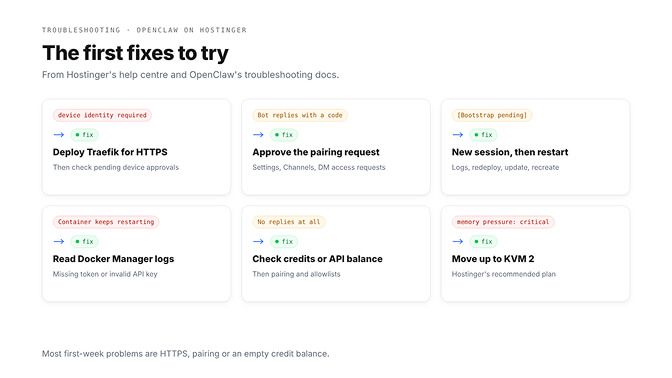
Most first-week problems on Hostinger come down to three things: HTTPS, pairing and an empty credit balance.
Hostinger vs other OpenClaw hosts
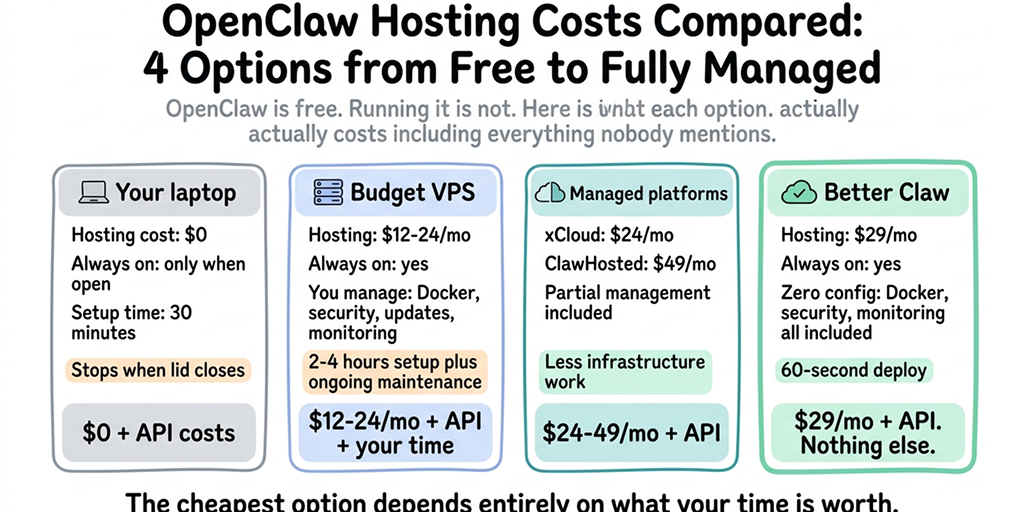
On the first term, Hostinger is the cheapest way into hosted OpenClaw of the providers we checked. Here's how it sits next to two managed hosts and one do-it-yourself VPS.
| Host | Type | Entry price | Billing | Specs | You manage |
|---|---|---|---|---|---|
| Hostinger Managed OpenClaw | Managed | $4.99 a month | 24-month prepay, renews at $11.99 | 25 GB disk | Your agent |
| Hostinger KVM 2 | VPS with template | $8.79 a month | 24-month prepay, renews at $14.99 | 2 vCPU, 8 GB, 100 GB | Server, updates, security |
| xCloud OpenClaw | Managed | $24.99 a month | Monthly, or save on 12 or 24 months | 4 vCPU, 6 GB, 100 GB | Your agent |
| ClawHosters Budget | Managed | €19 a month | Monthly | 2 vCPU, 4 GB, 40 GB | Your agent (SSH included) |
| Hetzner CPX22 | DIY VPS | €16.99 a month | Hourly, capped monthly | 2 vCPU, 4 GB, 80 GB | Everything |
Checked: 12 November 2026, on each provider's own site. Hetzner's price is for Helsinki and excludes VAT.
Even at the $11.99 renewal, Hostinger's managed plan sits below the other managed prices here. The trade is the long prepay: xCloud and ClawHosters bill monthly, Hetzner by the hour.
For every provider we track, with locations and EU options, see our OpenClaw hosting comparison.
When to skip the VPS
Some people searching for OpenClaw on Hostinger don't need OpenClaw itself. They want an agent that answers in chat and runs jobs on a schedule.
If you want OpenClaw for what it is, with its skills, its open-source code and full control, Hostinger is a sensible place to run it. If you want the agent rather than the server, that's where BetterClaw fits, and we'll be plain about it: BetterClaw does not host OpenClaw.
It runs its own managed agents on your own model keys with zero markup, with 500+ connectors and no Docker to update. You give up OpenClaw's skills ecosystem, root access and WhatsApp, which BetterClaw doesn't offer. Our OpenClaw alternative page and the BetterClaw vs VPS hosting comparison lay out the trade-offs.
BetterClaw's free plan gives you 1 agent and 100 credits a month with no card. Paid plans start at $19 a month for Starter (1 agent, 2,000 credits a month), or $15 a month billed annually. Pro, at $49 a month, adds 5 agents, unlimited connectors and Telegram and Slack webhooks. See BetterClaw plans.
The renewal date is the real price tag
Hostinger makes OpenClaw easy to start, and the managed plan is fair value even after renewal. Put the renewal date in your calendar the day you buy.
Then decide now who does the upkeep in year three. If it's you, take KVM 2 and turn on HTTPS on day one. If it isn't, take the managed plan and let Hostinger press Update.
Frequently Asked Questions
Is Hostinger good for OpenClaw?
Yes, for most people starting out. OpenClaw's own docs include a Hostinger setup page, Hostinger offers both a managed plan and a 1-click VPS template, and the first-term prices are the lowest of the hosts we checked. The catch is the 24-month prepay and the renewal rate, so compare on the renewal price.
How much is OpenClaw on Hostinger after renewal?
Managed OpenClaw and KVM 1 renew at $11.99 a month, and KVM 2 at $14.99 a month, for the same 24-month term. Renewing Managed OpenClaw for another 24 months comes to $287.76, against $119.76 for the first term. Prices exclude VAT and were checked on 12 November 2026.
Which Hostinger VPS plan do I need for OpenClaw?
Hostinger's install guide recommends KVM 2 (2 vCPU, 8 GB RAM) or greater. OpenClaw's docs set the minimum at 1 vCPU and 1 GB of RAM and recommend 2 GB or more, so KVM 1 works for a light agent. Choose KVM 2 if you plan on browser automation or several channels.
Do I need an API key for OpenClaw on Hostinger?
No, if you buy Hostinger's AI credits at checkout, because they work inside OpenClaw without an account at any model provider. You can also use your own key from OpenAI, Anthropic, Google Gemini or xAI. On the managed plan, you can connect your ChatGPT Plus or Pro subscription instead.
Can I move off Hostinger later?
Yes. OpenClaw keeps its config, sessions, channel logins and workspace in a state directory, and its migration guide moves that to a new machine with a verified backup. If you'd rather leave OpenClaw behind, our OpenClaw to BetterClaw migration guide walks through moving your SOUL.md, memory files and channels.
Why is my OpenClaw Telegram bot on Hostinger not replying?
Usually it's waiting for pairing approval: an unknown sender gets an 8-character code instead of a reply, and you approve it in the dashboard or with openclaw pairing approve telegram <CODE>. If there's no code either, check that Channels shows Running: Yes and Probe ok, then restart the container. Also confirm you still have AI credits or a funded API key.