The one config change that cut our OpenClaw API bill by 65%. Here's exactly how to set it up.
I opened my Anthropic dashboard on a Monday morning and stared at the number. $214. One week. One agent.
The agent was doing good work. Morning briefings. Calendar management. Email triage. Research tasks. Cron jobs running every 30 minutes to check for updates.
But $214 in seven days? For a personal AI assistant?
I dug into the usage logs. And that's when I saw it.
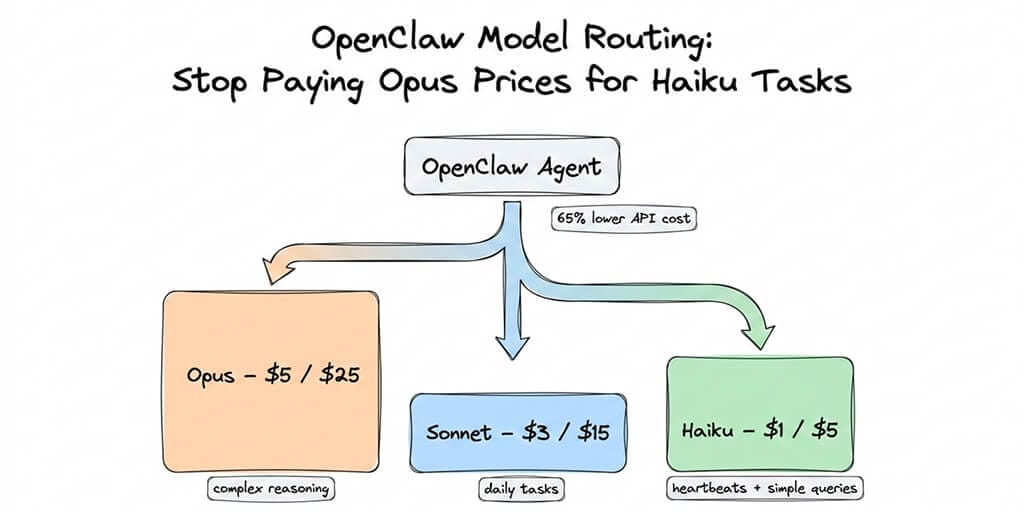
Every single task, from a complex research synthesis to a simple "are you still there?" heartbeat check, was routing through Claude Opus (4.6 at the time) at $5 per million input tokens and $25 per million output tokens. My agent was using a $25/million-token model to check the weather.
That's like hiring a neurosurgeon to take your temperature.
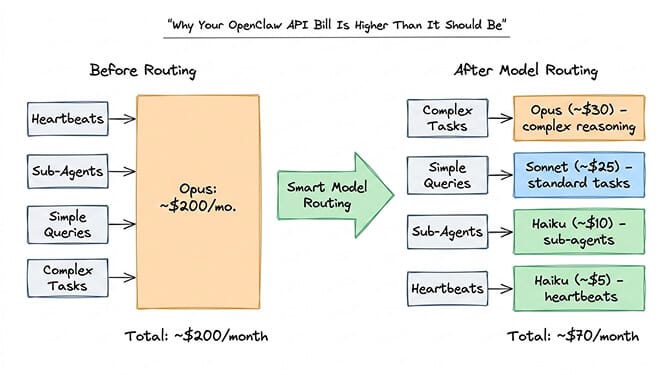
Here's what nobody tells you about OpenClaw model routing: by default, everything goes to your primary model. Every heartbeat. Every sub-agent. Every quick calendar lookup. If your primary is Opus, you're paying Opus rates for tasks that Haiku could handle in its sleep.
One config change later, my weekly bill dropped to $74. Same agent. Same quality on the tasks that mattered. 65% savings.
This is that config change.
Why your OpenClaw API bill is higher than it should be
OpenClaw supports 28+ AI model providers. Claude, GPT, Gemini, DeepSeek, Mistral, local models through Ollama. The framework is genuinely model-agnostic.
But the default behavior is anything but smart about how it uses them.
When you set up OpenClaw, you pick a primary model. Most people choose something powerful: Claude Opus, a flagship GPT model, or Claude Sonnet. Makes sense. You want your agent to be capable.
The problem is that OpenClaw sends everything to that model.
Heartbeats are the biggest offender. These are periodic "are you still there?" checks that run every 30 minutes by default. They use your primary model. That's 48 Opus calls per day doing nothing more than confirming your agent is alive.
Sub-agents make it worse. When your main agent spawns parallel workers (researching multiple topics, checking multiple inboxes), each sub-agent defaults to the primary model too.
Simple queries round it out. "What's on my calendar today?" does not need Opus-level reasoning. But it gets Opus-level pricing.
One community member built a calculator to show the impact. For a light user (24 heartbeats per day, 20 sub-agent tasks, 10 queries), running everything through Opus costs roughly $200 per month. With smart routing, the same workload drops to about $70.
The viral Medium post "I Spent $178 on AI Agents in a Week" captured this exact pain. Most of that spend was waste.
The model pricing math you need to know
Before we touch config files, here's the pricing reality for 2026.
Claude's current lineup (per million tokens, input/output, as of September 2026):
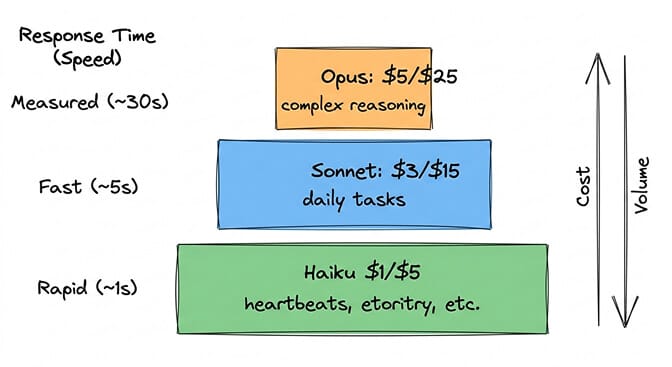
Opus 5.5: $4 / $20. The flagship for agentic work. Best for complex multi-step tasks.
Sonnet 5: $2 / $10. The workhorse. Matches or exceeds previous Opus quality for most tasks.
Haiku 4.5: $1 / $5. The sprinter. Fast, cheap, genuinely capable for straightforward work.
(Anthropic also sells Fable 5.1 at $10 / $50 for the hardest long-horizon work. Older models like Opus 4.6 and 4.7 at $5 / $25 and Sonnet 4.6 at $3 / $15 are still available if your config pins them.)
The output token pricing is where the real money goes. Opus output costs 4x what Haiku output costs. And agents generate a lot of output tokens, especially with extended thinking enabled.
The right model for each task isn't always the smartest model. It's the cheapest model that does the job well enough.
For a deeper dive into how these costs compound across different OpenClaw usage patterns, we wrote a full breakdown of OpenClaw API costs with specific monthly projections.
OpenRouter makes the comparison even starker. DeepSeek's Flash model runs at $0.15 to $0.30 per million input tokens, depending on whether you hit its off-peak or peak hours. Gemini 3.1 Flash-Lite sits at $0.25. These aren't as capable as Claude for complex reasoning, but for a heartbeat check? More than sufficient.
What model routing actually is (and isn't)
Model routing is exactly what it sounds like: a layer that sits between your agent and the LLM providers, looks at each incoming request, and sends it to the cheapest model that can handle it well.
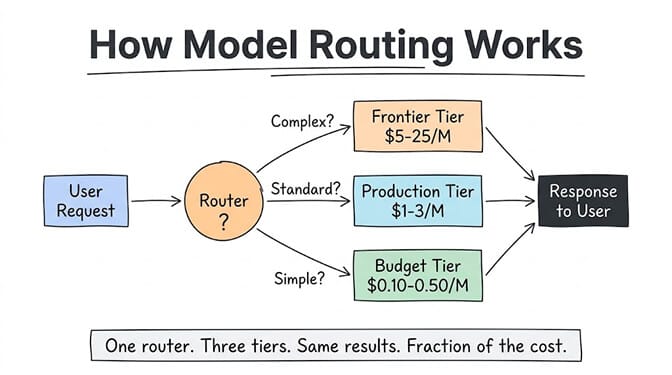
It's not a new model. It's not fine-tuning. It's not prompt engineering. It's traffic management for AI.
Think of it like a mail room. A letter asking for your office hours doesn't go to the CEO. A contract negotiation does. Model routing applies the same logic to AI requests: simple tasks go to the fast, cheap model. Hard tasks go to the powerful, expensive one.
The routing decision happens in milliseconds and is based on one or more of these signals: input complexity (how many tokens, how many instructions), task type (classification vs. reasoning vs. creative), required output quality (customer-facing vs. internal log), or explicit rules you set ("always use Opus for code review, always use the cheap model for status updates"). OpenClaw's built-in routing, covered next, is the explicit-rules kind: you assign a model per task type (heartbeat, sub-agent, primary).
Routing only pays off if you know which models belong at each tier. Our cheapest AI models for agents comparison covers that, and if you're still deciding which models belong where, our guide to choosing the right LLM for your task walks through it in four questions.
How OpenClaw model routing actually works
OpenClaw's model configuration lives in ~/.openclaw/openclaw.json. The key section looks like this:
{
  "agents": {
    "defaults": {
      "model": {
        "primary": "anthropic/claude-opus-5-5"
      },
      "models": {
        "anthropic/claude-opus-5-5": { "alias": "opus" },
        "anthropic/claude-sonnet-5": { "alias": "sonnet" },
        "anthropic/claude-haiku-4-5": { "alias": "haiku" }
      }
    }
  }
}
This gives you two things:
A primary model for complex reasoning (Opus). Named aliases so you can switch mid-conversation with /model sonnet or /model haiku. (The models map doesn't restrict anything on its own. If you want an allowlist, that's a separate modelPolicy.allow setting.)
But this alone doesn't route tasks intelligently. Everything still defaults to primary.
Here's where it gets interesting.
The config change that cut our bill 65%
OpenClaw supports setting different models for different task types. The VelvetShark community guide documented this clearly, and here's the practical version.
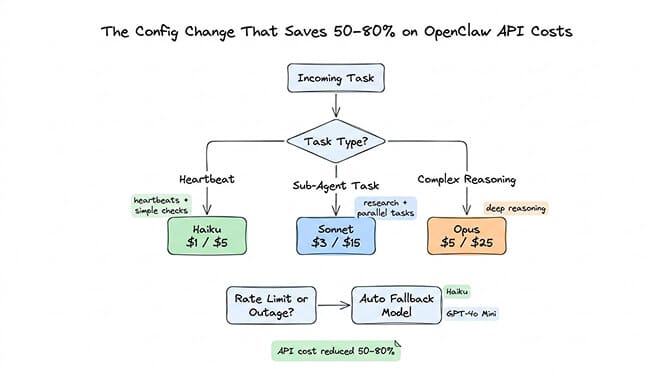
In your openclaw.json, you can specify models for heartbeats (heartbeat.model), sub-agents (subagents.model), and the primary reasoning model separately:
{
  "agents": {
    "defaults": {
      "model": { "primary": "anthropic/claude-opus-5-5" },
      "heartbeat": { "model": "anthropic/claude-haiku-4-5" },
      "subagents": { "model": "anthropic/claude-sonnet-5" }
    }
  }
}
That's it. Three lines.
Heartbeats now run on Haiku at $1/$5 instead of Opus at $4/$20. Sub-agents use Sonnet (plenty capable for parallel research tasks) at $2/$10. Only your primary interactions, the ones where you actually want top-tier reasoning, use Opus.
One catch the OpenClaw docs call out: a heartbeat can leave its model in place on the shared session, so your next main-session turn may run on Haiku. Adding "isolatedSession": true to the heartbeat block runs each heartbeat in a fresh session and avoids that.
For a more aggressive setup, you can route the primary model to Sonnet and only escalate to Opus manually:
{
  "agents": {
    "defaults": {
      "model": { "primary": "anthropic/claude-sonnet-5" },
      "heartbeat": { "model": "anthropic/claude-haiku-4-5" },
      "subagents": { "model": "anthropic/claude-haiku-4-5" },
      "models": {
        "anthropic/claude-opus-5-5": { "alias": "opus" },
        "anthropic/claude-sonnet-5": { "alias": "sonnet" },
        "anthropic/claude-haiku-4-5": { "alias": "haiku" }
      }
    }
  }
}
Now your default is Sonnet (which, in 2026, is genuinely excellent for most everyday tasks). When you need Opus for something complex, you type /model opus, handle the task, then /model sonnet to switch back.
Model fallbacks add another layer of protection. If your primary model hits rate limits, auth failures, or timeouts, OpenClaw can automatically fall back to a cheaper alternative instead of failing:
{
  "agents": {
    "defaults": {
      "model": {
        "primary": "anthropic/claude-sonnet-5",
        "fallbacks": ["anthropic/claude-haiku-4-5", "openai/gpt-5.4-mini"]
      }
    }
  }
}
Edit the file, save, restart your gateway. Done.
The OpenRouter shortcut (for people who hate config files)
If editing JSON feels like too much, OpenRouter offers a shortcut that works surprisingly well.
Set your model to openrouter/auto and OpenRouter's Auto Router picks a model for each prompt. It classifies the task type, then chooses from the models the OpenRouter community actually spends on for that kind of task, within a cost tier. With no cost setting, it routes roughly in the cheapest (low) band, so simple queries land on cheap models.
It's not as precise as manual routing. You give up some control. But for someone who just wants lower bills without touching config files, it works.
The full setup through OpenRouter is straightforward: get an API key from openrouter.ai and run openclaw onboard --auth-choice openrouter-api-key (onboarding defaults to openrouter/auto). To pin a specific model later, it's one command: openclaw models set openrouter/<provider>/<model>.
If you want to see the full model routing configuration in action, including the OpenRouter auto-routing approach and manual fallback setup, this community tutorial walks through the entire process with real usage numbers and cost comparisons.
Watch on YouTube: OpenClaw Multi-Model Setup and Cost Optimization (Community content)
The three ways to implement model routing
OpenClaw's per-task config and the OpenRouter auto-router are two points on a wider spectrum. Whatever agent stack you run, routing comes in three flavors, with effort decreasing as you go.
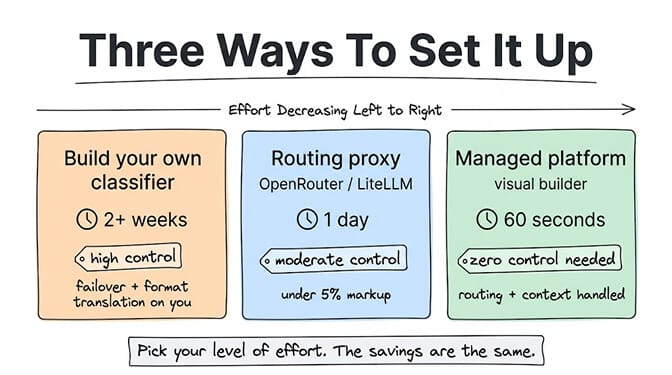
Option 1: Build your own classifier (2+ weeks, high control). You write a lightweight classifier (often a cheap LLM call itself, or a rule-based system) that examines each request and decides which model should handle it. Maximum control, customized to your exact workload, no vendor dependency. The cost: 2 to 4 weeks of engineering to build, test, and tune, ongoing maintenance as models change, and you handle failover, rate limiting, and format translation between providers yourself. Worth it if you have a dedicated ML engineer and thousands of dollars a month in AI spend to optimize. For someone burning $200/month on tokens, probably not.
Option 2: Use a routing proxy (1 day, moderate control). Services like OpenRouter and LiteLLM sit between your app and multiple LLM providers. You send requests to one endpoint, and the proxy routes them based on rules you configure. Fast setup and access to 200+ models through one API, with some auto-routing based on cost and capability. The trade-offs: fees (OpenRouter passes through provider token prices without markup but charges 5.5% when you buy credits; a self-hosted LiteLLM proxy has no fee but you run it yourself), another service in your stack, and you're still writing the routing rules. The OpenRouter shortcut above is this option, and our OpenRouter vs direct API vs local Ollama comparison puts real cost and latency numbers on it.
Option 3: Use a platform that handles it natively (60 seconds, zero control needed). Managed agent platforms take routing off your plate. On BetterClaw you bring your own keys across 28+ model providers with zero inference markup, assign models to different task types through the visual builder, and the platform handles the routing. Smart context management and per-agent cost caps come built in.
Pick your level of effort. The savings come from the routing itself, not from which option you choose.
The context window trap (and how it eats your budget)
Here's a cost problem that model routing alone won't fix.
OpenClaw has had a known issue where cron jobs that share a session accumulate context. A task scheduled to "check emails every 5 minutes" gradually builds a context window that grows with every execution. What starts as a 2,000-token prompt can balloon to 100,000 tokens.
At Opus 5.5 pricing ($4 per million input tokens), that escalation turns a $0.008 task into a $0.40 task. Run it 50 times a day and you're burning $20 daily on a single cron job.
The fix is to cap context and keep scheduled work out of your main session. Run cron jobs in isolated sessions (sessionTarget: "isolated") so each run starts fresh, and cap active input per model with contextTokens on the model's entry under models.providers. For heartbeats, isolatedSession: true plus lightContext: true gives the smallest prompt.
We documented this memory bug and its workarounds in detail. It's one of those things that no setup guide mentions until you've already been burned.
Even without the cron bug, there's a quieter version of the same problem: token bloat. Self-hosted agent frameworks (OpenClaw, CrewAI, LangGraph) typically send the full conversation history, all loaded skill instructions, and the complete system prompt with every single request. A simple "what time is it?" can carry 20,000 tokens of context for a 50-token answer.
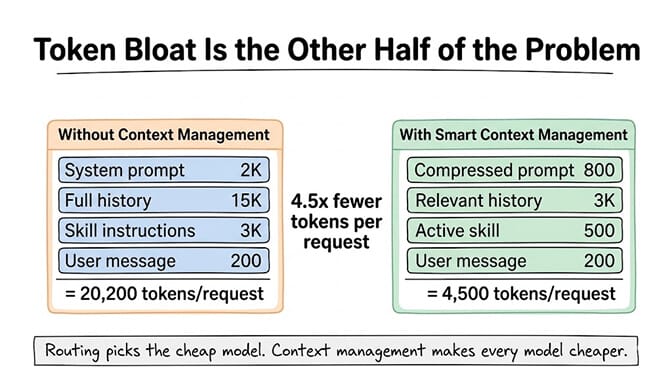
On Opus 5.5 ($4 per million input tokens), that's about $0.08 of input per "what time is it?" On DeepSeek's Flash model with only the relevant history and the active skill in context, it's about $0.0007 off-peak ($0.0014 at peak rates). Routing picks the cheap model. Context management makes every model cheaper. Doing one without the other is like switching to a fuel-efficient car but driving with the parking brake on. For how context costs compound across real workloads, our AI agent cost guide shows monthly numbers across five use cases.
Also: set spending caps. OpenRouter lets you configure daily, weekly, or monthly budget limits. If you're using Anthropic directly, monitor your dashboard religiously. A recursive agent loop can drain hundreds of dollars overnight. One community member reported a $37 burn in six hours from a single runaway research task.
If you'd rather not think about any of this, if you want model routing handled automatically with built-in spending controls and anomaly detection that pauses your agent before costs spiral, BetterClaw handles all of this at $49/month for Pro. BYOK, 60-second deploy, and you never have to edit a JSON config file again.
Which model for which task (the practical cheat sheet)
After months of running OpenClaw with various model configurations, here's what actually works:
Use Opus for: Complex multi-step reasoning. Writing that needs to be genuinely good. Code architecture decisions. Anything where you'd want a senior engineer's opinion, not an intern's.
Use Sonnet for: Daily driver tasks. Email drafting. Calendar management. Research summaries. Content generation. 90% of what most people use their agent for. Sonnet 5 is remarkably capable.
Use Haiku for: Heartbeats. Simple lookups. Quick classifications. Sub-agent tasks that are narrow and well-defined. High-frequency, low-complexity operations.
Use DeepSeek/Gemini Flash for: Extreme cost optimization on tasks where quality tolerance is high. Heartbeats. Status checks. Data parsing.
Smart routing isn't about always using the cheapest model. It's about never using an expensive model where a cheap one would do.
For ideas on high-value tasks worth running through Opus, our guide to the best OpenClaw use cases covers the workflows where premium model access actually pays for itself.
The three-tier setup that works for most agents
If you want to go beyond Claude-only routing, here's the cross-provider setup most teams converge on.
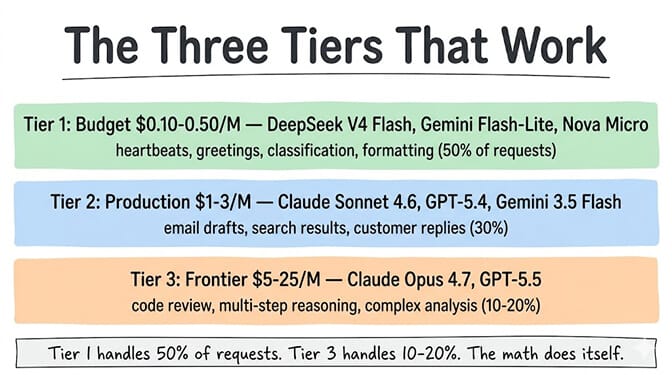
Tier 1 (about 50% of requests): Budget. DeepSeek's Flash model (V4.1 Flash) at $0.15/$0.60 off-peak or $0.30/$1.20 at peak, or Gemini 3.1 Flash-Lite at $0.25/$1.50. For heartbeat checks, greetings, simple classification, formatting, and routing decisions. If you're staying all-Claude, Haiku 4.5 ($1/$5) fills this slot, as in the configs above.
Tier 2 (about 30% of requests): Production. Claude Sonnet 5 at $2/$10, GPT-5.4 at $2.50/$15, or Gemini 3.5 Flash at $1.50/$9. For email drafts, customer replies, search summaries, and most standard agent work.
Tier 3 (10-20% of requests): Frontier. Claude Opus 5.5 at $4/$20 or GPT-5.5 at $5/$30. For code generation, complex reasoning, multi-step analysis, and anything where the quality gap between production and frontier actually matters.
The key insight: most people start at Tier 3 and never leave. The fix is starting at Tier 1 and only escalating when needed. If you can't tell the difference between the Tier 1 and Tier 3 output for a given task, use Tier 1. Your wallet will know the difference even if you can't.
For the full per-provider price list behind these tiers, see our complete LLM pricing guide.
Real-world results: what routing actually saves
Our own bill dropped 65% from routing alone. Anecdotal reports on r/openclaw and similar forums point the same way: developers running heavier setups on a single frontier model for everything describe monthly bills in the hundreds of dollars for one agent, and much smaller bills after moving to tiered models with context management. We haven't verified those numbers independently, so treat them as directional. The biggest drops show up when routing and context limits are applied together.
The pattern is usually the same: Haiku or Flash for heartbeats and simple queries (fractions of a cent per request). Sonnet or GPT-5.4 for standard work (a few cents). Opus or GPT-5.5 reserved for genuinely complex tasks (used 10 to 20% of the time).
The people who figure this out early run their agents far longer on the same budget than those stuck on a single expensive model.
What this means for the future of agent costs
Here's the thing I keep thinking about.
AI model pricing has been falling dramatically. Opus 5.5 at $4/$20 is about 73% cheaper than Opus 4.1 was at $15/$75. Sonnet 5 delivers quality that would have required Opus just months ago. Haiku keeps getting better.
The trend line is clear: the models get cheaper and smarter. But agent usage keeps going up. More tasks, more automations, more cron jobs, more sub-agents. The savings from better pricing get eaten by expanded workloads.
Smart model routing isn't a one-time optimization. It's a habit. Every time you add a new skill or schedule a new cron job, ask yourself: does this need Opus? Or is Sonnet (or Haiku) enough?
That question, asked consistently, is the difference between a $50/month agent and a $200/month one.
OpenClaw is one of the most exciting projects I've worked with. 390,000+ GitHub stars for good reason. The ability to text your AI assistant on WhatsApp and have it handle real work across your entire digital life is genuinely transformative. But running it affordably requires intentional choices about how OpenClaw works under the hood, especially around model selection.
If you've been running your agent on a single model and wincing at the bill, try the three-line config change above. You'll see results within 24 hours.
And if you'd rather skip the config file entirely and get automatic model routing, anomaly-based cost controls, and zero-config deployment, give BetterClaw a try. It's $49/month for Pro, BYOK, and your first agent deploys in about 60 seconds. We handle the infrastructure and the optimization. You focus on building workflows that are actually worth the tokens.
Frequently Asked Questions
What is OpenClaw model routing and why does it matter?
OpenClaw model routing is the practice of assigning different AI models to different task types within your agent. By default, OpenClaw sends every request (heartbeats, sub-agents, simple queries, and complex reasoning) to your primary model. Routing lets you assign cheap models like Haiku ($1/$5 per million tokens) to low-complexity tasks while reserving expensive models like Opus 5.5 ($4/$20) for tasks that genuinely need them. In our case it cut the API bill by 65%.
What is model routing in AI, in general?
Model routing is a technique where a layer between your application and LLM providers analyzes each request and sends it to the cheapest model that can handle it well. Simple tasks (classification, greetings, formatting) go to budget models ($0.10-0.50/M tokens). Complex tasks (reasoning, coding, analysis) go to frontier models (roughly $4-5/M input and $20-30/M output). It isn't a new model, fine-tuning, or prompt engineering; it's traffic management for AI requests.
How does model routing compare to just using a cheaper model for everything?
Using one cheap model for everything saves money but sacrifices quality on complex tasks. Model routing gives you both: cheap models where quality doesn't matter, expensive models where it does. Because the frontier model still handles the hard 10-20% of requests, a routed setup keeps quality on the tasks that need it while costing far less than an all-frontier setup.
How does Claude Opus compare to Sonnet for OpenClaw agent tasks?
Claude Opus 5.5 ($4/$20 per million tokens) excels at complex multi-step reasoning, code architecture, and nuanced analysis. Claude Sonnet 5 ($2/$10) handles 90% of typical agent tasks (email, calendar, research, content generation) at roughly the same quality level. For most OpenClaw users, Sonnet as the primary model with Opus available for manual escalation offers the best cost-to-quality ratio.
How do I set up multi-model routing in OpenClaw?
Edit your ~/.openclaw/openclaw.json file and, under agents.defaults, set model.primary, heartbeat.model, and subagents.model to separate models. For example, set primary to Sonnet, heartbeat to Haiku, and subagent to Haiku. Save the file and restart your gateway. You can also switch models mid-conversation by typing /model opus or /model haiku in your chat. Outside OpenClaw's own config, the other routes are a routing proxy like OpenRouter or LiteLLM (about a day to set up) or a custom classifier you build yourself (2+ weeks of engineering).
How much does OpenClaw cost per month with smart model routing?
API costs with smart routing typically run $40-80/month depending on usage, compared to $150-200/month without routing. The VPS or hosting cost is separate ($5-29/month depending on your approach). BetterClaw Pro at $49/month includes zero-config deployment and built-in cost optimization. When you bring your own API keys, the model token costs are the same regardless of hosting.
Is it safe to use cheaper models like Haiku for OpenClaw sub-agents?
Yes, for well-scoped tasks. Haiku 4.5 is genuinely capable for narrow, well-defined operations like lookups, status checks, and data parsing. The key is matching model capability to task complexity. Don't use Haiku for tasks requiring complex reasoning or multi-step planning. Cap context with per-model contextTokens limits and run scheduled jobs in isolated sessions to prevent runaway costs regardless of which model you use.
Does model routing reduce the quality of AI responses?
No, when done correctly. The key is routing by task complexity, not randomly. A budget model handling "what's on my calendar?" produces the same result as a frontier model. A frontier model handling a complex code review produces a much better result than a budget model. Routing matches capability to need. You only lose quality if you route a complex task to a model that can't handle it, which is why fallback rules matter.