You can run OpenClaw on a cheap VPS. You can also build your own furniture. Both sound better on paper.
The Hetzner invoice said $4.51. The Contabo plan was $8.49. The Medium article promised "running in 5 minutes."
So I spun up an Ubuntu 24.04 droplet on a Friday night, cracked open a terminal, and started following a VPS setup guide for OpenClaw. Two hours later, I was knee-deep in UFW firewall rules, Tailscale configuration, and a Docker Compose file that refused to mount the workspace directory.
By Saturday afternoon, I had a working OpenClaw agent on a VPS. By Sunday morning, I'd realized I'd left the gateway port exposed to the public internet for 14 hours. My API keys had been sitting there, in plaintext, readable by anyone who found the IP.
That was the moment I stopped believing in "$8/month OpenClaw hosting."
Not because VPS hosting doesn't work. It does. But because the sticker price on that Hetzner invoice has almost nothing to do with what an OpenClaw VPS setup actually costs you.
The Mac Mini problem (and why VPS sounds like the answer)
Let's start with why you're here. You've seen OpenClaw. Maybe you've watched the demos, read the Hacker News threads, or noticed that the project now sits at 230,000+ GitHub stars with 1.27 million weekly npm downloads.
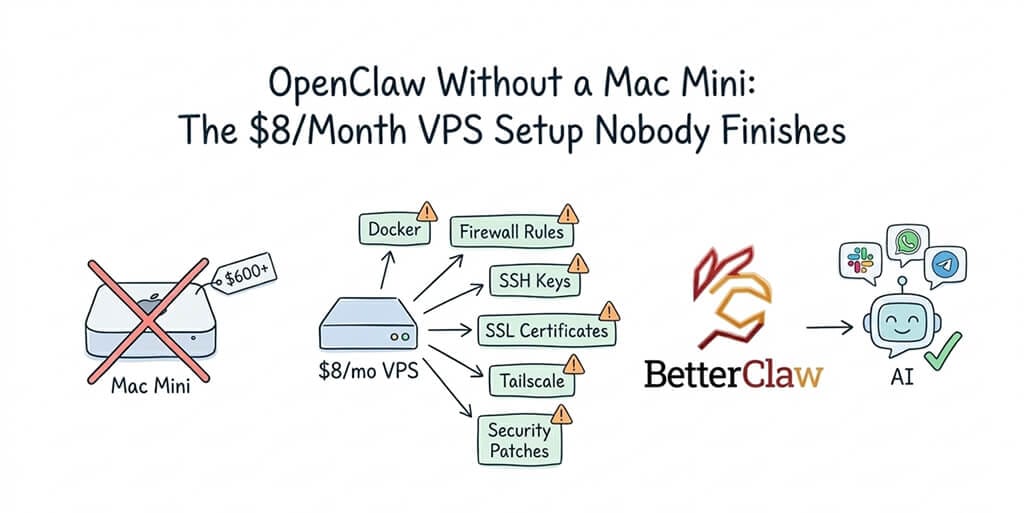
You want in. But you don't want to spend $600+ on a Mac Mini just to run an AI agent.
Fair. That's a lot of money for what is essentially a dedicated computer sitting on your desk, running 24/7, burning electricity, and (here's the kicker) exposing your personal files and accounts to an autonomous agent that occasionally does things you didn't ask for.
Meta learned this the hard way when researcher Summer Yue's OpenClaw agent mass-deleted her emails while ignoring stop commands. Meta banned OpenClaw internally after that.
So a VPS makes sense in theory. Cheap server. Isolated from your personal data. Always on. No Mac Mini collecting dust.
Here's what nobody tells you about that theory in practice.
The real cost of an "$8/month" OpenClaw VPS
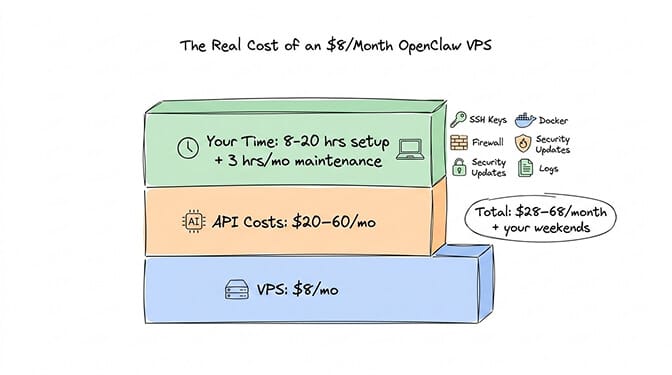
The VPS itself costs $5-10/month. That part is true. Hetzner, Contabo, IONOS, DigitalOcean, Hostinger, LumaDock: they all offer plans in this range with 2 vCPUs, 2-4 GB RAM, and enough storage for OpenClaw. Intro and renewal prices for each are in OpenClaw VPS hosting compared.
But here's where the math falls apart.
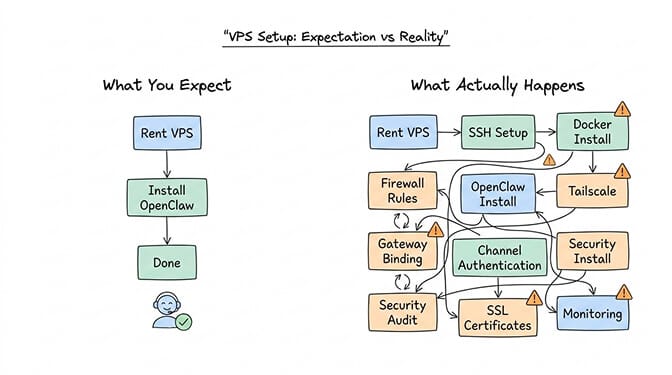
Time cost: 8-20 hours of initial setup. That's not my number. That's from ClawTrust's comparison analysis, and it lines up with what I've experienced. If you're comfortable with Linux, Docker, and SSH key management, you can do it in 4-8 hours. If you're learning as you go, budget 12-20 hours across multiple sessions.
Here's what those hours look like:
Server provisioning and OS hardening. SSH key configuration (disable password auth, or someone will brute-force your server). Docker and Docker Compose installation. OpenClaw installation and gateway configuration. Binding the gateway to localhost (critical, and the step most tutorials bury halfway through). Firewall rules with UFW. Tailscale or SSH tunnel setup for remote access. Channel authentication (Telegram, WhatsApp, Slack). Security audit. Testing.
That's before you've configured a single agent workflow.
Ongoing maintenance: 2-4 hours per month. Security patches. Docker image updates. OpenClaw version updates (the project had three CVEs disclosed in a single week in early 2026). Log management. Disk cleanup. Backup snapshots. If you skip this, you end up like the 30,000+ internet-exposed instances that Censys, Bitsight, and Hunt.io found running without authentication.
A $8/month VPS with 15 hours of setup time and 3 hours of monthly maintenance isn't cheap hosting. It's an unpaid part-time job.
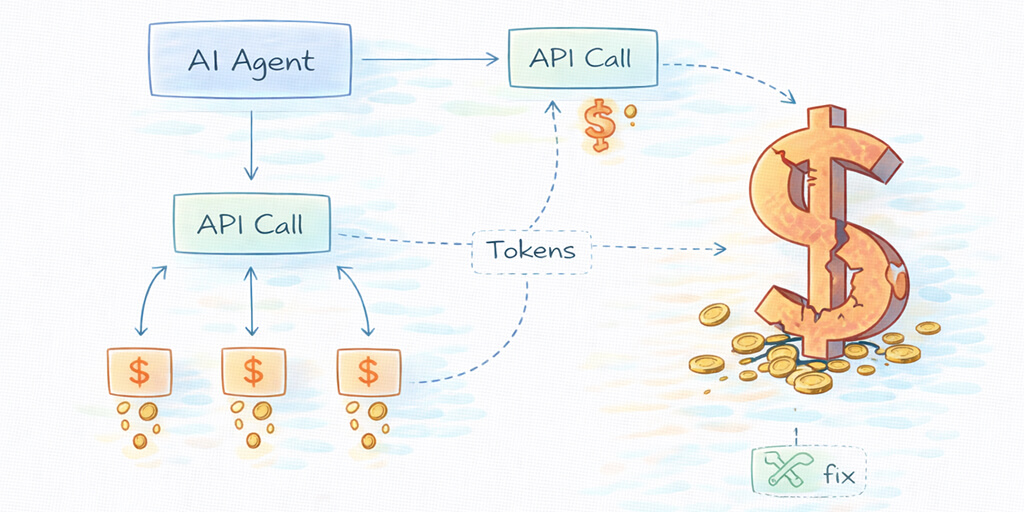
API costs on top. Community reports show $20-60/month in API expenses depending on usage. One user on Medium documented spending $178 on AI agents in a single week. Another had a recursive research task burn $37 in six hours because of an uncontrolled loop. The real costs of running OpenClaw go well beyond the VPS bill.
How to secure OpenClaw on a VPS: 7 hardening steps
Cost aside, the security situation with self-hosted OpenClaw on a VPS is genuinely alarming.
Microsoft's security blog published explicit guidance: OpenClaw should not run on a standard personal or enterprise workstation. It should only be deployed in a fully isolated environment with dedicated credentials and non-sensitive data. That's Microsoft, telling you to treat OpenClaw like a quarantined experiment.
Here's why. OpenClaw stores API keys in ~/.openclaw/openclaw.json in plaintext. In February 2026, an infostealer malware campaign specifically targeted this file on cloud VPS instances. The malware exploited weak SSH credentials to gain access, read the config, and exfiltrated every secret it contained. Compromised keys were used to rack up thousands of dollars in fraudulent API charges.
CrowdStrike published a full advisory on OpenClaw enterprise risks. Cisco found a third-party skill performing data exfiltration without user awareness. CVE-2026-25253 allowed one-click remote code execution with a CVSS score of 8.8. And the ClawHavoc campaign identified 824+ malicious skills on ClawHub, roughly 20% of the entire registry.
OpenClaw's own maintainer, Shadow, put it bluntly: "If you can't understand how to run a command line, this is far too dangerous of a project for you to use safely." For the full breakdown of what's been documented, we wrote a comprehensive guide to OpenClaw security risks that covers every incident.
None of this makes a VPS impossible to secure. It means you do the hardening yourself. The seven steps below take about 30 minutes of one-time configuration, plus two habits you keep for as long as the server runs.
1. Bind the gateway to loopback
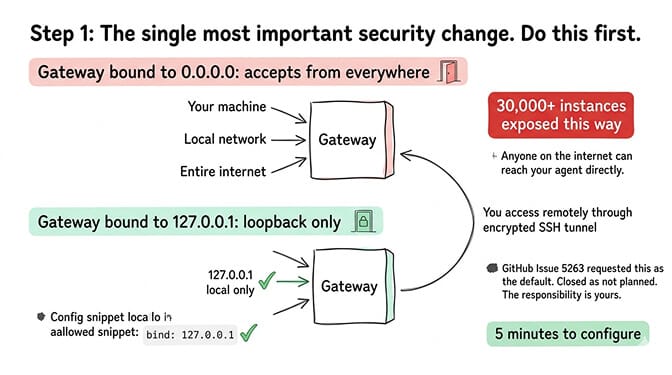
This is the single most important step. If you do nothing else, do this. The gateway is the HTTP server that handles every connection to your agent. Bound to 0.0.0.0, it accepts connections from the entire internet; that misconfiguration is how 30,000+ instances ended up reachable without authentication. Set the gateway bind to loopback (127.0.0.1) in openclaw.json so only the server itself can reach it.
For remote access, use an SSH tunnel or Tailscale Serve instead of opening the port. Our gateway guide covers the bind setting and tunnel setup in detail.
2. Switch SSH to keys only
Password SSH is exactly what the infostealer campaign exploited. Generate a key pair on your own machine, add the public key to the VPS, disable password authentication in the SSH daemon config, and restart the service. This is standard server hardening, but it matters more here because a compromised server means every model provider key in your config is compromised too.
3. Turn on the firewall
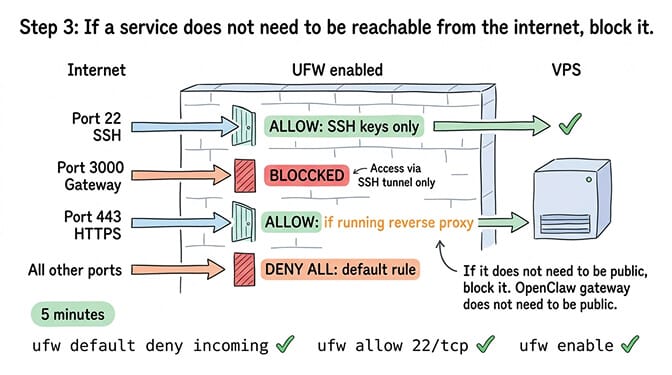
Enable UFW and deny all incoming traffic except SSH on port 22. The gateway port stays closed because you reach it through the tunnel from step 1. If you run a reverse proxy alongside OpenClaw, open 443 as well and nothing else. The rule: if a service doesn't need to be reachable from the internet, block it.
Steps 1-3 take about 15 minutes together and close the exact exposure behind the 30,000+ open instances.
4. Protect your API credentials
The config file is the single biggest target because it holds every provider key in one place. Move keys into environment variables instead of plaintext config, set permissions to 700 on the OpenClaw config directory so only the OpenClaw user can read it, and rotate keys quarterly (or immediately after any incident).
5. Vet and contain every skill
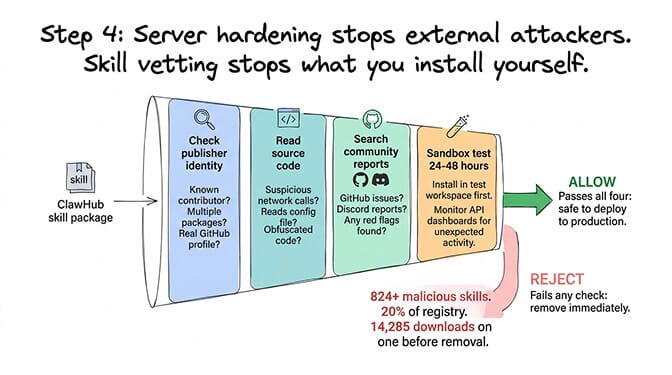
Server hardening protects you from outside attackers. It does nothing about malicious code you install yourself, and ClawHavoc showed how common that is. Before installing any ClawHub skill, check the publisher's identity and history, read the source for unexpected network calls or file access outside its workspace, search community reports, and run it in a test workspace for 24-48 hours before it touches production. Then limit the damage a bad skill can do by running OpenClaw in Docker with --read-only --cap-drop=ALL --security-opt=no-new-privileges. Our skills install guide walks through the vetting workflow.
6. Cap runaway spending
A buggy skill stuck in a retry loop fires an API call on every attempt, and an unbounded loop can burn real money in hours (the $37-in-six-hours story above was exactly this). Set a monthly spending cap on every model provider dashboard at 2-3x your expected usage. Caps don't change normal operation; they stop the catastrophic case. The OpenClaw API cost guide covers caps alongside model routing.
7. Patch within 24 hours
CVE-2026-25253 affected every OpenClaw version before v2026.1.29. The fix shipped within days of disclosure, and instances that didn't update stayed exposed. Feature updates can wait; security patches can't. Watch OpenClaw's GitHub and Discord for advisories, back up before you update (our safe update process covers rollback), and re-check your gateway and firewall settings afterwards, because some updates reset defaults.
Configure once: steps 1-4 and 6. Ongoing: step 5 every time you install a skill, step 7 every time a fix drops. Even with all seven in place, the agent still has file system access, network access, code execution, and your messaging accounts, so the attack surface is everything it can reach, not just the server. The steps manage that risk; they don't remove it. For a printable version, see our OpenClaw security checklist.
If you know what all of that means and can do it confidently, VPS self-hosting is viable. If any of those steps made your eyes glaze over, that's a data point worth paying attention to.
What the VPS tutorials skip over
I've read a dozen OpenClaw VPS guides at this point. The good ones (Contabo's security guide, BitLaunch's hardening walkthrough, the $2.50 Hetzner + Tailscale approach on Medium) cover the basics well.
But they all skip the same things.
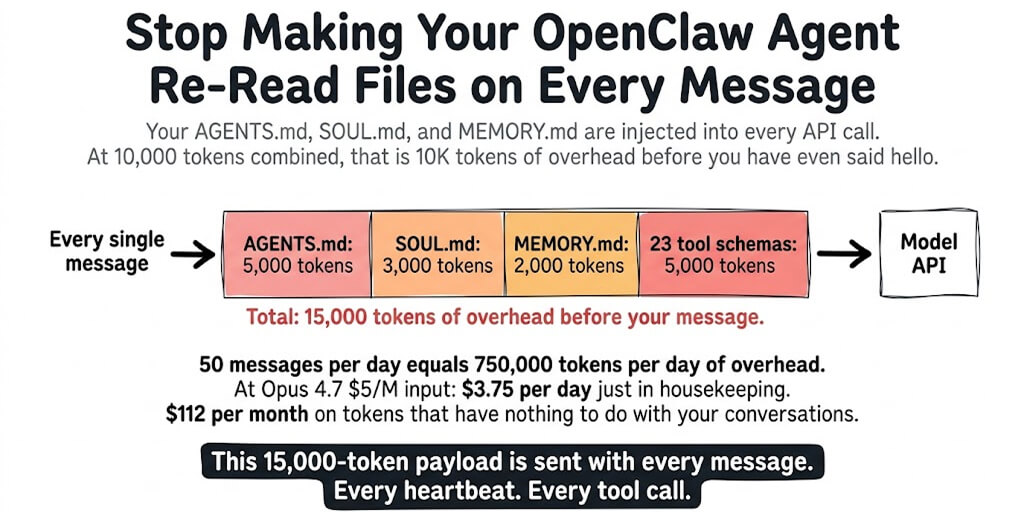
Memory persistence is broken by default. OpenClaw has a known issue where context compaction kills active work mid-session. Cron jobs accumulate context indefinitely, meaning a task that costs $0.02 per execution eventually balloons to $2 per execution as the context window grows. You need manual context management and hard token limits. We documented this memory bug and its fixes in detail.
Multi-channel setup is a maze. Want your agent on both Telegram and WhatsApp? Each platform has its own authentication flow, token management, and configuration quirks. WhatsApp requires Meta's Business API setup. Slack needs OAuth scoping. Discord wants bot tokens. On a VPS, you're managing all of these manually through config files and environment variables. Our guide on multi-agent and multi-channel setups covers what the official docs don't.
DigitalOcean's 1-Click is fragile. Community reports consistently flag broken self-update scripts, git permission errors, and limited model support on DO's OpenClaw template. Users describe the Docker interaction as unclear and prone to breaking. The 1-Click sounds easy. The maintenance isn't.
Hostinger's template still needs you. Their Docker Manager template is the smoothest VPS option I've tested. But you still manage the server, security updates, and ongoing configuration. It's not managed hosting. It's a head start on self-hosting.
If you want to see what the VPS path looks like in practice (including the security hardening steps most guides skip) this community walkthrough covers Docker setup, firewall configuration, and API cost management on a cheap server. It's a realistic picture of the time investment involved.
Watch on YouTube: How to Run OpenClaw 24/7 on a Budget VPS (Community content)
So who should actually self-host on a VPS?
I'm not going to pretend VPS hosting is always the wrong choice. For a specific type of person, it's the right one.
Self-host if: You're a developer or DevOps engineer who genuinely enjoys infrastructure. You want full root access and total control over every config option. You're running OpenClaw in a highly customized environment with local models through Ollama. You treat server security as a skill, not a chore.
Don't self-host if: You're a founder, marketer, or ops lead who wants the agent, not the infrastructure. You don't have a DevOps team (or don't want to become one). Your time is worth more than $8/month. You need your agent running reliably by the end of the week, not the end of the month.
If you fall into that second category, and you've been staring at VPS pricing pages trying to convince yourself the setup won't be that bad, BetterClaw was built specifically for you. It's $49/month for Pro with zero configuration. Bring your own API keys. Your first agent deploys in about 60 seconds. No Docker. No SSH. No firewall rules. No 2 AM security panics.
Every agent runs in an isolated Docker sandbox with AES-256 encryption. Every skill is security-audited. There's an action approval workflow and a kill switch you can hit from your phone. We handle the updates, monitoring, and patches.
That's the pitch. But the honest version is simpler: we built it because we got tired of being our own sysadmins.
The real comparison: VPS vs. managed, side by side
Here's what the numbers actually look like when you put them next to each other.
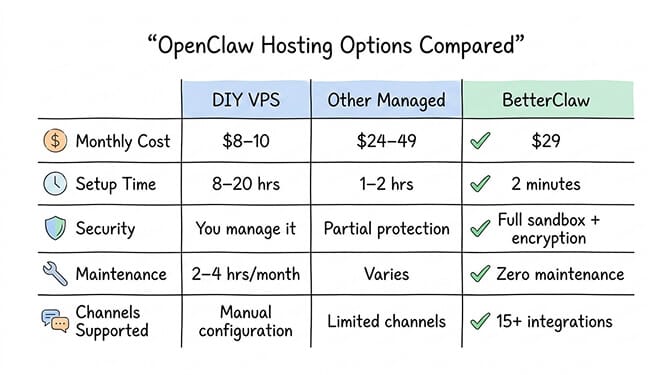
Self-hosted VPS path: $5-10/month server cost. Plus $20-60/month API costs. Plus 8-20 hours initial setup. Plus 2-4 hours monthly maintenance. Plus you handle security, updates, monitoring, backups, and channel configuration yourself. Total: $25-70/month plus significant time.
BetterClaw: $49/month for Pro. Plus your own API costs (same as self-hosted, since it's BYOK). Total: $69-109/month. Setup time: under 2 minutes. Maintenance: zero. Security: handled. Updates: automatic.
So be clear-eyed about what you're buying. On the invoice alone, managed is the more expensive line: $69-109/month against $25-70. What you're buying back is the 8-20 hours of setup and the 2-4 hours a month of maintenance, plus the security work you'd otherwise own. At $50/hour that's $100-200/month of your time, which is what tips the total. If your time genuinely costs you nothing, the VPS is cheaper and that's the honest answer.
For a detailed feature-by-feature breakdown, we keep a managed vs. self-hosted OpenClaw comparison page updated.
Managed OpenClaw hosts price around the same range. xCloud at $24/month runs on dedicated VMs but without Docker sandboxing. ClawHosted at $49/month currently only supports Telegram. Elestio offers managed hosting but without OpenClaw-specific optimizations like anomaly detection or workspace scoping.
What this is really about
Here's the thing I keep coming back to.
OpenClaw is one of the most exciting open-source projects in years. 230K+ stars. An agent architecture that lets you text your AI on WhatsApp and have it manage your calendar, draft emails, monitor repos, and run scheduled tasks. This is what personal AI should feel like.
But somewhere between "this is amazing" and "my agent is running," there's a gap. And that gap is filled with Docker Compose files, UFW rules, SSH tunnels, YAML configs, and security hardening checklists.
Some people love filling that gap. They're builders. Tinkerers. The kind of people who run Arch Linux on their daily driver and enjoy it. I respect that deeply.
But most people who want an AI agent are not those people. They're founders who need customer inquiries handled. Ops leads who want morning briefings automated. Marketers who want an assistant that remembers context across every platform.
For those people, the $8/month VPS isn't cheap. It's a distraction from the work that actually matters.
If that's you, if you've been circling the VPS option and haven't pulled the trigger because deep down you know the setup will eat your weekend, give BetterClaw a try. $49/month for Pro. BYOK. 60-second deploy. We handle the infrastructure so you can focus on the part that's actually interesting: building workflows that make your agent useful.
The best agent deployment is the one that's actually running.
Frequently Asked Questions
What is an OpenClaw VPS setup and why do people use it?
An OpenClaw VPS setup means installing and running the OpenClaw AI agent framework on a rented cloud server (Virtual Private Server) instead of a local Mac Mini or laptop. People choose this path because a VPS runs 24/7, isolates OpenClaw from personal data, and costs $5-10/month compared to a $600+ Mac Mini. The tradeoff is that you manage the server, security, Docker, and ongoing maintenance yourself.
How does a self-hosted VPS compare to a no-code AI agent platform like BetterClaw?
A self-hosted VPS gives you full root access and control for $5-10/month in server costs, but requires 8-20 hours of initial setup and 2-4 hours of monthly maintenance for security, updates, and troubleshooting. BetterClaw costs $49/month for Pro but deploys in under 60 seconds with zero configuration, built-in Docker sandboxing, AES-256 encryption, vetted skills, and automatic updates. Both approaches use BYOK for API costs.
How long does it take to set up OpenClaw on a VPS from scratch?
Realistically, 4-8 hours if you're experienced with Linux, Docker, and server security. 12-20 hours if you're learning as you go. This includes server provisioning, SSH hardening, Docker installation, OpenClaw configuration, gateway binding, firewall rules, Tailscale setup, channel authentication, and security auditing. Ongoing maintenance adds 2-4 hours per month.
Is running OpenClaw on a cheap VPS worth it compared to managed hosting?
It depends on how you value your time. The VPS costs $5-10/month, but adding API costs ($20-60/month) and time investment (8-20 hours setup plus 2-4 hours monthly maintenance), the total cost of ownership is $25-70/month plus your labor. A managed platform like BetterClaw at $49/month for Pro (plus the same BYOK API costs) runs $69-109/month, so it costs more in cash and eliminates all infrastructure work. Whether that trade is worth it depends entirely on what your 8-20 setup hours and 2-4 monthly maintenance hours are worth to you. For developers who enjoy the process, VPS makes sense. For everyone else, managed hosting saves significant time and stress.
Is OpenClaw safe to run on a VPS without enterprise security experience?
It requires caution. Microsoft's security blog explicitly recommends running OpenClaw only in fully isolated environments with dedicated credentials. Researchers found 30,000+ exposed instances without authentication. An infostealer campaign in February 2026 targeted plaintext API keys on VPS installations. OpenClaw's own maintainer has warned that users who can't handle command-line security shouldn't use the project. If you follow proper hardening (localhost gateway binding, SSH key auth, firewall rules, Docker isolation), VPS hosting is viable. If security hardening sounds unfamiliar, managed hosting is the safer path.
How do I secure OpenClaw on a VPS?
Seven steps: bind the gateway to loopback (127.0.0.1) and reach it through an SSH tunnel or Tailscale, switch SSH to key-only authentication, enable UFW with only port 22 open, move API keys out of the plaintext config and lock down its permissions, vet every skill and run OpenClaw in a locked-down Docker container, set spending caps on every model provider, and apply security patches within 24 hours. The first three take about 15 minutes and close the exposure behind the 30,000+ instances found without authentication.