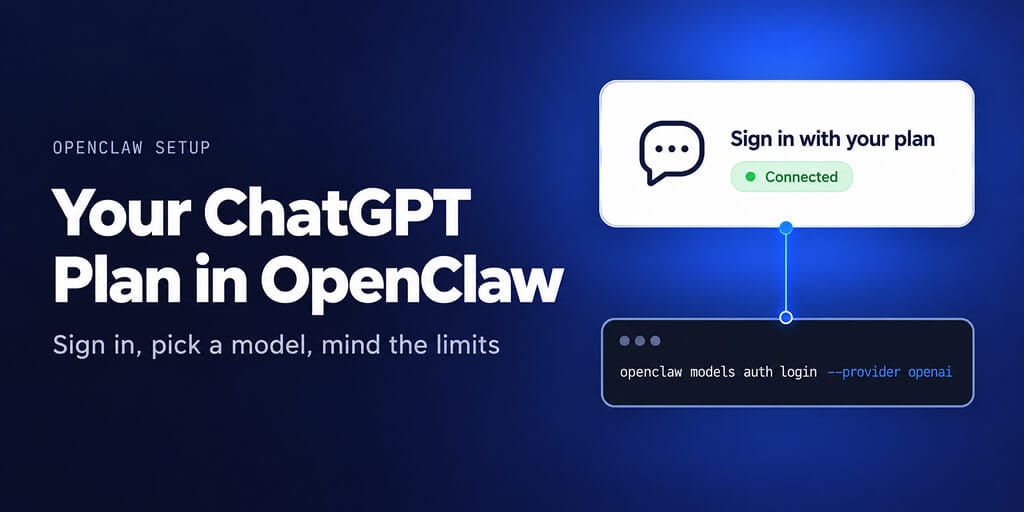
OpenAI officially lets your ChatGPT plan pay for OpenClaw's model calls. Here is how to connect it, what you get, and where the limits bite.
For most of 2026, "can I run my agent on my subscription?" had a scary answer. Anthropic cut Claude Pro and Max logins off OpenClaw on April 4.
OpenAI went the other way. On May 2, Sam Altman posted that you can sign in to OpenClaw with your ChatGPT account and use your subscription there. At DevDay on September 29, OpenAI made it formal: Sign in with ChatGPT now lets subscribers spend their plan's usage in partner tools, and OpenClaw was one of the 16 launch partners.
So yes, it's allowed. Here's how to set it up properly.
Which ChatGPT plans work with OpenClaw
OpenAI's help article on using your plan in other apps says Go, Plus and Pro plans can use their ChatGPT plan for AI requests in participating apps. Eligible requests count against the ChatGPT Work and Codex usage your plan includes.
| Plan | Price | Codex models included |
|---|---|---|
| Go | $8 a month | GPT-6 Luna, for lightweight tasks |
| Plus | $20 a month | GPT-6.1 Sol and GPT-6 Luna |
| Pro | $100, $200 or $500 a month | Higher usage, no five-hour limit for now |
| Business | $20 per user a month annual, $25 monthly | Codex included; check your workspace policy |
Two recent changes worth knowing:
- From October 30, Pro 200's included usage drops from 20 times to 10 times the Plus allowance. OpenAI also launched Pro 500, the only Pro tier with Ultrafast mode.
- OpenAI's help article doesn't cover Business workspaces for third-party plan usage. OpenClaw's docs say your account and workspace must allow it, so check with your admin first.
Two ways to sign in, plus the API key
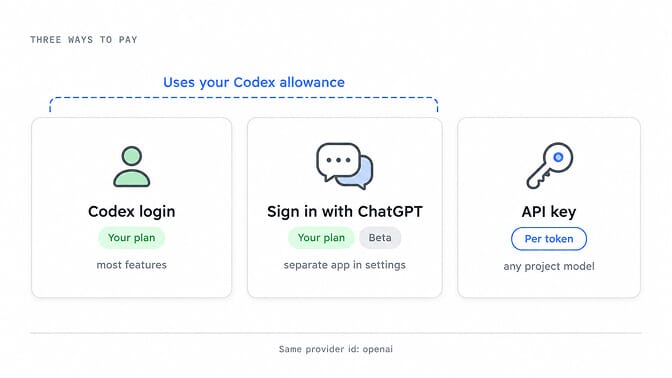
OpenClaw's OpenAI provider (openai) supports three credentials. The first two use your plan.
| Codex login | Sign in with ChatGPT (Beta) | OpenAI API key | |
|---|---|---|---|
| What it is | Your ChatGPT account using the Codex product | OpenClaw authorized as its own app | A Platform project key |
| Billing | Your Codex allowance | Your Codex allowance | Per token, API billing |
| Models | What your Codex account exposes | Eligible Responses models | What your project allows |
| Image generation | With account access | Not supported by this credential | Yes |
| Usage view | Codex usage and quota in OpenClaw | ChatGPT Settings > Usage only | Platform dashboard |
For most people, Codex login is the one to use. It covers more of OpenClaw's features, and OpenClaw can show your plan, quota windows and credit balance. Sign in with ChatGPT is newer and labeled beta. Its advantage is that OpenClaw is authorized as its own app, managed from your ChatGPT login connections, so ChatGPT's per-app controls apply to it.
How to connect your ChatGPT subscription to OpenClaw
Run these on the machine where your OpenClaw Gateway runs. Commands are from OpenClaw's current docs (2026.10.5).
Step 1: Sign in
The guided way:
openclaw onboard --auth-choice openai
Or sign in directly. Without --method, this defaults to Codex browser login:
openclaw models auth login --provider openai
On a server with no browser, use the device-code flow and approve the login from your phone or laptop:
openclaw models auth login --provider openai --method device-code
For Sign in with ChatGPT instead, use --method siwc and approve token sharing in the browser. If you approve only the identity permissions, the account saves but can't run models.
Step 2: Pick a model
openclaw config set agents.defaults.model.primary openai/gpt-6-astra
GPT-6 Astra is the default for a fresh subscription setup, but access is still rolling out. If your account doesn't show it, pick a model it does show, such as openai/gpt-6.1-sol or openai/gpt-5.6-luna.
Step 3: Check it works
openclaw models list --provider openai
Once the Gateway is running, send /codex status in chat to confirm the Codex runtime is active, and /status to see which account and endpoint the agent is using.
Step 4: Add an API key as backup (optional)
You can list a subscription profile and an API-key profile under auth.order.openai. OpenClaw tries the subscription first. When the plan hits a usage limit, it marks that profile blocked until the reset time and moves to the next profile, without changing your model. When the reset passes, the subscription is used again.
Usage limits: what happens when you run out
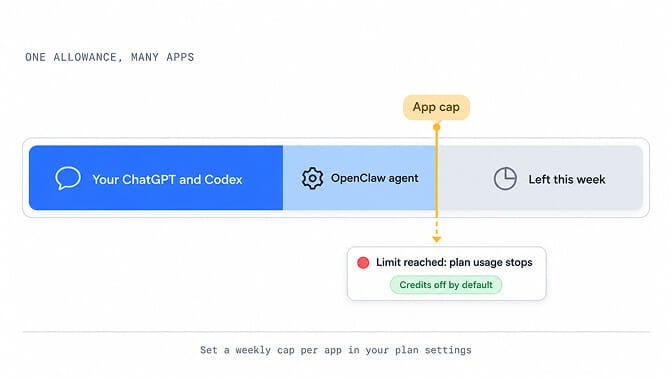
Your plan's limits are shared across ChatGPT, Codex and every app you connect. OpenAI publishes estimates rather than fixed numbers. For Plus, it estimates roughly 350 to 3,000 local messages per five hours on GPT-6 Luna and 15 to 160 on GPT-6.1 Sol. Weekly limits may also apply. Pro plans currently have no five-hour limit.
When you hit the limit:
- The app stops using your plan. It doesn't quietly switch to paid usage.
- Credits are off by default. You can let an app use purchased credits, but only if its usage limit is set to 100%.
- You can cap each app's weekly share in ChatGPT Settings > Usage. A cap is a ceiling on your existing allowance, not extra usage.
The practical point: an always-on agent can eat the same allowance you use for your own ChatGPT work. If you rely on Codex during the day, cap OpenClaw's share so your agent doesn't leave you short.
Subscription or API key: which is cheaper?
It depends on how much your agent runs. Here are OpenAI's current API prices per 1M tokens.
| Model | Input | Output |
|---|---|---|
| GPT-6 Astra | $10 | $50 |
| GPT-6.1 Sol | $2 | $10 |
| GPT-6 Luna | $0.10 | $0.50 |
Take an agent task that sends 20,000 input tokens and gets 2,000 back on GPT-6.1 Sol. Through the API that's $0.04 of input plus $0.02 of output, so $0.06 a task. A $20 Plus plan equals about 330 of those tasks.
- If your agent runs more than a few hundred tasks a month and stays inside your plan's limits, the subscription wins.
- If your agent runs constantly, you'll hit the limits, and an API key gives you predictable capacity.
- If most tasks are simple, GPT-6 Luna on an API key costs 20 times less than Sol per token. That can beat any subscription.
The setup in Step 4, with the plan first and a key as backup, gets you most of both.
Running it on BetterClaw instead
If you'd rather not keep a Gateway alive, BetterClaw supports ChatGPT subscriptions directly. Open Settings > Agents, pick the agent, choose "ChatGPT Subscription" on the Model tab and click "Connect to ChatGPT". After you approve in ChatGPT, your browser lands on a "This site can't be reached" page at localhost:1455. That's expected: copy the full URL, paste it back into the dialog and click Connect. Plus and Pro plans work, and the available models match what your plan includes.
Two tips from our docs: don't run codex login at the same time, because it can grab the redirect, and expect to sign in again when you add more ChatGPT models later, because each sign-in is single use. See BetterClaw plans.
Troubleshooting
The browser callback fails on a remote server
Use --method device-code. It was built for headless machines and setups where the localhost callback can't reach you.
OpenClaw no longer picks up my Codex CLI login
That's by design. Onboarding no longer imports credentials from ~/.codex. Sign in through OpenClaw's own browser or device-code flow.
My saved model stopped working
GPT-5.4 and GPT-5.4 Mini are retired from the ChatGPT-account route. Run openclaw doctor --fix, which replaces them with GPT-5.6 Terra and GPT-5.6 Luna.
The model I want isn't listed
Your account's catalog decides. OpenClaw won't add access your plan doesn't have, so pick a model that openclaw models list --provider openai shows.
For anything else, our OpenClaw API key troubleshooting guide covers the auth errors people hit most.
If you want your ChatGPT plan powering an agent without running OpenClaw yourself, connect it to a BetterClaw agent. Plans start at $19 a month with a 7-day money-back guarantee.
Frequently Asked Questions
Can I use ChatGPT Plus with OpenClaw?
Yes. Sign in with openclaw models auth login --provider openai and OpenClaw uses your Plus plan's Codex allowance. Plus includes GPT-6.1 Sol and GPT-6 Luna.
Is using my ChatGPT subscription in OpenClaw against OpenAI's terms?
No. OpenAI supports it. Sam Altman announced it for OpenClaw in May, and OpenClaw was a launch partner when OpenAI opened plan usage to third-party tools at DevDay on September 29, 2026.
Does OpenClaw use up my ChatGPT limits?
Yes. Requests count against the same ChatGPT Work and Codex usage your plan includes. You can cap each app's weekly share in ChatGPT's usage settings.
Which model should I use with a ChatGPT subscription?
GPT-6 Astra is OpenClaw's default for new subscription setups, where your account has it. GPT-6.1 Sol is a strong everyday choice on Plus, and GPT-6 Luna stretches your allowance furthest.
Does it work on a headless server or VPS?
Yes. Use openclaw models auth login --provider openai --method device-code, then approve the login from a browser on any other device.
Can I use a ChatGPT Business or Enterprise account?
OpenAI's help article lists Go, Plus and Pro for using your plan in other apps. Business includes Codex, but your workspace has to allow it, so check with your admin before relying on it.