Match your error to a fix
| Error code / message | Most likely cause | Go to |
|---|---|---|
401 Unauthorized or invalid_api_key | Wrong token type or billing | Check 1, 2 |
403 Forbidden | Billing issue or account ban | Check 2 |
429 Too Many Requests | Rate limit or provider outage | Check 5 |
Connection refused / timeout / APIConnectionError | Wrong config field or Docker mount | Check 3 |
Visually-correct key but authentication failed | Invisible characters | Check 4 |
| No error, just silence | Provider outage | Check 5 |
A user posted to r/OpenClaw at 2 AM: "My API key is 100% correct. I copied it directly. I've restarted the gateway three times. The agent just says 'Error generating response.' What am I doing wrong?" Most replies were noise. The actual answer was buried near the end of the thread: "Do you have billing set up on your Anthropic account? A key without credits is a valid key that can't do anything."
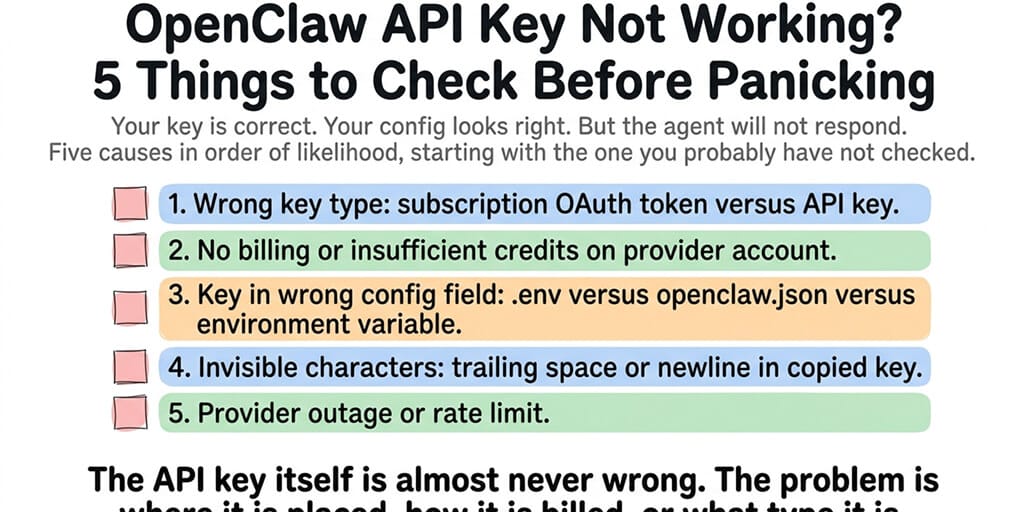
The API key wasn't wrong. The account behind it had no money. This is the most common pattern with OpenClaw API key errors. The key is technically correct. Something else is broken. Here are the five things to check, ranked by how often they're the actual cause.
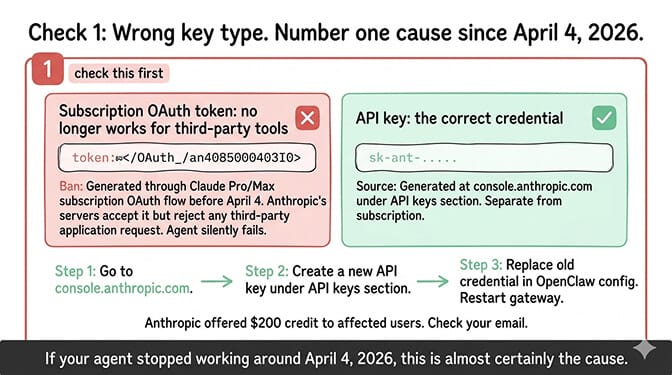
Check 1: invalid_api_key from a subscription token instead of an API key (post-Anthropic ban)
This cause spiked on April 4, 2026, when Anthropic stopped Claude Pro/Max subscriptions from covering third-party tools like OpenClaw. Anthropic reversed that on May 13, then on June 15 paused the "Agent SDK credit" system it had announced as the replacement; for now the Agent SDK, claude -p, and third-party tools built on the Agent SDK draw from normal subscription limits, and Anthropic says it will give advance notice before revised terms take effect. The rule that trips people up hasn't changed: an OAuth token is not an API key. If your OpenClaw config expects an API key (ANTHROPIC_API_KEY) and you've put a subscription OAuth token there, the token looks valid, but it's the wrong credential type for that field.
How to check
If your Anthropic credential starts with sk-ant-api03-, it's an API key (correct for an API key field). If it starts with sk-ant-oat01- or came from a subscription OAuth flow, it's an OAuth token, not an API key.
The fix
- Open
console.anthropic.comand create a new API key. - Replace the old credential in your OpenClaw config (
.env,openclaw.json, or whichever location your gateway reads — see Check 3). - Restart the gateway, then verify (or stop/start the Docker container):
openclaw gateway restart   # restart the gateway after swapping the key
openclaw doctor --deep     # confirm the new credential authenticates
If your entire setup broke on April 4 and you'd rather not rebuild from scratch every time Anthropic changes a policy, BetterClaw handles credentials through a managed dashboard — paste a key, it validates against the provider, and policy churn doesn't take your agent down. Start free, 1 agent + BYOK.
For the complete migration walkthrough including all four paths forward (new API key, swapping to DeepSeek/Gemini, model routing, or moving to a managed platform), our Anthropic migration guide covers each option.
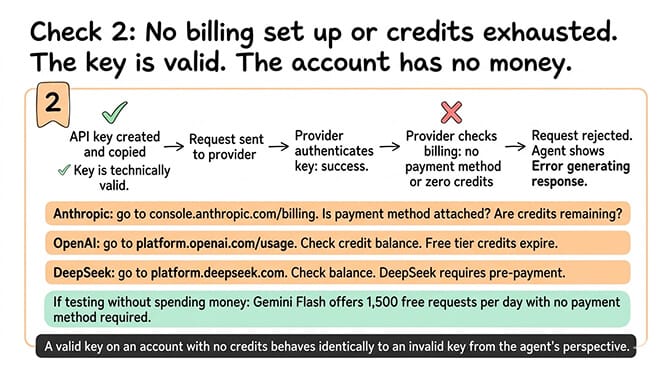
Check 2: No billing set up or insufficient credits
What happens
You created an API key. The key is valid. But your account has no payment method or your credits are exhausted. The provider accepts the key, authenticates the request, and then rejects it because there's no money to charge.
How to check by provider
- Anthropic: Open
console.anthropic.comand navigate to Settings → Plans and Billing. Is a payment method attached? Do you have remaining credits or an active billing plan? - OpenAI: Open
platform.openai.com/settings/organization/billing(or/usagefor consumption). Free trial credits were discontinued mid-2025; new accounts need $5 prepaid before API access works. - DeepSeek: Open
platform.deepseek.com. Check your balance. DeepSeek bills pay-as-you-go on V4-Flash at $0.14/$0.28 per million tokens once your one-time 5M-token signup credit is used.
The fix
Add a payment method. Load credits. If you're testing and don't want to spend money, use Gemini 2.5 Flash (1,500 free requests/day, no payment method required) — get a key at ai.google.dev. For free and budget options, our free models for OpenClaw ranked and cheapest providers posts cover the full set.
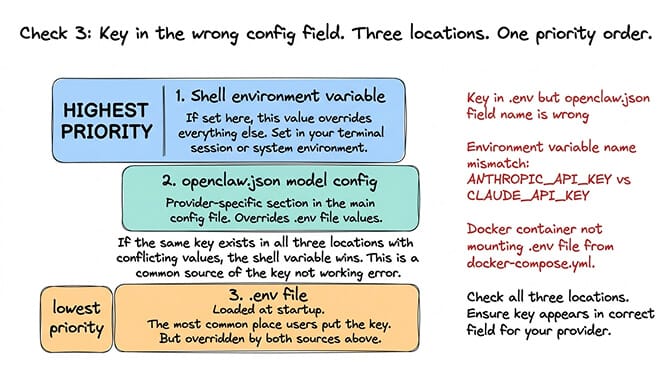
Check 3: The key is in the wrong config field
Here's where most people get it wrong. OpenClaw can read API keys from multiple places. Priority order (highest to lowest), per OpenClaw's docs:
- Process / shell environment variables (e.g.
export ANTHROPIC_API_KEY=...in your terminal) - Local
./.envin your current working directory - Global
~/.openclaw/.envin your home directory envblock insideopenclaw.json
If two locations hold different values for the same key, the higher-priority source wins — and the agent silently uses the wrong one. A common gotcha: people assume openclaw.json overrides .env. It doesn't. Having one place a key can live is a real argument for an AI agent builder where credentials are stored once and granted per agent.
Common mistakes
- The key is in
.env, butopenclaw.jsondefines the provider with a different field name, so the gateway never reads.env. - The key value is correct, but the env var name is wrong:
ANTHROPIC_API_KEYvsCLAUDE_API_KEYvsAI_API_KEY. - The key is set in a Docker shell, but the container doesn't see it — the
.envfile isn't mounted indocker-compose.yml.
The fix
Check all three locations (.env, openclaw.json, shell environment). Make sure the key appears in the correct field for your provider, and confirm no conflicting value sits in a higher-priority source. If you're on Docker Compose, your service block should look like this:
services:
  openclaw:
    image: openclaw/openclaw:latest
    env_file:
      - .env                              # mount the env file
    environment:
      - ANTHROPIC_API_KEY=${ANTHROPIC_API_KEY}   # forward to container
Restart the gateway after editing. For the OpenClaw troubleshooting guide, our guide covers configuration debugging step by step.
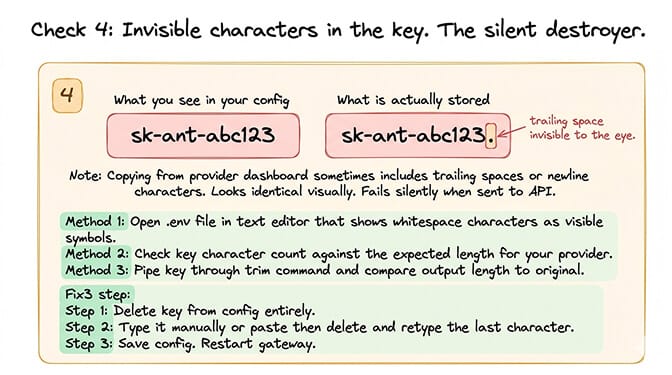
Check 4: Invisible characters in the key (the silent destroyer)
What happens
You copied the API key from your provider's dashboard. But the copy included a trailing space, a newline character, or a zero-width Unicode character. The key looks identical visually. It's actually sk-ant-abc123 (with a space) instead of sk-ant-abc123 (without).
How to check
Open your .env file in a text editor that shows whitespace characters (VS Code's "Render Whitespace" setting works). Or run a length check from the terminal:
# Count the raw character length of your key
echo -n "your-key-here" | wc -c

# Anthropic standard keys are 108 chars after sk-ant-api03-
# OpenAI sk-proj- keys are typically ~164 chars
# If the count is off by 1-3, invisible characters are likely the problem
If the length doesn't match the expected format, you have hidden whitespace or a stray character.
The fix
Delete the key from your config. Type it manually (don't paste). Or paste it, then delete the last character and retype it to remove any trailing whitespace. Save. Restart the gateway.
If debugging API key placement across .env files, JSON configs, Docker mounts, and invisible characters sounds like more config troubleshooting than you signed up for, BetterClaw handles API key management through a dashboard. Paste your key in a single field. The platform validates it against the provider. No .env files. No config priority conflicts. No invisible-character problems. Free plan with 1 agent and BYOK. Pro is $49/month (5 agents included) — Enterprise lifts the cap.
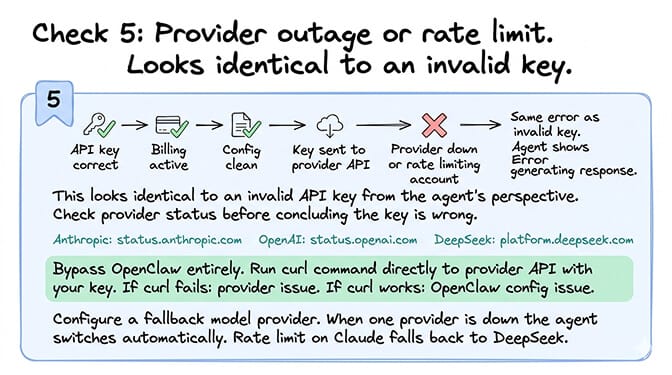
Check 5: Provider outage or rate limit
What happens
Your key is correct, your billing is fine, your config is clean. But the provider is down or rate-limiting your account. This looks identical to an invalid API key from your agent's perspective.
How to check
Start with the provider's status page: status.anthropic.com, status.openai.com. Then validate the key directly by bypassing OpenClaw — one curl command tells you whether the failure is on the provider side or somewhere in your local config:
# Anthropic
curl https://api.anthropic.com/v1/messages \
  -H "x-api-key: $ANTHROPIC_API_KEY" \
  -H "anthropic-version: 2023-06-01" \
  -H "content-type: application/json" \
  -d '{"model":"claude-haiku-4-5","max_tokens":10,"messages":[{"role":"user","content":"ping"}]}'

# OpenAI
curl https://api.openai.com/v1/chat/completions \
  -H "Authorization: Bearer $OPENAI_API_KEY" \
  -H "content-type: application/json" \
  -d '{"model":"gpt-5.5","max_tokens":10,"messages":[{"role":"user","content":"ping"}]}'
If you get a JSON response, the key works and the issue is in OpenClaw's config. If you get 401, the key or billing is wrong (Check 1 or 2). If it times out or connection-refuses, it's a network issue. If you get 429, you're rate-limited — see our rate limit guide.
The fix
For an active provider outage, wait it out. For chronic rate-limiting, configure a fallback model provider so the agent switches automatically when one provider is down or throttled. For the security checklist that includes provider redundancy, our checklist covers the seven hardening steps including multi-provider setup.
If all five checks pass and it still doesn't work
The five checks above cover the most common causes — not all of them. If you've worked through everything and the agent is still silent:
- Key revoked by the provider (security incident, leaked-on-GitHub auto-revocation). Rotate the key and try again.
- Wrong regional endpoint. Some teams' OpenAI/Anthropic accounts are bound to specific regions; the global API URL may return 404 or 401 for those keys. Check your provider's "regional endpoints" docs.
- Corporate proxy or VPN blocking API calls. Try the curl command above from a clean network.
- OpenClaw version incompatibility with a provider's API version (Anthropic versioning bumps, OpenAI breaking changes). Update OpenClaw and rerun
openclaw doctor --deep. - Free-tier IP ban or per-IP daily cap. Some providers throttle free-tier traffic per IP, not per key. Try from another network as a quick test.
If none of that resolves it, post your sanitized config and the exact error string in the BetterClaw Discord or the OpenClaw GitHub issues — community responses there are faster than waiting for provider support tickets.
Provider API key formats — quick reference
Before you debug further, make sure you have the right type of key for your provider. The prefix tells you:
| Provider | Key prefix | Notes |
|---|---|---|
| Anthropic | sk-ant-api03-... | Standard API key. sk-ant-oat01- is a subscription OAuth token, not an API key; if your tool expects an API key, use sk-ant-api03-. |
| OpenAI | sk-proj-... (current), sk-... (legacy) | sk-svcacct- for service accounts. |
| Groq | gsk_... | |
| DeepSeek | sk-... | Pay-as-you-go after the one-time 5M-token signup credit. |
| Gemini (Google AI Studio) | AIza... | ~39 characters total. |
If the key in your config doesn't match the prefix for the provider you've selected in openclaw.json, that's your problem — you're configuring it as the wrong provider.
Why OpenClaw API key errors are rarely about the key
Four of these five causes have nothing to do with the API key itself. Wrong token type (subscription vs API). No billing. Wrong config location. Invisible characters. Provider outage. The key is almost never wrong. Everything around the key is where the failure happens.
This is the same pattern across all OpenClaw troubleshooting. The core functionality (agent intelligence, conversation quality, memory) works well. The infrastructure around it (config files, environment variables, Docker mounts, billing setup, credential management) is where things break.
If you want the API key validated by the platform when you paste it, with clear error messages when billing isn't set up, and zero .env file management, give BetterClaw a try. Free plan with 1 agent and BYOK. Pro is $49/month (5 agents included). 60-second deploy. Paste your key. It works. No config file archaeology required.
Frequently Asked Questions
Why is my OpenClaw API key not working?
Five common causes in order of likelihood: using a subscription OAuth token (sk-ant-oat01-) where an API key (sk-ant-api03-) is expected, no billing set up or insufficient credits on your provider account, key in the wrong config field (.env vs openclaw.json vs environment variable), invisible trailing characters (space or newline) in the key, or provider outage/rate limit. Check these in order. The key itself is almost never wrong.
How do I fix the Anthropic API key error after the ban?
Open console.anthropic.com and create a new API key (separate from your subscription OAuth token). Replace the old credential in your OpenClaw config with the new sk-ant-api03- key. Restart the gateway and verify with openclaw doctor --deep. Anthropic's one-time compensation credit (equal to your plan price — $20 Pro, $100 Max 5x, $200 Max 20x) had a redemption window of April 3-17, 2026 and is now closed. Anthropic reversed the ban on May 13, 2026, but paused its planned "Agent SDK credit" system on June 15, the day it was due, and says it will give advance notice before a revised plan takes effect. An API key remains the most reliable credential for an always-on agent.
How do I check if my Anthropic API key is valid outside OpenClaw?
Run a curl test against the Messages API:
curl https://api.anthropic.com/v1/messages \
  -H "x-api-key: sk-ant-YOUR_KEY_HERE" \
  -H "anthropic-version: 2023-06-01" \
  -H "content-type: application/json" \
  -d '{"model":"claude-haiku-4-5","max_tokens":10,"messages":[{"role":"user","content":"ping"}]}'
A JSON response = key works (the problem is in OpenClaw). 401 = key or billing is wrong. Timeout = network. 429 = rate limit. Equivalent commands exist for OpenAI (api.openai.com/v1/chat/completions with Authorization: Bearer), DeepSeek, and Groq.
Where does OpenClaw store API keys?
Four locations with this priority order (highest to lowest): (1) shell / process environment variables, (2) local ./.env in the working directory, (3) global ~/.openclaw/.env, (4) env block inside openclaw.json. If the same key exists in multiple locations with conflicting values, the highest-priority source wins. A common misconception is that openclaw.json overrides .env — it doesn't. Check all four locations when debugging.
Can I use OpenClaw without paying for an API key?
Yes. Gemini 2.5 Flash offers 1,500 free requests/day with no payment method required — create a key at ai.google.dev. Qwen3 runs locally via Ollama: with a modest GPU (6-8GB VRAM), qwen3:8b at q4 quantization works on systems with less system RAM; CPU-only inference typically needs 16GB+ system RAM. Both routes work with OpenClaw. BetterClaw's free plan includes hosting with BYOK, so you can run a free model on a free platform.
Does BetterClaw validate API keys before deployment?
Yes. BetterClaw validates the API key when you paste it into the dashboard against the provider. If the key is invalid, the format is wrong, or the provider returns an authentication error, the platform tells you immediately with a clear error message. No .env files. No config priority debugging. No invisible-character problems. The key either works or the platform tells you exactly why it doesn't.