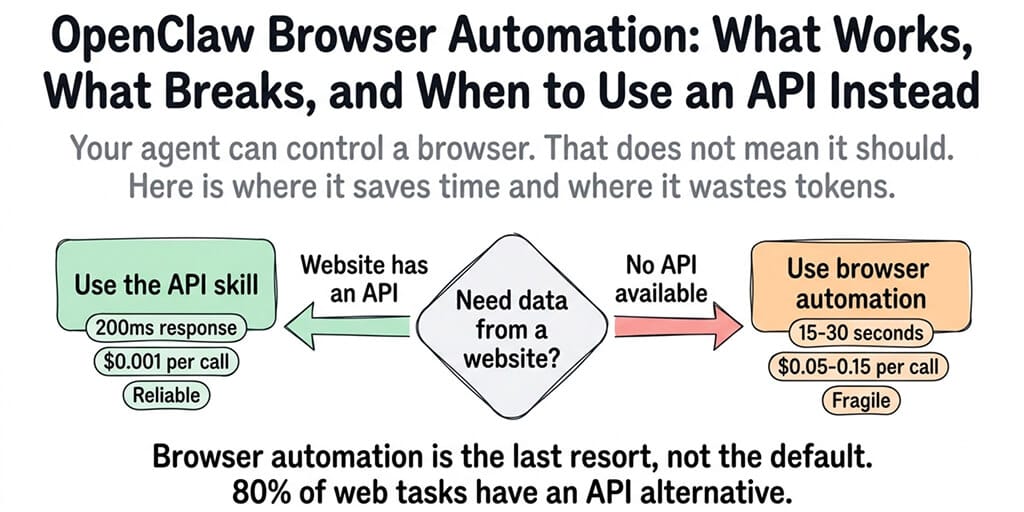
Your agent can control a browser. That doesn't mean it should. First, what the OpenClaw browser actually is. Then, where it saves time and where it wastes tokens on clicks.
What is the OpenClaw browser?
The default profile is called openclaw. It never touches your personal browsing profile: its own cookies, its own tabs, its own logins. You can also point OpenClaw at your real signed-in Chrome session (the user profile) when a task needs your logins, but that is opt-in.
You drive it from the agent with tool calls, or yourself from the CLI: openclaw browser start, openclaw browser open <url>, openclaw browser snapshot, openclaw browser doctor. The same CLI manages profiles, tabs, cookies, and the Chrome extension relay.
Do I need to install a separate browser, or Firefox?
No separate install in most cases. OpenClaw picks your system default browser if it is Chromium-based, and otherwise looks for Chrome, Brave, Edge, Chromium, or Chrome Canary in that order. If it picks the wrong one, set browser.executablePath in ~/.openclaw/openclaw.json.
Firefox is not supported for agent control, because OpenClaw drives the browser over the Chrome DevTools Protocol. You can keep Firefox as your everyday browser, but the agent needs a Chromium-based browser installed. On a headless server with no desktop browser, install Chromium and set browser.headless to true.
Do I need both OpenClaw and the browser component?
Only if your agent has to use websites. The browser ships inside OpenClaw, so there is nothing extra to buy or download. Chat, scheduled tasks, and API-based skills all work without it. If your agent never needs a real web page, turn it off with browser.enabled: false. That saves memory and removes a tool the model could reach for when a cheaper API call would do.
What is agent-browser?
agent-browser is a separate open-source browser automation CLI from Vercel Labs, and some community OpenClaw skills wrap it. It also drives Chrome or Chromium over the DevTools Protocol, and agent-browser install downloads its own Chromium. You do not need it alongside OpenClaw's built-in browser. Pick one or the other.
When the browser is worth the tokens
I asked my OpenClaw agent to check a competitor's pricing page and summarize the changes. It opened a headless browser, navigated to the page, waited for JavaScript to render, extracted the text, closed the browser, and returned the summary.
It took 23 seconds and cost roughly $0.12 in API tokens (the model described every click, scroll, and text extraction step). The same information was available through a simple HTTP GET request that would have taken 2 seconds and cost $0.001.
This is the OpenClaw browser automation trap. The capability exists. It works. And for most tasks, it's the slowest, most expensive, and most fragile way to get the job done.
Here's when browser automation makes sense, when it's a waste, and how to tell the difference.
How OpenClaw browser automation actually works
The agent controls the browser through tool calls. It takes a snapshot of the page structure, then acts on elements by reference: open, click, type, fill, wait, screenshot. OpenClaw also bundles a browser-automation skill that teaches the agent how to recover when a tab changes or a reference goes stale. The Browser Relay extension is the other route, for driving tabs in your own Chrome window.
Each browser action is a separate tool call. Navigate to URL. Wait for page load. Click element. Extract text. Scroll. Fill form. Submit. Every action is an API request. A simple "check this page" workflow can generate 5-15 tool calls, each carrying the full conversation context as input tokens.
The browser itself runs as a local process, or in a container if you sandbox it. On a VPS with 2GB RAM, launching Chromium alone consumes 300-500MB. If you're already running OpenClaw, Docker, and the model gateway on the same machine, the browser can push you into swap territory.
For the complete guide to OpenClaw Docker troubleshooting, our Docker guide covers the memory issues that browser automation makes worse.
Where browser automation actually works (use it here)
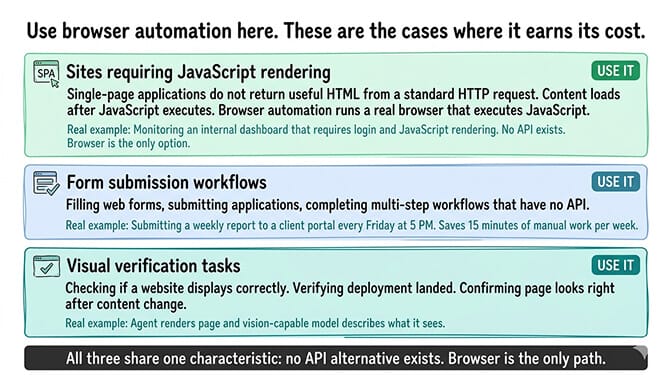
Sites that require JavaScript rendering
Single-page applications (React, Vue, Angular) don't return useful HTML from a standard HTTP request. The content loads after JavaScript executes. Browser automation handles this because it runs a real browser that executes JavaScript and renders the page.
Good use case: Monitoring a dashboard or internal tool that requires login and JavaScript rendering. The agent logs in, navigates to the data, extracts it, and reports back. No API exists. The browser is the only option.
Form submission workflows
Filling out web forms, submitting applications, or completing multi-step workflows that don't have an API. The agent navigates through pages, fills fields, clicks buttons, and handles redirects.
Good use case: Submitting a weekly report to a client portal that has no API. The agent fills the form with data from your system and submits it every Friday at 5 PM. Saves 15 minutes of manual work per week.
Visual verification tasks
Checking if a website is displaying correctly. Verifying that a deployment landed. Confirming that a page looks right after a content change. The browser renders the page and the agent (with a vision-capable model) can describe what it sees. Wiring that up is a checkbox on a no-code agent platform and a Playwright dependency chain almost everywhere else.
Where browser automation breaks (don't use it here)
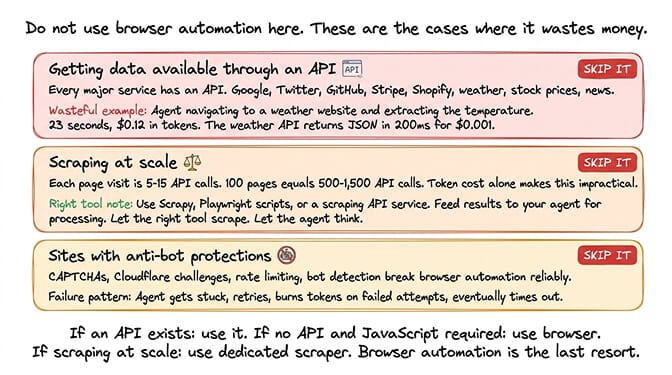
Getting data that's available through an API
This is where most people get it wrong. If the data you want is available through an API, use the API. Every major service has one. Google, Twitter, GitHub, Stripe, Shopify, Slack, Discord, weather services, stock prices, news aggregators. An API call is 10-50x faster, 100x cheaper in tokens, and 10x more reliable than browser automation.
Your agent doesn't need to "browse" to a weather website and extract the temperature. It needs to call a weather API endpoint that returns JSON in 200ms.
For the full list of OpenClaw skills including API integrations, our skills guide covers which services have direct API skills available.
Scraping at scale
If you need to scrape hundreds or thousands of pages, browser automation through OpenClaw is the wrong tool. Each page visit is 5-15 API calls. 100 pages is 500-1,500 API calls. The token cost alone makes this impractical.
Use a dedicated scraping tool (Scrapy, Playwright scripts, or a scraping API service) and feed the results to your OpenClaw agent for processing. Let the right tool do the scraping. Let the agent do the thinking.
Sites with anti-bot protections
CAPTCHAs, Cloudflare challenges, rate limiting, and bot detection break browser automation reliably. The agent gets stuck, retries, burns tokens on failed attempts, and eventually times out. If a site actively blocks automated access, browser automation isn't going to work regardless of how you configure it.
The rule: If an API exists, use it. If no API exists and the site requires JavaScript, use browser automation. If you need to scrape at scale, use a dedicated scraper and feed the results to your agent. Browser automation is the last resort, not the default.
The token cost problem nobody talks about
Here's what nobody tells you about OpenClaw browser automation.
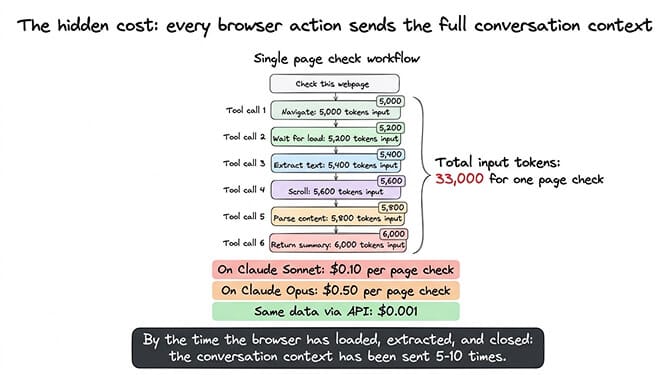
Every browser action is a tool call. Every tool call carries the full conversation context. By the time your agent has navigated to a page, waited for it to load, extracted the content, and closed the browser, it has sent the conversation context 5-10 times.
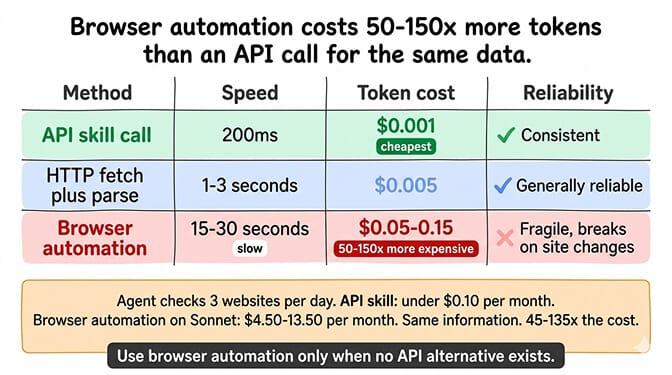
A single "check this webpage" command can consume 15,000-50,000 input tokens depending on your session length and context size. On Claude Sonnet 5 ($2 per million input tokens), that's roughly $0.03-0.10 per page check in input alone. On Opus 5.5 ($4 per million), it's $0.06-0.20. Output tokens and older, pricier models push it higher.
If your agent checks three websites per day, that's $0.09-0.30/day on Sonnet 5 just for the browser operations. Over a month, browser automation alone can cost $2.70-9.00. The same checks through API skills would cost under $0.10/month.
Smart context management (which we built into BetterClaw) reduces this overhead by keeping the context lean during tool-heavy operations. But even with optimization, browser automation is inherently more expensive than API calls because it requires more round trips.
How to set up browser automation (when you actually need it)
If you've confirmed that browser automation is the right approach (no API alternative, JavaScript rendering required), here's the setup.
On self-hosted OpenClaw the browser is already built in: make sure a Chromium-based browser is installed, then run openclaw browser doctor to confirm OpenClaw can reach it. For a deeper look at the specific Browser Relay pattern, our browser relay guide covers the architecture.
On self-hosted OpenClaw: You need a Chromium-based browser installed, sufficient RAM (2GB+ free for Chromium), and browser.headless: true if the machine has no display.
On BetterClaw: Browser automation skills are available through the verified skills marketplace. Docker-sandboxed execution means the browser runs in an isolated container automatically. No additional setup.
Browser tasks legitimately take more steps than typical conversations, so watch for runaway loops when a page's structure changes and the agent keeps retrying the same click. For the complete guide to preventing agent loops, our loop troubleshooting post covers how to catch and stop them.
The honest take
Browser automation is one of those capabilities that sounds amazing in a demo and disappoints in production. Watching an agent open a browser, navigate to a page, and extract information feels like magic. Then you see the token bill and realize the same result was available through a $0.001 API call.
The capability matters for the 20% of web tasks that genuinely have no API alternative. For the other 80%, there's a faster, cheaper, more reliable skill that does the same thing without launching a browser.
If you want browser automation with Docker-sandboxed execution and verified skills that won't exfiltrate your data (a real concern after Cisco found a ClawHub skill doing exactly that), give BetterClaw a try. Free plan with 1 agent, 100 credits a month and BYOK. $49/month for Pro with 5 agents. 60-second deploy. The browser runs in a sandbox. The skills are verified. The context management keeps the token costs from spiraling.
Frequently Asked Questions
What is the OpenClaw browser?
It is a built-in, agent-only browser profile that OpenClaw controls through the Chrome DevTools Protocol. It runs on a Chromium-based browser already on your machine (Chrome, Brave, Edge, or Chromium) and keeps its own cookies and tabs, separate from your personal browsing. It is enabled by default and managed with the openclaw browser CLI.
Do I need both OpenClaw and the browser component?
No. The browser ships inside OpenClaw, so there is nothing separate to install except a Chromium-based browser if you do not already have one. You only need it if your agent has to use websites. Everything else works without it, and you can turn it off with browser.enabled: false.
Does OpenClaw use Firefox?
No. OpenClaw drives the browser over the Chrome DevTools Protocol, so it only supports Chromium-based browsers: Chrome, Brave, Edge, and Chromium. You can keep using Firefox yourself, but the agent needs one of those installed.
What is OpenClaw browser automation?
OpenClaw browser automation lets your agent control a Chromium-based browser through tool calls. The agent can navigate to URLs, click elements, fill forms, extract text, and take screenshots. Each browser action is a separate model round trip, which makes it slower and more expensive than API-based alternatives.
Should I use Puppeteer or Playwright with OpenClaw?
For most people, neither: OpenClaw's built-in browser already handles navigation, clicks, forms, and screenshots, so you do not need to add a library. Community skills built on Puppeteer or Playwright exist, and both work, but they duplicate what is already there. On BetterClaw, verified browser skills are pre-tested for compatibility.
How much does OpenClaw browser automation cost in tokens?
A single page check costs roughly 15,000-50,000 input tokens (5-10 tool calls, each carrying full conversation context). On Claude Sonnet 5, that's about $0.03-0.10 per page in input tokens. On Opus 5.5, $0.06-0.20. The same data through an API skill costs under $0.001. Browser automation is 50-150x more expensive in tokens than API alternatives. Use it only when no API exists.
When should I use browser automation vs an API skill?
Use browser automation only when: the website requires JavaScript rendering (SPA/React), no API exists for the data you need, or you need to submit forms on sites without APIs. Use API skills for everything else. Weather, stock prices, social media data, payment processing, email, calendar. If an API exists, it's faster, cheaper, and more reliable than browser automation.
Is OpenClaw browser automation safe?
The browser runs in your environment with your permissions. On self-hosted setups, a compromised browser skill could access your local network or file system. Cisco found a ClawHub browser skill performing data exfiltration. On BetterClaw, browser skills run in Docker-sandboxed containers with workspace isolation, preventing access to the host system. Verified skills are tested before publication, eliminating the ClawHub supply chain risk.