Both models are trending. Both promise agent-grade performance. But one requires a Mac Studio to run locally and the other doesn't have open weights yet. Here's what you can actually do right now.
I pulled up Ollama's model library last week looking for MiniMax M3. It was there. I typed ollama pull minimax-m3 and expected a 100-gigabyte download to start.
Instead, it finished in two seconds. No weights downloaded. No disk space consumed.
What?
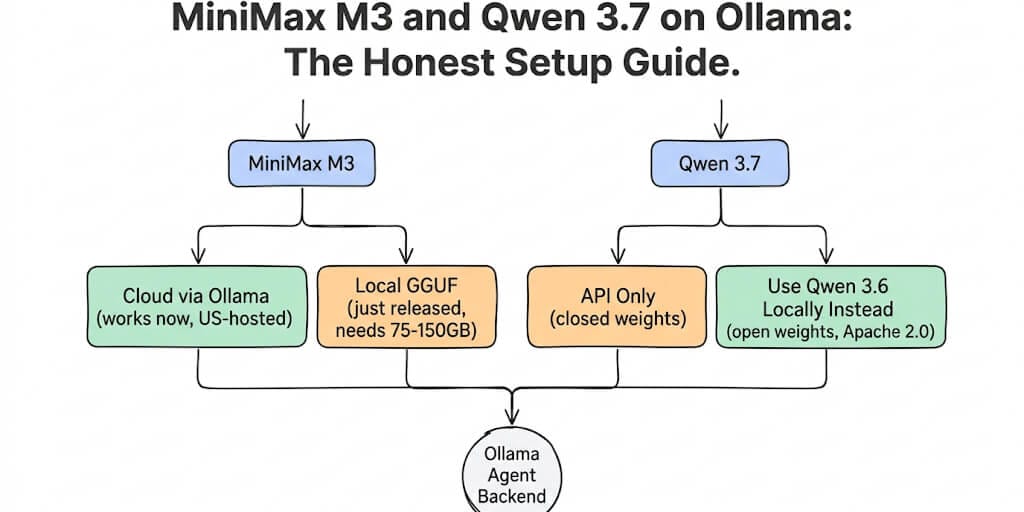
Turns out, MiniMax M3 on Ollama runs as a cloud-hosted model, not a local one. The :cloud tag routes your requests to Ollama's US-hosted M3 instance. Zero data retention. Fast. But your prompts leave your machine.
Then I searched for Qwen 3.7. It wasn't in Ollama's library at all. Because Qwen 3.7 Max and Plus are closed-weights, API-only models. You cannot run Qwen 3.7 locally right now. No GGUF files. No HuggingFace weights. Not yet.
Both models are trending. "minimax m3" is a breakout query on Google Trends. "qwen 3.7" search volume grew +2,600%. But the gap between "trending" and "I can run this as my local agent backend" is wider than the hype suggests.
Here's the honest setup guide for what actually works today, what's coming, and what to use in the meantime.
MiniMax M3 on Ollama: cloud now, local for power users
MiniMax M3 launched June 1, 2026 as the first open-weight model to combine frontier coding (59% SWE-Bench Pro), a 1-million-token context window, and native multimodality (text, image, and video in a single architecture). It's a mixture-of-experts model: 428B total parameters, 23B active per token. Open weights landed on HuggingFace on June 7. The API pricing is aggressive: $0.60/M input, $2.40/M output (standard), with promo rates at $0.30/M input and $1.20/M output.
The cloud path (works right now, 2 minutes)
# Install Ollama if you haven't
brew install ollama  # Mac
# or: curl -fsSL https://ollama.com/install.sh | sh  # Linux

# Pull MiniMax M3 Cloud
ollama pull minimax-m3:cloud

# Test it
ollama run minimax-m3:cloud "Write a Python function to parse invoices"
That's it. The :cloud tag sends your requests to Ollama's US-hosted infrastructure with zero data retention. In partnership with MiniMax, this instance runs on US servers specifically.
For agent integration, point your framework's Ollama endpoint at M3:
from ollama import chat
response = chat(
    model='minimax-m3:cloud',
    messages=[
        {'role': 'system', 'content': 'You are a helpful AI agent.'},
        {'role': 'user', 'content': 'Analyze this codebase for security issues.'}
    ]
)
OpenClaw, Hermes, and Codex all support M3 via Ollama:
openclaw launch openclaw --model minimax-m3:cloud
The local path (just released, needs serious hardware)
MiniMax released the open weights and GGUF quantizations for M3. You can download and run them via llama.cpp:
huggingface-cli download minimax/minimax-m3-GGUF minimax-m3-Q4_K_M.gguf
./llama-server -m minimax-m3-Q4_K_M.gguf -c 65536 --n-gpu-layers 80
But here's the reality check. Even at aggressive Q4 quantization, M3 needs 75-150 GB of memory. That's a Mac Studio with 192 GB unified memory ($6,000+), or 2+ A100 80 GB GPUs. This is not a laptop model. It's a workstation model. (For what consumer hardware can realistically run, see our guide on local LLM agents on consumer hardware.)
To be explicit: a single RTX 4090 (24 GB VRAM) cannot run M3 at any quantization level.
There's one more catch. llama.cpp support for M3 is still preliminary. As of late June 2026, you needed to compile llama.cpp from a specific pull request (PR #24523) to load the GGUF files at all. Check the current llama.cpp release notes before you build. Right now, local M3 is early-adopter territory.
The local math: A Mac Studio 192 GB running M3 24/7 costs nothing per token after the hardware investment. At $0.60/M input tokens via API, break-even is roughly 10M tokens/day for about 20 months. If you run agents 8+ hours daily on M3, self-hosting saves real money. If you run it occasionally, the API is cheaper.
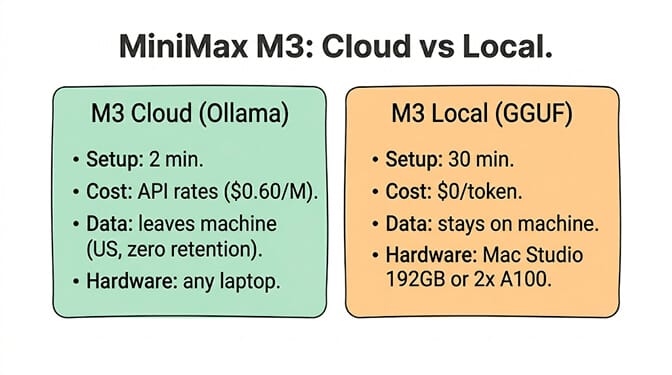
MiniMax M3 on Ollama Cloud gives you frontier agent performance with two commands. Local M3 gives you data sovereignty but requires workstation hardware. Pick based on your data sensitivity and volume, not your enthusiasm.
Qwen 3.7 on Ollama: not yet (here's what to use instead)
Qwen 3.7 Max and Plus launched as API-only models on May 20-21, 2026. The benchmarks are eye-catching: 92.4% GPQA Diamond (beating Opus 4.6), 97.1% HMMT Feb 2026, 79.1% IFBench, and 56.6 on the Artificial Analysis Intelligence Index.
But there are no open weights. No GGUF files. No Ollama model. No HuggingFace download. Alibaba follows a consistent pattern: ship the API first, release open weights 3-4 weeks later. Qwen 3.6 API launched late March, open weights dropped mid-April. By that pattern, Qwen 3.7 open weights should have arrived by mid-June 2026.
They didn't. As of late June 2026, the official Qwen organization on HuggingFace showed zero Qwen 3.7 repositories, and no community quants either. Some in the open-source community are asking whether Alibaba is splitting into two tracks: a closed frontier tier (3.7 Max, 3.7 Plus) and an open mid-tier that stays one generation behind. No one knows yet. Waiting for weights that may not come isn't a strategy.
Until then, the best Qwen model you can run locally for agent work is Qwen 3.6.
Qwen 3.6 on Ollama (the real local option today)
Qwen 3.6 has two variants worth running:
35B-A3B (MoE): 35 billion total parameters, only 3 billion active per token. Runs on GPUs with as little as 8-16 GB VRAM at Q4 quantization. Fast inference because the MoE architecture activates only a fraction of the model per token. About 24 GB on disk at Q4_K_M, and roughly 15 to 25 tokens per second on Apple Silicon.
27B (Dense): 27 billion parameters, all active. Needs 24+ GB VRAM (or 32 GB+ unified memory on a Mac). About 17 GB on disk. Stronger on coding benchmarks (77.2% SWE-bench, tying GPT-5 mini). Slower but more capable.
Both variants are Apache 2.0 licensed and support tools and function calling natively.
# The efficient MoE option (recommended for most)
ollama pull qwen3.6:35b-a3b

# The dense powerhouse (needs more VRAM)
ollama pull qwen3.6:27b

# Test tool calling
ollama run qwen3.6:35b-a3b
For agent integration with OpenClaw:
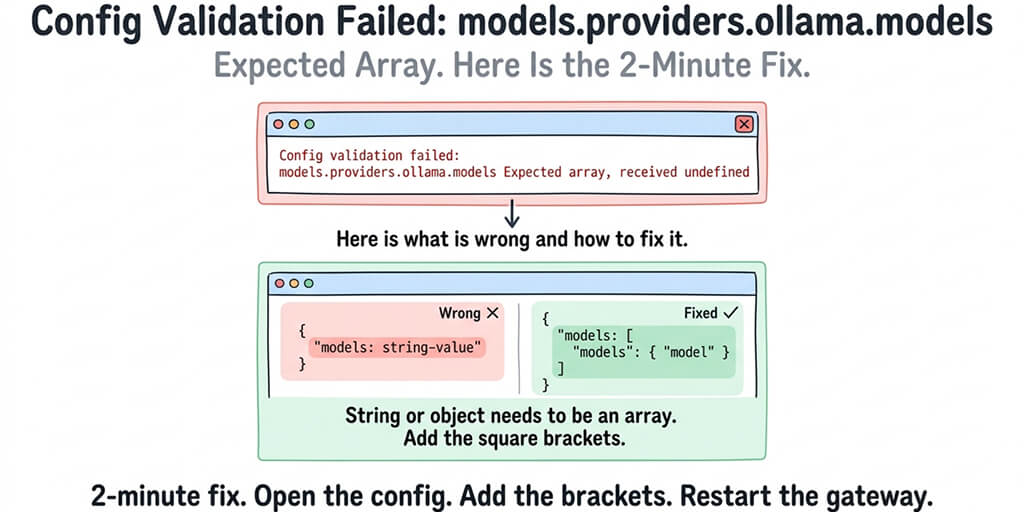
{
  "models": {
    "providers": {
      "ollama": {
        "baseUrl": "http://127.0.0.1:11434/v1",
        "models": [
          {
            "id": "qwen3.6:35b-a3b",
            "name": "Qwen 3.6 35B MoE",
            "contextWindow": 131072
          }
        ]
      }
    }
  }
}
The tool-calling gotcha that trips everyone up
Qwen 3.6 has a known quirk with tool calling. If you're using thinking mode, write --chat-template-kwargs '{"enable_thinking":false}' with no space after the colon, or the model silently rejects tool calls and routes them to the reasoning channel instead. Your agent will appear to "think about" calling a tool but never actually call it.
This is the kind of silent failure that wastes hours. The model doesn't error. It just... reasons about using the tool instead of using it. InsiderLLM documented this in their PI Agent setup guide.
That flag is for llama.cpp-style servers. If you're running Qwen 3.6 through Ollama itself, thinking mode is on by default, and the switch is "think": false in your Ollama API calls. Turning it off also gets you faster tool-call responses without the reasoning chain.
Need Qwen 3.7 right now? Use the API
If you specifically need Qwen 3.7 Max performance for long-horizon agent tasks, the API is the only route:
- OpenRouter:
qwen/qwen3.7-maxat $2.50 per million input tokens and $7.50 per million output tokens. - Alibaba Cloud Model Studio (DashScope): direct access, slightly cheaper than OpenRouter.
- Fireworks AI: hosts the 3.7 Plus variant through a direct partnership with Alibaba.
Qwen 3.7 natively supports the Anthropic API protocol, so agent frameworks built for Claude can talk to it without an adapter layer. That's a notable compatibility win if your stack already speaks Claude.
Configuring tool calling for agent backends
Both M3 (via cloud or local) and Qwen 3.6 (local) support native tool calling through Ollama. Ollama also exposes an OpenAI-compatible API at localhost:11434/v1, so any framework that accepts a custom OpenAI-compatible endpoint can connect to either model. Here's the native pattern:
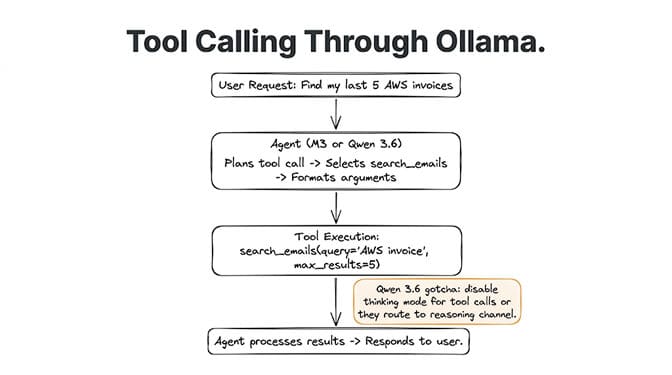
from ollama import chat

tools = [
    {
        "type": "function",
        "function": {
            "name": "search_emails",
            "description": "Search Gmail for emails matching a query",
            "parameters": {
                "type": "object",
                "properties": {
                    "query": {"type": "string", "description": "Search query"},
                    "max_results": {"type": "integer", "description": "Max emails to return"}
                },
                "required": ["query"]
            }
        }
    }
]

response = chat(
    model='minimax-m3:cloud',  # or 'qwen3.6:35b-a3b'
    messages=[
        {'role': 'user', 'content': 'Find my last 5 invoices from AWS'}
    ],
    tools=tools
)

# Check if the model wants to call a tool
for call in response.message.tool_calls or []:
    print(f"Tool: {call.function.name}, Args: {call.function.arguments}")
M3's tool-calling strength is multi-step reasoning across long contexts. The 1M context window means the agent can hold an entire codebase while planning and executing tool calls. SWE-Bench Pro 59.0% reflects this (our MiniMax M3 vs Claude vs GLM breakdown digs into the agent benchmarks in detail).
Qwen 3.6's tool-calling strength is efficiency. The 35B-A3B variant activates only 3B parameters per token, meaning tool-call planning and execution are fast and cheap. For high-volume agent workloads (hundreds of tool calls per day), this efficiency compounds.
Getting a tool call back is only the first milestone, though. Persistent memory, context management, trust levels, and skill verification are the production concerns that separate a working demo from a deployed agent. Running the model locally solves the inference problem. It doesn't solve the agent platform problem.
This is the kind of infrastructure work that takes an afternoon to set up correctly and a weekend to debug when something silently breaks. If you'd rather skip the Ollama configuration and get an agent running in 60 seconds, BetterClaw supports 28+ model providers via BYOK, including MiniMax and Qwen through OpenRouter. No Ollama to install. No tool-calling templates to debug. No thinking-mode gotchas to discover at 2 AM. Free plan with 1 agent and 100 credits a month. $49/month on Pro.
Which model for which agent workload?
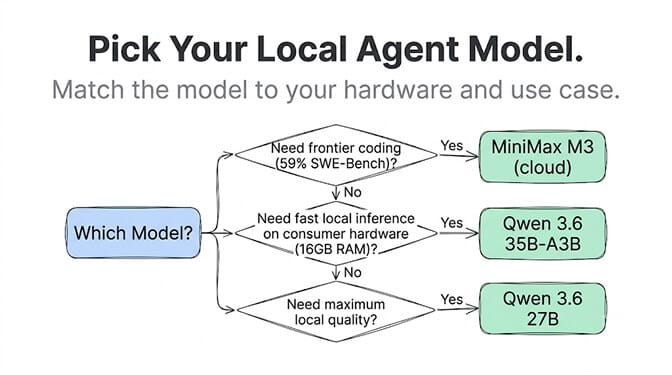
Here's the decision framework:
MiniMax M3 (cloud or local) when: Your agent handles long-horizon tasks (multi-file code review, long document analysis, extended research sessions). M3's 1M context window and MSA sparse attention are built for sessions that run for hours. BrowseComp score of 83.5 (beating Opus 4.7's 79.3) reflects strength on complex, multi-step browsing tasks.
Qwen 3.6 35B-A3B (local) when: Your agent handles high-volume, cost-sensitive workloads where speed and VRAM efficiency matter. 3B active parameters means fast inference on consumer hardware. Excellent for classification, extraction, routing, and moderate reasoning. The 35B total knowledge base gives it strong general capability despite the small active footprint.
Qwen 3.6 27B Dense (local) when: Your agent handles coding-heavy tasks requiring maximum capability at the Qwen tier. 77.2% SWE-bench (tying GPT-5 mini) with 27B parameters. Needs 24 GB+ VRAM but delivers the strongest coding performance in the Qwen 3.6 local lineup.
Neither (use an API instead) when: Your agent handles high-stakes tasks requiring frontier-level accuracy. Claude Sonnet at $3/M or Opus 4.8 at $5/M through an API still outperforms any local model on complex multi-step reasoning, nuanced tool selection, and safety-critical decisions. The local models shine on volume and privacy. The frontier APIs shine on quality ceiling.
The hybrid setup: you don't have to pick just one
In practice, the setup that works best is a mix. Run a local model for the majority of agent tasks and route to a frontier model for the hard stuff.
Qwen 3.6 35B-A3B handles roughly 80% of agent interactions: routine tool calls, simple reasoning, data extraction, structured output. It runs locally, costs nothing per token, and responds fast. The remaining 20% (complex multi-step reasoning, a 500K-token codebase analysis, tasks where you need frontier capability) goes to MiniMax M3 via Ollama Cloud or API, or to Qwen 3.7 Max via OpenRouter.
Ollama can serve multiple models simultaneously, and most agent frameworks support picking a model per task or step, so this doesn't require two separate stacks.
What's coming (and when to switch)
Qwen 3.7 open weights: Originally expected in June 2026 based on Alibaba's release pattern, but that window passed without a release (see above). If they drop, expect an MoE variant around 35-40B total that fits on a 24 GB GPU at Q4. The jump from 3.6 to 3.7 is significant on reasoning benchmarks (GPQA Diamond: 3.7 Max scores 92.4% vs 3.6's ~80%). Worth switching when available.
MiniMax M3 community quantizations: Already appearing on HuggingFace (Unsloth tracks them under unsloth/MiniMax-M3-GGUF). Q4_K_M is the practical default. More optimized quantizations (with less quality loss) will follow over the next weeks.
Ollama native M3 local: Expect Ollama to add a proper local M3 tag (not just :cloud) once community testing validates the quantizations. This will be the simplest local M3 path.
Gartner projects 40% of enterprise applications will embed AI agents by end of 2026. The local-first segment of that market is growing fast. Between Gemma 4 12B, Qwen 3.6, and now MiniMax M3, there are production-capable models running on consumer hardware. The gap between "local hobby project" and "local production agent" closed in 2026.
Give BetterClaw a look if you want to use these models without managing Ollama infrastructure. Free plan with 1 agent and 100 credits a month. $49/month on Pro. 28+ providers via BYOK including MiniMax (OpenRouter) and Qwen (Alibaba Cloud). We handle the model routing. You pick the provider that fits your workload.
Frequently Asked Questions
Can I run MiniMax M3 locally on Ollama?
Yes, with caveats. Ollama offers M3 as a cloud-hosted model (minimax-m3:cloud) that runs on US servers with zero data retention. For fully local deployment, MiniMax released GGUF weights, but M3 requires 75-150 GB of memory at Q4 quantization, meaning you need a Mac Studio 192 GB or 2+ A100 GPUs. The cloud path works on any laptop. The local path requires workstation hardware.
Can I run Qwen 3.7 locally on Ollama?
Not yet. Both Qwen 3.7 Max and Qwen 3.7 Plus are closed-weights, API-only models as of June 2026. No GGUF files, no HuggingFace weights, no Ollama model. Based on Alibaba's pattern (API first, open weights 3-4 weeks later), expect open weights sometime in June 2026. Until then, use Qwen 3.6 locally (35B-A3B for efficiency or 27B dense for maximum capability).
Which is better for local AI agents: MiniMax M3 or Qwen 3.6?
For long-horizon tasks (multi-file analysis, extended research, codebase review), M3's 1M context window gives it a clear advantage. For high-volume, cost-sensitive workloads on consumer hardware, Qwen 3.6 35B-A3B (only 3B active parameters) is more practical since it fits on a 16 GB GPU. M3 Cloud via Ollama is the best middle ground: frontier performance without local hardware requirements.
How much VRAM do I need to run these models?
MiniMax M3 local: 75-150 GB (workstation only). Qwen 3.6 35B-A3B: 8-16 GB at Q4 (runs on RTX 3060 or M2 MacBook). Qwen 3.6 27B dense: 24+ GB (RTX 4090, M3 Pro/Max). For most developers, Qwen 3.6 35B-A3B on a 16 GB machine or M3 Cloud via Ollama are the practical options. MiniMax M3 local is for teams with dedicated GPU servers.
Is running local models worth it compared to using APIs?
It depends on volume and data sensitivity. Local models cost $0 per token after hardware investment, making them ideal for high-volume workloads (5,000+ agent tasks daily) and data-sensitive environments (healthcare, finance, air-gapped infrastructure). For moderate usage (under 1,000 tasks daily), API costs (Claude Sonnet at $3/M, MiniMax M3 at $0.60/M) are typically $5-30/month, which is cheaper than GPU depreciation. BetterClaw supports both local (via compatible endpoints) and API providers via BYOK with zero markup.
How does MiniMax M3 compare to Qwen 3.7 for agent tasks?
MiniMax M3 is open-weight and available for both cloud and local inference through Ollama, while Qwen 3.7 is API-only with no announced date for open weights. On benchmarks, M3 scores 59% on SWE-Bench Pro and 83.5 on BrowseComp. Qwen 3.7 Max scores 92.4% on GPQA Diamond and 56.6 on the Artificial Analysis Intelligence Index. Pick M3 if you want open weights or Ollama compatibility. Pick Qwen 3.7 via API (OpenRouter, DashScope, or Fireworks) if raw reasoning benchmarks matter most for your use case.
How do I set up Ollama as a local AI agent backend?
Install Ollama (brew install ollama on Mac or curl -fsSL https://ollama.com/install.sh | sh on Linux), then pull your model: ollama pull qwen3.6:35b-a3b for fully local inference or ollama pull minimax-m3:cloud for cloud-hosted M3. Ollama exposes an OpenAI-compatible API at localhost:11434/v1 that most agent frameworks can connect to. The cloud path takes a couple of minutes; the local path takes 10 to 15 minutes including the model download.
Can I use MiniMax M3 and Qwen models together in one agent?
Yes. The hybrid approach routes routine tasks to a fast local model (Qwen 3.6 35B-A3B) and complex reasoning to a frontier model (MiniMax M3 via Ollama Cloud, or Qwen 3.7 Max via API). Ollama can serve multiple models at once, and most agent frameworks let you choose the model per task or step.