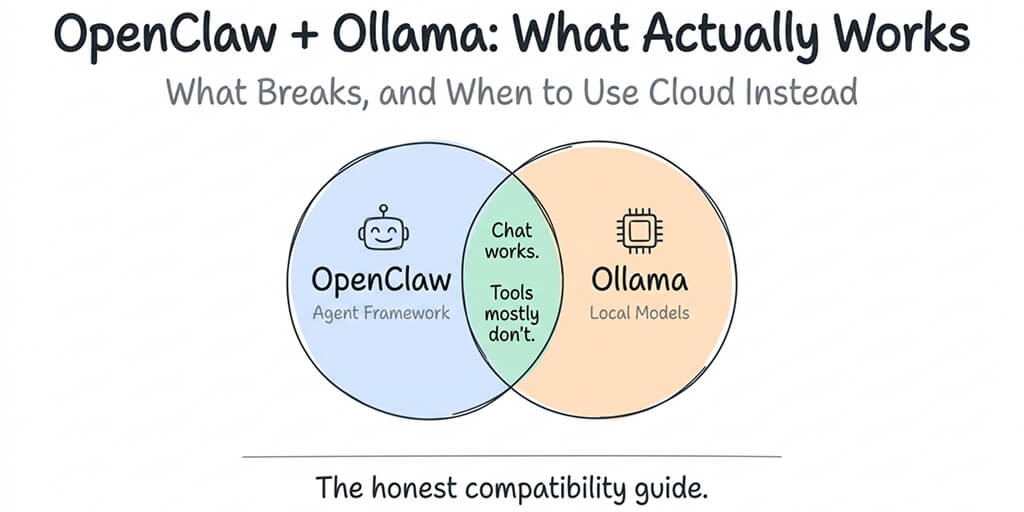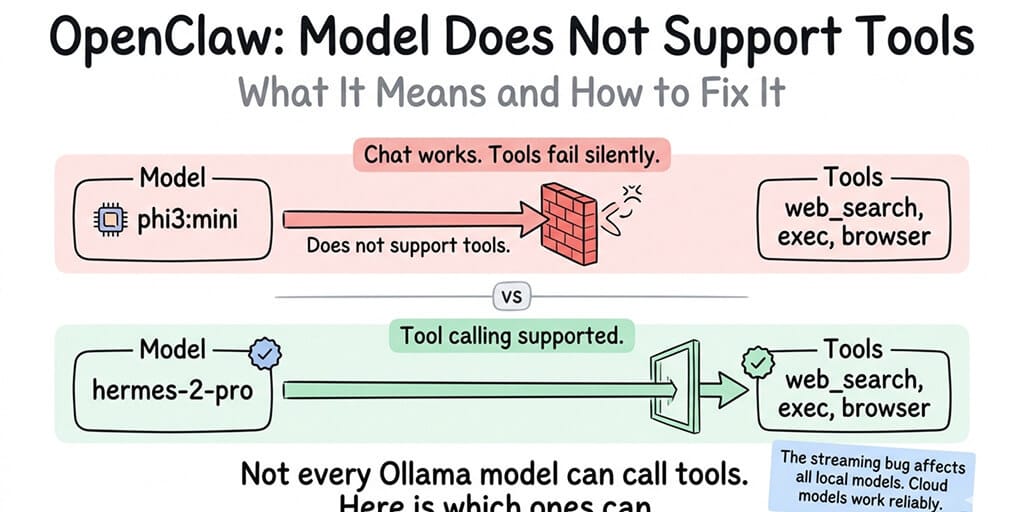
Your model can chat fine. It just can't call tools. Here's why, and which models actually work.
The rest of this post explains what's happening, which other models work, and how to choose between them.
Does this Ollama model support tools?
Checked on 28 September 2026 against each model's chat template in the Ollama registry. Template support is what Ollama actually checks, and the "tools" badge on the library page can be wrong for some sizes. This is the short list for OpenClaw users. Our full Ollama tool-calling list covers every model family, with the minimum Ollama version for each.
| Model tag | Tool calling on Ollama | Use instead |
|---|---|---|
gemma3 (1b, 4b, 12b, 27b) | No | gemma4 (e2b, e4b, 12b, 26b, 31b) |
gemma2 (2b, 9b, 27b) | No | gemma4 |
gemma4 (all sizes) | Yes | - |
llama3 (8b, 70b) | No | llama3.1 at the same size |
llama3.1 (8b, 70b, 405b) | Yes | - |
llama3.2 (1b, 3b) | Yes | - |
llama3.2-vision (11b, 90b) | No | llama4 or qwen3-vl |
llama3.3 (70b) | Yes | - |
llama4 (scout, maverick) | Yes | - |
qwen2.5 (0.5b to 72b) | Yes | - |
qwen2.5-coder (0.5b to 32b) | Yes | - |
qwen2.5vl (3b, 7b, 32b, 72b) | No | qwen3-vl |
qwen3 (0.6b to 235b) | Yes | - |
qwen3-vl, qwen3.5, qwen3.6, qwen3.8 | Yes, on a current Ollama | Update Ollama if you still get the error |
mistral, mistral-nemo, mistral-small | Yes | - |
phi3 (3.8b, 14b) | No | phi4-mini |
phi4 (14b) | No | phi4-mini or qwen3:14b |
phi4-mini (3.8b) | Yes | - |
deepseek-r1 (1.5b to 70b, and latest) | No | qwen3 at a similar size |
deepseek-r1:671b | Yes | - |
gpt-oss (20b, 120b) | Yes | - |
llava (all sizes) | No | qwen3-vl or gemma4 |
Two traps in that table. deepseek-r1 shows a "tools" badge on ollama.com, but only the 671b tag's template supports tools, so the sizes people actually run locally all fail. And qwen3.5, qwen3.6, qwen3.8, qwen3-vl and gemma4 get tool support from renderers built into Ollama itself, so an old Ollama install can reject them with this error even though the model supports tools. Run ollama --version and update before switching models.
You installed Ollama. You pulled phi3:mini because it's small and fast. You connected it to OpenClaw. You asked your agent to search the web.
And then: "Model does not support tools."
Your model loaded. Your gateway started. Chat works perfectly. But the moment your agent tries to use a skill, execute a command, or call any tool, this error kills the interaction.
Here's what it means and exactly how to fix it.
What "model does not support tools" actually means
Tool calling is a specific capability that not every language model has. When your OpenClaw agent needs to search the web, check your calendar, or read a file, it doesn't do those things directly. It generates a structured request (a "tool call") that tells OpenClaw which tool to use and what arguments to pass. OpenClaw then executes the tool and sends the results back to the model.
The problem: generating structured tool calls is a skill the model has to be trained for. A model that's great at conversation might never have been trained to output tool call syntax. When OpenClaw sends a request with available tools to a model that doesn't understand tool calling, the model either ignores the tools entirely or throws the "model does not support tools" error.
This isn't an OpenClaw bug. It's not a config problem. Your model genuinely can't do what you're asking it to do. It's like asking a calculator to play music. The hardware works. It just wasn't built for that function.
"Model does not support tools" means exactly what it says. Your model wasn't trained for function calling. Switch to one that was.
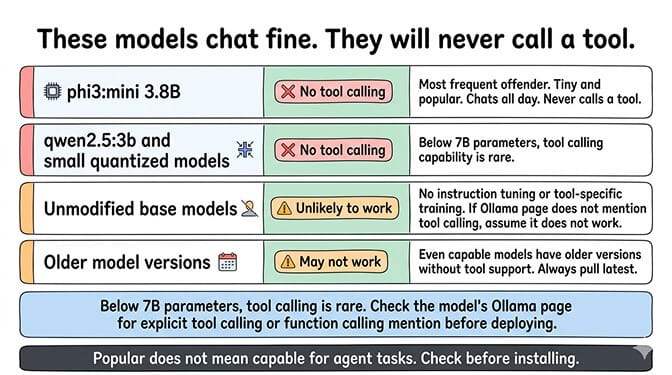
The models that trigger this error
These Ollama models are commonly used with OpenClaw and commonly trigger the "does not support tools" error:
phi3:mini (3.8B) is the most frequent offender. It's popular because it's tiny and runs on almost any hardware. But it has no tool calling support. It will chat all day. It will never call a tool.
Vision and reasoning variants often lack tool support even when the base family has it. qwen2.5vl, llama3.2-vision and llava can't call tools, and neither can deepseek-r1 below 671b. Size is not the rule: llama3.2:1b, qwen2.5:0.5b and qwen3:0.6b all support tools.
Unmodified base models without instruction tuning or tool-specific training. If the model's Ollama page doesn't mention "tool calling" or "function calling" in its capabilities, it won't work for agent tasks.
Older model versions that predate tool calling support. Even models that now support tools may have older versions on Ollama that don't. Make sure you're pulling the latest version.
For the complete list of recommended models for OpenClaw, our Ollama troubleshooting guide covers which models work, which don't, and the hardware requirements for each.
registry.ollama.ai/library/gemma3:4b does not support tools
This is now the most common version of the error. Ollama returns it as HTTP 400 with the full model name, for example {"error":"registry.ollama.ai/library/gemma3:4b does not support tools"}.
No Gemma 3 size supports tool calling on Ollama. Its chat template has no tool section, so gemma3:1b, gemma3:12b and gemma3:27b fail in exactly the same way. Changing the size won't help. Switch to Gemma 4, which does support tools:
ollama pull gemma4:e4b # or gemma4:12b / gemma4:26b for more capacity
Update the model name in your OpenClaw config and restart the gateway.
gemma3:12b does not support tools
Same cause as the 4b error above, and the same fix. gemma4:12b is the like-for-like replacement at the same size.
registry.ollama.ai/library/llama3:latest does not support tools
llama3 (8b and 70b, and llama3:latest, which is the 8b) predates Meta's tool-calling release. The fix is one version number: llama3.1 supports tools at 8b, 70b and 405b.
ollama pull llama3.1:8b
The same goes for llama3:8b does not support tools. llama3.2 (1b, 3b) and llama3.3 (70b) also work. llama3.2-vision does not.
gemma2:2b does not support tools
gemma2 has no tool support at any size (2b, 9b, 27b). Move to gemma4:e2b for the smallest tool-capable Gemma, or qwen3:1.7b / llama3.2:3b if you need something light.
qwen2.5vl:7b does not support tools
The vision-language Qwen 2.5 models can't call tools, even though text-only qwen2.5 can. If you need vision and tools together, use qwen3-vl (2b to 235b) or gemma4. If you don't need vision, qwen2.5:7b or qwen3:8b work.
deepseek-r1 does not support tools
Only deepseek-r1:671b supports tools on Ollama. Every size you can realistically run locally, from 1.5b to 70b and deepseek-r1:latest, returns this error despite the "tools" badge on the library page. Use qwen3 at a similar size for a local reasoning model that can call tools.
Open WebUI: "model does not support tools"
Open WebUI passes Ollama's error straight through, so you see the same registry.ollama.ai/library/<model> does not support tools text in the chat. It appears when a model is used with tools in Open WebUI's Native function calling mode, the default since v0.10.0.
The fix is the same: pick a tool-capable model from the table above. You can switch the Function Calling setting to Legacy (formerly "Default") per chat in Chat Controls → Advanced Params, per model in Admin → Models, or globally in Model Defaults. Legacy injects tools into the prompt instead of using the model's native tool format, so the error goes away. But Open WebUI no longer supports Legacy mode, and weak models call tools poorly with it. Its docs recommend switching models instead.
The models that actually support tool calling
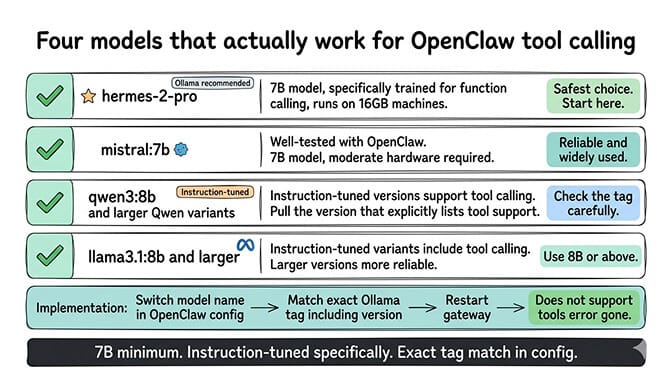
The community-recommended stack for OpenClaw + Ollama in 2026:
qwen3-coder:30b is the current community favorite for tool-heavy agent work (30.5B params / 3.3B active MoE, 256K native context). At aggressive quantization it fits on a 24GB GPU; full precision needs ~250GB memory. Pull with ollama pull qwen3-coder:30b.
glm-4.7-flash is the other pillar of the local stack — 30B-A3B MoE, ~19GB at q4_K_M, requires Ollama 0.14.3+. Strong reasoning, tool-call format is reliable. Pull with ollama pull glm-4.7-flash.
qwen3.5:9b and gemma4:e4b are the lightweight tool-capable picks for 16-24GB machines. Both released in 2026 and both train explicitly on tool-call format.
gpt-oss:20b (OpenAI's open-weights release, MXFP4-quantized, runs on 16GB) and hermes3 are the other entry-level options. Note that the previous-generation hermes-2-pro is no longer the official Hermes — Ollama's library now lists hermes3.
mistral:7b still works and remains in Ollama's official tool-calling recommendations, but its reasoning ceiling is lower than the 2026 options.
Switch your OpenClaw config to one of these. Use the exact name + tag (qwen3-coder:30b with the colon, not a hyphen). Restart the gateway. The "does not support tools" error should be gone.
Model compatibility at a glance
| Model | Size | Tool support | Min VRAM | Recommendation |
|---|---|---|---|---|
| phi3:mini | 3.8B | No | 4GB | Triggers the error. Avoid for agents. |
| gemma3:4b | 4B | No | 4GB | Triggers the error. Use gemma4:e4b. |
| mistral:7b | 7B | Yes | 8GB | Entry-level, lightweight |
| hermes3 | 8B | Yes | 8GB | Entry-level, replaces hermes-2-pro |
| qwen3.5:9b | 9B | Yes | 12GB | Sweet-spot smaller Qwen |
| gemma4:e4b | 4B-effective | Yes | 8GB | Best 16GB-machine option |
| llama3.1:8b | 8B | Yes (instruct) | 8GB | Solid, well-tested |
| gpt-oss:20b | 21B / 3.6B active | Yes | 16GB | OpenAI open-weights MoE |
| glm-4.7-flash | 30B / 3B active | Yes | 24GB (q4) | Community favorite |
| qwen3-coder:30b | 30B / 3B active | Yes | 24GB (quantized) | Best agent model |
| llama4:scout | 109B / 17B active | Yes | 24GB+ (quantized) | Workstation tier |
Native API vs /v1: the real cause of tool-call failures
Stay with me here. If you've switched to a tool-capable model and tool calls still fail silently — the agent narrates what it would do instead of calling tools — your config is pointing at the wrong endpoint.
For most of early 2026, OpenClaw routed Ollama requests through the OpenAI-compatible /v1 path with streaming enabled. Ollama's /v1 streaming implementation drops tool-call delta chunks (the bug tracked in GitHub Issue #5769). The model generates the tool call. The /v1 streaming pipeline drops it. OpenClaw never sees it.
OpenClaw's native Ollama provider uses /api/chat instead and preserves tool calls under streaming. The official Ollama provider docs explicitly warn against using /v1 because it still breaks tool calling. If your config has this:
ollama:
  baseUrl: "http://localhost:11434/v1"    # broken: drops tool calls
Change it to this:
ollama:
  baseUrl: "http://localhost:11434"       # native /api/chat, tool calls work
Then update OpenClaw to a recent release and run openclaw doctor --deep to verify.
So the full diagnostic order for "my agent can't call tools":
- Are you on a tool-capable model? (See the table above.)
- Is your
baseUrlpointing at the native API (no/v1)? - Is OpenClaw recent enough to use the native Ollama provider by default?
If yes to all three, tool calls work. If you're stuck on an older OpenClaw build that can't be updated, the community workaround is to disable streaming when tools are present (covered in our troubleshooting guide).
Fixes by provider
The error text is the same on every provider, but it doesn't always have the same cause. On Ollama with a small model, it usually means exactly what it says: the model wasn't trained for tool calling. With a tool-capable model, especially on a cloud provider, the cause is more often the model variant, the endpoint, the tool-schema format, or an outdated OpenClaw version. Find your provider below.
First, confirm it's a tool problem and not a model or connection problem:
# Check which provider and model OpenClaw is actually using
openclaw models status

# Send a one-shot test turn through that model
openclaw agent --message "hello" --local
If the model answers a plain request (for example ollama run <model:tag> "hello", or a direct API call to your provider) but fails inside OpenClaw with this error, the model isn't exposing function calling through the endpoint OpenClaw is using. If the plain request also fails, you have a model or connection issue, not a tools issue.
Quick reference
| Provider | Most likely cause | Fix |
|---|---|---|
| Ollama | Model not trained for tools, wrong model tag, or /v1 endpoint | Pull a tool-capable model and variant tag; drop /v1 from baseUrl |
| OpenRouter | Model doesn't support tools | Filter models by supported_parameters=tools |
| Anthropic | Outdated OpenClaw / SDK, or a proxy dropping tool schemas | openclaw update; test with a direct API key |
| Gemini | Wrong schema format | Use the native google provider, not openai-compatible |
| OpenAI | Shut-down or fine-tuned model ID | Update to a current model like gpt-5.5 or gpt-4.1 |
| DeepSeek | reasoning_content not passed back in thinking mode | openclaw update or disable thinking |
| Groq | Rate limit masquerading as a tools error | Add a 2s delay between tool calls |
| xAI/Grok | Unsupported schema keywords | Simplify schemas, drop additionalProperties: false |
| Mistral | Model variant without function calling | Use mistral-large-latest |
| MiniMax | Model ID format | Use minimax/minimax-m3 on OpenRouter |
| Kimi | reasoning_content not passed back | openclaw update or disable thinking |
| Local LLM servers | Chat template missing tools | Load a function-calling variant |
Ollama
Ollama is the most common source of this error, and there are three separate causes. The first two are covered above: a model that wasn't trained for tool calling (see the compatibility table) and a baseUrl that ends in /v1. The third is the model tag.
The tag gotcha: tool support comes from the chat template attached to the exact tag you pulled, so check that tag rather than assuming the whole family supports tools (older or community-uploaded tags can lack the tools template). Keep Ollama itself current, since older Ollama versions lack native tool calling:
# Update Ollama to latest
curl -fsSL https://ollama.com/install.sh | sh

# Pull a specific tool-capable tag
ollama pull qwen3.6:35b-a3b

# Confirm the tag exposes tools (also listed under Capabilities in plain `ollama show`)
ollama show qwen3.6:35b-a3b --modelfile | grep -i tool
If the output mentions tools or functions, that tag supports tool calling. If it doesn't, try a different tag or a model from the table above. For Qwen-specific setup, see our Qwen Ollama guide.
OpenRouter
What's happening: the model you selected on OpenRouter doesn't support function calling, or the model ID routes to a variant without tool support. Some smaller models, older versions, and free-tier models don't expose function calling.
The fix: switch to a tool-capable model.
{
  "model": "anthropic/claude-sonnet-4-6",
  "provider": "openrouter"
}
Models that support tools on OpenRouter include Claude Sonnet/Opus, GPT-5.5/GPT-4.1, Gemini 3.5 Flash, Qwen3-32B, and Llama 3.3 70B. To check any other model, filter the OpenRouter model list by tool support (openrouter.ai/models?supported_parameters=tools); only models that appear there accept tools.
Anthropic (Claude)
What's happening: OpenClaw is sending tool definitions in a format your installed version's Anthropic SDK doesn't handle correctly.
The fix: update OpenClaw, which pulls in the Anthropic SDK updates:
openclaw update
Also check: if you reach Claude through a proxy (LiteLLM, OpenRouter), the proxy may not be forwarding tool schemas correctly. Test with a direct Anthropic API key to isolate whether the problem is the proxy or the model.
Since the April 4 Anthropic ban on third-party tools, subscription access through OpenClaw has been in flux: Anthropic reversed the ban on May 13, then paused its replacement credit plan on June 15. For reliable tool calling, use a standard API key from console.anthropic.com.
Google Gemini
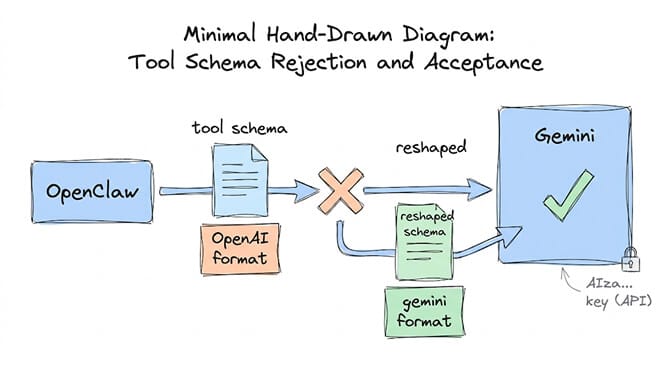
What's happening: Gemini's tool calling uses a different schema format from OpenAI's. If OpenClaw sends OpenAI-format tool definitions through an openai-compatible provider, Gemini rejects them.
The fix: use OpenClaw's native google provider:
// ~/.openclaw/openclaw.json
{
  agents: {
    defaults: {
      model: { primary: "google/gemini-3.5-flash" },
    },
  },
}

// Set the API key in your environment: GEMINI_API_KEY=AIzaSy...
The dual-header gotcha: if you get a 400 error alongside the tools error, you may also be hitting the dual authentication header bug. Use a standard Google Cloud API key (starts with AIza...), not a Vertex AI key.
OpenAI (GPT)
What's happening: this is rare, since current GPT models support tools natively. When it happens, it's usually an older or retired model ID, or a fine-tuned model without tool calling enabled.
The fix:
{
  "model": "gpt-5.5",
  "provider": "openai"
}
Check OpenAI's deprecations page for your model ID: gpt-4.5-preview, for example, was shut down in the API on July 14, 2025. (The June 2026 retirements of GPT-5.2 and GPT-4.5 applied to ChatGPT, not the API.) If your config references a shut-down model, update to a current one such as gpt-5.5 or gpt-4.1.
DeepSeek
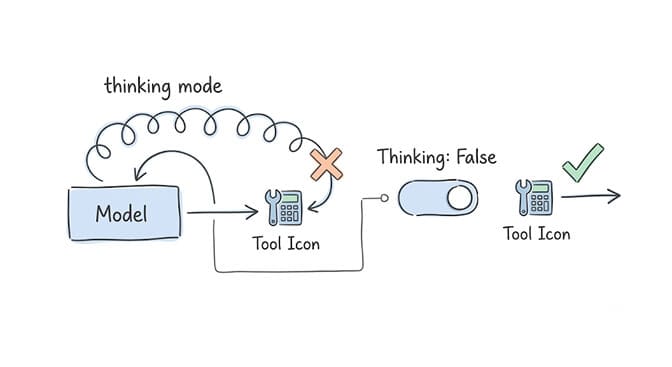
What's happening: DeepSeek's current models (V4.1 Flash and V4 Pro) support tool calling in thinking mode, but DeepSeek requires the reasoning_content from earlier turns to be passed back on every follow-up request. Older OpenClaw builds didn't replay it, so the conversation fails with a 400 error after the first tool call (GitHub issue #71435).
The fix: update OpenClaw to the latest version. If you can't update, disable thinking for the model in your OpenClaw config (params: { thinking: { type: "disabled" } } on the model entry). Routing DeepSeek through OpenRouter or another proxy has hit the same bug separately (issue #76018), so update even if the direct provider already works.
Groq
What's happening: Groq's tool calling works, but it's rate-limited. An agent loop fires requests fast enough to hit the free tier's 30 RPM limit on most models, and that can surface as a tools error instead of a rate-limit error.
The fix: use a tool-capable Groq model (Llama 3.3 70B and GPT-OSS 120B both support tools; Qwen3-32B was shut down on Groq in July 2026) and add a 2-second delay between tool calls on the free tier. For the full setup, see our Groq budget agent guide.
xAI (Grok)
What's happening: Grok models use the OpenAI-compatible API format but don't support every tool-calling feature. Some tool schemas that work on OpenAI fail on xAI.
The fix: simplify your tool schemas. xAI rejects some JSON Schema keywords that OpenAI accepts (additionalProperties: false is a common one), so strip those, and prefer flat parameter objects over deeply nested ones.
Mistral
What's happening: Mistral's API supports function calling, but not on every model variant.
The fix:
{
  "model": "mistral-large-latest",
  "provider": "mistral"
}
Use mistral-large-latest or mistral-medium-latest. Mistral's current small models (mistral-small-latest, Ministral) also support function calling, so if you see this error, check that you're not on an older or specialized variant. The -latest suffix gets you the current version. (Locally on Ollama, mistral:7b does support tools; see the table above.)
MiniMax (M3)
What's happening: MiniMax M3 supports native function calling through the OpenAI-compatible API. If you get this error, the model ID format is probably wrong.
The fix:
{
  "model": "minimax/minimax-m3",
  "provider": "openrouter"
}
If you're using a direct MiniMax API key instead, check MiniMax's documentation for the correct endpoint format.
Kimi (Moonshot)
What's happening: with thinking mode enabled, Kimi models break after the first tool call. The model returns reasoning_content that OpenClaw doesn't pass back in later turns, and the conversation stays broken from then on (GitHub issues #57573 and #82161).
The fix: run openclaw update to get the reasoning_content handling patch, or turn thinking off (thinkingDefault: "off") if you can't update.
Local LLM servers (LM Studio, text-generation-webui, koboldcpp)
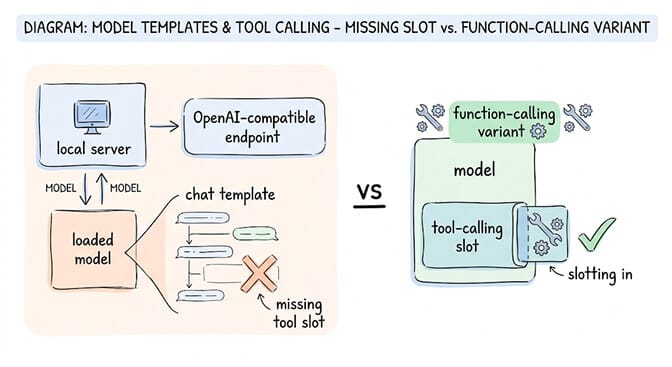
What's happening: your inference server exposes an OpenAI-compatible endpoint, but the model you loaded has no tool-calling support in its chat template.
The fix: load a model that explicitly supports function calling. On LM Studio, pick a model tagged "function calling" in the model browser. On text-generation-webui, use a model whose chat template includes tool definitions (Qwen, Llama 3.3, or Mistral, for example).
How to check before you try
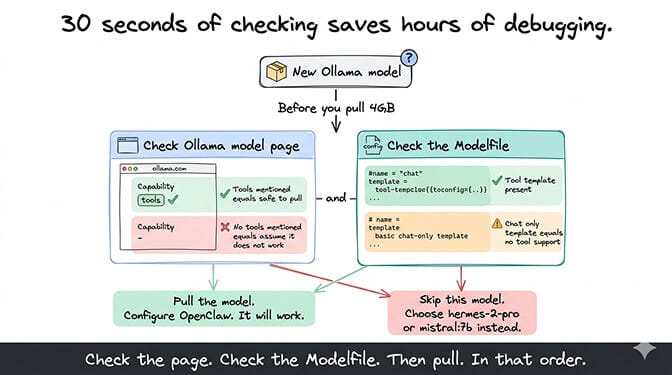
Before pulling a new Ollama model for OpenClaw, check whether it supports tool calling. Two quick ways:
Check the Ollama model page. Go to the model's page on ollama.com and look for the "tools" badge. No badge means no tool calling. A badge is not a guarantee for every size, though: deepseek-r1 has the badge but only its 671b tag supports tools.
Check the model's Modelfile. The Modelfile defines the model's capabilities. Models with tool calling support will have tool-related template configurations. If the Modelfile only has a basic chat template, tools aren't supported. Once a model is pulled, ollama show <model:tag> --modelfile | grep -i tool checks this in one command.
This 30-second check saves you the frustration of pulling a 4GB model, configuring it, testing it, and then getting the "does not support tools" error.
For the broader picture of how Ollama models interact with OpenClaw — including the native vs /v1 distinction, model discovery timeouts, and WSL2 networking issues — our comprehensive Ollama guide covers every failure mode.
The realistic path forward
The short version:
- Seeing "model does not support tools"? Switch to a tool-capable model (table above) and make sure your
baseUrldoesn't end in/v1. Both fixes together get tool calls working locally. - Need an agent without managing model compatibility yourself? BetterClaw ships $49/month for Pro, BYOK with 28+ cloud providers — every supported model has working tool calling, no "does not support tools" errors, no endpoint config to debug.
- Need to mix local and cloud? Model routing lets you keep Ollama for heartbeats or privacy-sensitive tasks and route tool-heavy work to a cloud provider.
The managed vs self-hosted comparison covers how these decisions translate across deployment approaches.
Frequently asked questions
What does "model does not support tools" mean in OpenClaw?
The Ollama model you're using wasn't trained for function calling. OpenClaw agents need models that can generate structured tool-call requests for web search, file ops, calendar, skills, and so on. Models like phi3:mini, every gemma3 size, llama3 and deepseek-r1 below 671b lack this capability on Ollama. Switch to a tool-capable model like qwen3-coder:30b, hermes3, or mistral:7b.
Which Ollama models support tool calling for OpenClaw?
Current picks: qwen3-coder:30b and glm-4.7-flash for the 24GB+ tier; qwen3.5:9b, gemma4:e4b, gpt-oss:20b, hermes3, and mistral:7b for 16GB machines. See the compatibility table above. Pair any of these with OpenClaw's native Ollama provider (baseUrl: http://localhost:11434, no /v1) and tool calls work end-to-end.
How do I fix the "model does not support tools" error?
Two-step fix: (1) pull a tool-capable model — ollama pull qwen3-coder:30b is the current default. (2) Make sure your Ollama provider's baseUrl is http://127.0.0.1:11434 with no /v1 suffix; the /v1 path drops tool-call responses even with the right model. Restart the gateway and run openclaw doctor --deep to verify.
Is it worth using Ollama with OpenClaw now that tool calling works?
Yes if you need data privacy, offline operation, or want to offload heartbeats and high-volume tooling from a cloud bill. Cloud APIs still win on reasoning ceiling and per-token latency, so most teams settle on a hybrid: cloud primary, local for privacy-sensitive or high-volume background tasks. The model routing guide covers the setup.
Will the Ollama tool calling issue be fixed in OpenClaw?
It's already fixed in current OpenClaw releases: the native Ollama provider (/api/chat) preserves tool calls under streaming, and it's the default in recent versions. If you're on an older build using the /v1 OpenAI-compatible path, update OpenClaw and switch your baseUrl to drop the /v1 suffix. The "model does not support tools" error itself is unrelated and stays — it only triggers when the model literally wasn't trained for function calling.
Does "model does not support tools" mean the same thing on every provider?
No. On Ollama with a small model like phi3:mini, it usually means the model was never trained for tool calling. On cloud providers, the model almost always supports tools and the cause is elsewhere: a model variant without tool support (OpenRouter, Mistral), a schema format mismatch (Gemini, xAI), an outdated OpenClaw or SDK version (Anthropic), a wrong model ID (OpenAI, MiniMax), or a thinking-mode conflict (DeepSeek, Kimi). The fixes by provider section covers each one.
Which cloud models support tool calling in OpenClaw?
Most current cloud models do: Claude Sonnet/Opus (Anthropic), GPT-5.5 and GPT-4.1 (OpenAI), Gemini 3.5 Flash and 3.8 Flash (Google), Mistral Large, MiniMax M3, DeepSeek V4.1 Flash, and GLM 5.2, plus Llama 3.3 70B on Groq and OpenRouter. On OpenRouter, filter the model list by supported_parameters=tools.
Why does tool calling break with thinking mode enabled?
Models with thinking mode (DeepSeek, Kimi, and others) return reasoning_content alongside each tool call, and their APIs require it to be passed back on later turns. Older OpenClaw builds didn't replay it, so the conversation fails with a 400 error after the first tool call. Update OpenClaw to pick up the reasoning_content fixes; if you can't, disable thinking mode for tool-calling tasks. Keep thinking mode for pure reasoning tasks without tools.
Related Reading
- OpenClaw Ollama "Fetch Failed" Fix — Connection errors between OpenClaw and Ollama
- OpenClaw Local Model Not Working: Complete Fix Guide — All local model issues in one guide
- OpenClaw Ollama Guide: Complete Setup — Full Ollama integration from scratch
- Cheapest OpenClaw AI Providers — Cloud alternatives when local models fall short