A Mac mini looks like the obvious always-on OpenClaw box. For most people it is the expensive answer to a cheap question.
My first OpenClaw agent ran on a 2019 ThinkPad sitting under my desk. It worked. Until I closed the lid to take it to a meeting. Agent offline. Until Windows Update restarted the machine at 3 AM. Agent offline. Until the WiFi dropped for 12 seconds and the gateway crashed without auto-reconnect. Agent offline.
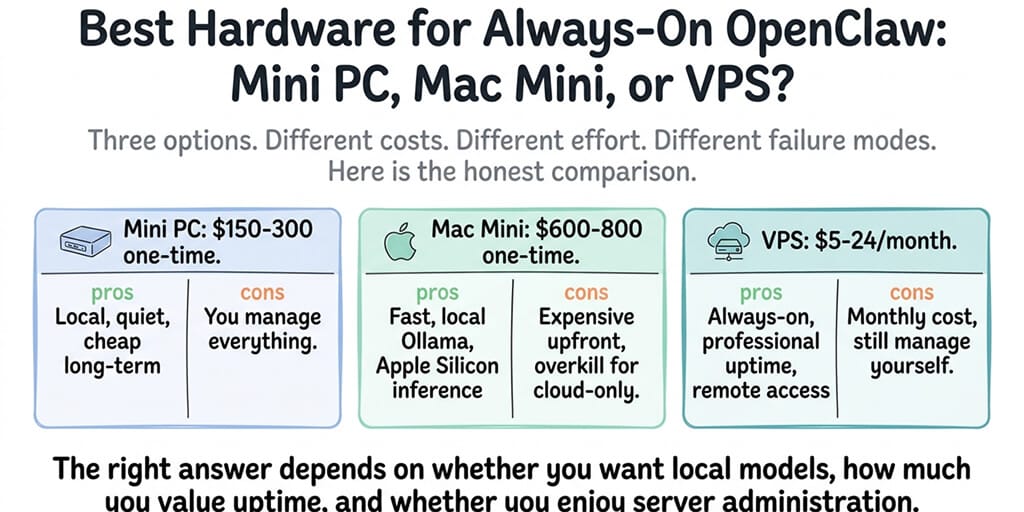
So the next question was obvious: buy a Mac mini and leave it in the corner, or rent a VPS and never think about the hardware again? Here's the answer with real 2026 prices and the arithmetic shown, so you can swap in your own numbers.
Mac mini, VPS and Raspberry Pi prices in 2026
Prices moved a lot this year. Memory got expensive, Apple replaced the M4 Mac mini, and Hetzner repriced its cloud in June. Here's what the official pages show as of 16 October 2026.
Mac mini (apple.com, US store). The current Mac mini comes with the M6 or the M5 Pro chip. The M4 model is no longer on Apple's Mac mini store page.
| Mac mini | CPU / GPU | Memory options | Starting price |
|---|---|---|---|
| M6 | 12-core / 12-core | 16GB, 24GB or 32GB | $899 (16GB, 256GB SSD) |
| M5 Pro | 15-core / 16-core | 24GB and up | $1,699 (24GB, 512GB SSD) |
| M5 Pro | 18-core / 20-core | up to 64GB | $1,899 |
Apple doesn't print the price of every configuration on the store page, so price the 24GB and 32GB M6 builds in the configurator before you budget for local models.
VPS. The cheapest plans that comfortably run the OpenClaw gateway with a cloud model:
- DigitalOcean Basic droplet: $6/month for 1GB RAM, $12/month for 2GB RAM, $24/month for 4GB RAM.
- Hostinger KVM 1: 1 vCPU, 4GB RAM, 50GB NVMe at $6.49/month as an intro price, paid upfront for the term, renewing at $11.99/month.
- Hetzner CX23 (the CX22's successor): 2 vCPU, 4GB RAM, 40GB NVMe at €5.49/month excluding VAT and IPv4, after the 15 June 2026 price change. Hetzner's own cost-optimized page currently marks the line "not available", so check before you plan around it.
Raspberry Pi 5. Raspberry Pi has raised prices several times because of LPDDR4 memory costs. The 16GB board is listed at $305 on raspberrypi.com, and the 2GB board went to $77.50 on 1 October 2026. The 8GB board, the sensible size for an OpenClaw gateway, is $175 after the April 2026 increase. That is the board only: power supply, storage and case are extra.
Mini PC. There's no single list price to quote. N100-class boxes with 16GB RAM have tracked memory prices up all year, so in the table below I use $300 as a placeholder. Swap in the quote you actually get.
For a wider list of providers with intro and renewal prices, see OpenClaw VPS hosting compared.
The 12-month cost table
This is the whole decision in one table. It counts four things for the first year:
- Upfront: the hardware price above.
- Power: watts × 24 hours × 365 days ÷ 1,000 × electricity rate. I use $0.17/kWh as an example rate. Yours will differ, so multiply by your own.
- Hosting: the monthly bill × 12.
- Your hours: setup plus 1 hour a month of updates, restarts and fixes, valued at an example $50/hour. If your time is free, ignore this column. If it isn't, it's usually the biggest number on the page.
Power, using Apple's published figures. Apple's Mac mini power consumption page lists the M6 Mac mini (16GB, 256GB) at 4W idle and 70W max, and the M5 Pro (64GB, 8TB) at 6W idle and 145W max.
- M6 at idle: 4W × 24 × 365 = 35.04 kWh × $0.17 = $5.96/year
- M6 flat out all year: 70W × 24 × 365 = 613.2 kWh × $0.17 = $104.24/year
- M5 Pro at idle: 6W × 24 × 365 = 52.56 kWh × $0.17 = $8.94/year
- M5 Pro flat out all year: 145W × 24 × 365 = 1,270.2 kWh × $0.17 = $215.93/year
An agent that calls cloud models sits near idle almost all day, so use the idle figure. Local inference pushes the chip toward max while a model is generating, so a Mac running local models lands somewhere between the two.
For the mini PC and the Pi there's no equivalent manufacturer figure for an always-on agent workload, so I assume an average of 10W (mini PC: 87.6 kWh = $14.89/year) and 5W (Pi 5: 43.8 kWh = $7.45/year). Treat those as estimates, not measurements.
Hours. Mac mini and mini PC: 4 hours setup + 12 monthly hours = 16 hours = $800. Raspberry Pi: 6 hours setup (ARM images, storage, cooling) + 12 = 18 hours = $900. VPS: 3 hours setup + 12 = 15 hours = $750. Managed: about 1 hour to set up an agent and no server to maintain = $50.
| Option (year one) | Upfront | Power | Hosting | Cash total | Your hours | Total with hours |
|---|---|---|---|---|---|---|
| Mac mini M6, 16GB (cloud models) | $899 | $6 | $0 | $905 | 16h = $800 | $1,705 |
| Mac mini M5 Pro, 24GB (local models) | $1,699 | $9–$216 | $0 | $1,708–$1,915 | 16h = $800 | $2,508–$2,715 |
| Mini PC, 16GB (placeholder price) | $300 | $15 | $0 | $315 | 16h = $800 | $1,115 |
| Raspberry Pi 5, 8GB (board only) | $175 | $7 | $0 | $182 | 18h = $900 | $1,082 |
| VPS, DigitalOcean 2GB | $0 | $0 | $12 × 12 = $144 | $144 | 15h = $750 | $894 |
| VPS, Hostinger KVM 1 (intro price) | $0 | $0 | $6.49 × 12 = $78 | $78 | 15h = $750 | $828 |
| BetterClaw Basic (managed) | $0 | $0 | $19 × 12 = $228 | $228 | 1h = $50 | $278 |
Three things this table doesn't show:
Model costs are extra on every row except local inference on your own hardware. With cloud models you pay your provider per token, whichever box runs the agent.
The Mac mini still exists in year two. Year-two cash cost for the M6 drops to about $6 of power. A VPS keeps billing. Over three years the gap narrows, but a 2GB droplet ($432) is still cheaper than an $899 Mac mini for cloud-only agents.
BetterClaw is not the same thing as running OpenClaw. It's a no-code AI agent platform and an alternative to OpenClaw, not OpenClaw hosting. Basic is one cloud agent with 500 credits a month, BYOK (bring your own key) with zero markup on your model bill, and a 2 vCPU / 4GB server you never log in to. It doesn't run models on your Mac by itself. For that, see Option 3 below. Plan details are on the pricing page.
How much RAM you need for local models on a Mac
For cloud models, RAM barely matters. The OpenClaw gateway is a Node.js process that routes messages and calls APIs. 2 to 4GB is plenty, which is why the base 16GB Mac mini is overkill for that job.
Local models are where the memory number decides everything, because the whole model has to fit in memory. Apple Silicon helps because the CPU and GPU share one pool of unified memory. The sizing we give for BetterClaw Desktop:
- 7 to 9B models with tool calling (for example the current small Qwen and Gemma models) handle simple scheduled tasks and single-tool workflows. Expect to need at least 16GB. That's the $899 M6.
- 27B and up handle multi-step workflows with several tools. Plan on 24GB of unified memory, or accept slower runs. That's the 24GB M6 or the M5 Pro from $1,699.
- Models without tool calling still work for chat-only agents.
One caution if you run OpenClaw itself on the Mac. Its system prompt is large, and a long context window fills memory fast on top of the model weights. Our local model hardware guide treats 32GB as the comfortable floor for real agent work with OpenClaw, which puts the 32GB M6 or an M5 Pro on the shortlist. If you're weighing a Mac against a GPU box, read Apple Silicon vs NVIDIA for AI agents first.
Which Mac mini to buy:
- Cloud models only: don't buy one for OpenClaw. Rent a VPS.
- Cloud models plus iMessage or local files: M6, 16GB, $899.
- Small local models (7 to 9B): M6, 16GB at minimum, 24GB if you can.
- 27B-class local models: M6 with 32GB, or M5 Pro with 24GB or more. Check which Ollama models support tool calling before you choose a model.
Security: a Mac mini on your home network vs a sandboxed VPS
This is the part of the decision most people skip.
A Mac mini at home sits on the same network as your laptop, your NAS, your printer and your smart TV. An OpenClaw agent can run shell commands, read files and install skills. If a malicious skill or a prompt injection gets it to do something it shouldn't, the blast radius is your home network and anything that Mac is signed in to: iMessage, iCloud, your browser sessions. That's also exactly why people want it on a Mac. Access cuts both ways.
If you go the Mac route:
- Give OpenClaw its own macOS user account. Don't run it in the account that holds your personal files and passwords.
- Keep the gateway on loopback, which is the default, and reach it remotely through Tailscale or an SSH tunnel. Never forward a router port to it.
- Turn on FileVault and automatic security updates, and keep OpenClaw updated. CVE-2026-25253 (CVSS 8.8) was a reminder that the gateway itself can be the vulnerable part.
- Vet every skill before you install it.
A VPS is isolated from your home by default. If the agent is compromised, the attacker gets a disposable server with nothing else on it. You can snapshot it, wipe it and rebuild it in minutes. The trade-off is that it has a public IP from minute one, so the hardening work moves to SSH keys, a firewall and a loopback-bound gateway. Our VPS setup guide walks through those steps.
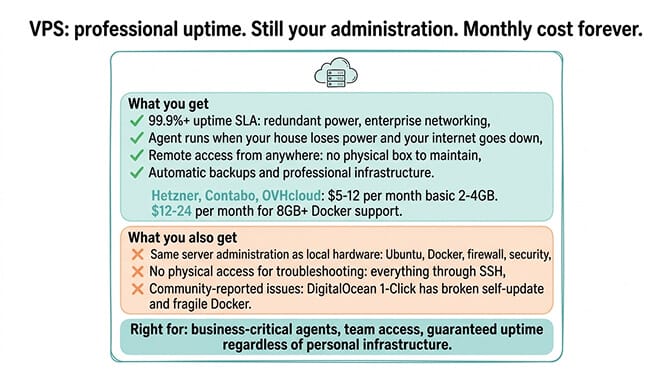
Neither option is safe without the work. The VPS just limits what a mistake can reach.
The hybrid setup: VPS gateway plus a Mac worker over Tailscale
You don't have to pick one. A common setup splits the jobs:
- The VPS runs the OpenClaw gateway 24/7. Channels, scheduled jobs and webhooks keep working when your home internet or power drops.
- The Mac mini runs the local model server (Ollama or LM Studio) and is reachable only over Tailscale. Bind Ollama to the Mac's Tailscale address instead of
0.0.0.0, and point the gateway's model provider at that address. - Keep a cloud model configured as the fallback, so the agent still answers when the Mac is asleep or offline.
What it costs in year one, using the numbers above:
| Piece | Year one |
|---|---|
| DigitalOcean 2GB droplet | $144 |
| Mac mini M6, 16GB | $899 |
| Mac power, idle to max | $6–$104 |
| Tailscale Personal plan | $0 (up to 6 users, unlimited user devices) |
| Cash total | $1,049–$1,147 |
Add your hours: you now maintain two machines and a private network, so budget more than either option alone. In return you get data-center uptime for the gateway and free local inference for the tasks that can use it.
Option 3: keep cloud agents and run the models on your Mac
There's a third route if what you really want is local models without running a server at all.
BetterClaw Desktop connects models running on your computer through Ollama, LM Studio or llama.cpp (or any OpenAI-compatible address on your machine or local network) to your BetterClaw agents, which live in the cloud. The agents keep chatting on Telegram, Slack, Discord and Gmail and running scheduled tasks. The thinking happens on your Mac.
What makes it different from the hybrid setup:
- No open ports, no tunnels. The app connects out to BetterClaw, so you don't forward a router port, change
OLLAMA_HOSTor keep a tunnel running. - Tool support shown per model. For every model it finds, it shows the context size and how well the model handles agent tools, so you know before you assign it whether it can run a workflow or only chat.
- No API key. It's a local-model bridge, not BYOK. It never asks for an AI provider key, because the model runs on your computer.
- Platforms: the macOS build is for Apple Silicon only (M1 and later) and needs macOS 13 (Ventura) or later. There are also builds for 64-bit Windows 10 and 11 and for 64-bit Linux as an AppImage. On an Intel Mac, use the web app with a cloud model.
The Mac still has to be on for local-model agents to answer. What you skip is the gateway, the VPS, the Tailscale config and the security hardening. If you're moving from a self-hosted OpenClaw setup, the migration guide covers what carries over. And if you'd rather start from scratch with an AI agent builder that never asks you to pick hardware, compare plans on the pricing page.
Frequently Asked Questions
Is a Mac mini worth it for OpenClaw?
Only if you need what a Mac uniquely gives you: local models on unified memory, iMessage, or access to files on that machine. For an agent that only calls cloud models, a 2GB VPS costs about $144 for the first year against about $905 for the cheapest Mac mini plus power, and it stays up when your home internet doesn't.
Which Mac mini is best for OpenClaw?
For cloud models plus iMessage or local files, the base M6 with 16GB and 256GB ($899) is enough. For small 7 to 9B local models, 16GB is the minimum and 24GB is more comfortable. For 27B-class local models, get the M6 with 32GB or an M5 Pro (from $1,699 with 24GB). Apple's store no longer lists the M4 Mac mini.
How much RAM does OpenClaw need?
With cloud models, the gateway runs comfortably in 2 to 4GB of RAM. With local models, the model decides: at least 16GB for 7 to 9B models with tool calling, and about 24GB of unified memory for 27B and up. Running OpenClaw's large system prompt and a long context on the same machine pushes the comfortable figure toward 32GB.
Mac mini or Raspberry Pi for OpenClaw?
For a cloud-model gateway, the Raspberry Pi 5 is cheaper upfront ($175 for the 8GB board, plus power supply and storage) and sips power, but setup and SD-card or storage issues take more of your time. The Pi is too slow for useful local agent models. If you want local models or iMessage, it has to be the Mac mini. If you want the cheapest reliable uptime, a VPS beats both.
Can I run OpenClaw on a Mac mini for free?
The software, yes. OpenClaw is free and open source, and so are Ollama and llama.cpp, so with local models there's no per-token bill. You still pay for the Mac mini itself (from $899), electricity (about $6 a year at idle at $0.17/kWh, more under local inference load) and your own setup and maintenance time.