It worked on the first message and died on the fourth. Here is every "provider rejected" error string, what each one actually means, and how to tell which one is yours in under two minutes.
The message that gets you here is almost always the same shape.
"It was working. I sent three messages. The fourth one came back with this."
LLM request failed: provider rejected the request schema or tool payload
Updated September 2026. Added the error strings people actually paste into search: the proxy and model-settings variant, the 401 key rejection, OpenClaw's newer redacted wording, the setup test-request failure, and the Bifrost provider-resolution error. Config keys re-checked against the current OpenClaw docs.
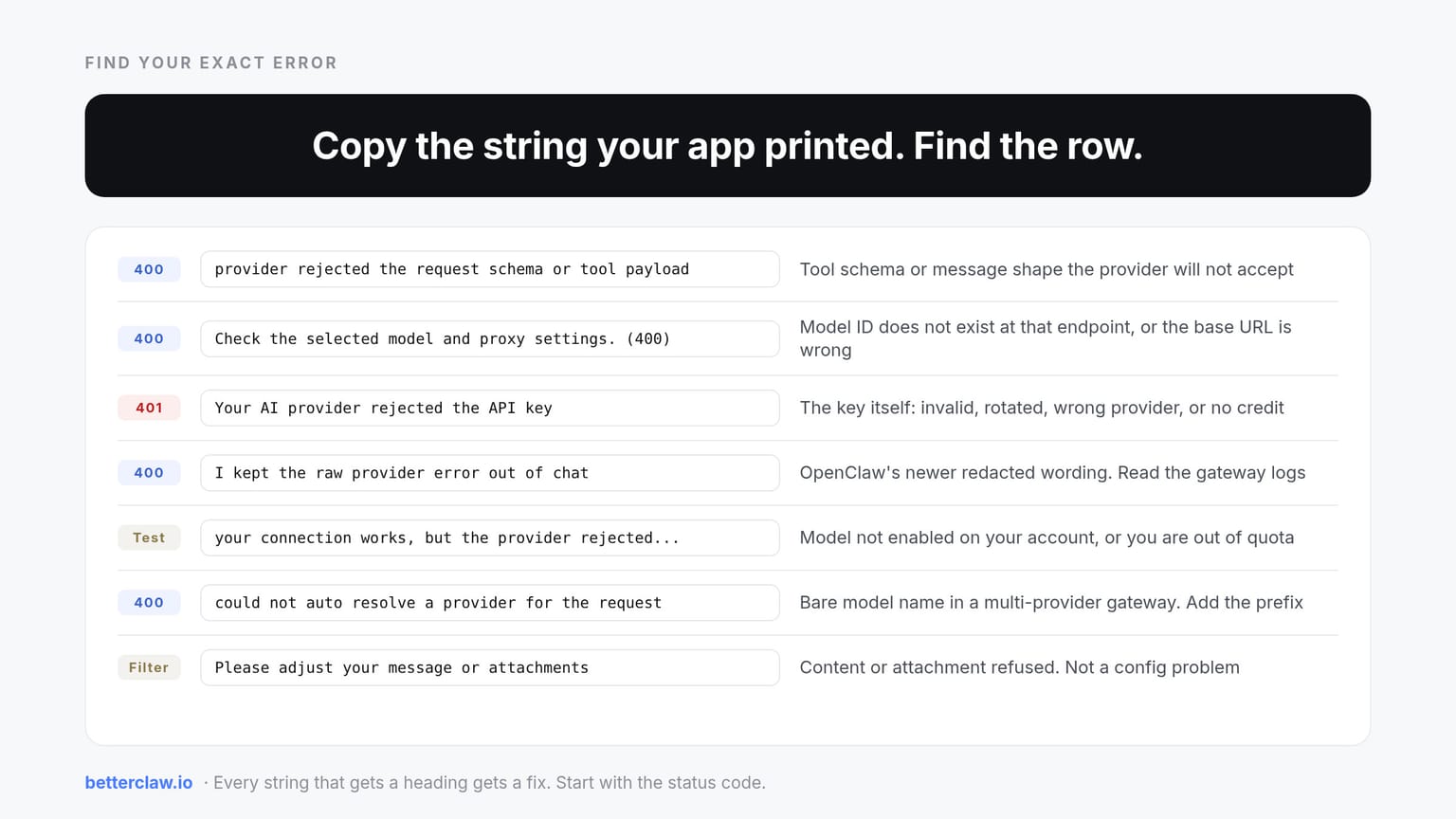
Find your exact error
Copy the string your app printed, find the closest row, follow the link.
| Your error says | Most likely cause | Go to |
|---|---|---|
LLM request failed: provider rejected the request schema or tool payload | Tool schema or message shape the provider will not accept | Causes 1 to 5 |
Agent failed before reply: LLM request failed: provider rejected... | Same error, surfaced by the agent runner | Causes 1 to 5 |
The AI provider rejected this request. Check the selected model and proxy settings. (400) | Model ID does not exist at the provider, or the proxy and base URL are wrong | Model and proxy settings |
Your AI provider rejected the API key | 401. The key itself: invalid, rotated, wrong provider, or no credit | Rejected API key |
The model provider rejected the request. I kept the raw provider error out of chat | OpenClaw's newer wording for the same 400. Read the gateway logs | Redacted provider error |
Your connection works, but the provider rejected a test request | Key is fine, but the model is not enabled on your account or you are out of quota | Failed test request |
API error: 400 could not auto resolve a provider for the request | Model name given without a provider prefix | Provider resolution |
The AI service rejected this request. Please adjust your message or attachments | Content or attachment rejected by the provider's filter | Message and attachments |
The configured API key was rejected by the inference provider. Contact your administrator | Managed deployment. Someone rotated the key | Admin-owned key |
Model does not support tools | The model cannot do function calling | Cause 3 |
A 400 is deterministic. Something in the payload is wrong every single time it is sent, which means it is findable.
Here is what nobody tells you about this particular error: the message is a catch-all. OpenClaw collapses at least six distinct failure modes into one string, so the error text tells you almost nothing about which one you hit. The fix depends entirely on that.
So let us sort them by how often they actually show up.
Cause 1: tool schemas replayed at a fallback provider
"LLM request failed: provider rejected the request schema or tool payload"
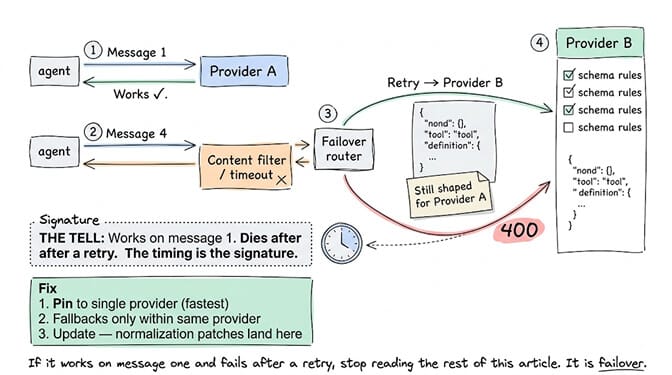
This is the big one, and it has a signature you can spot instantly.
Your agent works on message one, then dies on a later message right after a retry. That timing is the tell.
Here is the mechanism. OpenClaw prepares your tool definitions once, shaped for your primary model. The primary fails for some unrelated reason, a content filter or a timeout, and the router fails over to a second model. On a different provider. And it replays the same tool definitions, still shaped for the first provider.
Provider B has different rules about what is allowed in a tool input schema. It answers 400. This is documented in OpenClaw issue #64961, where an Azure GPT model returned a content filter error, failover went to Grok, and Grok rejected the untouched tool definitions.
The fix, in order of how quickly you can do it. Pin your agent to a single provider and remove cross-provider fallbacks. Or configure fallbacks only to models on the same provider with the same schema rules. Or update, because normalization on failover is exactly the kind of thing that gets patched.
If it works on message one and fails after a retry, stop reading the rest of this article. It is failover.
Cause 2: a JSON Schema keyword the provider will not accept
"Agent failed before reply: LLM request failed: provider rejected the request schema or tool payload"
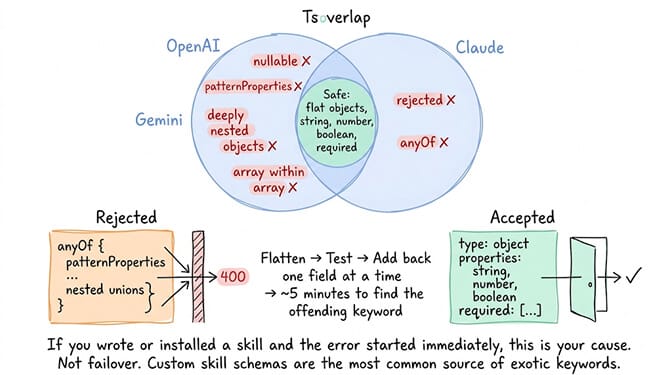
Every provider supports a different subset of JSON Schema in tool definitions, and the overlap is smaller than you would hope.
Gemini rejects patternProperties. Claude rejects anyOf in tool input schemas. Others get strict about nullable, deeply nested objects, or missing required arrays. OpenClaw carries provider-specific cleaning for some of these, but coverage is not universal and custom skills are where it breaks.
If you wrote or installed a skill and the error started immediately, this is your cause. Not failover. Custom skill schemas are the most common source of exotic keywords.
Strip the schema down to primitives. Flat objects, string and number and boolean types, explicit required, no unions. Then add complexity back one field at a time until it breaks, which takes about five minutes and tells you exactly which keyword the provider hates.
Cause 3: the model does not support tool calling at all
"Model does not support tools"
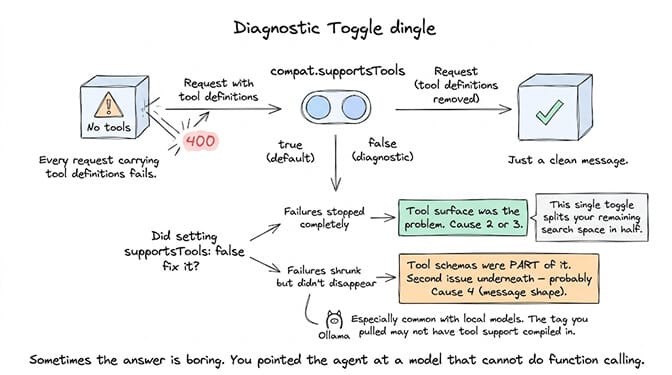
Sometimes the answer is boring. You pointed your agent at a model that cannot do function calling, and every request carrying tool definitions fails.
There is a clean diagnostic for this. Set compat.supportsTools: false on the model entry and send a message.
If the failures stop completely, the tool surface was the problem. If they shrink but do not disappear, tool schemas were part of the pressure and there is a second issue underneath, usually message shape. That single toggle splits your remaining search space in half.
This is especially common with local models through Ollama, where the tag you pulled may simply not have tool support compiled in. We wrote a fuller breakdown of the model does not support tools error covering which models actually work.
Cause 4: the message array shape, not the tools
"Run error: LLM request failed: provider rejected the request schema or tool payload"
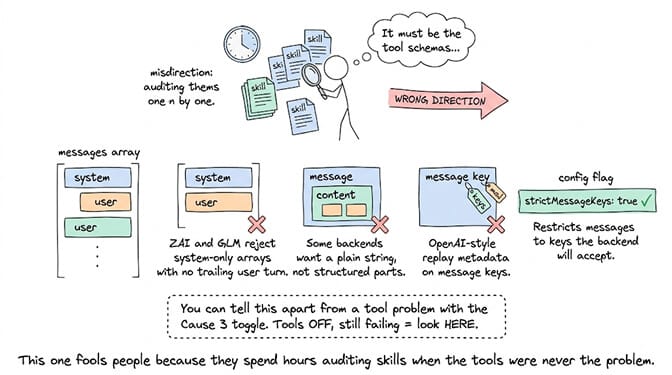
This one fools people because they spend hours auditing skills when the tools were never the problem.
Some backends reject a messages array that is system-only with no trailing user turn. ZAI and GLM have both been reported doing exactly this, in OpenClaw issue #68735. Others reject structured content parts and want a plain string. Others reject OpenAI-style replay metadata sitting on the message keys.
For that last one specifically, there is a config flag: models.providers.<provider>.models[].compat.strictMessageKeys: true, which restricts messages to the keys the backend will accept, meaning role and content only.
For backends that only accept messages[].content as a plain string rather than an array of structured content parts, set compat.requiresStringContent: true on the same model entry. The two flags are independent and local OpenAI-compatible servers often need both:
{ "id": "qwen/qwen3.5-9b", "compat": { "requiresStringContent": true, "strictMessageKeys": true } }
You can tell this apart from a tool problem with the Cause 3 toggle. Tools off, still failing, means look here.
Cause 5: reasoning parameters the provider will not take
"OpenClaw: LLM request failed: provider rejected the request schema or tool payload"
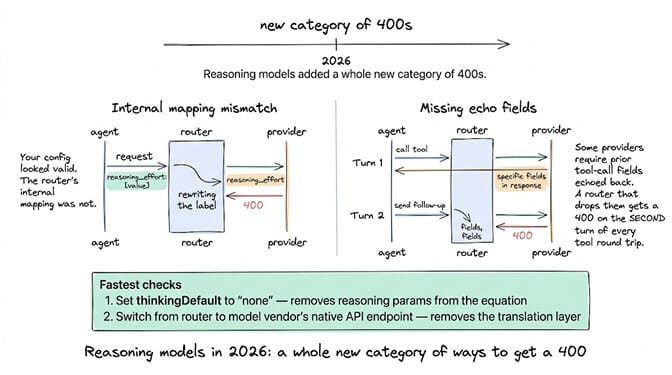
Reasoning models added a whole new category of 400s in 2026.
The best documented case is a version of OpenClaw internally mapping reasoning_effort to a value the upstream router does not accept, which surfaces as this exact error even though your own config looked valid. Azure AI Foundry reasoning models produced the same failure after an April update, in issue #65603, where disabling reasoning fixed everything except tool-calling requests.
A related variant: some providers require fields from a prior tool-call turn to be echoed back on the follow-up request, and a router that drops them gets a 400 on the second turn of every tool round trip.
Fastest checks are setting thinkingDefault to "none" to take reasoning parameters out of the equation, or switching from a router to the model vendor's native API endpoint. If your endpoint uses effort names the built-in profiles do not know about, compat.supportedReasoningEfforts and compat.reasoningEffortMap on the model entry let you declare and remap them rather than guessing. We covered the DeepSeek flavour of this in detail in DeepSeek 503 and schema errors, including the exact config change.
Cause 6: something in front of the provider, not the provider
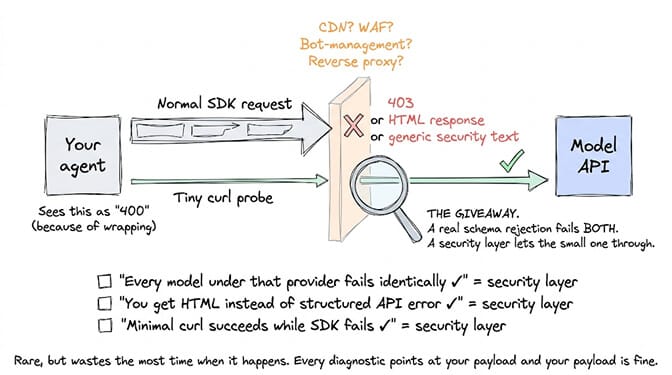
Rare, but it wastes the most time when it happens, because every diagnostic points at your payload and your payload is fine.
If there is a CDN, WAF, bot-management rule, or reverse proxy in front of an OpenAI-compatible endpoint, it can reject requests before they ever reach the model. The signatures are distinctive. Every model under that provider fails identically. You get HTML or generic security text instead of a structured provider API error. A tiny direct curl probe succeeds while normal SDK-shaped requests fail.
That last contrast is the giveaway. A real schema rejection fails the small probe too. A security layer usually lets the small one through.
How to work out which one you have in two minutes
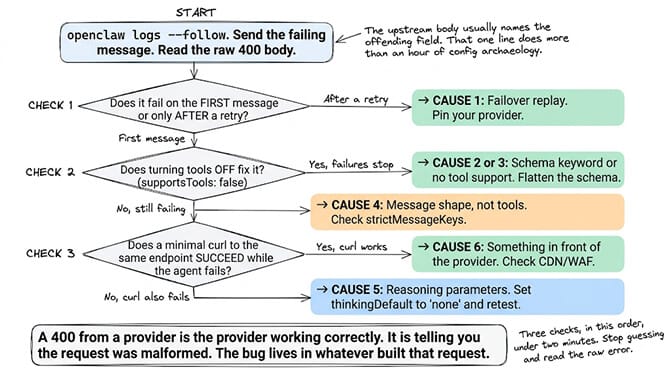
Stop guessing and read the raw error. Run openclaw logs --follow and send the failing message again.
The gateway's wrapper string is generic, but the upstream 400 body underneath it usually is not. Providers name the offending field. That one line of raw text does more than an hour of config archaeology.
Three checks, in this order:
- Does it fail on the first message or only after a retry? Retry means Cause 1.
- Does turning tools off fix it? Yes means Causes 2 or 3, no means Cause 4.
- Does a minimal
curlto the same endpoint succeed while the agent fails? Yes means Cause 6.
A 400 from a provider is the provider working correctly. It is telling you the request was malformed. The bug lives in whatever built that request.
Everything above is the 400 family. The sections below are the other strings people paste into search, several of which are a different HTTP status and a different fix entirely.
"The AI provider rejected this request. Check the selected model and proxy settings. (400)"
This wording comes from a desktop or web chat client rather than from OpenClaw, and it is worth saying plainly that we have not been able to pin it to a single named app. It appears across clients that give you a model dropdown plus a proxy or base URL field. The good news is that the wording tells you where to look, and the two checks below work in any of them.
The app sends your request through a proxy or a custom base URL, and the provider on the other end answered 400. Two things cause almost all of these.
The model ID does not exist at that provider. You picked or typed a model name the endpoint does not serve: a typo, a deprecated model, or a model from a different provider. Ask the endpoint what it actually has:
curl -s https://YOUR-BASE-URL/v1/models -H "Authorization: Bearer $KEY" | head -50
Pick a model ID from that list, exactly as spelled. Model IDs are case sensitive and version suffixes matter.
The proxy or base URL is wrong. Common ones: a missing /v1 at the end, http where the endpoint wants https, a proxy that strips the Authorization header, or a corporate proxy that returns an HTML block page the app reads as a 400. Test with the proxy turned off. If it works, the proxy is the problem. If the app has a test connection button, use it after every change.
If the model list loads but chat still fails, you are back to the six causes above. It is the same 400 with a friendlier label.
"Your AI provider rejected the API key"
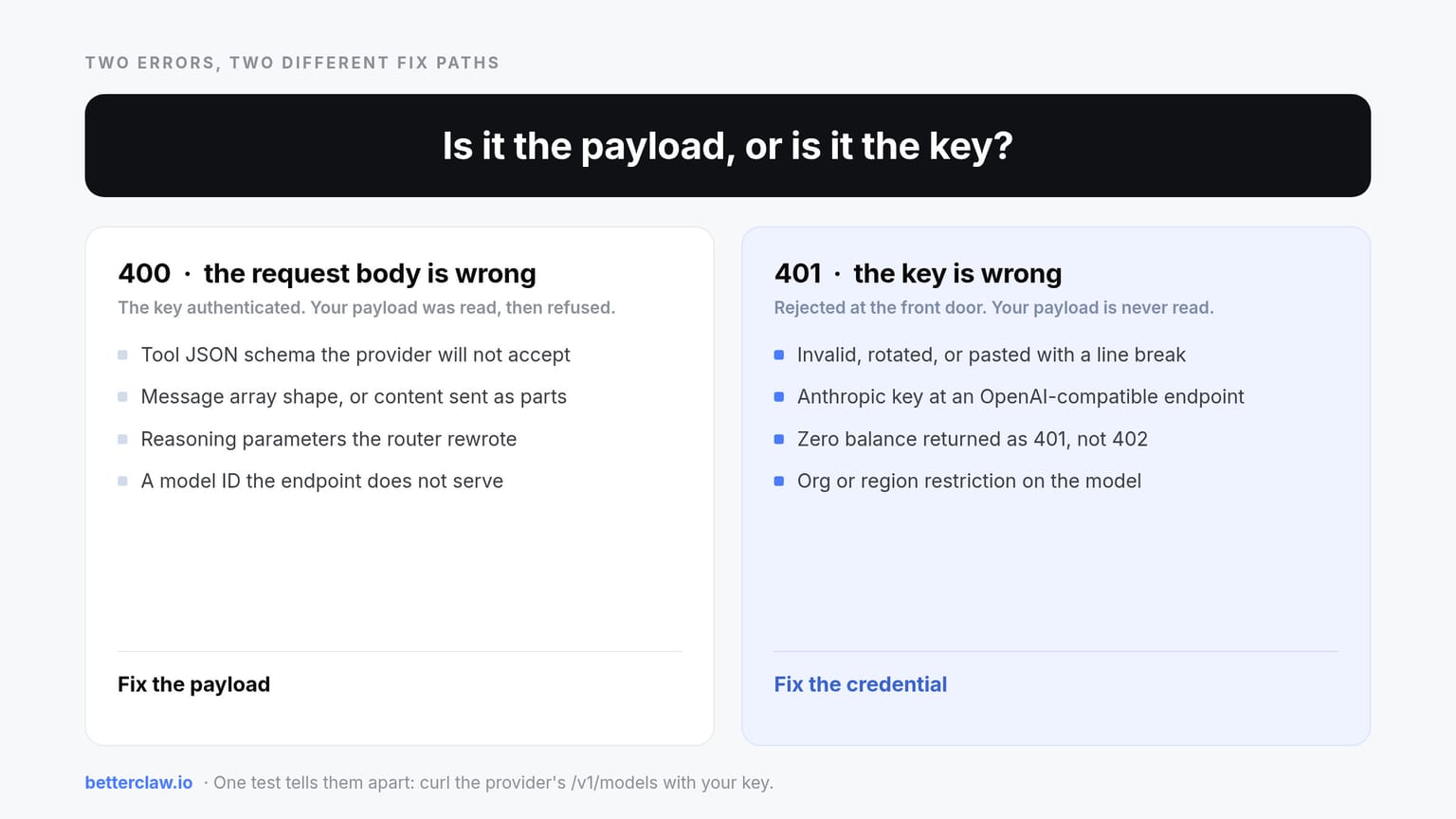
This one is different from everything else on this page. It is a 401, not a 400, and it really is the key.
- The key is wrong or was rotated. Paste it again from the provider dashboard. Watch for trailing spaces and for keys copied with a hidden line break.
- Wrong provider for the key. An Anthropic key will not work at an OpenAI-compatible endpoint and vice versa. Match the key to the base URL.
- No credit on the account. Some providers return 401 rather than 402 when the balance is zero. Check billing.
- Region or org restriction. Keys tied to an organisation that does not have access to the model you picked.
- Key stored in the wrong place. In OpenClaw, check the env var or the
apiKeyfield under the right provider entry, then restart the gateway so it re-reads config.
Quick test that bypasses the app entirely:
curl -s https://api.openai.com/v1/models -H "Authorization: Bearer $KEY" | head -5
If that returns 401, the app is not the problem. If it returns a model list, the key is fine and your error is a 400 in disguise, so go back to the six causes.
"The model provider rejected the request. I kept the raw provider error out of chat"
This is OpenClaw's newer wording for the same 400 covered above. OpenClaw now redacts the raw provider error in chat and keeps the fuller text in the gateway logs, so the string you see is deliberately vague.
Recent builds go one step further and show a short bounded explanation in chat when the provider gives one. The September 2026 change in PR #145402 is the example worth knowing: a request rejected for too many cache-control blocks now tells you how many the provider allows against how many your request contained, instead of the old "the agent run failed before producing a reply".
To see the rest, run:
openclaw logs --follow
Resend the failing message and read the upstream 400 body. Note that the log copy is redacted too, because credential and media redaction still applies and the error body preview is capped, so do not expect the full upstream payload. What you do get is the provider's own description of the offending field, which is the part you need. Then use the three checks in How to work out which one you have.
"Your connection works, but the provider rejected a test request"
You will see this on the provider test in OpenClaw's setup flow or Control UI. The key authenticated, which is the "your connection works" part, but the provider refused the test call. Almost always one of three things:
- The model you selected is not enabled for your account. New models often need opt-in, a higher tier, or an accepted usage policy.
- You are out of credit or you hit a spending cap.
- The key is a restricted key that cannot call chat completions, only embeddings or a narrower scope.
Fix: open the provider dashboard, confirm the model is available to you and the balance is positive, then re-run the test with a model you know works, such as the provider's cheap small model. If the small model passes and your chosen model fails, it is model access, not the key.
"API error: 400 could not auto resolve a provider for the request"
The full string is could not auto resolve a provider for the request, please specify a provider explicitly, and it does not come from OpenClaw. It is a Bifrost error, the LLM gateway from Maxim, so if you are seeing it you have Bifrost or something built on it between your agent and the model.
The cause is simple: you gave a bare model name in a setup with more than one provider configured, and the router could not guess which one you meant. Bifrost expects model names in provider/model form, for example anthropic/claude-sonnet-5, openai/gpt-5 or azure/gpt-5. Add the prefix in whichever config field names the model and the error goes.
Two things worth knowing. Bifrost will strip a provider prefix when matching against an allowed_models list, so a prefix there is safe. And auto-resolution failing on a provider that should be resolvable has been reported as a bug rather than expected behaviour, notably with Bedrock-family providers using custom deployment names, so if the prefix does not fix it, check your gateway version before rewriting your config further.
"The AI service rejected this request. Please adjust your message or attachments"
This one is about content, not config. The provider's safety or input filter refused what you sent, and the wording is a hint from the app rather than the raw provider error.
Common triggers: an attachment type the model does not accept, an image over the size limit, a PDF with too many pages, or text the provider's filter flagged. There is also a quieter one, where a long conversation carrying several attachments crosses the context window and the client reports it as a rejected message.
Remove the attachment and resend. If it goes through, re-add attachments one at a time until it breaks, which names the offender. If plain text also fails, start a fresh conversation, then rephrase.
"The configured API key was rejected by the inference provider"
The full string usually ends with "Contact your administrator", and that is the fix.
You are on a managed or team deployment where someone else owns the key. It was rotated, revoked, or it ran out of credit, and your deployment has no way to tell you which. There is nothing to change on your side, and re-entering your own key will not help because the deployment is not reading one from you.
Send the admin three things: the timestamp, the model you were using, and the exact string. That is enough for them to match it to a key in their console.
Not OpenClaw?
If you are seeing a provider rejection in LM Studio, Open WebUI, Ollama's OpenAI-compatible endpoint or a desktop chat app, the six causes still apply. The message wording differs, but the diagnostic is the same: read the raw 400 body, turn tools off, then try a minimal curl.
Two things are worth checking first in LM Studio specifically. The model you loaded may not have a tool-calling template, which produces a tool schema rejection that looks like Cause 2 but is really Cause 3. And LM Studio's server is strict about message shape, so if you are driving it from OpenClaw, the compat.requiresStringContent and compat.strictMessageKeys flags from Cause 4 are usually what you need.
If you are chasing the same class of error on a different framework, the Hermes agent error 400 guide covers the equivalent failures there, and our agent error decoder will take a pasted error string and return the specific cause.
If you would rather not own this category of problem at all, start free on BetterClaw. One agent, 100 credits a month, no card. Pro is $49 a month for five agents, unlimited connectors, and 90-day memory, with 20 percent off annually. Full pricing here. If you are still deciding between running a framework yourself and using a managed builder, our overview of no-code AI agent builders lays out the tradeoff honestly.
The thing that makes this error so annoying
Every provider agreed to speak roughly the same API dialect, and then quietly disagreed about the details.
One rejects anyOf. One insists on a trailing user turn. One wants reasoning fields echoed back. One wants a provider prefix on the model name. Individually each rule is reasonable. Collectively they mean any tool that routes across providers is doing continuous translation work, and translation is where things break.
That is the actual lesson buried in this error message. It is not a bug in your config or a bug in the provider. It is the cost of a compatibility layer, showing up on the fourth message of an otherwise perfect afternoon.
Frequently Asked Questions
What does "the AI provider rejected this request" mean?
It means the model provider returned an HTTP 400 because the request body or tool JSON schema was malformed for its API. It is not a rate limit, an outage, or an authentication failure, all of which produce different status codes. The provider is behaving correctly and the malformed payload was built upstream of it.
What does "check the selected model and proxy settings (400)" mean?
The app sent your request through a proxy or custom base URL and the provider answered 400. Confirm the model ID exists at that endpoint by calling GET /v1/models against it, and confirm the base URL is right, including the /v1 suffix. If the model list loads but chat still fails, it is a schema or message-shape problem rather than a settings problem.
Why does it say my AI provider rejected the API key?
That is a 401 authentication error, not the 400 schema error this page mostly covers. The key is invalid, rotated, matched to the wrong provider, or the account has no credit. Test the key with a direct curl to the provider's models endpoint. If that returns 401, the app is not the problem.
Where do I see the raw provider error in OpenClaw?
Run openclaw logs --follow and resend the message. Newer builds keep the raw error out of chat and put a redacted version in the gateway logs, with a capped error-body preview, so you get the provider's description of the offending field rather than the full payload.
Why does the provider reject a test request when my connection works?
The key authenticated, but the selected model is not available to your account or you are out of quota. Check model access and billing on the provider dashboard, then re-run the test with the provider's cheap small model to confirm the key itself is healthy.
What does "could not auto resolve a provider" mean?
You used a model name without a provider prefix in a multi-provider gateway. This string comes from Bifrost rather than OpenClaw, and Bifrost expects the provider/model form, such as anthropic/claude-sonnet-5. Add the prefix wherever your config names the model.
How is this different from "model does not support tools"?
"Model does not support tools" is a specific, narrow case where the selected model has no function-calling capability at all. The provider rejection error is a catch-all that covers at least six failure modes, including schema keywords, message array shape, reasoning parameters, and failover replay, of which missing tool support is only one.
How do I find out which cause is mine?
Run openclaw logs --follow and resend the failing message so you can read the raw upstream 400 body rather than the wrapper string, since providers usually name the offending field. Then run three checks: does it fail only after a retry, does setting compat.supportsTools: false stop it, and does a minimal curl to the same endpoint succeed. Those three answers narrow it to one cause in about two minutes.
Is it worth switching providers to avoid this?
Sometimes, and it is often the fastest fix rather than the most elegant one. Moving from a multi-provider router to a model vendor's native endpoint removes an entire translation layer and with it most of this error class. The tradeoff is losing failover, so weigh it against how much downtime you can absorb.
Should I report this to Anthropic, OpenAI, or my provider?
No. A 400 invalid request error is the provider correctly refusing a malformed payload, so the issue belongs in the tracker of whatever assembled the request. If you can reproduce it with a minimal curl containing the same tool definitions, that reproduction is the single most useful thing to attach to a bug report.