Which LFM3 tag to pull, how much memory it needs, and what to do when your agent sees no tool calls.
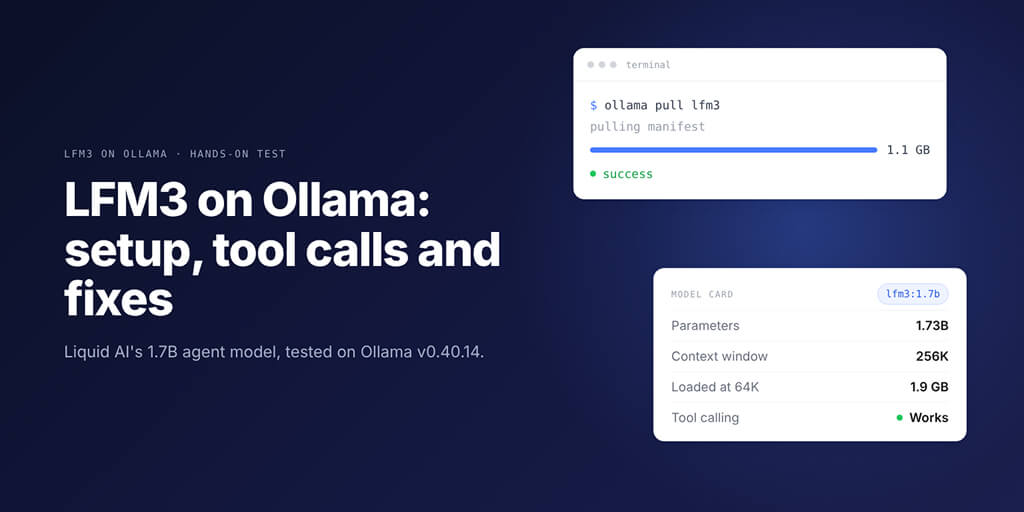
LFM3 on Ollama works, tool calling included. Update to Ollama v0.40.13 or later, run ollama pull lfm3, and you get Liquid AI's 1.7B text model: a 1.1 GB download with a 256K context window. In our test on v0.40.14, Ollama turned LFM3's XML tool calls into normal tool_calls JSON, so agents saw them.
Picture this. It's 2 AM, your local agent has a fresh 1.7B model loaded, and you ask for the weather in Paris.
The reply comes back empty. No tool call, no error, just a blank content field and a model that clearly tried.
We got that exact reply on 3 November 2026 by feeding LFM3 its tools the wrong way. So we installed it, broke it on purpose and fixed it.
What is LFM3, and why should an agent builder care?
LFM3 is Liquid AI's family of small open-weight models, announced on 27 October 2026. All six branch from LFM3-1.7B-Base, pre-trained on 22T tokens: text, vision, audio and omni models, plus two decision models.
When people say "LFM3", they usually mean the text model, LFM3-1.7B. Its model card says it was post-trained for agent frameworks such as Hermes Agent, Pi and OpenClaw.
That's what got our attention. Most small models merely accept a tools array. This one was trained for the job.
| Model | Parameters | Context (model card) | Inputs | Ollama name |
|---|---|---|---|---|
| LFM3-1.7B | 1.73B | 256K | Text | lfm3 |
| LFM3-VL-2B | 1.92B | 128K | Text, images, video | lfm3-vl |
| LFM3-Audio-2B | 2B | 32K | Text, audio | lfm3-audio |
| LFM3-Omni-2B | 2.17B | 32K | Text, images, video, audio | lfm3-omni |
One catch: on 3 November, the Input column on Ollama's tag lists showed no audio for lfm3-audio or lfm3-omni, so test audio first.
Liquid AI is also honest about the ceiling: the text model is "not recommended for agentic coding or complex multi-step reasoning due to its small size."
Under the hood, the text model has 24 layers: 13 gated short convolutions, 5 sliding-window attention layers and 6 global attention layers.
The licence, LFM Open License v1.0, allows commercial use while your company's annual revenue stays under $10 million.
Running LFM3 on Ollama takes four commands (and one version check)
Ollama added LFM3 in v0.40.12 (tagged 27 October) and fixed its GGUF builds in v0.40.13 (28 October), per the tagged commits in Ollama's GitHub repository. On Linux and Windows, v0.40.13 is the real minimum: ollama show lfm3 prints "requires 0.40.13".
Liquid AI's GGUF card lists v0.40.12 for macOS. We tested on v0.40.14 (2 November); v0.40.15 has since shipped.
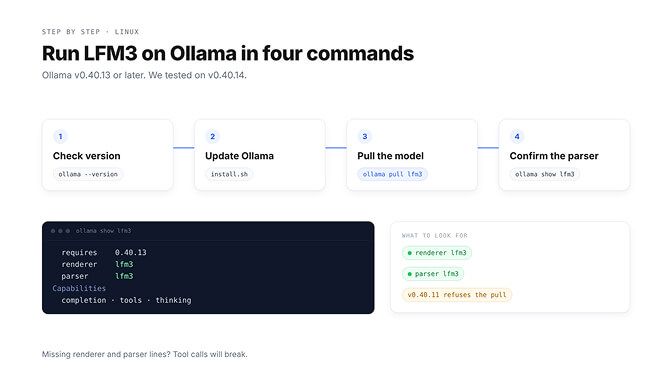
Check your version, update (on Linux the install script upgrades too), then pull:
ollama --version
curl -fsSL https://ollama.com/install.sh | sh
ollama pull lfm3
ollama show lfm3
On our Linux machine, lfm3 resolved to the 1.1 GB Q4_K_M build, and ollama show printed (trimmed):
    requires            0.40.13
    renderer            lfm3
    parser              lfm3
  Capabilities
    completion
    tools
    thinking
This is where most people get it wrong. They see tools under Capabilities and move on.
The lines that matter are renderer lfm3 and parser lfm3: Ollama's own LFM3 code formats prompts and reads output, and that code is why tool calling works. Then send a first prompt:
ollama run lfm3 "Summarise what a heat pump does in two sentences."
Still choosing a local runner? Our Ollama vs LM Studio comparison covers the trade-offs.
How much memory LFM3 needs, from 4K to the full 256K
Liquid AI says the text model "takes about 1 GB of memory" at 4-bit. Download sizes from Ollama's tag list:
| Tag | Format | Download |
|---|---|---|
lfm3 / lfm3:1.7b | Default, resolves per platform | 1.1 GB to 1.7 GB |
lfm3:1.7b-qad-q4_0 | GGUF 4-bit, quantization-aware distillation | 1.0 GB |
lfm3:1.7b-q4_K_M | GGUF 4-bit | 1.1 GB |
lfm3:1.7b-q8_0 | GGUF 8-bit | 1.8 GB |
lfm3:1.7b-bf16 | GGUF full precision | 3.5 GB |
nvfp4 / mxfp8 / mlx-bf16 | MLX, Apple Silicon | 1.7 / 2.1 / 3.5 GB |
The qad-q4_0 build, per Liquid AI's GGUF card, "was trained to recover the accuracy lost to Q4_0 quantization." On a small device, try that one first.
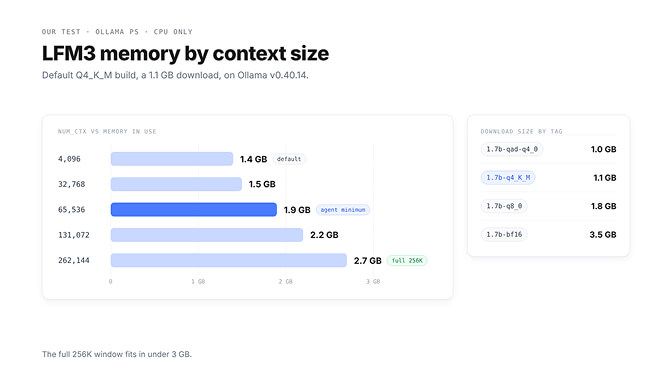
Context costs memory too. We loaded the default Q4_K_M build at five context sizes and read ollama ps (Linux, CPU only).
Context (num_ctx) | Memory in use |
|---|---|
| 4,096 (Ollama default under 24 GiB VRAM) | 1.4 GB |
| 32,768 | 1.5 GB |
| 65,536 | 1.9 GB |
| 131,072 | 2.2 GB |
| 262,144 (full 256K) | 2.7 GB |
Here's the weird part. The full 256K window fit in under 3 GB.
That lines up with Liquid AI's design. Only the 6 global attention layers see the whole context, and the sliding-window layers use a 256-token window.
On LFM3, context is cheap. Going from Ollama's 4K default to the full 256K cost us 1.3 GB, not a new GPU.
On our 2-vCPU machine with no GPU, generation ran at roughly 9 to 10 tokens per second. Treat that as a floor, not a benchmark.
Agents need far more than the 4K default. Ollama's docs recommend at least 64,000 tokens for agents and coding tools:
OLLAMA_CONTEXT_LENGTH=65536 ollama serve
Does LFM3 on Ollama actually call tools? We tested it
Yes. On v0.40.14 with the default lfm3 tag, the native /api/chat endpoint returned a proper structured tool call. Here is the exact request:
curl -s http://localhost:11434/api/chat -d '{
  "model": "lfm3",
  "stream": false,
  "messages": [{"role": "user", "content": "What is the weather in Paris right now?"}],
  "tools": [{"type": "function", "function": {
    "name": "get_weather",
    "description": "Get the current weather for a city",
    "parameters": {"type": "object",
      "properties": {"city": {"type": "string", "description": "City name"}},
      "required": ["city"]}}}]
}'
The response, with the thinking text removed:
"message": {
  "role": "assistant",
  "content": "",
  "tool_calls": [{"id": "call_vmg700ho",
    "function": {"index": 0, "name": "get_weather", "arguments": {"city": "Paris"}}}]
}
After a tool message with the weather, LFM3 replied: "The current weather in Paris is 14°C with light rain." The /v1/chat/completions endpoint also returned the call, with finish_reason: "tool_calls". For how other local models compare, see our list of Ollama models with tool calling support.
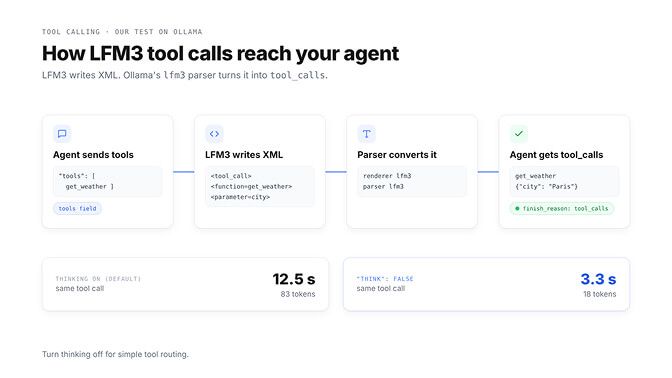
Now the part that trips people up. LFM3 itself does not write JSON.
Its model card shows calls in XML, <tool_call><function=get_weather><parameter=city>Paris</parameter></function></tool_call>, and Ollama's lfm3 parser converts that into tool_calls. Without that parser, the XML has nowhere to go, and that is the root of most "no tool calls" reports.
The model is rarely the problem. The translator between the model and your agent is. Check the parser before you blame the weights.
One speed tip: thinking is on by default. With "think": false, LFM3 made the same call with 18 generated tokens instead of 83, in 3.3 seconds instead of 12.5 on our machine.
So turn thinking off for simple tool routing. Liquid AI warns that disabling it "can be inconsistent, especially for reasoning-heavy tasks," so keep it on for harder steps.
That's the happy path. The next section covers four ways it can break, and every one is plumbing you would own.
Want the agent without the local setup? BetterClaw runs it always-on with BYOK across 28+ providers. Start your agent in 60 seconds
When LFM3 "does not support tools": the errors and their fixes
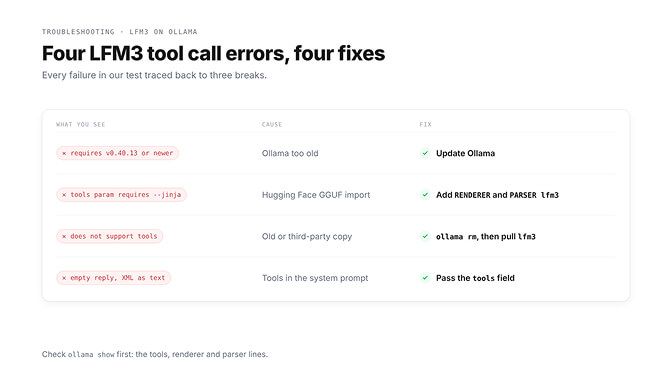
Every failure we hit came from one of three breaks: Ollama too old, no LFM3 parser, or tools missing from the tools field.
"model requires ollama version v0.40.13 or newer"
Word for word, from ollama pull lfm3 on v0.40.11:
Error: model requires ollama version v0.40.13 or newer (current version is v0.40.11)
Fix: update Ollama (install script on Linux, desktop app on macOS and Windows), check ollama --version, then pull again.
"tools param requires --jinja flag"
This one shows up when you import the GGUF from Hugging Face instead of using the library tag. After ollama pull hf.co/LiquidAI/LFM3-1.7B-GGUF:Q4_K_M on v0.40.14, ollama show listed tools, but the template source was gguf_chat_template with no renderer or parser.
Every request with tools failed:
{"error":"tools param requires --jinja flag"}
Requests without tools came back empty. So the model "supports tools" and rejects every tool request. Lovely.
Fix: use ollama pull lfm3, or wrap the Hugging Face file in a Modelfile with Ollama's LFM3 renderer and parser, plus Liquid AI's recommended sampling:
FROM hf.co/LiquidAI/LFM3-1.7B-GGUF:Q4_K_M
RENDERER lfm3
PARSER lfm3
PARAMETER temperature 0.1
PARAMETER top_k 50
PARAMETER repeat_penalty 1.1
ollama create lfm3-hf -f Modelfile
After that, ollama show lfm3-hf listed both lines, and the weather request returned a clean tool_calls entry.
"registry.ollama.ai/library/lfm3 does not support tools"
Ollama returns this when the model's capabilities, read from its template, lack tools. No LFM3 build triggered it on v0.40.14, so if you see it, something on your machine is stale. Our Agent Error Decoder entry for "Ollama does not support tools" runs the same check for other models.
Fix: run ollama show on the exact model name your agent uses. If tools, renderer lfm3 or parser lfm3 is missing, it's an old copy or a third-party upload: ollama rm it, then pull lfm3 again or use the Modelfile above.
Tool calls come back as text, or the reply is empty
This is the 2 AM blank reply from the top of this post. It happens when the agent lists its tools in the system prompt instead of the tools field.
In our test, /api/chat returned empty content, and the raw output showed a malformed XML call:
<tool_call>
<function=get_weather(city: string)}
</parameter>
</function>
</tool_call>
Fix: pass tool schemas in the tools field on every request, as the LFM3 model card instructs. In OpenClaw, use Ollama's native URL, because OpenClaw's docs warn that the /v1 URL "breaks tool calling and models can emit raw tool-call JSON as plain text."
LFM3 vs Qwen 3.5 4B vs Gemma 4 E4B: which small model should run your agent?
Liquid AI's own benchmark table compares LFM3-1.7B with both. These are vendor runs (vLLM, BF16), not independent results, so read them as a claim to test. If you are weighing the other two on their own, our Gemma 4 vs Qwen 3.5 breakdown goes deeper.
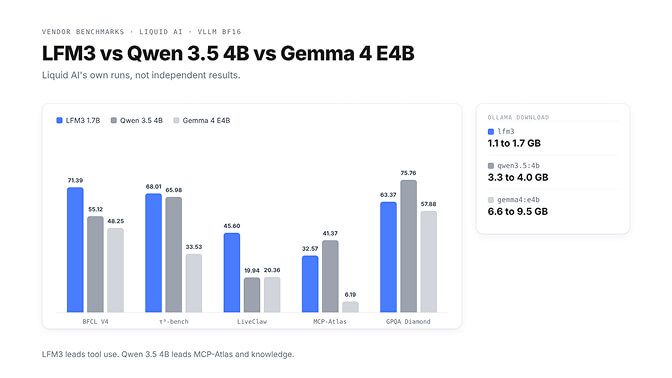
| LFM3 1.7B | Qwen 3.5 4B | Gemma 4 E4B | |
|---|---|---|---|
| Parameters (per Liquid AI) | 1.7B | 4.7B | 8B |
| Ollama default tag | 1.1 GB to 1.7 GB | 3.3 GB to 4.0 GB | 6.6 GB to 9.5 GB |
| Context on Ollama | 256K | 256K | 128K |
| Inputs on Ollama | Text | Text, image | Text, image |
| BFCL V4 (tool use) | 71.39 | 55.12 | 48.25 |
| τ³-bench average | 68.01 | 65.98 | 33.53 |
| MCP-Atlas | 32.57 | 41.37 | 6.19 |
| LiveClaw (OpenClaw tasks) | 45.60 | 19.94 | 20.36 |
| GPQA Diamond (knowledge) | 63.37 | 75.76 | 57.88 |
Stay with me here, because the numbers split cleanly. LFM3 leads on BFCL V4, τ³-bench and LiveClaw at a third of Qwen's download size. Qwen 3.5 4B leads on MCP-Atlas and knowledge, and both rivals read images.
Gemma 4 E4B is the hardest sell: the biggest download here and the lowest scores on BFCL V4, τ³-bench and MCP-Atlas.
Our pick: LFM3 as a fast local tool caller, Qwen 3.5 4B when the agent needs world knowledge or vision.
Wiring LFM3 into an OpenClaw agent
The quickest OpenClaw route is the launcher on Ollama's LFM3 page:
ollama launch openclaw --model lfm3
To configure OpenClaw by hand, use the native Ollama provider. This is the "small local model" recipe from OpenClaw's docs with LFM3 swapped in:
{
  agents: { entries: { local: { model: { primary: "ollama/lfm3" } } } },
  models: { providers: { ollama: {
    baseUrl: "http://127.0.0.1:11434", // no /v1
    apiKey: "ollama-local",
    api: "ollama",
    models: [{ id: "lfm3", name: "lfm3", input: ["text"],
      contextTokens: 32768, params: { num_ctx: 32768 } }],
  } } },
}
OpenClaw's setup uses a 32,768-token context for local models, while Ollama's OpenClaw guide recommends 64K or more. At 1.9 GB for 65,536 in our test, LFM3 can afford it, so raise both values when the agent reads long files.
Then split the work. Keep LFM3 for tool calls, routing and extraction, and send coding and long reasoning to a bigger model, as Liquid AI's card advises.
Would you rather skip the laptop? BetterClaw's BYOK route takes your own API key for 28+ providers with zero markup. For the local side, our OpenClaw and Ollama guide covers the rest of the setup.
Here's what stuck with us after a day of breaking LFM3. In every failure we hit, the fix was in the setup, not the weights: a version pin, a missing parser, a tool list in the wrong field.
Small models are now good enough that the plumbing is the hard part. Learn to read
ollama showthe way you read a stack trace, and a 1 GB model will do real work for you.
Frequently Asked Questions
What is LFM3?
LFM3 is Liquid AI's family of small open-weight models, announced 27 October 2026. The text model, LFM3-1.7B, has a 256K context window, was post-trained for agents such as OpenClaw, and is the lfm3 tag on Ollama.
Does LFM3 support tool calling in Ollama?
Yes. In our test on Ollama v0.40.14, the lfm3 tag returned structured tool_calls. LFM3 writes calls in XML, and Ollama's lfm3 parser converts them.
Why does Ollama say LFM3 does not support tools, and how do I fix it?
Your copy lacks the tools capability or the LFM3 parser, usually from an old pull or a third-party upload. Update to v0.40.13 or later and pull lfm3 again, or add RENDERER lfm3 and PARSER lfm3 to a Modelfile.
Is LFM3 better than Qwen 3.5 4B?
For tool calling, Liquid AI's numbers say yes: 71.39 on BFCL V4 against 55.12, at a third of the download size. Qwen 3.5 4B wins on knowledge and reads images. These are vendor benchmarks, so test both.
How much RAM does LFM3 need, and what does it cost to run?
In our test the default 1.1 GB build used 1.4 GB at Ollama's 4K default and 2.7 GB at the full 256K. The licence allows commercial use while annual revenue stays under $10 million.
Is LFM3 reliable enough for a real agent?
For tool calls, routing and extraction, yes, once Ollama's lfm3 parser is in place. Liquid AI does not recommend it for agentic coding or complex multi-step reasoning, so send those steps to a bigger model.