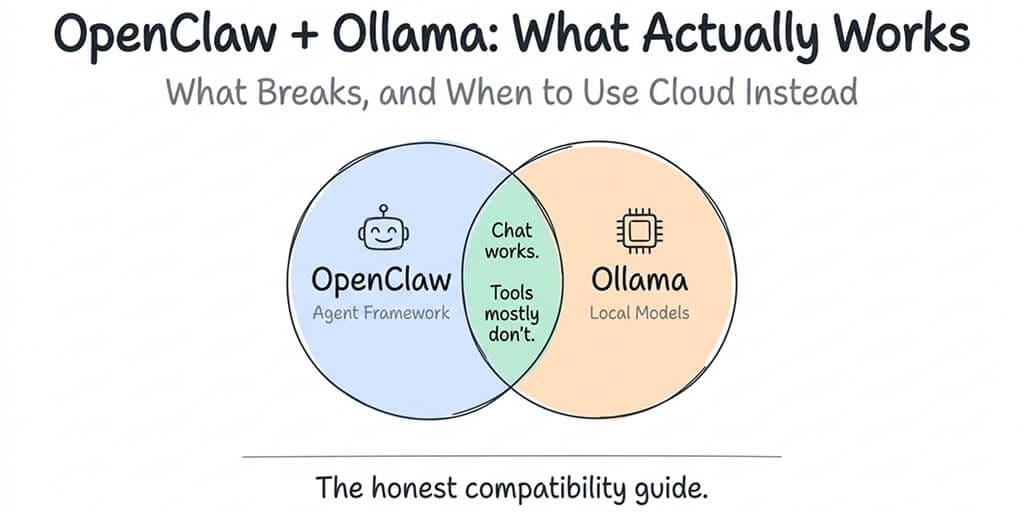
We tested every recommended Ollama model with OpenClaw. Some chat fine. Many call tools fine — once you fix the one config setting almost every guide gets wrong.
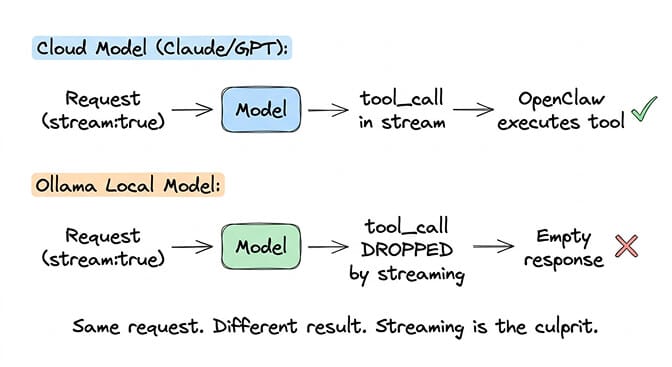
OpenClaw + Ollama works for both chat and tool calling when you point the gateway at Ollama's native /api/chat endpoint. If your baseUrl ends in /v1, tool calls drop silently (the /v1 OpenAI-compat path doesn't preserve tool-call delta chunks under streaming — the bug originally tracked in GitHub Issue #5769). Drop the /v1 suffix, restart the gateway, and tool calls flow through correctly. This guide covers the working config, the three gotchas that still trip people up, model picks for 2026, and the cost trade-off vs. cheap cloud APIs.
I spent a Saturday afternoon trying to get Qwen3 8B running through Ollama as my OpenClaw agent's primary model. Zero API costs. Full privacy. The dream setup.
The model loaded. The gateway started. I typed "hello." It responded instantly. Then I asked it to check my calendar. The agent generated a narrative essay about how it would check my calendar if it could, instead of actually calling the calendar tool. Beautiful prose about web searching, zero actual web searches.
Three hours later I found the actual cause: my config pointed at http://localhost:11434/v1. The /v1 path is OpenAI-compatible but drops tool-call deltas. The native /api/chat path doesn't. One config change, and the agent started calling tools normally.
Here's the full picture: what works, what still breaks, the three gotchas that eat hours, and when Ollama is — and isn't — worth the effort.
Native API vs /v1: where tool calls actually live or die
The root cause of most "Ollama tool calling broken" reports is the endpoint your OpenClaw Ollama provider points at, not Ollama itself. GitHub Issue #5769 originally documented streaming dropping tool calls on the OpenAI-compatible /v1 path. That's the path that's broken — and it's still broken — because Ollama's /v1 streaming doesn't emit tool_calls delta chunks correctly.
OpenClaw's native Ollama provider uses /api/chat instead and preserves tool calls under streaming. The official Ollama provider docs explicitly warn against using /v1 because it still breaks tool calling.
The working config
{
  "models": {
    "providers": {
      "ollama": {
        "baseUrl": "http://127.0.0.1:11434",
        "apiKey": "ollama-local",
        "api": "ollama",
        "models": [{
          "id": "qwen3-coder:30b",
          "contextWindow": 65536
        }]
      }
    }
  }
}
Three things matter here:
- No
/v1suffix onbaseUrl. If you've followed an older guide that wrotehttp://localhost:11434/v1, drop the/v1. api: "ollama"explicitly selects the native provider. Don't rely on auto-detection.- Model
iduses the exact Ollama tag. Useqwen3-coder:30b(with colon), notqwen3-coder-30b(hyphen) — and not prefixed withollama/since the provider is already declared.
After saving, restart OpenClaw and verify with openclaw doctor --deep. If your version of OpenClaw is recent enough to ship the native provider as default, you're done.
How to verify Ollama is actually being used (not silent cloud fallback)
OpenClaw can silently fall back to a cloud provider if your Ollama config isn't recognized — meaning your agent looks like it's working but is quietly burning your Anthropic credits. To confirm Ollama is in the loop:
# 1. From the OpenClaw gateway logs, watch a request go out
openclaw logs --follow --filter provider=ollama

# 2. Or hit Ollama's own request log
tail -f ~/.ollama/logs/server.log
# A live request from OpenClaw shows up as POST /api/chat with your model name.
If openclaw doctor --deep reports the Ollama provider as healthy and you see live /api/chat requests hit Ollama when your agent runs, the config is wired correctly.
Falling back to the older workaround
If you're stuck on an OpenClaw build that pre-dates the native /api/chat provider, the community workaround is to patch streaming off when tools are present:
const shouldStream = !(context.tools?.length && isOllamaProvider(model));
This requires modifying OpenClaw's source and rebuilding. Updating to a current release and switching baseUrl is the easier path.
For a detailed breakdown of all five ways local models fail in OpenClaw (including discovery timeouts, WSL2 networking, and the CLI vs API confusion), our troubleshooting guide covers each failure mode.
What works well with OpenClaw + Ollama
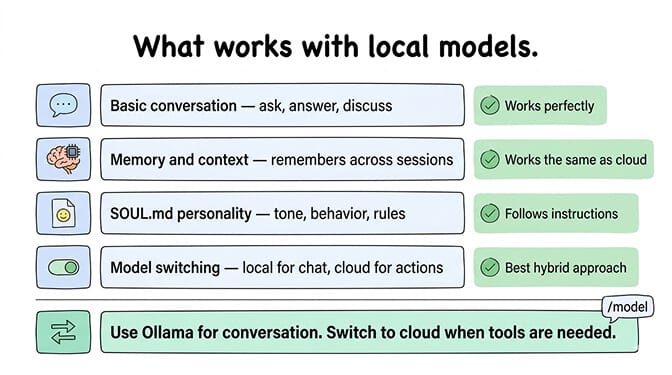
Once you're on the native /api/chat provider with a tool-capable model, almost everything OpenClaw does works locally. Here are the parts you should expect to work cleanly.
Basic conversation
Ask questions, get answers, have discussions. The agent responds through whatever chat platform you've connected (Telegram, WhatsApp, Slack). If all you want is a private chatbot that runs on your hardware, Ollama delivers.
Memory and context
Ollama models maintain conversation context through OpenClaw's memory system. The agent remembers previous messages, stores preferences, and builds context over time. This works the same as with cloud models, and the same as it does on a hosted AI agent builder if you later decide the local hardware is not worth the maintenance.
SOUL.md personality
Your agent's personality configuration works normally with local models. Customize tone, behavior rules, and working context. The model follows the system prompt instructions.
Tool calling (on the native API + a tool-capable model)
With the native /api/chat provider and a model that was trained for function calling (qwen3-coder:30b, glm-4.7-flash, hermes3, gemma4:e4b, gpt-oss:20b, mistral:7b), tool calls flow through. Skills execute. Web searches happen. File operations land. You can verify by watching ~/.ollama/logs/server.log for the actual /api/chat requests as the agent runs.
Model switching mid-conversation
The /model command works with Ollama models. You can switch between local and cloud providers on the fly. Type /model ollama/qwen3-coder:30b for a quick local response, then /model anthropic/claude-sonnet-4-6 when you want the heavier reasoning ceiling of a cloud model.
This hybrid approach is one of the strongest uses of Ollama in OpenClaw: local for routine work and privacy-sensitive tasks, cloud for complex reasoning.
What still breaks (and what to do about it)
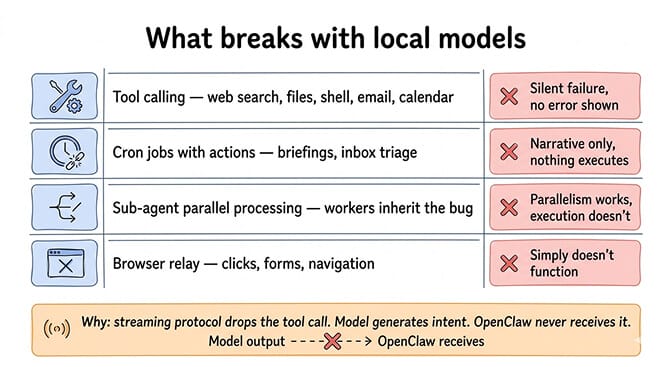
Tool calling on the /v1 OpenAI-compat path
This is the original "Ollama tool calling is broken" story, and it's still broken. If your baseUrl ends in /v1, the tool-call delta chunks get dropped on the streaming response and your agent narrates what it would do instead of doing it. Fix is the one above: drop /v1 from baseUrl and use the native provider.
Models that weren't trained for function calling
Even on the native provider, models like phi3:mini or older 3B-7B builds without explicit tool-calling training will fail with "model does not support tools" errors or by ignoring the tools entirely. See the "model does not support tools" fix for the full list of safe vs. unsafe model picks.
Sub-agent parallel processing at small model sizes
Sub-agents that need precise multi-step tool sequencing struggle on local models under ~30B parameters even when tool calling mechanically works. Reasoning, not protocol, is the limit at smaller sizes. Use a 30B-class model (or a cloud model) for orchestrator roles and keep the smaller local model for individual workers.
Browser relay
OpenClaw's browser automation requires precise, long sequences of structured tool calls to click elements, fill forms, and navigate pages. Local models can produce correct tool-call syntax but the format-fidelity over a long browser session is still well below cloud-model reliability. Most browser-relay workflows are better served by cloud models today.
The models the community actually recommends
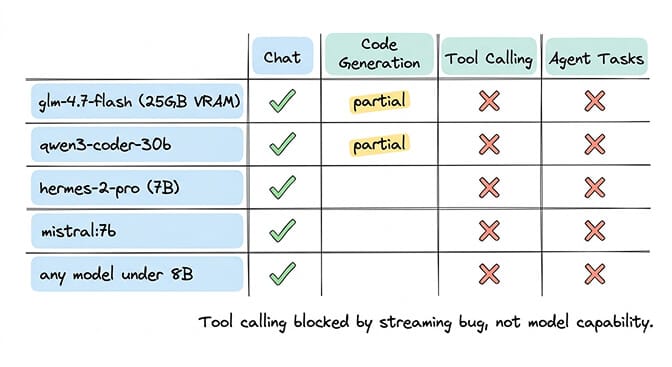
Some local models work noticeably better than others. Here's the current 2026 picks:
| Model | Size | Tool support | Min VRAM (q4) | Best for |
|---|---|---|---|---|
glm-4.7-flash | 30B-A3B MoE | Yes | ~19GB at q4_K_M | Community favorite — strong reasoning + code |
qwen3-coder:30b | 30.5B / 3.3B active MoE | Yes | ~24GB | Code-heavy agent workflows, 256K context |
qwen3.6:35b-a3b | 35B / 3B active MoE | Yes | ~24GB | Newer Qwen MoE designed for agents |
qwen3.5:9b | 9B | Yes | ~12GB | Sweet-spot 16-24GB-machine option |
gemma4:e4b | 4B-effective | Yes | ~8GB | Best 16GB-machine option (April 2026) |
gpt-oss:20b | 21B / 3.6B active MoE | Yes | ~16GB | OpenAI open-weights MoE, MXFP4 |
hermes3 | 8B | Yes | ~8GB | Lightweight tool-calling pick (replaces hermes-2-pro) |
mistral:7b | 7B | Yes | ~8GB | Still works, lower reasoning ceiling |
phi3:mini, qwen2.5:3b | <8B | No | — | Avoid for agent tasks — trigger "model does not support tools" |
For agent workflows, plan for 30B+ parameters with at least 64K context window. Anything smaller struggles with OpenClaw's system prompts and multi-turn conversations.
One-command setup — Ollama 0.17+ ships a launch subcommand that auto-installs and configures OpenClaw to use the local daemon:
ollama launch openclaw --model glm-4.7-flash
That picks the right native baseUrl, pulls the model if needed, and writes the provider config for you.
Apple Silicon notes
On M-series Macs, Ollama runs via Metal acceleration and the unified-memory architecture changes the math: a 32GB M3 Pro or M4 Pro can comfortably run 30B-class models at q4 — the same models that need a 24GB discrete NVIDIA card on Linux/Windows. Mac Mini M4 with 16GB unified memory handles 7B-14B models smoothly; the 24GB upgrade unlocks the 30B tier. (Apple repriced the Mac Mini in May 2026 — base now starts at $799, the M4 Pro variants at $1,299, with a 48GB max after DRAM cuts replaced the old 64GB option.)
For guidance on choosing the right model for your specific use case, our model comparison covers cost-per-task data across local and cloud providers.
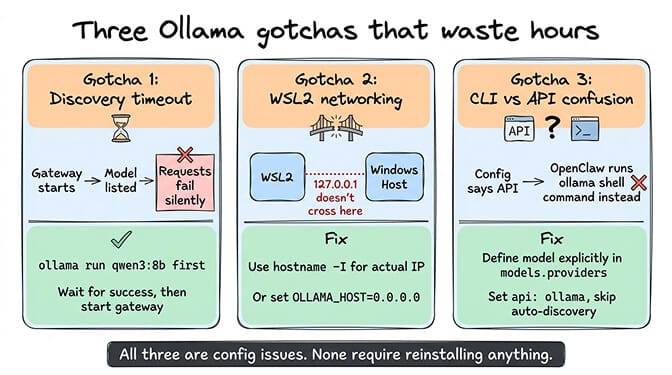
The three Ollama gotchas that waste hours
Beyond the tool calling bug, three configuration issues eat the most time.
Gotcha 1: Model discovery timeout
When OpenClaw starts, it tries to auto-discover Ollama models. If Ollama is slow (common when the model isn't pre-loaded), discovery times out silently. Your gateway starts. Your model is listed. But requests fail.
Fix: Pre-load the model before starting OpenClaw:
ollama run qwen3:8b
# Wait for "success," then Ctrl+C
openclaw gateway start
Or define models explicitly in your config to skip discovery entirely (shown above).
Gotcha 2: WSL2 networking
If you're running OpenClaw in WSL2 and Ollama on the Windows host (or vice versa), 127.0.0.1 doesn't resolve across the boundary. Your config says localhost. Your curl works. But OpenClaw can't reach Ollama.
Fix: Use the actual WSL2 IP from hostname -I. Or bind Ollama to 0.0.0.0 with OLLAMA_HOST=0.0.0.0:11434 ollama serve.
Gotcha 3: The CLI vs API confusion
GitHub Issue #11283 documents this bizarre behavior: you configure Ollama as a remote API provider with a baseUrl. OpenClaw should make HTTP API calls. Instead, it tries to execute ollama run as a shell command on your local machine. This happens when OpenClaw's model routing falls back to a cloud model that then tries to "help" by calling Ollama via CLI.
Fix: Make sure your Ollama model is explicitly defined in the models.providers section with api: "ollama" and is listed in the models array. Don't rely on auto-discovery for remote Ollama.
The honest cost comparison: Ollama vs cheap cloud providers
The appeal of Ollama is zero API costs. But "zero API costs" and "zero cost" are different things.
Running Ollama on hardware you own means electricity, hardware depreciation, and your time debugging issues. A Mac Mini M4 (now starting at $799 after the May 2026 repricing) running 24/7 consumes roughly $3-5/month in electricity. The machine itself depreciates over its useful life.
Meanwhile, cloud providers in 2026 remain cheap enough that the math rarely favors local on cost alone. Cheap providers like DeepSeek V4-Flash, Gemini 3 Flash, and Claude Haiku 4.5 run a moderately active agent for a few dollars a month with reliable tool calling. For up-to-date pricing across providers, see our cheapest cloud providers for OpenClaw breakdown.
The cheapest model isn't the one with the lowest per-token price. It's the one that can do the job. With native /api/chat working, local Ollama models can absolutely do the job for chat and many tool-calling tasks — the trade-off shifts from "tool calling vs. no tool calling" to "raw speed/quality vs. privacy and zero token costs."
If you want multi-provider routing, multi-channel support, and zero Ollama debugging, BetterClaw supports 28+ cloud providers with BYOK and zero configuration. Start free on the 1-agent free plan — no credit card — or upgrade to Pro at $49/month. 60-second deploy.
When Ollama with OpenClaw genuinely makes sense
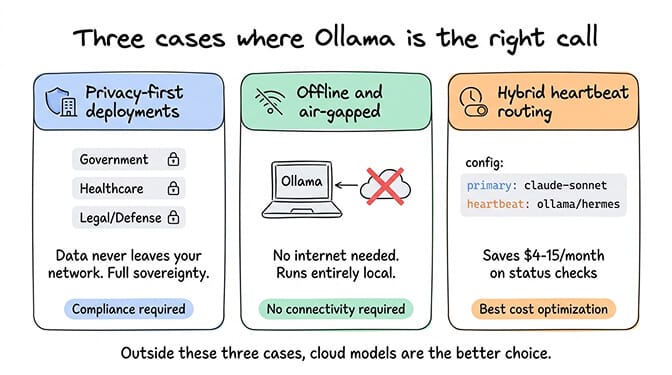
I'm not going to pretend Ollama is never the right choice. Three scenarios justify the setup.
Privacy-first deployments
If your data absolutely cannot leave your network, local models are the only option. Government, healthcare, legal, defense: these environments have compliance requirements that no cloud provider can satisfy. The tool calling limitation is real, but for conversational interaction with sensitive data, Ollama delivers complete data sovereignty.
Offline and air-gapped environments
No internet? No API calls. Ollama runs entirely locally. If you need an AI assistant in an environment without reliable connectivity, local models are it.
Hybrid heartbeat routing
Use Ollama for heartbeats (the 48 daily status checks that cost tokens on cloud providers) and a cloud model for everything else. Heartbeats don't require tool calling. They're simple status checks. Running them locally saves $4-15/month depending on your cloud model pricing.
{
  "agent": {
    "model": {
      "primary": "anthropic/claude-sonnet-4-6",
      "heartbeat": "ollama/hermes3"
    }
  }
}
For the full model routing setup, our intelligent provider switching guide covers the config patterns.
Where this leaves you
With native /api/chat working, the gap between local and cloud has narrowed for the subset of tasks that don't require frontier-level reasoning — but "narrowed" isn't "closed." Cloud models like Claude Sonnet 4.6 still outperform local models on complex multi-step reasoning, long-context accuracy, and prompt-injection resistance, and they're simply faster per-token on hosted GPUs. The practical answer is hybrid: cloud for the heavy stuff, local for privacy-sensitive tasks and high-volume background work like heartbeats.
If you want an agent that works with any provider without debugging streaming protocols or maintaining your own hardware, give BetterClaw a try. Free plan with 1 agent + BYOK. Pro at $49/month. 60-second deploy. The tool calling just works because we handle the model integration layer.
Frequently Asked Questions
Does OpenClaw work with Ollama local models?
Yes — for both chat and tool calling. Use OpenClaw's native Ollama provider (api: "ollama", baseUrl: "http://127.0.0.1:11434" with no /v1 suffix). The native /api/chat path preserves tool-call deltas under streaming. The legacy /v1 OpenAI-compat path drops them, which is the original cause of GitHub Issue #5769.
Why is my OpenClaw agent not calling tools when using Ollama?
Two likely causes. First: your baseUrl ends in /v1 — drop it. The native /api/chat path supports tool calling; the /v1 path doesn't. Second: your model wasn't trained for function calling (e.g., phi3:mini). Switch to a tool-capable model like qwen3-coder:30b, glm-4.7-flash, hermes3, or gemma4:e4b. Restart the gateway and run openclaw doctor --deep to confirm.
How does Ollama compare to cloud providers for OpenClaw?
Ollama gives you zero token costs and full data privacy; cloud providers give you higher reasoning ceilings and faster per-token latency on hosted GPUs. Cheap providers like DeepSeek V4-Flash, Gemini 3 Flash, and Claude Haiku 4.5 run a moderate agent for a few dollars a month. Most teams settle on hybrid: cloud primary, Ollama for heartbeats and privacy-sensitive tasks.
How do I set up Ollama with OpenClaw?
Easiest path: ollama launch openclaw --model glm-4.7-flash (Ollama 0.17+). Manual path: install Ollama, run ollama pull qwen3-coder:30b, configure ~/.openclaw/openclaw.json with the Ollama provider (api: "ollama", baseUrl: "http://127.0.0.1:11434", no /v1, contextWindow: 65536). Restart and run openclaw doctor --deep.
Is running OpenClaw with Ollama cheaper than cloud APIs?
Usually not on cost alone. Ollama has zero token costs but needs capable hardware ($799+ Mac Mini M4 or GPU-equipped desktop) and electricity. Cheap cloud providers run a full agent for a few dollars a month. Ollama wins for privacy, offline operation, and high-volume heartbeats — not for cost savings alone.
Which Ollama models work best with OpenClaw?
For agent workflows: glm-4.7-flash (~19GB VRAM at q4, community favorite), qwen3-coder:30b (strong for code, 24GB+ VRAM), and qwen3.6:35b-a3b. For 16GB machines: qwen3.5:9b, gemma4:e4b, or hermes3. Avoid models under 8B parameters for tool use. Set context window to 64K+.