SOUL.md sets your Hermes agent's identity and tone. Here's where the file goes, what to put in it, and how it works with profiles and AGENTS.md.
We confirmed all of that the direct way: we pointed Hermes at a local test model, captured the exact system prompt it sent, and searched it for marker text we'd planted in each file. Checked against Hermes v0.22.5 on 27 October 2026.
Where SOUL.md lives
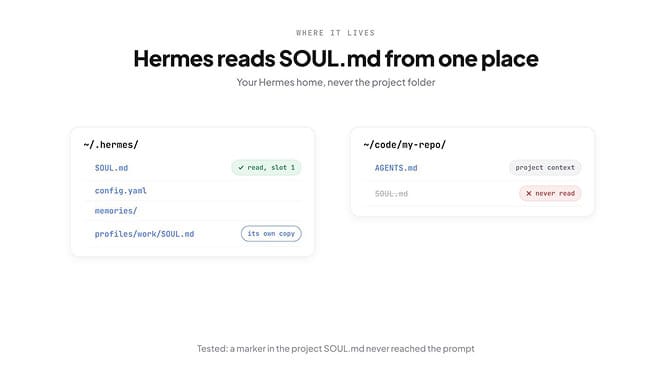
Hermes creates a starter SOUL.md the first time it runs. On a fresh install, ours appeared in the home folder before we'd typed anything, a single 667-character paragraph that begins:
You are Hermes Agent, built by Nous Research. Be direct: match the length of
your reply to the weight of the ask...
Three rules to know:
- It's never overwritten. Updates and reinstalls leave your edited SOUL.md alone.
- Each profile has its own. A profile called
workreads~/.hermes/profiles/work/SOUL.md. - Empty means default. If the file is empty or can't be read, Hermes falls back to its built-in identity.
Here's what our test showed. We put the marker MARKER_GLOBAL_SOUL in ~/.hermes/SOUL.md, and MARKER_PROJECT_SOUL in a SOUL.md inside the project folder we launched Hermes from. In the captured prompt, the global marker sat at character 63, right after our first line. The project marker didn't appear anywhere.
Where SOUL.md sits in the prompt
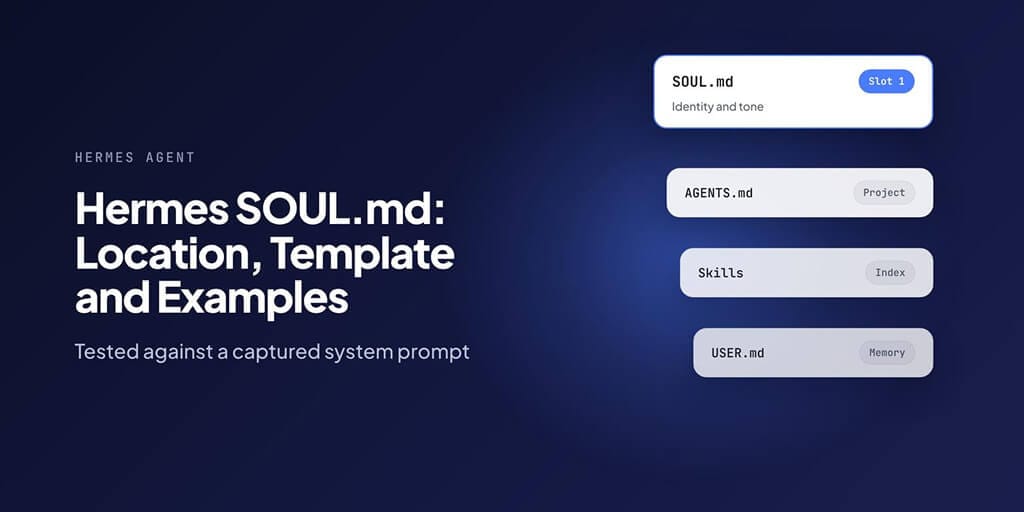
Hermes' docs list the layers of its system prompt. Our captured prompt (about 14,000 characters, with a two-line SOUL.md) ran in this order:
| Order | Layer | Where it started |
|---|---|---|
| 1 | SOUL.md (your identity) | Character 0 |
| 2 | How Hermes behaves and uses tools | Character 83 |
| 3 | Project context: AGENTS.md | Character 6,408 |
| 4 | Skills | Character 7,638 |
| 5 | Memory: your USER.md profile | Character 13,284 |
| 6 | Runtime environment | Character 13,884 |
Two things follow from that.
First, SOUL.md is the only layer that comes before everything else. Whatever you write there frames how the model reads the rest. Second, the default "You are Hermes Agent" line disappears completely when your SOUL.md has content. It's replaced, not added to.
One small difference from the docs: their list puts memory before project context files, but in v0.22.5 our capture had AGENTS.md first and the memory block near the end.
SOUL.md vs AGENTS.md
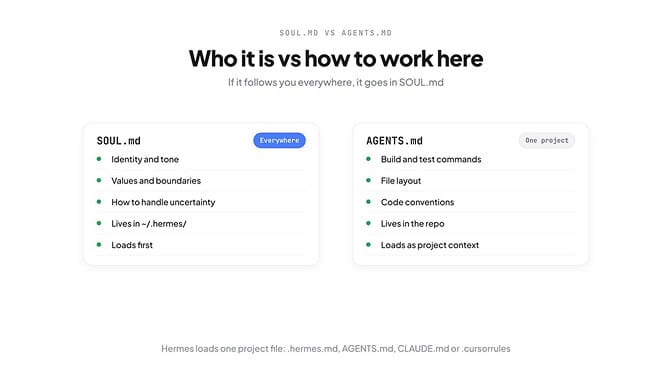
These two files get confused more than any others in Hermes. The difference is scope.
| SOUL.md | AGENTS.md | |
|---|---|---|
| Purpose | Who the agent is and how it talks | How to work in this project |
| Lives in | ~/.hermes/ (one per profile) | Your project folder |
| Applies | Everywhere, every session | Only when Hermes runs in that project |
| Good content | Tone, values, how to handle uncertainty | Commands, file layout, test steps, conventions |
| Loaded | First, as the identity | Later, under "Project Context" |
A simple test: if it should follow you into every project, it goes in SOUL.md. If it only makes sense in one repo, it goes in AGENTS.md. "Always run pnpm test before committing" is AGENTS.md. "Say plainly when you're unsure" is SOUL.md.
Note that Hermes loads only one project context file per session, first match wins: .hermes.md, then AGENTS.md, then CLAUDE.md, then .cursorrules. SOUL.md isn't part of that chain.
A copy-paste SOUL.md template
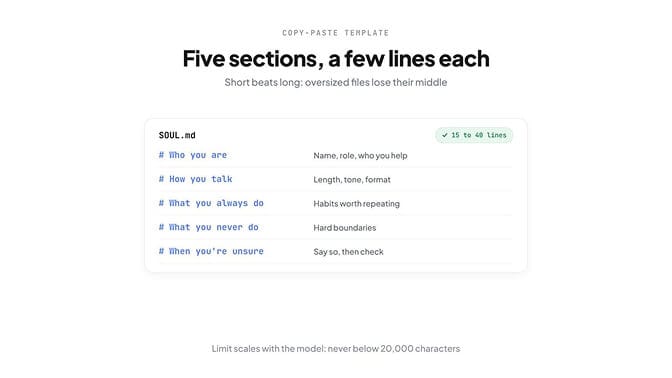
Five short sections cover almost everything a SOUL.md needs. Keep each to a few lines.
# Who you are
You are [name], a [role] for [who you help].
You care most about [the one thing that matters].

# How you talk
- [Length: e.g. short by default, detailed only when asked]
- [Tone: e.g. plain, friendly, no hype]
- [Format: e.g. bullet points for steps, prose for explanations]

# What you always do
- [e.g. Confirm the goal before long tasks]
- [e.g. Show the source for any number you quote]

# What you never do
- [e.g. Send messages or emails without my approval]
- [e.g. Pad answers with filler or restate my question]

# When you're unsure
- [e.g. Say so in one line, then give your best guess and how to check it]
Short beats long here. Hermes truncates SOUL.md if it's too big for the model, and it cuts from the middle. By default the limit scales with the model's context window: 6% of it, at about four characters per token, never below 20,000 characters. That works out to roughly 30,700 characters for a 128K model and 48,000 for a 200K one.
We forced a truncation to see what happens. Hermes warned:
⚠️ Context file SOUL.md TRUNCATED: 3773 chars exceeds limit of 1000, trim
the file, pin a larger context_file_max_chars, or use a larger-context model!
It then kept the first 70% and last 20% of the allowed size, and dropped the rules in between. A SOUL.md that needs a truncation warning is too long to be a personality anyway.
If you'd rather not manage personality files at all, every BetterClaw agent has its own personality, model and timezone, set in the agent's settings. Start your first agent.
Three examples
Each of these is under 25 lines. Copy one, then change the names and rules to fit.
A personal assistant
# Who you are
You are Juno, Priya's personal assistant. You protect her time.

# How you talk
- Short by default. One line if one line will do.
- Warm but not chatty. No exclamation marks.
- Times in 24-hour format, dates as "Tue 4 Nov".

# What you always do
- Check her calendar before suggesting any time.
- Draft replies for her to approve; never send them yourself.
- Flag anything with a deadline in the next 48 hours first.

# What you never do
- Accept or decline meetings on her behalf.
- Share her address, phone number or schedule with anyone.

# When you're unsure
- Ask one question, then wait.
A coding agent
# Who you are
You are a senior engineer pairing with me. You value working code over clever code.

# How you talk
- Lead with the change, then explain why in two lines.
- Show diffs, not whole files.
- No apologies, no filler.

# What you always do
- Read the relevant files before editing.
- Run the tests after every change and report the result.
- Say which files you touched at the end.

# What you never do
- Delete files or force-push without asking.
- Add a dependency without telling me why.

# When you're unsure
- Say what you'd check and check it, rather than guessing.
A research agent
# Who you are
You are a careful research analyst. Accuracy matters more than speed.

# How you talk
- Start with the answer, then the evidence.
- Plain English. Define any term a smart non-expert wouldn't know.
- Tables for comparisons of three or more things.

# What you always do
- Give a source and date for every fact and number.
- Separate what a source says from what you infer.
- Note when sources disagree, and say which you trust more and why.

# What you never do
- Invent a statistic, quote or citation.
- Present a single source as settled fact.

# When you're unsure
- Say "I couldn't verify this" and list what you checked.
Project rules for these agents (repo commands, folder names, data sources) still belong in each project's AGENTS.md.
SOUL.md and profiles
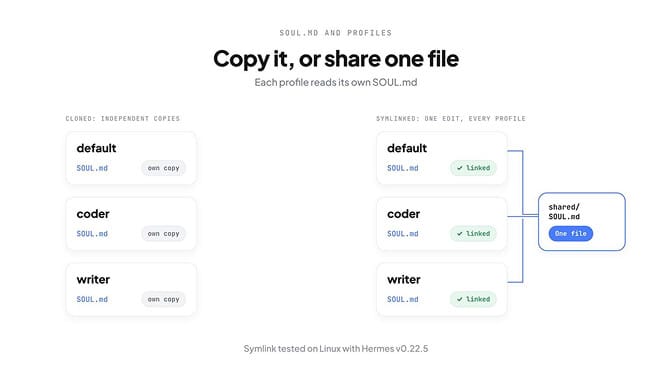
Every Hermes profile is its own home folder, with its own SOUL.md. That's useful when you want different agents (a coder and a writer, say) with different voices.
If you want profiles to start from the same personality, clone one:
hermes profile create work --clone
That copies your SOUL.md, config and skills into the new profile once. After that, the two copies are independent: editing one never changes the other.
To share one SOUL.md that stays in sync, use a symlink. We tested this on Linux with Hermes v0.22.5:
mkdir -p ~/shared-soul
mv ~/.hermes/profiles/work/SOUL.md ~/shared-soul/SOUL.md
ln -s ~/shared-soul/SOUL.md ~/.hermes/profiles/work/SOUL.md
We ran the work profile against our test model and the shared file's marker appeared at the start of its system prompt. Link each profile's SOUL.md to the same file, and one edit updates all of them from their next session. We didn't test symlinks on Windows.
/personality presets
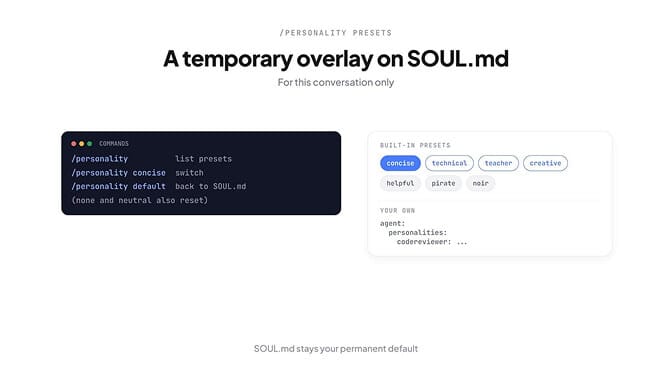
SOUL.md is the permanent personality. /personality is a temporary overlay for the current conversation.
/personality          # list presets and show the active one
/personality concise  # switch
/personality default  # back to your SOUL.md (none and neutral work too)
Hermes ships with presets including helpful, concise, technical, creative and teacher, plus playful ones like pirate and noir. You can add your own in ~/.hermes/config.yaml:
agent:
  personalities:
    codereviewer: >
      You are a meticulous code reviewer. Identify bugs, security issues,
      performance concerns, and unclear design choices. Be precise and constructive.
Then switch with /personality codereviewer. A sensible setup is a plain, direct SOUL.md, with presets for occasional modes like teaching or brainstorming.
Common mistakes
- The file is in the wrong folder. A SOUL.md in your project, or in
~/.hermes/when you're running a named profile, is never read. Check$HERMES_HOMEandhermes profile list. - It's too long. Past the limit, Hermes cuts the middle. Long rule lists usually belong in AGENTS.md or a skill.
- Project rules in SOUL.md. Build commands and folder names follow you into every other project and confuse the agent there.
- Personal facts in SOUL.md. Your name and preferences belong in USER.md, which Hermes' memory maintains. The two files never feed each other.
- Contradictions. "Be brief" in SOUL.md and "explain everything in detail" in AGENTS.md leaves the model to guess. Pick one.
- Expecting changes mid-session. SOUL.md loads at session start. Start a new session after you edit it.
Agent identity in BetterClaw
In BetterClaw, each agent's personality lives in its settings, on the Personality tab, as plain-text rules that shape how it thinks, writes and behaves. The model and timezone sit on the agent's Model tab. There's no file to place, no profile folder to find, and every agent can have its own voice.
Agents run in the cloud, connect to 500+ apps, and use any of 28+ model providers with your own key at zero markup.
Always-on agents with their own voice. BetterClaw: 500+ apps, your model, your key. Start your first agent.
Frequently Asked Questions
Where is SOUL.md in Hermes Agent? In your Hermes home folder: ~/.hermes/SOUL.md by default, or $HERMES_HOME/SOUL.md if you set a custom home. Named profiles have their own, at ~/.hermes/profiles/<name>/SOUL.md. Hermes creates a starter file automatically if none exists.
What's the difference between SOUL.md and AGENTS.md? SOUL.md defines who the agent is and how it talks, everywhere, and loads first in the system prompt. AGENTS.md holds rules for one project, like commands and conventions, and loads later as project context. If a rule should follow you into every project, it belongs in SOUL.md.
Can I use one SOUL.md for all Hermes profiles? Yes. Replace each profile's SOUL.md with a symlink to one shared file; we tested this on Linux with v0.22.5 and the shared file loaded. hermes profile create <name> --clone copies SOUL.md once instead, so later edits don't sync.
How long should SOUL.md be? Short: most good ones are 15 to 40 lines. Hermes truncates context files that exceed a limit based on the model's window (never below 20,000 characters) and drops the middle, so long rule lists are better in AGENTS.md or a skill.
Does Hermes read SOUL.md from my project folder? No. Hermes loads SOUL.md only from its home folder, so your personality stays the same across projects. We confirmed it by planting a marker in a project SOUL.md; it never appeared in the system prompt. Use AGENTS.md for project rules.