Your scheduled task didn't run, ran but sent nothing, or timed out. Here's how to find which one in two minutes, and the exact fix for each.
Checked against Hermes v0.22.5 on 27 October 2026.
Quick check: find your cause in two minutes
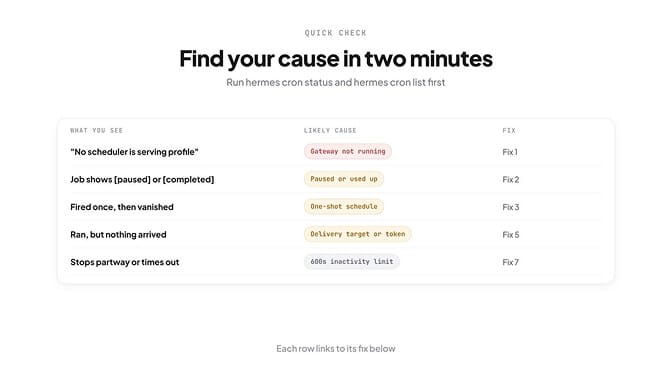
Run these two commands:
hermes cron status
hermes cron list
cron status says whether a scheduler is serving your profile. cron list shows each job's state ([active], [paused] or [completed]), its next run, and the last error if it failed.
| What you see | Likely cause | Fix |
|---|---|---|
| "No scheduler is serving profile 'default'" | The gateway isn't running | Fix 1 |
| The job shows paused or completed | Paused, or its repeat count is used up | Fix 2 |
| It fired once, then vanished from the list | A one-shot schedule | Fix 3 |
| A "Next run" time that's hours off | Time zone | Fix 4 |
| It ran, but nothing arrived | Delivery target, token or SILENT | Fix 5 |
| It ran, but did the wrong thing | The prompt relies on memory it doesn't have | Fix 6 |
| It stops partway or times out | The 600-second inactivity limit | Fix 7 |
Fix 1: the gateway isn't running
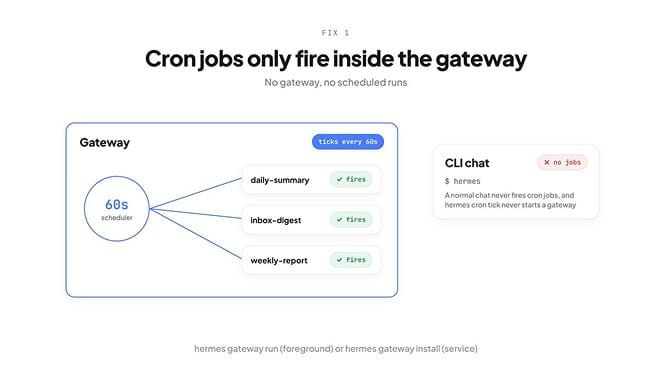
Cron jobs run inside the gateway, and nowhere else. The gateway ticks the scheduler every 60 seconds and runs whatever is due. A normal hermes chat never fires jobs.
On a fresh install with no gateway, this is what we got:
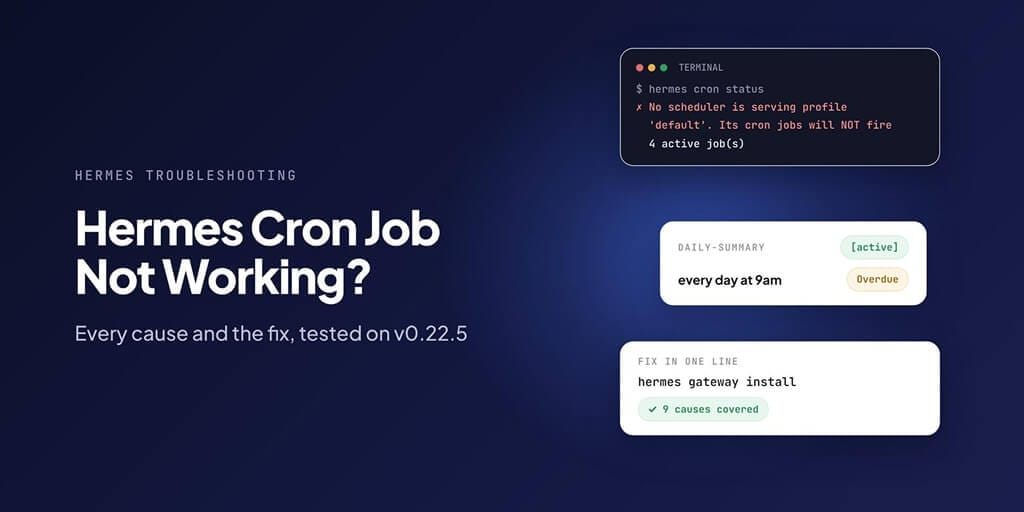
$ hermes cron status
✗ No scheduler is serving profile 'default', its cron jobs will NOT fire
Hermes does warn you when you create a job without one, but the warning is easy to miss in the scroll.
To fix it, start a gateway:
hermes gateway run        # foreground, good for testing, Docker and WSL
hermes gateway install    # install as a background service
hermes gateway start      # start the installed service
On a Linux server, sudo hermes gateway install --system installs a service that starts at boot, so jobs survive a reboot.
Once we started the gateway, the same command changed to:
✓ Gateway is running, cron jobs will fire automatically
Ticker heartbeat: 55s ago
One trap: hermes cron tick never starts a gateway, and hermes cron run <job> with no gateway failed for us with GatewayRPCError: request_failed.
If your jobs show as "Overdue" in cron list, the scheduler stopped ticking. hermes gateway restart fixes that, and each overdue job catches up once.
Tired of keeping a gateway alive just so your jobs run? BetterClaw runs scheduled tasks on its own servers and keeps a history of every run. Start your first agent.
Fix 2: the job is paused, used up, or everything is paused
Look at the state in hermes cron list:
- paused: run
hermes cron resume <job>. You can use the job's name instead of its ID. - completed: the repeat count ran out. A job created with
--repeat 3showsRepeat: 0/3and stops after three runs. Reset it withhermes cron edit <job> --repeat <n>.
There's also a global switch. hermes pause stops every scheduled job at once, and nothing fires until someone runs hermes resume. If all your jobs stopped on the same day, check that first.
Fix 3: it was a one-shot schedule (or the schedule was wrong)
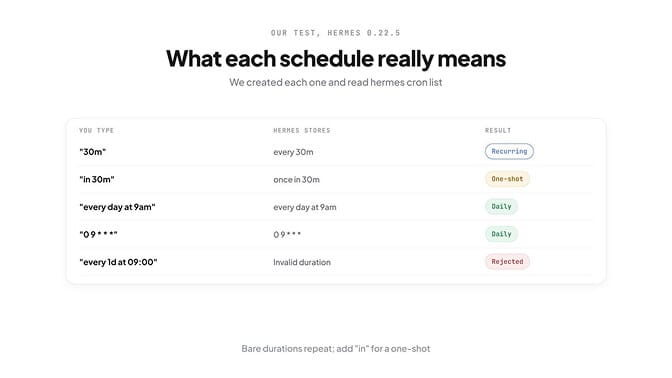
This is where most online guides are now wrong, so we tested every format ourselves.
| You type | Hermes stores | Result |
|---|---|---|
"30m" | every 30m | Recurring |
"in 30m" | once in 30m | One-shot |
"every day at 9am" | every day at 9am | Daily |
"0 9 * * *" | 09*** | Daily |
"every 1d at 09:00" | rejected: "Invalid duration" | Not created |
A bare duration like 30m repeats in current Hermes. For a one-off, add "in": in 30m, in 2h, or an exact timestamp like 2026-11-01T09:00:00. One-shots fire once and then leave the list, which looks like a broken job if you didn't mean it.
Natural phrases like weekdays at 9am work for recurring jobs. Mixing styles doesn't, as the last row shows.
If your create command printed "Failed to create job", the job doesn't exist; Hermes 0.22.5 rejects a bad schedule instead of saving it.
hermes cron edit <job> --schedule "every day at 9am"
Fix 4: the time zone is wrong
Jobs use the time zone of the machine running the gateway. A server set to UTC fires a "9am" job at 9am UTC, which is the middle of the night in San Francisco.
Compare the two:
date
hermes cron list    # check the "Next run" times
If they disagree, change the server's time zone or write the schedule in its time.
Fix 5: it ran, but nothing was delivered
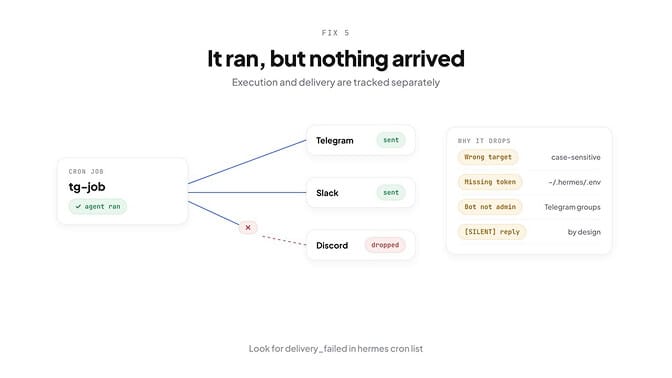
Hermes tracks running a job and delivering it as two separate things. A job can succeed and still send nothing.
We created a job that delivers to Telegram on a machine with no Telegram token, then ran it. Hermes checked the job before starting the agent, and refused:
Last run: blocked_config: delivery platform 'telegram' has no gateway credentials configured (not connected).
⚠ The result was not delivered: no delivery target resolved for deliver=telegram.
The agent never ran, so nothing was charged. Hermes sends that alert once, not on every tick, and hermes cron doctor keeps listing the problem until you fix it.
One catch: doctor only knows about the problem after the job has tried to run. Before the first run, it said "Cron doctor found no issues" for the same token-less Telegram job. Use hermes cron run <job> once after creating a job to flush out delivery problems straight away. The full record is saved under ~/.hermes/cron/output/<job_id>/.
The usual causes:
- The target is wrong. Targets are case-sensitive:
telegram,discord,slack,email,local, or a specific chat liketelegram:-1001234567890. The CLI default islocal, which saves to~/.hermes/cron/output/and sends nothing. - The token is missing.
telegram,discordandslackneedTELEGRAM_BOT_TOKEN,DISCORD_BOT_TOKENorSLACK_BOT_TOKENin~/.hermes/.env. - The bot lacks permission. A Telegram bot must be an admin in the group. A Slack bot needs the
chat:writescope. - The reply said SILENT. Any successful run whose reply contains
[SILENT]is saved but not sent. Failed runs always deliver.
When delivery itself fails, hermes cron list shows the job as delivery_failed with the reason. If your platform mangles the "Cronjob Response" header and footer, turn them off with hermes config set cron.wrap_response false.
Fix 6: the job forgets what it did last time
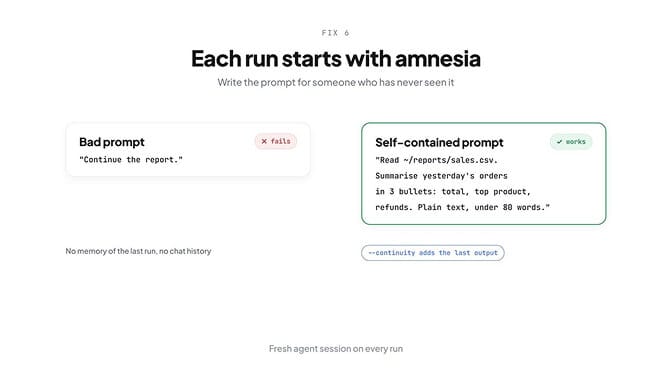
Every cron run starts a fresh agent session. It has no chat history and no memory of the last run. A prompt like "continue the report" means nothing to it.
Write the prompt for someone who has never seen your project:
- Bad: "Continue the report."
- Good: "Read ~/reports/sales.csv. Summarise yesterday's orders in three bullets: total, top product, refunds. Plain text, under 80 words."
If the job really needs to know what it said last time, like a news scout that shouldn't repeat stories, turn on continuity. Each run then sees its own previous output:
hermes cron edit <job> --continuity
You can attach skills with --skill <name> (repeat the flag for several). Skills must be installed on the machine running the gateway; check with hermes skills list.
Fix 7: the job hangs or times out
Cron jobs have an inactivity timeout of 600 seconds. It's not a total time limit: the job can run for hours as long as it keeps calling tools. It only stops after 10 minutes of silence, usually a stuck tool or a hung provider call.
Change it with an environment variable on the gateway:
export HERMES_CRON_TIMEOUT=1800 # 30 minutes; 0 means no limit
Scripts attached to a job have their own, separate limit of 3,600 seconds. Change it with cron.script_timeout_seconds in config.yaml or HERMES_CRON_SCRIPT_TIMEOUT.
Move heavy data collection into a script and let the agent handle only the result. For jobs that need no AI at all, --no-agent runs the script and sends its output directly.
Fix 8: skills or scripts not found
Three things to check:
- Skills don't sync between machines. If you created the job on your laptop but the gateway runs on a server, install the skill there too.
- Scripts belong in
~/.hermes/scripts/.hermes cron doctorflags a script that's missing or lives outside that folder. - Cron runs without the clarify, messaging and cron-management tools, so a skill that asks questions or sends its own messages won't work on a schedule.
Fix 9: two gateways, or a store it can't write
Run one gateway per machine. Two gateways fight over the scheduler lock, and jobs get delayed or skipped:
ps aux | grep hermes
Hermes also skips any job it can't record, to avoid double runs later, so an unwritable ~/.hermes/cron/ (disk full, wrong owner) stops everything.
When that happens, hermes cron status leads with "Cron store is NOT writable, scheduled jobs are being skipped". Clear disk space or fix the folder's owner, and each skipped job fires once on the next tick. No restart needed.
Which model runs your cron job
Hermes picks the model at the moment the job fires, in this order:
- A model pinned to the job (
hermes cron edit <job> --model <m> --provider <p>, or--pinto lock in your current model). cron.modelinconfig.yaml, a default for every unpinned job.- Your main chat model.
Set a cheap default for the whole fleet without touching your chat model:
hermes config set cron.model <model>
One catch: a pinned job never uses your fallback providers. If its one provider is down, the run fails. Unpinned jobs walk the fallback chain. Use --unpin if you'd rather have the fallback.
How to stop it happening again
- Run the gateway as a service, not in a terminal tab.
- Write every prompt so it works with no memory, or use
--continuity. - Choose the delivery target on purpose;
localsends nothing. - Stagger jobs (
0 9 * * *and5 9 * * *), because jobs due at the same tick run one after another. - Run
hermes cron doctorweekly. It's read-only and exits with an error while anything is wrong, so it works in a monitoring script. - Check
hermes cron runsfor history and~/.hermes/logs/agent.logfor scheduler messages.
The takeaway
When a Hermes cron job doesn't run, start with hermes cron status. Nine times out of ten the answer is in its first line: no gateway, or a gateway that stopped ticking.
After that, it's the schedule format, the delivery target, or a prompt that assumes memory it doesn't have.
Your agent, on schedule, without the server: BetterClaw gives you 500+ apps and any model with your own key. Basic is $19 a month for one agent, Pro is $49 a month for five, and every plan has a 7-day free trial. Start your first agent.
Frequently Asked Questions
Why isn't my Hermes cron job running? Usually because no gateway is running: cron jobs only fire inside the gateway, never in a normal chat. Run hermes cron status; if it says no scheduler is serving your profile, start one with hermes gateway run or install it as a service with hermes gateway install.
Does Hermes cron need the gateway running? Yes. The gateway ticks the scheduler every 60 seconds and runs due jobs. hermes cron tick runs one pass but doesn't start a gateway, so agent jobs are skipped without one.
Why did my Hermes cron job run but send nothing? Check the delivery target (the CLI default is local, which only saves a file), the bot token in ~/.hermes/.env, and the bot's permissions. A reply containing [SILENT] is also not sent. hermes cron list shows delivery_failed with the reason when sending itself failed.
How do I change the timeout for a Hermes cron job? Set HERMES_CRON_TIMEOUT (in seconds) for the gateway; the default is 600 seconds of inactivity, and 0 means no limit. Attached scripts have a separate 3,600-second limit set by cron.script_timeout_seconds.
Which model does a Hermes cron job use? A model pinned to the job first, then cron.model from your config, then your main chat model at the moment the job fires. Pinned jobs don't use fallback providers.
Why does my cron job forget what it did last time? Each run starts a fresh agent session with no memory of earlier runs. Make the prompt self-contained, or turn on --continuity so each run sees its own previous output.