Windows, September 2026: if Cowork stopped reaching your files after the September 8 Windows update, that was a Windows bug Microsoft fixed on September 14 (KB5129195 on Windows 11 24H2/25H2). Run Windows Update and restart. Full fix and build numbers.
Three months ago I watched a non-technical founder build a competitive analysis dashboard in Claude Cowork. No code. No spreadsheet formulas. She described what she wanted, Cowork planned the steps, read her files, pulled data through MCP connectors, and delivered a working live dashboard in 30 minutes.
Then she closed her laptop. The dashboard stopped updating. She messaged me: "Where did it go?"
That's Claude Cowork in one interaction. Genuinely powerful. Genuinely limited. And genuinely confusing if you don't understand what it is, what it isn't, and where it breaks.
This is the complete guide. What Cowork does. How to set it up. What goes wrong. What the rate limits actually mean. How memory works (and doesn't). What live artifacts can do. And when you need something that runs when your laptop is closed.
What Claude Cowork actually is (30-second version)
Cowork is Anthropic's autonomous desktop agent. It lives inside the Claude Desktop app. You point it at a folder on your computer, describe a task, and it executes multi-step workflows: reading files, writing documents, running terminal commands, connecting to apps through MCP, and delivering finished work.
It launched January 12, 2026 (macOS) and went generally available on April 9, 2026 across all paid plans.
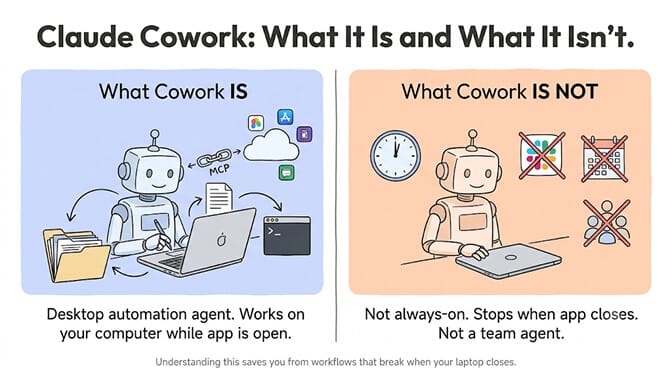
What it is: A desktop automation agent that works on your computer while you watch (or don't).
What it isn't: An always-on agent. When you close the app or your laptop sleeps, Cowork stops. It doesn't connect to chat platforms. It doesn't respond to your team. It doesn't run scheduled tasks in the background.
Requires: A paid Claude plan (Pro $20/mo, Max $100–200/mo, Team $30/seat, or Enterprise).
The guide sections (jump to yours)
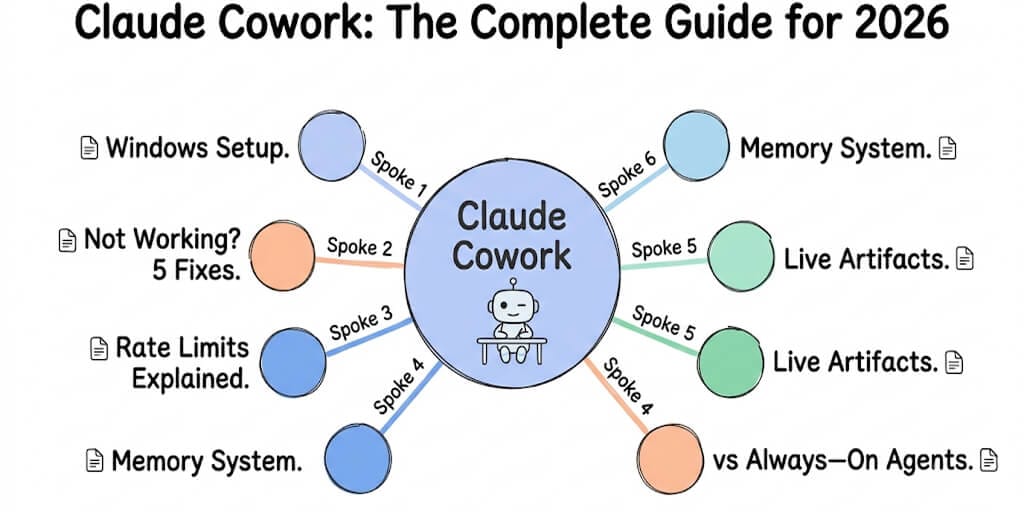
Every section below is a short summary with a link to the full deep dive. If you're brand new, start with our how to use Claude Cowork beginner guide, which covers projects, scheduled tasks, and connectors.
Setting up Cowork on Windows
Cowork works on Windows with full feature parity since February 10, 2026. But there are three requirements the docs barely mention: Virtual Machine Platform must be enabled, you need admin privileges for the VM service installer, and the desktop app must stay open for the entire session.
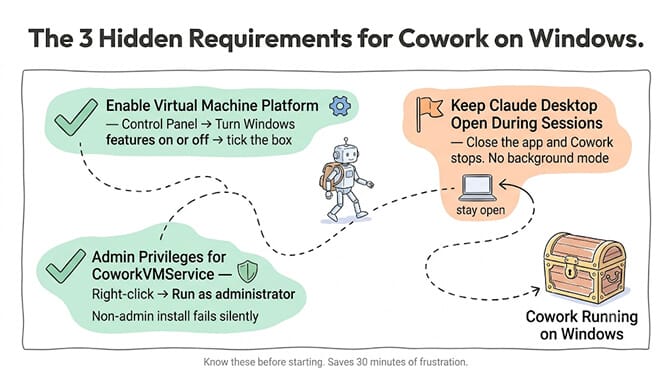
The complete setup takes 5 minutes if you know the requirements. Our Claude Cowork Windows setup guide walks through every step, including the three hidden prerequisites.
Cowork not working on Windows (5 fixes)
If Cowork breaks on Windows, there are five known failure modes: the CoworkVMService stops after sleep/reboot (it ships with startup type Manual), the "yukonSilver not supported" platform detection bug, Windows Home missing the full Hyper-V stack, network conflicts with VPNs or Docker on the 172.16.0.0/24 range, and corrupted installs from the old Squirrel installer.
The fastest fix for 80% of cases:
sc start CoworkVMService
sc config CoworkVMService start= auto
Every fix with exact error strings is in our Claude Cowork not working on Windows troubleshooting guide.
Understanding Cowork rate limits
This is where most frustration lives. Cowork tasks are not the same as chat messages. A single Cowork session organizing 15 PDFs can consume as much quota as dozens of regular chat messages. Anthropic uses rolling 5-hour windows plus weekly caps. Pro users report hitting limits after 10–20 substantial Cowork operations.
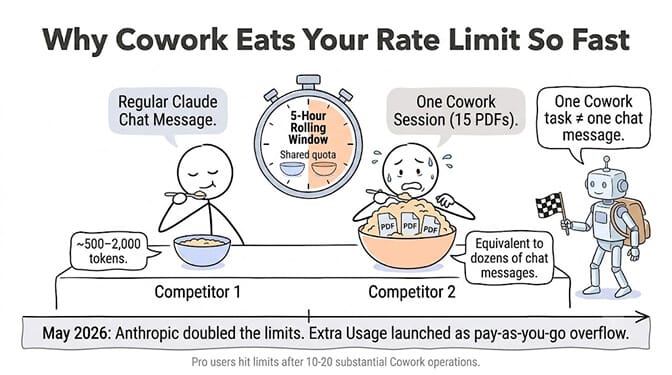
In May 2026, Anthropic raised the 5-hour rate limits and launched Extra Usage (pay-as-you-go overflow at standard API rates). The ghost rate limit bug still exists.
Our Claude Cowork rate limit guide covers the actual math, the ghost bug, and what changed after the May update.
Cowork memory vs Claude chat memory
These are two completely separate systems. Chat Memory is your profile (name, role, preferences) that appears at claude.ai. Cowork Memory is project-scoped context tied to a folder of files. They do not share data. Telling Claude your pricing tiers in Chat doesn't mean Cowork knows them. Our breakdown of Cowork project memory vs Claude chat memory goes through where each one lives, what it stores, and why archiving a project behaves nothing like resetting chat memory.
There are actually three isolated memory pools: Chat Memory, Project Memory, and Cowork Memory. None of them talk to each other.
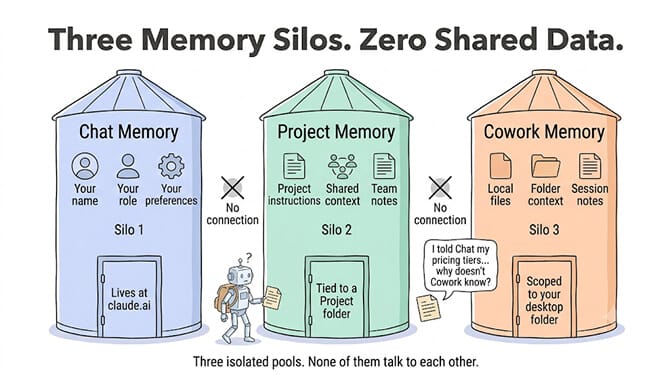
The full breakdown of what each remembers and where it forgets is in our Cowork memory vs Claude chat memory comparison. For the broader concept of how agent memory works (context windows, attention degradation, memory files), see our agent memory deep dive.
Live artifacts (the dashboard feature)
Launched April 20, 2026. Live artifacts are persistent HTML dashboards that connect to your apps through MCP and refresh with current data when you open them. Morning briefing dashboards. Competitor trackers. Project status boards. Saved in the Cowork sidebar under "Live artifacts."
The distinction: regular artifacts are snapshots (what was true when built). Live artifacts are connected views (what's true right now).
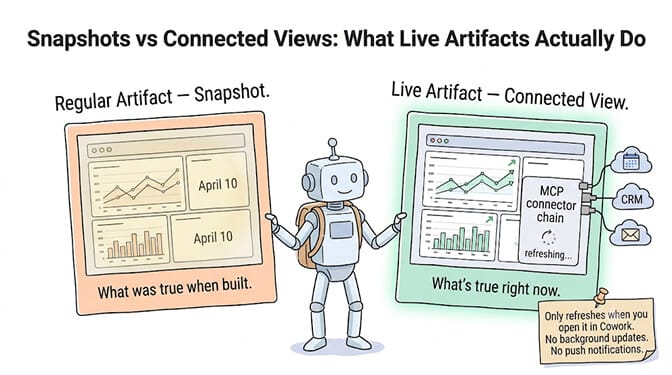
The catch: they only refresh when you open them in Cowork. No push notifications. No background updates. No API access. For the full capabilities and limitations, see our Claude Cowork live artifacts guide.
Cowork vs OpenClaw (desktop agent vs always-on agent)
This is the comparison that clarifies everything. Cowork is a desktop agent. It works on your computer while the app is open. OpenClaw is a server-based agent framework. It runs 24/7, connects to chat platforms, and serves multiple users.
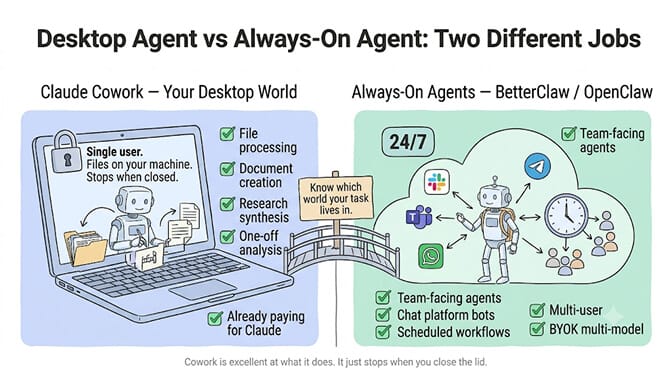
You need Cowork when your work is about processing, creating, and organizing information on your computer: research synthesis, document creation, file organization, single-user workflows.
You need OpenClaw (or BetterClaw) when your agent needs to be available to other people, on chat platforms, around the clock: customer support, team assistants, scheduling agents.
Our OpenClaw vs Claude Cowork comparison covers the architecture differences in detail.
If you need the always-on side without managing OpenClaw's Docker infrastructure, BetterClaw deploys agents across 15+ messaging channels using 28+ model providers. It runs whether your computer is on or not. Free plan with 1 agent and 100 credits a month. $49/month on Pro.
Cowork vs an always-on agent, at a glance
The fastest way to know which side of the fence you're on:
| Capability | Claude Cowork | Always-on agent (OpenClaw or BetterClaw) |
|---|---|---|
| Runs when the app or laptop is closed | No | Yes |
| Chat platforms (Slack, Teams, WhatsApp, Telegram) | No | 15+ channels |
| Scheduled / background tasks | No | Yes |
| Serves a team / multiple users | Single user | Yes |
| Model choice | Claude only | 28+ providers (BYOK) |
| Local file access on your machine | Native | Via server workspace |
| Audit logs / Compliance API | Not captured | Platform-dependent |
| Cost | Included in Claude Pro/Max | Free plan; $49/mo for 5 agents (BetterClaw Pro) |
| Best for | Solo, file-heavy desktop work | Team-facing, 24/7 automation |
If most of your rows land in the left column, Cowork is the right tool. If they land on the right, you need an always-on agent - keep reading.
When Cowork is the right choice
File-heavy solo work. Organizing downloads. Processing PDFs. Creating spreadsheets. Converting formats. If the inputs are local files and the output goes to your filesystem, Cowork is excellent.
Document creation. Excel spreadsheets with working formulas. PowerPoint presentations. Reports. Cowork produces polished deliverables directly on your machine.
One-off research and analysis. Ask Cowork to research a topic, pull from connected services via MCP, and produce a synthesis document. The live artifacts feature makes this even more powerful.
You're already paying for Claude. If you have a Pro or Max subscription, Cowork is included. No additional cost except your rate limit consumption.
When you need something else
24/7 availability. Cowork stops when you close the app. If your agent needs to run overnight, respond to messages while you sleep, or process tasks on a schedule, you need a server-based agent.
Team-facing agents. Cowork is single-user. One person, one desktop. Agents that serve teams via Slack, Teams, WhatsApp, or Telegram need a different architecture.
Multi-model flexibility. Cowork only runs Claude. If you want to route tasks to cheaper models like DeepSeek Flash or M3, you need a BYOK platform.
Enterprise requirements. Cowork's activity is not captured in audit logs, the Compliance API, or data exports (confirmed in Anthropic's own docs). For regulated industries, this is a showstopper.
Cowork is genuinely impressive as a desktop automation tool. It's not an always-on agent platform. Understanding that distinction saves you from building workflows that break when your laptop closes.
If you need the 24/7 side, BetterClaw runs agents across chat platforms whether your computer is on or not - free plan available, $49/month on Pro.
Frequently Asked Questions
What is Claude Cowork?
Claude Cowork is Anthropic's autonomous desktop agent built into the Claude Desktop app. It reads and writes files on your computer, executes multi-step tasks in a sandboxed VM, and delivers finished work to a folder. It launched January 12, 2026 on macOS and went generally available April 9, 2026 on all paid plans (Pro $20/mo, Max $100–200/mo, Team, Enterprise). Cowork only runs while the desktop app is open.
Does Claude Cowork work on Windows?
Yes. Full feature parity with macOS since February 10, 2026. Three requirements: Virtual Machine Platform must be enabled (Control Panel → Turn Windows features on or off), administrator privileges for installation, and the desktop app must remain open during sessions. The most common Windows issue is CoworkVMService stopping after reboot or sleep. Fix: sc start CoworkVMService and sc config CoworkVMService start= auto.
Why does Cowork hit rate limits so fast?
Cowork tasks consume far more quota than chat messages. A single session organizing files spawns sub-agents, tool calls, and file operations that all count against your 5-hour rolling window. Pro users hit limits after 10–20 substantial operations. Anthropic raised limits in May 2026 and launched Extra Usage (pay-as-you-go overflow). The ghost rate limit bug (showing "limit reached" when you have quota remaining) still occurs intermittently.
Is Cowork memory the same as Claude chat memory?
No. They are completely separate systems that do not share data. Chat Memory stores your profile (name, role, preferences) for claude.ai conversations. Cowork Memory is project-scoped context tied to a specific folder and set of files. Telling Claude something in Chat does not mean Cowork knows it. There are actually three isolated pools: Chat Memory, Project Memory, and Cowork Memory.
Can Cowork replace an always-on AI agent?
No. Cowork stops when you close the desktop app or your computer sleeps. It doesn't connect to chat platforms (Slack, Teams, WhatsApp). It doesn't run scheduled tasks in the background. It doesn't serve multiple users. For always-on agents that operate 24/7 across messaging channels, you need a server-based platform like BetterClaw ($0 free plan, $49/month Pro) or a self-hosted framework like OpenClaw.