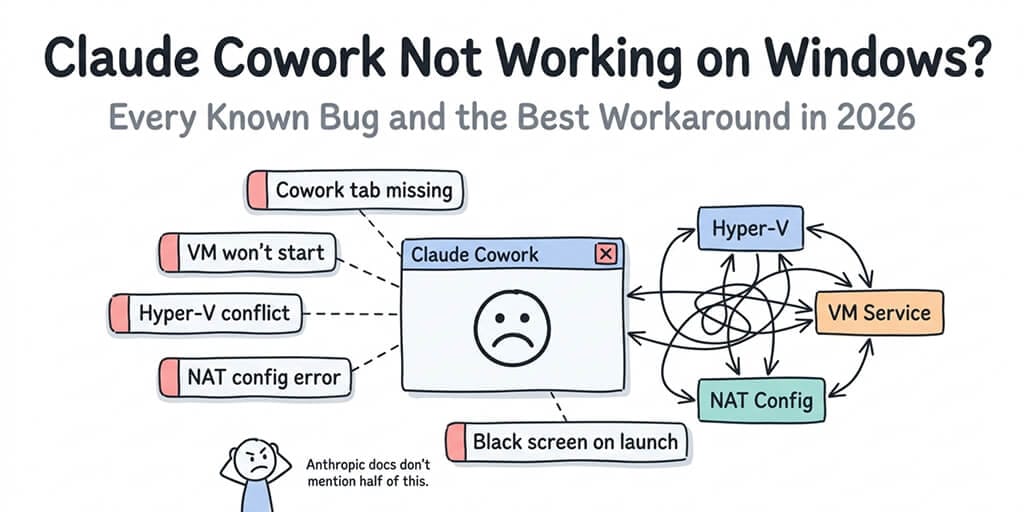
Claude Cowork fails on Windows when the virtualization stack it depends on isn't running. In practice that means one of three things: the Windows Host Compute Service components are missing or stopped (hns, vmcompute, vfpext), CoworkVMService has stopped after a reboot or sleep, or the machine can't host the VM - most often Windows Home, where many users report failures because Home lacks the full Hyper-V stack. Each has a different fix, and all three are checkable in under five minutes.
Broken down further, those three causes split into five distinct failure modes: (1) the CoworkVMService stops after reboot or sleep, (2) the "yukonSilver" platform detection bug marks capable systems as unsupported, (3) Windows Home edition lacks the full Hyper-V stack, which many Home users report breaks Cowork, (4) network conflicts with VPNs or Docker on the 172.16.0.0/24 range, and (5) corrupted installs from the old Squirrel installer. Each has a different fix.
Cowork shipped on Windows on February 10, 2026, and went GA across all paying subscribers on April 9, 2026. If you haven't installed it yet, our Claude Cowork Windows setup guide walks through the clean install and the three requirements nobody mentions upfront. The Claude Code GitHub repo has been collecting Windows-specific bugs since launch: cryptic "yukonSilver not supported" errors, missing Cowork tabs on fully capable machines, and a VM service that resists removal. We've tracked the major failure modes and what actually fixes each one. No fluff.
One thing worth knowing before you debug anything: Cowork now runs on desktop, web (claude.ai), iOS, Android, and Chrome. Cloud sessions continue when your laptop is closed. Desktop sessions still need the app open for local file access. Every bug on this page lives in the Windows desktop app's local VM, so if your task doesn't need files on this PC, running Cowork on the web sidesteps all of them.
Fix: Missing HCS Services (hns, vmcompute, vfpext)
If Cowork reports a missing HCS service - or missing HCS services - it means the Host Compute Service and its networking components aren't running or aren't installed. HCS is the low-level API that Hyper-V and Windows containers use to create and manage lightweight VMs - exactly what Cowork's sandbox is built on. VMCompute (vmcompute) hosts the compute layer, HNS (hns) provides the virtual networking the sandbox needs, and VFPExt (Virtual Filtering Platform Extension) is the packet-filtering driver HNS depends on. If these don't exist or won't start, Cowork can't stand up its environment and usually fails silently or throws a mount/boot error.
First, check whether the services exist and are running (PowerShell as Administrator):
Get-Service vmcompute
Get-Service hns
# VFPExt is a driver, not a normal service - check it the same way:
Get-Service vfpext -ErrorAction SilentlyContinue
If any return "Cannot find any service," the underlying feature isn't installed. Fix it:
- Open Control Panel → Programs → Turn Windows features on or off (or run
optionalfeatures). - Enable Hyper-V, Windows Hypervisor Platform, and Containers.
- Click OK and restart when prompted - the services only register after a reboot.
- Re-run
Get-Service vmcomputeand confirm Status shows Running.
If the services now exist but show Stopped, set them to start automatically and start them:
Set-Service vmcompute -StartupType Automatic
Start-Service vmcompute
Get-Service vmcompute   # confirm Status = Running
Finally, none of this works if hardware virtualization is off. VT-x (Intel) or AMD-V (AMD) must be enabled in your BIOS/UEFI - reboot into firmware settings, turn virtualization on, save, and boot back into Windows before re-checking the services.
If only vfpext is missing
Get-Service vfpext returning "Cannot find any service" while vmcompute and hns are present is a case worth calling out on its own. VFPExt (Virtual Filtering Platform Extension) is the packet-filtering driver HNS loads to route traffic in and out of the sandbox VM. It ships with the Hyper-V / Containers feature set, so if you enabled Hyper-V but skipped Containers, you can end up with hns present but vfpext never loaded - and Cowork's VM boots with no working network. Enable Containers in Turn Windows features on or off, reboot, and re-check with Get-Service vfpext -ErrorAction SilentlyContinue. If it still won't load on a machine that already has those features on, repair the stack from an elevated prompt and reboot:
DISM /Online /Enable-Feature /FeatureName:Microsoft-Hyper-V-All /All
Cowork tab greyed out or unclickable
If the Cowork tab is visible but greyed out and won't respond to clicks, your account is eligible - the app just can't reach a ready local VM. That's this HCS path, not a UI glitch: vmcompute or hns is missing or stopped, or CoworkVMService died after a reboot or sleep. Run the Get-Service vmcompute checks above, then start the VM service with sc start CoworkVMService. A greyed-out tab almost never means a broken install - it means the virtualization stack isn't up yet.
Try this first: restart CoworkVMService
Before anything else, check whether Cowork's background service is actually running. CoworkVMService ships with startup type Manual, which means it stops after reboots, Windows updates, and sleep/wake cycles. Once it stops, Cowork hangs or fails to connect even though everything else looks fine. This is the most common Cowork issue on Windows and the fastest one to fix.
Open PowerShell as Administrator and run:
sc start CoworkVMService
If that fixes Cowork until the next reboot, make it stick by switching the service to automatic startup (mind the space after =):
sc config CoworkVMService start= auto
If sc start returns "service not found," skip to the install-related sections below - your Cowork installation may be broken. Otherwise, restart Claude Desktop and check the Cowork tab.
"Claude's Workspace Service Isn't Running"
This is the same problem as above, just worded differently in some versions of the error dialog. "Claude's workspace service" is CoworkVMService.
If you see this message, open PowerShell as Administrator and run:
Restart-Service CoworkVMService
If the service has stopped after a reboot, sleep/wake, or a Windows update, that is expected - CoworkVMService ships with startup type Manual, so it does not survive restarts on its own. To make it persistent:
Set-Service CoworkVMService -StartupType Automatic
Then restart once. The error should not return.
Check your system before you debug
Anthropic ships a downloadable Cowork readiness checker linked from the "Get started with Claude Cowork" article in Anthropic's help center (separate utility, not part of Claude Desktop). Run it first - it reports whether your machine has the Hyper-V components Cowork needs. Caveat: on Windows 11 Home it can falsely report "ready" because Windows 11 internally still reports as 10.0 and the checker misidentifies the OS (GitHub #50621). If the checker says ready but Cowork won't load, run Get-Service vmms in PowerShell - if that service doesn't exist, you're on Home, and the missing Hyper-V pieces are the likely reason Cowork won't start.
The Five Ways Cowork Breaks on Windows
The problems aren't random. They fall into five distinct patterns, and knowing which one you're hitting is half the battle.
1. The Missing Tab (yukonSilver bug)
You install Claude Desktop, open it, and the Cowork tab simply isn't there. Only "Chat" shows up. This is the "yukonSilver not supported" bug, tracked in GitHub issues #25136, #32004, and #32837. Claude's internal platform detection incorrectly marks your system as incompatible, even when all virtualization features are enabled.
2. The Infinite Setup Spinner
The Cowork tab appears, but clicking it shows "Setting up Claude's workspace" with a loading bar stuck at 80 to 90%. It never completes. Users have reported leaving it running for 12+ hours with no progress. No error message. Just spinning.
3. The API Connection Failure
The workspace starts but can't reach Claude's API. You get "Cannot connect to Claude API from workspace" or its Japanese equivalent. This was a day-one launch bug on Windows 11 Home and has resurfaced multiple times since.
4. The Network Conflict
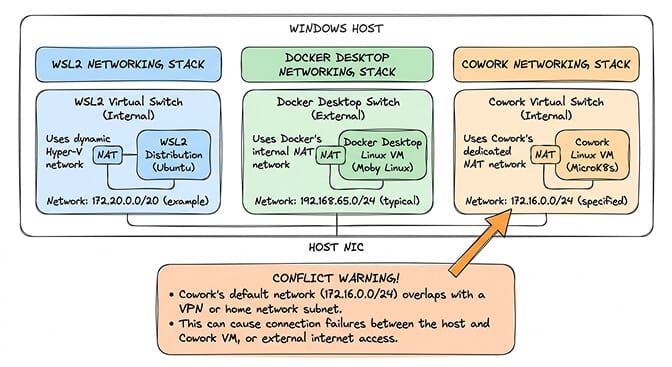
Cowork uses a hardcoded network range (172.16.0.0/24) for its internal NAT. If your home network, corporate VPN, or another VM tool uses the same range, Cowork's VM can't reach the internet. Worse, it can break your WSL2 and Docker networking in the process.
5. The Update Regression
Auto-updates have introduced Cowork-breaking regressions more than once. The most-reported example was v1.1.5749 on March 9, 2026, which broke working installs and required a patch release to recover. Anthropic has since shipped multiple updates; if you're stuck on a known-bad version, updating to the current Claude Desktop release is usually the fix.
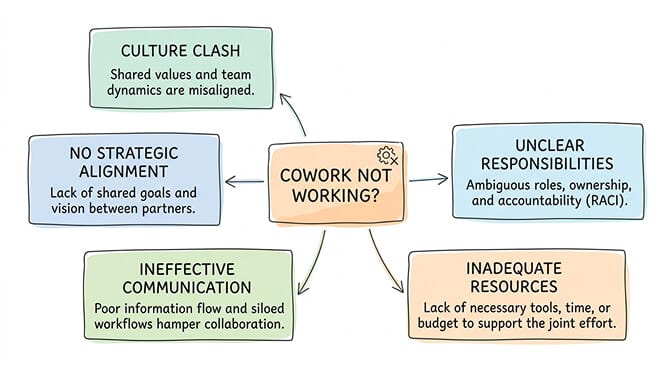
Cowork Tab Missing or Disappeared from the Desktop App?
Three different symptoms get reported the same way, and they have different causes. Identify yours first:
- The tab never appeared. A first-run problem - version, feature flag, or plan eligibility. Work through the three checks below.
- The tab was there and disappeared. Almost always an update regression or a plan change. Cowork is removed from the UI when the app updates to a build where platform detection fails, or when a subscription lapses or downgrades.
- The tab is visible but greyed out or unclickable. The app sees your account as eligible but the local VM stack isn't ready. This is the HCS/
CoworkVMServicepath, not a UI bug - jump to the HCS services fix above.
"I don't see Cowork on my desktop app"
Searching why is Claude Cowork not showing up or Cowork not showing up? If the tab never appeared at all, it's a first-run problem - your Claude Desktop build, a feature flag, or plan eligibility - not a bug in the VM stack. Work the three checks below in order; if the tab still won't show up on a Pro or Enterprise machine with them all satisfied, it's the yukonSilver platform-detection bug covered above.
If the Cowork tab never appears - and you've ruled out the yukonSilver platform-detection bug above - work through three quick checks before deeper debugging:
- Update the app. Cowork only ships in recent Claude Desktop builds. Open Settings → About, install any available update, then fully quit and relaunch the app (a background restart isn't enough).
- Confirm the feature is enabled. Check Settings → Features (Beta/Labs on some builds) and make sure Cowork is toggled on for your account.
- Check plan eligibility. Cowork is gated to paid tiers. If you're on the free plan the tab won't appear regardless of version - upgrade to a qualifying plan, then relaunch.
The tab disappeared after working fine
If Cowork was working and then vanished, check these in order:
- Did the app update recently? Open Settings → About and note the build. The v1.1.5749 regression documented below removed the tab on machines that had been running Cowork without issue. Rolling back to the prior build restores it.
- Did your plan change? A lapsed card, a downgrade, or a seat removed from a Team workspace all revoke Cowork access immediately, and the tab disappears without an explanatory message.
- Did you switch accounts? Cowork eligibility is per-account, not per-install. Signing into a free account on the same machine hides the tab until you switch back.
- Did Windows update? A feature update can reset Windows Features, silently turning off Virtual Machine Platform or Hyper-V. Re-check them with
Get-Service vmcomputebefore assuming it's an app problem.
If all of the above check out and the tab is still missing, revisit the yukonSilver and Windows Home sections above.
The Windows Home Gray Area
This is where it gets messy.
Claude Cowork runs inside a lightweight virtual machine on your Windows machine. That's how it creates its sandboxed environment for file access and code execution. Anthropic's "Deploy Claude Desktop for Windows" doc says Claude Desktop "requires the Virtual Machine Platform to use Cowork" - and Windows 11 Home has Virtual Machine Platform. The doc doesn't name a Windows edition requirement either way.
The problem? Home edition has Virtual Machine Platform and Windows Hypervisor Platform, but not full Hyper-V: there's no vmms (Hyper-V Virtual Machine Management) service and no full HCS/Containers stack. When Cowork fails on Home, those missing pieces are what users point to. The VM either fails silently or throws a cryptic "Plan9 mount failed: bad address" error.
Many Windows Home users have filed GitHub issues (#27906, #31991, #45883 among them) after spending hours troubleshooting Cowork failures on Home. One user explicitly noted they "subscribed to Max specifically to use this feature" and only hit the problem after paying.
A documentation request (GitHub issue #27906) asked Anthropic to state clearly that Home is unsupported. That issue is closed, but there's no visible Anthropic statement confirming Home is unsupported - and none saying it's supported.
The quickest check is to open PowerShell and run Get-Service vmms. If the service isn't found and Cowork won't start, your options for the desktop app come down to upgrading to Windows 11 Pro. Don't rely on Anthropic's readiness checker alone - GitHub #50621 documents that it falsely reports "ready" on Windows 11 Home because Windows 11 internally still reports its version as 10.0 and the checker misclassifies the OS.
Can't enable Virtual Machine Platform, or don't want to upgrade? Use web Cowork to skip Hyper-V entirely. Since July 7, 2026, Cowork runs at claude.ai in the browser (and on iOS, Android, and in the Chrome side panel) as a cloud session on Anthropic's infrastructure. Nothing runs on your PC, so the Windows edition, Hyper-V, and CoworkVMService stop mattering. The trade-off: cloud sessions can only read and write files in folders on your computer while the desktop app is open, so work on local files still needs the desktop app. For everything else, the browser is the fastest fix on Windows Home.
The yukonSilver not supported Bug and Why Your Pro Machine Still Fails
Stay with me here, because this one is especially frustrating.
Even if you're running Windows 11 Pro with every virtualization feature enabled (Hyper-V, VMP, WHP, WSL2), you might still see the Cowork tab missing entirely. The logs will show "yukonSilver not supported (status=unsupported)" followed by the VM bundle cleanup routine running instead of the actual VM boot.
"yukonSilver" is Claude's internal codename for its VM configuration on Windows. The bug is in the platform detection logic: it incorrectly classifies fully capable x64 Windows 11 Pro systems as unsupported.
But that's not even the real problem. The installer also creates a Windows service called CoworkVMService, and this service sometimes becomes impossible to remove. Running sc.exe delete CoworkVMService as Administrator returns "Access denied." The service blocks clean reinstalls and creates a circular failure where you can't fix the problem and you can't start fresh.
The documented workaround from community debugging: manually run Add-AppxPackage as the target user to install the MSIX package correctly for your account. It's a PowerShell command that most of Cowork's target audience (non-developers) would never discover on their own.
Squirrel vs. MSIX: which installer do you have?
Anthropic switched Claude Desktop on Windows from a Squirrel .exe installer to an MSIX/Microsoft Store package around February 10-13, 2026. If you installed Claude Desktop before that, you have the Squirrel build, and the in-app "Reinstall" button can silently fail (tracked in GitHub issues #25162, #25385, #26457; error code 0x80073CFA in some logs). The fix is a manual uninstall via "Add or remove programs," followed by downloading the fresh MSIX from the official Claude download page. Note that MSIX installs also require Windows "Sideload apps" / "Trusted App Installs" to be enabled - without it, the MSIX install fails before it starts.
As one developer debugging the issue put it: "Cowork is marketed at the people least equipped to debug it when it breaks."
If you've been running into similar infrastructure headaches with AI agents and want something that works out of the box, our comparison of self-hosted vs managed OpenClaw deployments covers why some teams are moving away from local setups entirely. And if the errors you're chasing are usage-related rather than install-related, see what to do when you hit a rate limit reached on Claude Cowork.
The Network Bug That Breaks Docker Too
Here's what nobody tells you about Cowork's networking on Windows.
Cowork creates its own Hyper-V virtual switch and NAT network. It's separate from WSL2's networking and separate from Docker Desktop's networking. Three different tenants sharing the same hypervisor, each with their own plumbing.
The specific failure: Cowork creates an HNS (Host Network Service) network called "cowork-vm-nat" but sometimes fails to create the corresponding WinNAT rule. The HNS network exists, but there's no NAT translation. The VM boots, but it has no internet access.
And in a particularly fun bug, Cowork's virtual network has been reported to permanently break WSL2's internet connectivity until you manually find and delete the offending network configuration using PowerShell HNS diagnostic tools.
The fix, discovered by community members, involves stopping all Claude processes, killing the Cowork VM via hcsdiag, removing the broken HNS network, and recreating it on a non-conflicting subnet like 172.24.0.0/24 or 10.200.0.0/24.
This is three PowerShell commands for someone who knows what they're doing. For someone who just wanted to organize their Downloads folder with AI, it's a wall.
What Actually Fixes Each Bug (Quick Reference)
Missing Cowork Tab (yukonSilver bug)
First, check whether you're on Windows Home (Get-Service vmms returns nothing), since Home's missing Hyper-V pieces are a common cause of Cowork failures. If you're on Pro or Enterprise and still don't see the tab, fully uninstall Claude Desktop, remove the leftover service, and clear residual files before reinstalling:
sc.exe stop CoworkVMService
sc.exe delete CoworkVMService
Remove-Item -Recurse "$env:APPDATA\Claude"
Remove-Item -Recurse "$env:LOCALAPPDATA\Packages\Claude_*"
Then reinstall fresh from the official Claude download page.
Infinite Setup Spinner
Two common causes here. First, the VM download itself. Look in %APPDATA%\Claude\vm_bundles\ - if the directory is empty or incomplete, your download was interrupted and a clean reinstall usually resolves it.
Second, the cross-drive storage path bug (GitHub #36642, #30584, #37754). Cowork writes rootfs.vhdx to C:\Windows\Temp first and then tries to rename it into its final location. If Windows "Where new content is saved" sends user data to a non-C: drive, that rename crosses devices and Node.js throws EXDEV: cross-device link not permitted. Symptom: the spinner hangs forever with no visible error. Fix: open Settings → System → Storage → Advanced storage settings → Where new content is saved, switch "New apps" back to the C: drive, and retry.
If the spinner persists on Windows Home and Get-Service vmms finds nothing, Home's missing Hyper-V pieces are the likely cause. For the desktop app that usually means upgrading to Pro, but web Cowork at claude.ai skips the local VM entirely for any task that doesn't need local files.
API Connection Failure
Disable your VPN temporarily (fully quit, don't just disconnect). Check whether your network uses the 172.16.0.0/24 range. If Chat works but Cowork doesn't, the problem is the VM's network stack, not your internet. Update to the latest Claude Desktop - v1.1.4328 or higher specifically addressed early API connection bugs.
Network Conflict
Check whether Cowork's HNS network exists but the NAT rule doesn't:
Get-NetNat
Get-HnsNetwork | Where-Object {$_.Name -eq "cowork-vm-nat"}
If Get-NetNat is empty but the HNS query returns a result, you're in the "missing NAT rule" state. Remove the broken network and recreate it on a non-conflicting subnet like 172.24.0.0/24 or 10.200.0.0/24.
Update Regression (v1.1.5749)
If Cowork broke after the March 9 update, there's no user-side fix. Update to the latest Claude Desktop release - Anthropic has shipped multiple patches since.
If all of this sounds like a lot of infrastructure debugging for a tool that's supposed to "just work," that's because it is. This is the kind of operational friction we built BetterClaw to eliminate. Your agent runs on managed infrastructure: no local VMs, no Hyper-V, no NAT conflicts. $49/month for Pro, BYOK, first deploy in ~60 seconds.
Cowork vs. a managed agent: pick what matches your job
Cowork's desktop app runs a local Hyper-V VM, which is why every Windows edition quirk, network conflict, and update regression becomes a potential failure point. Since July 7, 2026, that VM is only in the path for local work: Cowork now runs on desktop, web (claude.ai), iOS, Android, and Chrome. Cloud sessions continue when your laptop is closed. Desktop sessions still need the app open for local file access. If you need a co-pilot for your own files, that trade-off makes sense.
If you need an agent that lives on messaging platforms, is shared by a team, and runs on the model you choose, the architecture has to be different. Our OpenClaw vs Claude Cowork comparison breaks down exactly when Cowork makes sense and when you need a server-based agent. BetterClaw, a no-code AI agent platform, runs your agent on cloud infrastructure with Slack, Discord, WhatsApp, and 15+ channels. No local VM, no Hyper-V, no PowerShell on a Tuesday night. $49/month, BYOK, first deploy in ~60 seconds. Start free.
Frequently Asked Questions
Why is Claude Cowork not working on my Windows machine?
Top causes: CoworkVMService stopped after reboot or sleep, Windows Home edition missing the full Hyper-V stack (many Home users report failures), the "yukonSilver" platform detection bug, network conflicts with VPNs or Docker on 172.16.0.0/24, or a corrupted install from the old Squirrel package. Check your Windows edition, then your VM service state, then the Claude Code GitHub issues for your exact error.
How do I fix "missing HCS services: hns, vmcompute, vfpext" in Claude Cowork?
Those are the Windows Host Compute Service components Cowork's sandbox VM needs. Open Turn Windows features on or off, enable Hyper-V, Windows Hypervisor Platform, and Containers, then reboot so the services register. Confirm with Get-Service vmcompute and Get-Service hns in an elevated PowerShell. If they exist but show Stopped, run Set-Service vmcompute -StartupType Automatic; Start-Service vmcompute. If only vfpext is missing, the Containers feature is the one to enable.
How do I restart CoworkVMService on Windows?
Open PowerShell as Administrator and run sc start CoworkVMService to start it for the current session. To make it survive reboots, run sc config CoworkVMService start= auto (mind the space after =). The service ships with startup type Manual, so it stops after reboots, Windows updates, and sleep/wake cycles. This is the single most common Cowork fix on Windows.
Does Claude Cowork work on Windows 11 Home?
It's a gray area. Anthropic's documented requirement is Virtual Machine Platform, which Windows 11 Home has, and it doesn't name an edition requirement. In practice, many Home users report Cowork failing because Home lacks full Hyper-V (vmms) and parts of the HCS stack. Anthropic's readiness checker can falsely report Home as "ready" (it misidentifies the OS), so don't trust it alone - run Get-Service vmms in PowerShell. If it's missing and Cowork won't start, upgrade to Windows 11 Pro for the desktop app, or use Cowork on the web at claude.ai, which runs in the cloud and skips the local VM entirely (local file access still needs the desktop app).
How do I fix the "yukonSilver not supported" error in Claude Cowork?
This is a platform detection bug on Claude's side, still open as of May 2026. The workaround: fully uninstall Claude Desktop, stop and delete CoworkVMService via elevated PowerShell, clear %APPDATA%\Claude and the %LOCALAPPDATA%\Packages\Claude_* folder, then reinstall fresh from the official download.
Is Claude Cowork on Windows stable enough for daily use in 2026?
Cowork went GA in April 2026, but Windows is still the rougher platform. The yukonSilver bug remains open, the CoworkVMService Manual-startup behavior catches users after every reboot, and update regressions appear periodically. Fine for local file work if your system is compatible, and for tasks that don't touch local files, web Cowork avoids the Windows stack entirely. For workloads where downtime means lost work, a managed agent is more reliable.