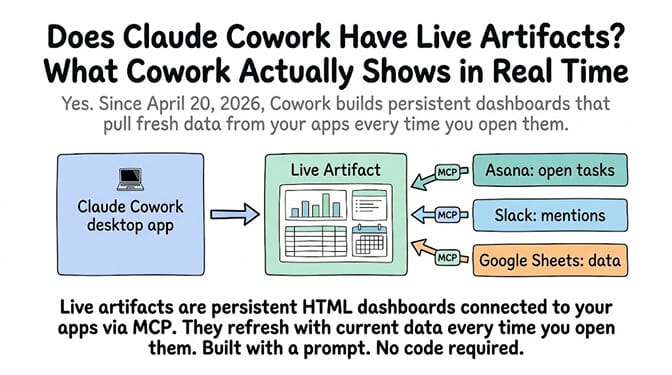
Yes. Claude Cowork launched live artifacts on April 20, 2026. They are persistent, interactive HTML dashboards that connect to your apps through MCP and refresh with current data when you open them. They're saved in the Cowork sidebar under "Live artifacts" and require a paid plan (Pro $20/month or higher). The rest of this post covers what they show, what they can't do, and when you need something different.
Update (September 14, 2026): Two things changed since this post was written. Cowork now runs on desktop, web (claude.ai), iOS, Android, and Chrome; cloud sessions keep working when your laptop is closed, and scheduled tasks run in the cloud. And Anthropic changed artifacts on August 19, 2026: live artifacts created before that date stay in the Artifacts view and keep working, but you can view them rather than edit them in place, and they open in the desktop app only. Check Anthropic's current Cowork artifacts documentation for how newer artifacts behave.
Windows, September 2026: if Cowork stopped reaching your files after the September 8 Windows update, that was a Windows bug Microsoft fixed on September 14 (KB5129195 on Windows 11 24H2/25H2). Run Windows Update and restart. Full fix and build numbers.
A user on the Duke Digital Media Community built a live dashboard in 30 minutes. No code. No engineering team. No BI tool subscription. She described what she wanted in Claude Cowork, toggled the artifact to "Live," and the dashboard started pulling YouTube video counts, RSS feed titles, and calendar events in real time.
A working dashboard from a prompt. Refreshing with live data. Built by someone with no technical experience.
That's what live artifacts do. And it's genuinely impressive. But there are limits nobody's covering yet, and a use case gap that matters if you need monitoring that alerts you, not a dashboard you have to open.
What Live Artifacts Actually Are (the Clear Answer)
Live artifacts are persistent, interactive HTML pages that Claude builds inside Cowork. They live in their own Live artifacts tab in the Cowork sidebar. You can reopen, refresh, and iterate on them from any future session. They connect to your apps and files through MCP (Model Context Protocol) and pull fresh data when opened.
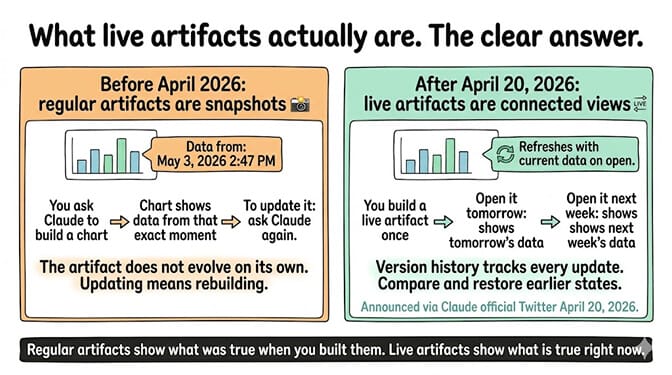
Before live artifacts (pre-April 2026): Claude's artifacts were snapshots. You built a chart. It showed data from that moment. To update it, you asked Claude again. The artifact didn't evolve on its own.
After live artifacts (April 20, 2026): The artifact connects to data sources. Open it tomorrow and it shows tomorrow's data. Open it next week and it shows next week's data. Version history tracks every update. You can compare versions and restore earlier states.
Announced: Claude's official Twitter account, April 20, 2026: "In Cowork, Claude can now build live artifacts: dashboards and trackers connected to your apps and files. Open one any time and it refreshes with current data."
The distinction: Regular artifacts are snapshots. Live artifacts are connected views. Regular artifacts show what was true when you built them. Live artifacts show what's true right now.
What You Can Build (Five Real Examples)
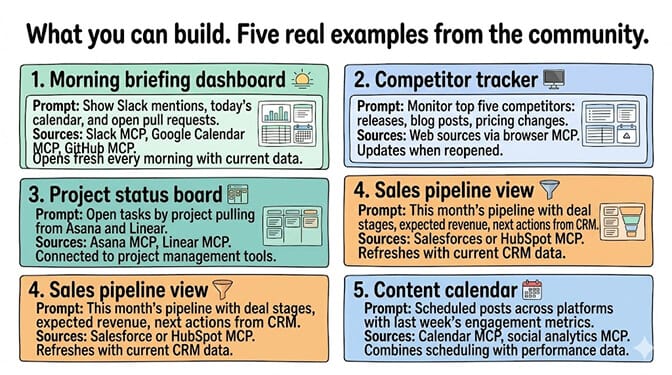
- Morning briefing dashboard. "Build me a dashboard that shows my Slack mentions, today's calendar, and open pull requests." Opens fresh every morning with current data.
- Competitor tracker. "Create a tracker that monitors my top five competitors: recent releases, blog posts, pricing changes." Pulls from web sources and updates when reopened.
- Project status board. "Build a dashboard showing open tasks by project, pulling from Asana and Linear." Connected to your project management tools via MCP.
- Sales pipeline view. "Show me this month's pipeline with deal stages, expected revenue, and next actions from my CRM." Refreshes with current CRM data.
- Content calendar. "Create a calendar view of my scheduled posts across platforms with engagement metrics from last week's posts." Combines calendar data with analytics.
For the comparison of Claude Cowork versus always-on AI agents, our Claude Code vs Cowork comparison covers when desktop agents work and when you need something running 24/7.
How to create a Claude Cowork live artifact (two paths)
Both paths take under 5 minutes. Pick whichever fits your workflow.
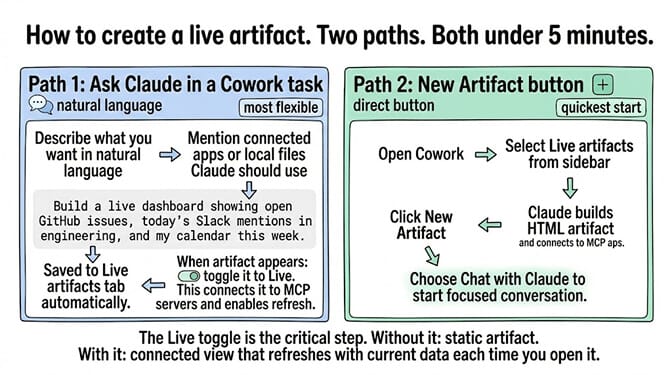
Path 1: Ask Claude in a Cowork task
- Open Cowork and start a new task.
- Describe what you want in natural language, naming the connected apps or local files Claude should pull from. For example: "Build me a live dashboard that shows open GitHub issues for my repo, today's Slack mentions in #engineering, and a list of recent emails from my CEO. Use the GitHub, Slack, and Gmail MCP connectors." (Substitute the connectors you've actually wired up — see the MCP FAQ below for the current directory.)
- Claude builds the HTML artifact, connects it to your MCP servers, and saves it to the Live artifacts tab in the sidebar.
- Toggle the artifact to Live if it isn't already — this is the step that enables real-time data refresh. Without the toggle, the artifact stays a static snapshot.
Path 2: Use the New Artifact button
- Open Cowork.
- Select Live artifacts from the sidebar.
- Click New artifact.
- Choose Chat with Claude to start a focused conversation about what to build.
- Once Claude generates the artifact, toggle it to Live to connect it to MCP servers and enable refresh-on-open.
Version history
Each saved live artifact tracks a version history. You can revisit prior versions, compare them, and restore an earlier state from the artifact's menu — useful when an iteration breaks something or when you want to roll back a layout change. (UI details vary by Cowork build; the version-history affordance lives alongside the artifact's open/refresh controls.)
Three limitations of Claude Cowork live artifacts
Here's what nobody tells you about live artifacts.
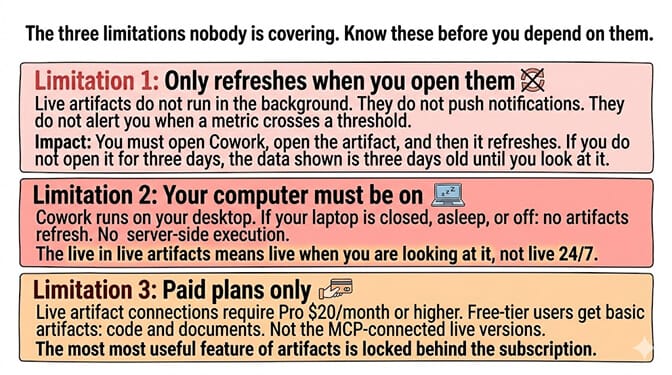
Limitation 1: They only refresh when you open them. Live artifacts don't run in the background. They don't push notifications. They don't alert you when a metric crosses a threshold. You have to open Cowork, open the artifact, and it refreshes at that point. If you don't open it for three days, the data shown is three days old until you look at it.
Workaround: Add opening Cowork to your morning routine — pin Cowork to the dock, set a desktop shortcut, or use a startup script so the relevant artifacts refresh while you're making coffee.
Limitation 2: Older live artifacts are desktop-only and read-only. Live artifacts created before August 19, 2026 open in the desktop app only, and you can view them but no longer edit them in place. Cowork itself now runs on web and mobile, and cloud sessions keep going with the laptop closed, but those older dashboards still need the desktop app. The "live" in Claude Cowork live artifacts still means "live when you're looking at it," not "live 24/7." (Windows users hit extra friction with the desktop app — our guide on Claude Cowork not working on Windows covers the VM and service bugs.)
Workaround: If you still need to change an older dashboard, rebuild it as a new artifact. For genuine 24/7 monitoring with alerts, a cloud agent is the right tool — see the comparison below.
Limitation 3: Paid plans only. Live artifact connections require Pro ($20/month) or higher. Free-tier users get basic artifacts (code, documents) but not the MCP-connected live versions. The most useful feature of artifacts is locked behind the subscription.
Workaround: None on the Claude side — the MCP connection layer is a paid feature. If your use case is monitoring rather than visual dashboards, a free BetterClaw plan (1 agent, BYOK) covers basic 24/7 checks without the Cowork paywall.
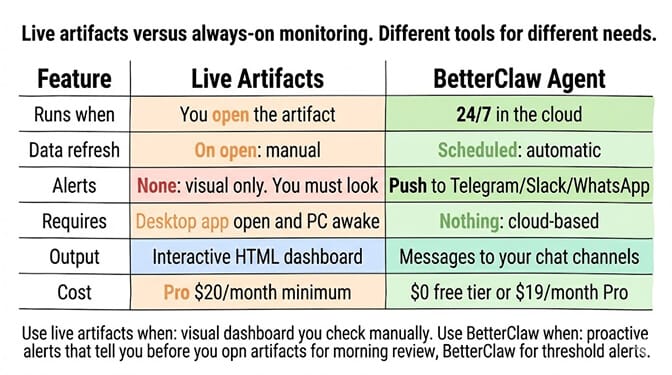
If you need data monitoring that alerts you proactively and operates 24/7 without you opening a dashboard, BetterClaw's always-on agents handle continuous monitoring. Set up a scheduled task that checks your metrics hourly and posts to Telegram or Slack when thresholds are crossed. No "open the artifact to refresh." The agent runs in the cloud. Free tier with 1 agent and BYOK. $49/month for Pro.
Claude Cowork live artifacts vs BetterClaw monitoring
| Live Artifacts | BetterClaw Agent | |
|---|---|---|
| Runs when | You open the artifact | 24/7 in the cloud |
| Data refresh | On open (manual) | Scheduled (automatic) |
| Alerts | None (visual only) | Push to Telegram/Slack/WhatsApp |
| Requires | Opening the artifact (pre-Aug 19 ones: desktop app only) | Nothing (cloud-based) |
| Output | Interactive HTML dashboard | Messages to your chat channels |
| Cost | $20/month (Pro minimum) | $0 (free tier) or $49/month (Pro) |
Use live artifacts when: You want a visual dashboard you check manually. The data is useful when you look at it but doesn't need real-time alerting. You're at your desk and want a quick overview.
Use BetterClaw when: You need proactive alerts ("pipeline dropped below $50K, notify me on Telegram"). You need monitoring while you sleep. You need the data pushed to you, not pulled by you.
Use both when: Live artifacts for the visual dashboard you review each morning. BetterClaw for the alerts that tell you when something needs attention before you open the dashboard.
What Claude Cowork live artifacts mean for BI tools and monitoring
Live artifacts are Anthropic's answer to "Claude should produce things that last." Before April 2026, everything Claude built was temporary — a conversation ended and the output lived only in chat history. Live artifacts change that: the output persists, evolves, and connects to real data sources. That puts pressure on traditional BI tools priced at $30-70 per user per month. A Claude Pro subscription at $20/month that also builds live dashboards starts to overlap with tools that only do dashboards.
It also overlaps with the connected-database features that Notion AI and Google Sheets have been quietly rolling out — both of those refresh data on open the same way Cowork does, but neither pulls from the same MCP-connected app set. The honest read is that live artifacts displace the "quick internal dashboard" use case that previously required Retool, Metabase, Notion AI, or a developer afternoon. For 24/7 monitoring with proactive alerts, you still need an always-on agent.
If you want the always-on monitoring that Claude Cowork live artifacts can't provide, start free on BetterClaw — 1 agent, BYOK, no credit card. Pro is $49/month. 15+ messaging channels for alerts. Scheduled monitoring runs. The dashboard lives in Cowork; the alerts come through BetterClaw.
Frequently Asked Questions
Does Claude Cowork have live artifacts?
Yes. Anthropic launched live artifacts in Claude Cowork on April 20, 2026. They are persistent, interactive HTML dashboards that connect to your apps and files through MCP (Model Context Protocol). They refresh with current data when you open them and are saved in the "Live artifacts" tab in the Cowork sidebar. Available on paid plans (Pro $20/month or higher).
How do live artifacts differ from regular Claude artifacts?
Regular artifacts are static snapshots created during a conversation. Live artifacts are persistent and connected to data sources. Regular artifacts show data from the moment they were built. Live artifacts refresh with current data when reopened. Live artifacts also have version history, so you can track changes and restore earlier versions. Live artifacts require Cowork and a paid plan; ones created before August 19, 2026 open in the desktop app only.
What can I build with Claude Cowork live artifacts?
Dashboards connected to project management tools (Asana, Linear), CRM pipeline views, competitor trackers, morning briefings (Slack mentions + calendar + PRs), content calendars with engagement metrics, and any data visualization that pulls from your connected apps. Describe what you want in natural language. Claude builds the HTML and connects it to your MCP servers.
Do live artifacts update automatically in the background?
No. Live artifacts refresh when you open them, not continuously in the background, so an artifact you haven't opened shows the data from the last time you did. For 24/7 monitoring with push notifications, use an always-on agent like BetterClaw ($0 free tier or $49/month Pro).
How much do Claude Cowork live artifacts cost?
Live artifacts require a paid Claude plan: Pro ($20/month), Max ($100 or $200/month for 5x / 20x), Team, or Enterprise. Free-tier users get basic artifacts but not live MCP-connected versions. For comparison, BetterClaw offers always-on monitoring agents starting at $0 (free plan with BYOK) or $49/month (Pro) — proactive alerts to messaging channels rather than visual dashboards. The deeper architectural comparison lives in our BetterClaw vs Claude Cowork post.
Can I share a Claude Cowork live artifact with my team?
Claude supports publishing regular artifacts to a shareable URL (Settings → publish from the artifact menu) without the recipient needing a Claude account. Whether the same publish flow works cleanly for live artifacts — including how the MCP connections behave for a viewer who isn't the owner — is not explicitly confirmed in current Anthropic docs. Workarounds for team use right now: each teammate creates their own copy of the artifact from a shared prompt and their own MCP connections, or you fall back to an alerting tool (like BetterClaw) for cross-team visibility. Anthropic may formalize live-artifact sharing later — check the current Cowork docs before planning a team rollout.
Which MCP connectors work with Claude Cowork live artifacts?
Anthropic's connector directory covers GitHub, Slack, Gmail, Google Drive, Notion, Asana, Linear, Jira, HubSpot, Figma, Snowflake, Stripe, Canva, Box, Monday.com, Hex, Amplitude, and a few dozen others. There's no separate "live artifacts compatibility" list — anything reachable via an MCP connector you've configured in Cowork can be pulled into an artifact. Note: Google Calendar specifically isn't currently in the verified native directory (Gmail and Google Drive are) — for calendar workflows you may need a community MCP server. The practical gating factor is configuring the MCP server for each app first, then asking Claude to build the artifact on top of it.