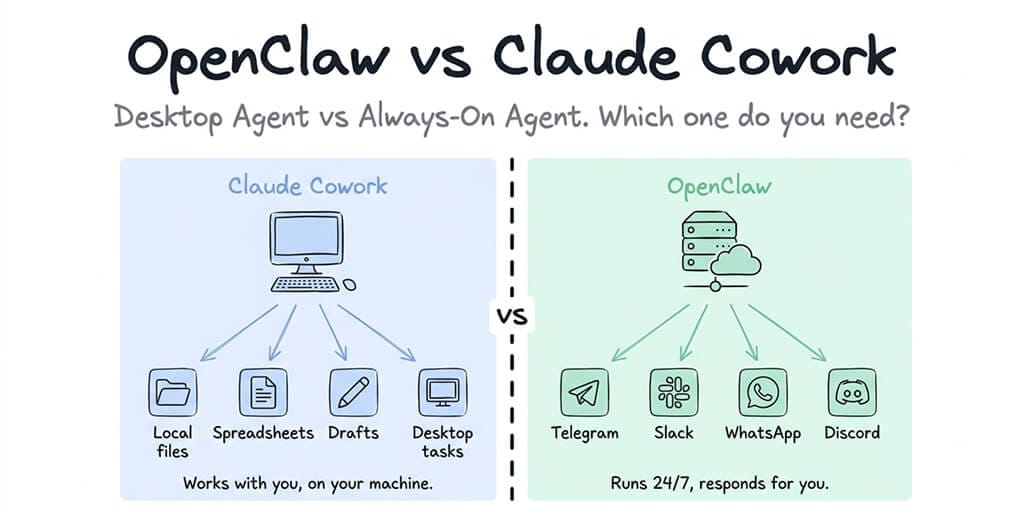
One lives on your desktop. The other lives on a server. They solve completely different problems, and most people are comparing the wrong things.
A founder in our Discord posted a question that stopped me mid-scroll: "I've been using Claude Cowork for a week and it's amazing. Why would I need OpenClaw?"
Fair question. Both are AI agents. Both can automate multi-step tasks. Both are built on sophisticated model architectures. From a distance, they look like competitors.
They're not. OpenClaw and Claude Cowork solve fundamentally different problems for fundamentally different workflows. One is a desktop productivity agent that works with your local files while you watch. The other is an always-on server agent that talks to your team on Slack at 3 AM while you sleep.
Choosing between them isn't about which is "better." It's about whether you need a desktop assistant or an autonomous agent. Here's how to tell.
What Claude Cowork actually is (and isn't)
Claude Cowork launched in January 2026 as a research preview inside the Claude Desktop app. Anthropic built it in roughly a week and a half using Claude Code itself, which is either impressive or terrifying depending on your perspective.
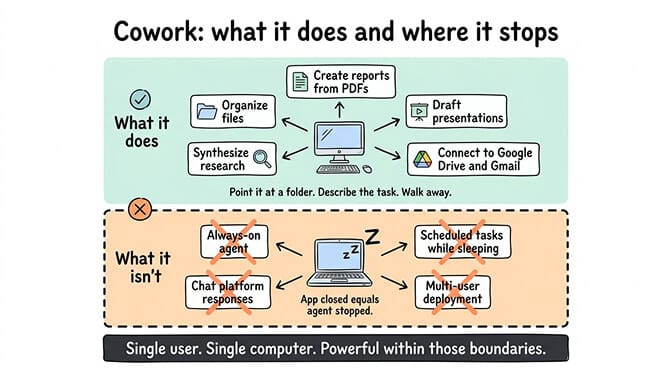
Here's what it does: you point Cowork at a folder on your computer and describe a task. Organize these files. Synthesize this research. Create a report from these PDFs. Draft a presentation from these notes. Cowork plans the work, breaks it into steps, and executes. You can watch it work, steer it mid-task, or walk away and come back to finished output.
It connects to services like Google Drive, Gmail, DocuSign, and others through Anthropic's connector ecosystem. It supports plugins for domain-specific workflows (financial analysis, HR, engineering). It can use your browser through Claude in Chrome for tasks that need web access.
What it is: A desktop productivity agent for knowledge workers. Files in, organized/processed files out. Think of it as an extremely capable virtual assistant sitting at your computer.
What it isn't: An always-on agent. When you close the Claude Desktop app, Cowork stops. It doesn't connect to chat platforms. It doesn't respond to your team's messages. It doesn't run scheduled tasks while your laptop sleeps (the scheduled task feature requires the app to be open). It's a single-user tool for a single computer.
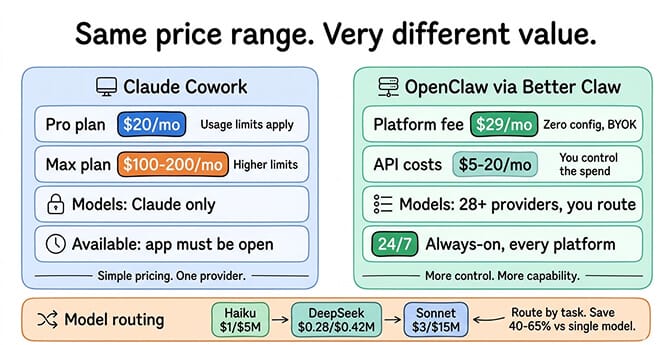
Cowork requires a paid Claude subscription. Pro at $20/month, Max at $100-200/month, Team, or Enterprise. It only runs Claude models. No switching to DeepSeek when you want cheaper tokens or Gemini for specific tasks.
What OpenClaw actually is (and isn't)
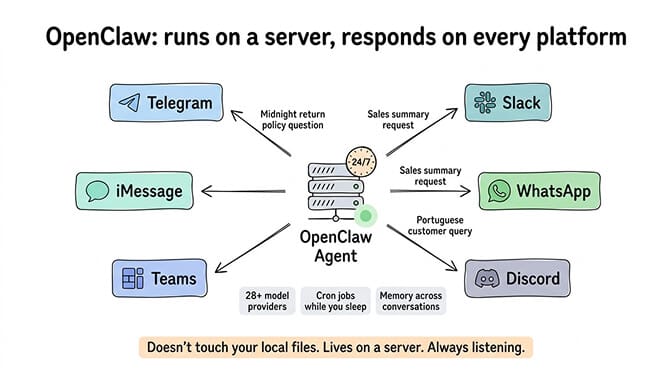
OpenClaw is an open-source autonomous agent framework with 230,000+ GitHub stars, created by Peter Steinberger (who has since joined OpenAI). It runs on a server and connects to chat platforms like Telegram, Slack, WhatsApp, Discord, Teams, and iMessage.
Here's what it does: your OpenClaw agent runs 24/7, listening for messages across whatever platforms you've connected. Someone messages your Telegram bot at midnight asking about your return policy? The agent responds. Your operations lead asks in Slack for yesterday's sales summary? The agent pulls data and answers. A customer sends a WhatsApp message in Portuguese? The agent translates and replies.
OpenClaw supports 28+ AI model providers. You can use Claude, GPT-4o, DeepSeek, Gemini, Mistral, or even local models through Ollama. You can route different tasks to different models (cheap models for simple queries, powerful models for complex reasoning). The skill ecosystem adds capabilities like web search, browser automation, calendar management, and custom API integrations.
What it is: An always-on, multi-channel agent that runs independently on server infrastructure. It persists memory across conversations, executes scheduled tasks via cron jobs, and operates autonomously without anyone watching.
What it isn't: A desktop file organizer. OpenClaw doesn't work with your local files. It doesn't create presentations from your Downloads folder. It doesn't clean up your desktop. It lives on a server and communicates through chat platforms.
For the full breakdown of how OpenClaw works under the hood, our explainer covers the architecture, skill system, and model routing in detail.
The real question: desktop agent or always-on agent?
Here's where most people get it wrong. They compare features. They should compare workflows.
You need Cowork if your work is primarily about processing, creating, and organizing information on your computer. Research synthesis. Document creation. File organization. Data extraction from PDFs. Presentation drafting. These are tasks where you're the only user, the inputs are local files, and the outputs go back to your filesystem.
Cowork excels here because it has direct access to your files, your browser, and your connected services. It can read a folder of receipts, extract the data, create an expense report, and save it to your Drive. That workflow would be awkward in OpenClaw because OpenClaw isn't designed to work with local files.
You need OpenClaw if your agent needs to be available to other people, on chat platforms, around the clock. Customer support bots. Team assistants. Scheduling agents. Research agents that respond in Slack. Any workflow where the agent serves multiple users or needs to operate independently while you're not at your computer.
OpenClaw excels here because it was designed for exactly this: persistent, autonomous, multi-channel communication. It doesn't depend on your laptop being open. It doesn't stop when you close an app. It runs on infrastructure and serves whoever messages it.
Cowork is a productivity multiplier for you. OpenClaw is a team member that works when you don't.
Where they actually overlap (it's smaller than you think)
There is a genuine overlap zone: personal automation tasks that involve external services.
Both can connect to Gmail. Both can interact with Google Drive. Both can browse the web. If your use case is "check my email every morning and summarize what's important," either tool could theoretically handle it.
But the execution model differs dramatically. Cowork does this while you're sitting at your computer with the app open. OpenClaw does this via a cron job at 6 AM every morning, regardless of whether you're awake, and delivers the summary to your Telegram.
For scheduled automation that runs independently, OpenClaw is the only option. Cowork's scheduled task feature requires the Claude Desktop app to be open and your computer to be awake. True background automation needs server-side execution.
For the specific workflows and cost breakdown of running automated tasks in OpenClaw, our API cost guide covers the real numbers for morning briefings, email triage, and other common automations.
The cost comparison nobody does honestly
Cowork's pricing is straightforward: $20/month for Claude Pro (with usage limits), $100-200/month for Claude Max (higher limits). This includes the Cowork feature plus regular Claude chat access. You're locked into Claude models only.
OpenClaw's pricing depends on your deployment choice. Self-hosting is free (you pay for the server, typically $5-25/month on a VPS, plus API costs for your chosen model provider). Managed alternatives like BetterClaw, a no-code AI agent platform, run $49/month for Pro with BYOK, meaning you bring your own API keys and choose from 28+ providers.
Here's the cost question most people miss: model flexibility changes your monthly bill dramatically.
On Cowork, every task uses Claude. Simple file organization? Claude. Complex research synthesis? Claude. Quick email check? Claude. You're paying Claude-tier pricing for every interaction, even the ones that don't need frontier-model intelligence.
On OpenClaw, you route different tasks to different models. Heartbeat checks go to Haiku at $1/$5 per million tokens. Simple responses go to DeepSeek at $0.28/$0.42 per million tokens. Complex reasoning goes to Claude Sonnet at $3/$15 per million tokens. This intelligent model routing typically cuts API costs 40-65% compared to using a single model for everything.
For moderate usage: Cowork runs $20-200/month depending on your plan. BetterClaw runs $49/month platform fee plus $5-20/month in API costs, totaling $54-69/month. The difference is that OpenClaw gives you 24/7 availability, multi-channel support, and model choice. Cowork gives you desktop file access and zero infrastructure management.
The security angle: local vs server-based agents
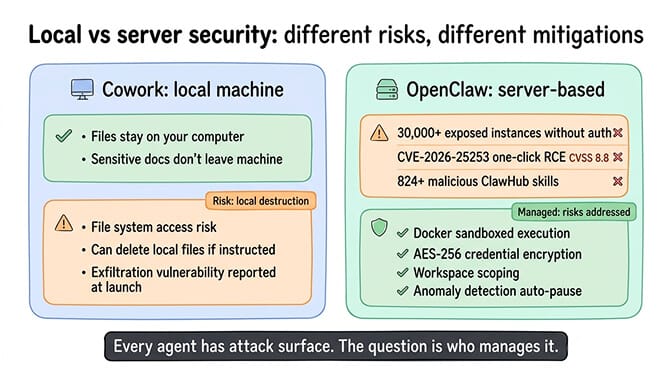
Cowork runs on your local machine. Your files stay on your computer. Data is processed locally (though requests still go to Anthropic's API for model inference). This is appealing for sensitive document work because the files themselves don't leave your machine.
That said, Cowork has already had a data exfiltration vulnerability reported days after launch. And any tool with file system access carries inherent risk. Anthropic noted in their launch post that Cowork "can take potentially destructive actions (such as deleting local files) if it's instructed to."
OpenClaw runs on server infrastructure. Security depends entirely on your deployment. Self-hosted OpenClaw has significant attack surface: 30,000+ instances found exposed without authentication, CVE-2026-25253 (one-click RCE, CVSS 8.8), and the ClawHavoc campaign finding 824+ malicious skills on ClawHub. CrowdStrike published a full security advisory on the risks.
Managed platforms address these risks differently. BetterClaw's security model includes Docker-sandboxed execution (skills can't access the host system), AES-256 encryption for credentials, workspace scoping, and anomaly detection with auto-pause. Self-hosting means you're responsible for all of these protections yourself.
For the full rundown of documented OpenClaw security incidents and mitigation steps, our security guide covers everything from the CrowdStrike advisory to the Cisco data exfiltration discovery.
The "both" answer: when you actually need both
Here's what nobody tells you: the best setup for many founders and small teams is running both.
Use Cowork for personal productivity tasks during your work day. File organization, document synthesis, research compilation, presentation creation. These are desktop-native tasks that Cowork handles elegantly.
Use OpenClaw for anything that needs to run without you. Customer-facing bots, team assistants, automated monitoring, scheduled reports, multi-channel communication. These are server-native tasks that require always-on infrastructure.
The two tools don't compete. They complement. Cowork makes you more productive at your desk. OpenClaw extends your team's capabilities around the clock.
If the server-side deployment is what's holding you back from running an always-on agent, BetterClaw handles the infrastructure so you can focus on what the agent actually does. $49/month for Pro, BYOK with 28+ providers. Docker-sandboxed execution, encrypted credentials, 15+ chat platforms. Your agent deploys in 60 seconds, runs 24/7, and doesn't require your laptop to be open.
The honest recommendation
If you're a solo founder who works primarily on document-heavy tasks and doesn't need a chat-facing agent, start with Cowork. It's simpler, requires zero infrastructure decisions, and the desktop-native experience is genuinely good for knowledge work.
If you need an agent that serves your team, responds to customers, or runs automated workflows while you sleep, you need OpenClaw. The always-on, multi-channel, multi-model architecture is purpose-built for exactly this.
If you're building a company and both descriptions resonate, use both. $20/month for Cowork on your machine. $49/month for BetterClaw Pro plus $5-20/month in API costs for an always-on agent handling the external-facing work. That's a $74-89/month investment for a desktop productivity agent and a 24/7 autonomous team member.
The question was never "which is better." It's "which problem are you solving right now?"
If the answer is "I need an agent that's available when I'm not," start your agent on BetterClaw. $49/month for Pro. 60-second deploy. 15+ chat platforms. Your agent runs while you close your laptop and go live your life.
Frequently Asked Questions
What is the difference between OpenClaw and Claude Cowork?
OpenClaw is an open-source autonomous agent framework that runs 24/7 on server infrastructure, connecting to 15+ chat platforms (Telegram, Slack, WhatsApp, Discord) and supporting 28+ AI model providers. Claude Cowork is a desktop productivity agent built into the Claude Desktop app that works with your local files and folders. OpenClaw serves multiple users on chat platforms independently. Cowork assists a single user with desktop tasks while the app is open.
How does Claude Cowork compare to OpenClaw for customer support?
OpenClaw is significantly better for customer support. It runs 24/7 on server infrastructure, connects to the chat platforms your customers actually use (WhatsApp, Telegram, Slack, web chat), supports model routing for cost optimization, and maintains persistent memory across conversations. Claude Cowork is a desktop-only tool that stops when you close the app and has no chat platform integrations. Cowork is designed for personal productivity, not customer-facing interactions.
Can I use both Claude Cowork and OpenClaw together?
Yes, and many founders do. Use Cowork for personal desktop productivity (file organization, document creation, research synthesis) during your work day. Use OpenClaw for always-on automated tasks (customer support bots, team assistants, scheduled reports, multi-channel communication). The two tools complement rather than compete. Cowork handles your desk. OpenClaw handles everything else.
How much does it cost to run OpenClaw vs Claude Cowork?
Claude Cowork costs $20/month (Pro plan, with usage limits) or $100-200/month (Max plan). It only uses Claude models. BetterClaw costs $49/month for Pro plus $5-20/month in API costs from your chosen provider. OpenClaw's model flexibility (28+ providers, including DeepSeek at $0.28/$0.42 per million tokens) means you can route tasks to cheaper models where appropriate, often cutting API costs 40-65% compared to using Claude for everything.
Is Claude Cowork secure enough for business documents?
Cowork processes files locally on your machine, which is appealing for sensitive documents. However, model inference still goes to Anthropic's API, and a data exfiltration vulnerability was reported shortly after launch. Anthropic warns that Cowork "can take potentially destructive actions (such as deleting local files)." For business use, review your data sensitivity requirements, keep Cowork folder access limited to what's necessary, and back up important files before processing them.
Related Reading
- OpenClaw vs Manus for Autonomous Tasks — How OpenClaw compares to another popular AI agent platform
- OpenClaw vs Accomplish: Which AI Agent Wins? — Side-by-side comparison with Accomplish
- Best OpenClaw Use Cases — Real-world tasks where OpenClaw excels over alternatives
- OpenClaw Security Risks Explained — Security implications for all deployment options