Klarna went fully autonomous with AI support and had to hire humans back. Here's the smarter path: start with assist, then dial up autonomy when the data says you're ready.
Klarna bet everything on fully autonomous AI support. For a while, the numbers looked incredible. Their AI agent handled the work of 700 full-time support reps. Response times dropped. Costs dropped.
Then CSAT scores on complex tickets started slipping. Customers with nuanced problems (payment disputes, multi-party transactions, edge cases in their buy-now-pay-later terms) got responses that were technically correct but emotionally tone-deaf. Klarna quietly started hiring human agents back.
The lesson wasn't that AI support doesn't work. It does. The lesson was that skipping straight to "fully autonomous" without a transition period is how you lose customers on the cases that matter most.
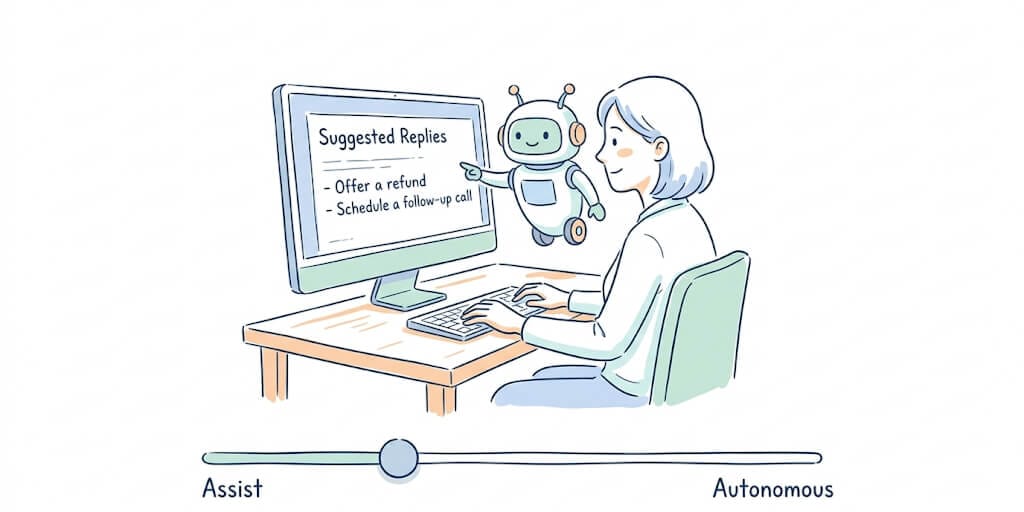
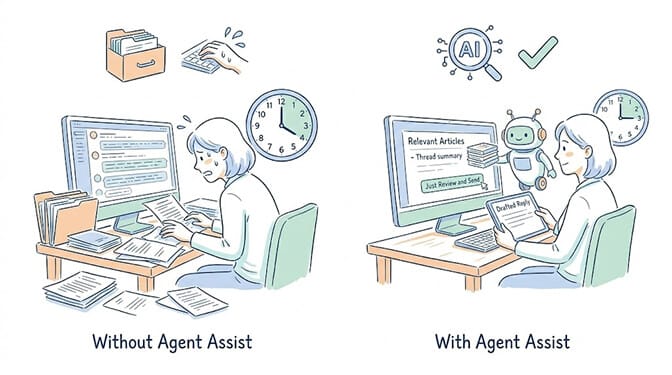
That's where AI agent assist comes in. Not replacing your team. Working alongside them. Drafting replies. Surfacing knowledge. Suggesting next actions. Letting the human handle judgment and empathy while the AI handles speed and research.
And here's the part nobody in the contact center vendor world will tell you: agent assist isn't a permanent mode. It's the first step in a progression toward autonomy. The question isn't "assist or autonomous." It's "when does this specific workflow earn the right to graduate?"
What is AI agent assist, actually?
Strip away the vendor marketing and AI agent assist is straightforward.
It's an AI that sits alongside your human support agent during a live interaction. The human is still in control. The AI is doing the grunt work.
What agent assist actually does:
- Drafts reply suggestions based on the customer's message and conversation history
- Surfaces relevant knowledge base articles, past tickets, and product documentation in real time
- Summarizes long conversation threads so the agent doesn't have to re-read 47 messages
- Suggests next actions ("this looks like a billing dispute, here's the refund policy")
- Auto-fills ticket fields (category, priority, sentiment)
What agent assist does not do:
- Send replies without human approval
- Take actions (refunds, account changes, escalations) without a human clicking "approve"
- Replace the human agent
- Handle conversations end-to-end
AI agent assist is a copilot, not a pilot. The human makes the decisions. The AI makes them faster.
The result? Your support rep handles 3x more tickets per hour without losing the human touch on sensitive issues. Your first response time drops from hours to minutes. Your CSAT stays stable or improves because a human is still reviewing every outbound message.
Agent assist vs autonomous agents vs chatbots (the actual differences)
These three things get confused constantly. They're not the same.
Chatbot: Scripted, rule-based responses. "If customer says X, reply with Y." No reasoning. No context awareness. No memory. Think of the "how can I help you?" popup on every SaaS website that can answer about 4 questions before saying "let me connect you with a human." That's a chatbot.
AI agent assist: AI working alongside a human agent during live conversations. The AI drafts, suggests, and surfaces information. The human reviews, edits, and sends. Every action goes through a human. Best for complex support, sales conversations, and any interaction where judgment matters.
Autonomous AI agent: AI handles the entire interaction end-to-end. No human in the loop. The agent reads the message, reasons about the right response, takes actions (sends replies, updates records, processes refunds), and moves on to the next ticket. Best for high-volume, low-complexity queries where the patterns are well-established.
| Chatbot | AI Agent Assist | Autonomous Agent | |
|---|---|---|---|
| Who controls? | Scripts/rules | Human agent | AI agent |
| Can it reason? | No | Yes (drafts/suggests) | Yes (acts independently) |
| Memory? | No | Yes (conversation context) | Yes (persistent) |
| Best for | FAQ deflection | Complex support | High-volume routine queries |
| Risk level | Low | Low (human reviews) | Higher (needs guardrails) |
Here's the mistake most teams make: they jump from chatbot straight to autonomous agent. They skip the assist stage entirely. And that's how you get the Klarna situation. CSAT drops on the hard cases because nobody taught the agent (or validated its judgment) on those cases first.
The smart path is a progression. Start with assist. Watch what the agent gets right. Watch what it gets wrong. Build confidence in the patterns. Then gradually increase autonomy on the workflows where the AI has proven itself.
How BetterClaw's trust levels create the assist-to-autonomous journey
This is where most AI agent assist tools fall short. They're binary. You're either in "assist mode" or you're not. Graduated trust levels are worth looking for specifically when you shortlist an AI agent builder, because they are what makes the progression above possible at all.
BetterClaw built something different: three graduated trust levels that map directly to the assist-to-autonomous progression.
Intern mode = pure agent assist. The agent reads incoming messages, drafts reply suggestions, classifies tickets by priority, and surfaces relevant context. But it takes zero autonomous actions. Every draft, every classification, every suggested action waits for a human to review and approve. This is full assist mode. The training wheels are on.
Specialist mode = semi-autonomous. The agent handles routine, well-established patterns on its own (password resets, order status inquiries, shipping updates, FAQ answers) and escalates anything complex or ambiguous to a human. You define which categories go autonomous and which stay in assist. Most teams land here permanently for support workflows. It's the sweet spot.
Lead mode = fully autonomous. The agent runs the entire support workflow end-to-end. It reads, reasons, acts, and follows up. The one-click kill switch is always available. Real-time health monitoring auto-pauses the agent if anomalies appear. This mode is for high-volume, well-validated workflows where the agent has proven reliable over weeks or months.
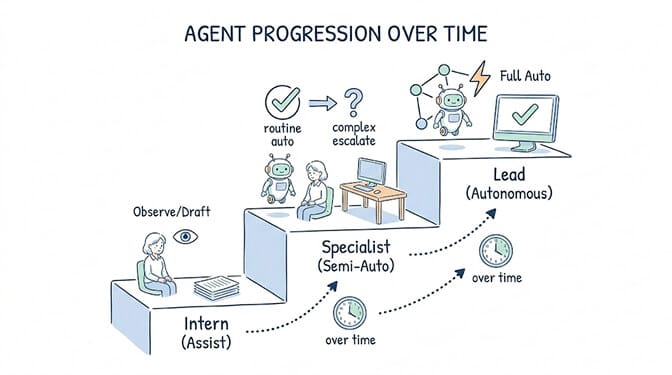
Start at Intern. Watch the agent for a week. Promote to Specialist when you trust the patterns. Promote to Lead when you trust the judgment. Demote back to Intern any time, with one click.
The progression isn't permanent. If you push to Lead and notice the agent mishandling a new type of query, demote it back to Specialist or Intern instantly. No configuration change. No redeployment. One click.
That's the gap in the market. Traditional agent assist tools (Capacity, Intercom's Copilot, Observe.AI, Cresta) are locked in assist mode forever. They help your human agents work faster, but they never graduate to autonomy. You're paying $500-2,000 per seat per month for a tool that stays a copilot permanently.
BetterClaw starts at $0 (free plan) or $49/month (Pro) and gives you the full progression from assist to autonomous in the same tool.
AI agent assist in practice: the support triage walkthrough
Let me show you how this actually works with a customer support use case.
The setup: You connect Gmail via one-click OAuth. You set the agent's trust level to Intern (pure assist). You write instructions: "Read incoming support emails. Classify as P1 (urgent, revenue-impacting), P2 (important, not urgent), or P3 (low priority). Draft a response for each. Never send without my approval."
The daily flow: Your agent reads 47 emails overnight. It classifies them. 3 are P1. 12 are P2. 32 are P3. For each email, it drafts a contextual reply based on your knowledge base and past responses it's learned from. It surfaces relevant documentation. Everything sits in your approval queue.
Your morning: Instead of reading 47 emails, you're reviewing 47 draft replies. Most of them are good. You approve 40 with zero edits. You tweak 5. You rewrite 2 from scratch (edge cases the agent hasn't seen before). Total time: 20 minutes instead of 3 hours.
Week two: The agent has learned from your corrections. The drafts that needed rewriting? The agent handles those patterns correctly now. Your edit rate drops from 15% to 5%.
Week four: You feel confident that P3 tickets (low-priority, routine questions) are being drafted correctly every time. You promote the agent to Specialist for P3 only. Now P3 emails get responded to automatically. P1 and P2 still go through your approval queue.
That's the progression. Not a switch. A dial. And you control the dial based on real performance data, not hope.
One of our users, James Porter, went from 24-hour first response times to under 5 minutes using this exact pattern. He started at Intern. Promoted to Specialist after two weeks. His support queue went from a source of stress to something that basically runs itself for routine tickets.
If you're running a support operation and your reps are spending half their day drafting responses that an AI could draft in seconds, this is built for exactly that problem. BetterClaw's free plan gives you 1 agent, 500 credits a month, and trust levels, to test whether the assist-to-autonomous progression works for your specific workflow. $49/month for Pro when you scale. No enterprise sales call required. Start here.
BetterClaw vs traditional AI agent assist tools
Let's talk about the elephant in the pricing room.
Traditional agent assist software (Capacity, Observe.AI, Cresta, and the agent assist features inside Intercom and Zendesk) is priced for enterprise contact centers. We're talking $500 to $2,000+ per seat per month. Some charge per resolution. Some charge per conversation. The pricing models vary, but the floor is high.
| BetterClaw | Traditional Agent Assist (Capacity, Cresta, etc.) | |
|---|---|---|
| Starting price | $0/mo (free) or $49/mo (Pro) | $500-2,000/seat/mo |
| Channels | 15+ (email, Telegram, Slack, WhatsApp, Discord, Teams) | Usually locked to their own widget or 1-2 channels |
| Assist to autonomous | Yes (Intern → Specialist → Lead) | Assist only (no autonomy path) |
| LLM pricing | BYOK, zero markup | Bundled (markup included) |
| Setup time | 60 seconds | Days to weeks (vendor onboarding, integration, training) |
| Kill switch | Yes (one-click) | Varies |
| Free plan | Yes | No |
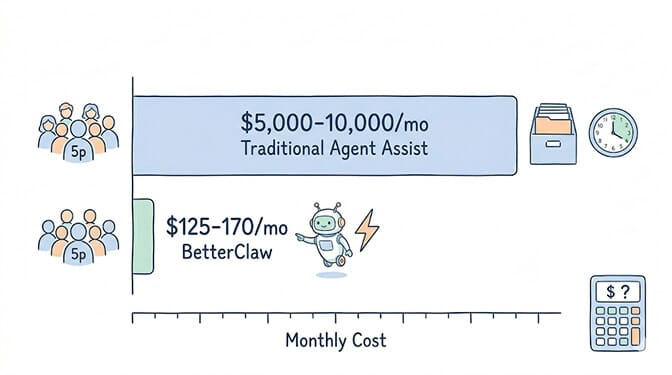
The price difference isn't subtle. A team of 5 support reps on traditional agent assist software: $2,500-10,000/month. The same team using BetterClaw Pro: $79/month ($49 for Pro, which includes 5 agents and 2 team seats, plus 3 extra seats at $10/mo) plus LLM costs ($30-75/month for BYOK inference). Total: roughly $109-154/month.
That's not a 20% savings. That's a 94%+ reduction.
The tradeoff? Traditional tools come with dedicated onboarding teams, custom integrations, and enterprise support agreements. If you need a vendor to hold your hand through deployment, that has value. But if you can follow a visual builder and write plain-English instructions, you don't need a $2,000/month vendor for that.
When to stay in assist mode vs go autonomous
Let's be honest about this. Not every workflow should graduate to fully autonomous.
Stay in assist mode (Intern) for:
- Healthcare communications (HIPAA implications, clinical judgment needed)
- Financial advice or transactions above a threshold
- Legal communications (contract terms, compliance responses)
- Any interaction where getting it wrong costs more than getting it slow
- New workflows the agent hasn't processed enough data to be reliable on
Move to semi-autonomous (Specialist) for:
- Password resets, account unlocks, MFA troubleshooting
- Order status and shipping tracking inquiries
- FAQ-style questions your knowledge base covers thoroughly
- Appointment scheduling and rescheduling
- Standard refund requests within clear policy parameters
Consider fully autonomous (Lead) for:
- High-volume, low-complexity ticket categories where the agent has performed at 95%+ accuracy for 30+ days
- Internal operations (employee onboarding FAQs, IT help desk tier 1)
- Workflows where speed matters more than nuance (real-time price alerts, status notifications)
The goal isn't to make everything autonomous. It's to make the right things autonomous and keep a human on the things that need judgment.
Gartner predicts 40% of enterprise applications will embed AI agents by end of 2026. But the companies getting real value aren't the ones that flipped the switch to fully autonomous overnight. They're the ones that started with agent assist patterns and graduated specific workflows based on performance data.
The progression matters more than the destination
The most important word in "AI agent assist" isn't "AI." It's "assist."
It acknowledges that your human team has skills the AI doesn't: empathy, judgment, context about your specific customers, the ability to say "I'm really sorry about that" and mean it.
What your human team doesn't have is time. Time to read every email. Time to search the knowledge base for every ticket. Time to draft a first response within 5 minutes instead of 5 hours.
Agent assist gives your team time back. And then, gradually, it gives you the confidence to let the AI handle the simple stuff on its own. Not because you trust AI blindly. But because you watched it work in assist mode for weeks and saw it get the patterns right.
That's the journey. Not a switch. Not a binary decision. A dial you turn up based on evidence.
If your team is drowning in support tickets and you want to start with agent assist before considering autonomy, BetterClaw's free AI readiness audit identifies the highest-impact workflows for your specific operation. We assess your ticket volume, classify which workflows are candidates for assist vs semi-autonomous vs fully autonomous, and share a clear proposal. No commitment required. If it makes sense, we implement it on BetterClaw. If it doesn't, you still walk away with a useful analysis.
Frequently Asked Questions
What is AI agent assist?
AI agent assist is software that works alongside your human support agents during live customer interactions. It drafts reply suggestions, surfaces relevant knowledge base articles, summarizes conversation threads, and suggests next actions. The human agent reviews, edits, and sends. The AI handles speed and research. The human handles judgment and empathy. BetterClaw's Intern trust level provides full agent assist functionality at $0/month (free plan) or $49/month (Pro).
How does AI agent assist compare to an autonomous AI agent?
Agent assist keeps a human in the loop for every action. The AI drafts and suggests, the human approves and sends. An autonomous agent handles the entire interaction end-to-end without human review. The smart approach is to start with assist (BetterClaw's Intern mode), validate the AI's accuracy over 1-2 weeks, then gradually increase autonomy (Specialist mode) for well-established patterns. This avoids the CSAT drops that companies like Klarna experienced when jumping straight to full autonomy.
How long does it take to set up AI agent assist with BetterClaw?
About 60 seconds for the initial setup. Connect your email via OAuth, write your instructions in plain English, set the trust level to Intern (pure assist), and deploy. The agent immediately starts drafting replies and classifying incoming messages. Most teams see value within the first day. Refinement happens over the first 1-2 weeks as you correct drafts and the agent learns from your edits.
How much does AI agent assist software cost?
Traditional agent assist tools (Capacity, Cresta, Observe.AI) charge $500-2,000 per seat per month. BetterClaw starts at $0/month (free plan, 1 agent, 500 credits) and scales to $49/month for Pro (5 agents, 12,000 credits/month, all channels). A team of 5 support reps using BetterClaw costs roughly $109-154/month total (Pro plus 3 extra seats, including LLM inference with BYOK). The same team on traditional tools: $2,500-10,000/month.
Is AI agent assist reliable enough for customer-facing support?
Yes, because the human stays in control. In Intern (assist) mode, the AI never sends a reply without human approval. It drafts, suggests, and classifies, but every outbound message goes through a human review. This eliminates the risk of the AI sending incorrect or inappropriate responses. BetterClaw adds additional safeguards: secrets auto-purge after 5 minutes (AES-256), isolated Docker containers per agent, real-time health monitoring, and a one-click kill switch. 50+ companies including Carelon and Robert Half use BetterClaw for customer-facing workflows.