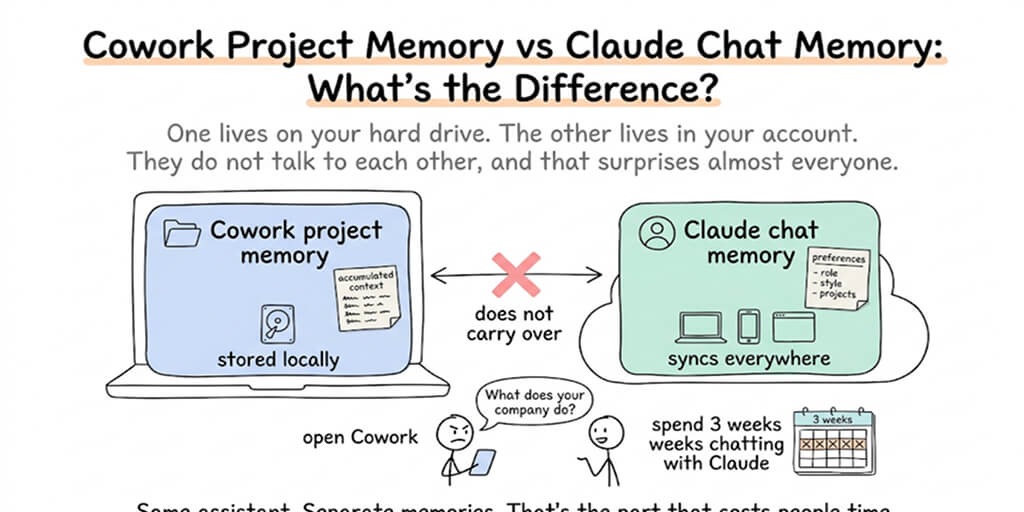
One lives on your hard drive. The other lives in your account. They do not talk to each other, and that surprises almost everyone.
You spent three weeks teaching Claude your business in chat. Your tone, your clients, your file naming rules. Then you opened Cowork, gave it a task, and it asked what your company does.
The second half of that sentence is the part that costs people time.
Quick comparison
| Cowork project memory | Claude chat memory | |
|---|---|---|
| Scope | One Cowork project. Nothing carries between projects | Across your chats. Each chat project gets its own separate memory space |
| What it stores | Context from tasks you have run inside that project | Your role, projects, professional context, communication preferences, technical and coding style |
| Editable | Managed through the project, on by default | Fully editable. View entries by category in Settings, edit or delete any of them, or just tell Claude in the conversation |
| Where it lives | Locally on your desktop, inside the project folder. No cloud sync | In your Claude account, synced across web, Claude Desktop, and Claude Mobile |
| Persistence | Stays with the project. Archiving removes it from the UI but leaves local files alone | Follows your chat data retention policy. Pause keeps it, Reset deletes everything permanently |
| Availability | Paid plans on Claude Desktop for macOS and Windows | New memory experience on free, Pro, and Max. Team and Enterprise on the legacy experience for now |
Anthropic does not publish a size or entry cap for either system. If you find an article quoting you one, it is guessing.
What Cowork project memory actually is
A Cowork project is a workspace that holds four things: instructions, scheduled tasks, context, and memory. Memory is the one that compounds.
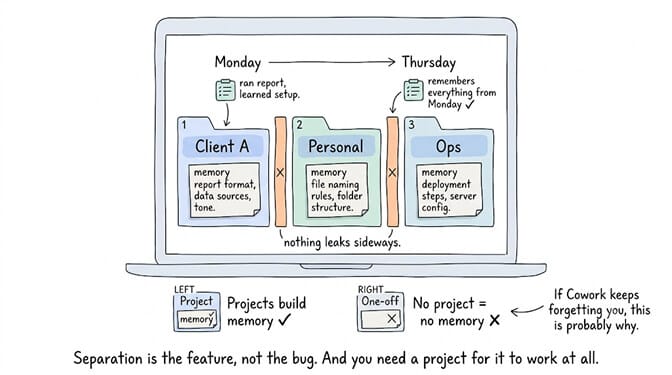
When it is on, Claude remembers context from tasks you have already run in that project and applies it to future tasks in the same project. Run a report on Monday, and Thursday's version does not need the setup explained again.
The boundary is hard by design. What Claude learns in your client project does not appear in your personal project. Anthropic frames that separation as a guardrail rather than a limitation, and if you have ever pasted something confidential into the wrong window you will understand why.
One detail people miss: within Cowork, memory is supported in projects only. A one-off Cowork session with no project attached does not build memory. If Cowork keeps forgetting you, the most likely reason is that you never made a project.
What Claude chat memory actually is
Different animal entirely.
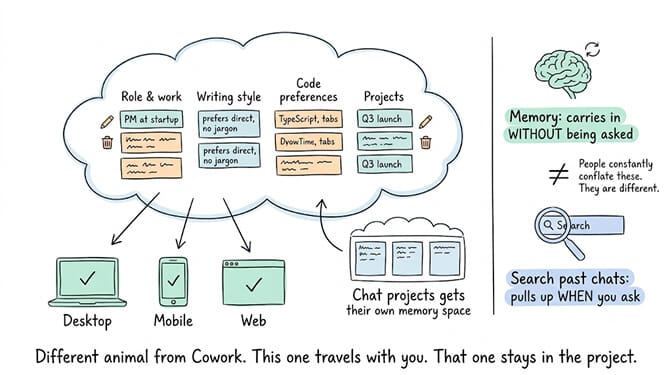
Claude builds memory as a set of individual entries organized into categories, and it reads, writes, and updates those entries in real time as you chat rather than on a fixed daily schedule. It focuses on work context: your role, your ongoing projects, how you like things written, how you like code styled.
Chat projects get the same containment treatment. Each project has its own memory space and its own project summary, kept separate from other projects and from your non-project chats.
Chat memory is also separate from searching past chats, which people constantly conflate. Search is a retrieval tool call that pulls from your conversation history when you ask for it. Memory is what Claude carries in without being asked. You can have one without the other.
The four differences that actually matter
Scope
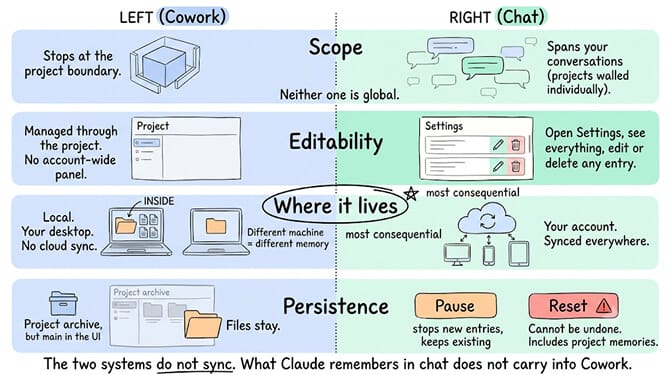
Cowork project memory stops at the project boundary. Chat memory spans your standalone conversations, with project chats walled off individually. Neither one is global, which is the correction most articles on this topic need.
Editability
Chat memory is the transparent one. Open Settings, see everything Claude remembers grouped by category, select an entry, change it or delete it. You can also just say it in the conversation and the edit applies to your next one.
Cowork project memory is on by default when you create a project and is managed through the project itself. There is no account-wide panel listing it, because it is not account-wide.
Where it lives
This is the difference nobody puts in the comparison table, and it is the most consequential one. Cowork projects are desktop-only and stored locally, with no cloud sync. Chat memory syncs across web, Claude Desktop, and Claude Mobile.
Different machine, different Cowork memory. Same account, same chat memory.
Persistence
Chat memory follows your existing chat data retention policy. Pausing keeps what exists but stops new entries. Resetting permanently deletes everything including project memories, and it cannot be undone. When a conversation is deleted, memory entries generated from it are not automatically removed, though you can delete them individually.
Cowork project memory persists with the project. Archiving a project pulls its metadata out of the interface but leaves your local files untouched.
The two systems do not sync. What Claude remembers about you in chat does not carry into Cowork sessions.
When to use which
Use Cowork project memory for repeated work with a fixed shape: a monthly report, a client account, a content pipeline. Anything where the value is Claude not re-learning the same setup every time you run it.
Use chat memory for the durable stuff about you rather than about a task. Your role, your writing preferences, the way you like output formatted. That travels with you across every conversation on every device.
Use both, and expect to enter your core context twice. Once in chat, once in your Cowork project instructions. It is annoying and it is the current reality.
Slight tangent, but relevant if this friction is what brought you here. We build a no-code agent platform, and memory is one of the first things people hit when they move from a chat assistant to an actual agent. Ours is persistent, uses hybrid vector and keyword search, and is scoped per agent for the same containment reason. If you want to see how agent memory works when it is the product rather than a feature preview, the free plan gives you one agent with no credit card.
Three misconceptions worth clearing up
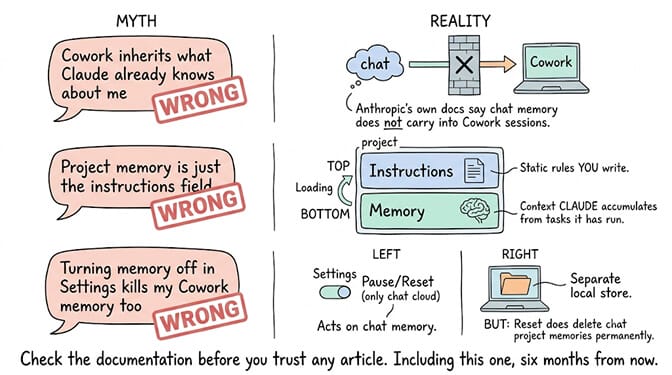
"Cowork inherits what Claude already knows about me." It does not, at least not yet. Anthropic's own documentation says chat memory does not carry into Cowork sessions.
"Project memory is just the instructions field." Instructions are static rules you write. Memory is context Claude accumulates from tasks it has actually run. Both load, and they do different jobs. Our complete Claude Cowork guide walks through how the layers stack, and the Cowork setup walkthrough covers getting projects configured properly in the first place.
"Turning memory off in Settings kills my Cowork memory too." Pause and Reset act on Claude's chat memory. Reset does delete chat project memories permanently. Cowork projects are a separate local store.
If any of this resonated, start free with BetterClaw. One agent, every core feature, no credit card, bring your own key. Pro is $49 a month for five agents, or $39 on annual, and full pricing is here. Different tool, same underlying problem: an assistant that forgets is an assistant you manage instead of one that helps.
The honest read on all of this is that memory in AI tools is still being built in public. Two products from the same company, both called memory, both scoped differently, neither aware of the other. That gets fixed eventually. Until then, the practical move is to know which box you are talking into, and check the documentation before you trust an article that tells you the answer with more confidence than Anthropic does. Including this one, six months from now. If you are wiring memory into something you actually depend on, our writeup on how AI agent memory works covers what breaks first.
Frequently Asked Questions
How does a Cowork project's memory differ from memory in Claude chat?
Cowork project memory is scoped to one Cowork project and stored locally on your desktop, so context from tasks in that project applies only to future tasks in the same project. Claude chat memory lives in your Claude account, works across web, Claude Desktop, and Claude Mobile, and stores things like your role, working style, and preferences. The two do not sync, and chat memory is not currently available in Cowork.
What is Claude Cowork memory?
It is context Claude retains from tasks you have run inside a Cowork project and reapplies to later tasks in that same project. It is enabled by default when you create a project, and what Claude learns in one project does not carry over to another. Cowork memory only works inside projects, not in standalone sessions.
How do I turn on memory in a Cowork project?
Create a project from the Projects panel in Claude Desktop, using start from scratch, an existing folder, or an import from a chat project. Memory is on by default for the project, so there is nothing extra to enable. Cowork requires a paid plan and the latest version of Claude Desktop for macOS or Windows.
Does Claude chat memory cost extra?
No. The newer memory experience is available on free, Pro, and Max plans at no additional cost, with Team and Enterprise on the legacy experience during rollout. Searching past chats is the paid-plan feature, available on Pro, Max, Team, and Enterprise. Cowork itself requires a paid plan.
Is Claude memory private enough for client work?
Memory follows your existing chat data retention policies, entries are viewable and deletable in Settings, and incognito chats are excluded from memory entirely. Project-level separation means confidential work stays in its own memory space rather than bleeding into general chats. For Enterprise accounts, an owner disabling memory at the organization level permanently deletes memory data for every user, so check with your admin before relying on it.