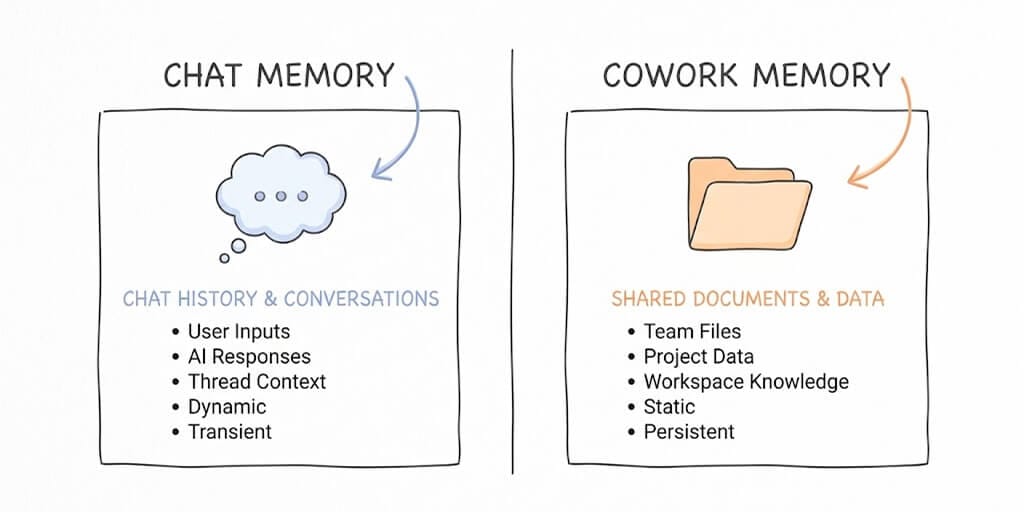
Cowork Memory and Claude Chat Memory are two completely separate systems that do not share data. Claude Chat Memory is a profile of you (name, role, preferences) that appears in standalone conversations at claude.ai. Cowork Memory is project-scoped context tied to a folder of files inside the Cowork desktop agent. Neither system knows what the other has stored.
For a shorter walkthrough focused on the project boundary specifically — what carries between projects, what stays local to your desktop, and what Pause and Reset actually act on — see Cowork project memory vs Claude chat memory.
At a glance
| Claude Chat Memory | Project Memory + Knowledge | Cowork Memory | |
|---|---|---|---|
| Scope | The user (you) | One Chat Project | One Cowork Project + its folder |
| What it stores | Profile: name, role, preferences | Standing instructions + uploaded files (Knowledge) + project chat memory | Standing instructions + folder artifacts + cross-run context |
| Persistence | Across all standalone Chat sessions | Inside the Project only | Inside the Cowork Project only |
| Plan | Free + every paid plan (since March 2026) | Free + every paid plan | Paid plans only (Pro / Max / Team / Enterprise) |
| Crosses to other scopes? | No | No | No |
| Compliance suitability | Reasonable for general work; use Temporary Chat for regulated data | Per-project isolation helps | Anthropic explicitly says don't use for regulated data |
| Best for | "Claude knows me" continuity | One ongoing workstream | File-producing autonomous tasks |
The rest of the post walks through each system, the failure modes that catch people out (the three isolated pools), and what to use when.
I was 30 minutes into a Cowork session, watching it slowly retrace context I'd already covered in Claude Chat the day before, when it hit me.
These two things do not talk to each other.
I'd told Claude in Chat about our pricing tiers, our positioning, the exact subject line formula we use for cold outreach. Then I opened Cowork to actually produce a deck. And it asked me what we sell.
If you've used both, you've felt this. The naming makes it sound like one product with two modes. It is not. Chat Memory and Cowork Memory are two different memory systems with two different philosophies, two different scopes, and two different sets of tradeoffs. And most people pick the wrong one for the wrong job.
Here's the breakdown that should have been in the docs.
What Chat Memory Actually Does
Chat Memory is the layer you get when you talk to Claude at claude.ai or in the mobile app. As of March 2026, it's free on every plan, including the free tier. Before that, it was Team and Enterprise only.
The mechanic is two-part. First, Claude runs an automatic synthesis roughly every 24 hours, scanning your standalone conversations and building a compressed profile of you. Your name, your role, what you're working on, how you like things explained. Second, you can manually pin facts by telling Claude "remember that I prefer Postgres" and it'll store that explicitly.
Then, at the start of every new chat outside of a project, that synthesis gets injected as context.
A few things to know about it:
- It's a profile, not a record. Claude knows you're a founder building a B2B SaaS. It does not know why you chose Postgres over MySQL last Tuesday, what schema you settled on, or what tradeoffs you weighed.
- It's scoped. Memory from your standalone chats does not leak into your Projects. Each Project has its own isolated memory pool. Your meal-planning project Claude has no idea what your content-strategy project Claude knows. This is actually correct behavior, but it surprises people the first time.
- It has recency bias. The synthesis is a living summary. Old conversations fade. If you discussed something six months ago and haven't mentioned it since, don't count on Claude remembering.
- It's transparent. When Claude references a memory, it tells you. ChatGPT does the same thing silently. This is the single biggest functional difference between the two products.
Claude Chat Memory is a profile of who you are. It is not a record of what you've done.
How to view and edit your Claude Chat Memory
You can audit (and trim) what Claude has stored about you directly in the web UI:
- In Claude (web), open Settings → Capabilities → Memory, or go straight to
claude.ai/settings/capabilities?modal=memory. - The "Manage memory" modal shows your synthesized profile and any manually pinned facts.
- You can edit individual entries, pause memory for the current session, or Reset memory (which wipes everything, including project-level memories — see the next section).
If Claude says "Got it, I'll keep that in mind" but you don't see a visible tool call or a new entry in Manage memory, nothing was actually stored. The auto-synthesis runs in the background (roughly daily, though Anthropic uses softer language than "exactly 24 hours") — explicit remember X instructions update immediately via Claude's memory tool.
A note on the third memory system: Project Knowledge
Claude has a third memory-adjacent feature most posts skip. Inside a Project you get both Project Memory (the synthesized patterns/preferences/decisions scoped to that one project) and Project Knowledge (the files, URLs, and pasted text you upload as a knowledge base for the project). These are different mechanisms — Project Memory is synthesized like Chat Memory, Project Knowledge is retrieved as context rather than synthesized. Neither leaks to standalone chats or to Cowork.
What Cowork Memory Actually Does
Cowork is Anthropic's autonomous desktop agent. It reads and writes files on your machine, runs multi-step tasks in a sandboxed VM, and delivers finished artifacts to a folder. It launched as a research preview on January 12, 2026 (initially Max-only, expanded to Pro Jan 16, Team/Enterprise Jan 23) and went generally available on April 9, 2026. If you're still getting set up, our how to use Claude Cowork beginner guide covers projects, scheduled tasks, and connectors.
And its memory system is built for a completely different job.
Cowork Memory lives inside Projects. Per Anthropic's own docs, memory is supported within projects but is not retained across standalone Cowork sessions. That's the official line. You set up a Cowork Project, point it at a folder, give it standing instructions, and across runs inside that project, it carries forward the relevant context.
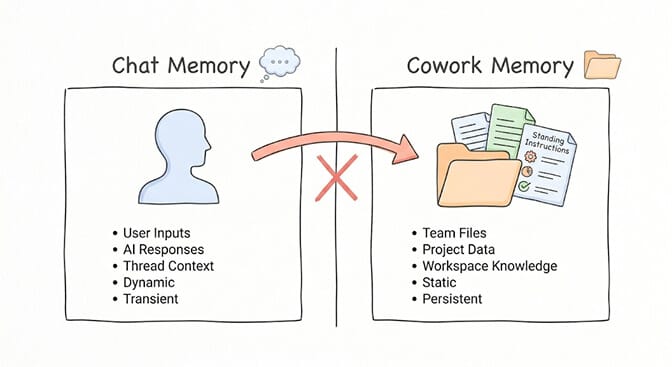
There's also an enterprise layer some people conflate with this. Cowork Customize lets workspace administrators set persistent memory at the workspace level. Personas, brand voice, terminology, policy rules. That's a separate product layer, mostly for teams.
Here's the part nobody tells you: Cowork's memory is artifact-aware in a way Chat Memory will never be. Because Cowork operates over files, the context isn't just "what you told me." It's "what's in the folder, what got written last run, what's in the manifest." That's a fundamentally different kind of memory.
But it's also brittle in different ways. Cowork activity is not captured in audit logs, the compliance API, or data exports — only OpenTelemetry streaming is available as a workaround, and Anthropic itself notes that workaround isn't a compliance-grade audit trail (prompt content isn't included by default). Anthropic's official guidance is not to use Cowork for regulated workloads (see Anthropic's "Use Claude Cowork safely" help-center article). Memory also doesn't persist across standalone sessions outside of projects.
Why Cowork Memory and Claude Chat Memory don't share context
Let me show you what trips everyone up.
You can have Chat Memory enabled, Project Memory enabled, and Cowork Memory enabled simultaneously, and they will all coexist as separate, isolated pools.
So if you're me, three weeks ago:
- Chat (standalone) knew my name, my company, my preferences.
- Chat Project "Q2 Strategy" had detailed context on our roadmap.
- Cowork Project "Quarterly Deck" had access to the folder of source files.
- None of these three knew what the other two knew.
The result: I'd brief Cowork on the strategy, then go back to standalone Chat to write a follow-up post, and standalone Chat would ask me what the strategy was.
This isn't a bug. This is intentional design. Anthropic explicitly siloed these to prevent client data from one project bleeding into another. But if you don't know it's happening, Claude will seem to have selective amnesia, and you'll waste hours re-explaining yourself.
Claude Memory vs ChatGPT Memory
The most common comparative question users actually search after reading the above is "is Claude Memory the same as ChatGPT Memory?" Short answer: no, but the difference is more nuanced than "Claude tells you, ChatGPT doesn't."
| Claude Memory | ChatGPT Memory | |
|---|---|---|
| Primary system | One synthesized profile per user, surfaced via Settings → Capabilities → Memory | Two systems: (a) "Saved Memories" — auditable, editable list; (b) "Reference Chat History" — runtime inference from all past chats |
| Transparency | Saved entries visible and editable in the UI; the auto-synthesis runs in the background and isn't individually narrated | Saved Memories are auditable; Reference Chat History is genuinely opaque — no list, no deletion target, just inferred at runtime |
| Deletion | Per-entry delete + global "Reset memory" (also wipes project memories) | Per-Saved-Memory delete; turning off Reference Chat History stops the inference but doesn't expose what was inferred |
| Free plan availability | Available on Free since March 2026 | Available on Free in lightweight form since June 2025 |
| Agent use | Designed for human users, not autonomous agents | Same |
The "ChatGPT does it silently" framing in many comparisons (including the original version of this post) is fair when applied to Reference Chat History but unfair when applied to Saved Memories — which are about as auditable as Claude's. The deeper architectural difference is that Anthropic exposes one synthesized profile and Anthropic ships explicit per-Project memory; OpenAI ships one curated list plus an opaque runtime layer.
What Anthropic's scoped memory design means for builders
Step back and think about what's actually happening here.
Anthropic is building memory as a series of carefully scoped, opt-in containers. Each scope has different retention rules, different access patterns, different export controls. Compare this to ChatGPT, which builds a single global memory that follows you everywhere.
The Anthropic approach is more annoying day-to-day. It's also more defensible if you ever need to delete something, isolate client work, or comply with an audit.
But for builders, this scoping has real consequences:
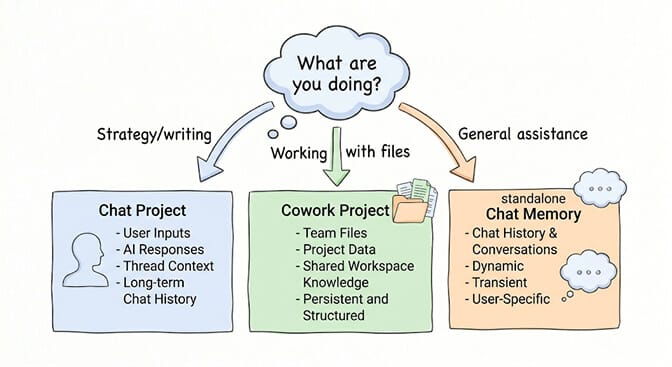
- If you're a developer iterating on a project, you want Cowork Project Memory. The agent can read files, modify code, remember what it did last run, and pick up where it left off.
- If you're a founder doing strategy work, you want a Chat Project. Memory is scoped to the project, doesn't leak into your personal chats, and the synthesis is dense enough to give Claude real context.
- If you want general "Claude knows me," that's standalone Chat Memory. Don't expect it to know about your specific Project work though.
If you've been using BetterClaw or building agents on OpenClaw, this scoping will feel familiar. It's the same pattern as workspace isolation in agent architecture. Each scope is sandboxed. Memory is durable but constrained. That's the right design when you're building production systems, even if it's clunky for casual use.
Why Claude Memory doesn't work for autonomous agents
Here's where this comparison gets interesting for anyone building actual agents.
Chat Memory and Cowork Memory are both built around the same assumption: a single human user with a coherent set of preferences and ongoing projects. That works for personal productivity. It does not work for autonomous agents that run 24/7, talk to dozens of people, execute tasks across multiple channels, and need to maintain state for weeks at a time — the architectural split our OpenClaw vs Claude Cowork comparison walks through in detail.
If you've tried to give an OpenClaw agent real persistent memory, you know what I mean. The default system writes to MEMORY.md files, splits them into ~400-token chunks, and uses semantic search to retrieve them. Community benchmarks show this hitting roughly 45% recall accuracy on complex queries. Old context drifts. The agent forgets what it knew about a customer two weeks ago. People have built elaborate three-layer memory systems just to get reliable retention.
This is the gap. Claude's first-party memory is for humans using Claude. Agent memory, for systems that run autonomously, is still mostly DIY.
Platforms built for autonomous agents approach this differently. BetterClaw, for example, ships smart context management that doesn't burn tokens on housekeeping, persistent memory with hybrid vector plus keyword search, and workspace isolation by default — the same architectural pattern Anthropic uses in Cowork Customize, but designed for autonomous, multi-channel use. Free plan with 1 agent BYOK, Pro at $49/month.
When Cowork Memory Is the Right Tool
Use Cowork Memory when:
- You're working over a folder of files across multiple sessions. Cowork can see the artifacts, remember its previous output, and iterate.
- You want delegation, not conversation. Set up the project, point at the folder, leave standing instructions. Come back to finished work.
- You're producing artifacts: spreadsheets, decks, structured outputs. The memory of "what's in the folder right now" is more useful than the memory of "what we discussed."
Don't use Cowork Memory when:
- You want continuity across many small ad-hoc questions. That's Chat.
- You need compliance, audit logs, or regulated data handling. Anthropic explicitly told you not to.
- You're trying to give an agent persistent memory across users or channels. That's a different architecture entirely.
When Chat Memory Is the Right Tool
Use Chat Memory when:
- You want Claude to know who you are across conversations. Job, projects, preferences, communication style.
- You want to scope context to a specific workstream. Use a Project for that. Memory stays inside.
- You're doing thinking, writing, coding-by-conversation. Anything where the artifact is the chat itself, not a file on disk.
Don't use Chat Memory when:
- You need Claude to remember exact details, decisions, or reasoning chains. The synthesis compresses too much. Save the chat URL or paste the relevant parts into a Project's instructions.
- You're working in regulated contexts. Use Temporary Chat (the ghost icon) for client-sensitive work. No memory created, nothing persisted.
Recommended Claude memory setup for 2026
After a few months of bouncing between these, here's my setup:
- Standalone Chat: minimal memory. Just enough to know I'm a founder so I get the right register of response.
- One Chat Project per ongoing workstream. Each one has dense standing instructions, and the project memory accumulates over time.
- Cowork only when I need files produced. Project-scoped. Standing instructions on the folder. I treat it like a coworker, not a chatbot.
For the actual agent that runs 24/7 across Slack, WhatsApp, and email? Different system entirely. Anthropic doesn't have a product for that. They have building blocks, you assemble them. Or you use a platform built for it — our BetterClaw vs Claude Cowork comparison goes deeper on the architectural differences.
Claude memory roadmap: where Anthropic is heading
Anthropic's Dreaming feature — announced at Code with Claude 2026 and shipped May 6, 2026 in research preview for Claude Managed Agents (not the standard Messages API) — is the early signal of where this is going. After a session ends, Dreaming reviews the agent's past runs, extracts recurring patterns, mistakes, and successful workflows, and writes them as plain-text notes and structured "playbooks" the agent can reuse on future runs. It doesn't modify model weights. Early customer reports include Harvey citing ~6x task completion gains and Wisedocs cutting review time roughly in half.
(Naming collision: OpenClaw also has a "Dreaming" feature, shipped April 6, 2026 in OpenClaw 2026.4.5. The two are independent — Anthropic Dreaming runs on Managed Agents; OpenClaw Dreaming is the open-source memory consolidator with Light/Deep/REM phases.)
The direction matters more than the specific feature. Memory is moving from a static profile or folder-of-files toward an active, self-curating layer the agent reasons over. If you're building anything autonomous, that's the architecture to plan for.
Frequently Asked Questions
What is the difference between Cowork Memory and Claude Chat Memory?
Chat Memory is a profile of you that gets carried into standalone Claude conversations at claude.ai. Cowork Memory is project-scoped context inside the Cowork desktop agent, tied to a specific folder of files. They do not share data. Chat Memory is about who you are. Cowork Memory is about what's in the project.
Does Cowork Memory carry over between sessions like Chat Memory does?
Only inside Projects. Per Anthropic's documentation, Cowork Memory is supported within projects but is not retained across standalone Cowork sessions. If you start a fresh Cowork session outside of a project, it has no prior context.
How do I make Claude remember context across both Chat and Cowork?
You can't, directly. They're isolated by design. The workaround is to put shared context into a Chat Project's standing instructions and into a Cowork Project's setup separately. Some teams export their Chat Memory and paste the key facts into Cowork's project instructions to bridge the gap.
Is Cowork Memory available on the free Claude plan?
Cowork itself requires a paid Claude plan (Pro, Max, Team, or Enterprise). Chat Memory, on the other hand, has been free for all users since March 2026, including the free tier. So you can have Chat Memory without Cowork, but not the reverse.
Is Claude's memory system safe for client or regulated data?
Claude Chat Memory is reasonable for general professional work but not for regulated data. Cowork is explicitly not safe for regulated workloads. Anthropic's guidance is that Cowork activity isn't captured in audit logs, the Compliance API, or data exports — only OpenTelemetry streaming is available as a workaround, and Anthropic itself says it isn't a compliance-grade audit trail. For attorney-client material, HIPAA-covered information, or SEC-regulated data, use Temporary Chat mode, which creates no persistent memory.
How do I see what Claude has remembered about me?
In Claude (web or desktop), open Settings → Capabilities → Memory — or go directly to claude.ai/settings/capabilities?modal=memory. The "Manage memory" modal lists your synthesized profile and any explicitly pinned facts, and lets you edit individual entries, pause memory for the current session, or reset everything (including project-level memories). If Claude says "Got it, I'll keep that in mind" but you don't see the entry afterward, the memory tool didn't actually fire — nothing was stored.
Is Claude Memory the same as ChatGPT Memory?
No. Claude exposes one synthesized memory profile per user (editable in Settings) plus separate per-Project memories. ChatGPT runs two memory systems: Saved Memories (auditable, editable, deletable) and Reference Chat History (a runtime inference layer over all your past chats that you can't view or selectively delete — only turn off entirely). Claude's auto-synthesis happens in the background and isn't individually narrated either, but Claude doesn't ship the equivalent of an opaque cross-conversation reference layer.