
BetterClaw vs xCloud for OpenClaw Hosting
Both platforms promise managed OpenClaw hosting without Docker or SSH. But “managed” means very different things depending on who’s saying it. Here’s an honest breakdown of what each platform does, what it doesn’t, and who each one is actually built for.
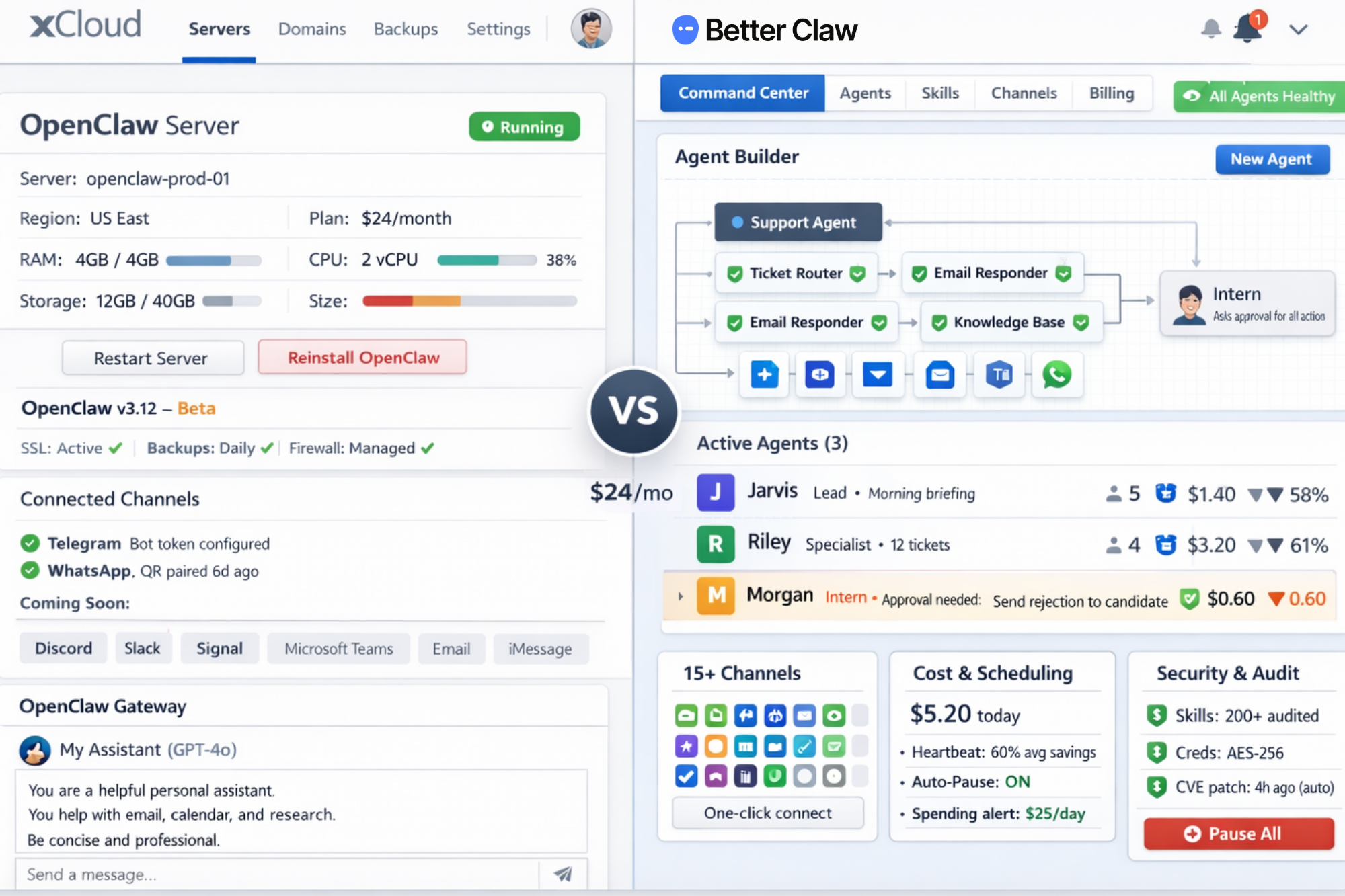
The 60-Second Summary
xCloud is a WordPress and server hosting company that added OpenClaw as a one-click install in February 2026. You get a managed VPS with OpenClaw pre-installed and running. The server infrastructure is handled for you. Everything inside OpenClaw (agent configuration, skills, channels, security, monitoring) is your responsibility.
 BetterClaw
BetterClaw is a purpose-built AI agent platform. It’s not OpenClaw installed on a server. It’s a complete managed environment with a visual agent builder, 200+ security-audited skills, action approval workflows, trust levels, per-agent cost tracking, a kill switch, and a real-time command center. The infrastructure and the agent experience are both fully managed.
The core difference: xCloud manages your server. BetterClaw manages your agents.
What xCloud Offers (and What It Doesn’t)
xCloud launched OpenClaw hosting in February 2026 as an extension of their existing managed server platform. They’ve been hosting WordPress, WooCommerce, and Laravel sites for years, and OpenClaw was added as a new product line.
- Server provisioning and maintenance
- OpenClaw installation (one-click deploy)
- SSL certificates
- Daily encrypted backups
- Server-level security (firewall, encryption)
- OpenClaw version updates
- Environment variable management from a dashboard
- One-click OpenClaw reset/reinstall
- Agent configuration, personality setup, or skill installation
- Troubleshooting agent workflows, integrations, or prompts
- Skill security vetting (you use ClawHub’s unvetted marketplace)
- Action approval or agent guardrails
- Cost monitoring or spending limits
- Multi-channel setup beyond Telegram and WhatsApp (Discord, Slack, and Signal are on xCloud’s roadmap for Q2 2026)
- Any agent-level support (their support covers server-level issues only)
There are also some infrastructure constraints worth knowing about. xCloud requires their own managed servers with 4GB+ RAM. You can’t install OpenClaw on an existing server or external VPS you already own. Once OpenClaw is installed, the server runs only OpenClaw. And their OpenClaw product is still flagged as a beta feature with limited support.
None of this makes xCloud a bad product. It’s solid managed VPS hosting with a clean setup experience. For someone who just wants OpenClaw running on a server without touching Docker, it delivers on that promise at $24/month. But if what you need goes beyond “OpenClaw on a server,” the gaps start showing up fast.
Feature-by-Feature Comparison
Overview
Agent Management
Skills & Security
Memory
Chat Platforms
Infrastructure & Support
Where BetterClaw and xCloud Actually Diverge
The comparison table covers everything, but five differences have the biggest practical impact on your day-to-day experience.
1. Agent Configuration: Visual Builder vs. Config Files
With xCloud, you deploy OpenClaw and then configure your agent using OpenClaw’s standard approach: editing SOUL.md files, installing skills from ClawHub, connecting channels manually, and tweaking YAML configs. If you’re comfortable with that workflow, it works fine.
BetterClaw replaces all of that with a visual agent builder. You pick a name, choose a role from pre-built templates, drag skills in from a curated marketplace, and connect channels with one click. The entire process takes under two minutes.
If your team includes non-technical operators (marketing, support, HR, ops), the visual builder is the only path that works without a developer in the loop.
2. Security Vetting: Audited Skills vs. ClawHub
xCloud uses ClawHub, OpenClaw’s community skill marketplace with 5,700+ skills. ClawHub added VirusTotal scanning in February 2026, which catches known malware signatures. But it doesn’t catch a skill that’s well-written but designed to exfiltrate your API keys, read your emails, or inject prompts into your agent’s context.
BetterClaw’s skills marketplace is smaller (200+ vs 5,700+), but every skill is manually reviewed for malicious code, data exfiltration attempts, and prompt injection vectors before it’s published. You trade breadth for safety.
3. Guardrails: Action Approval vs. Full Autonomy
xCloud deploys OpenClaw with its default behavior: agents operate autonomously with no approval workflows, no spending limits, and no kill switch beyond restarting the server. If your agent decides to send 200 emails, delete a folder, or loop through expensive API calls at 3 AM, there’s no built-in mechanism to stop it.
BetterClaw includes trust levels (Intern, Specialist, Lead) and action approval workflows. You define which actions require your consent. An Intern-level agent asks before it does anything. A Specialist handles routine tasks independently and escalates edge cases. A Lead operates with full autonomy, but you can still hit the kill switch instantly from your phone.
For personal agents running your calendar and morning briefings, the default OpenClaw autonomy might be fine. For business agents handling customer emails or processing transactions, guardrails aren’t optional.
4. Chat Platform Support: 15+ vs. 2
xCloud’s OpenClaw hosting currently supports Telegram and WhatsApp. Discord, Slack, and Signal are on their roadmap for Q2 2026 but aren’t available today.
BetterClaw supports 15+ platforms out of the box: WhatsApp, Telegram, Slack, Discord, Microsoft Teams, Signal, iMessage, email, web chat, and more. A single agent can serve multiple channels simultaneously with shared memory across all conversations.
If your team uses Slack, or if your customers are on Discord, or if you need email integration, this determines whether your agent can actually reach the people it needs to reach.
5. What “Support” Covers
xCloud’s documentation is clear: their support covers server-level issues. Provisioning, uptime, SSL, backups, restarts. If your agent is misconfigured, if a skill isn’t working, if your WhatsApp pairing breaks, if your agent is looping and burning API credits — that’s on you.
BetterClaw’s support covers the full stack: both infrastructure and agent behavior. The platform itself prevents most common failure modes (cost spikes get auto-paused, skills are pre-vetted, channels are one-click), but when something needs attention, support isn’t limited to “have you tried restarting the server?”
Choosing the Right Platform
You want full OpenClaw with root access.
xCloud gives you SSH access to your server. You can install any ClawHub skill, modify OpenClaw’s configuration however you want, and use features that haven’t been ported to BetterClaw yet.
You want to run local models.
If you’re planning to use Ollama or other local LLMs to avoid API costs entirely, you need direct server access that xCloud provides. BetterClaw uses cloud-hosted model providers exclusively.
You’re a developer who prefers config files over GUIs.
Some people genuinely prefer editing SOUL.md and YAML over clicking through a visual interface. If that’s you, xCloud’s experience is closer to native OpenClaw.
You specifically want a traditional managed-VPS model.
xCloud starts at $24/month. BetterClaw’s Free plan is $0 but caps you at 1 agent and 100 credits, and Pro is $49/month. If you need more than the Free plan allows, want a single personal agent for Telegram morning briefings, and prefer a traditional managed-server model, xCloud is the cheaper paid option.
Where BetterClaw Is the Better Choice You’re deploying agents for a team or business.
Trust levels, action approval, audit trails, per-agent cost tracking, and multi-channel support across Slack, Teams, email, and more. These are requirements when agents handle customer data and business operations.
You need agents on Slack, Discord, Teams, or email.
xCloud supports Telegram and WhatsApp today. If your team lives in Slack or your customers are on Discord, BetterClaw is the only managed option that supports those channels right now.
You have non-technical team members deploying agents.
The visual agent builder means your operations manager, marketing lead, or HR coordinator can create and manage their own agents without a developer in the loop.
Security was the reason you stopped using OpenClaw.
If the CrowdStrike advisory, the Cisco findings, or the exposed instance reports made your security team shut down OpenClaw projects, BetterClaw’s sandboxed execution, skill vetting, encrypted credentials, and full audit trail are built specifically to address those concerns.
You need cost controls.
Heartbeat scheduling reduces API waste by 60%+ compared to always-on agents. Per-agent cost tracking with anomaly alerts and auto-pause prevents surprise bills. No other OpenClaw hosting provider has built-in cost management at the agent level.
You don’t want to manage anything.
Not the server. Not the agent configuration. Not the skills. Not the channels. Not the security. If you want to describe what your agent should do and have a platform handle everything else, that’s what BetterClaw is designed for.
Pricing: What You Actually Pay
Both platforms use BYOK (Bring Your Own Key), so you pay your AI model provider directly for API usage in addition to the platform fee. See how OpenClaw API costs add up.
- API costs: $30–200/month (depends on model and usage)
- What’s included:
- Managed VPS, OpenClaw installed, SSL, backups, server updates
- What’s not included:
- Agent builder, skill vetting, guardrails, cost tracking, multi-channel (beyond Telegram/WhatsApp), agent-level support
BetterClawRecommended- Free plan: $0/mo — 1 agent, 100 credits, 3 connectors, BYOK
- API costs: $15–100/month (Heartbeat scheduling saves 60%+)
- Pro includes:
- 5 agents, 12,000 credits/mo, unlimited connectors, 2 team seats, visual builder, 200+ audited skills, 15+ channels, trust levels, action approval, kill switch, advanced cost tracking, audit trail, Command Center, encrypted credentials, 90-day memory
- Not included:
- Root server access, local model support
Compare total cost, not just the platform line. Part of the gap between xCloud’s server bill and BetterClaw Pro gets offset by API cost savings from Heartbeat scheduling. Always-on agents burn tokens checking for work even when there’s nothing to do. BetterClaw’s Heartbeat system wakes agents on schedule, checks for tasks, and stands them down if there’s no work. Most teams see their API bill drop by 60%+, and the Free plan lets you measure that before you commit to Pro.
Switching from xCloud to BetterClaw
If you're currently running OpenClaw on xCloud and want to move to BetterClaw, the process is straightforward. BetterClaw supports the same skill format and chat platform integrations as OpenClaw. You can bring your agent's personality configuration, skill preferences, and connected channels over without starting from scratch. Most migrations take under an hour.
BetterClaw vs xCloud: Common Questions
Is xCloud really managed OpenClaw hosting?
xCloud manages the server infrastructure: provisioning, uptime, SSL, backups, and OpenClaw installation. That’s genuine managed VPS hosting. What it doesn’t manage is anything inside OpenClaw itself. Agent configuration, skill installation, channel setup (beyond Telegram), security vetting, cost monitoring, and troubleshooting agent behavior are all your responsibility. BetterClaw manages both the infrastructure and the agent experience.
How does BetterClaw pricing compare to xCloud at $24/month?
They’re priced on different models. BetterClaw’s Free plan is $0/month and runs 1 agent on 100 credits with BYOK, so you can start below xCloud. BetterClaw Pro is $49/month and includes 5 agents, 12,000 credits, unlimited connectors, and 2 team seats — more than xCloud’s server bill, because it’s a different product. BetterClaw includes a visual agent builder, 200+ security-audited skills, trust levels, action approval workflows, per-agent cost tracking, kill switch, 15+ chat platform integrations, persistent hybrid memory, a real-time Command Center, and full audit trail. None of these are available on xCloud, which manages the server and leaves the agent experience to you.
Does xCloud support Slack, Discord, or Microsoft Teams?
Not currently. xCloud’s OpenClaw hosting supports Telegram and WhatsApp. Discord, Slack, and Signal are on their public roadmap for Q2 2026 but aren’t available today. BetterClaw supports 15+ platforms including Slack, Discord, Microsoft Teams, Signal, iMessage, email, and web chat, all available now with one-click setup.
Can I get agent-level support on xCloud?
No. xCloud’s documentation explicitly states that their support covers server-level issues only. They provision, maintain, and restart your server. They do not support agent configuration, skill troubleshooting, workflow debugging, integration issues, or prompt optimization. If your agent stops working correctly, you’ll need to diagnose and fix it yourself.
Is xCloud's OpenClaw hosting production-ready?
xCloud flags their OpenClaw hosting as a beta feature with limited support. Their documentation notes that if you encounter issues, the recommended resolution is to reinstall OpenClaw. For personal agents and experimentation, this is reasonable. For business-critical agent deployments, you’ll want to evaluate whether beta-level support meets your reliability requirements.
Does xCloud vet ClawHub skills for security?
No. xCloud uses OpenClaw’s default skill system, which sources from ClawHub. ClawHub added VirusTotal scanning in February 2026, which catches known malware signatures. It does not catch well-crafted skills designed to exfiltrate data, inject prompts, or abuse API access. Cisco’s security research team confirmed active data exfiltration in ClawHub skills. BetterClaw manually reviews every skill before publishing.
Can I run multiple agents on xCloud?
Yes. xCloud supports OpenClaw’s sub-agent system, where multiple agents run on the same server. However, all agents share server resources and use the same OpenClaw instance. On BetterClaw, each agent runs in its own isolated Docker sandbox with independent cost tracking, trust levels, and connected channels. There’s no resource contention between agents.
Can I migrate from xCloud to BetterClaw?
Yes. BetterClaw supports the same skill format and chat platform integrations. Most teams migrate in under an hour. You can bring your agent personality files, skill preferences, and channel configurations. Our migration guide provides step-by-step instructions.
Which should I choose for a personal AI assistant?
If you only need Telegram or WhatsApp and prefer config files over a visual interface, xCloud is a solid choice at $24/month. If you want even more control, consider self-hosting OpenClaw. If you want multiple chat platforms, built-in cost controls, or the ability to set up your agent without editing files, BetterClaw is the better fit — start on the Free plan to see whether 1 agent and 100 credits covers your use case before paying for Pro.
Which should I choose for business AI agents?
For business use, BetterClaw. Trust levels, action approval workflows, skill security vetting, per-agent cost tracking, kill switch, audit trail, and multi-channel support (especially Slack and Teams) are table stakes for agents handling customer data, sending outbound communications, or processing business transactions. xCloud doesn’t offer any of these features. Also see how BetterClaw compares to ClawHosters.
Ready to See the Difference?
Deploy your first agent in under 2 minutes. No Docker. No config files. No SSH. Just tell your agent what to do and watch it work.
Free plan available · Pro $49/mo · BYOK · 7-day money-back guarantee