The non-technical founder's walkthrough to your first useful task, your first scheduled automation, and the limits nobody warns you about.
I opened Cowork for the first time, pointed it at my downloads folder, and asked it to sort the chaos.
Then I went to make coffee.
When I came back, the folder was clean. Screenshots in /Screenshots. PDFs in /Documents. Receipts in /Receipts. A small summary.md file at the root explaining what got moved where. Total time: about four minutes, most of which I spent staring at my mug.
That was the moment I understood what Claude Cowork actually is. It's not a smarter chatbot. It's a coworker that touches your real files, runs real tasks, and hands you finished work.
If you've been hearing about Cowork but haven't tried it yet, or you tried it once and bounced because the docs felt overwhelming, this guide is for you. We'll go from install to your first useful task, then to scheduled automation, then to the limits that catch people off guard.
Looking for the bigger picture instead of a step-by-step? Our Claude Cowork complete guide is the hub for every Cowork topic — setup, Windows fixes, rate limits, memory, live artifacts, and when you need an always-on agent instead.
What Claude Cowork Actually Is (in 90 Seconds)
Cowork lives inside the Claude Desktop app. It uses the same agentic architecture as Claude Code, but without the terminal. You describe an outcome, Claude plans it, executes the steps, and drops the finished output into a folder on your machine.
Three things separate it from regular Claude Chat:
- It reads and writes your local files. No 20-file upload caps. No 30MB per-file ceiling. It works directly on your disk.
- It runs multi-step tasks autonomously. You don't approve every move. You set it loose, it works, you come back.
- It produces real artifacts. Excel files with working formulas. PowerPoint decks. Word docs. Organized folders. Stuff you can open and use.
Chat is for thinking. Cowork is for doing.
Cowork went generally available on macOS and Windows on April 9, 2026. It requires a paid Claude plan: Pro, Max, Team, or Enterprise. Pro is $20/month at the time of writing. Verify current pricing on Anthropic's page before signing up.
Getting Cowork Installed
Here's the part most tutorials over-complicate.
Download the Claude Desktop app from claude.com/download. Install. Sign in with your paid account. Look for the "Cowork" tab in the left sidebar. That's it. (On Windows there are a couple of extra prerequisites — our Claude Cowork Windows setup guide covers the Virtual Machine Platform and admin requirements, and what to do when Cowork isn't working on Windows if the tab never appears.)
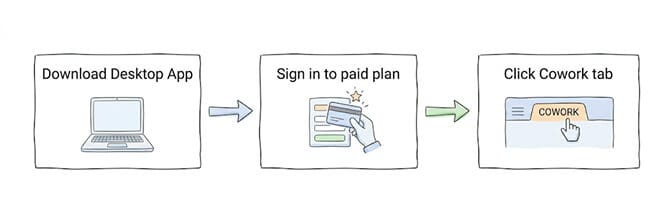
A few quick checks before you start:
- Local files need the desktop app open. Cowork now runs on desktop, web (claude.ai), iOS, Android, and Chrome. Cloud sessions continue when your laptop is closed. Desktop sessions still need the app open for local file access, so keep it open for tasks that work on your files. There's a readiness checker on the download page if you want to confirm your machine supports the desktop app.
- Cowork uses more of your usage allowance than regular chat. Anthropic is explicit about this. Reserve it for tasks that benefit from file access. Use chat for one-off questions.
- Don't use Cowork for regulated workloads. Per Anthropic's own docs, Cowork activity is not captured in audit logs, the Compliance API, or data exports. If you're handling HIPAA, attorney-client, or SEC-regulated material, this isn't the tool.
Your First Useful Task
Here's where most beginner guides go wrong. They have you ask Cowork to "organize a folder" as the demo and call it a day.
That's the equivalent of testing a Ferrari by driving it to the mailbox. You learned nothing about the car.
Try this instead.
Pick a folder you've been meaning to clean up. Receipts, screenshots, downloaded PDFs, anything messy. Then give Cowork a prompt that requires actual judgment:
"Look at every file in
/Downloads. Group them by type and purpose. Move them into appropriately named subfolders. For any receipts or invoices you find, also createreceipts.xlsxwith columns for vendor, date, amount, and category. Leave asummary.mdat the root explaining what you did and any files you weren't sure about."
Now you'll see what Cowork actually does. It plans the work. It opens files to understand them. It makes judgment calls. It produces an artifact you didn't explicitly ask for but obviously need. It tells you what it skipped.
This is the shape of every useful Cowork task: a clear outcome, some inputs, and trust that Claude will handle the in-between.
How to Talk to Cowork (the Prompt Pattern That Works)
After running a few hundred tasks, I've landed on a pattern that works almost every time:
- State the outcome first. Not the steps. "Build a comparison spreadsheet of these three competitors" beats "First open this page, then copy the pricing, then..." Cowork is better at planning than you are. Let it.
- Tell it where the inputs live. A folder path, a file, a URL, a connector. Be specific.
- Tell it where the output goes. "Save the result to
/Documents/Q2-Reports/." This matters more than you'd think. - Mention any constraints. "Use formulas, not hardcoded numbers." "Keep it under 10 slides." "Match the tone of the existing brand guide in this folder."
That's it. No magic prompt frameworks. Just clarity about what you want, where the stuff is, and where the result should land.
Projects: Where Cowork Stops Being a One-Off Tool
You can run Cowork without projects. Most people do for the first week.
Then it gets annoying. You re-explain your tone preferences every time. You re-attach the same brand guidelines. You re-point at the same folder. After the tenth time, you wonder why nothing remembers anything.
Projects fix that. They're persistent workspaces with their own instructions, linked folders, scheduled tasks, and memory.
Set one up like this:
In the Cowork sidebar, click New project. Name it. Pick a folder. Add instructions (tone, formatting, rules you want applied across every task). Optionally link a chat project or paste in reference URLs.
Now every task you run inside that project inherits the context. Memory accumulates inside it. And critically, that memory doesn't leak into other projects, which is the right design when you're juggling client work.
One important catch: project memory only works inside projects. Standalone Cowork sessions don't carry context across runs. So if continuity matters, use a project. Always.
Worth knowing before you set one up: project memory is stored locally on your desktop and never reaches your Claude account, so what Cowork remembers and what Claude chat remembers are two separate stores that do not sync. Expect to enter your core context twice.
For the deeper breakdown of how Cowork Memory differs from Chat Memory, see our Cowork Memory vs Claude Chat Memory comparison.
Scheduled Tasks: Where the Real Value Lives
This is the part that turned Cowork from "nice to have" into "I rely on this."
Inside any Cowork task, type /schedule. Claude walks you through a few questions, picks a cadence, and saves your task as a recurring job. Daily. Weekly. Hourly. Or on demand.
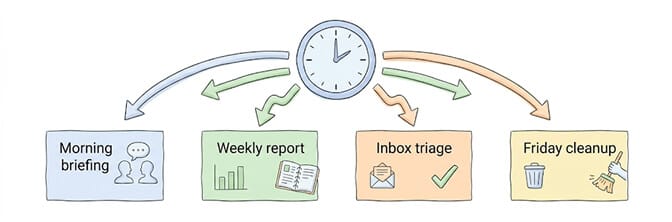
A few that have stuck for me:
- A morning briefing that pulls overnight emails, today's calendar, and any open Linear issues into one summary doc at 7am.
- A Friday cleanup that organizes my Downloads folder and archives anything over 30 days old.
- A weekly expense report that scans
/receipts, builds a categorized spreadsheet, and emails it to my bookkeeper. - A daily check on three competitor pricing pages, with a Slack message if anything changes.
Note: scheduled tasks only run while your computer is awake and Claude Desktop is open. This is the single biggest gotcha. Close your laptop, the schedule stops. If you need automation that runs whether your machine is on or off, that's a different category of tool entirely.
If you've ever tried to build similar automation on a self-hosted agent framework like OpenClaw, you know how much infrastructure it takes. Docker. YAML configs. Heartbeat crons. Skill installation. Channel adapters. We built BetterClaw so you skip all of that. Free tier with 1 agent and BYOK, Pro at $49/month. Multi-channel from a single agent, smart context management, verified skills. The automation runs in the cloud, so your laptop being closed doesn't stop anything.
Connectors: Where Cowork Starts Touching Your Real Life
By default, Cowork only sees what's in the folders you've linked.
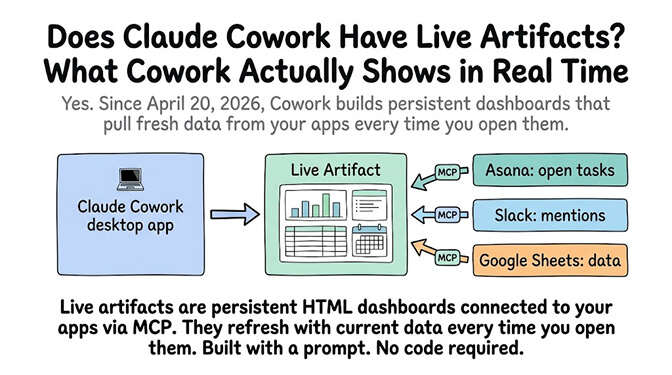
Connectors change that. They let Cowork reach into Gmail, Google Drive, Calendar, Notion, Slack, GitHub, HubSpot, Outlook, SharePoint, and dozens of other services through Anthropic's official integrations or MCP servers.
Set them up from the Customize tab. Click Connectors. Pick the apps you live in.
The starter pack most people land on: Gmail, Calendar, Drive, and Notion. Those four cover roughly 80% of typical knowledge worker chaos.
Once they're connected, you can ask things like:
"Check tomorrow's calendar. For each meeting, search Gmail for any recent threads with the attendees, then write a 2-paragraph briefing per meeting and save it to
/Documents/Meeting-Prep/[date].md."
Cowork pulls from Calendar, pulls from Gmail, synthesizes, writes. You get briefing docs you didn't have to assemble.
The Limits Nobody Warns You About
Stay with me, because this is the part that saves you from disappointment.
- Cowork doesn't live on your messaging channels. Cloud sessions now keep running with the laptop closed and scheduled tasks run in the cloud, but local file access still needs Claude Desktop open. The bigger limit is channels: if you want true 24/7 automation across them (Slack at noon, WhatsApp at midnight, email continuously), Cowork can't do that.
- Cowork is single-user. There's no sharing, no team handoff, no multi-user threads. Whatever you build is yours alone.
- Cowork costs more usage than chat. Long autonomous runs eat into your plan's allocation fast. Anthropic flags this explicitly — here's why you keep hitting a Claude Cowork rate limit and how to stretch each 5-hour window.
- Cowork's memory only persists inside projects. Run a one-off task, the context dies with the session. This catches everyone at least once.
- Cowork is not for regulated data. Anthropic's docs are direct: do not use Cowork for regulated workloads.
Cowork agents that need to run autonomously across many users, many channels, and many days at a time, are a different shape of problem entirely. That's where autonomous agent platforms come in. Cowork is brilliant at "I personally need this done." It's not built for "our customers need this responded to overnight."
What Cowork Is Actually For
After a few months of using it daily, here's how I think about Cowork:
It's a personal force multiplier. Not a team agent. Not a 24/7 customer service bot. Not infrastructure. A tool that lives on your machine, knows your files, and turns finished work in your folder while you do something else.
That's a meaningful category. Not everything needs to be a fleet of autonomous agents. Sometimes you just want the receipt folder organized, the deck built, the briefing on your desk by 8am.
For that, Cowork is the best thing Anthropic has shipped in years.
For everything else, you'll need a different layer. Cowork is one tool. The next layer is autonomous agents that run across channels and users without a laptop staying open. That's where the OpenClaw ecosystem lives, and that's where we built BetterClaw as the better alternative. Free tier with 1 agent BYOK, Pro at $49/month, deploy in 60 seconds without Docker, YAML, or infrastructure management. If Cowork is the laptop-bound coworker, BetterClaw is the agent that keeps working when you close the lid.
Both can live in the same workflow. Use Cowork for the work that's yours. Use a deployed agent for the work that runs without you.
Frequently Asked Questions
What is Claude Cowork and how does it work?
Claude Cowork is an agentic mode inside the Claude Desktop app that reads and writes your local files, runs multi-step tasks autonomously, and produces finished artifacts like spreadsheets, decks, and organized folders. Where Chat is conversation, Cowork is execution. You describe an outcome, Claude plans and runs the steps, and you come back to completed work.
How is Claude Cowork different from regular Claude Chat?
Chat has cloud upload limits (20 files, 30MB each) and produces responses in the chat window. Cowork runs on the desktop app, accesses your local files directly without uploads, and delivers finished files into your folders. Cowork can also schedule recurring tasks, which Chat cannot.
How do I get started with Claude Cowork as a beginner?
Download the Claude Desktop app, sign in with a paid plan (Pro, Max, Team, or Enterprise), click the Cowork tab in the sidebar, and start with a concrete task like organizing a messy folder. State the outcome you want, point at the input files, and tell Claude where to save the output. Avoid prescribing step-by-step instructions and let Claude plan the work.
How much does Claude Cowork cost in 2026?
Cowork is included in any paid Claude plan. Claude Pro is around $20/month, with Max, Team, and Enterprise tiers above that. There's no separate Cowork subscription. Free Claude accounts cannot access Cowork. Check Anthropic's pricing page for current numbers as they update periodically.
Is Claude Cowork safe to use for sensitive business data?
Anthropic explicitly recommends against using Cowork for regulated workloads. Cowork activity is not captured in audit logs, the Compliance API, or data exports. For attorney-client material, HIPAA-covered information, or SEC-regulated data, use Temporary Chat mode or a properly compliant system. General business work is fine, but anything legally sensitive belongs elsewhere.