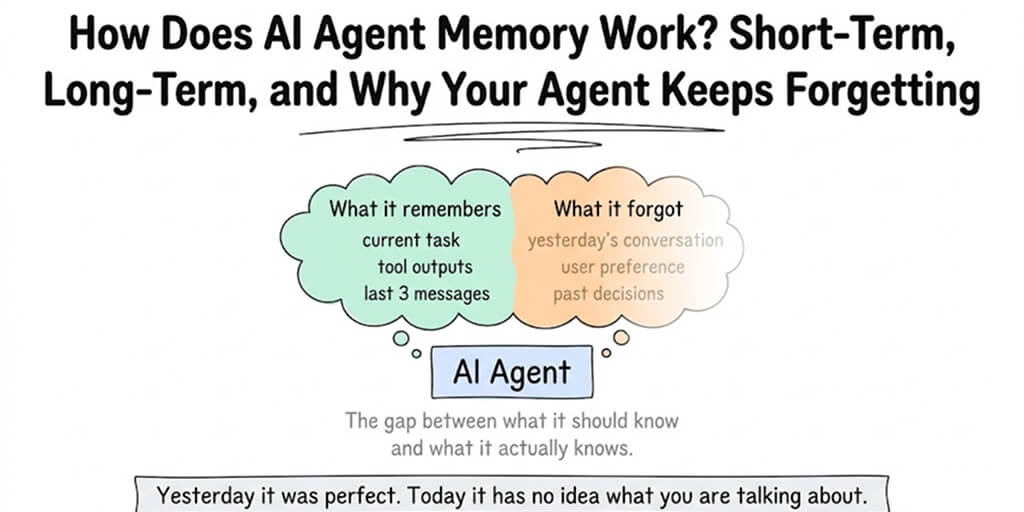
Your agent handled yesterday's support ticket perfectly. Today it has no idea what you're talking about. Here's what's actually happening under the hood.
The support agent we built worked flawlessly on day one.
A customer asked about their order status. The agent checked the database, found the shipment, drafted a response with the tracking number. Beautiful. Exactly what we wanted.
The next day, the same customer came back. "Hey, you told me yesterday my order was shipping. Any update?"
The agent had no idea what the customer was talking about. No memory of yesterday's conversation. No record of the tracking number it had provided. It asked the customer for their order number again, like they'd never spoken before.
The customer was annoyed. We were confused. The agent was working. It just... forgot.
This is the most common failure mode in AI agents, and understanding AI agent memory is the difference between a demo that impresses people and a production system that actually works.
Here's how it all fits together.
The context window: your agent's working memory
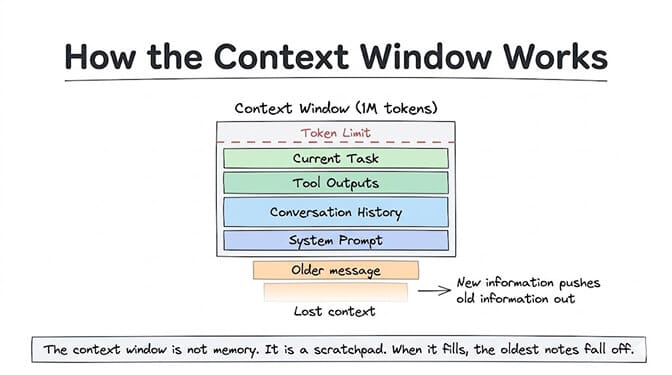
Every AI model has a context window. Think of it as the agent's desk. Everything on the desk is visible and accessible. Everything not on the desk might as well not exist.
When you talk to Claude, GPT, or any LLM, you're filling that desk with information. Your message, the system prompt, the conversation history, tool outputs, memory snippets. All of it gets packed into the context window, converted to tokens, and sent to the model.
Here are the current context window sizes for major models (September 2026):
- Claude Opus 5: 1 million tokens
- GPT-6 Astra: 1.05 million tokens
- DeepSeek V4 Pro: 1 million tokens
- Gemini 3.5 Flash: 1 million tokens
A million tokens sounds like a lot. It's roughly 750,000 words, or about 1,500 pages of text. But here's the thing about AI agent memory: agents burn through tokens fast.
Every conversation turn is tokens. Every tool call and its response is tokens. Every system instruction is tokens. Every piece of context the agent needs to understand the current task is tokens. A complex agent workflow can consume 50,000-100,000 tokens in a single task execution.
At that burn rate, even a 1-million-token context window fills up after 10-20 complex tasks. And when the context window fills up, the oldest information gets pushed out. Your agent "forgets" not because it decided to, but because the information physically can't fit anymore.
There's a second, less obvious cost. The model doesn't "remember" your conversation at all. It re-reads all of it, plus the system prompt and every tool definition and response, on every turn. So token usage grows triangularly: a 30-message conversation averaging 500 tokens per message isn't 15,000 tokens, it's roughly 232,500 tokens across all the API calls.
The context window is not memory. It's a scratchpad. When the scratchpad is full, the oldest notes fall off the edge. Everything we call "memory" is really a decision about what to put on the scratchpad before the model re-reads it.
Short-term memory: the current conversation
Short-term AI agent memory is the simplest type. It's the conversation history within a single session.
When you message your agent and it responds, then you reply and it responds again, all of those messages are held in the context window for the duration of that session. The agent can reference what you said three messages ago because those messages are still on the desk.
This is why agents feel smart within a single conversation. They can track context, remember what you asked earlier, refer back to previous points. It all works because the data is right there in the window. When you build an AI agent on a managed platform, this layer is handled for you and the retention window becomes a setting rather than code.
The problem starts when the session ends.
Most agent frameworks treat each session independently. When the connection closes, the context window is cleared. The next session starts fresh. This is why our support agent forgot about yesterday's conversation. It wasn't the same context window. It was a new desk with nothing on it.
Some basic implementations try to solve this by dumping the entire previous conversation into the next session's context window. This works for a few sessions. But after a week of conversations, you're spending 500,000 tokens just on history before the agent even starts on the current task. Your costs spike. Your latency increases. And the model has to process a mountain of stale context to find the one relevant piece.
This is what engineers call token bloat. It's the reason context management matters so much for agents, and it's the single biggest hidden driver of runaway AI costs. For a deeper look at how context engineering is becoming a formal discipline, Anthropic formalized the concept in September 2025 and Salesforce named it the #1 AI trend of 2026.
Long-term memory: the hard problem
If short-term memory is a scratchpad, long-term AI agent memory is a filing cabinet. It stores information across sessions, indefinitely, and retrieves the right pieces when they're relevant to the current task.
This is where things get architecturally interesting.
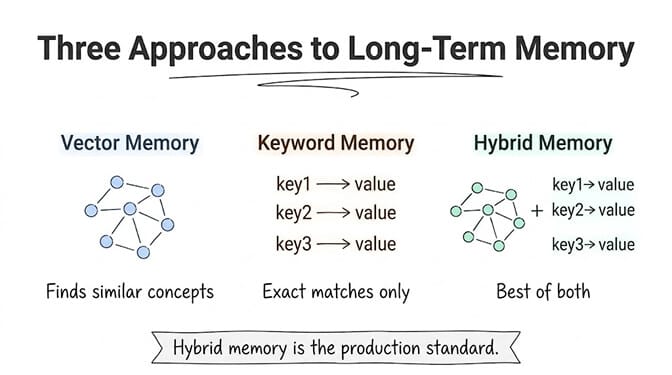
There are three common approaches to long-term agent memory, and each has different tradeoffs:
Approach 1: Vector memory (semantic search)
The agent takes important information from each conversation, converts it into numerical representations called embeddings, and stores them in a vector database. When a new conversation starts, the agent searches the database for memories that are semantically similar to the current query.
Customer asks: "What about my shipping issue?" Vector search retrieves: memories tagged with "shipping," "order," "delivery." Agent now has relevant context without loading the entire conversation history.
Strength: Finds conceptually related information even when the exact words are different. "My package didn't arrive" retrieves memories about "shipping delays."
Weakness: Sometimes retrieves the wrong memories. Semantic similarity isn't the same as relevance. The word "order" might pull up memories about "restaurant orders" when you meant "product orders."
Approach 2: Keyword memory (exact match)
Simpler than vector search. The agent stores key-value pairs: facts, preferences, entity names. When specific keywords appear in the current conversation, the matching memories are loaded.
Strength: Precise. When it matches, it matches correctly.
Weakness: Brittle. "Did my package ship?" won't trigger a memory stored under "delivery status" unless the keyword mapping was set up to handle synonyms.
Approach 3: Hybrid memory (vector + keyword)
This is where most production-grade agent platforms have landed. Combine both approaches. Use keyword matching for exact lookups (customer IDs, order numbers, specific facts). Use vector search for conceptual relevance (topics, themes, related issues).
The hybrid approach is what BetterClaw uses. Persistent memory with hybrid vector + keyword search. The agent stores important facts and conversation summaries automatically, retrieves them using both exact and semantic matching, and loads only the relevant memories into the context window for each new session. Smart context management means the agent pulls in what matters without burning tokens on irrelevant history.
The difference between a useful agent and a frustrating one usually comes down to memory architecture. Not model quality, not prompt engineering. Memory.
The memory layer most people forget: working memory
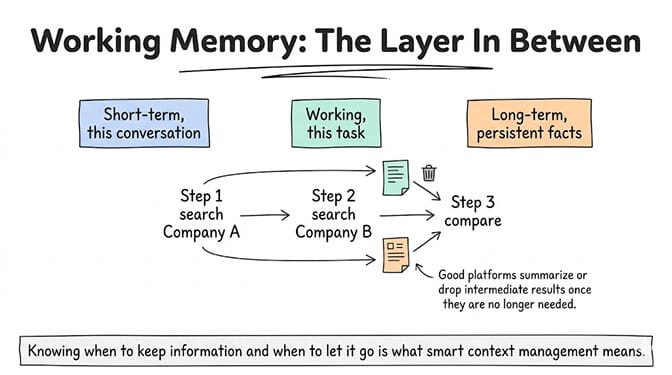
There's a third type of AI agent memory that sits between short-term and long-term. Call it working memory, or scratchpad memory.
This is where the agent stores intermediate results during a multi-step task. It's not conversation history (short-term). It's not persistent facts (long-term). It's the temporary state the agent needs to complete the current workflow.
Example: your agent is researching competitors. Step 1, it searches the web for Company A. Step 2, it searches for Company B. Step 3, it compares the two. In step 3, the agent needs the results from steps 1 and 2. Those results are working memory. They only need to exist for the duration of this task.
The problem: in most frameworks, working memory and conversation memory share the same context window. Tool outputs from step 1 are still sitting in the context window when step 10 happens, even if they're no longer relevant. This is another source of token bloat.
Good agent platforms manage working memory separately. They summarize or discard intermediate results once they're no longer needed, freeing up context window space for the current step. This is what "smart context management" means in practice: knowing when to keep information and when to let it go.
For a closer look at what different platforms include (and what they charge for memory features), we published a comparison of the best AI automation tools covering memory capabilities across all major platforms.
Where your agent's memory actually lives: conversation, memory files, and tool state
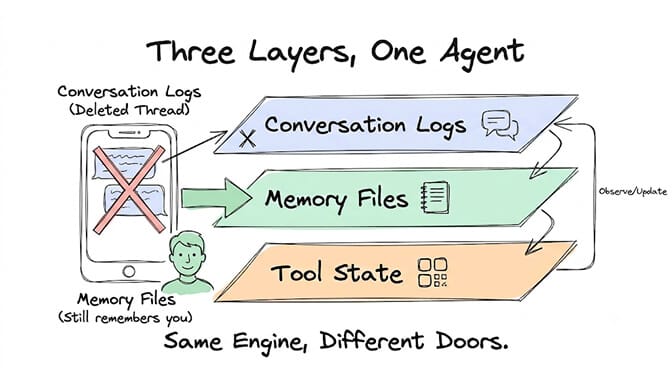
When you're debugging a real agent, the practical question is where a given piece of information was stored. There are three places.
Conversation logs. The raw chat history the model re-reads every turn. It grows with every message and is the only layer that clears on its own, per session or on a retention timer. When it clears, the agent doesn't forget who you are, just what you specifically talked about.
Memory files. Curated facts the agent has written down: your name, preferences, project context, standing decisions. They're injected on every turn, but unlike chat history they're the same size at message 5 as at message 500.
Tool state. Whatever the agent wrote into connected apps: the Google Sheet it filled in, the Notion page it drafted, the commits it pushed. It's the most durable memory an agent has, and it's where work product belongs.
| Event | Conversation logs | Memory files | Tool state |
|---|---|---|---|
| End of session | Saved (time-limited) | Persists | Persists |
/new command | Cleared | Persists | Persists |
| Agent restart | Cleared | Persists | Persists |
| Retention window expires | Cleared | Persists (unless memory has its own retention limit) | Persists |
| Manual memory delete | Unaffected | Deleted | Persists |
| Agent deletion | Deleted | Deleted | Persists (in external tools) |
If X only ever lived in the conversation log, losing it after a restart is expected behavior, not a bug. So put anything the agent needs to remember into memory files, and treat chat history as disposable.
Split memory files by purpose, too. In OpenClaw-style setups, SOUL.md holds personality (how the agent sounds) and AGENTS.md holds procedures like escalation rules and templates (what it does). One merged blob is harder for the model to parse late in a conversation.
This split is what makes a session reset safe. In OpenClaw and Hermes, /new starts a fresh session: the old chat drops out of context, and the system prompt and memory files load again, without erasing anything the agent "knows." Use it after 15-20 messages in a heavy tool-calling session, when the agent starts drifting, or before switching tasks. Scheduled agents should get this automatically: every run starts clean and the memory files carry the knowledge forward.
Why agents drift after about 20 messages
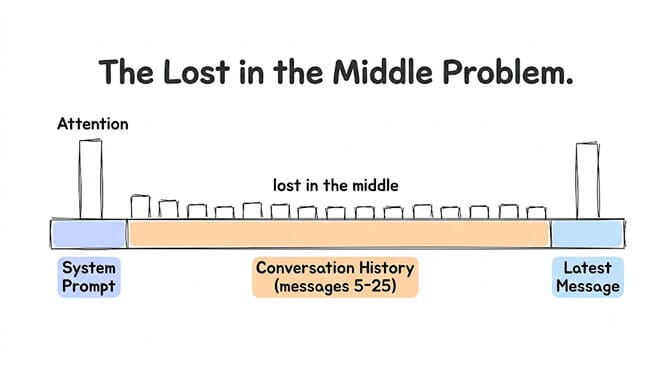
Not all forgetting is truncation. Often the instructions are still in the context window, and the agent ignores them anyway.
Research on long contexts found that models use information at the beginning and end of their input more reliably than information buried in the middle, an effect Liu et al. (2023) named "lost in the middle." In a long agent session, most of the context ends up in that middle: earlier instructions and corrections, history, and tool responses. In our experience, instructions hold well for the first 10-15 messages of a heavy tool-calling session, but by message 20-30 the agent increasingly follows recent messages over its instructions: wrong tool parameters, invented tools, dropped escalation rules, until it behaves like a generic chatbot.
The real limit isn't size, it's attention quality. More in our context window guide and in why agent rules drift after long conversations.
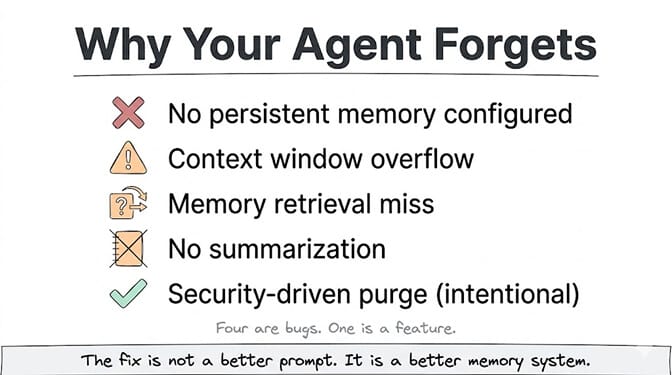
Why your agent forgets: the five most common causes
Now that you understand the architecture, here are the specific reasons your agent loses context:
1. No persistent memory configured. The most common cause. The agent is running with short-term memory only. Each session starts fresh. This is the default in most frameworks, including AutoGen (which is fully stateless by design) and basic LangChain setups. A close cousin: memory exists, but the agent leaned on chat history instead of writing to it, so a restart wipes everything. No context window trick substitutes for persistent memory.
2. Context window overflow. The agent's conversation history plus tool outputs plus system prompts exceed the model's context limit. Older information gets truncated, or the model starts ignoring what's in the middle. The agent doesn't know it lost information. It just doesn't have it anymore. Four things usually fill the window:
- Conversation history. A 50-message support conversation can eat 15,000 to 30,000 tokens. "Drop the oldest messages" works until the agent needs message three to answer message fifty-one. Fix: summarize older turns and keep the summary.
- Oversized system prompts. We've seen 8,000-token prompts riding along on every turn. Fix: keep core identity and rules in the prompt; move task-specific instructions (like refund handling) into documents retrieved only when relevant.
- Unfiltered tool responses. Five API calls returning 4,000-token JSON blobs is 20,000 tokens of raw JSON. Fix: extract only the fields the agent needs, like "Customer: Jane Smith, Plan: Pro, Status: Active."
- RAG overload. Poorly tuned retrieval pulls too many, too long, or barely relevant chunks. Fix: cap top-k at 3 to 5 chunks, use hybrid search, and set a minimum similarity threshold.
3. Memory retrieval failure. The agent has long-term memory, but the retrieval system didn't find the relevant memories for this session. Either the search query was too vague, the embedding was poor quality, or the memory was stored under different terminology than what the user is using now.
4. No memory summarization. Old conversations are stored verbatim instead of being summarized into key facts. This wastes storage, makes retrieval noisy, and fills the context window with redundant information when memories are loaded.
5. Security-driven memory limits. Some platforms intentionally limit how long certain information stays in memory. BetterClaw, for example, auto-purges secrets (API keys, passwords, credentials) from agent memory after 5 minutes using AES-256 encryption. This isn't a bug. It's a security feature. Sensitive data shouldn't persist in agent memory indefinitely. The security architecture behind agent memory is worth understanding, especially after the ClawHavoc campaign found 1,400+ malicious skills that could access stored credentials.
This is the kind of problem we spent months on at BetterClaw. Memory shouldn't be something you think about. It should just work. Your agent remembers what matters, forgets sensitive data on schedule, and loads the right context into each session automatically. Free plan includes 7-day memory. Pro includes extended retention with hybrid search. No configuration required.
A quick diagnostic checklist
- History growing unbounded? Every 10-15 messages, summarize into a 200-300 token brief and start fresh with it (or use
/new). - System prompt over 2,000 tokens? Split it, and keep instructions in the system role, not the first user message.
- Raw tool responses or more than 5 RAG chunks per query? Trim both, as above.
- Instructions fading late in long sessions? Where your framework allows, re-inject a short version near the end of the context.
- Agent re-asking things you told it? That fact never left the chat log. Say "Remember that I prefer responses under 3 sentences" so it gets written to a memory file.
- Memory wrong, stale, or full of trivia? Review memory files monthly and add an
AGENTS.mdrule like "Only save information the user explicitly asks you to remember." 50 focused entries beat 500, since memory tokens compete with conversation tokens. - Need it to forget something? Delete the entry directly (the
.mdfile on OpenClaw, the memory panel on BetterClaw). Asking in chat isn't guaranteed to work.
Persistent memory vs a bigger context window
A larger window rarely fixes forgetting. It's slower, costs more per call, and still suffers from lost-in-the-middle: a bigger desk instead of a filing system.
Use a bigger window when the model must reason over one large document in a single pass, like a contract, a codebase file, or a research paper. Use persistent memory when information has to survive across conversations, when relevance changes turn by turn, or when costs need to stay predictable. For most agents (support, sales, ops, personal assistants), persistent memory with a moderate window wins.
What good AI agent memory looks like in 2026
The state of the art has moved fast. Here's what production-grade AI agent memory looks like as of June 2026:
Automatic summarization. After each conversation, the agent extracts key facts, decisions, and preferences and stores them as compressed memory entries. The full transcript goes to archival storage. The summary goes to active retrieval.
Retrieval-augmented context. Before each new session, the agent queries its memory store with the current conversation's context. Only relevant memories are loaded into the context window. This keeps token usage efficient while ensuring the agent knows what it needs to know.
Memory scoping. Different types of information have different lifespans. Customer preferences are long-term. Credentials are minutes. Intermediate tool outputs are per-task. A good memory system manages these lifecycles automatically.
Memory search. The user or admin can search through the agent's memory, verify what it "knows," correct inaccuracies, and delete specific entries. Memory should be auditable, not a black box.
Gartner projects that 40% of enterprise applications will embed AI agents by end of 2026. Those agents will all need memory that works across sessions, across channels, and across users. The platforms that solve memory well will win. The ones that don't will produce agents that feel impressive for five minutes and frustrating for the next five months.
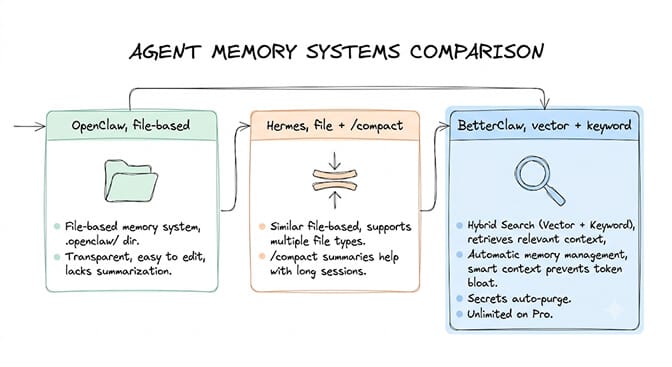
How OpenClaw, Hermes, and BetterClaw handle memory
OpenClaw is file-first: Markdown files in the agent's workspace. Curated long-term facts live in MEMORY.md (with an optional USER.md profile) and load at session start; running context goes into dated daily notes (memory/YYYY-MM-DD.md), with today's and yesterday's loaded on a fresh session. Chat history is separate: /new archives it and starts a fresh session. Memory search is hybrid (vector + keyword) once embeddings are configured, and the memory-wiki plugin adds a read, write, and search surface for curated facts. Every file is transparent and hand-editable; daily notes fade from recall over time (a 30-day half-life), while curated files stay until you edit them.
Hermes layers small, bounded memory files (MEMORY.md and USER.md, injected into the system prompt at session start), session search over past conversations using SQLite full-text search, and skills that capture reusable procedures. Its /compress command flushes memories and summarizes the conversation so you can keep going from the summary; /new starts a fresh session. (Responses getting cut off is a different problem: see fixing truncated Hermes responses.)
BetterClaw uses persistent memory with hybrid vector + keyword search, retrieving only the relevant memories each turn, so long conversations don't carry everything along. Memory is managed automatically, and you can view, edit, and delete entries in the memory panel. The tradeoff is less hands-on file control than OpenClaw.
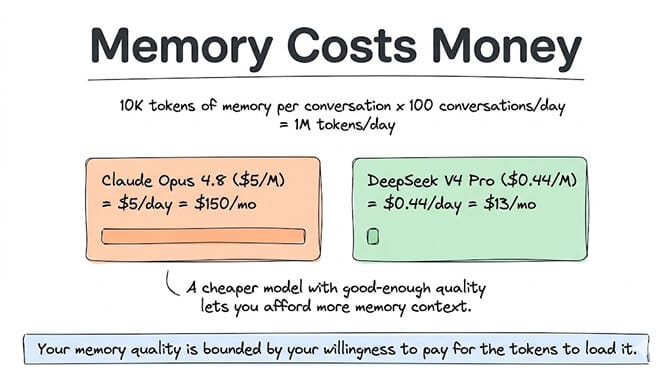
The uncomfortable truth about agent memory and cost
Here's something nobody talks about openly: memory costs money.
Every time your agent loads memories into the context window, those memories are tokens. Tokens cost money. An agent that loads 10,000 tokens of memory context per conversation and handles 100 conversations per day is consuming 1 million tokens per day just on memory retrieval.
At Claude Opus 4.8 input pricing ($5/million tokens), that's $5/day or $150/month in memory-related token costs alone. At DeepSeek V4 Pro ($0.66/million input tokens off-peak, double that at peak), it's about $0.66/day or $20/month off-peak.
The model you choose for your agent directly affects how much memory you can afford to load. This is why choosing the right LLM for each task includes thinking about memory cost, not just task cost. A cheaper model with good-enough quality for most tasks lets you spend more on memory context.
Your agent's memory quality is bounded by your willingness to pay for the tokens to load it. Choose your model accordingly.
What this means for you, right now
If you're setting up an AI agent and wondering why it keeps forgetting things, now you know the architecture behind it. The fix isn't a better prompt. It's a better memory system.
The most important thing you can do: choose a platform or framework that handles memory as a first-class feature, not an afterthought. Persistent memory across sessions. Hybrid retrieval. Smart context management that prevents token bloat. Automatic summarization. Credential purging for security.
Some platforms treat memory as an enterprise upsell. Some don't offer it at all. The best ones include it in every plan, because an agent without memory isn't really an agent. It's a very expensive chatbot that starts over every time.
If any of this resonated, give BetterClaw a look. Free plan with 1 agent, 100 credits a month, and 7-day memory retention. $49/month for Pro with 90-day memory, hybrid vector + keyword search, and smart context management built in. Deploy in 60 seconds. The memory system works out of the box. No configuration, no database setup, no embedding pipeline to manage. We handle the infrastructure. You handle the interesting part.
Frequently Asked Questions
What is AI agent memory?
AI agent memory is the system that lets an autonomous AI agent store, retrieve, and use information across multiple sessions and tasks. It includes short-term memory (current conversation context), working memory (intermediate results during task execution), and long-term memory (persistent facts, preferences, and history stored in vector or keyword databases). Without memory, an agent starts fresh every conversation and can't learn from past interactions.
How does AI agent memory differ from a context window?
The context window is the model's working limit for a single request. It holds everything the model can "see" at once (typically 200K to 1M tokens in 2026 models). AI agent memory is a separate storage system that persists information across sessions. The memory system decides which stored information to load into the context window for each new conversation. Think of the context window as a desk and memory as a filing cabinet.
How do I fix my AI agent forgetting context between sessions?
First, check whether your agent has persistent memory enabled. Many frameworks default to session-only memory. If it's enabled, verify the retrieval system is finding relevant memories (check your memory database for stored entries from previous conversations). If memories exist but aren't loading, the retrieval query may be too narrow. Switching from keyword-only to hybrid (vector + keyword) search usually fixes retrieval misses. On managed platforms like BetterClaw, persistent memory works by default with no configuration.
How much does AI agent memory cost to run?
Memory cost depends on how many tokens of context you load per session and which model you use. Loading 10,000 tokens of memory per conversation at 100 conversations/day costs about $5/day on Claude Opus 4.8 ($5/MTok input) or about $0.66/day on DeepSeek V4 Pro ($0.66/MTok input off-peak, $1.32 at peak). Platform costs for memory vary: some include it in base pricing (BetterClaw includes 7-day memory on the free plan), others charge separately or gate it behind enterprise plans.
Is it safe to store customer data in AI agent memory?
It depends on the platform's security architecture. Look for: AES-256 encryption for stored memories, automatic purging of sensitive credentials (API keys, passwords), isolated storage per agent, and auditable memory contents. Platforms that store everything in plaintext or share memory databases across agents create security risks. After the ClawHavoc campaign found 1,400+ malicious skills that could access stored credentials, credential management in agent memory became a critical security consideration.
Why does my AI agent forget instructions after about 20 messages?
LLMs re-read the entire context every turn, and as it grows they use information in the middle of it less reliably (the "lost in the middle" effect, Liu et al. 2023). In our experience, tool-heavy sessions start drifting toward recent messages over earlier instructions somewhere past 15-20 messages. Cap sessions at 10-15 messages, summarize, and start fresh with the summary plus the system prompt and memory files.
What is the difference between chat history and memory files?
Chat history is the raw conversation re-sent every turn. It grows, gets expensive, and clears per session or on a retention timer. Memory files hold curated facts like preferences and project context. They don't grow with the conversation and survive restarts and /new resets.
How do I make my AI agent remember my preferences?
State them explicitly. "Remember that I prefer responses under 3 sentences" prompts most agents to write it to a memory file instead of leaving it in the conversation log, which eventually gets cleared.
How do I delete agent memory in OpenClaw?
Edit or remove the entry directly in the relevant .md file in the agent's workspace. Asking the agent to "forget" something depends on it finding the right entry, so direct editing is the reliable method. On BetterClaw, delete the entry from the memory panel.
Is persistent memory better than a larger context window?
For most agents, yes. A larger window costs more, runs slower, and still loses information in the middle. Persistent memory retrieves only what's relevant each turn. Bigger windows suit reasoning over one large document in a single pass.