Three layers, one confusing mental model, and the table you'll end up screenshotting.
You restart your agent after a routine update. First message: "Hey, remember that thing I told you yesterday about the Henderson account?"
Nothing. Blank stare, if a text response can stare blankly. Your agent asks who Henderson is.
You panic a little. Did you lose everything? Then you ask it your name, and it answers correctly. It still knows your preferences, your project context, your writing style. Just not the specific conversation from yesterday.
Here's the weird part. Both of those things are working exactly as designed. Your agent didn't have one memory that broke. It has three separate systems, and you just watched one of them do exactly what it's supposed to do while the other two stayed completely intact.
How AI Agent Memory Actually Works
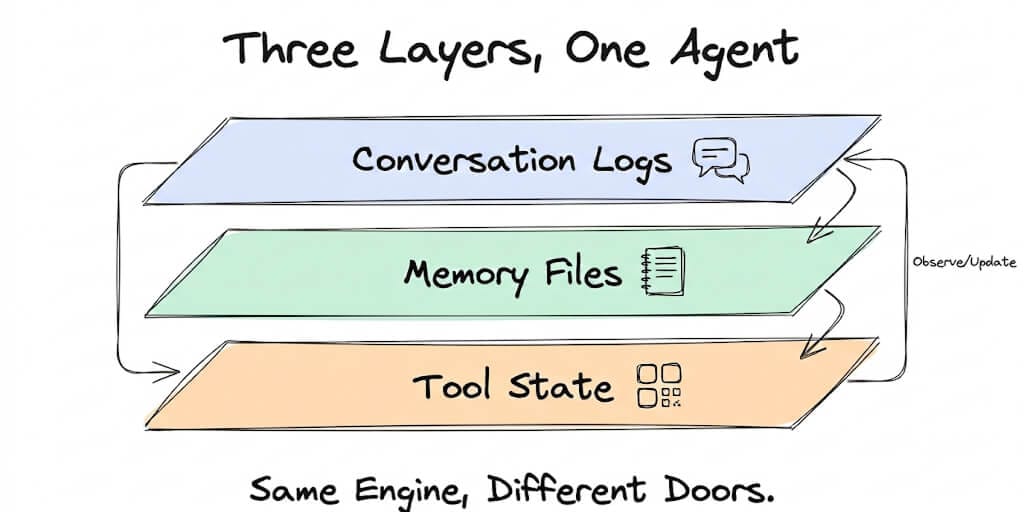
AI agent memory has three layers: conversation logs, which are temporary and get cleared per session or on a timer; memory files, which are persistent and survive restarts while holding learned preferences; and tool state, which lives externally in connected apps like Google Sheets or a CRM. Almost all the confusion agent builders run into comes from not knowing which layer holds what.
Once you separate these three in your head, "why did my agent forget X" stops being a mystery and starts being a quick diagnostic question: which layer was X supposed to live in.
The Three Layers: Conversation, Memory Files, and Tool State
Layer 1: Conversation logs
This is the raw chat history between you and your agent. Every message sent and received in the current session, start to finish.
How long it survives depends entirely on the platform. Free plans on BetterClaw keep 7 days of conversation history. Pro plans get configurable retention. Raw OpenClaw keeps the log until you clear it manually, which for most self-hosted setups means it grows indefinitely unless someone actively manages it.
Here's the part that trips people up: when conversation logs clear, the agent doesn't forget who you are. It forgets what you specifically talked about. Those are different things, and conflating them is where most "my agent lost its memory" panic starts.
Conversation logs are like text messages. You can scroll back and see them. But if you delete the thread, the person on the other end still remembers you. They just can't see the specific messages anymore.
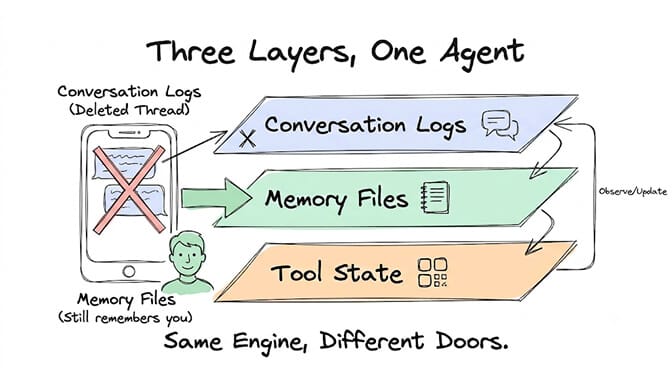
Layer 2: Memory files
This is structured information your agent has learned about you over time. Preferences, facts you've shared, how you like things done, names, project context. The stuff that should stick around regardless of what happens to any single conversation.
Memory files persist across sessions and restarts. On BetterClaw, they're permanent unless you explicitly delete them. On OpenClaw, they live as .md files in the agent's workspace directory, most commonly MEMORY.md plus dated daily notes, and they get read fresh at the start of every session.
When conversation logs clear, memory files are completely unaffected. Your agent still knows you prefer concise responses. It still knows your name is whatever you told it. It still knows you're working on Project Y. None of that lived in the conversation log to begin with.
Memory files are like a notebook. Even if the conversation ends, the notes remain.
Layer 3: Tool state
This is information stored in the external tools your agent connects to. A Google Sheet with categorized emails. A Notion database with meeting notes. A GitHub repo with committed code.
This is, without exaggeration, the most durable form of agent memory that exists. It lives permanently in the external tool, completely independent of your agent's own memory system. Even if you deleted the agent entirely tomorrow, the spreadsheet it built, the Notion page it wrote, the commits it pushed, all of that stays exactly where it is.
This is also the layer most people underuse. A well-designed agent treats tool state as the source of truth for anything that matters long-term, not the agent's own memory files. Memory files should hold the preferences and context. The actual work product belongs in a system built to store it permanently.
What Survives a Restart, a Reset, and a Deletion
This is the table worth screenshotting.
| Event | Conversation logs | Memory files | Tool state |
|---|---|---|---|
| End of session | Saved (time-limited) | Persists | Persists |
/new command | Cleared | Persists | Persists |
| Agent restart | Cleared | Persists | Persists |
| 7-day retention expiry (free plan) | Cleared | Persists | Persists |
| Manual memory delete | Unaffected | Deleted | Persists |
| Agent deletion | Deleted | Deleted | Persists (in external tools) |
Notice the pattern. Tool state survives literally everything, including the agent's own deletion. Memory files survive everything except you deliberately deleting them. Conversation logs are the only layer that clears on its own, on a schedule, without you doing anything.
Stay with me here, because this table answers about 80% of the "why did my agent forget" questions before they're even fully asked. If something got cleared and it's in the conversation logs row, that's expected behavior, not a bug.
5 Memory Problems and How to Fix Each One
Problem 1: "My agent forgot everything after I restarted it." Cause: the agent was leaning on conversation history as its memory instead of writing anything to a memory file. When the conversation cleared, everything genuinely was lost, because there was nowhere else it lived. Fix: configure your agent to actively save important context to memory files, not just rely on what's sitting in the chat log. On OpenClaw, this is what the memory-wiki plugin and MEMORY.md workflow exist for. On BetterClaw, memory files are managed automatically, so this specific failure mode mostly doesn't happen.
Problem 2: "My agent keeps asking me things I already told it." Cause: that information lived in conversation logs that expired or got cleared, and it never made it into a memory file in the first place. Fix: when you share something worth remembering, say so explicitly. "Remember that I prefer responses under 3 sentences" is a direct instruction most agents will act on by writing it to a memory file rather than leaving it to float in the chat log.
Problem 3: "My agent's memory seems wrong or outdated." Cause: conflicting information across memory files written during different sessions, sometimes months apart, that never got reconciled. Fix: periodically review the actual memory files. On OpenClaw, that means opening the .md files in the agent's workspace directory directly. On BetterClaw, it means opening the memory panel in the visual interface. Either way, remove the entries that contradict each other or that are simply stale.
Problem 4: "My agent remembers too much irrelevant stuff." Cause: overly aggressive memory saving, where the agent is treating trivial one-off details from every conversation as worth preserving forever. Fix: put explicit memory rules in SOUL.md. Something like "Only save information the user explicitly asks you to remember. Do not save casual conversation details, one-time requests, or temporary context." This is a negative constraint doing the same job negative constraints do everywhere else in agent configuration: giving the model a hard line instead of a vague preference.
Problem 5: "I want my agent to forget something specific." Cause: you shared something you don't actually want retained long-term. Fix: on OpenClaw, find and edit the relevant .md memory file directly. On BetterClaw, use the memory panel to delete the specific entry. Saying "forget that I told you about X" in chat sometimes works, but it isn't guaranteed, since the model has to correctly identify and remove the right entry on its own. Manual deletion through the file or the panel is the version you can actually trust.
How to Set Up Agent Memory That Actually Works
A few rules, once you internalize them, make almost every future memory problem preventable instead of something you're debugging after the fact.
- Use memory files for facts that should persist. Preferences, names, project context, standing decisions. The things that shouldn't need to be re-explained every time.
- Use conversation logs for in-session context only. The current task, the document you're actively working on together, anything that genuinely only matters for the next few exchanges.
- Use tool state for work products. Emails sent, documents created, data analyzed. Anything that constitutes actual output belongs in the tool that's built to store it permanently, not in the agent's own memory.
- Set up a periodic memory review. Once a month, actually read through your agent's memory files. Delete what's outdated. This takes ten minutes and prevents Problem 3 from ever becoming a real issue.
- Don't over-memorize. An agent with 500 memory entries performs worse than one with 50 focused entries. Memory tokens compete with conversation tokens in the same context window, and a bloated memory file is functionally the same problem as a bloated
SOUL.md.
If that last point sounds familiar, it's because it's the same underlying mechanism covered in why agent rules drift after long conversations. Memory bloat and rules drift are two symptoms of the same root cause: too much competing for too little attention inside a context window that doesn't grow to meet you.
Memory Management on OpenClaw, Hermes, and BetterClaw
OpenClaw: memory lives as .md files in the agent's workspace directory, most commonly MEMORY.md alongside dated daily notes. Conversation logs are stored locally and persist until you clear them yourself. For more structured, wiki-style persistent knowledge beyond simple preference tracking, OpenClaw's memory-wiki plugin gives agents a dedicated read, write, and search surface for curated facts rather than raw chat history. Manual management, when you need it, means opening and editing the .md files directly.
Hermes: memory architecture here is meaningfully different from OpenClaw's file-first approach. Hermes uses a multi-level system, session memory, persistent memory, and a separate skill-memory layer that captures reusable procedures from past problem-solving, retrieved through full-text search rather than OpenClaw's hybrid vector-plus-keyword approach. Retention is configurable per agent, and memory files live in the Hermes data directory. The practical tradeoff worth knowing: Hermes tends to hold up better across long personal-assistant style usage where recalling something from months ago matters, while OpenClaw's plain-markdown approach stays easier to read and hand-edit directly.
BetterClaw: memory files are managed automatically through the visual interface. You can view, edit, and delete specific memories in the memory panel without ever touching a file path. Free plan retention is 7 days of conversation history, with memory files persisting indefinitely. Pro plan gives you configurable retention and longer conversation history. No file editing required, which is the whole point.
We built it this way because we were tired of the specific failure pattern in Problem 1, watching someone lose real context because they'd been chatting instead of explicitly telling the agent what to remember. BetterClaw's free plan handles that distinction automatically, with one agent and 500 credits a month, no credit card needed.
If your memory files are growing large enough that you're worried about the token cost of loading them every session, that's worth pairing with a look at how much token budget your skills are actually consuming, since integrations and memory both draw from the same shared context budget. And if you're seeing responses get cut off entirely rather than just losing context over time, our guide to fixing truncated Hermes responses covers that adjacent but distinct failure mode.
The takeaway that actually matters
Your agent was never going to remember everything, and that's not a flaw. It's the same reason you don't remember every text message you've ever sent, but you absolutely remember your best friend's birthday and how they take their coffee.
The three layers exist because each one is solving a different problem. Conversation is for right now. Memory files are for who you are and what you need. Tool state is for what actually got done. Once you stop expecting one layer to do all three jobs, the whole system stops feeling unpredictable.
If managing which layer holds what sounds like exactly the kind of infrastructure decision you'd rather not make by hand, give BetterClaw a try. Free plan with one agent and 500 credits a month, no credit card. $49 a month for Pro when you're ready to scale. Your first deploy takes about 60 seconds. We handle deciding where things live. You handle deciding what's actually worth remembering.
Frequently Asked Questions
How does AI agent memory work?
AI agent memory operates across three separate layers: conversation logs that are temporary and get cleared on a schedule, memory files that persist across restarts and hold learned preferences, and tool state that lives permanently in whatever external apps the agent is connected to. Most confusion about agents "forgetting" things comes from not knowing which of these three layers a piece of information was ever stored in.
What's the difference between conversation history and memory files?
Conversation history is the raw back-and-forth of a specific session, and it clears on a timer or when you manually reset it. Memory files are curated, structured facts, like your preferences and project context, that the agent writes down separately and that survive restarts and session resets entirely. Clearing conversation history doesn't touch memory files at all.
Does my agent remember things between sessions?
Yes, but only what's been saved to a memory file. Anything that only ever existed in the conversation log is gone once that log clears, while anything explicitly saved to memory, like your name or a stated preference, carries over into every future session regardless of how many conversations have happened in between.
How to make my AI agent remember my preferences?
State it explicitly rather than assuming the agent picked it up from context. Saying "remember that I prefer responses under 3 sentences" prompts most agents to write that to a memory file instead of leaving it to live only in the current conversation, which is the layer that eventually gets cleared.
How to delete agent memory in OpenClaw?
Open the relevant .md memory file in the agent's workspace directory and remove or edit the specific entry directly. Asking the agent in chat to "forget" something sometimes works, but it depends on the model correctly identifying and removing the right entry, so direct file editing is the more reliable method when you need to be certain something is actually gone.