The installer said "quick start." Your terminal said otherwise. Here's what's actually going wrong and how to fix each one.
The onboarding wizard finished. The gateway started. The TUI loaded. I typed "hello" and pressed enter.
Nothing happened.
No error message. No response. No indication that anything was wrong. Just a blinking cursor and a typing indicator that spun forever.
I checked if Ollama was running. It was. I tested it directly with curl. Perfect response. I verified the API key. Valid. I restarted the gateway. Same result.
Forty-five minutes of my life. Gone. For what turned out to be a context window mismatch that nobody told me about during setup.
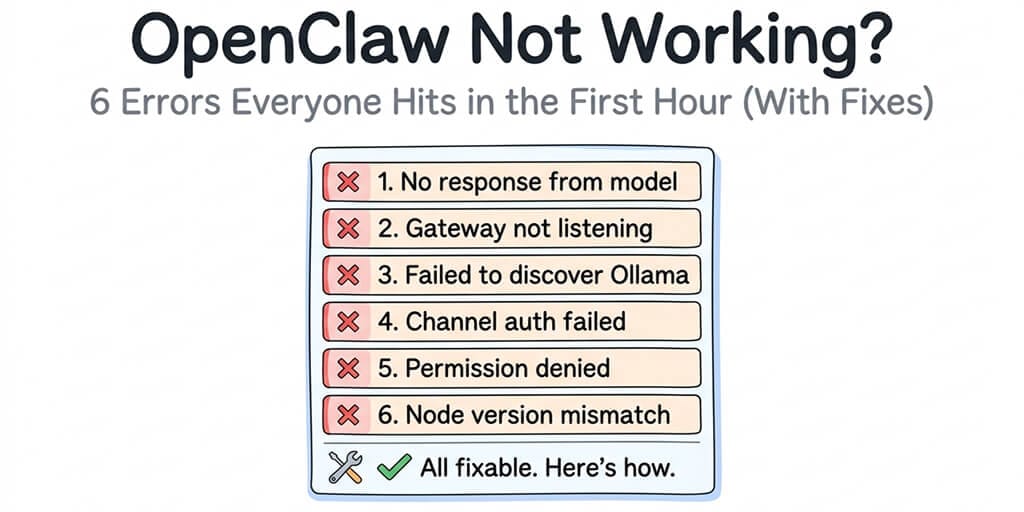
If OpenClaw is not working for you right now, you're in good company. The project has 7,900+ open issues on GitHub. Entire categories of bugs are documented, reproduced, and still unresolved. The good news: the six errors you're most likely hitting in your first hour all have known fixes.
Here they are, in the order you'll probably encounter them.
Error 1: "No response" after sending a message (the silent failure)
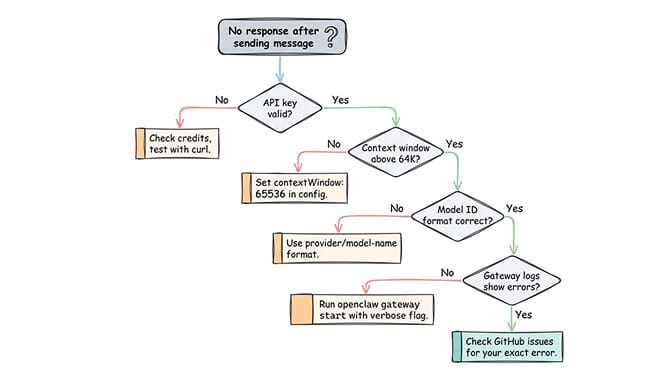
This is the #1 complaint on GitHub and Discord. You send a message. The typing indicator appears. Nothing comes back. No error in the TUI. No useful log entry.
What's happening: Your model isn't responding to OpenClaw's request format. The most common cause is a context window mismatch. OpenClaw's system prompts are large. If your model's context window is too small (under 32K tokens), the prompt exceeds capacity and the model silently fails.
The fix:
If using Ollama local models, set a context window of at least 64K tokens in your config. OpenClaw's own docs recommend this minimum:
{
  "models": {
    "providers": {
      "ollama": {
        "models": [{
          "id": "qwen3:8b",
          "contextWindow": 65536
        }]
      }
    }
  }
}
If using a cloud provider (Anthropic, OpenAI), check that your API key is valid and has credits. A depleted key produces the same silent failure. Test directly:
curl https://api.anthropic.com/v1/messages \
  -H "x-api-key: YOUR_KEY" \
  -H "content-type: application/json" \
  -d '{"model":"claude-sonnet-4-20250514","max_tokens":100,"messages":[{"role":"user","content":"hello"}]}'
If the curl returns a valid response but OpenClaw doesn't, the issue is usually the model configuration in openclaw.json. Double-check the model ID format: it should be provider/model-name (for example, anthropic/claude-sonnet-4-6).
For a deeper dive into why local models frequently fail in OpenClaw (including the streaming + tool calling bug that affects every Ollama model), our troubleshooting guide covers five distinct failure modes.
Error 2: "Failed to discover Ollama models" on gateway startup
You see the gateway start, but the logs show:
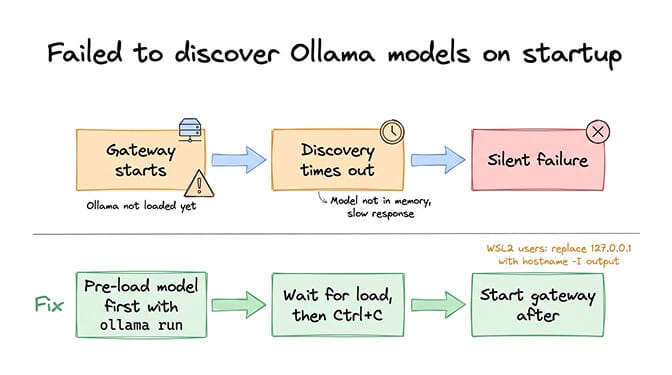
Failed to discover Ollama models: TimeoutError: The operation was aborted due to timeout
What's happening: OpenClaw tries to auto-discover your Ollama models during startup. If Ollama is slow to respond (common on first load when the model isn't in memory yet), or if the network path between OpenClaw and Ollama isn't quite right, discovery times out silently.
This is documented in GitHub Issues #14053, #22913, and #29120. It's one of the most reported bugs in the project.
The fix:
Pre-load your model before starting OpenClaw:
ollama run qwen3:8b
# Wait for it to load, then Ctrl+C
# NOW start the gateway
openclaw gateway start
If running Ollama on a different host (or Windows with WSL2), replace 127.0.0.1 with the actual network IP. WSL2 and localhost don't always resolve correctly across the boundary. Use hostname -I to get the WSL2 IP.
If discovery keeps failing, define your models manually in openclaw.json instead of relying on auto-discovery. When models are explicitly listed, OpenClaw skips discovery entirely.
Error 3: Channel authentication fails (Telegram, WhatsApp, Slack)
You've connected a model. It works in the TUI. But when you try to connect a chat platform, authentication fails.
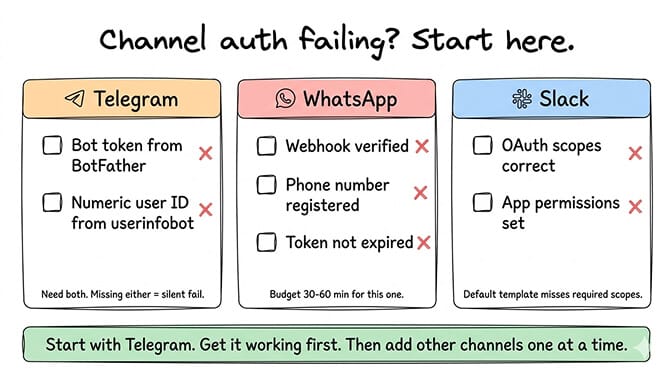
Telegram: The most common mistake is using the wrong bot token format or forgetting to set your user ID in the allowlist. You need both the bot token from @BotFather and your numeric user ID from @userinfobot. Missing either one causes silent auth failure.
WhatsApp: Meta's Business API setup is genuinely complex. The onboarding wizard tries to simplify it, but most people hit issues with webhook verification, phone number registration, or token expiration. Budget 30-60 minutes for WhatsApp specifically.
Slack: OAuth scoping is the typical issue. OpenClaw needs specific permissions that the default Slack app template doesn't always include.
The universal fix: Start with Telegram. It's the fastest channel to get working. Once you've confirmed your agent responds on Telegram, add other channels one at a time. Debugging multiple channel auth failures simultaneously is a recipe for confusion.
For the full multi-channel setup process (including the gotchas the docs skip), our detailed setup guide covers each platform step by step.
Error 4: "Permission denied" on config files or workspace
EACCES: permission denied, open '/home/user/.openclaw/openclaw.json'
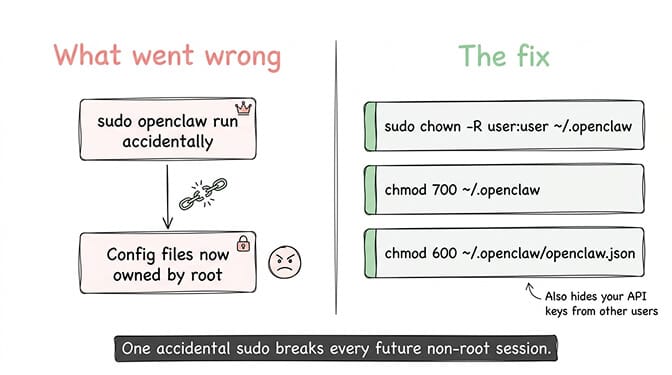
What's happening: File permissions are wrong. This happens most often when you've run OpenClaw as root at some point (even accidentally) and then try to run it as your normal user. The config files now belong to root, and your user can't read or write them.
The fix:
sudo chown -R $(whoami):$(whoami) ~/.openclaw
chmod 700 ~/.openclaw
chmod 600 ~/.openclaw/openclaw.json
This gives your user ownership and sets appropriate permissions. The 600 permission on openclaw.json is also a security best practice, since the file contains your API keys in plaintext.
If you ever run sudo openclaw by accident, immediately fix the file ownership afterward. One root-level command can break permissions for every subsequent non-root session.
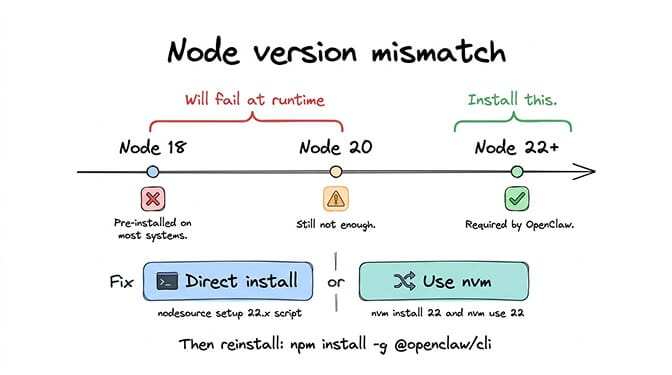
Error 5: Node.js version mismatch
error@openclaw/cli: Required node version >=22.0.0
Or worse, you get cryptic syntax errors that look like broken JavaScript because your Node version doesn't support the language features OpenClaw uses.
What's happening: OpenClaw requires Node.js 22 or higher. Many systems come with Node 18 or 20 pre-installed. The npm install succeeds but the runtime fails.
The fix:
node --version
# If less than 22:
curl -fsSL https://deb.nodesource.com/setup_22.x | sudo -E bash -
sudo apt-get install -y nodejs
Or use nvm for version management:
nvm install 22
nvm use 22
Then reinstall OpenClaw:
npm install -g @openclaw/cli
On DigitalOcean's 1-Click image, Node version issues are particularly common. Community reports indicate the pre-installed version doesn't always meet OpenClaw's requirements, and the self-update script can break Node dependencies. If you're hitting persistent Node issues on DO, our VPS setup guide covers the clean installation path.
Error 6: Gateway bound to wrong address (the security mistake disguised as a bug)
Your agent works in the TUI but not from other devices. Or it works from everywhere, including the entire internet. Both are problems.
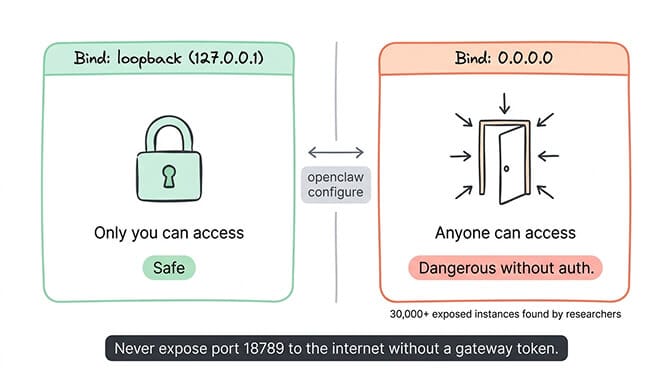
What's happening: The gateway's bind setting determines who can connect. loopback means only your machine. 0.0.0.0 means everyone. The default varies depending on how you configured it during setup.
If you can't access the dashboard from your phone or another computer, the gateway is bound to loopback. If researchers at Censys are finding your instance (30,000+ exposed instances discovered without authentication), it's bound to 0.0.0.0 without a gateway token.
The fix:
For local-only access (most common for personal use):
openclaw configure
# Select "Local (this machine)"
Verify:
ss -tlnp | grep 18789
# Should show 127.0.0.1:18789
For remote access, use Tailscale or SSH tunnels. Never expose 18789 directly to the internet without a strong gateway auth token.
The full security hardening checklist covers gateway binding plus nine other security steps that most users skip.
The error that isn't an error: "It works but costs too much"
This isn't a bug, but it's the complaint I hear most often after the first hour is over and the agent is actually running.
The default configuration sends every request (including heartbeats, sub-agents, and simple lookups) to your primary model. If that's Claude Opus or GPT-4o, you're paying premium rates for tasks that need zero intelligence.
The fix: set separate models for heartbeats and sub-agents. Use Haiku ($1/$5 per million tokens) for automated operations and Sonnet ($3/$15) for your actual interactions. This single config change cuts API costs by 50-80%.
{
  "agent": {
    "model": {
      "primary": "anthropic/claude-sonnet-4-6",
      "heartbeat": "anthropic/claude-haiku-4-5",
      "subagent": "anthropic/claude-haiku-4-5"
    }
  }
}
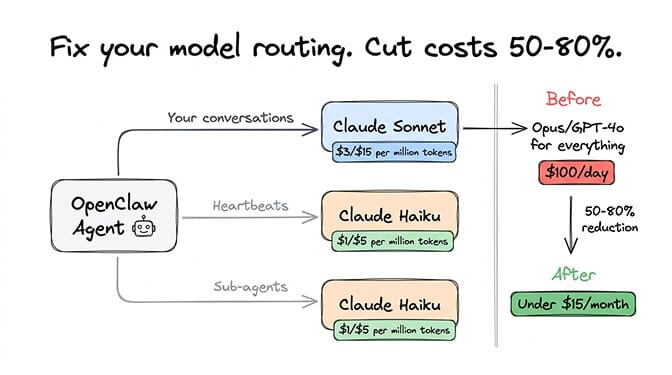
For the complete cost optimization strategy, our API cost reduction guide covers five changes that dropped a typical bill from $100/day to under $15/month.
The pattern behind all six errors
Here's what nobody tells you about the OpenClaw not working experience.
Every one of these errors exists because OpenClaw is infrastructure software masquerading as an app. It has an installer that looks friendly. It has a TUI that feels approachable. But underneath, you're managing a Node.js daemon, a WebSocket gateway, multiple API integrations, file permissions, network binding, and model configuration.
That's not a criticism of OpenClaw. It's a 230,000-star project for a reason. The architecture is genuinely powerful. But OpenClaw's own maintainer, Shadow, said it plainly: "If you can't understand how to run a command line, this is far too dangerous of a project for you to use safely."
The six errors above are the first hour. After that comes security hardening, Docker isolation, firewall configuration, cron job tuning, context window management, and ongoing patching. The project had three CVEs in a single week in early 2026.
Some people thrive on this. If you're a developer who enjoys infrastructure challenges, self-hosting is rewarding.
For everyone else, the question is whether you want to spend your first hour on Node versions and file permissions, or on building agent workflows that actually do something useful.
If you'd rather skip every error on this list, give Better Claw a try. $49/month for Pro, BYOK with any of the 28+ supported providers, and your first agent deploys in about 60 seconds. No Node version issues. No gateway binding confusion. No Ollama discovery timeouts. No permission errors. We handle the infrastructure so you can get to the part that actually matters.
Frequently Asked Questions
Why is my OpenClaw not working after installation?
The most common cause is a silent model failure: your model isn't responding to OpenClaw's request format due to context window limitations (needs 64K+ tokens), an invalid or depleted API key, or incorrect model ID formatting in your config. Check your gateway logs at /tmp/openclaw/openclaw-[date].log for specific error messages. If using Ollama, pre-load the model before starting the gateway to avoid discovery timeouts.
How do I fix the "Failed to discover Ollama models" error?
This timeout error (documented in GitHub Issues #14053, #22913, #29120) occurs when Ollama is slow to respond during gateway startup. Fix it by pre-loading your model with ollama run [model] before starting the gateway, or by defining models manually in your openclaw.json config instead of relying on auto-discovery. On WSL2, use the actual network IP instead of 127.0.0.1.
How long does it take to get OpenClaw working from scratch?
Realistically, 1-4 hours for a basic working agent, depending on your experience level and which errors you hit. Telegram is the fastest channel to connect (15-20 minutes). WhatsApp takes 30-60 minutes due to Meta's Business API complexity. Factor in additional time for security hardening and model routing configuration. Managed platforms like Better Claw reduce this to under 2 minutes.
How much does it cost when OpenClaw is finally running?
API costs depend on your model and usage. Running everything on Claude Opus: $30-70/month. With smart model routing (Sonnet primary, Haiku heartbeats): $15-50/month. Using DeepSeek for most tasks: $3-8/month. Hosting adds $5-29/month. The biggest cost surprise is heartbeats (48/day at your primary model rate) and cron job context accumulation, both fixable through config changes.
Is it normal for OpenClaw to have this many setup issues?
Yes. The project has 7,900+ open issues on GitHub, 850+ contributors, and is evolving rapidly (multiple releases per week). The maintainer explicitly warns that this is not software for people unfamiliar with command-line tools. Many issues stem from the wide variety of environments (macOS, Linux, Windows/WSL2, Docker, VPS) and the complexity of integrating with dozens of model providers and chat platforms. The active community means most issues have documented fixes.
Related Reading
- OpenClaw Agent Stuck in Loop: How to Fix It — Diagnose and fix agent loops that drain your API budget
- OpenClaw Docker Troubleshooting Guide — Container-specific errors and fixes
- OpenClaw Gateway Won't Start After Updating — When the breakage started right after an update, match the log line first
- OpenClaw OOM Errors: Complete Fix Guide — Memory crashes and how to prevent them
- OpenClaw Ollama "Fetch Failed" Fix — Local model connection errors decoded
- OpenClaw Memory Fix Guide — Fix context compaction and memory drift issues
- OpenClaw "Cannot read properties of undefined (reading 'trim')" Fix — The trim TypeError and its 5 causes, starting with a stale sessions.json