To fix OpenClaw memory loss on OpenClaw 2.0 (v2026.8.1 and later): run openclaw doctor --fix after upgrading, keep the pre-compaction memory flush on (agents.defaults.compaction.memoryFlush.enabled, on by default), make sure the agent's workspace is writable, turn on agents.defaults.compaction.notifyUser so compaction is never silent, keep MEMORY.md inside its bootstrap budget, and persist the whole ~/.openclaw directory if you run in Docker.
Your agent didn't forget. OpenClaw summarized its memory while it was still thinking.
I was three hours into a complex research task. My OpenClaw agent had been browsing competitor pricing pages, compiling data into a structured comparison, and was halfway through a summary when it just... stopped making sense.
It started repeating itself. Asked me for context I'd already given. Then it confidently summarized data it had never actually collected - hallucinating a competitor's pricing that didn't exist.
I checked the logs. That's when I saw it: embedded run auto-compaction start.
OpenClaw had decided my context window was too full, compressed the older turns into a summary, and my agent was now working from that summary instead of the actual data. Three hours of structured research, replaced by a lossy summary that kept the vibes but lost the facts.
That was an older version. OpenClaw 2.0 changed a lot about how memory works, and most of the fixes people still copy from forums are for settings that don't exist. This guide is rebuilt around what the docs said as of v2026.9.6. The latest stable release is now 2026.10.2 (12 October 2026).
What Compaction Actually Does (And Why It Feels Like Memory Loss)
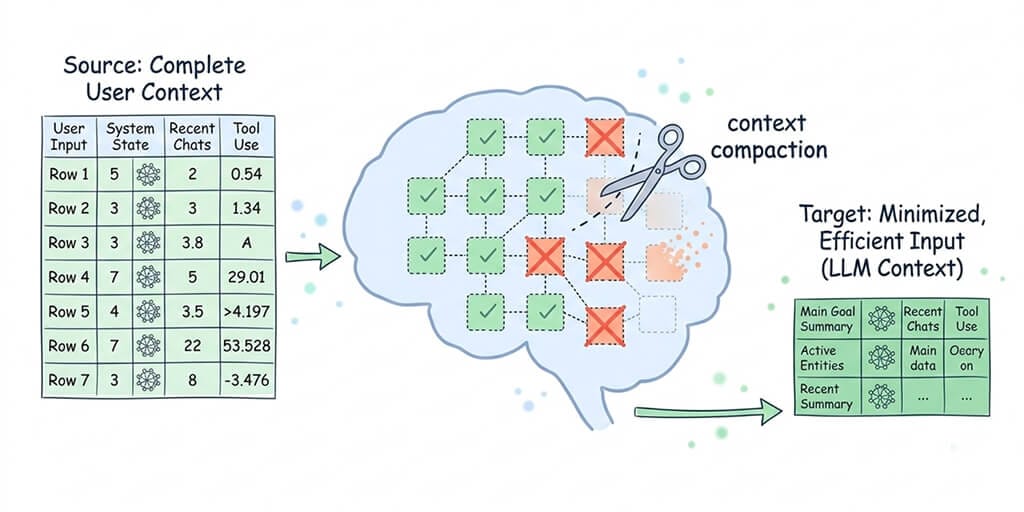
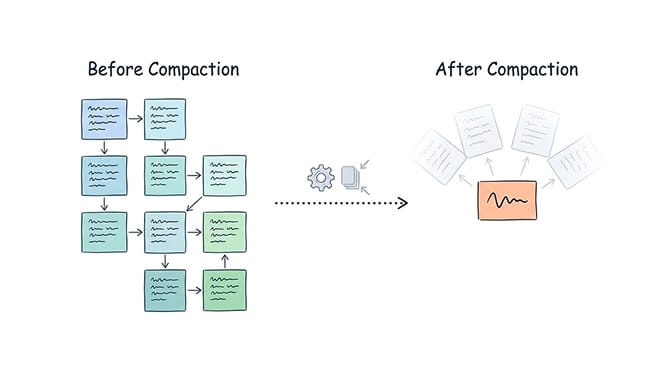
Every model has a context window. When a conversation approaches that limit, OpenClaw compacts older messages into a summary so the chat can continue. Recent messages are kept intact, and tool calls stay paired with their results.
Two things matter here.
First, the full conversation stays on disk. Compaction only changes what the model sees on the next turn. Nothing is deleted from the transcript. But from the agent's point of view, the detail is gone.
Second, compaction is automatic. It runs when the session nears the context limit, or when the provider returns a context-overflow error (in which case OpenClaw compacts and retries). By default, it runs silently.
The summarizer doesn't know what's important to your current task. So your carefully structured data table can come back as "the agent collected competitor pricing data." Newer configs use a stricter "safeguard" mode that audits summary quality and preserves exact identifiers by default, which helps. But a summary is still a summary.
OpenClaw doesn't lose memory because it forgets. It loses memory because it summarizes - and summaries are lossy by design.
How OpenClaw Memory Works in 2.0
To understand the fixes, you need to understand how OpenClaw's architecture works under the hood.
OpenClaw's memory is plain Markdown in the agent workspace (~/.openclaw/workspace by default). The model only remembers what gets saved to disk. There are four memory files:
USER.md(optional): your stable preferences and profile, written as directives. Loaded every session with its own small budget.MEMORY.md: long-term memory. Durable facts and decisions. Loaded at the start of a session.memory/YYYY-MM-DD.md: daily notes. Detailed running context. Indexed for search, not injected on every turn. Today's and yesterday's notes load automatically when you start a fresh session with/newor/reset.DREAMS.md(optional): the Dream Diary, a human-readable log of what background consolidation did.
Here's what changed in OpenClaw 2.0 (v2026.8.1):
- QMD is retired. Built-in Memory now owns search and recall. If you used QMD,
openclaw doctor --fixremoves the retired settings, carries forward what it can, and rebuilds the index from your Markdown files. QMD-only features like reranking and cross-agent transcript search are gone. - The agent searches memory with tools.
memory_searchfinds relevant notes (hybrid keyword + vector search when an embedding provider is configured),memory_getreads a specific file or line range, andintentstores "when this happens, do that" instructions. - Dreaming is on by default. A scheduled background sweep scores what's been recalled from daily notes and promotes the durable items into
MEMORY.md, with a summary inDREAMS.mdfor you to review. - Recall favors recent notes. Daily notes decay on a 30-day half-life in ranking, so old notes fade unless they get promoted.
- Personal agents can recall across their own private conversations, including context from just before a session reset.
If you want durable memory to behave more like a maintained knowledge base, the bundled memory-wiki plugin sits alongside all this. Our OpenClaw Memory Wiki guide covers setup and the 2.0 changes in detail.
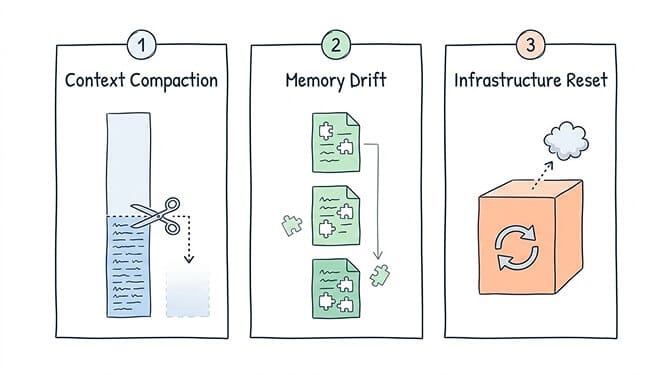
The Three Ways Your OpenClaw Agent Still Loses Its Mind
2.0 made memory far more reliable, but the failure modes haven't disappeared. They've just moved.
1. Context Compaction Mid-Task
Your agent is actively working, the context window fills up, and the runtime summarizes the older turns. Anything that wasn't written to a memory file before that point only survives as summary text.
Who it hits hardest: Anyone running complex, multi-step tasks. Research workflows. Data analysis. Long coding sessions. Anything where the agent builds up context over time. Large tool outputs (file reads, search results, API responses) make it happen sooner.
2. The Memory Flush Didn't Run (Or Didn't Save What Mattered)
Before compaction, OpenClaw runs a silent "write memory now" turn so important context lands in memory/YYYY-MM-DD.md first. It's on by default. But it's skipped in some situations the docs spell out: when the session's workspace is read-only or has no workspace access (workspaceAccess: "ro" or "none", common in sandboxed setups), for heartbeat turns, and for CLI backends. And if the flush fails, the reply still continues.
Then there's MEMORY.md itself. If it grows past the bootstrap budget, OpenClaw keeps the file intact on disk but truncates the copy it injects into context. Your agent "forgets" facts that are technically still in the file.
3. Infrastructure Resets
This one's unique to self-hosted deployments. Since 2.0, sessions, transcripts and the memory index live in a per-agent SQLite database under ~/.openclaw/agents/, and your Markdown memory lives in the workspace. If a Docker container restarts without that state directory on a persistent volume, all of it can go with the container.
The good news: when the state survives, 2.0 recovers well. Interrupted agent turns resume automatically after a gateway restart, and queued messages drain.
The Fixes That Actually Work on 2.0
All of these are documented config keys in ~/.openclaw/openclaw.json. If you find a guide telling you to set maxContextTokens, compactMessageCount, or [PINNED] tags, ignore it. Those aren't OpenClaw settings.
1. Migrate properly after upgrading. Run openclaw doctor --fix once after moving to 2.0 or later. It handles the QMD retirement, migrates legacy dreaming state, and repairs old memory-index schemas. Then check openclaw memory status, and rebuild with openclaw memory index --force if the index looks wrong.
2. Make compaction visible. Silent compaction is what makes memory loss feel mysterious.
{
  agents: {
    defaults: {
      compaction: {
        notifyUser: true,
      },
    },
  },
}
You'll get a short notice when compaction starts and finishes, and a warning if the memory flush ran out of retries. /status also shows a compaction count.
3. Keep the memory flush on, and give it a writable workspace. The flush lives at agents.defaults.compaction.memoryFlush and defaults to enabled: true. It triggers softThresholdTokens (default 4,000) before the compaction threshold, and forces a flush once the transcript reaches forceFlushTranscriptBytes (default "2mb"). If your agent runs in a sandbox with read-only workspace access, the flush can't write, so give the main agent write access to its workspace. You can also run the flush on a cheap local model with memoryFlush.model.
4. Steer compaction when you trigger it. Before a long task hits the limit, type /compact Focus on the pricing table and the open questions. Manual compaction keeps the most recent keepRecentTokens (default 20,000) intact. You can also point summarization at a different model with agents.defaults.compaction.model.
5. Stop tool output from eating your context. If compaction triggers constantly, oversized tool results are usually why. Enable session pruning with agents.defaults.contextPruning.mode: "cache-ttl". It trims old tool results from what the model sees without rewriting the conversation, and the full history stays on disk.
6. Keep MEMORY.md small. It's the curated layer, not an archive. Use /context list or /context detail to see raw versus injected sizes and whether anything is being truncated. Move detail into memory/*.md (which the agent can search on demand) rather than raising agents.defaults.bootstrapMaxChars (default 20,000) and spending more prompt on every turn.
7. Ask the agent to remember things explicitly. "Remember that the client's fiscal year starts in April" makes the agent write the note to the right file immediately, instead of hoping the flush or Dreaming catches it later.
8. Review what Dreaming promotes. Dreaming is on by default. Read DREAMS.md occasionally to see what it promoted into MEMORY.md. If you'd rather curate long-term memory by hand, disable it with plugins.entries.memory-core.config.dreaming.enabled: false.
9. Delete bad memories at the source. If a session filled memory with wrong or untrusted content, openclaw memory forget removes it by --session, --hook-source, or --participant, with --since to narrow the window. It deletes immediately, so always run it with --dry-run first.
10. Persist the whole state directory in Docker. Mount ~/.openclaw (config, agent databases and workspace) on a volume, not just the workspace folder. And put the workspace in a private Git repo, as the docs recommend, so you can restore memory files if something goes wrong.
Why This Is Still Work
Here's what I kept coming back to while researching this article.
Every one of those fixes is sensible. And every one of them is something you have to know about, configure, and keep an eye on. You're not just configuring an AI assistant. You're becoming its memory manager, its ops team, and its therapist.
That's backwards.
The entire point of an AI agent is that it handles the grunt work so you can focus on decisions. If you're spending 30 minutes per session making sure your agent doesn't forget what it's doing, you're not saving time. You're trading one kind of busy work for another.
Memory issues also compound your API costs - every compaction cycle and every re-explained task spends tokens re-establishing context. This is exactly why we built BetterClaw with a managed memory layer. BetterClaw uses hybrid vector + keyword search backed by persistent storage that doesn't depend on your container's runtime state.
Your agent's memory survives restarts. It survives updates. It survives sessions. And because the search retrieves what's relevant for the current task on demand, your agent doesn't need to stuff everything into the context window.
No flush thresholds to tune. No volume mounts. No crossing your fingers every time a long conversation gets deep. If you need a no-code AI agent platform with this memory architecture built in, BetterClaw handles it out of the box.
If you've been fighting OpenClaw memory issues and want an agent that actually remembers what it's doing, BetterClaw is a managed OpenClaw alternative with persistent memory built in: a free plan with 1 agent and BYOK, and Pro at $49/month for 5 agents. Already self-hosting? Migrate in under an hour →. Deploy in 60 seconds. Stop babysitting your agent's brain.
What This Means If You're Running Agents in Production
Let me be clear about something: OpenClaw is an extraordinary piece of software. Peter Steinberger built something that made autonomous AI agents accessible to regular developers. Nearly 400,000 GitHub stars aren't hype - they're earned. And the 2.0 memory rebuild, with nearly a thousand contributors on that release, shows the project taking the problem seriously.
But the workloads keep growing. People are running multi-hour research workflows. Building business operations around daily agent briefings. Deploying agents that manage client communications across multiple chat channels. Any system that summarizes to stay inside a context window will lose detail somewhere, and when you self-host, making sure it loses the right detail is your job.
The best agents aren't the ones with the largest context windows. They're the ones that remember the right things at the right time - without you having to manage what "the right things" are.
If you've been losing work to context compaction, spending hours on memory workarounds, or just tired of your agent forgetting what you told it ten minutes ago - give BetterClaw a try. Free plan to start, $49/month for Pro. Persistent memory that actually persists. Deploy in 60 seconds, and spend your time on the work your agent was supposed to handle in the first place.
Frequently Asked Questions
What is OpenClaw memory and why does it break?
OpenClaw memory is plain Markdown in the agent workspace: MEMORY.md for durable facts, USER.md for preferences, and daily notes in memory/YYYY-MM-DD.md, indexed by the built-in Memory engine. It appears to break mostly because of compaction: when a conversation nears the context limit, older turns are summarized, and anything not yet written to a memory file only survives as summary text. Skipped memory flushes, an oversized MEMORY.md, and lost Docker volumes cause the rest.
How does OpenClaw context compaction work?
When the conversation approaches the model's context window, or the provider returns an overflow error, OpenClaw summarizes older turns into a compact entry and keeps recent messages intact. The full history stays on disk; only what the model sees changes. Before compacting, a silent memory flush writes important context to memory files. Compaction runs silently unless you set agents.defaults.compaction.notifyUser: true, and you can trigger and steer it yourself with /compact.
What changed in OpenClaw 2.0 memory?
OpenClaw 2.0 (v2026.8.1) retired the QMD backend, so built-in Memory now owns search and recall; run openclaw doctor --fix to migrate. The agent uses the memory_search, memory_get, and intent tools. Dreaming is on by default and promotes durable facts from daily notes into MEMORY.md, logging what it did to DREAMS.md. Personal agents can also recall context from their other private conversations.
How do I fix OpenClaw memory loss in self-hosted deployments?
Run openclaw doctor --fix after upgrading, keep agents.defaults.compaction.memoryFlush enabled with a writable workspace, set notifyUser: true so compaction is visible, use /compact with focus instructions before long tasks hit the limit, enable session pruning if tool output is large, keep MEMORY.md within its bootstrap budget, and mount the whole ~/.openclaw directory on a persistent volume in Docker.
How does BetterClaw handle memory differently from OpenClaw?
BetterClaw is a no-code AI agent platform with a managed memory layer: hybrid vector + keyword search backed by persistent storage. It retrieves only the relevant memories for each interaction, and memory survives container restarts, software updates, and long sessions without flush settings, volume mounts, or manual curation on your side. There's a free plan with 1 agent and BYOK, and Pro is $49/month for 5 agents.
Related Reading
- OpenClaw Memory Wiki Guide — Set up the memory-wiki layer and what changed in OpenClaw 2.0
- OpenClaw Memory Compaction Explained — When compaction triggers and how to control it
- OpenClaw OOM Errors: Complete Fix Guide — Memory crashes that often trigger the issues described above
- OpenClaw Agent Stuck in Loop: How to Fix It — Loops caused by agents losing context after memory compaction
- OpenClaw Not Working: Every Fix in One Guide — Master troubleshooting guide covering all common errors
- OpenClaw Setup Guide: Complete Walkthrough — Get your memory configuration right from the start