Your agent is burning tokens while you sleep. Here's how to stop the bleeding and take back control of your AI spend.
Earlier this year, I woke up to a Slack notification from a user that made my stomach drop.
"Hey, is it normal to spend $22 per day on API costs? I'm using Haiku 4.5 and all I'm doing is setting up a mission control and second brain."
Twenty-two dollars a day. On Haiku. At the time, the cheapest model in the Anthropic lineup.
That's $660 a month for an agent that's supposed to save you time, not drain your bank account. And this person isn't an edge case. They shared their OpenClaw usage dashboard on Reddit, and the numbers told a painful story: 670 messages, 505 tool calls, 80.6K average tokens per message, and an error rate that suggested something was deeply wrong with their setup. If you're still in the setup phase, getting the model routing right from the start prevents most of these cost blowouts.
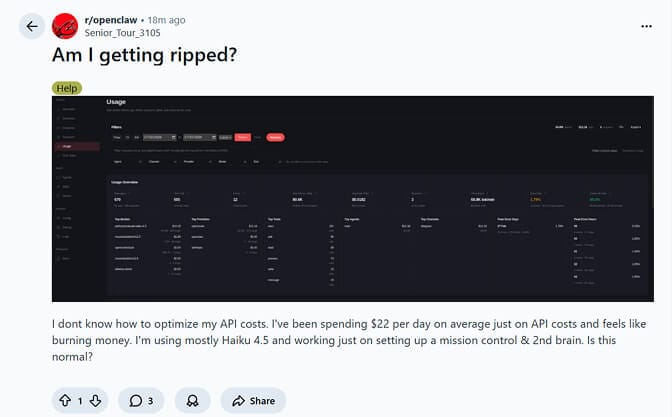
Real Reddit post from r/openclaw. This is more common than you think.
But that's not even the worst case we've seen.
Another developer posted their multi-agent workflow results. They'd burned through 400 million tokens with zero tangible output. The agents were looping, re-analyzing the same steps, stalling mid-workflow, and hemorrhaging context like a broken pipe.
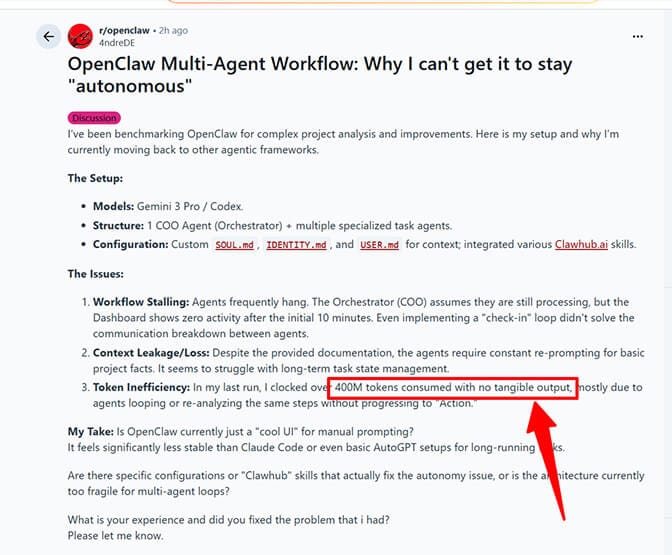
400 million tokens consumed. No output. This is the nightmare scenario nobody warns you about.
These aren't isolated incidents. A GitHub discussion thread titled "Burning through tokens" has developers sharing war stories of $10+ days on moderate usage, $50 heartbeat bills, and one memorable case of a $3,600 monthly API bill.
If you're running OpenClaw and your costs feel out of control, you're not alone. And you're probably making at least two of the five mistakes I break down further down this page. First, though, the numbers those mistakes get multiplied by.
What OpenClaw Actually Costs Per Model
The framework is free. Everything you pay goes to whichever model provider you point it at. Here are the rates that matter, current as of 13 October 2026.
| Model | Input per million | Output per million |
|---|---|---|
| Claude Opus 5.5 | $4.00 | $20.00 |
| Claude Sonnet 5.5 | $2.00 | $10.00 |
| Claude Sonnet 4.6 (still on sale) | $3.00 | $15.00 |
| Claude Haiku 5.5, prompts up to 100K tokens | $0.10 | $0.50 |
| Claude Haiku 5.5, prompts over 100K tokens | $0.50 | $2.50 |
deepseek-flash, off-peak | $0.15 | $0.60 |
deepseek-flash, peak hours | $0.30 | $1.20 |
| Gemini 2.5 Flash | Free tier: 1,500 requests/day | — |
Three things people consistently get wrong about this table.
Opus is not 5x Sonnet any more. The $15/$75 figure you'll still find quoted across older cost posts was Opus 4.1. Opus 5.5 is $4/$20, which makes it exactly 2x Sonnet 5.5 and about 1.3x Sonnet 4.6 per token. It's still the expensive choice. It is not the catastrophic choice it used to be, and any advice built on a 5-10x gap is out of date.
Haiku 5.5 has a 100K cliff. Haiku 5.5 (released 7 October 2026) bills $0.10/$0.50 per million as long as the prompt stays at or under 100K tokens. Go over and the whole request bills at $0.50/$2.50, five times as much. That matters in OpenClaw specifically, because a long-running session plus framework overhead can push a single request past 100K without you noticing. Haiku 5.5 also uses a new tokenizer: Anthropic's migration guide says it produces about 30% more tokens than Haiku 4.5 for the same text, and Simon Willison measured about 1.25x. Budget on the token count you actually see, not the one you saw on Haiku 4.5.
DeepSeek's cheap tier runs on a clock. deepseek-flash (DeepSeek-V4.1-Flash) bills $0.15/$0.60 per million off-peak and $0.30/$1.20 during peak hours, which run 01:00-04:00 and 06:00-10:00 UTC, Monday to Friday. Cache hits are $0.003 per million. If your cron jobs happen to fire inside that window, you're paying double for nothing. The older deepseek-v4-flash name still resolves, but it's served by V4.1-Flash at these prices, so quotes of "$0.14/$0.28" are stale.
The multiplier nobody prices in: calls per task
Per-token rates only tell you half the story, because an OpenClaw agent doesn't make one call per task.
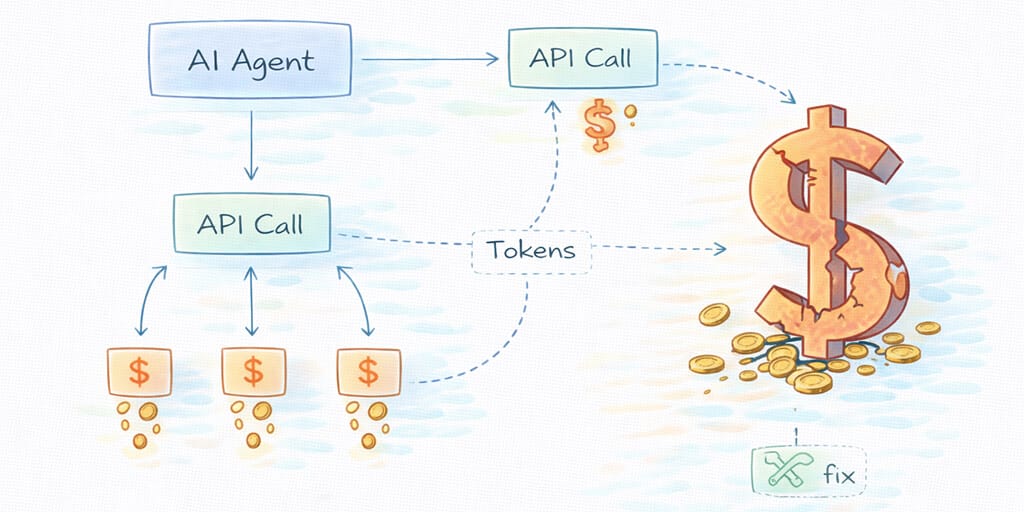
"Summarize this email" might take one API call. "Research competitors and draft a report" can trigger 15 to 30. Each call carries input tokens (your prompt, system instructions, the full conversation so far) and output tokens. So call #1 in a chain might cost $0.02, while call #15, carrying the context of calls 1 through 14, costs $0.35. Cost within a single OpenClaw task isn't linear. It compounds.
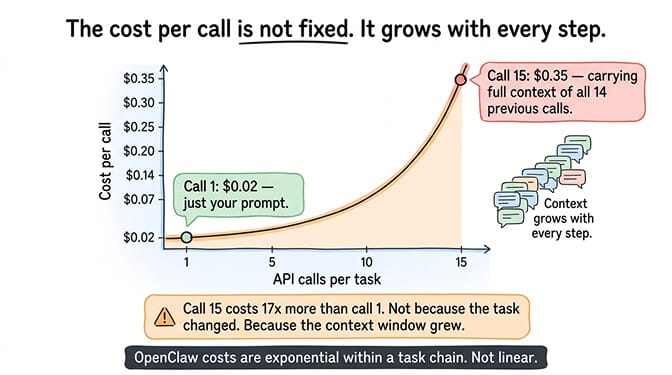
Put numbers on it. A 20-call task chain averaging 2,000 tokens of output per call produces 40,000 output tokens. The output side alone runs $0.80 on Opus 5.5, $0.60 on Sonnet 4.6, $0.40 on Sonnet 5.5, and $0.02 on Haiku 5.5. Ten such tasks a day is 300 a month: $240/month on Opus 5.5, $180 on Sonnet 4.6, $120 on Sonnet 5.5, and $6 on Haiku 5.5, before you count a single input token.
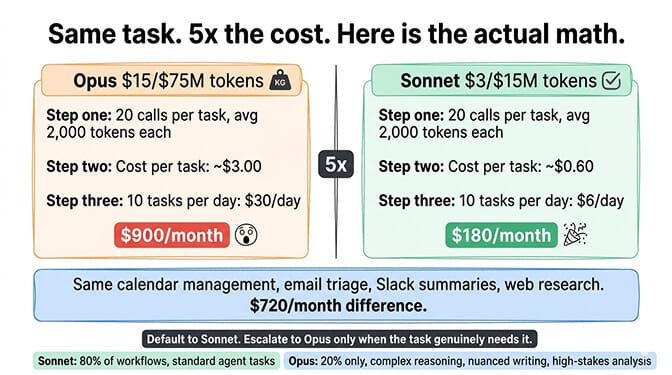
That's the case for reserving Opus for the 20% of work that needs it: complex reasoning chains, nuanced writing, multi-step analysis where getting it wrong costs more than the API call does. For the per-task data behind choosing between Sonnet and Opus, our model comparison has the breakdown.
The 136K Problem Nobody Talks About
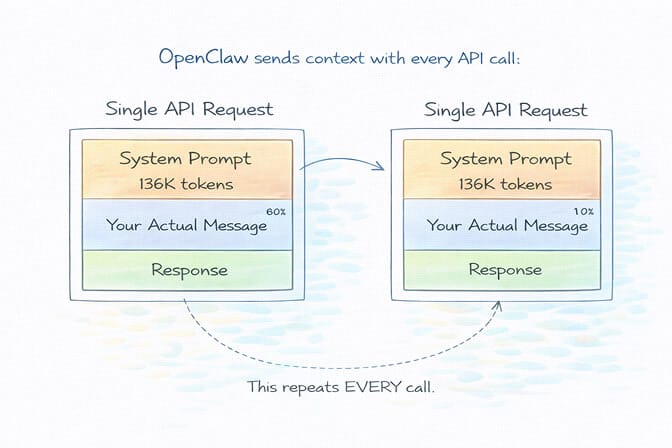
Here's something that shocked me when I first dug into how OpenClaw works under the hood.
Every single API call your agent makes carries a base system prompt of roughly 136,000 tokens. That's not your personality files. That's not your custom instructions. That's OpenClaw's internal framework overhead: tool schemas, agent configuration, memory context, and system-level instructions.
One hundred and thirty-six thousand tokens. Sent with every request.
On Claude Haiku 4.5, the model in that $22/day story, at $1 per million input tokens, that's about $0.136 per uncached call for the system prompt alone. Prompt caching brings it down to roughly $0.0136 on a cache hit, because cached reads bill at about a tenth of the base rate. Which sounds fine, right up until you do the arithmetic on 500 tool calls a day at a realistic hit rate.
The current models change the numbers, not the shape. On Sonnet 5.5 ($2 per million input), 136K tokens is $0.272 per uncached call. On Haiku 5.5, a 136K-token request is over the 100K line, so the whole request bills at the $0.50 rate: $0.068 uncached. Get the same agent's prompt under 100K and the input rate drops to $0.10 per million, so a 90K-token prompt costs $0.009. Keeping requests under 100K is worth more on Haiku 5.5 than any other single setting.
The biggest line item on your OpenClaw API bill isn't the work your agent does. It's the context it carries while doing it.
And here's what makes it worse: Anthropic's prompt caching only helps if your requests hit the cache window, which has a 5-minute TTL. If your agent goes idle for six minutes between tasks, the next request is a cold start. Full price. Every token.
That Reddit user spending $22/day? Their dashboard showed an 86.5% cache hit rate, which sounds great until you run it. At 500 tool calls a day, a 13.5% miss rate is about 68 calls carrying the full 136K at $0.136 each: $9.25. The other 432 calls bill at $0.0136: $5.88. That's roughly $15/day in system-prompt overhead alone, before a single token of their actual 80,600-token-per-message conversations. The cold starts really were eating them alive.
The Five Ways Your OpenClaw Agent Bleeds Money
I've spent months watching users rack up unnecessary API costs. The patterns are remarkably consistent.
1. The "Wrong Model for Every Job" Trap
This is the most common and most expensive mistake.
Your agent is using Claude Opus to check the weather. It's using Sonnet to read a file name. It's deploying a $4-per-million-token model for tasks that a $0.10-per-million-token model handles perfectly.
The cost difference is stark. Take 3,000 messages a month at 2,000 input and 500 output tokens each: 6 million input tokens and 1.5 million output tokens. On Claude Opus 5.5 that's $24 of input plus $30 of output, about $54. On Haiku 5.5 it's $0.60 plus $0.75, about $1.35. That's a 40x gap per token. Haiku 5.5's tokenizer counts roughly 25-30% more tokens for the same text, which still leaves it more than 30x cheaper for the many tasks where the output quality is indistinguishable.
Most OpenClaw users set one model as their default and forget about it. That single decision can be the difference between a $15 month and a $150 month.
2. The Heartbeat Money Pit
OpenClaw's heartbeat feature is brilliant in concept: your agent proactively wakes up, checks for tasks, and takes action without being prompted.
In practice, it's a cost bomb.
Every heartbeat trigger is a full API call. It carries the entire session context. If you've configured it to run every 5 minutes, that's 288 API calls per day of pure overhead. One developer on GitHub reported their heartbeat alone was costing $50 per day.
Here's what makes it insidious: the heartbeat runs whether or not there's anything to do. Your agent wakes up at 3 AM, sends 136K tokens to check if there are new emails, finds nothing, and goes back to sleep. Then does it again five minutes later.
Heartbeats are just the most visible member of a whole category. Scheduled automations (cron jobs), re-sent tool descriptions and retry loops sit alongside them on the invoice, and the cron audit further down this page covers the scheduled side.
3. Context Bloat (The Silent Killer)
Every message in your conversation history gets sent with every new API call. Every. Single. One.
Start a fresh session and your first message might cost $0.02. By message 50, you're carrying so much context that each request costs $0.15+. By message 200, you're pushing the context window limits and your agent starts forgetting things anyway.
That second Reddit user who burned 400 million tokens? Their agents were stuck in loops, re-analyzing the same steps because the context had grown so large that the model was losing track of what it had already done. The irony is brutal: the more context you carry, the worse your agent performs and the more you pay.
Conversation history is only part of it. On every call, the agent rebuilds roughly the same baseline: system prompt, tool descriptions, recalled memory. Tool descriptions are the sneaky part. A Slack tool might take around 200 tokens to describe and a GitHub tool around 400, so an agent with 15 skills installed can carry thousands of tokens of "here's what you can do" on every turn, whether the task needs those tools or not. Put a modest 8,000-token baseline on an agent making 200 calls a day and that's 1.6 million tokens of repeated context daily before any new work happens. At Sonnet 5.5's $2 per million that's $3.20 a day, about $96 a month, uncached. Caching cuts the repeated part to roughly a tenth on a hit. Uninstalling skills you haven't used in 30 days cuts it to zero.
4. Unmonitored Automations and Retry Loops
This is where OpenClaw costs go from "annoying" to "terrifying."
A workflow that triggers 10 times per day during testing might trigger 500 times per day once connected to live inputs. Browser automation sessions are especially expensive because every navigation step requires a model decision. And if an automated task gets stuck in a loop? One user reported burning $200 in a single day because a task was retrying infinitely.
The retry pattern is always the same. A tool call fails: an expired API key, a rate-limited service, a malformed argument. The agent sees the error and tries again, with a slight variation or none. Same result. Each attempt is a full API call carrying the whole context. In one reported case, a misconfigured agent burned $40 overnight retrying the same broken action 400 times. The fix is a retry budget, not disabling retries, because transient failures are real: a few attempts with backoff, then stop and tell a human. Any action that retries more than five times in a session is a bug, not a strategy, and it's worth searching your logs for.
Without spending limits and monitoring, an OpenClaw agent is a credit card with no maximum and no alerts.
5. Skills Stuffed into Personality Files
This is a sneaky one.
Many users put detailed instructions, templates, and workflow guides directly into their personality markdown files (SOUL.md, IDENTITY.md, USER.md). The problem? Those files are loaded with every single API call. Every instruction you add increases your per-message cost across the board.
A community member on the OpenClaw GitHub shared a smarter approach: move instructions into skills instead. Skills are only loaded when relevant, not with every request. This alone can cut your per-message token overhead significantly.
The 8-Step OpenClaw Cost Optimization Stack
Enough about the problems. Here's the fix, as eight changes in priority order. Fix the biggest leak first: each step builds on the one before it, and most people stop after step one and leave a big share of the savings on the table.
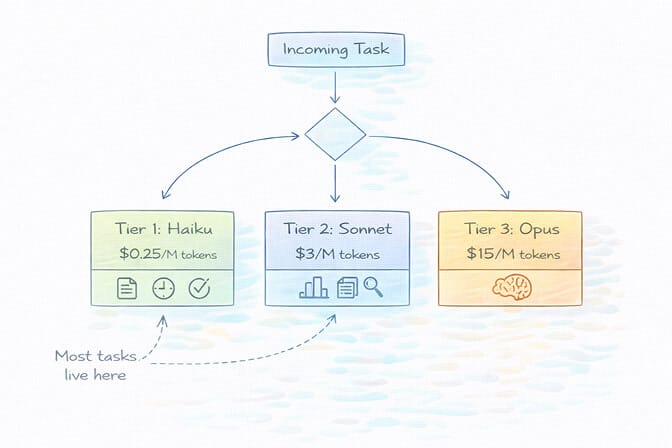
Step 1: Set Up Model Routing (This Alone Saves 50-70%)
The single highest-impact change you can make is matching model capability to task complexity, instead of letting one default model handle everything.
The playbook:
Tier 1 (routine tasks): Use Haiku 5.5 ($0.10/$0.50 up to 100K-token prompts) or deepseek-flash for simple queries, file operations, and basic tool calls. Cost: fractions of a cent per message.
Tier 2 (moderate complexity): Route to Sonnet 5.5 ($2/$10), or Sonnet 4.6 ($3/$15) if you're still on it, for tasks requiring nuanced understanding. Cost: a few cents per message. Our cheapest AI models for agents comparison has current prices for every tier, plus what each costs across three monthly agent workloads.
Tier 3 (complex reasoning): Reserve Opus 5.5 ($4/$20) for genuinely difficult problems, debugging, and multi-step analysis. Use sparingly.
Most agent tasks live in Tier 1. Responding to simple queries, performing file operations, executing basic tool calls: Haiku handles these perfectly. You save Opus for when you actually need it.
In ~/.openclaw/openclaw.json, your everyday model goes in agents.defaults.model.primary. Moving that one setting off Opus 5.5 onto Sonnet 5.5 halves per-token cost on everything it handles (a 25% cut if you land on Sonnet 4.6 instead), and for most interactions you won't see a quality difference. Only complex multi-step reasoning shows a meaningful gap. Pushing routine work further down to Haiku is where the rest of the 50-70% comes from. If your cheap tier is deepseek-flash, keep its scheduled jobs out of the peak-hour window covered above.
{
  agents: {
    defaults: {
      model: {
        primary: "anthropic/claude-sonnet-5-5",
        fallbacks: ["deepseek/deepseek-flash"],
      },
      heartbeat: {
        model: "anthropic/claude-haiku-5-5",
      },
    },
  },
}
Run Opus only where you ask for it, for example with /model anthropic/claude-opus-5-5 in the session that needs it. The OpenClaw model routing guide has a copy-paste config, and the model-by-model comparison has per-task dollar figures across seven common agent tasks.
Step 2: Reset Sessions Aggressively
This is where most people get it wrong. They do step one and think they're done.
Every message re-sends the entire conversation history as input tokens, so per-message cost accelerates throughout every conversation. Message 50 in a session carries the history of the 49 before it. Split the same 50 messages across five 10-message sessions and the conversation-history share of your input drops by roughly three-quarters. Same content. You did nothing except start a new session four times.
The fix: After completing each independent task, reset. Don't let a morning email summary inflate the context for an afternoon calendar check. Use /new every 20-25 messages, or whenever you switch topics. It archives the old session and starts a clean conversation buffer, while your persistent memory (MEMORY.md) carries forward. Use the /compact command to compress history when you need to keep going in the same thread, and delete old session files. Treat context like RAM: the less you carry, the faster and cheaper everything runs.
Step 3: Cap the Context Window
Session resets only work when you remember to do them. A context cap works when you don't.
The problem: Without a cap, conversation context grows until compaction kicks in near the model's full window. Compaction summarizes old messages, but by then every request is already carrying a huge context.
The fix: Set contextTokens on your model entry in ~/.openclaw/openclaw.json (older guides cite a context key that OpenClaw does not recognize). This makes compaction run earlier and keeps every request lean.
{
  models: {
    providers: {
      anthropic: {
        models: [
          {
            id: "claude-sonnet-5-5",
            name: "Claude Sonnet 5.5",
            contextTokens: 32000,
          },
        ],
      },
    },
  },
}
32,000-64,000 is the usual range for a lean setup. The system prompt, tool definitions, and the compaction reserve all come out of the same budget, so check your fixed overhead with /usage full before you pick a number: a setup carrying heavy tool schemas needs a higher cap, and anything under roughly 16,000 leaves very little room for the conversation itself. The agent still has persistent memory for long-term recall. Only the active buffer is bounded.
The math: An uncapped conversation keeps climbing toward the model's full window. A capped one never sends much more than the cap per request, however long it runs. By the time an uncapped session reaches 100,000 tokens of context, a 32,000 cap is sending 68% less input per message, and the gap widens from there. The OpenClaw memory compaction guide covers how compaction and context limits interact.
Step 4: Clean Up Your Memory Files
Steps 2 and 3 bound the conversation buffer. This one bounds the other thing that gets injected into your prompts.
The problem: After a few weeks of use, your memory files (MEMORY.md, daily logs) accumulate redundant entries, stale facts, and noise. Every memory recall searches those files and injects the retrieved chunks into the prompt. This one is invisible in a way context bloat isn't, because it doesn't show up as a longer conversation. It shows up as a mysteriously higher floor on every request.
The fix: Monthly cleanup. Archive old daily files, deduplicate MEMORY.md, remove stale entries. Fifteen minutes a month is enough if you actually do it. (While you're in there, check your personality files for the instructions that belong in skills, per mistake #5 above.)
The math: A clean 60-line MEMORY.md injects roughly 500 tokens per recall. A bloated 500-line file injects 3,000-5,000. On an agent doing 50 messages a day with a recall on most of them, that's the difference between about 750,000 and 5.25 million extra input tokens a month: $1.50 versus $10.50 on Sonnet 5.5. The OpenClaw memory fix guide has the step-by-step cleanup.
Step 5: Tame the Heartbeat
Two levers here, and you want both.
Slow it down. OpenClaw's default heartbeat interval is 30 minutes (agents.defaults.heartbeat.every). If you shortened it, put it back to 30 minutes or 1 hour. That's 48 or 24 calls a day instead of 288 at 5 minutes. For most personal assistant use cases, checking for new tasks every 5 minutes is overkill, and every: "0m" turns the recurring heartbeat off entirely.
Route it to a cheap model. Heartbeats don't need intelligence. They need a model that can confirm nothing needs doing. Point agents.defaults.heartbeat.model at anthropic/claude-haiku-5-5 or deepseek/deepseek-flash instead of letting heartbeats inherit your primary model. Opus 5.5 is 40x Haiku 5.5 per token, so that ratio holds whatever your heartbeat volume is.
Shrink what each heartbeat carries. Two more heartbeat settings do the most for the 136K problem. isolatedSession: true runs each heartbeat in a fresh session with no conversation history, which OpenClaw's docs put at roughly 100K tokens down to 2-5K per run. lightContext: true skips the workspace bootstrap files. On Haiku 5.5 this also keeps every heartbeat under the 100K line, so it bills at $0.10 per million input instead of $0.50.
If you want to go further, configure a local heartbeat check that runs without making API calls at all. Check system memory and task queues locally, and only trigger an API call when there's actually something to do. This approach was highlighted by a developer who cut their monthly costs from $90 to $6 by implementing local heartbeat logic.
Step 6: Add a Fallback Provider
This one doesn't lower your baseline. It prevents spikes.
The problem: When your primary provider goes down or rate-limits you, OpenClaw retries. Retries during rate limits extend the cooldown and waste tokens, and without a fallback your agent is stuck until the limit clears.
The fix: List a secondary provider in agents.defaults.model.fallbacks: deepseek-flash, or Gemini Flash on its free tier. When your primary hits a rate limit, the fallback handles requests until it resets. No failed retries, no wasted tokens, no agent downtime. Our guide to the cheapest OpenClaw AI providers covers the options, free tiers included.
Step 7: Turn On Loop Detection
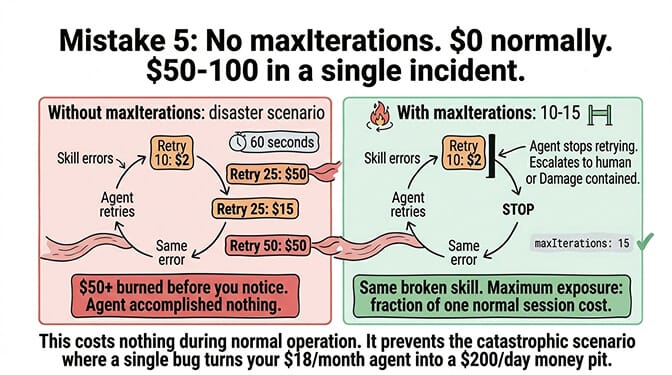
Mistake #4 above is how a $15 month turns into a $200 day. This is the guard against it.
The problem: Without a loop guard, a broken skill can loop indefinitely. Each retry is a full API call carrying the whole context. A 50-iteration loop in 60 seconds burns $10-50 before you notice anything is wrong, and it always seems to happen overnight.
The fix: Set tools.loopDetection.enabled: true in your OpenClaw config. It's off by default. It watches for the agent repeating the same tool calls and stops the loop. OpenClaw has no iteration-count setting, so also give each run a time budget with agents.defaults.timeoutSeconds (for example 600; 0 means unlimited).
The math: Zero during normal operation. This step doesn't lower your bill by a cent on a good month. It prevents a single bug from becoming the most expensive line on the invoice. The agent stuck in a loop guide covers the patterns that cause loops in the first place.
Step 8: Set Spending Caps and Monitor Everything (Or Don't Bother)
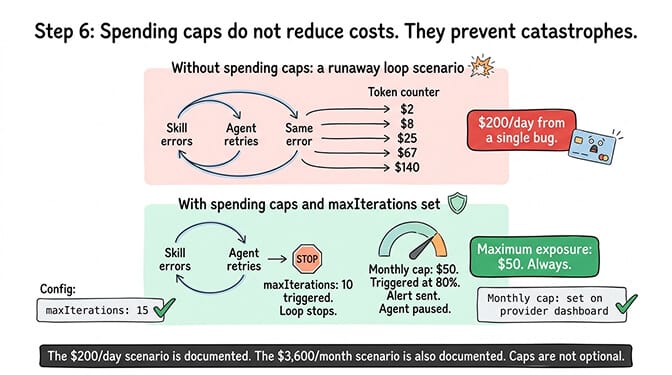
Loop detection catches loops inside OpenClaw. It doesn't catch a misconfigured cron job, a webhook firing 500 times instead of 10, or an integration you forgot you connected. Without a spending cap, the only limit on that damage is your credit card.
Set hard monthly caps on every provider dashboard at 2-3x your expected usage: if you expect $20/month, cap at $50. This isn't an OpenClaw setting, which is exactly why people skip it. It lives in the Anthropic, OpenAI, DeepSeek, and Google dashboards, and you have to set it in each one separately. Enable alerts at 50%, 75%, and 90% thresholds. Use separate API keys per workflow so you can track exactly where costs originate.
The OpenClaw /usage full command shows per-request token consumption. Use it. The dashboard shown in that first Reddit screenshot? That user had the data to diagnose their problem. The issue was that they didn't know what the numbers meant.
What the Full Stack Does to a Real Bill
Take a moderate-usage agent, 50 messages a day, on a default config: Opus on everything, one continuous session, no context cap, a bloated memory file, heartbeats on the primary model.
Two multipliers stack in that setup. Opus 5.5 at $4/$20 is 2x Sonnet 5.5 per token. Unbounded sessions and a bloated memory file roughly double the tokens in every request. 2 x 2 is 4x, which means the optimized version of the same agent runs on somewhere around a quarter of the original bill, and less again once routine work moves down to Haiku. Same agent. Same tasks. The configuration is the only thing that changed.
The order matters. Step 1 captures the biggest savings and step 2 the next biggest chunk. Steps 3-6 capture the remaining margin, and 7 and 8 are the safety nets that stop one bad night from wiping out a month of savings. If you're only going to do two things, do steps 1 and 2.
Audit your OpenClaw cron jobs
The stack above deals with the agent you talk to. Scheduled jobs are the agent you don't. They run in the background around the clock, and every agent-turn run is a full API call with your bootstrap context attached (AGENTS.md, SOUL.md, MEMORY.md, tool schemas), even when the answer is "nothing to report." This audit takes about ten minutes.
1. List everything that runs on a schedule. OpenClaw now calls scheduled jobs automations. openclaw automations list --all shows every job, disabled ones included (openclaw cron list still works as an alias), and openclaw config get agents.defaults.heartbeat shows your heartbeat settings. Expect a few surprises: an email check you set up weeks ago, a daily summary, a page watcher for something that never changes.
2. Price each job. Monthly cost = runs per day × tokens per run × price per token × 30. An hourly job is 24 runs a day. At 15,000 input tokens a run that's 360,000 tokens a day: $1.44/day or $43.20/month on Opus 5.5, $21.60/month on Sonnet 5.5, and $1.08/month on Haiku 5.5. Here's a typical set of background jobs, input tokens only:
| Job | Runs | On Opus 5.5 | On Haiku 5.5 |
|---|---|---|---|
| Heartbeat | 24/day | $43.20/month | $1.08/month |
| Email check | 24/day | $43.20/month | $1.08/month |
| Daily summary | 1/day | $1.80/month | $0.05/month |
| Weekly review | ~4/month | $0.26/month | under $0.01/month |
| Total | $88.46 | $2.21 |
Output tokens come on top, and Haiku 5.5's tokenizer counts roughly 25-30% more tokens than older Claude models for the same text, so treat the right-hand column as a floor. The gap is still about 40x.
3. Give each job its own model. By default an automation runs on the agent's model, so if your primary is Opus, so is your email poll. Set a per-job model with openclaw automations edit <job-id> --model anthropic/claude-haiku-5-5 (or deepseek/deepseek-flash), and route the heartbeat with agents.defaults.heartbeat.model as in step 5 above. Keep the expensive model for jobs that actually need to reason.
4. Cut the frequency. The cheapest job is the one that doesn't run. An email check every 5 minutes is 288 runs a day; at 15,000 tokens a run on Opus 5.5 that's 4.32 million tokens, $17.28 a day, about $518 a month for checking email. Every 30 minutes covers almost every personal-assistant use, and hourly is fine for most.
5. Turn thinking off and slim the context. A job checking "has anything changed?" doesn't need reasoning tokens. openclaw automations edit <job-id> --thinking off removes them for that job. For isolated agent-turn jobs, --light-context keeps the workspace bootstrap files out of the run, which shrinks the 15,000-token floor every run pays.
6. Kill the jobs you forgot about. For each job in the list, ask three questions: Is this still useful? When did I last read its output? Would I notice if it stopped? If the answer to the last one is no, openclaw automations disable <job-id> pauses it and openclaw automations remove <job-id> deletes it. A forgotten hourly page watcher is 720 API calls a month for nothing.
The pattern behind all six: your agent is expensive because it works while you sleep, not because you talk to it. If you've never looked at your scheduled jobs, this is the highest-return ten minutes in the whole cost stack.
Two Budget Tricks Outside the Stack
The eight steps cut what you pay per token and cap the damage. These two change how you pay in the first place.
The ChatGPT OAuth trick (flat-rate conversations)
If you have a ChatGPT Plus subscription ($20/month), you can connect OpenClaw to your ChatGPT account using OAuth. This routes your agent's requests through your ChatGPT subscription instead of the API, meaning you pay the flat subscription fee instead of per-token pricing.
The catch: ChatGPT has usage limits on the Plus plan. You'll hit rate limits during heavy agent usage. It's not suitable for high-frequency cron jobs or tasks that need consistent throughput. But for direct interactions and moderate daily usage, it effectively gives you GPT-4o access for a flat $20/month instead of variable per-token billing.
The ChatGPT OAuth approach works best as a supplement, not a replacement. Use it for your direct conversations with the agent. Keep Haiku or deepseek-flash for automated operations. This hybrid approach caps your conversational costs at a flat rate while keeping background operations cheap.
One warning before you lean on it. OAuth connections are rate-limited aggressively, responses slow to a crawl at peak, and providers have acted against automated usage running through consumer subscriptions before. Google banned users who overloaded their Antigravity backend through OpenClaw. Treat subscription OAuth as a convenience for your own chat traffic, never as the foundation of a production workflow.
The Gemini Flash hack (almost free)
Google Gemini 2.5 Flash offers a free tier through Google AI Studio: 1,500 requests per day, 1 million token context window, no credit card required. For personal OpenClaw use (morning briefings, basic calendar management, simple automations), the free tier is often enough.
Even the paid tier at $0.075 per million input tokens is essentially free at agent scale. A full month of moderate usage runs $1-3 total.
The tradeoff: Gemini's tool calling isn't as reliable as Claude for complex chains. It works well for straightforward operations but stumbles on multi-step reasoning that needs precise instruction following. Best used for heartbeats, simple lookups, and as a fallback model.
For a deeper look at all the budget-friendly providers that work with OpenClaw, our guide to the cheapest OpenClaw AI providers covers five alternatives with real pricing data.
What a Cheap OpenClaw Setup Actually Costs
Ranges are easy to hide behind, so here's a worked example instead.
A founder running one OpenClaw agent for daily email triage, Slack monitoring, and weekly competitor research:
- Primary model: Claude Sonnet 5.5 for email and Slack, about $0.27/day ($8/month)
- Secondary model: Gemini Flash for classification and routing, about $0.05/day ($1.50/month)
- Occasional model: Claude Opus 5.5 for the weekly deep-research run, about $0.56/week ($2.40/month)
That's roughly $12/month in API fees. Keep the primary on Sonnet 4.6 (still on sale at $3/$15) and the same email and Slack work costs about $0.40/day, which puts the total near $16.
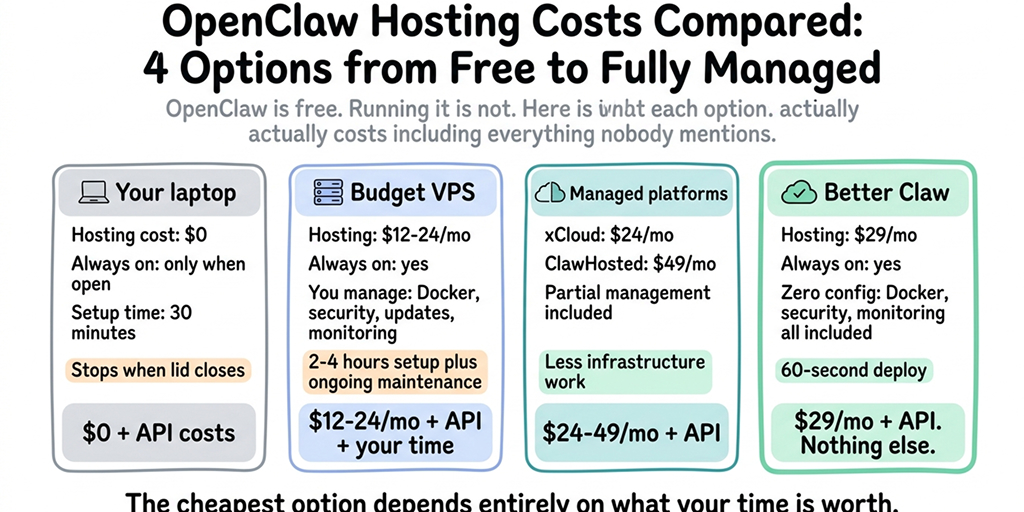
Hosting is what you add on top. A Hetzner VPS is $6/month plus your own maintenance hours. BetterClaw Basic is $19/month (1 agent, 500 credits, 10 connectors), which is the right tier for exactly this setup: one agent, always on, nothing to maintain. Call it $31/month all in. Pro at $49/month only starts making sense once you're running more than one agent (5 agents, 12,000 credits). Both are BYOK with zero inference markup, so the $12 stays $12.
For all four hosting options side by side, including the ones that aren't us, see OpenClaw hosting costs compared.
The Deeper Question: Should You Be Managing This at All?
Here's what nobody tells you about OpenClaw's security and cost risks.
Every hour you spend optimizing token routing, debugging heartbeat configs, monitoring spending dashboards, and resetting bloated sessions is an hour you're not spending on the thing your agent was supposed to help with in the first place.
The OpenClaw maintainer Shadow put it bluntly: "if you can't understand how to run a command line, this is far too dangerous of a project for you to use safely." That warning extends to cost management too. If you're not comfortable diving into token economics and model routing configurations, you will overspend. It's not a question of if, but how much.
We built BetterClaw because we got tired of watching smart people burn money on infrastructure problems instead of building actual agent workflows. BetterClaw runs your agent in the cloud with Telegram, Slack, Discord and Gmail built in, plus webhooks, 500+ connectors, unlimited skills and 28+ model providers via your own API key with no markup. Basic is $19/month for one agent and Pro is $49/month for up to five. No heartbeat config to tune, no servers to maintain. The infrastructure is handled so you can focus on what your agent actually does.
The Real Cost Isn't the API Bill
Let me share a quick calculation that changed how I think about this.
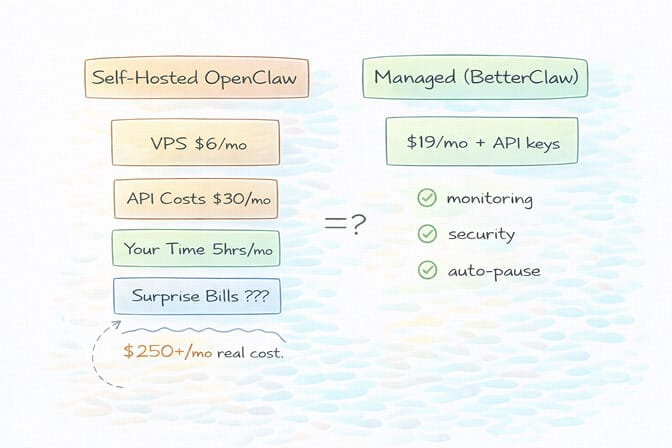
Say you spend 5 hours per month configuring, monitoring, and troubleshooting your self-hosted OpenClaw setup. If your time is worth $50/hour (conservative for a developer or founder), that's $250/month in opportunity cost.
Add $30/month in API costs. Plus $6/month for a VPS. Plus the $200 surprise bill when an automation loops at 2 AM and you don't catch it until morning.
That's the whole-picture version of the question, and it lands differently depending on who you are.
Compare that to a managed deployment where all of this is handled for you. Or explore BetterClaw, a no-code AI agent platform. See how BetterClaw compares to xCloud for managed hosting.
The math doesn't lie. But more importantly, the experience doesn't lie. Every minute you spend in a YAML file or debugging Docker is a minute you're not iterating on your agent's actual capabilities - the use cases that make OpenClaw genuinely transformative.
The cheapest token is the one your infrastructure never wastes.
If any of this hit close to home - if you've stared at an API bill and felt that sinking feeling - give BetterClaw a try. BetterClaw runs your agent in the cloud with Telegram, Slack, Discord and Gmail built in, plus webhooks, 500+ connectors, unlimited skills and 28+ model providers via your own API key with no markup. Free plan: 1 agent, 100 credits a month, 3 connectors, no card. Basic is $19/month for one agent and Pro is $49/month for up to five. We handle the infrastructure headaches. You handle the interesting part.
What's Coming Next
The OpenClaw ecosystem is evolving fast. With 230K+ GitHub stars, 1.27 million weekly npm downloads, and the project moving to an open-source foundation, the tooling around cost management will improve.
But today, right now, the gap between "free open-source software" and "affordable to actually run" is massive. The users posting on Reddit about $22/day costs aren't doing anything wrong. The framework just isn't optimized for cost efficiency out of the box.
Whether you self-host with careful optimization or choose a managed alternative, the key insight is the same: treat your AI agent's API costs like a production expense, not an afterthought.
Your agent should be saving you money. Not the other way around.
Frequently Asked Questions
What are typical OpenClaw API costs per month?
Most users spend between $5 and $30 per month on API costs for moderate usage (around 50 messages per day). However, costs can skyrocket to $100-600+ per month with premium models, misconfigured heartbeats, or unmonitored automations. The model you choose matters more than anything else: as of October 2026, Haiku 5.5 ($0.10/$0.50 per million for prompts up to 100K tokens) costs 40x less per token than Opus 5.5 ($4/$20) for the same number of messages.
How does BetterClaw compare to self-hosted OpenClaw for cost management?
Self-hosted OpenClaw gives you full control but requires manual configuration of model routing, session management, heartbeat intervals, and spending limits. BetterClaw runs the agent in the cloud for $19/month on Basic (1 agent) or $49/month on Pro (5 agents), with Telegram, Slack, Discord and Gmail built in, plus webhooks, 500+ connectors, unlimited skills and 28+ model providers via your own API key with no markup. For users spending 5+ hours monthly on infrastructure management, the managed approach typically costs less when you factor in time.
Why are my OpenClaw API costs so high?
Usually three things at once: an expensive model (Opus) handling every task instead of routing by complexity, long sessions that re-send the whole conversation history with every message, and no context cap, so that history grows unbounded. On top of that, every API call carries OpenClaw's own framework overhead, and a single user message can trigger several API calls behind the scenes. Model routing and session resets fix most of it.
How much do OpenClaw cron jobs and heartbeats cost?
Monthly cost = runs per day × tokens per run × price per token × 30. An hourly job carrying 15,000 input tokens is 360,000 tokens a day: about $43/month on Opus 5.5 ($4 per million input) and about $1.08/month on Haiku 5.5 ($0.10 per million), before output tokens. Run openclaw automations list --all to see every scheduled job, give each a cheap model with --model, turn thinking off with --thinking off, and route the heartbeat with agents.defaults.heartbeat.model.
What are the hidden costs of running OpenClaw?
The charges that don't come from work you asked for: heartbeats, scheduled jobs, conversation history and tool descriptions re-sent on every call, and retry loops. An agent with an 8,000-token baseline making 200 calls a day re-sends 1.6 million tokens of context daily, about $96 a month uncached on Sonnet 5.5. A retry loop with no budget can burn tens of dollars overnight. Cheap heartbeat models, isolatedSession and lightContext heartbeats, pruned skills and loop detection close most of the gap.
How do I reduce OpenClaw token usage quickly?
The three fastest wins are: configure model routing so cheap models handle simple tasks (saves 50-70%), increase your heartbeat interval from 5 minutes to 30+ minutes and route heartbeats to a cheap model (saves $30-90/month for heavy users), and reset session context with /new after each independent task to prevent context bloat. After that, set contextTokens on your model entry, clean up MEMORY.md monthly, add a fallback provider, turn on tools.loopDetection.enabled, and set spending caps on every provider dashboard. Moving instructions from personality files into skills also reduces per-message overhead significantly. The 8-step OpenClaw cost optimization stack above walks through each change in priority order.
Does BetterClaw reduce my per-token API costs?
No. Per-token prices are set by your model provider, and BetterClaw is BYOK with zero inference markup. What it changes is the work around them: your agent runs in the cloud with 28+ model providers to choose from, so picking a cheaper model doesn't mean editing config files or maintaining a server.
Is $49/month for BetterClaw Pro worth it compared to a $5 VPS?
The VPS is only one piece of the puzzle. A $5 VPS still requires you to manage Docker, security, updates, SSL, monitoring, and cost optimization yourself. Users report spending 5-10 hours per month on maintenance. BetterClaw runs your agent in the cloud with Telegram, Slack, Discord and Gmail built in, plus webhooks, 500+ connectors and unlimited skills, and there's no server for you to maintain. The real comparison is $19/month fully managed for one agent (or $49/month for five) versus $5/month plus your time and the risk of surprise API bills from unmonitored agents. If you only need one agent and want to test the difference first, the free plan (1 agent, 100 credits/month, BYOK) costs nothing, and Basic at $19/month is the step up when 100 credits runs out.
How does OpenClaw Sonnet vs. Opus compare for agent tasks?
Sonnet handles about 80% of typical agent workflows (email, Slack, scheduling, research summaries) at half of Opus's per-token cost on Sonnet 5.5, or 75% on Sonnet 4.6. Opus 5.5 at $4/$20 per million is 2x Sonnet 5.5 ($2/$10) and about 1.3x Sonnet 4.6 ($3/$15), not the 5x gap older guides quote from the retired $15/$75 Opus 4.1 pricing. Opus still earns its premium on complex multi-step reasoning, nuanced writing, and tasks where accuracy is critical. The smart move is using both: route routine tasks to Sonnet and reserve Opus for high-stakes work.
Is OpenClaw cheaper than Claude Cowork or ChatGPT Plus for agent tasks?
It depends on your setup. Claude Cowork and ChatGPT Plus have fixed subscription costs but strict rate limits that throttle agent performance. OpenClaw gives you unlimited control at pay-per-use API rates. For light usage, a subscription may be cheaper. For heavy, customized agent workflows, a well-optimized OpenClaw setup usually costs less and performs better, because you can route cheap tasks to cheap models instead of paying a flat rate for everything.
Is OpenClaw safe to run if I'm worried about runaway API costs?
Without proper safeguards, no. CrowdStrike published a full security advisory on OpenClaw enterprise risks, 30,000+ instances were found exposed without authentication, and 824+ malicious skills were discovered on ClawHub. On the cost side, agents can loop infinitely, heartbeats can drain hundreds of dollars silently, and there's no built-in spending cap in the default configuration. If you self-host, set hard API key limits and monitor daily.