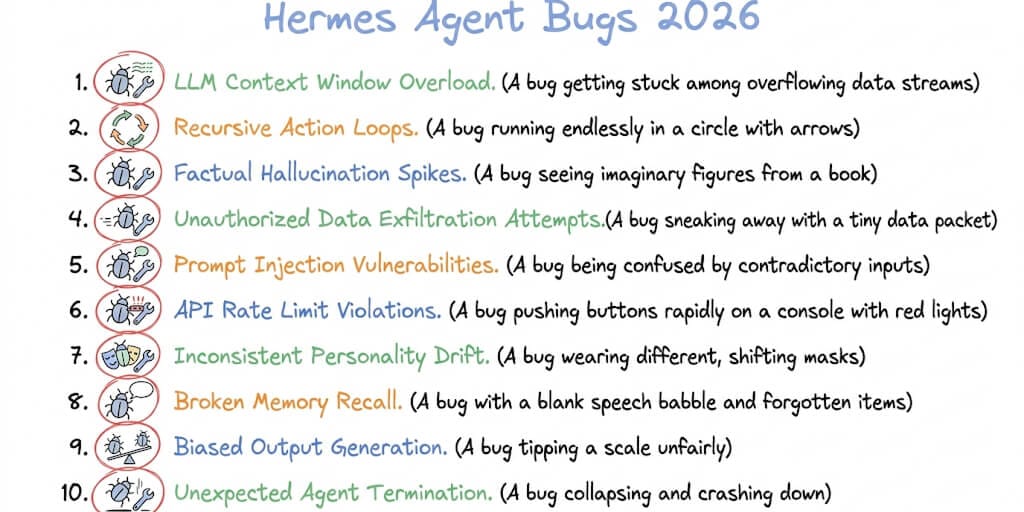
Quick answer: Most Hermes Agent failures fall into three buckets: infrastructure (Docker, file systems, encoding), provider edge cases (DeepSeek, Ollama, OpenRouter), and long-running process maintenance (file-descriptor leaks, ghost sessions, token bloat). Below are the 10 most reported bugs with the symptom, the GitHub issue, and the working fix for each. Some are fixed in recent releases, some are still open, so the first move is almost always to update. This page is the overview. For the errors that need a deeper walkthrough, we link to dedicated guides as we go.
Your agent. Working. Not broken.
One AI agent that just works. No silent failures. Free forever, not a trial. Start free → No credit card · No Docker · No config files
First: Update, Because Hermes Ships Weekly
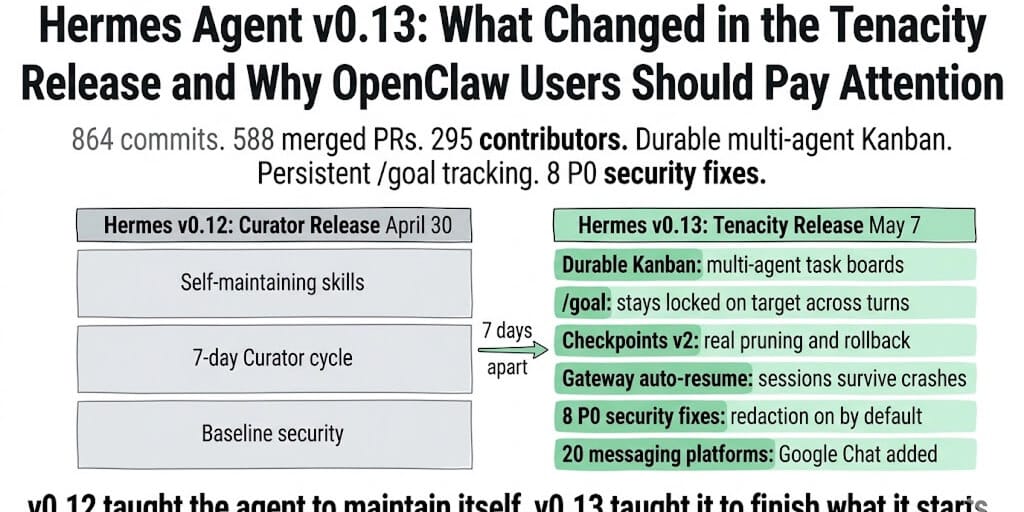
Before you debug anything, check your version. Hermes ships at an extraordinary pace, and a large share of the bugs people hit were already fixed upstream. As of June 2026 the current release is v0.16.0 "Surface Release" (June 5, 2026), which closed 399 issues since v0.15.2, including 2 P0 and 62 P1 fixes. The v0.15 "Velocity Release" (May 28) refactored the core run_agent.py agent loop, which touches several of the bugs below directly.
hermes --version
hermes update
If updating fixes your problem, stop here. If not, find your symptom below. Note that PyPI sometimes lags the Git release, so if hermes update leaves you behind, install from source.
Bug 1: Infinite Tool-Call Loops (the agent that never finishes)
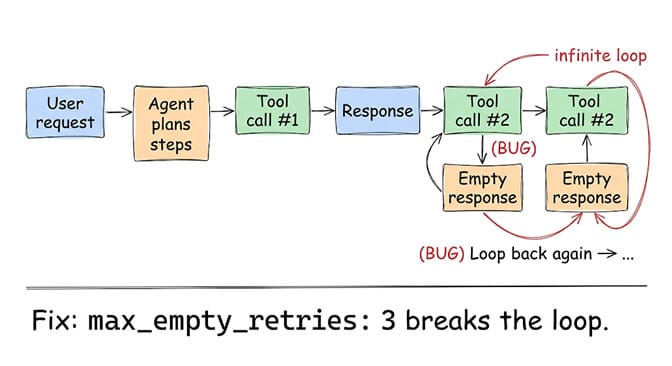
Symptom: you ask for a multi-step task, the agent makes one tool call, gets a response, then loops on the same call or silently drops the rest and returns an incomplete answer.
Root cause: the agent loop sometimes receives an empty response after a tool call and, instead of retrying or escalating, uses earlier content as the final answer. GitHub issue #9400 documents the status line: "Empty response after tool calls, using earlier content as final answer." Most common with non-Claude models (GLM-5, some Ollama models). Note that the v0.15 Velocity Release refactored run_agent.py, so re-test on current before applying workarounds.
Fix: set a retry cap, and for Ollama disable streaming (the stream-plus-tools interaction is the trigger, Ollama issue #2805):
# ~/.hermes/config.yaml
agent:
  max_empty_retries: 3
  tool_call_timeout: 30
hermes config set model.streaming false
How managed platforms handle this: BetterClaw's agent loop includes automatic retry with backoff, a max-iteration cap, and anomaly detection that auto-pauses agents stuck in loops before they burn your token budget.
Bug 2: Token Bloat on the Telegram Gateway (2-3x cost)
Symptom: the same conversation costs 2 to 3 times more through Telegram than through the CLI.
Root cause: the gateway historically spawned in the hermes-agent directory and loaded development files like AGENTS.md as "garbage data" into context. A community member measured roughly 6 to 8k input tokens in CLI versus 15 to 20k on Telegram for the same work.
Fix: the core fix (start in the home directory) is merged, so update first. If costs are still high, check what is loading into context and remove stray .md files from the Hermes directory:
hermes update
hermes config env-path
Token bloat is structural in self-hosted frameworks because every extra token is your cost, not the platform's. For the full breakdown, see our guide on the hidden costs of agent token overhead.
Bug 3: Dashboard Fails to Start in Docker (read-only overlayfs)
Symptom: hermes dashboard in the official Docker container fails with "Web UI npm install failed."
Root cause: /opt/hermes/web is part of the committed image layers (overlayfs lowerdir), so npm install cannot write node_modules there, even as root. GitHub issue #12243. Container-layer bugs like this are the tax on running the stack yourself; a no-code AI agent builder leaves them with whoever maintains the image.
Fix: mount a writable volume over the web directory:
docker run -d --name hermes \
  -v /data/hermes:/opt/data \
  -v /data/hermes-web:/opt/hermes/web \
  -p 9119:9119 \
  nousresearch/hermes-agent:latest
Note that v0.16's broader browser admin panel changed parts of the dashboard, so on current builds re-test before applying the volume workaround. For containerized installs end to end, see our Hermes Docker install guide.
Bug 4: Ollama Local Models Hang Indefinitely With Tool Definitions
Symptom: you configure a local Ollama model and the agent never responds. No error, no timeout, just silence.
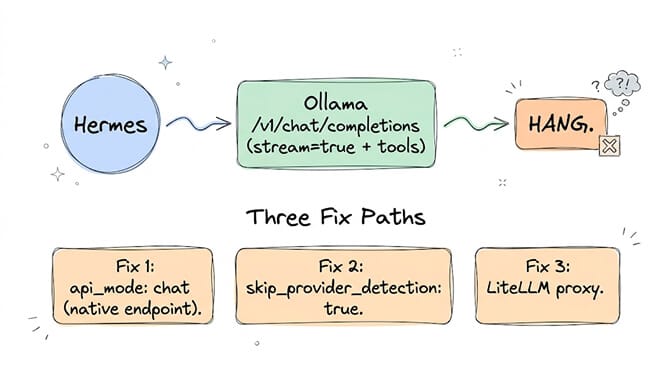
Root cause: Ollama's /v1/chat/completions hangs when stream=true and tool definitions are included (Ollama issue #2805). Hermes's pre-flight provider detection also interferes with proxies like LiteLLM (issue #25629).
Fix, in order of preference:
hermes config set model.api_mode chat            # native Ollama API, not OpenAI-compatible
hermes config set model.skip_provider_detection true
Or route through a LiteLLM proxy, which handles stream-plus-tools correctly (with pre-flight detection disabled). This is the same class of issue covered in depth in our local model troubleshooting guide.
Bug 5: CLI Crash on Startup ("Invalid key 'c-S-c'")
Symptom: Hermes crashes immediately on launch, before you can type.
Root cause: a P0 bug in the prompt_toolkit integration. The c-S-c (Ctrl+Shift+C) binding uses a Shift modifier prompt_toolkit does not support. Fixed in v0.13.0 (issues #19895, #19919).
Fix: update. This one is resolved on any current release:
hermes update
Bug 6: CLOSE_WAIT File Descriptor Leak (WhatsApp and Feishu)
Symptom: after several days, Hermes becomes unresponsive, memory climbs, and it eventually runs out of file descriptors.
Root cause: an httpx keepalive leak with WhatsApp's aiohttp adapter and Feishu connection hygiene. Connections stick in CLOSE_WAIT. Audited and fixed in v0.13.0 (issues #18451, #18766).
Fix: update. On older versions, a periodic restart keeps it alive between updates:
0 */6 * * * systemctl restart hermes-gateway
If debugging file-descriptor leaks at 2am is not why you got into agents, that is exactly why we built BetterClaw. Free plan available. We handle the leaks, you handle the workflows.
Bug 7: DeepSeek V4 Pro Gateway Crash Loop
Symptom: your Telegram bot and all messaging integrations go unresponsive after configuring DeepSeek V4 Pro via OpenRouter.
Root cause: OpenRouter's upstream provider applies aggressive rate limits, and the gateway does not recover gracefully when hit. It crash-loops. GitHub issue #16677 (P1, no clean workaround).
Fix: use a personal DeepSeek API key instead of the shared OpenRouter pool, or the DeepSeek direct API:
hermes config set model.provider deepseek
hermes config set model.default deepseek-v4-pro
For which providers behave best for agents and current pricing, see our cheapest AI providers guide.
Bug 8: Windows Native Beta Encoding Crash
Symptom: on Windows without WSL, file or directory operations with non-ASCII characters crash with 'charmap' codec can't encode.
Root cause: Windows uses cp1252, Hermes assumes UTF-8 (issue #16201).
Fix:
$env:PYTHONUTF8 = "1"
hermes
The v0.16 desktop app ships native Windows builds, which sidesteps much of the old Windows-beta breakage, so if you are on the CLI native beta, the desktop app may be the cleaner path now.
Bug 9: Cold-Start Performance (slow launch)
Symptom: running hermes takes 15 to 25 seconds before the prompt appears.
Root cause: import overhead and network calls during startup, since Hermes loads providers, tools, and skills upfront. Successive releases have hammered this: v0.14 cut roughly 19 seconds, and v0.15/v0.16 shaved more and cut per-conversation function calls by about 47%.
Fix: update to current, where heavyweight backends lazy-install on first use. If you cannot update, disable unused providers and tools to reduce startup load:
# ~/.hermes/config.yaml
toolsets:
  disabled:
    - browser
    - vision
    - code_execution
Bug 10: Session Memory Leak (ghost sessions)
Symptom: over time the session list fills with broken entries, analytics show sessions that never closed, and memory creeps up.
Root cause: the TUI compression feature created ghost sessions with incomplete metadata (issue #20001), compounding the CLOSE_WAIT leak. Fixed in v0.13.0.
Fix: clean old sessions and update:
hermes sessions clean --before 2026-05-01
0 0 * * 0 hermes sessions clean --before $(date -d '-30 days' +%Y-%m-%d)
Specific Errors? Go Straight to the Deep-Dive
This page is the overview. When your problem is one exact error string, these dedicated guides go deeper than the summary above:
- Auth failures: Hermes "auth handler error authenticating": 6 fixes
- HTTP 400: Hermes Agent error 400: 6 causes fixed
- Truncated output: Hermes "response truncated (finish_reason='length')": 5 fixes
- Install errors: Hermes Agent installation errors: 9 fixes
The Pattern Across All 10 Bugs
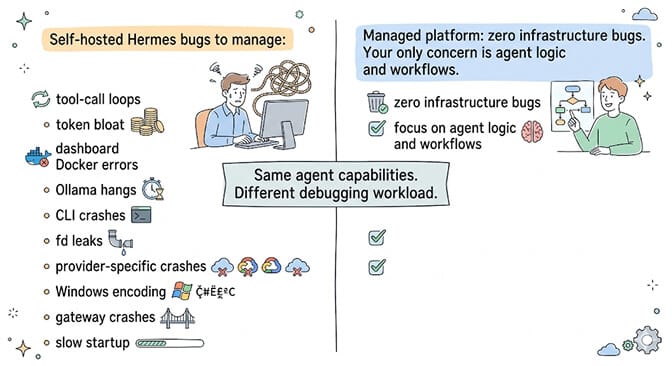
Every bug here is infrastructure management, a provider edge case, or long-running process maintenance. None of them is about building agents, designing workflows, or writing skill logic. That is the real cost of self-hosting: the framework is free, the bugs are expensive.
Hermes is genuinely impressive. The June v0.16 Surface Release shipped a native desktop app, a full admin panel, and 399 closed issues. The velocity is extraordinary. But velocity creates bugs, and bugs cost your time. The honest question is not "is Hermes good" (it is) but "do you want to build agents or maintain agent infrastructure?"
If your answer is build agents, give BetterClaw a try. Free plan with 1 agent and 500 credits a month. $49/month for Pro. 200+ verified skills, 28+ providers, 60-second deploy. We handle the 10 bugs above and hundreds you will never see.
Frequently Asked Questions
What are the most common Hermes agent bugs in 2026?
The most reported are infinite tool-call loops, token bloat on the Telegram gateway (2-3x cost), the dashboard failing in Docker (read-only overlayfs), Ollama local models hanging with tool definitions, and the DeepSeek V4 Pro crash loop. Most are fixed in recent releases, so updating to the current version (v0.16 as of June 2026) resolves a large share of them.
How do I fix Hermes agent not working after an update?
Run hermes doctor to check installation health, verify your config with hermes config path, and confirm your provider API key is actually set (the setup wizard sometimes skips the key prompt). If the gateway crashes, check Docker volume permissions and restart it. Because Hermes ships weekly, also confirm you are on the current release rather than a lagging PyPI build.
Why does my Hermes agent keep looping on tool calls?
The model returns an empty response after a tool call and the loop retries without a cap, most often with non-Claude or local Ollama models. Set max_empty_retries: 3 and disable streaming for Ollama backends. The v0.15 refactor of the agent loop changed this code path, so test on the current version first.
How much does it cost to run Hermes Agent vs a managed platform?
Hermes is free (MIT), but self-hosting runs $5 to $50/month for a VPS plus 15+ hours of setup and 2 to 5 hours/month of maintenance. BetterClaw's free plan includes 1 managed agent at $0; Pro is $49/month. Once you count hosting, maintenance time, and token bloat, Pro is frequently cheaper than self-hosting.
Is the Hermes Agent dashboard reliable?
The built-in dashboard works well locally but historically had Docker issues (read-only overlayfs, issue #12243). The v0.16 Surface Release added a much broader browser admin panel, so reliability has improved on current builds. For server deployments, the official docs still recommend putting the dashboard behind auth and never exposing it publicly.
Stop debugging, start building.
A managed agent with retry caps, anomaly detection, and smart context built in, so the 10 bugs above never reach you. BYOK, free forever, not a trial. Start free →