Hermes Agent installs in about three minutes when nothing goes wrong. Here are the six things that still go wrong in September 2026, the five that used to and no longer do, and what to do when you're done debugging.
Three hours into a Friday evening. Fresh Ubuntu 24.04 box. I ran the Hermes install script, watched it try to pull Python 3.11 even though 3.13 was already installed, then watched it fail because the download timed out.
Restarted. Got through the install. Ran hermes setup. Configured Anthropic as the provider. The wizard skipped the API key prompt entirely because an old key existed from a previous attempt. I didn't notice. Spent 45 minutes wondering why every request returned a 401.
Both of those specific bugs are now fixed — that's the good news, and it's why this post gets re-verified rather than reposted. The current tagged release is v0.21.3 (tag v2026.9.14, published 14 September 2026). What follows is what actually breaks on a current build, checked against the repo, the installer script, and PyPI rather than against last spring's issue list. If Hermes installed fine and it's a runtime error you're chasing, go to Hermes Agent not working instead.
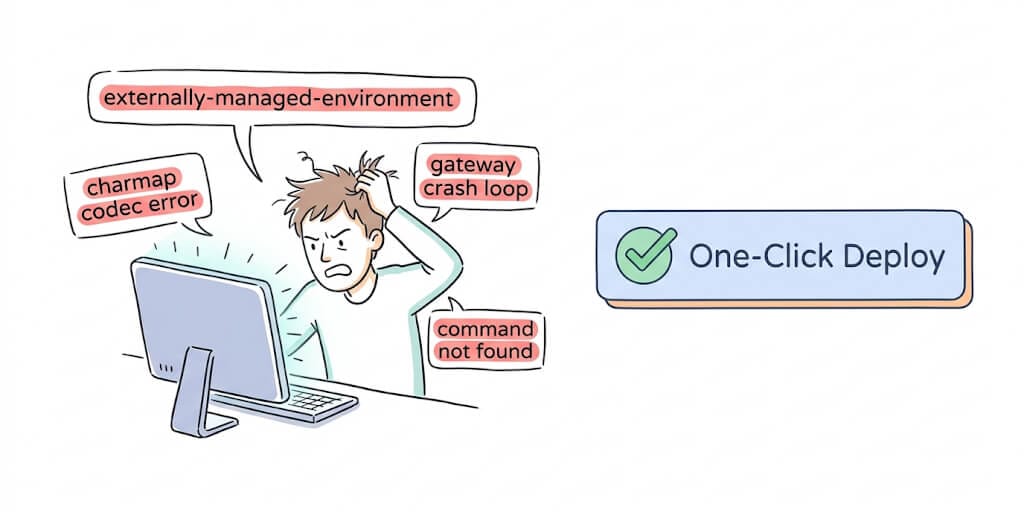
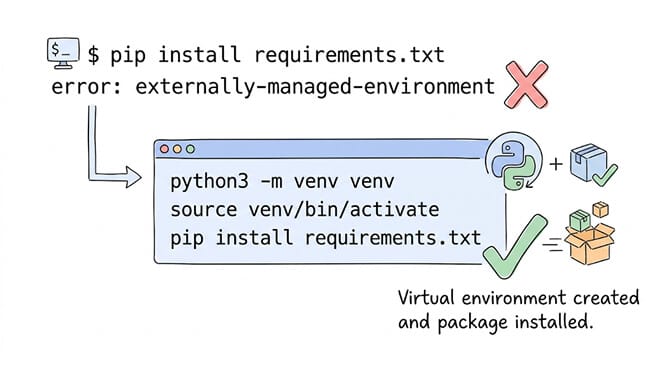
Error 1: "externally-managed-environment" on pip install
This is still the most common Hermes installation error, and it's not technically Hermes's fault.
What happens: You run pip install -e '.[acp]' or any pip command inside the Hermes directory. Python refuses with a wall of text about externally managed environments.
Why it happens: Ubuntu 24.04 and Debian 12+ implement PEP 668, which prevents pip from installing packages system-wide. The message itself tells you to create a virtual environment or use pipx; people read it as a Hermes failure and go looking for a Hermes fix.
The fix: Create a virtual environment first:
python3 -m venv ~/.hermes-venv
source ~/.hermes-venv/bin/activate
pip install -e '.[all]'
Or use uv, which the Hermes installer prefers anyway:
uv venv venv --python 3.11
export VIRTUAL_ENV="$(pwd)/venv"
uv pip install -e '.[all]'
GitHub issue #13548 is this exact scenario, filed 21 April 2026 and still open as a question rather than a bug — which is the right classification. The fix takes 30 seconds once you know it.
Error 2: The Python version confusion (and the claim we got wrong)
Correction first, because we had this wrong for months: Hermes does not require Python 3.11 specifically. The package's own metadata declares requires-python = ">=3.11,<3.14". Python 3.11, 3.12 and 3.13 are all supported. Only 3.10 and below, and 3.14 and above, are out.
Where the confusion comes from is the installer script, which sets PYTHON_VERSION="3.11" as its preferred interpreter — and it carries the full range alongside it, with a comment telling maintainers to keep it in sync with pyproject.toml:
PYTHON_VERSION="3.11"
PYTHON_SUPPORTED_RANGE=">=3.11,<3.14"  # pyproject requires-python; keep in sync
What happens: on older builds the installer looked for 3.11, didn't find it, and tried to download a standalone build from GitHub — which on a slow or restricted connection times out. That was issue #10778 (16 April 2026, P2, closed): an installer that ignored a perfectly good Python 3.13.12 and then died with "operation timed out" fetching 3.11.
What the installer does now: it asks uv for 3.11 first, and if that isn't present it runs uv python find --system ">=3.11,<3.14" and reuses whatever in-range interpreter you already have, pinning the venv to it. Only when nothing in that range exists does it fall back to uv python install 3.11.
The fix, if you're still hitting a download timeout: install any supported interpreter first and let the installer find it.
# macOS — any of these work
brew install python@3.12

# Ubuntu/Debian
sudo apt install python3.12 python3.12-venv

# Then re-run the installer
curl -fsSL https://raw.githubusercontent.com/NousResearch/hermes-agent/main/scripts/install.sh | bash
The installer is idempotent, so re-running it is safe.
Key takeaway: don't downgrade to 3.11 because a blog post (this one, previously) told you to. If you're on 3.12 or 3.13, you're fine. If you're on 3.14, you're too far ahead and need to install something in range.
For a broader look at what the Hermes framework does well and where it falls short, our honest comparison of BetterClaw and Hermes covers architecture differences and trade-offs. If you're ready to switch, our Hermes Agent alternatives roundup ranks six options by setup time.
Error 3: "hermes: command not found" after installation
What happens: The install script completes successfully. You type hermes. Nothing.
Why it happens: The installer adds the Hermes binary to ~/.local/bin, but your shell hasn't reloaded. This trips up a surprising number of people because the install script says "Done!" and they assume everything is ready.
The fix:
source ~/.bashrc
# or for zsh:
source ~/.zshrc
If that doesn't work, check the PATH manually:
echo $PATH | tr ':' '\n' | grep local
ls -la ~/.local/bin/hermes
If the symlink doesn't exist, create it:
ln -s "$(pwd)/bin/hermes" ~/.local/bin/hermes
The fix is always "reload your shell." Always.
Error 4: Windows native path and encoding failures
Still open, and still the reason WSL2 is the safer Windows path. Forty-five minutes of debugging is roughly forty-four more than it takes to build an AI agent on a hosted platform, which is worth weighing if this is your third attempt.
What happens: You install Hermes natively on Windows (no WSL). hermes update fails with a mixed-slash path error like failed to remove file C:\Users\foobar\...\../../Scripts/hermes.exe. Basic terminal commands such as pwd return exit code 126. In Git Bash, anything touching non-ASCII characters throws 'charmap' codec can't encode characters.
Why it happens: path normalisation is inconsistent between Windows native paths and Unix-style forward slashes, and Windows defaults to cp1252 where Hermes assumes UTF-8. GitHub issue #16201 (26 April 2026, P2) tracks all of it and is still open.
The fix for the encoding half: set the UTF-8 environment variable before running Hermes.
$env:PYTHONUTF8 = "1"
hermes
Or opt out of the Windows UTF-8 shim entirely, which the docs describe as "useful for bisecting an encoding bug; unlikely to be the right setting in normal operation":
$env:HERMES_DISABLE_WINDOWS_UTF8 = "1"
The honest take: the path-handling half has no clean workaround. If you're on Windows and need an agent working today, use WSL2 or the Docker image.
Error 5: Permission denied on the data directory in Docker
What happens: You change a configuration setting, restart the gateway, and the service dies immediately. On Docker, Zeabur and some VPS setups this surfaces as a permission-denied error on the data directory or the .env inside it.
Why it happens: the user inside the container doesn't own the mounted volume. And the number almost everyone reaches for is wrong: the official image creates a non-root user hermes with UID 10000 (not 1000), home directory /opt/data, and drops privileges to it via s6-setuidgid.
The fix on bare metal is the obvious one:
ls -la ~/.hermes/.env
sudo chown -R $(whoami):$(whoami) ~/.hermes/
The fix in Docker is not to chown. Tell the container which host user owns the directory, and the s6-overlay init hook remaps the internal user to match before any service starts:
services:
  gateway:
    image: nousresearch/hermes-agent:latest
    volumes:
      - ~/.hermes:/opt/data
    environment:
      - HERMES_UID=${HERMES_UID:-10000}
      - HERMES_GID=${HERMES_GID:-10000}
    command: ["gateway", "run"]
HERMES_UID=$(id -u) HERMES_GID=$(id -g) docker compose up -d
PUID/PGID work as aliases for NAS images. Two details worth correcting from older guides, this one included: the data volume is /opt/data, not ~/.hermes inside the container, and user: "1000:1000" in compose is the wrong mechanism as well as the wrong number. Our Hermes Docker install guide has the full permission, port and compose walkthrough.
If you're tired of debugging Docker permissions, gateway crashes, and Python version conflicts just to get an AI agent running, BetterClaw handles all of this infrastructure. Free tier with 1 agent and BYOK. $49/month for Pro with 5 agents. Your agent deploys in 60 seconds. We handle the Docker, the gateway, the permissions, the monitoring. You handle the interesting part: making your agent actually useful.
Error 6: PyPI lags the GitHub release
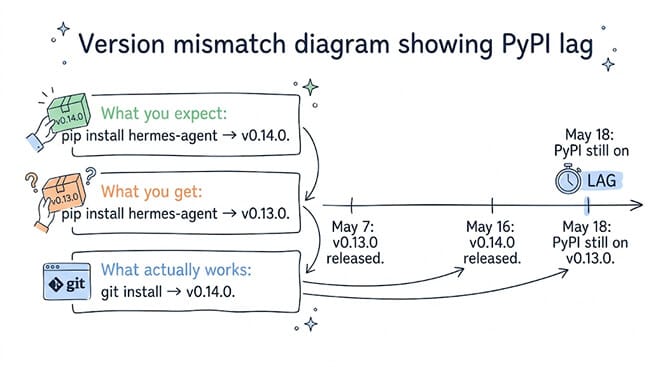
What happens: You run pip install hermes-agent expecting the newest build. You get an older one, and features announced in the release notes aren't there.
Why it happens: the two channels move at different speeds. As of 16 September 2026, PyPI's latest hermes-agent is 0.19.0, published 20 July 2026. The newest GitHub release is v0.21.3 (tag v2026.9.14), published 14 September 2026 — a patch release that, in the maintainers' words, "rolls up the ~338 PRs merged since v0.21.2 into a stable tagged release for downstream consumers (Docker images, Hermes Cloud, hosted deployments)."
So pip is roughly two minor versions behind. This is the same gap we flagged in May, when PyPI sat on 0.13.0 while GitHub had shipped 0.14.0 — the numbers moved, the gap didn't.
The fix: Install from Git or the official installer if you need current features.
pip install git+https://github.com/NousResearch/hermes-agent.git@v2026.9.14
curl -fsSL https://raw.githubusercontent.com/NousResearch/hermes-agent/main/scripts/install.sh | bash
The Docker image tracks the release tags, so nousresearch/hermes-agent:latest is also current.
Five errors that are already patched (update before you debug)
If you're following an older guide, these five will send you chasing bugs that no longer exist. All are closed.
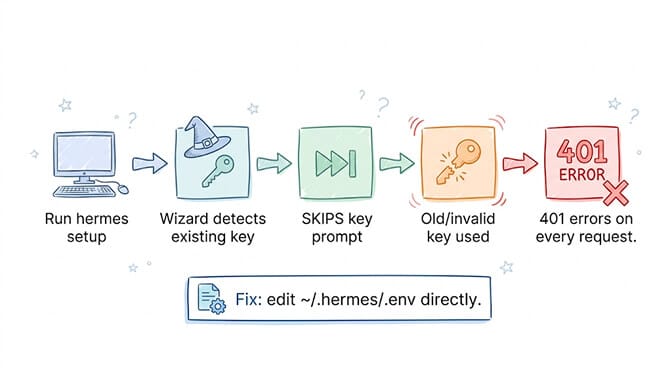
The setup wizard skipping the API key prompt — #16394, closed, merged via PR #20162. hermes setup used to skip the key prompt whenever any value already sat in ~/.hermes/.env, so people configured a "new" key that was never written. The merged change adds an explicit keep / replace / clear choice. For the auth failures that are still live, our Hermes auth error troubleshooting guide re-verified the whole list — the headline finding is that Hermes currently reports provider quota exhaustion (429) as an authentication failure.
The installer ignoring your existing Python — #10778, closed. Covered in Error 2. The installer now reuses any interpreter in >=3.11,<3.14.
DeepSeek V4 Pro gateway crash loop — #16677, closed (P1). Setting deepseek/deepseek-v4-pro via OpenRouter used to put the gateway in a crash loop when rate limits hit, taking Telegram and every other messaging integration down with it. If you're on a build old enough to still hit this, a personal DeepSeek key at OpenRouter gives you individual rate limits instead of the shared pool — but the real fix is hermes update.
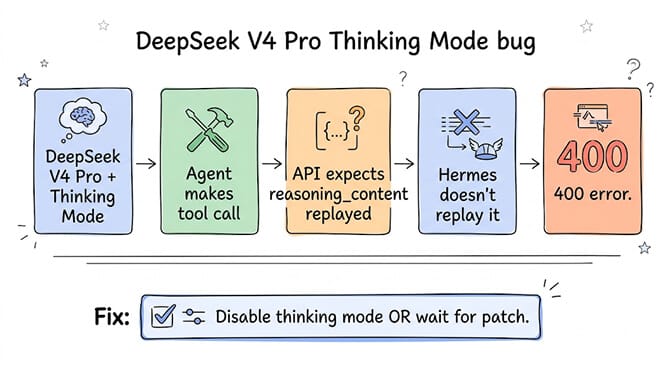
DeepSeek thinking mode returning 400 after tool calls — #16137, closed (P2). _copy_reasoning_content_for_api() handled Kimi/Moonshot but not DeepSeek, so reasoning mode plus tool calls produced "The reasoning_content in the thinking mode must be passed back to the API." This was one variant of a broader pattern; our Hermes Agent error 400 guide ranks all the causes of a 400 by how often they're the real problem.
deepseek-v4-pro sessions showing unknown cost — #24218, closed via PR #24216 (P3). The model was registered for context-window lookups but missing from the pricing table, so hermes insights couldn't compute spend. Pricing was added.
For how these provider issues compare to the simpler BYOK approach, our guide on choosing the cheapest AI providers covers the cost vs. reliability trade-offs.
The pattern you should notice
Look at what we just covered. Python version ranges. Virtual environments. PATH configuration. Encoding and path separators on Windows. Container UID remapping. Package registry lag.
Not one of these is about building an agent. Not one is about defining a workflow, choosing a model for a task, or connecting to a chat platform. They're all infrastructure.
That's the real cost of self-hosted AI agents. The framework is free. The time you spend making it run is not.
To be fair to the project: five of the eleven errors in this post got fixed between spring and September, and a patch release in September rolled up ~338 merged PRs. That's real velocity. But velocity in an agent framework means the guide you're reading is probably describing a version you aren't running — which is its own tax.
The question isn't whether Hermes is good. It is. The question is whether your time is better spent debugging installation errors or building agent workflows.
We built BetterClaw because we asked ourselves that same question. 200+ verified skills. 25+ OAuth integrations. 28+ AI model providers. Secrets that auto-purge from agent memory after 5 minutes. Trust levels that let you control what your agent can do autonomously. And zero installation errors, because there's nothing to install.
Give BetterClaw a try. Free tier with 1 agent and 100 credits a month. $49/month for Pro with 5 agents ($39/month billed annually). See full pricing. Your first deploy takes about 60 seconds. We handle the infrastructure. You handle the interesting part.
Frequently Asked Questions
What Python version does Hermes Agent require?
>=3.11,<3.14. Python 3.11, 3.12 and 3.13 all work — that range is declared in the package metadata on PyPI and repeated in the installer script as PYTHON_SUPPORTED_RANGE. The installer's preferred version is 3.11, which is where the widespread "3.11 only" claim comes from, but it now checks for any in-range system interpreter before downloading one. You do not need to downgrade from 3.12 or 3.13.
What are the most common Hermes Agent installation errors?
The "externally-managed-environment" pip error on Ubuntu 24.04 and Debian 12+ (PEP 668 — use a virtual environment or uv), confusion over the supported Python range, "hermes: command not found" because the shell hasn't reloaded ~/.local/bin, native-Windows path and encoding failures, permission-denied on the Docker data volume because the container runs as UID 10000, and PyPI serving an older version than the GitHub release tag.
Why does pip install hermes-agent give me an old version?
Because PyPI lags the GitHub release. As of 16 September 2026 PyPI's latest is 0.19.0 (published 20 July 2026) while the newest GitHub release tag is v0.21.3, published 14 September 2026. If you need current features, install from Git (pip install git+https://github.com/NousResearch/hermes-agent.git@v2026.9.14) or use the official curl installer, both of which track the repo.
Why does Hermes Agent fail with permission errors in Docker?
The official image runs as a non-root user hermes with UID 10000 — not the customary 1000 — and the data volume inside the container is /opt/data. Don't chown your host directory to 1000 and don't set user: "1000:1000" in compose. Instead pass HERMES_UID=$(id -u) and HERMES_GID=$(id -g) (or the PUID/PGID aliases); the s6-overlay init hook remaps the internal user before services start.
How long does it take to install Hermes Agent from scratch?
The official estimate is 2 to 3 minutes. In practice, a clean install on a fresh system takes 15 to 45 minutes once you account for Python environment setup, PATH configuration, and provider setup. On native Windows, where the open path-handling issue has no clean workaround, budget considerably more or use WSL2. BetterClaw agents deploy in under 60 seconds with no terminal required.
How does Hermes Agent compare to BetterClaw for reliability?
Hermes Agent is an open-source framework you self-host and maintain. It's powerful but requires debugging Python environments, Docker permissions, gateway configurations, and provider-specific issues. BetterClaw is a managed platform where agents deploy in 60 seconds with no installation. Hermes gives you full control. BetterClaw gives you zero infrastructure headaches. For the full comparison, we cover architecture, pricing, and trade-offs honestly.
How much does Hermes Agent cost compared to managed alternatives?
Hermes Agent itself is free (MIT license). But self-hosting costs include a VPS ($5 to $50/month), your time for setup and maintenance, plus LLM API costs. BetterClaw's free tier includes 1 agent with managed hosting and 100 credits a month at $0/month. Basic is $19/month with 1 agent, 500 credits and 10 connectors. Pro is $49/month with 5 agents ($39/month billed annually). When you factor in hosting costs and maintenance time, self-hosted Hermes often costs more than BetterClaw Pro.