Everything happening under the hood when you text your AI agent at 2 AM, and why understanding it matters more than you think. Updated for OpenClaw 2.0 (v2026.8.1) and the current v2026.10.3 release.
It was a Tuesday night, and I was watching my OpenClaw agent reply to a Slack message, browse a competitor's pricing page, summarize the findings, and drop the results into our team channel.
Nobody asked it to do the last part. It just... did.
That was the moment I stopped thinking of OpenClaw as a chatbot and started thinking of it as infrastructure. But here's the thing: I had no idea how any of it actually worked.
And if you're like most of the people behind OpenClaw's nearly 400,000 GitHub stars, you probably don't either. You installed it, followed a tutorial, maybe got it talking through Telegram. But what's actually happening between the moment you send "check my calendar" and the moment it replies with your schedule?
That's what this article is about.
Not another setup guide. Not a feature list copy-pasted from the README. We're going to open the hood and look at the engine. Every layer. Every decision. And by the end, you'll understand not just how OpenClaw works, but why it works the way it does, and where things get complicated when you're running it yourself.
A quick note on versions. OpenClaw 2.0 (v2026.8.1) landed at the start of September and rebuilt a lot: a new web UI, sessions and transcripts moved into SQLite, and a new built-in memory system. Point releases have shipped roughly weekly since, and v2026.10.3 (released October 13, 2026) is the latest stable release at the time of writing. Everything below reflects the current docs.
If you're here for the GitHub repo, the release lines and the install-from-source steps, those have their own sections after the security part below.
The Gateway: OpenClaw's Nervous System
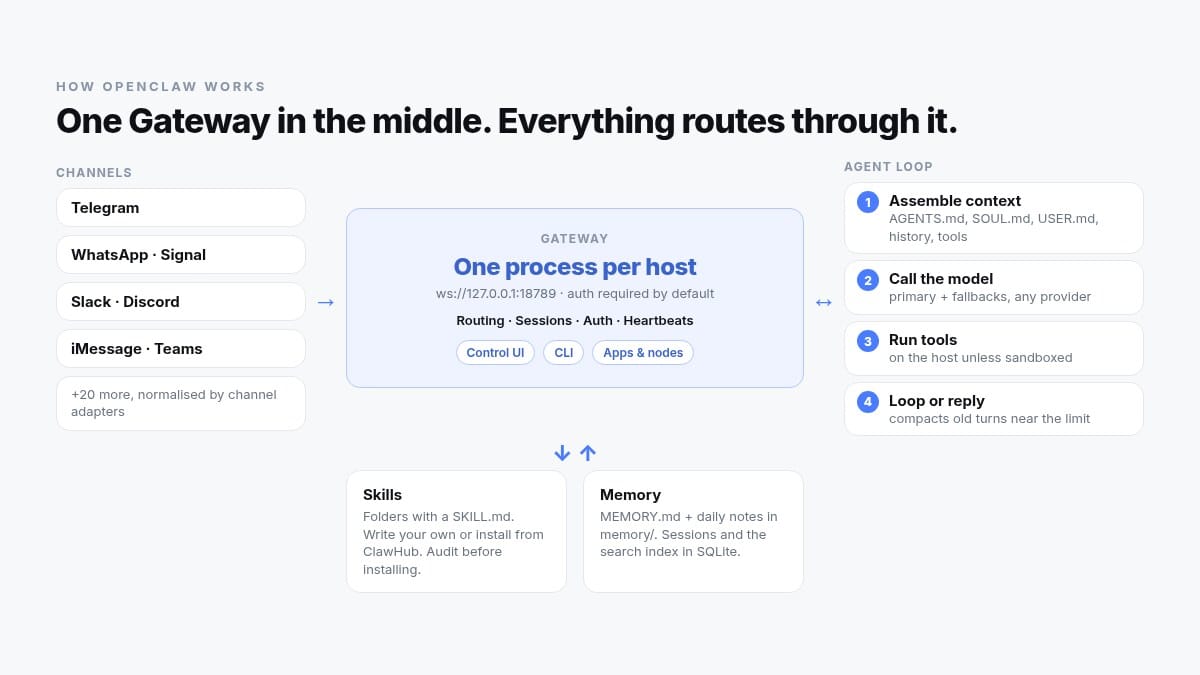
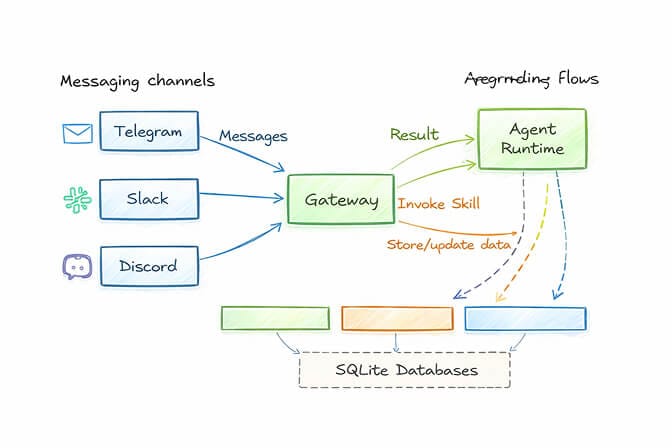
Everything in OpenClaw flows through a single process called the Gateway.
Think of it as air traffic control. Every message from every chat platform, every heartbeat, every tool execution, every session state change goes through this one process. It runs as a background service on your machine (systemd on Linux, launchd on macOS) and serves WebSocket and HTTP on one port, ws://127.0.0.1:18789 by default. The web Control UI, the CLI, the mobile apps and any paired devices all connect to it over that WebSocket.
The Gateway handles four critical jobs:
Routing. When a message arrives from WhatsApp, Telegram, Discord, or any of the 30+ supported channels, the Gateway figures out which agent and session should handle it. With multi-agent routing, different channels or even different contacts can go to completely isolated agents with their own workspaces and models.
Session management. Each conversation gets its own session, and since 2.0 those sessions and their transcripts live in a per-agent SQLite database instead of loose files. The Gateway tracks who's talking, what context has been loaded, and what tools are available. Sessions can now also run on paired devices or cloud workers while the Gateway keeps the transcript and credentials.
Authentication. Gateway auth is required by default and fails closed: with no valid auth configured, the Gateway refuses WebSocket connections. Onboarding generates a token even for a local-only setup, and new devices have to be paired. An explicit auth.mode: "none" still exists, but the docs limit it to trusted loopback setups and onboarding never offers it.
Heartbeat orchestration. This is the part that makes OpenClaw feel alive. Every 30 minutes by default (every hour on Anthropic OAuth/token auth), the Gateway runs a heartbeat turn. The agent checks a small checklist, called the heartbeat monitor scratch (you set it with openclaw cron scratch), decides if anything needs attention, and either acts or replies silently. Anything that has to happen on an exact schedule, like a morning briefing, belongs in an automation (a scheduled job) rather than the heartbeat.
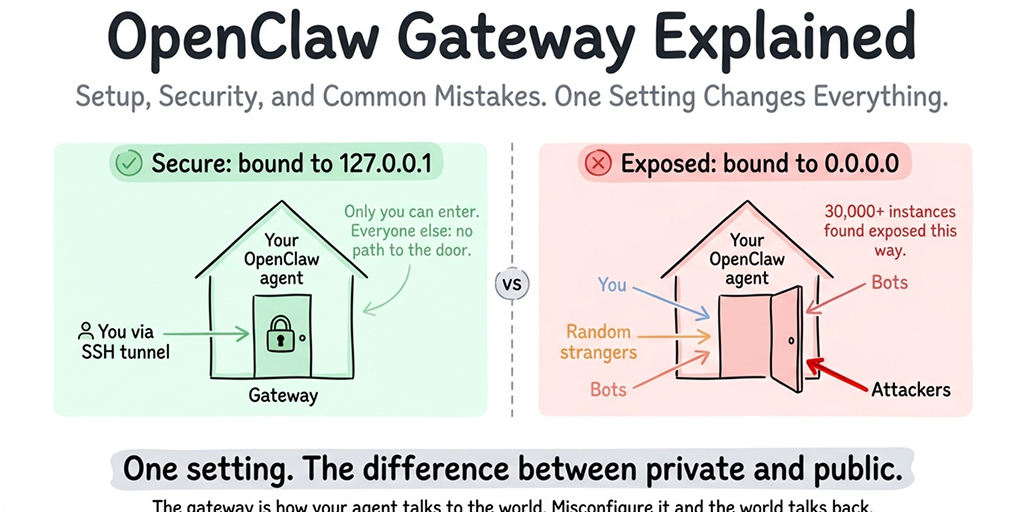
Here's the part nobody tells you: the Gateway is a single point of failure. The docs are explicit that there's one Gateway per host. If it crashes, every connected channel goes silent until it restarts. 2.0 improved restart recovery (interrupted turns resume and queued messages drain), but it's still one process. If it's misconfigured, your agent is either unreachable or, worse, reachable by the wrong people. This is fine when you're tinkering on a weekend project. It's less fine when you're running an agent that handles client communications. Our OpenClaw gateway guide covers bind settings and remote access in detail.
The Agent Loop: Input, Think, Act, Repeat
Once the Gateway routes a message to the right session, the agent runtime takes over. This is where the intelligence lives.
OpenClaw uses the familiar ReAct loop (Reason + Act). If you've worked with any modern agent framework, you've seen this before. But OpenClaw's implementation has some specific wrinkles worth understanding.
Here's the flow:
- Context assembly. Before the LLM sees your message, OpenClaw builds the context window. It packs in the system prompt, your workspace bootstrap files (
AGENTS.mdfor operating rules,SOUL.mdfor persona,USER.mdfor your preferences,MEMORY.mdfor durable facts), conversation history, tool schemas, and the skills available to the agent. You can see exactly what went in with/context listor/context detail. The context load is substantial, which is why most serious deployments use a frontier model. - LLM inference. The assembled context goes to whichever model you've configured. OpenClaw is model-agnostic. You set the primary model and fallbacks in
~/.openclaw/openclaw.json(agents.defaults.model.primaryandagents.defaults.model.fallbacks), and the runtime rotates auth profiles and falls back across models when a provider fails. - Tool execution. If the model decides it needs to take action (browse a webpage, run a shell command, check your calendar), it outputs a tool call. The runtime executes it, in a sandbox if you've configured one, and feeds the result back.
- Loop or reply. The model looks at the tool result and decides: do I need more information, or am I ready to respond? This loop can run multiple cycles for complex tasks. When the conversation nears the model's context limit, OpenClaw compacts older turns into a summary and keeps going.
The key insight: OpenClaw isn't a chatbot that sometimes uses tools. It's an orchestration engine that happens to communicate through chat. The messaging interface is just the surface. Underneath, it's running the same agent patterns you'd find in any enterprise automation framework.
But here's where it gets messy.
Skills, Memory, and the "It's All Just Files" Philosophy
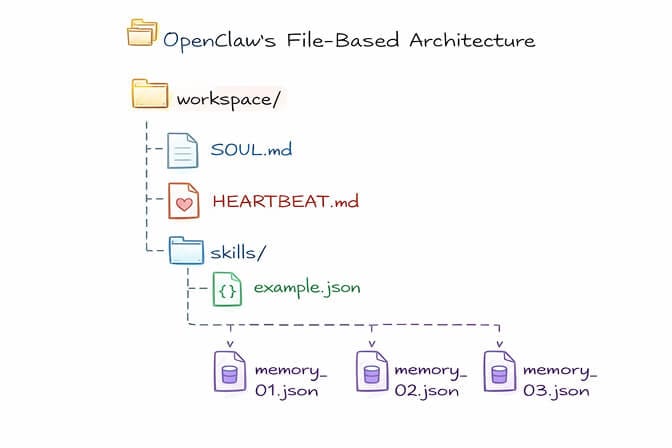
One of the boldest design decisions in OpenClaw is that the agent's brain is a folder of files.
Your agent's personality? A Markdown file called SOUL.md. Its operating rules? AGENTS.md. Its long-term memory? MEMORY.md plus dated notes in a memory/ folder. Skills? Folders containing a SKILL.md file. All of it lives in the agent workspace (~/.openclaw/workspace by default), and you can open any of it in a text editor.
2.0 moved the machine-facing state (sessions, transcripts, the memory search index) into SQLite. But the parts you author and read are still plain Markdown.
This is both OpenClaw's greatest strength and its biggest operational headache.
The strength: You can version control your agent's workspace with Git (the docs recommend a private repo). You can inspect every rule, every memory, every skill in a text editor. There's nothing hidden. For developers who value transparency, this is deeply satisfying.
The headache: You're now responsible for managing a growing pile of files across potentially multiple agent workspaces. MEMORY.md gets truncated in context if it outgrows the bootstrap budget. Skills need updating. Configuration drift between what's in your files and what the agent is actually doing becomes a real problem over time.
The skills system is particularly interesting. Skills are modular capability packages that teach your agent how to use tools. Browse the web. Control your email. Manage GitHub repos. You can write your own or install them from ClawHub, the community registry, with a single command. In 2.0, creating, validating, finding and installing skills became one connected flow, with a Skill Workshop that holds proposals and checks.
But stay with me here: the skill registry has had security problems. Cisco's AI security team built a malicious third-party skill that exfiltrated data and injected prompts without the user noticing, specifically to show how the trust model could be abused. ClawHub now shows security audit results before you install, but you're still giving community-contributed packages access to your agent's tools.
The memory system got the biggest rebuild in 2.0. The old QMD backend is retired, and built-in Memory now owns search and recall (run openclaw doctor --fix to migrate an older setup). The agent searches its notes with the memory_search and memory_get tools, and uses intent to remember event-triggered "when X happens, do Y" instructions. Before compaction, a silent memory flush writes important context to disk. And Dreaming, on by default, runs a scheduled background sweep that promotes durable facts from daily notes into MEMORY.md and writes a reviewable diary to DREAMS.md. It's far more reliable than the early file-only approach, but it's also more moving parts to understand. Our OpenClaw memory fix guide walks through how it behaves in practice.
Multi-Channel: One Agent, Every Platform
This is the feature that made OpenClaw go viral.
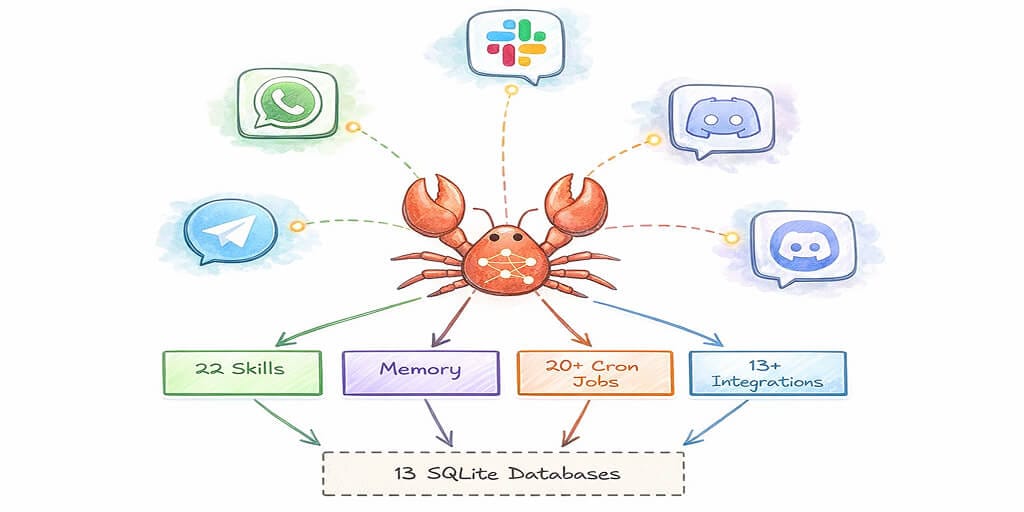
Your single agent can connect to WhatsApp, Telegram, Slack, Discord, Signal, iMessage, Microsoft Teams, Google Chat, Matrix, SMS, WebChat and more than 20 other channels at once. Telegram is bundled with the core install; most others are official plugins that install on demand during setup. Each channel adapter normalizes messages into a common format before handing them to the Gateway.
The practical implication: by default, a personal agent keeps one rolling "main session" across your direct chats. You text your agent from WhatsApp while commuting, switch to Slack at your desk, and it's the same conversation. Same session. Same memory. Different interfaces.
Each adapter handles platform-specific quirks. WhatsApp uses QR code pairing through the Baileys library. Discord and Slack use bot tokens. iMessage now has a native plugin built on the imsg bridge (the older BlueBubbles setup has a migration guide). The adapters abstract all of this away, so the agent runtime doesn't need to know which platform it's talking to.
The real-world problem: Setting up even three channels means configuring three separate authentication flows, managing three sets of credentials, and debugging three different failure modes. I've seen developers spend an entire weekend just getting WhatsApp + Telegram + Slack working together reliably.
And that's on a good day.
The Security Question Nobody Can Ignore
Let's be direct about this. OpenClaw asks for a level of system access that would make any security engineer nervous.
It can read and write files. Run shell commands. Control your browser. Access your email, calendar, and messaging accounts. And if you're running it with broad host access and no sandbox (which many tutorials don't warn against), a compromised agent can do a lot of damage to your machine.
Prompt injection is the biggest threat. Because OpenClaw processes messages from external sources (group chats, forwarded content, even scraped web pages), a malicious prompt embedded in that data can hijack the agent's behavior. CrowdStrike published a detailed analysis of this attack surface, noting that attackers can poison the inputs an agent reads and then hijack its tools.
OpenClaw's maintainers have been responsive. Gateway auth is now required by default, unknown senders have to be approved through DM pairing, and openclaw security audit checks your configuration for common footguns (openclaw doctor covers broader health and migrations). But as one of OpenClaw's own maintainers warned in Discord: "If you can't understand how to run a command line, this is far too dangerous of a project for you to use safely."
That's an honest assessment. And it's why the question of where and how you deploy OpenClaw matters as much as understanding how the framework works.
Where to actually find OpenClaw before you install the wrong thing
The canonical repository is openclaw/openclaw on GitHub. That is the one. It carries the MIT license, the TypeScript core, the Gateway, the docs, the release history, and the issue tracker.
As of October 13, 2026 it sits at about 392,000 stars and 82,000 forks, which puts it among the most starred repositories in the history of the platform. The official org hosts around 96 public repositories in total, including the skill and plugin registry.
Here is what nobody tells you. The popularity created a problem.
Search "openclaw github" and you will get the real repo, plus a swarm of mirrors, forks, tutorial sites, and lookalike orgs. Some are harmless. Some are community projects with similar names. And some are typosquats waiting for a distracted developer to npm install the wrong package at midnight.
Three checks before you trust a repo claiming to be OpenClaw:
- The org is
openclaw, notopenclaw-ai,open-claw, or anything with a hyphen you did not expect - The license file says MIT and the language breakdown is TypeScript with some Swift
- The release history is dense and version numbers are date-based, like
2026.10.2

The official docs, the security guide, the sandboxing guide, and the exposure runbook all live in that same repository. Read the security guide before you expose the Gateway to anything.
OpenClaw on GitHub: the repo, releases and how to read the update issues
The repo. Everything lives at github.com/openclaw/openclaw: source, docs, releases and the issue tracker. The project is stewarded by the OpenClaw Foundation, a non-profit, and the README is explicit that it has no paid tier, hosted service or token.
The releases. Versions are date-based, and there are two lines on the Releases page worth telling apart:
| Line | Current version | What it is |
|---|---|---|
| Stable | 2026.10.3, released October 13, 2026 (marked Latest) | The normal release line. 2026.10.2 shipped on October 12 and 2026.10.1 on October 10. |
| Extended-stable | 2026.8.35, released October 2, 2026 | A gateway-only line the project calls its current equivalent to LTS: OpenClaw from the end of August 2026 plus critical security updates, reliability and performance fixes, and new model support. |
You will also see pre-releases such as 2026.10.5-beta.1 to beta.3 (October 11 to 13). Those are betas, not something to run an agent you depend on. Our latest-version page covers what changed in each release and how to update.
The "Update failure: …" issues. Open the issue tracker and you will see a steady stream of issues titled like Update failure: activating (2026.10.1). These are not hand-written bug reports. When an update fails, OpenClaw's updater rolls back and builds an update failure report, which the user reviews and confirms before it is filed. Each one records the version the user was on, the platform and Node version, the install method, the update target, the phase that failed (for example validating, activating or a package swap that hit a Windows EPERM), whether the rollback succeeded, and the recovery outcome. Triage then labels them, and many carry P0 and impact:ux-release-blocker.
GitHub search shows 239 issues with "Update failure" in the title opened between October 1 and October 13, 2026. Read that number carefully. Only failed updates generate a report, so it tells you updates break often enough to matter, not what share of updates fail. Before you update, check the newest of these issues for your version and install method, and look at the rollback line: if it says the rollback succeeded, the reporter ended up back on their previous version.
Installing from source. The repository is a pnpm workspace, and a plain npm install at the repository root is not supported. The README's steps:
git clone https://github.com/openclaw/openclaw.git
cd openclaw
pnpm install
pnpm build
pnpm ui:build
Most people don't need the source. The installer (curl -fsSL https://openclaw.ai/install.sh | bash on macOS, Linux and WSL2, or the PowerShell script on Windows) provisions a supported Node.js runtime for you. If you already manage Node (24.16+ or 26.1+), npm install -g openclaw@latest --allow-scripts=openclaw installs the published package; drop the --allow-scripts flag on npm 11.15 and earlier. Then run openclaw onboard --install-daemon. The setup guide walks through both paths.
Watch: OpenClaw Full Tutorial for Beginners (freeCodeCamp)
If you're a visual learner, this freeCodeCamp course walks through everything from installation and the Gateway concept to Docker-based sandboxing and skill management. It was recorded before OpenClaw 2.0, so the UI and the memory section look different today, but the Gateway and agent-loop concepts still hold. It's a good companion to the architecture breakdown we've covered here.
Watch on YouTube: OpenClaw Full Tutorial for Beginners (Community content from freeCodeCamp.org)
Where Self-Hosting Starts to Hurt
Understanding how OpenClaw works is one thing. Running it reliably is another.
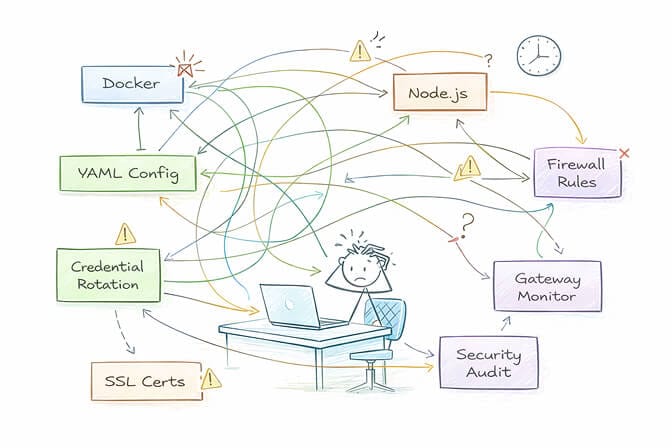
Here's what the architecture overview doesn't tell you: you need a machine running 24/7. You need to manage Node.js versions, update OpenClaw without breaking your config (the 2.0 release notes literally suggest keeping a coding assistant handy in case the automatic update fails), handle credential rotation for every connected platform, monitor the Gateway process, and have a plan for when things break at 3 AM. And if you want proper security, you need sandboxing, firewall rules, non-root execution, and regular audits.
For developers who enjoy infrastructure, this is a fun weekend. For everyone else, it's a full-time ops job.
This Is Exactly the Problem We Built BetterClaw to Solve
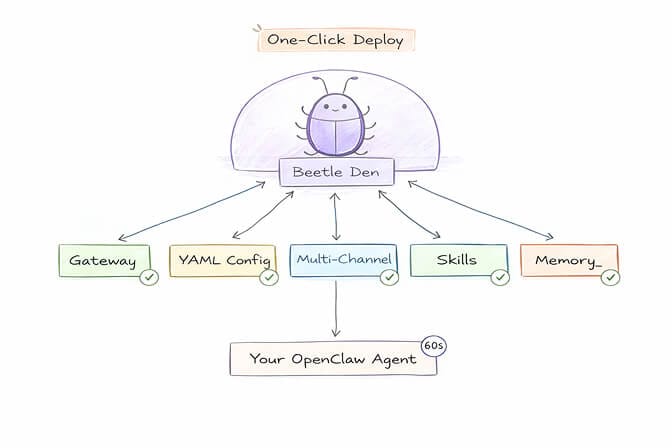
BetterClaw is a no-code AI agent platform and a managed OpenClaw alternative. You get the capabilities we've discussed in this article, the agent loop, the multi-channel connections, unlimited skills, the memory, but without any of the infrastructure work. One-click deploy. Docker-sandboxed execution with AES-256 encryption. Persistent memory with hybrid vector and keyword search. Real-time health monitoring that auto-pauses your agent if something goes wrong.
Sixty seconds from sign-up to a running agent. Free plan with 1 agent and BYOK to start, $49/month for Pro with 5 agents.
The Big Picture: Why Architecture Matters
If you've made it this far, you understand something that most OpenClaw users don't: this isn't just a chatbot. It's a distributed system with a control plane, an execution runtime, persistent state, multi-channel I/O, and a modular capability layer.
That architecture is powerful. It's also the reason OpenClaw is one of the most interesting open-source projects in years. Peter Steinberger built something that makes the patterns behind every serious AI agent framework tangible and inspectable. Understanding OpenClaw's architecture means understanding how AI agents will work everywhere.
But understanding the architecture also means understanding the operational cost. Every layer we discussed, the Gateway, the agent loop, the file-based memory, the multi-channel adapters, the security surface, is something you either manage yourself or let someone else manage for you.
The best developers I know are the ones who understand the engine and know when it makes sense to let someone else change the oil.
If you want to tinker and learn, self-host OpenClaw. The codebase is beautiful and the community is incredible. If you want a production-grade agent running reliably across your team's chat channels without the infrastructure overhead, give BetterClaw a try. Deploy in 60 seconds. We handle the rest.
Either way, now you know what's happening under the hood. And that makes all the difference.
Frequently Asked Questions
What is OpenClaw and how does the OpenClaw framework work?
OpenClaw is an open-source (MIT-licensed) AI agent framework created by Peter Steinberger that runs on your own machine and connects to messaging apps like WhatsApp, Telegram, Slack, and Discord. It works by routing messages through a central Gateway process (a WebSocket server on port 18789 by default) to an LLM-powered agent runtime that can reason, use tools, and take real-world actions. Unlike traditional chatbots, OpenClaw runs as a persistent service with memory, scheduled heartbeats and automations, and modular skills.
How does OpenClaw memory work in OpenClaw 2.0?
Memory is Markdown in the agent workspace: MEMORY.md for durable facts, USER.md for your preferences, and dated daily notes in memory/. Built-in Memory (which replaced the retired QMD backend in 2.0) indexes those files, and the agent retrieves them with memory_search and memory_get. A silent memory flush saves context before compaction, and Dreaming, on by default, promotes durable facts into MEMORY.md in the background.
How does OpenClaw compare to ChatGPT or Claude's web interface?
ChatGPT and Claude's web interface are cloud-hosted chat apps. OpenClaw is a self-hosted agent framework that can take autonomous actions: running shell commands, controlling browsers, managing files, and executing scheduled tasks. The biggest difference is that OpenClaw lives inside your existing messaging apps and runs continuously on your own hardware, with the model of your choice behind it.
How do I deploy OpenClaw without managing Docker and infrastructure?
The fastest way to skip that work is to use a no-code AI agent platform like BetterClaw instead, which handles infrastructure, sandboxing, security configuration, and multi-channel setup for you. You get a running agent in under 60 seconds with no config files, no terminal commands, and no server management. There's a free plan with 1 agent and BYOK, and Pro is $49/month for 5 agents.
Is OpenClaw safe and secure enough for business use?
OpenClaw requires careful security configuration for business use. The framework asks for broad system permissions, and prompt injection is a known risk. Best practices include keeping the Gateway on loopback with token auth, running tools in a sandbox, scoping file access, reviewing skills before you install them, running openclaw security audit, and never running it as root. Managed platforms like BetterClaw include sandboxed execution, AES-256 encryption, and workspace scoping by default.
How much does it cost to run an OpenClaw AI agent?
OpenClaw itself is free (MIT-licensed), but you pay for LLM API usage and for the machine it runs on. API cost depends heavily on the model: Claude Sonnet 5 is $2/$10 per million input/output tokens, Claude Opus 5.5 is $4/$20, and cheaper models cost far less. Add a VPS or an always-on machine on top. Managed options like BetterClaw start with a free plan and $49/month for Pro, which removes the infrastructure management time.
Related Reading
- OpenClaw vs Hermes — Head-to-head on setup, models, channels, hosting and cost
- Is OpenClaw Dead? — Commit activity, the security crisis, and what's actually happening
- Claude Subscription and OpenClaw: The Ban, the Reversal, and What To Do — What changed in Anthropic's terms and your options now
- OpenClaw Memory Wiki Guide — The persistent-memory layer, set up end to end
- Model Does Not Support Tools: The Fix — The most common error when wiring local models to OpenClaw
- Complete OpenClaw Setup Guide — Install, configure and run your first agent
- What OpenClaw Actually Costs to Run — API fees, hosting, and the overhead nobody budgets for