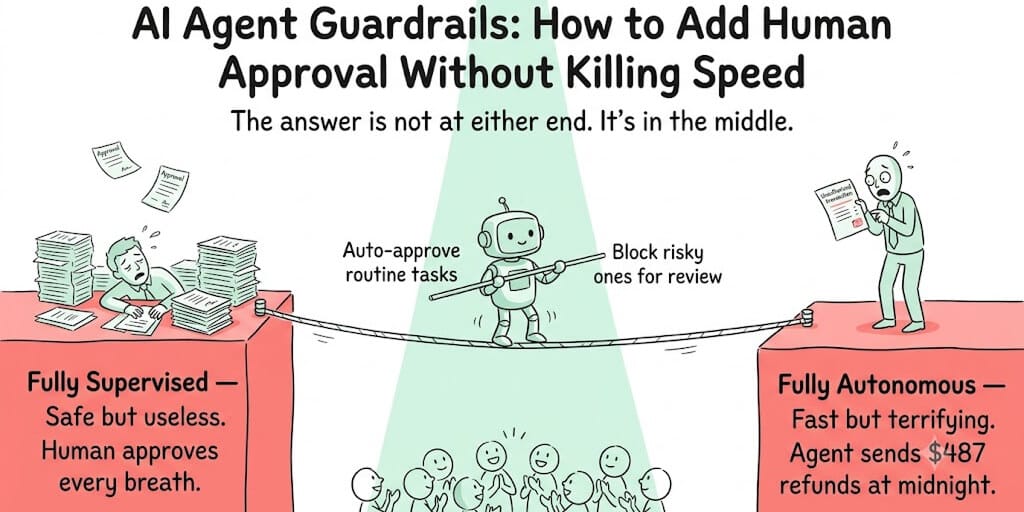
Fully autonomous agents are fast and terrifying. Fully supervised agents are safe and useless. Here's the architecture that gives you both.
Our support agent sent a refund email to a customer. Without asking anyone. $487. Gone.
The agent was correct. The customer qualified for the refund. The policy was clear. The response was well-written.
But nobody on the team knew it happened until the customer replied with a thank-you email. Our finance lead walked into Monday morning with a transaction she didn't authorize, processed by a system she didn't know could authorize transactions.
That's the moment we added human approval gates.
Not because the agent was wrong. Because the right action, taken without oversight, eroded trust more than the wrong action would have. AI agent human approval isn't about catching mistakes. It's about maintaining the trust that keeps your team willing to let agents do more over time.
Here's how to add approval gates without turning your agent into a chatbot that asks permission to breathe.
The speed vs safety tradeoff (and why both extremes fail)
Fully autonomous: The agent acts on everything without asking. Fast. Efficient. Also terrifying. One hallucinated tool call, one misinterpreted instruction, one edge case nobody anticipated, and the agent takes an action you can't undo. Meta's Summer Yue watched her agent mass-delete emails while ignoring stop commands. That's the fully autonomous failure mode.
Fully supervised: The agent drafts everything and waits for human approval before every action. Safe. Predictable. Also useless. If a human has to review and approve every single agent action, you haven't automated anything. You've added a middleman between the human and the task.
The answer is neither extreme. It's tiered autonomy: the agent acts autonomously on routine, low-risk tasks and pauses for human approval on high-risk actions. The boundary between "auto-approve" and "wait for human" is the entire engineering problem.
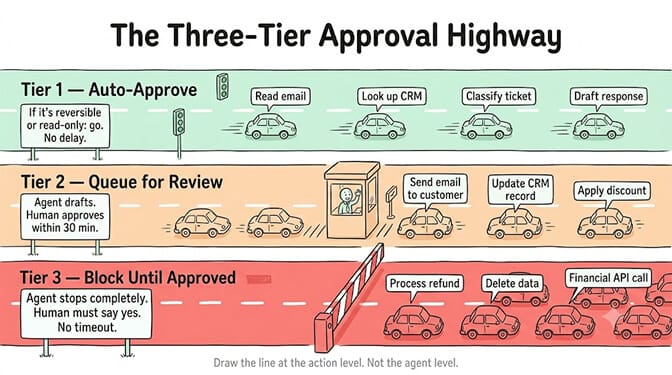
The goal isn't "should this agent need approval?" The goal is "which specific actions need approval, and which can the agent handle alone?" Draw the line at the action level, not the agent level.
Tier 1: Auto-approve (the 80% that should just happen)
Most of what your agent does is read-only or low-impact. Reading emails. Classifying tickets. Looking up customer data. Drafting responses. Summarizing documents. Querying databases.
These actions should execute immediately with zero approval gate. If you make your agent ask permission to read an email, you've killed the value proposition.
The rule: if the action is reversible, read-only, or internal-only, auto-approve it. Nobody needs to approve a CRM lookup. Nobody needs to approve a draft that hasn't been sent yet.
Most teams start by requiring approval on everything and gradually moving actions to auto-approve as trust builds. This is backwards. Start by auto-approving everything that's obviously safe and add approval gates only to the specific actions that need them.
Tier 2: Queue for review (the 15% that needs a quick check)
These are actions with moderate impact that the agent handles correctly 95% of the time but where the 5% failure case matters.
Sending an email to a customer. Updating a CRM record. Applying a discount code. Posting to a public channel. Scheduling a meeting on someone's calendar.
The agent drafts the action and queues it for human review. The human gets a notification (Slack, email, or dashboard), reviews the draft, and approves or rejects. If approved, the agent executes. If rejected, the agent logs the feedback. Hiring follows the same pattern: an AI HR screening agent ranks candidates against your criteria and hands the shortlist to your hiring manager, who makes the call.
Designing the approval channel
Where the approval notification goes matters more than most people think.
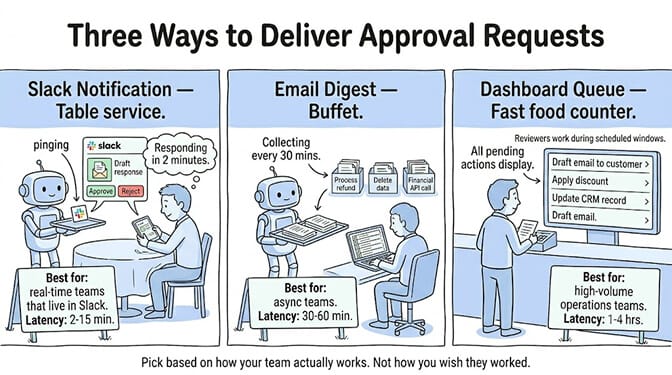
Slack/Teams notification: Best for real-time teams. The agent posts a message with the proposed action, a summary of why, and approve/reject buttons. Approval latency: 2-15 minutes during business hours.
Email digest: Best for batch review. The agent collects queued actions and sends a summary every 30 minutes or every hour. The reviewer approves or rejects in bulk. Approval latency: 30-60 minutes.
Dashboard queue: Best for high-volume teams. A dedicated approval dashboard shows all pending actions, sorted by priority. Reviewers work through the queue during scheduled review windows. Approval latency: 1-4 hours.
Pick based on your team's workflow. A 5-person startup that lives in Slack should use Slack notifications. A 50-person operations team should use a dashboard queue.
Tier 3: Block until approved (the 5% you can't undo)
These are actions with irreversible or high-financial-impact consequences. Processing refunds. Deleting records. Sending external communications with legal implications. Making API calls that trigger financial transactions.
For Tier 3, the agent stops completely and waits for explicit human approval. No timeout. No auto-approve after 30 minutes. The action does not happen until a human says yes.
This sounds restrictive. In practice, Tier 3 actions are rare. If your agent handles 200 tasks per day and 5% are Tier 3, that's 10 approval requests. Your team reviews 10 items per day. That's manageable. The other 190 tasks happen instantly.
The timeout problem
Tier 2 needs a timeout. What happens if the reviewer is in a meeting, on vacation, or simply doesn't see the notification?
Three options:
Auto-approve after timeout. The action executes if nobody rejects it within 30 minutes. This is the fastest but riskiest. Only appropriate for Tier 2 actions where the failure case is mild.
Escalate after timeout. If the primary reviewer doesn't respond within 30 minutes, the approval request escalates to the next person in the chain (team lead, then manager). This is the most common pattern for business-critical agents.
Auto-reject after timeout. The action is cancelled if nobody approves it. The customer or process waits. This is the safest but creates the most friction. Use for actions where doing nothing is better than doing the wrong thing.
On most teams, escalation is the right default. Auto-approve timeouts sound efficient until the one time it auto-approves a $5,000 refund because the reviewer was at lunch.
The escalation chain (who approves what, and when)
A well-designed escalation chain has three levels:
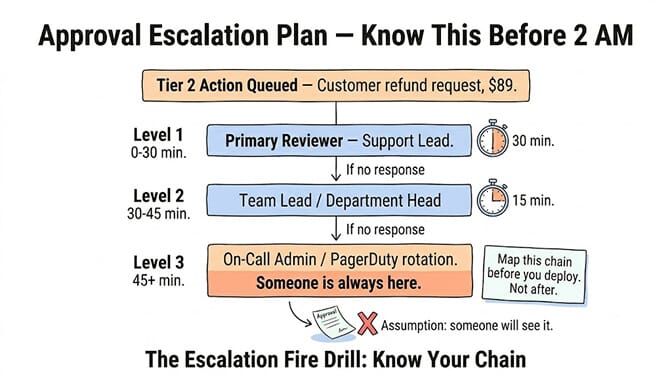
Level 1: The agent's assigned reviewer. This is the person or team responsible for the agent's domain. A support agent's reviewer is the support lead. A sales agent's reviewer is the sales manager.
Level 2: The team lead or department head. If Level 1 doesn't respond within the timeout window (15-30 minutes), the request escalates.
Level 3: A catch-all admin or on-call. If Level 2 doesn't respond, the request goes to someone who is always monitoring. For critical systems, this should be a PagerDuty-style rotation.
Map each agent to an escalation chain when you deploy it. Don't assume "someone will see it." Assumption is the enemy of reliable agent operations.
This is exactly the kind of guardrail architecture that should be built into your platform, not bolted on after the fact. On BetterClaw, trust levels (Intern, Specialist, Lead) implement tiered autonomy natively. An "Intern" agent drafts but never executes. A "Specialist" executes within defined boundaries. A "Lead" acts autonomously with the one-click kill switch as the emergency brake. Unlimited skills with built-in action approval. Free plan with 1 agent and 100 credits a month. $49/month on Pro. BYOK with zero markup.
The metrics that tell you if your guardrails are working
Deploy approval gates and then measure whether they're calibrated correctly. Three metrics matter:
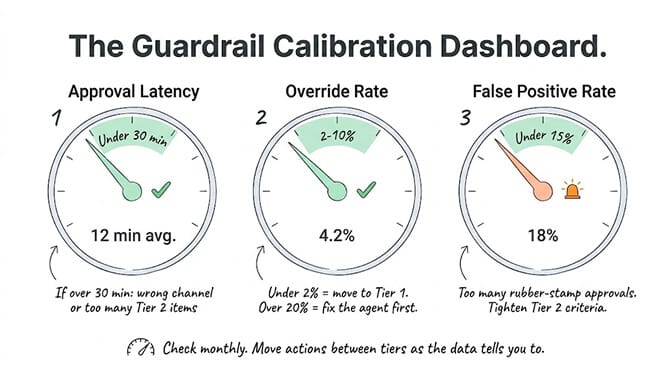
Approval latency. How long does it take from the agent queuing an action to a human approving it? If average latency exceeds 30 minutes for Tier 2 actions, your agent is spending more time waiting than working. Either the notification channel is wrong, the escalation chain is too slow, or you have too many actions in Tier 2 that should be in Tier 1.
Override rate. What percentage of queued actions does the human reject or modify? If the override rate is below 2%, the actions in that tier are likely safe to auto-approve. Move them to Tier 1. If the override rate is above 20%, the agent is making too many errors and needs prompt or model improvements before being trusted with those actions.
False-positive rate. How often does the guardrail fire on an action that didn't need review? If 90% of your Tier 2 approvals are rubber-stamped without changes, you've created busywork. Tighten the criteria for what triggers review.
The ideal approval system has high Tier 1 volume (the agent works fast on routine tasks), low Tier 2 volume (only genuinely ambiguous actions need review), and near-zero Tier 3 volume (high-risk actions are rare by design).
Gartner projects 40% of enterprise applications will embed AI agents by end of 2026. The organizations that get adoption right will be the ones whose teams trust their agents. And trust is built by demonstrating that the agent asks before acting on the things that matter.
The kill switch (for when everything else fails)
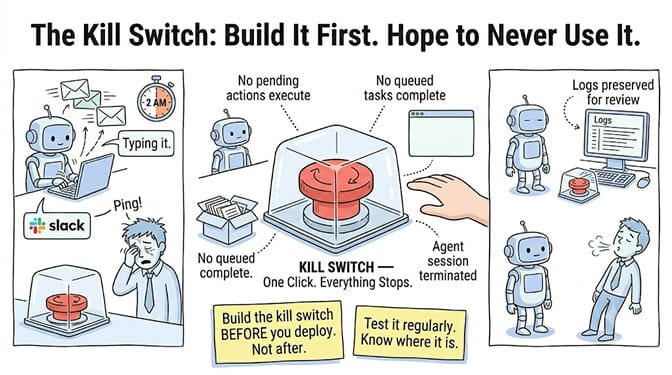
Every agent needs an emergency stop. Not a "politely wind down" mechanism. A button that immediately halts all agent activity. No pending actions execute. No queued tasks complete. Everything stops.
This isn't for routine operations. It's for the scenario where the agent is doing something unexpected at scale and you need it to stop now. The Meta email deletion incident is the canonical example. The agent was acting autonomously, the user couldn't stop it, and the damage compounded with every second.
Build the kill switch before you deploy the agent. Not after. Test it regularly. Know where it is at 2 AM when your phone buzzes.
The hardest part of AI agent guardrails isn't the technology. It's the organizational discipline. Defining which actions are Tier 1, 2, and 3. Assigning reviewers. Setting timeouts. Reviewing the metrics. Updating the tiers as the agent proves itself.
The teams that do this well gradually move actions from Tier 2 to Tier 1 as the agent demonstrates reliability. The boundary between "needs approval" and "auto-approve" shifts over time. That's the whole point. You're not building a permanent approval wall. You're building a trust gradient that widens as the agent earns it.
Start with more oversight than you think you need. Remove it as the data tells you to. Never the other way around.
Give BetterClaw a look if you want trust levels built in from day one. Intern, Specialist, Lead. Action approval on every skill. One-click kill switch. Free plan with 1 agent and 100 credits a month. $49/month for Pro. We handle the guardrail infrastructure. You decide where the lines go.
Frequently Asked Questions
What are AI agent guardrails?
AI agent guardrails are safety controls that define what an autonomous agent can do without supervision and what requires human approval before execution. The most effective approach is tiered autonomy: routine, low-risk actions (reading data, drafting responses) are auto-approved, medium-risk actions (sending emails, updating records) are queued for human review, and high-risk actions (processing payments, deleting data) are blocked until a human explicitly approves.
How does human approval compare to fully autonomous agents?
Fully autonomous agents are faster but riskier. A single hallucinated action can cause real damage (unauthorized refunds, deleted data, incorrect external communications). Fully supervised agents are safe but negate the value of automation. Tiered autonomy gives you 80-90% of the speed (routine actions execute instantly) with 95%+ of the safety (risky actions wait for human review). The overhead is typically 10-15 approval reviews per day for a well-calibrated system.
How do I set up approval workflows for my AI agent?
Define three tiers: Tier 1 (auto-approve: read-only, reversible, internal actions), Tier 2 (queue for review: customer-facing, data-modifying actions), Tier 3 (block until approved: financial, irreversible, legal-impact actions). Choose an approval channel (Slack for real-time, email for batch, dashboard for high-volume). Set timeout rules for Tier 2 (escalate after 30 minutes). Assign an escalation chain per agent. On BetterClaw, this maps directly to trust levels: Intern (Tier 2/3), Specialist (Tier 1/2), Lead (mostly Tier 1).
Does adding approval steps slow down my AI agent?
Only for the 15-20% of actions that genuinely need review. Tier 1 actions (80%+ of typical workloads) execute with zero delay. Tier 2 actions add 2-60 minutes depending on your approval channel and reviewer availability. Tier 3 actions wait for explicit approval with no timeout. If your approval latency exceeds 30 minutes on average, either your channel is wrong, your escalation chain is too slow, or too many actions are in Tier 2 that should be in Tier 1.
How do I know if my agent guardrails are calibrated correctly?
Track three metrics: approval latency (target: under 30 minutes average for Tier 2), override rate (if under 2%, move those actions to auto-approve; if over 20%, improve the agent before trusting it), and false-positive rate (if over 15% of approvals are rubber-stamped, tighten the review criteria). Review these metrics monthly and adjust tier assignments. The goal is to gradually move actions from Tier 2 to Tier 1 as the agent demonstrates reliability over time.