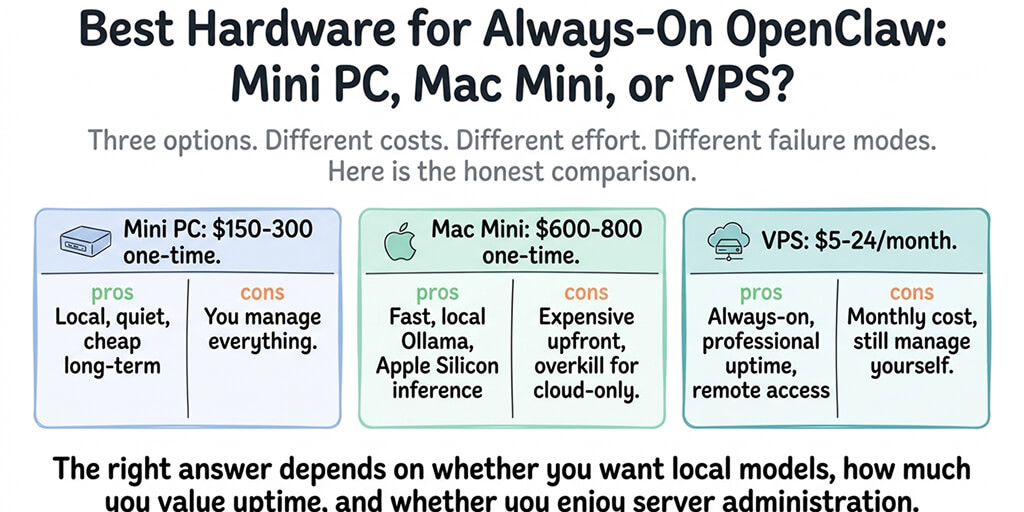
The "free AI agent" dream has a hardware price tag. Here is the honest breakdown of what runs, what struggles, and what is not worth the electricity.
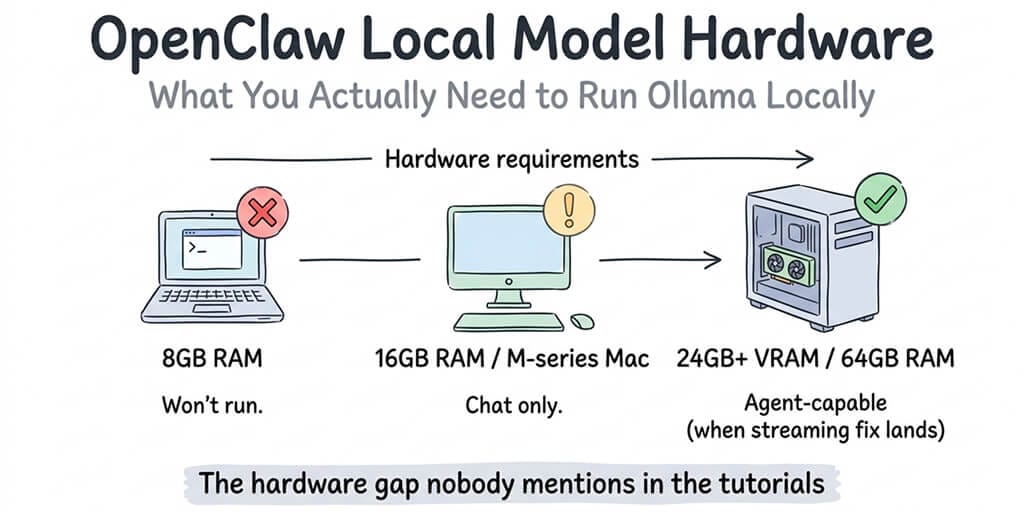
Quick answer: OpenClaw itself runs on almost nothing. A $5/month VPS or a Raspberry Pi handles the agent when you point it at a cloud model. The hardware question only gets expensive when you want to run the model locally too. For that, plan on 32GB RAM minimum (16GB only works for 7B chat-only experiments) and either a GPU with 24GB+ VRAM (used RTX 3090, RTX 4090, or RTX 5090) or an Apple Silicon machine with 32GB+ unified memory. If you're considering a unified-memory box like NVIDIA's DGX Spark for this, weigh the DGX Spark alternatives first. All-in, a local setup costs roughly $30 to $100/month once you factor hardware depreciation, electricity, and maintenance time. Tool calling works with OpenClaw's native Ollama provider as of April 2026. If you are still on the /v1 OpenAI-compatible path, see the troubleshooting guide.
Your agent. Running. Not broken.
One AI agent on managed infrastructure. Verified skills, encrypted secrets, smart context management. Free forever, not a trial. Start free → No credit card · No Docker · No config files
Here's the quick reference for running local models with Ollama by model size:
| Model Size | Min RAM | Recommended | GPU VRAM | Example Models |
|---|---|---|---|---|
| 7B | 8GB | 16GB | 4GB+ | Gemma 4 4B, Phi-3 |
| 13B | 16GB | 24GB | 8GB+ | Gemma 4 12B |
| 27-33B | 24GB | 32GB | 12GB+ | Qwen 3.7 27B |
| 70B+ | 48GB | 64GB | 24GB+ | LLaMA 3 70B |
Gateway Mode vs Local Model Mode: The Split That Decides Everything
Before you spend a dollar, understand the single most important distinction. OpenClaw runs in two very different modes, and they have wildly different hardware needs.
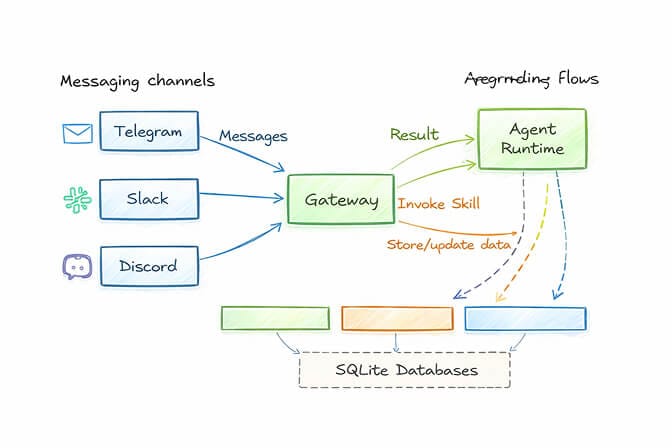
Gateway mode is OpenClaw connecting to a cloud model (Claude, GPT, DeepSeek, Gemini) over an API. In this mode OpenClaw is just a Node.js process that routes messages, runs skills, and schedules heartbeats. It needs barely any hardware: 2 to 4GB RAM, any modern CPU, no GPU at all. A $5/month VPS or a Raspberry Pi runs this indefinitely.
Local model mode is OpenClaw running the language model on your own machine via Ollama. This is the resource-hungry path. The model loads entirely into memory, so RAM and VRAM become the hard constraints, and a capable GPU or Apple Silicon machine goes from optional to essential.
Most wrong hardware purchases come from buying for the model when the gateway is what is actually running. Decide which mode you are in first. If you only need a 24/7 agent on a cloud model, stop reading and buy the cheapest always-on box you can find. The rest of this guide is about the local path.
Does OpenClaw Need a GPU?
Short answer: no for gateway mode, yes for local models above roughly 20B parameters.
OpenClaw the framework is a lightweight Node.js application. It needs no GPU and runs fine on a basic laptop, a Raspberry Pi, or a cheap VPS when the AI processing happens in the cloud. A GPU only matters when you run a local LLM via Ollama on the same machine.
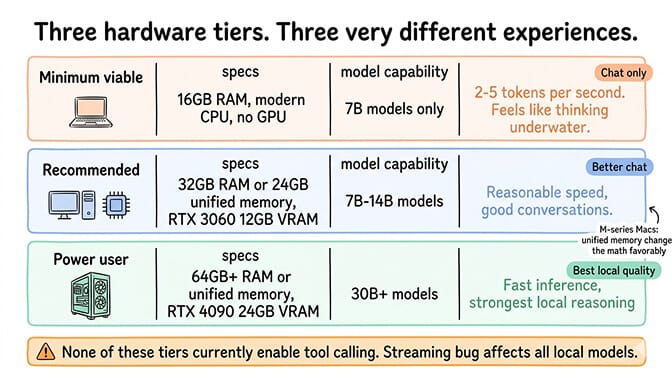
For light local models (7B to 9B), a GPU with 8 to 12GB VRAM, or any Apple Silicon Mac with unified memory, gives you usable speed. For the 30B-class models that actually hold up to agent work, you want 24GB+ VRAM. Without a GPU, Ollama falls back to CPU inference, which generates maybe 2 to 5 tokens per second and makes the agent feel like it is thinking underwater. Technically it runs. Practically you will not enjoy it.
The Hardware Floor: What You Need at Minimum
Running Ollama with OpenClaw requires more resources than most people expect. The bottleneck is not OpenClaw itself. It is the local model.
RAM is the primary constraint. Local models load entirely into memory. A 7B parameter model needs roughly 4 to 8GB just for the weights. Add OpenClaw's own footprint (its system prompt alone runs to tens of thousands of tokens, which sits in your KV cache), the OS, and any other services, and 32GB is the practical floor for a useful experience.
A note on the 16GB-vs-32GB debate, since you will see both quoted: 16GB is enough for the model weights of a 7B model alone, which is why many guides list it as the minimum. But once OpenClaw's system prompt and a 64K context window load into the KV cache, 16GB chokes on real agent tasks. 32GB is the honest floor for anything beyond chat-only experiments.
VRAM matters more than RAM if you have a GPU. Running models on a dedicated GPU is dramatically faster than CPU inference. An NVIDIA RTX 3060 with 12GB VRAM runs 7B models comfortably. A used RTX 3090 or RTX 4090 with 24GB VRAM handles models up to about 30B parameters. For glm-4.7-flash (30B-A3B MoE, ~19GB at q4_K_M quantization), 24GB VRAM is enough at q4. Higher quants need a 32GB card.
Apple Silicon changes the math. M1/M2/M3/M4 Macs with unified memory handle local models surprisingly well because the GPU and CPU share the same memory pool. A Mac Mini M4 with 24GB unified memory runs 7B to 14B models smoothly. A Mac Studio with 64GB+ unified memory runs the larger models that give the best results.
CPU inference works but is painfully slow. Without a dedicated GPU or Apple Silicon, expect 2 to 5 tokens per second on a 7B model, versus 1 to 2 seconds total for a full cloud API response.
RAM and VRAM by Model Size
This is the table to bookmark. Match your machine to the model tier you want to run.
| Model size | RAM / unified memory | GPU VRAM | Example model | Real-world feel |
|---|---|---|---|---|
| 7B to 8B | 16GB (32GB with OpenClaw loaded) | 8 to 12GB | mistral:7b, qwen3.5:9b | Chat-only, marginal for agent tasks |
| 13B to 14B | 24GB | 12 to 16GB | gemma4 mid-tier | Usable, still limited reasoning |
| 30B class | 32GB | 24GB at q4 | glm-4.7-flash, qwen3-coder:30b | The real agent sweet spot |
| 70B class | 64GB+ unified | 48GB+ (multi-GPU) | larger Llama / Qwen | Best quality, workstation territory |
The pattern: 24GB VRAM or 32GB unified memory is the entry point where local OpenClaw stops being a toy. Below that, you are running chat experiments, not an agent.
Can I Run OpenClaw on a Raspberry Pi or Mac Mini?
Two of the most common device questions, answered directly.
Raspberry Pi: yes for the gateway, no for the model. A Pi 4 or Pi 5 with 8GB RAM runs the OpenClaw gateway indefinitely when paired with a cloud API, and it has stayed up for months in real community builds. But the Pi's GPU has minimal AI acceleration, and CPU-only inference on a 7B+ model is extremely slow. The smallest genuinely workable local model is around 20B parameters and needs a real GPU. The clean pattern is split architecture: Pi for the agent, a separate machine for inference.
Mac Mini: yes, and it is the community's overwhelming first pick for a dedicated OpenClaw box. The base Mac Mini M4 (16GB) runs 7B to 9B models adequately and handles cloud-API mode without breaking a sweat. The 24GB upgrade is the sweet spot for daily local use. The Mac Mini M4 Pro extends into 30B-class models at quantization. Apple Silicon's efficiency is the draw: an M4 Mini idles around 4 to 8 watts and costs roughly $1 to $2/month to run 24/7.
If you only need cloud-API mode, even a Mac Mini is overkill. A $5/month VPS does the same job.
The Models Worth Running Locally (and the Ones That Aren't)
Not all local models perform equally with OpenClaw. The community has tested extensively, and the consensus is clear.
Models That Work Well for Agents
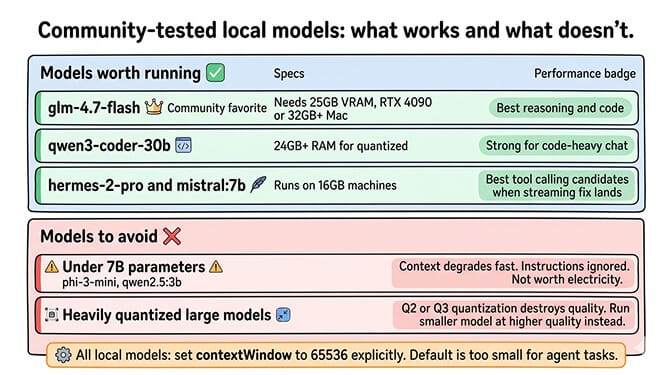
glm-4.7-flash is the community favorite. 30B-A3B MoE architecture, ~19GB at q4_K_M and ~32GB at q8_0, requires Ollama 0.14.3 or newer. Strong reasoning and code generation. Pull with ollama pull glm-4.7-flash. Fits on a 24GB GPU at q4 and on Apple Silicon machines with 32GB+ unified memory.
qwen3-coder:30b performs well for code-heavy conversations. 30.5B params / 3.3B active MoE with a 256K-token native context. The official model card lists ~250GB at full precision, so for most builds you will run an aggressive quant that fits in 24 to 32GB. Pull with ollama pull qwen3-coder:30b.
hermes3 (the official Hermes 3 in Ollama's library) and mistral:7b are the lightweight tool-calling picks for 16 to 24GB machines. Lower reasoning ceiling than the 30B+ models, but they run anywhere and get the tool-call format right.
Newer Models Worth a Look (released 2026)
The Ollama library has moved fast in early 2026. A few notable additions:
qwen3.6:35b-a3bis a Qwen 3.6 MoE designed explicitly for agentic workflows (35B total / 3B active). Pull withollama pull qwen3.6:35b-a3b.qwen3.5:9bis the sweet-spot smaller Qwen for 16 to 24GB machines.gemma4:e4bandgemma4:26bare Google's Gemma 4 generation (April 2026), Apache 2.0 licensed. The e4b variant is a strong 16GB-machine option; the 26B MoE fits comfortably on 24GB GPUs.gpt-oss:20bis OpenAI's open-weight 21B MoE (3.6B active), MXFP4-quantized, runs on 16GB. The tag uses a colon, not a hyphen.llama4:scoutandllama4:maverickare Meta's Llama 4 MoEs (Scout 109B / Maverick 400B, both 17B active). Maverick is server territory; Scout is feasible on a 24GB GPU at quantization.
One-Command Setup: ollama launch openclaw
Ollama 0.17 added a launch subcommand that auto-downloads, installs, and configures OpenClaw to use the local Ollama daemon:
ollama launch openclaw --model glm-4.7-flash
The --model flag pre-pulls the model. Without flags, it walks you through a TUI picker. This replaces the manual provider config most older guides describe.
Models to Avoid
Anything under 7B parameters. Models like phi-3-mini (3.8B) and qwen2.5:3b technically run but produce unreliable results for agent tasks. Context tracking degrades quickly. Instructions get ignored. Not worth the electricity.
Unquantized large models on insufficient hardware. If your hardware forces heavy quantization (Q2 or Q3), quality drops dramatically. You are better off running a smaller model at higher quality than a large model at extreme quantization.
Ollama's own OpenClaw integration docs recommend setting the context window to at least 64K tokens. Many popular models default to much less. Configure this explicitly to avoid the agent running out of context mid-conversation.
For guidance on choosing the right model for your agent's specific tasks, our model comparison covers cost-per-task data across local and cloud providers.
Tool Calling: What Works Now, and What Still Trips People Up
For most of early 2026, the honest answer was that tool calling did not work for local models through OpenClaw. The reason was documented in GitHub Issue #5769: OpenClaw sent requests via the OpenAI-compatible /v1 path with streaming enabled, and Ollama's /v1 streaming dropped tool-call delta chunks. Your model decided to call a tool, generated the call, and OpenClaw never saw it.
That has been resolved. OpenClaw's native Ollama provider now integrates directly with Ollama's /api/chat endpoint, which preserves tool calls under streaming. The official Ollama provider docs explicitly warn against the /v1 URL because it still breaks tool calling. If your config points at http://localhost:11434/v1, drop the /v1 and update OpenClaw. Then run openclaw doctor --deep to confirm.
What that means for the hardware question:
- Buying a GPU for OpenClaw agent tasks is no longer pointless. Tool calling works, skills execute, and the hardware investment pays off in capability.
- Model capability is still the real bottleneck. Models under ~30B parameters frequently fail on multi-step agent reasoning even when tool calling works mechanically. A 7B model that successfully emits a tool call is still a 7B model.
- If you installed before April 2026 and stopped using OpenClaw because of this, it is worth reinstalling. Update, switch to the native Ollama provider, and retest.
If you are on an older build and cannot update, the community workaround is to patch streaming off for Ollama specifically, covered in our troubleshooting guide.
The Real Cost of "Free" Local Models
The appeal of local models is zero API costs. But "zero API costs" and "zero cost" are very different things. Let's do the actual math.
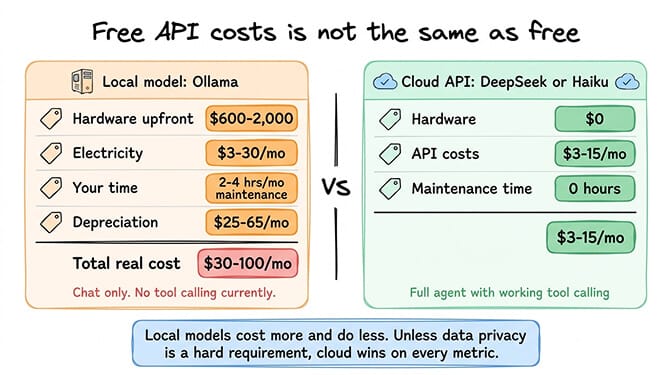
Hardware cost. Apple repriced the Mac Mini lineup in May 2026 amid a DRAM shortage. The Mac Mini M4 now starts at $799 with 16GB unified memory; the M4 Pro variants start at $1,299 and top out at 48GB. On the GPU side, the RTX 5090 launched at $1,999 MSRP but typically sells for $2,500 to $3,200 on the street, an RTX 4090 runs $1,600 to $2,000, and a used RTX 3090 runs $600 to $800 in good condition. Budget $80 to $120 for a PSU upgrade if your existing supply cannot handle a 4090-class card.
Electricity. A Mac Mini M4 running 24/7 consumes roughly $3 to $5/month. A desktop with an RTX 4090 under load uses significantly more, roughly $15 to $30/month depending on rates and inference frequency.
Your time. Initial setup is 1 to 2 hours with a recent OpenClaw release. Ongoing maintenance (model updates, Ollama updates, occasional WSL2 networking gotchas) adds 1 to 3 hours per month.
Hardware depreciation. That $799 Mac Mini depreciates. That $1,800 GPU depreciates faster. Over two years, you are losing $25 to $75/month in hardware value.
Total monthly cost of local model ownership: roughly $30 to $100/month when you factor in amortization, electricity, and time.
Meanwhile, cloud APIs in 2026 remain cheap enough that the math rarely favors local on cost alone. Providers like DeepSeek and Gemini's free tier run a moderate-usage agent for a few dollars a month with working tool calling and large context windows. For up-to-date numbers, see our cloud cost comparison.
When Local Hardware Genuinely Makes Sense
I have just spent several paragraphs explaining why local models cost more and do less than cloud APIs. Here are the three scenarios where the hardware investment is justified.
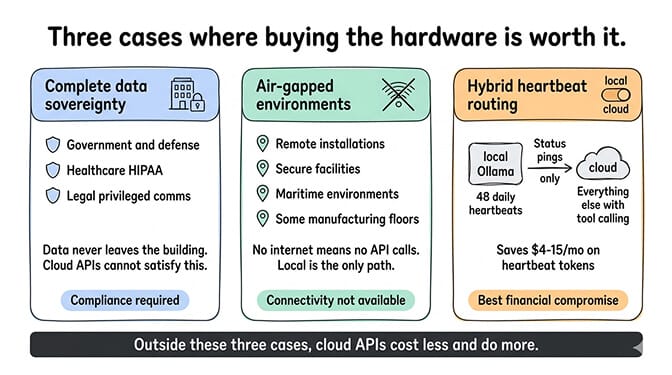
Complete data sovereignty. If your data absolutely cannot leave your network, local models are the only option. Government agencies, defense contractors, healthcare organizations under strict HIPAA requirements, legal firms handling privileged communications. A local agent that discusses sensitive documents without any data leaving the building is worth the hardware cost.
Air-gapped and offline environments. No internet means no API calls. If you need an AI assistant in a facility without reliable connectivity (remote installations, secure facilities, maritime environments, some manufacturing floors), local models are the only path.
Hybrid heartbeat routing. This is the practical compromise that makes the most financial sense. Use a local Ollama model for heartbeats (the 48 daily status checks that consume tokens on cloud providers) and route everything else to a cloud model with working tool calling. Heartbeats do not require tool calling; they are simple status pings. Running them locally saves $4 to $15/month. Set the heartbeat model to your local Ollama instance and the primary model to a cloud provider like Claude Sonnet or DeepSeek.
For the full model routing configuration, our routing guide covers the hybrid setup pattern.
If managing local hardware, cloud APIs, and routing config feels like more infrastructure work than your agent is worth, BetterClaw handles model routing across 28+ providers with a dashboard dropdown. $49/month for Pro, BYOK. Pick your models. Set your limits. Deploy in 60 seconds. No hardware to buy, no Ollama to debug.
The Hardware Buying Guide (if you're still committed)
If your use case genuinely requires local models, here is what to buy at each budget level.
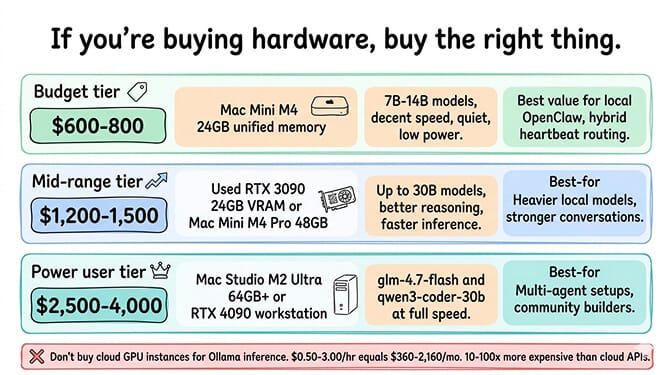
Budget tier (~$800 to $1,000). Mac Mini M4. Base 16GB for chat-only experimentation, 24GB upgrade for a usable agent. Runs 7B to 14B models at decent speed. Quiet, low power, handles hybrid heartbeat routing without issue.
Mid-range tier (~$1,300 to $2,000). Used RTX 3090 (24GB VRAM, $600 to $800 secondhand) in an existing desktop, or a Mac Mini M4 Pro starting at $1,299 with up to 48GB unified memory. Runs models up to 30B parameters. Good enough for glm-4.7-flash at q4 or qwen3-coder:30b at aggressive quantization.
Power user tier (~$2,500 to $5,000). Two paths:
- RTX 5090 in a workstation. $1,999 MSRP, $2,500 to $3,200 street. 32GB GDDR7 and roughly 35 to 50% more tokens per second than a 4090. The first consumer GPU that fits 30B-class models comfortably above q4.
- Apple Silicon with maxed unified memory. The M5 Max MacBook Pro (shipping now) tops out at 128GB unified memory, the sweet spot for 70B-class models without aggressive quantization. (Weighing Mac against an NVIDIA build? Our Apple Silicon vs NVIDIA guide covers the speed-versus-capacity call.) The M5 Mac Studio arrived on 25 August 2026 with M5 Max (from $2,499) and M5 Ultra (from $5,499, 1.2 TB/s), deliveries from 22 September. The 512GB M5 Ultra tier is not available until late October, so 256GB is the current ceiling.
The previous Mac Studio (M4 Max / M3 Ultra) remains a strong pure-memory option if you find one discounted, though high-memory configs have long lead times. Check stock and ship dates before committing.
What not to buy. Do not rent a cloud GPU instance (Lambda Labs, Vast.ai) for running Ollama with OpenClaw. The per-hour cost ($0.50 to $3.00/hour) adds up to $360 to $2,160/month, which is 10 to 100x more than cloud API costs. GPU instances make sense for training, not inference.
Where Local Stands Today (and where it still trails cloud)
With native tool calling working, the gap between local and cloud has narrowed for tasks that do not require frontier-level reasoning. glm-4.7-flash and qwen3-coder:30b are genuinely useful for agent work on the right hardware. Skills execute. Heartbeats run cheaply. Code-heavy workflows run locally without round-tripping a cloud provider.
But narrowed is not closed. Cloud models like Claude Sonnet still outperform local models on complex multi-step reasoning, long-context accuracy, and prompt injection resistance. The hardware requirements for competitive local models (24GB+ VRAM at q4, 32GB+ for higher quants, 64GB+ unified memory on Apple Silicon) put them out of reach for casual users. And cloud inference is just faster: a 30B-class model on a 4090 is several times slower per token than the same model on a hosted API.
The practical answer remains hybrid. Cloud for the tasks that need it. Local for privacy-sensitive conversations, heartbeats, and cost savings on high-volume background tooling. OpenClaw's model routing supports the split out of the box.
The managed vs self-hosted comparison covers how these choices translate across deployment options.
Skip the hardware question entirely.
Run your OpenClaw agent on infrastructure that is already optimized. 28+ providers, BYOK, 60-second deploy, Docker-sandboxed execution. Free forever, not a trial. Start free →
Frequently Asked Questions
What hardware do I need to run local models with OpenClaw?
32GB RAM and a GPU with 24GB+ VRAM (used RTX 3090, RTX 4090, or RTX 5090) is the practical floor for a useful agent experience. Apple Silicon equivalent: 32GB+ unified memory. 16GB only works for 7B chat-only experiments. If you only run a cloud model through OpenClaw, you need almost nothing: 2 to 4GB RAM and no GPU. Configure Ollama's context window to at least 64K tokens.
Does OpenClaw need a GPU?
No for gateway mode, where OpenClaw connects to a cloud model and runs as a lightweight Node.js process on any CPU. Yes for local model mode once you go above roughly 20B parameters, where a 24GB+ VRAM GPU or 32GB+ Apple Silicon machine is needed for usable speed. Small local models (7B to 9B) run on 8 to 12GB VRAM or any unified-memory Mac.
Can I run OpenClaw on a Raspberry Pi?
For the gateway, yes. A Pi 4 or Pi 5 with 8GB RAM runs OpenClaw indefinitely when paired with a cloud API, with response times of 3 to 8 seconds. For local model inference, no: the Pi's GPU has minimal AI acceleration and the smallest workable local model is around 20B parameters. The clean setup is split architecture, with the Pi running the agent and a separate machine handling inference.
Can I run OpenClaw on a Mac Mini?
Yes, and it is the community's favorite dedicated box. The base Mac Mini M4 ($799 with 16GB after the May 2026 repricing) runs 7B to 14B models adequately. The 24GB upgrade is the sweet spot for daily use. The Mac Mini M4 Pro ($1,299+, up to 48GB) runs 30B-class models at quantization.
How do I set up Ollama with OpenClaw?
Easiest path: run ollama launch openclaw --model glm-4.7-flash (Ollama 0.17+), which auto-installs and configures the gateway. Manual path: install Ollama, pull your model, point OpenClaw's Ollama provider at http://localhost:11434 (no /v1), set the context window to 64K+, and run openclaw doctor --deep to verify.
Is running OpenClaw locally cheaper than cloud APIs?
Usually not on cost alone. A Mac Mini M4 depreciates roughly $25/month over two years plus $3 to $5/month electricity, totaling $30 to $40/month, while comparable cloud usage often runs a few dollars on cheap providers. Local wins for data sovereignty, offline use, or high-volume heartbeats, not for cost savings alone.