Almost nobody gets their local model working from the generic advice out there. That changes now. Five steps. Each with one diagnostic command and one fix. Skip to the step that matches your symptom.
Local models without the config wrangling.
Point BetterClaw at your Ollama instance or any OpenAI-compatible endpoint — alongside 28+ cloud providers via BYOK. Free forever, not a trial. Start free → No credit card · BYOK · Zero markup
Your OpenClaw local model was supposed to be the easy part. Pull a model on Ollama. Point OpenClaw at localhost. Done.
Except it's not done. It's "Error: model not responding." Or it's "connection refused." Or it's a blank screen where your agent should be thinking. Or worse, it silently falls back to a cloud model and you don't realize you're paying for tokens on something that should be free.
I've debugged this exact problem on about 30 different setups. Laptops, VPS boxes, Docker stacks, Apple Silicon Macs, Linux servers with AMD GPUs. The root cause falls into five categories. Every time.
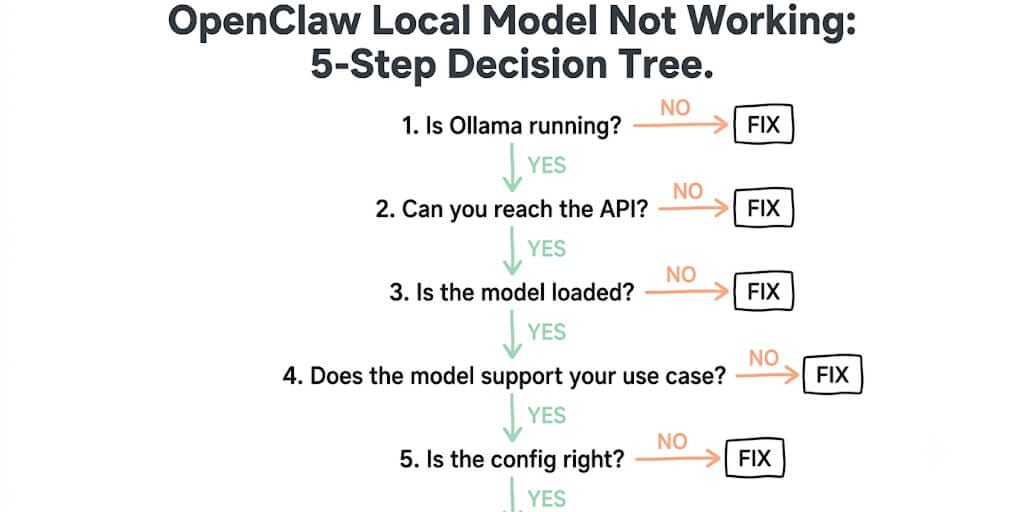
Here's the decision tree. Start at Step 1. Follow the YES/NO branches. You'll hit your fix in under 2 minutes.
Step 1: Is Ollama actually running?
The diagnostic command:
ollama ps
If it returns a model name and status: Ollama is running. Go to Step 2.
If it returns nothing or "Error: could not connect to ollama":
Ollama isn't running. This is the #1 cause. Laptop went to sleep. Service didn't start on boot. Terminal was closed.
The fix:
# macOS: Relaunch the Ollama app, or:
ollama serve &

# Linux:
sudo systemctl restart ollama
sudo systemctl enable ollama   # Auto-start on boot

# Verify
ollama ps
40% of "OpenClaw local model not working" reports are just Ollama not running. The service stops when your laptop sleeps, when Docker restarts, or when you close the terminal that started it.
Step 2: Can you reach the Ollama API?
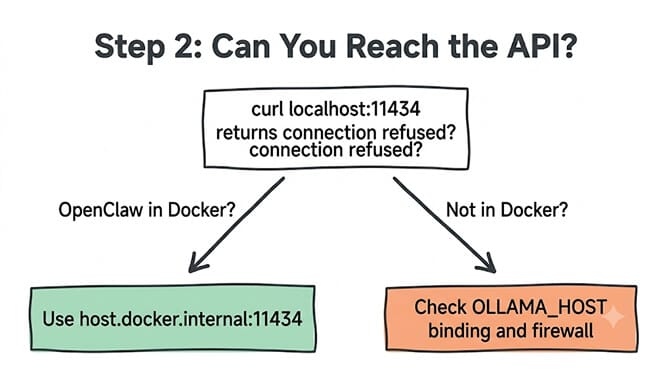
The diagnostic command:
curl http://localhost:11434/api/tags
If it returns a JSON list of models: The API is reachable. Go to Step 3.
If it returns "Connection refused":
Ollama is running but not listening on the expected address. Two sub-causes:
Sub-cause A: Wrong bind address. Ollama defaults to 127.0.0.1:11434 (localhost only). If OpenClaw runs in Docker, it can't reach localhost on the host machine.
# Fix: Bind to all interfaces
sudo systemctl edit ollama
# Add:
[Service]
Environment="OLLAMA_HOST=0.0.0.0:11434"

sudo systemctl restart ollama
Sub-cause B: Port blocked. Firewall or another process on 11434.
# Check what's using the port
lsof -i :11434

# If blocked by firewall (Linux):
sudo ufw allow 11434/tcp
Our Ollama connection error guide covers every connection variant, from "could not connect to ollama app" to Docker and Windows errors.
Step 3: Is the model actually loaded?
The diagnostic command:
ollama list
If your model appears in the list: The model is pulled. Go to Step 4.
If the model isn't listed:
You haven't pulled the model, or the pull failed silently.
The fix:
# Pull the model
ollama pull qwen3.6:35b-a3b

# Verify it's available
ollama list

# Test it directly (bypass OpenClaw to confirm Ollama works)
ollama run qwen3.6:35b-a3b "Say hello"
If ollama run works but OpenClaw doesn't, the model is fine. The problem is the connection between OpenClaw and Ollama. Go to Step 5.
If ollama run hangs or returns errors, the model itself has issues. Common causes: insufficient RAM (the model is too large for your hardware) or a corrupted download (re-pull with ollama pull again). See our Qwen 3.7 Ollama hardware guide for RAM requirements by model.
Step 4: Does the model support your use case?
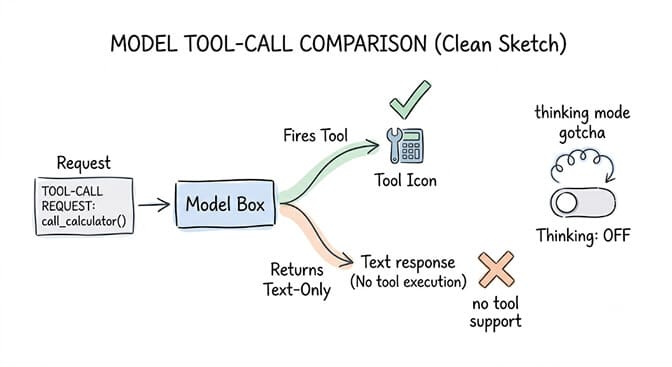
The diagnostic command:
# Test tool calling specifically
ollama run qwen3.6:35b-a3b '{"role":"user","content":"What time is it?","tools":[{"type":"function","function":{"name":"get_time","parameters":{}}}]}'
If the model responds with a tool call: Tool calling works. Go to Step 5.
If the model ignores the tools or returns a text-only response:
The model doesn't support function calling, or it's a base model without instruction tuning.
The fix: Switch to a tool-capable model:
# Models with reliable tool calling on Ollama:
ollama pull qwen3.6:35b-a3b     # Excellent tool support
ollama pull llama3.3:70b         # Good tool support
ollama pull mistral-nemo         # Good tool support

# Models WITHOUT tool support:
# llama2, codellama, phi-2, most base (non-instruct) models
The thinking-mode gotcha: If you're using Qwen 3.6 with thinking mode enabled, the model may "reason about" calling tools instead of actually calling them. Disable thinking mode for tool-calling tasks. This is documented in our tool support fix for every provider.
Step 5: Is the OpenClaw config pointing to the right endpoint?
The diagnostic command:
# Check your OpenClaw provider config
cat ~/.openclaw/config.yaml | grep -A5 "ollama\|local\|baseUrl"
If the baseUrl points to the correct Ollama address: Something else is wrong. Re-run Steps 1-4 or check the Hermes error 400 guide for provider-specific issues.
If the baseUrl is wrong or missing:
This is the most common config mistake. OpenClaw needs the OpenAI-compatible endpoint format. Not Ollama's native API.
The fix:
# In ~/.openclaw/config.yaml
providers:
  ollama:
    baseUrl: "http://127.0.0.1:11434/v1"   # Note the /v1
    models:
      - id: "qwen3.6:35b-a3b"
        name: "Qwen 3.6 Local"
        contextWindow: 32768
Three common config mistakes:
- Missing
/v1:http://localhost:11434doesn't work. OpenClaw expectshttp://localhost:11434/v1(OpenAI-compatible endpoint). - Wrong hostname in Docker:
localhostinside Docker means the container, not your host. Usehttp://host.docker.internal:11434/v1. - Wrong model ID: The model ID in your config must exactly match what
ollama listshows.qwen3.6is different fromqwen3.6:35b-a3b. Copy the exact string.
If you want local models running as agent backends without managing Ollama configs, endpoint URLs, and Docker networking, BetterClaw supports local model endpoints alongside 28+ cloud providers via BYOK. Point to your Ollama instance or any OpenAI-compatible endpoint. Free plan with 1 agent and 100 credits a month. $49/month on Pro.
The quick-reference card (screenshot this)
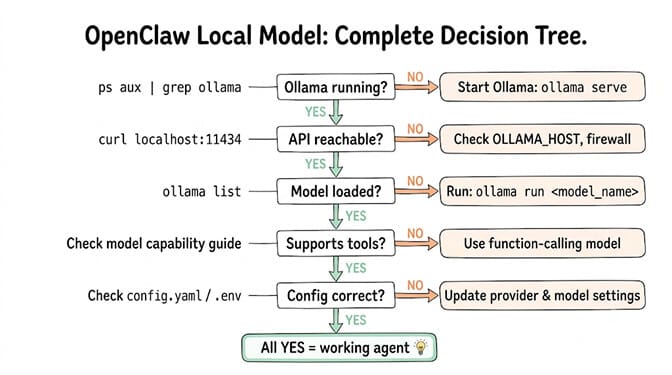
| Step | Diagnostic | Most Common Fix |
|---|---|---|
| 1. Is Ollama running? | ollama ps | ollama serve & or restart service |
| 2. Can you reach the API? | curl localhost:11434/api/tags | Set OLLAMA_HOST=0.0.0.0:11434 or fix Docker networking |
| 3. Is the model loaded? | ollama list | ollama pull qwen3.6:35b-a3b |
| 4. Does it support tools? | Test with tool call | Switch to qwen3.6 or llama3.3 (instruct variant) |
| 5. Is the config right? | Check baseUrl in config | Add /v1 to URL, fix Docker hostname, match model ID |
The pattern is always the same. Five possible failure points, checked in order. Ollama service. Network reachability. Model availability. Model capability. Config accuracy. Fix them in sequence and the local model works.
The longer pattern is also always the same. You fix this today. Something changes tomorrow (laptop sleeps, Ollama updates, Docker restarts, you pull a new model). And you're back here checking Step 1 again.
This is the fundamental tradeoff of local inference: zero token cost, maximum debugging cost.
Give BetterClaw a look if you'd rather build agents than maintain local inference infrastructure. Free plan with 1 agent and 100 credits a month. $49/month for Pro. 200+ verified skills. Cloud models via BYOK with zero markup, or connect your local Ollama instance. We handle the connection plumbing. You handle the agent logic.
Frequently Asked Questions
Why is my OpenClaw local model not working?
The five most common causes, in order of frequency: Ollama service not running (40% of cases), API not reachable due to bind address or Docker networking (25%), model not pulled or corrupted download (15%), model doesn't support tool calling (10%), and OpenClaw config pointing to the wrong endpoint (10%). Run ollama ps first. If it returns nothing, restart Ollama. That fixes the problem in nearly half of cases.
How do I connect OpenClaw to Ollama?
Set the provider in your OpenClaw config (~/.openclaw/config.yaml) with baseUrl: "http://127.0.0.1:11434/v1". The /v1 suffix is required for the OpenAI-compatible endpoint. If OpenClaw runs in Docker, use http://host.docker.internal:11434/v1 instead. The model ID must exactly match what ollama list shows (e.g., qwen3.6:35b-a3b, not just qwen3.6).
Which Ollama models work with OpenClaw for tool calling?
Models with reliable tool calling support include: Qwen 3.6 (35B-A3B and 27B), Llama 3.3 70B, Mistral Nemo, and GLM 5.2. Base models (non-instruct), older models (Llama 2, CodeLlama, Phi-2), and some small quantizations do not support tools. Update Ollama to version 0.17+ for full tool calling support. Disable thinking mode on Qwen models when using tool calls.
Why does OpenClaw keep falling back to the cloud model?
OpenClaw falls back to a cloud model when the local model fails silently (connection timeout, model not responding, tool calling not supported). Check your agent logs for fallback messages. If you see "falling back to..." entries, run the 5-step decision tree to fix the local model connection. To prevent silent fallbacks, remove cloud provider API keys from your config during testing so failures are visible.
Is it worth running a local model instead of a cloud API for OpenClaw?
Local models eliminate per-token costs and keep data private. A personal agent running 500 tasks/day on Qwen 3.6 costs $0/month locally vs $15-45/month on cloud APIs. The tradeoff: you manage the hardware, Ollama service, and connection configuration. For development and privacy-sensitive workloads, local is worth it. For production agents requiring 24/7 uptime, cloud APIs (via BYOK on BetterClaw at $0-19/month platform cost) are more reliable.
Connect local or cloud, your choice.
BetterClaw points at your Ollama endpoint or 28+ cloud providers via BYOK — no config wrangling, zero markup. Free forever, not a trial. Start free →