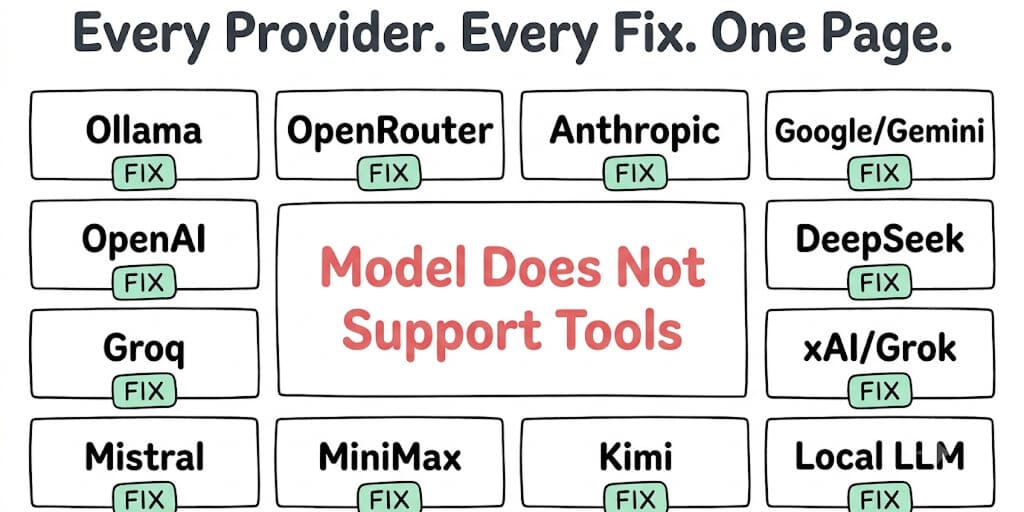
The error says your model doesn't support tools. In most cases, it does. The problem is how OpenClaw is sending the request. Here's the exact fix for every provider, with the config change you need to paste.
Tool calling that just works, across every provider.
BetterClaw runs 200+ verified skills identically across 28+ providers via BYOK — no per-provider tool-format debugging. Free forever, not a trial. Start free → No credit card · No model-variant hunting · Zero markup
My agent was working perfectly on Claude Sonnet. Then I switched to Qwen 3.6 on Ollama and got hit with: "Model does not support tools."
But Qwen 3.6 does support tools. I'd tested it manually. Tool calls worked fine in the Ollama CLI. Just not through OpenClaw.
Twenty minutes of debugging later, I found it. The model tag I pulled didn't include the tool-calling variant. qwen3.6 is not the same as qwen3.6:35b-a3b on Ollama. One supports tools. The other doesn't.
This is the most common OpenClaw tool calling error. The error message is the same regardless of provider. But the cause and fix are different for each one.
Here's the definitive reference. One section per provider. Find yours. Paste the fix.
The 30-second diagnostic
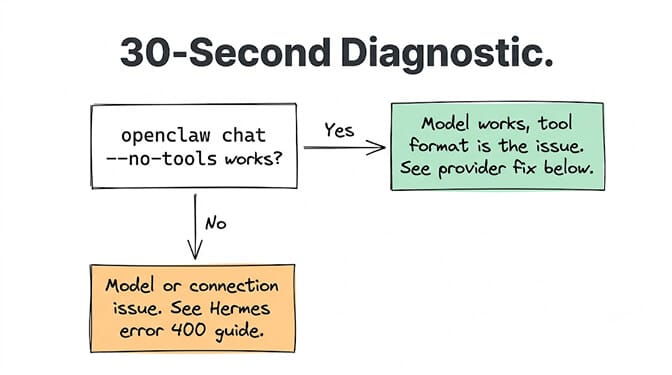
Before scrolling to your provider, confirm the problem:
# Check your current provider and model
openclaw config show | grep -A 5 "model"

# Test without tools to confirm the model works
openclaw chat -q "hello" --no-tools
If --no-tools works but normal chat fails, the model doesn't expose function calling through the endpoint OpenClaw is using. That's what every fix below addresses.
Ollama (the #1 cause of this error)
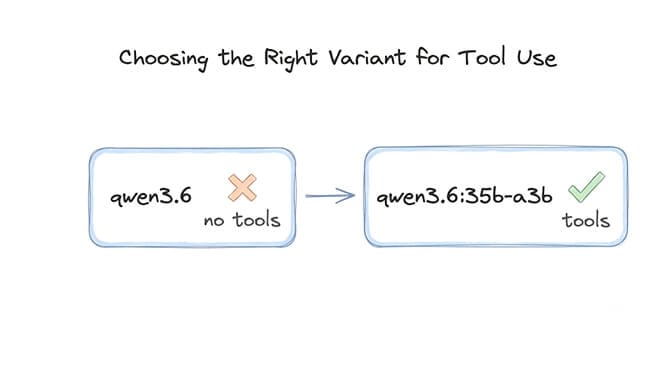
What's happening: You pulled a model variant that doesn't include tool-calling support. Or your Ollama version is too old to support native tool calling.
The fix:
# Update Ollama to latest
curl -fsSL https://ollama.com/install.sh | sh

# Pull a tool-capable model variant
ollama pull qwen3.6:35b-a3b     # Qwen (tool-capable)
ollama pull llama3.3:70b         # Llama 3.3 (tool-capable)
ollama pull mistral:7b           # Mistral (tool-capable)
The gotcha: Not all Ollama model tags support tools. The base qwen3.6 tag may not include tool calling metadata. Use the specific variant tags. Check with:
ollama show qwen3.6:35b-a3b --modelfile | grep -i tool
If the output mentions tools or functions, the variant supports tool calling. If it doesn't, try a different tag.
For the full Ollama setup and Modelfile configuration, see our Qwen Ollama guide.
OpenRouter (the second most common)
What's happening: The model you selected on OpenRouter doesn't support function calling. Or you're using a model ID that routes to a variant without tool support.
The fix:
{
  "model": "anthropic/claude-sonnet-4-6",
  "provider": "openrouter"
}
Models that support tools on OpenRouter: Claude Sonnet/Opus (Anthropic), GPT-5.5/GPT-4.1 (OpenAI), Gemini 3.5 Flash (Google), Qwen3-32B, Llama 3.3 70B. Check the model card on OpenRouter's website. If it says "Functions: Yes," it supports tools.
Models that DON'T support tools on OpenRouter: Some smaller models, older model versions, and free-tier models may not expose function calling. If you're on a free model and getting this error, switch to a tool-capable model.
Anthropic (Claude)
What's happening: API version mismatch. OpenClaw is sending tool definitions in a format the Anthropic API doesn't accept with your current SDK version.
The fix:
# Update OpenClaw to latest (includes Anthropic SDK updates)
openclaw update

# Or set the API version explicitly in .env
ANTHROPIC_API_VERSION=2024-06-01
Also check: If you're using Claude through a proxy (LiteLLM, OpenRouter), the proxy may not be forwarding tool schemas correctly. Test with a direct Anthropic API key first to isolate whether the issue is the proxy or the model.
Since the April 4 Anthropic ban on third-party tools, subscription access through OpenClaw has been in flux: Anthropic reversed the ban on May 13, then paused its replacement credit plan on June 15. For reliable tool calling, use a standard API key from console.anthropic.com.
Google / Gemini
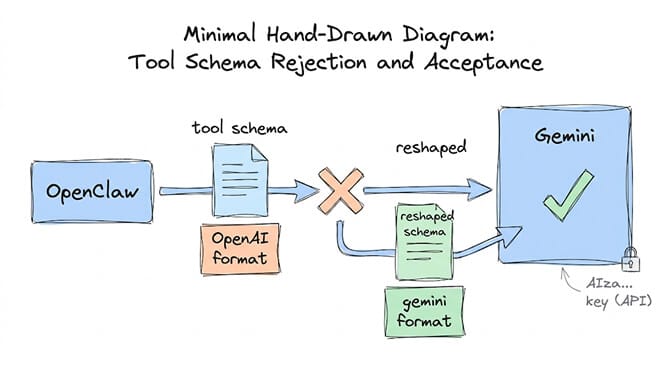
What's happening: Gemini's tool calling uses a different schema format than OpenAI's. OpenClaw sends OpenAI-format tool definitions. Gemini rejects them.
The fix:
# Use the gemini provider (not openai-compatible)
# In ~/.openclaw/config.yaml:
provider: gemini
model: gemini-3.5-flash

# Set the correct API key
GEMINI_API_KEY=AIzaSy...
The dual-header gotcha: If you get a 400 error alongside the tools error, you may also be hitting the dual authentication header bug. Use a standard Google Cloud API key (starts with AIza...), not a Vertex AI key.
OpenAI (GPT)
What's happening: This is rare with OpenAI since most GPT models support tools natively. If you're getting it, it's usually because you're using an older model ID or a fine-tuned model that doesn't have tool calling enabled.
The fix:
{
  "model": "gpt-5.5",
  "provider": "openai"
}
Note: GPT-4.5 is retiring June 27, 2026. GPT-5.2 was already retired June 12. If your config references either model, update to gpt-5.5 or gpt-4.1.
DeepSeek
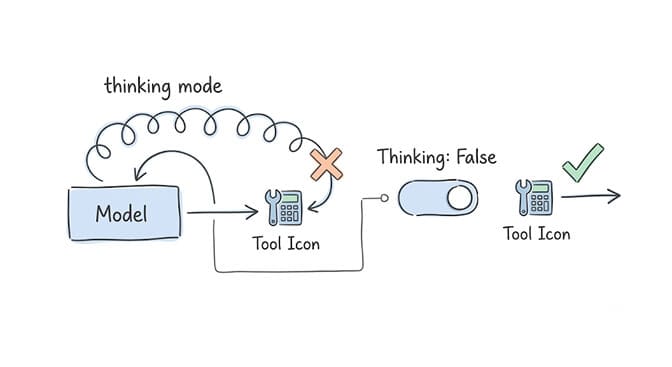
What's happening: DeepSeek V4 Flash supports tool calling, but the thinking mode creates conflicts. When thinking mode is enabled, the model may skip tool execution in favor of reasoning about tools.
The fix:
# Disable thinking mode for tool-calling tasks
# In your config or prompt:
# Set enable_thinking: false

# Or use the non-thinking model variant if available
The reasoning_content bug (GitHub issue #15717) also causes 400 errors after the first tool call. Update OpenClaw to the latest version for the fix. Keeping that version current is your job when you self-host; on BetterClaw the runtime is patched for you and this class of error never reaches your agent.
Groq
What's happening: Groq's tool calling works but is rate-limited. At 500+ tok/s, you can hit the 30 RPM limit before the model even attempts a tool call, which can surface as a tools error instead of a rate limit error.
The fix:
# Use tool-capable models on Groq
# Qwen3-32B and Llama 3.3 70B both support tools

# Add rate limiting to your agent
# 2-second delay between tool calls on free tier
For the full setup, see our Groq budget agent guide.
xAI / Grok
What's happening: Grok models use the OpenAI-compatible API format but may not support all tool-calling features. Some tool schema formats that work on OpenAI don't work on xAI.
The fix: Simplify your tool schemas. Remove optional fields, default values, and nested objects. xAI's tool calling is more restrictive on schema complexity. Use flat parameter objects.
Mistral
What's happening: Mistral models support function calling but require specific API versions and model variants.
The fix:
{
  "model": "mistral-large-latest",
  "provider": "mistral"
}
Use mistral-large-latest or mistral-medium-latest. Smaller Mistral models may not support tools. The -latest suffix ensures you get the current version.
MiniMax (M3)
What's happening: MiniMax M3 supports tool calling via the OpenAI-compatible API. If you're getting this error, the model ID format may be wrong.
The fix:
{
  "model": "minimax-m3",
  "provider": "openrouter"
}
M3 supports native function calling and scores well on tool usage benchmarks (BrowseComp 83.5). If using a direct MiniMax API key, check their documentation for the correct endpoint format.
Kimi (Moonshot)
What's happening: Kimi models with thinking mode enabled break after the first tool call. The model returns reasoning_content that OpenClaw doesn't pass back in subsequent turns.
The fix:
# Update OpenClaw to the latest version
openclaw update

# Or disable thinking mode:
# In config, set thinking: false for the kimi provider
This is GitHub issue #13848. The conversation becomes permanently broken after the first tool call unless reasoning_content handling is patched.
Local LLMs (LM Studio, text-generation-webui, koboldcpp)
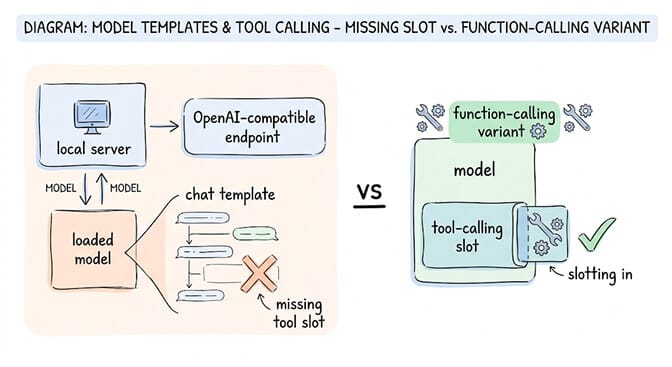
What's happening: Your local inference server is exposing an OpenAI-compatible endpoint, but the model you loaded doesn't have tool-calling support in its chat template.
The fix: Load a model that explicitly supports function calling. On Ollama, use the variants listed above. On LM Studio, select a model tagged as "function calling" in the model browser. On text-generation-webui, use a model with a chat template that includes tool definitions (like Qwen, Llama 3.3, or Mistral).
If you'd rather not debug provider-specific tool format mismatches, BetterClaw handles tool calling at the platform level. 200+ verified skills work across all 28+ providers. No per-provider configuration. No format mismatches. Free plan with 1 agent and 100 credits a month. $49/month on Pro. BYOK with zero inference markup.
The quick reference table
| Provider | Most likely cause | Fix |
|---|---|---|
| Ollama | Wrong model tag | Pull tool-capable variant (e.g. :35b-a3b) |
| OpenRouter | Model doesn't support functions | Check model card for "Functions: Yes" |
| Anthropic | API version mismatch | openclaw update or set API version |
| Gemini | Wrong schema format | Use provider: gemini, not openai-compatible |
| OpenAI | Retired model ID | Update to gpt-5.5 |
| DeepSeek | Thinking mode conflict | Set enable_thinking: false |
| Groq | Rate limit masquerading | Add 2s delay between tool calls |
| xAI/Grok | Schema too complex | Flatten tool parameter objects |
| Mistral | Wrong model variant | Use mistral-large-latest |
| MiniMax | Model ID format | Use correct ID via OpenRouter |
| Kimi | reasoning_content not passed back | openclaw update |
| Local LLM | Chat template missing tools | Load function-calling variant |
The "model does not support tools" error is never about the model. It's about the format, the endpoint, the variant, or the version. The model almost certainly supports tools. OpenClaw just isn't asking the right way for that provider.
Give BetterClaw a look if you'd rather build agents than debug provider-specific tool calling formats. Free plan with 1 agent and 100 credits a month. $49/month for Pro. 28+ providers. 200+ verified skills. Tool calling just works. We handle the provider compatibility.
Frequently Asked Questions
What does "model does not support tools" mean in OpenClaw?
It means OpenClaw tried to send function/tool definitions to your AI model, and the model endpoint rejected them. In most cases, the model DOES support tools, but OpenClaw is sending the tool schema in the wrong format for that specific provider, or you're using a model variant that doesn't include tool-calling support. The fix is provider-specific: wrong model tag on Ollama, schema format mismatch on Gemini, API version mismatch on Anthropic, or thinking mode conflict on DeepSeek/Kimi.
Which models support tool calling in OpenClaw?
Most modern models support tool calling: Claude Sonnet/Opus (Anthropic), GPT-5.5/4.1 (OpenAI), Gemini 3.5 Flash/Pro (Google), Qwen 3.6 35B-A3B (Ollama), Llama 3.3 70B (Ollama/Groq), Mistral Large, MiniMax M3, DeepSeek V4 Flash, and GLM 5.2. On Ollama, use specific variant tags that include tool support. On cloud providers, most current model versions support tools natively.
How do I enable tool calling on Ollama for OpenClaw?
Update Ollama to the latest version (curl -fsSL https://ollama.com/install.sh | sh), then pull a tool-capable model variant. For Qwen: ollama pull qwen3.6:35b-a3b. For Llama: ollama pull llama3.3:70b. Verify tool support with ollama show modelname --modelfile | grep -i tool. If no tool metadata appears, try a different model tag or a different model entirely.
Why does tool calling break with thinking mode enabled?
Models with thinking mode (DeepSeek, Kimi, Qwen) generate internal reasoning tokens before responding. When tool calling is triggered during thinking mode, the model may "think about" calling the tool instead of executing it, or return reasoning_content that OpenClaw doesn't pass back in subsequent turns. The fix: disable thinking mode for tool-calling tasks (enable_thinking: false). Use thinking mode only for pure reasoning tasks without tools.
Is there an agent platform where tool calling just works without provider configuration?
Yes. BetterClaw handles tool calling at the platform level across all 28+ supported providers. 200+ verified skills (with 4-layer security audit) work identically regardless of which model or provider you connect via BYOK. No per-provider format debugging. No model variant hunting. Free plan with 1 agent and 100 credits a month. $49/month for Pro.
Stop debugging tool formats per provider.
BetterClaw's 200+ verified skills work the same across 28+ providers via BYOK. Free forever, not a trial. Start free →