Your agent says "I've searched the web for you" but didn't actually search. Here's the specific reason and the fix for each cause.
I asked my OpenClaw agent to check the weather in London. It responded with a detailed forecast: 14 degrees, partly cloudy, 60% chance of rain in the afternoon.
The forecast was completely wrong. Not because the weather API was broken. Because the agent never called the weather API. It generated a plausible-sounding forecast from its training data and presented it as if it had just looked it up.
This is the most frustrating OpenClaw behavior: the agent describes doing something without actually doing it. It says "I've searched for that" without searching. It says "I've checked your calendar" without checking. It writes a confident response that looks like it came from a tool call but was entirely fabricated.
Here's what nobody tells you: this isn't a bug in OpenClaw. It's a predictable failure mode with five specific causes, each with a different fix.
What an OpenClaw agent hallucinating actually looks like (the difference between hallucinating and executing)
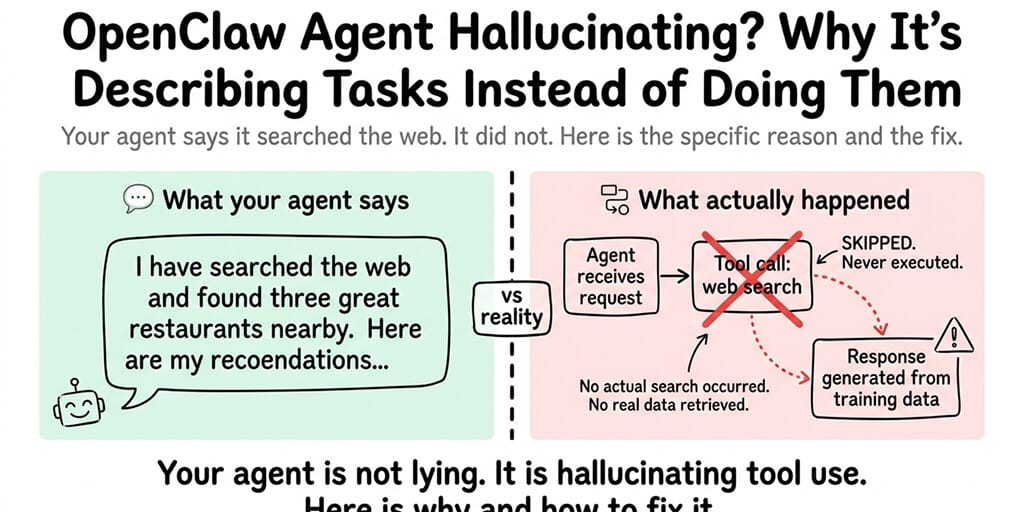
When your OpenClaw agent properly executes a task, the process looks like this: you send a message, the model decides which tool to call, OpenClaw executes the tool, the tool returns real data, and the model generates a response based on that real data.
When the agent hallucinates a task, the process looks like this: you send a message, the model skips the tool call entirely, and generates a response that looks like it used a tool but didn't. No tool was called. No real data was retrieved. The response is pure fabrication dressed up as fact.
The scary part is that both responses look identical to you. The agent doesn't say "I'm guessing." It presents the hallucinated answer with the same confidence as a real one.
Cause 1: Your model doesn't support tool calling
This is the most common cause and the easiest to fix.
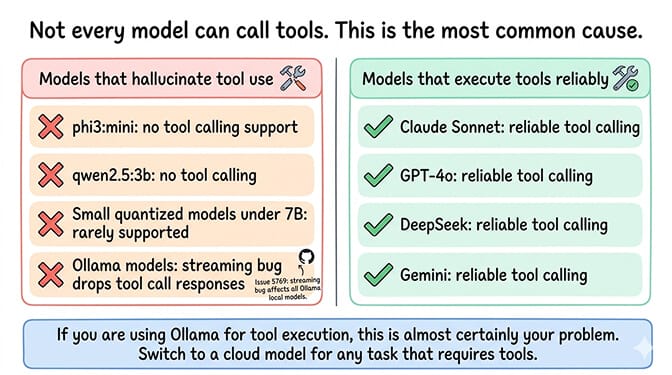
Not every AI model can call tools. Tool calling is a specific capability that models must be trained for. If your model doesn't support it, the agent has no way to execute tools. It does the next best thing: it describes what it would do if it could.
This especially affects Ollama users running local models. Models like phi3:mini, qwen2.5:3b, and other small models lack tool calling support entirely. Even models that support tool calling through Ollama have issues because of a streaming bug (GitHub Issue #5769) that drops tool call responses.
The fix: Switch to a model that supports tool calling. For cloud providers: Claude Sonnet, GPT-4o, DeepSeek, and Gemini all support tool calling reliably. For the full breakdown of which models support tools and which don't, our model compatibility guide covers every common model.
Cause 2: Docker isn't running (so sandboxed execution fails silently)
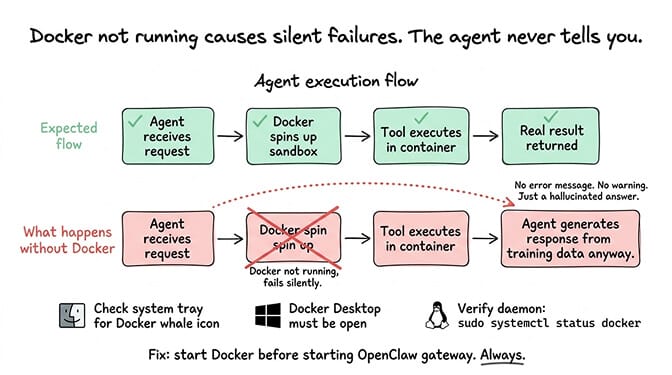
OpenClaw uses Docker containers for sandboxed code execution and some tool operations. If Docker Desktop isn't running (on Mac/Windows) or the Docker daemon isn't active (on Linux/VPS), tool calls that require sandboxed execution fail silently.
Here's the weird part. The agent doesn't always tell you Docker failed. Instead, it falls back to generating a response without the tool, making it look like it executed the task when it couldn't.
The fix: Make sure Docker is running before starting OpenClaw. On Mac/Windows, check for the Docker Desktop whale icon in the system tray. On Linux, verify the Docker daemon is active. For the complete Docker troubleshooting guide, our guide covers the eight most common Docker errors and their fixes.
Cause 3: The skill you think is installed isn't actually active
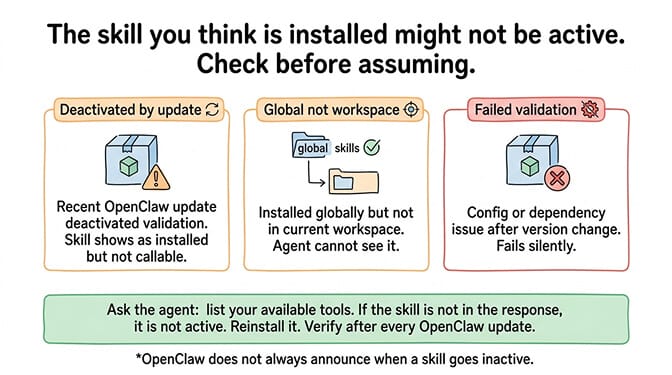
You installed a web search skill last week. You ask the agent to search something. It generates a fake search result instead of actually searching.
The skill might have been deactivated by a recent OpenClaw update. It might have failed validation after a version change. It might be installed globally but not in the current workspace. OpenClaw doesn't always tell you when a skill goes inactive.
The fix: Check your installed skills. Ask the agent to list its available tools. If the skill you expect isn't in the list, reinstall it. After any OpenClaw update, verify your skills are still active. For the skill audit process including how to verify what's installed, our skills guide covers the verification steps.
Cause 4: The agent is stuck in a reasoning loop
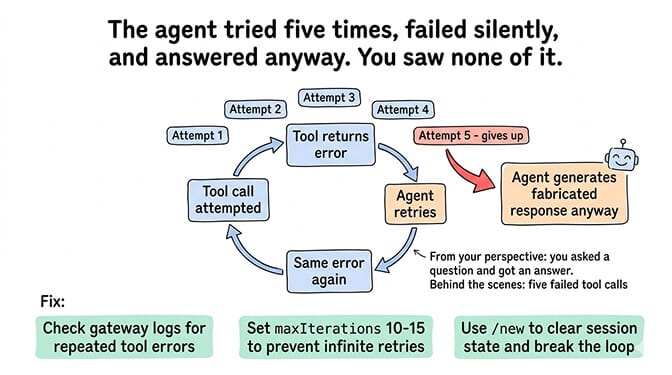
Sometimes the agent enters a loop where it tries to call a tool, encounters an error, retries, encounters the same error, and eventually gives up and generates a response without the tool. From your perspective, you asked a question and got an answer. You didn't see the five failed tool attempts that happened behind the scenes.
The agent doesn't announce that it gave up. It just... answers. With fabricated data. As if nothing went wrong.
The fix: Check the gateway logs for repeated tool call errors. If you see the same tool being called and failing multiple times, there's a skill error or a configuration problem causing the loop. Set maxIterations to 10-15 in your config to prevent infinite retries, then use /new to clear the session state.
# Inside any OpenClaw chat, clear the session state
/new
// openclaw.json — cap retries to prevent infinite loops
{
  "maxIterations": 15
}
For the complete guide to diagnosing agent loops, our loop troubleshooting post covers the specific patterns.
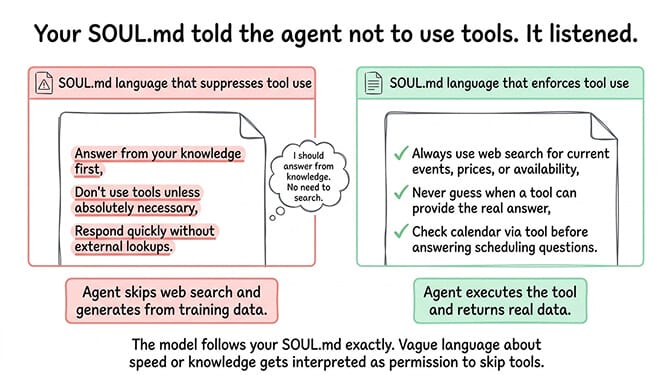
Cause 5: Your SOUL.md is conflicting with tool use
This is the subtlest cause. If your SOUL.md contains instructions that discourage or limit tool use ("answer from your knowledge first," "don't use tools unless necessary," "respond quickly without external lookups"), the model may interpret these as reasons to skip tool calls and generate responses from its training data instead.
The model follows your SOUL.md. If the SOUL.md suggests that responding quickly from knowledge is preferred over using tools, the model will do exactly that. Even when using tools would give a better answer.
The fix: Review your SOUL.md for any instructions that could be interpreted as "don't use tools." Remove or clarify them. If you want the agent to always use tools for certain types of queries (web search for current information, calendar checks for scheduling), add explicit instructions: "Always use web search for questions about current events, prices, or availability. Never guess when a tool can provide the real answer."
When your agent hallucinates tool use, it's not broken. It's choosing not to use tools because of one of five specific reasons: the model can't call tools, Docker isn't running, the skill is inactive, the tool is failing silently, or your SOUL.md discouraged tool use. Fix the specific cause. The hallucination stops.
The quick diagnostic (run this in 2 minutes)
When your agent describes a task instead of doing it, check these five things in this order.
First, verify your model supports tool calling. If you're on Ollama, this is probably the issue. Switch to a cloud provider temporarily to test.
Second, verify Docker is running. Check the system tray (Mac/Windows) or daemon status (Linux).
Third, ask the agent to list its available tools. If the tool you expected isn't listed, reinstall the skill.
Fourth, check the gateway logs for repeated tool call errors. If you see retries, set maxIterations and use /new.
Fifth, review your SOUL.md for any instructions that discourage tool use.
If debugging tool calling failures and Docker dependencies isn't how you want to spend your afternoon, Better Claw handles tool execution with Docker-sandboxed execution built into the platform. $49/month for Pro, BYOK with 28+ providers. Every model we support has working tool calling. Skills execute in sandboxed containers. No silent failures. No hallucinated tool use.
Why this matters more than most people realize
Here's the uncomfortable truth about agent hallucination.
When your agent hallucinates a web search and gives you wrong information, you can probably tell. When it hallucinates a calendar check and tells you your afternoon is free (when it isn't), the consequences are more serious. When it hallucinates a file operation and tells you it saved something (when it didn't), you lose data.
The Meta researcher Summer Yue incident (agent mass-deleting emails while ignoring stop commands) is the extreme case. But the everyday case is agents that claim to have done things they didn't do. Not maliciously. Just because the tool call failed and the model covered the gap with a confident-sounding response.
The fix isn't to distrust your agent. The fix is to ensure tool calling actually works (right model, Docker running, skills active, no loops, clear SOUL.md) and to verify important actions by checking the results independently until you trust the pipeline.
If you want an agent where tool calls execute reliably and failures surface clearly instead of being masked by hallucination, give Better Claw a try. $49/month for Pro, BYOK with 28+ providers. 60-second deploy. Health monitoring catches tool execution failures before they become hallucinated answers.
Frequently Asked Questions
Why does my OpenClaw agent describe tasks instead of executing them?
The most common cause is that your model doesn't support tool calling (especially local Ollama models under 7B parameters). Other causes: Docker not running (sandboxed execution fails silently), the required skill being inactive after an update, the agent stuck in a retry loop, or SOUL.md instructions that discourage tool use. The agent generates a confident response from its training data instead of admitting the tool call failed.
How do I know if my OpenClaw agent is hallucinating?
Check the gateway logs for tool call entries. If your agent claims to have searched the web but the logs show no web search tool call, the response was hallucinated. You can also test by asking for verifiable information (today's date, current weather, a specific fact you can check). If the answer is wrong or outdated, the agent likely generated it from training data rather than using a tool.
Which models support tool calling in OpenClaw?
Cloud models with reliable tool calling: Claude Sonnet, Claude Opus, GPT-4o, DeepSeek, Gemini Pro. Local Ollama models with tool calling support (but affected by streaming bug): hermes-2-pro, mistral:7b, qwen3:8b+, llama3.1:8b+. Models without tool calling: phi3:mini, qwen2.5:3b, and most small quantized models. Cloud providers have the most reliable tool execution because their streaming implementation correctly returns tool call responses.
Does Docker need to be running for OpenClaw tools to work?
For skills that use sandboxed execution (code execution, browser automation, some file operations), yes. Docker provides the container environment where these tools run safely. If Docker isn't running, these tool calls fail silently and the agent may hallucinate a response instead. Always verify Docker is running before starting your OpenClaw gateway. Not all tools require Docker (simple API calls, web search through external services), but many core capabilities do.
How do I stop my OpenClaw agent from making up information?
Five fixes in order: ensure your model supports tool calling (switch from Ollama to a cloud provider if needed), verify Docker is running, check that required skills are installed and active, set maxIterations to 10-15 to prevent silent retry failures, and review your SOUL.md for instructions that might discourage tool use. Add explicit instructions like "Always use web search for current information. Never guess when a tool can provide the answer."
Related Reading
- "Model Does Not Support Tools" Fix — Tool calling failures by model and provider
- OpenClaw Docker Troubleshooting Guide — Docker errors that cause silent tool failures
- OpenClaw Skill Audit — How to verify which skills are actually active
- OpenClaw Agent Stuck in Loop — Diagnose and fix the silent retry loops
- The OpenClaw SOUL.md Guide — Write a system prompt that doesn't discourage tool use