Your Ollama models field is a string or object instead of an array. Here's the 2-minute fix.
You edited your openclaw.json to add Ollama. You started the gateway. You got this:
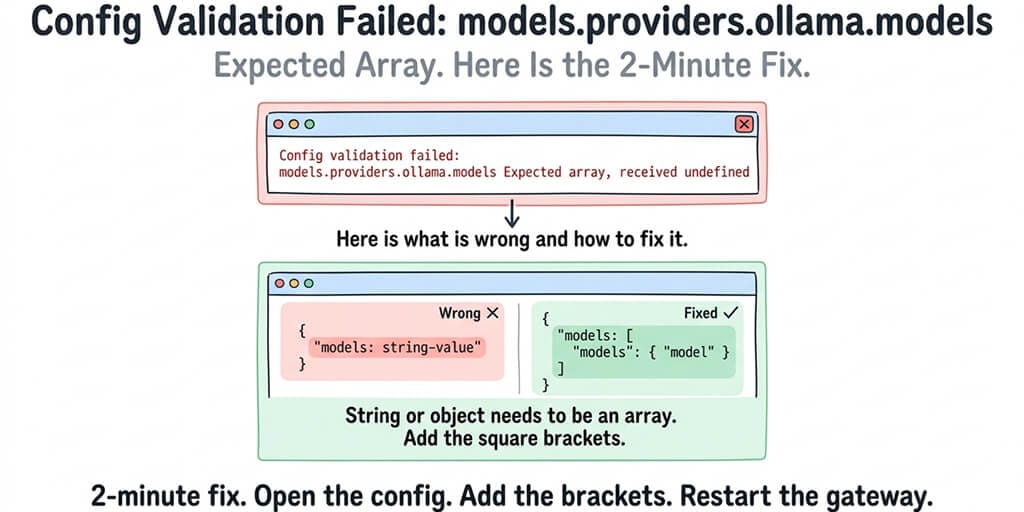
Config validation failed: models.providers.ollama.models expected array, received undefined
Or one of its cousins:
models.providers.ollama.models expected array, received string
models.providers.ollama.models expected array, received object
The error is telling you exactly what's wrong. The models field under your Ollama provider needs to be a JSON array (square brackets), and right now it's either missing, a string, or a plain object.
What "Config validation failed: models.providers.ollama.models expected array" actually means
OpenClaw expects the models field to be an array of model objects. Each model object contains at least an id (the model name) and optionally a contextWindow value.
The three most common mistakes that trigger this error:
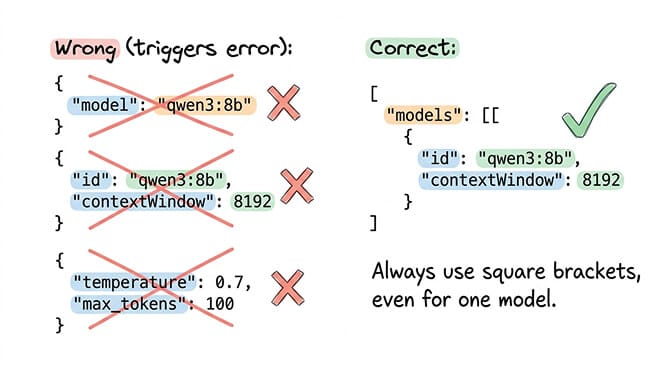
Mistake 1: You put a string where an array belongs. You wrote the model name directly as a string value instead of wrapping it in an array. The config expects square brackets around a list of model objects, even if you only have one model.
Mistake 2: You used an object instead of an array. You wrote the model as a single object without the enclosing array brackets. OpenClaw needs the models field to be a list (array), even when the list has one item.
Mistake 3: The models field is missing entirely. You defined the Ollama provider with a baseUrl and apiKey but forgot the models field altogether. OpenClaw tries to read it, gets undefined, and throws the validation error.
The fix
Your Ollama provider section in openclaw.json needs to look like this:
{
  "models": {
    "providers": {
      "ollama": {
        "baseUrl": "http://127.0.0.1:11434",
        "apiKey": "ollama-local",
        "api": "ollama",
        "models": [
          {
            "id": "qwen3-coder:30b",
            "contextWindow": 65536
          }
        ]
      }
    }
  }
}
The key details:
baseUrlpoints to your Ollama instance — no/v1suffix. The native/api/chatpath (no/v1) preserves tool calls under streaming; the/v1OpenAI-compat path drops them.apiKeyaccepts any string since Ollama doesn't authenticate.apiset to"ollama"tells OpenClaw to use the native API format.modelsis an array (square brackets), even if it has only one entry.- Each model object needs at minimum an
idmatching the exact nameollama listshows, plus an optionalcontextWindowof at least65536for agent operations.
Broken vs. fixed: the three common shapes
| You wrote | Fix |
|---|---|
"models": "qwen3-coder:30b" (string) | "models": [{ "id": "qwen3-coder:30b" }] |
"models": { "id": "qwen3-coder:30b" } (object) | "models": [{ "id": "qwen3-coder:30b" }] |
(no models field at all) | Add "models": [{ "id": "qwen3-coder:30b", "contextWindow": 65536 }] |
The fix is identical for all three: wrap the model definition(s) in square brackets so models is an array.
Shortcut: skip the explicit config entirely
On current OpenClaw versions, you can bypass writing a models array at all. Set the API key as an environment variable and let OpenClaw auto-discover whatever Ollama has pulled:
export OLLAMA_API_KEY="ollama-local"
# In openclaw.json, remove the models.providers.ollama block entirely.
# OpenClaw will discover and use the models from Ollama at startup.
This sidesteps the validation error completely and means new ollama pull results show up without editing config. Once everything works, run openclaw doctor --deep to verify provider connectivity.
For the complete Ollama configuration and troubleshooting guide, our local model guide covers every common error including fetch failures, discovery timeouts, and the native /api/chat vs /v1 endpoint distinction.
How to check your fix worked
Save your openclaw.json. Start the gateway. If the validation error is gone, you're good.
If you see a different error after fixing this one (like "fetch failed" or "failed to discover ollama models"), those are separate connection issues. For the specific fetch failed error fixes, our Ollama fetch error guide covers every variant.
If editing JSON config files and debugging validation errors isn't how you want to spend your time, BetterClaw handles model configuration through a dashboard. $49/month for Pro, BYOK with 28+ cloud providers. No JSON. No config validation errors. Pick your model from a dropdown.
Other error variations that mean the same thing
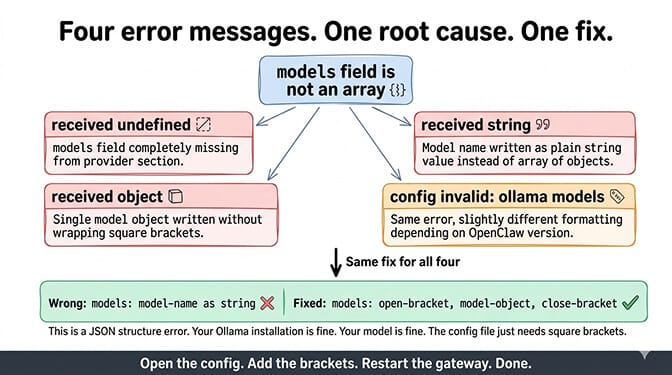
All of these are the same root cause (models field isn't an array):
"expected array, received undefined" means the models field is completely missing from your provider section.
"expected array, received string" means you wrote the model name as a plain string value instead of an array of objects.
"expected array, received object" means you wrote a single model object without wrapping it in array brackets.
"config invalid: ollama models expected array" is the same error with slightly different formatting depending on your OpenClaw version.
The fix for all of them is identical: make the models field an array of model objects with square brackets.
This is a JSON structure error, not an Ollama problem. Your Ollama installation is fine. Your model is fine. The config file just needs the right format.
If you're done debugging config files and want your agent running in 60 seconds, give BetterClaw a try. $49/month for Pro. BYOK with 28+ providers. Zero config validation errors because there's no config file.
Frequently Asked Questions
What does "config validation failed: models.providers.ollama.models expected array" mean?
It means the models field in your OpenClaw Ollama provider configuration is either missing, a string, or an object instead of a JSON array. OpenClaw requires models to be an array (square brackets) containing model objects, even if you only have one model. Fix it by wrapping your model definition in array brackets.
Why does this error say "received undefined"?
"Received undefined" means the models field doesn't exist in your Ollama provider section at all. You defined the provider (baseUrl, apiKey) but forgot to add the models field. Add a models array with at least one model object containing an id and optional contextWindow.
How do I check if my OpenClaw config is valid?
Save your openclaw.json and start the gateway. If it starts without validation errors, the config is valid. For JSON syntax specifically, paste your config into any JSON validator to check for missing brackets, extra commas, or mismatched braces. The most common issue is missing the closing square bracket on the models array.
Does this error mean my Ollama installation is broken?
No. This is a config file format error in your openclaw.json. Your Ollama installation, your pulled models, and your Ollama server are all fine. The error is about how you described the Ollama provider in your OpenClaw config, not about Ollama itself. Fix the JSON structure and Ollama will connect normally.
Can I avoid config validation errors entirely?
Yes. Managed platforms like BetterClaw ($49/month for Pro) configure model providers through a visual dashboard instead of JSON files. You pick your provider and model from dropdowns. No config files, no validation errors, no JSON debugging. For self-hosted setups, copy a known working config from the OpenClaw documentation and modify only the values you need to change.
Related Reading
- OpenClaw Ollama "Fetch Failed" Fix — Connection errors between OpenClaw and Ollama
- OpenClaw Ollama Guide: Complete Setup — Full Ollama integration from scratch
- "Model Does Not Support Tools" Fix — Tool calling failures with Ollama models
- OpenClaw Local Model Not Working: Complete Fix Guide — All local model issues in one guide
- OpenClaw Not Working: Every Fix in One Guide — Master troubleshooting guide for all common errors