Your agent runs on Ollama for $0/token. When Ollama crashes, sleeps, or hits a task it can't handle, it falls back to a cloud API automatically. Here's the setup with health checks, routing logic, and the 3 failure modes you need to handle.
Local-first, cloud safety net, zero plumbing.
Connect your Ollama endpoint and your cloud API key. BetterClaw pings Ollama before each task and routes to cloud when it's down. Free forever, not a trial. Start free → No credit card · No Docker · No config files
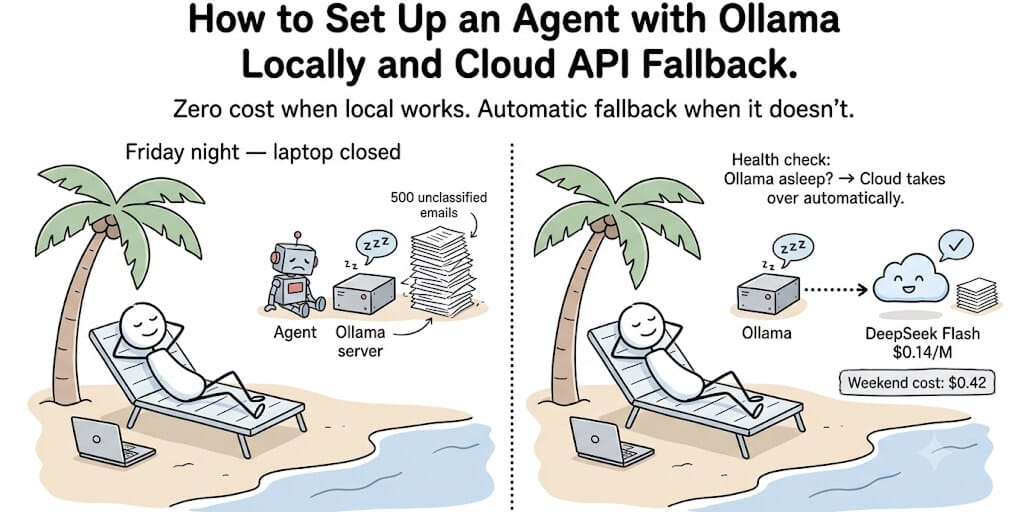
This problem shows up on r/selfhosted and r/LocalLLaMA every week: "My local agent stopped working over the weekend. Missed 300 tasks." The root cause is always the same. Ollama runs on a laptop. Laptop sleeps. Agent dies silently.
The fix isn't "never let your laptop sleep." The fix is a fallback layer. The agent tries Ollama first (free). If Ollama doesn't respond within 3 seconds, it falls back to a cloud API (cheap). You get $0/token when your machine is awake and $0.14/M when it's not. A full weekend offline costs $0.42 in cloud tokens instead of $0 in missed tasks.
The r/selfhosted community calls this pattern "local-first with cloud safety net." Here's the implementation. Health check, routing logic, three failure modes, and the cost math that justifies the 30 minutes of setup.
The architecture (it's simpler than it sounds)
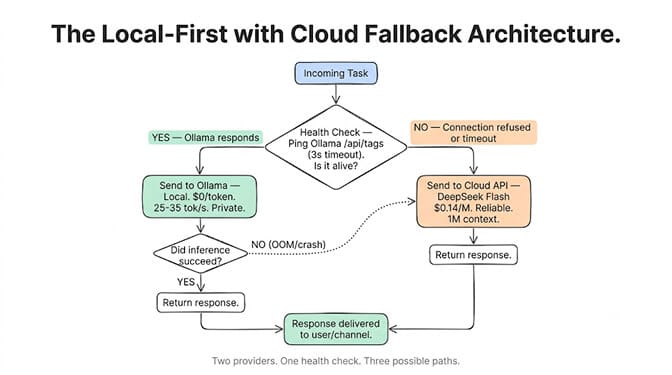
Task arrives
  → Health check: ping Ollama (GET /api/tags, 3s timeout)
  → If Ollama responds:
      → Send to Ollama (local, $0)
      → If Ollama response fails mid-task:
          → Retry on cloud API (fallback)
  → If Ollama doesn't respond:
      → Send to cloud API directly
  → Return response to user/channel
Two providers configured. One primary (Ollama). One fallback (cloud API). The health check runs before every task. The mid-task retry catches cases where Ollama starts processing but crashes during inference (OOM, model too large for context).
Step 1: Set up Ollama as the primary provider
# Install and start Ollama
curl -fsSL https://ollama.com/install.sh | sh
ollama pull qwen3.6:35b-a3b
sudo systemctl enable ollama
sudo systemctl start ollama
For the complete Ollama setup with Modelfile configuration, including context window settings and thinking-mode gotchas, see our dedicated Ollama setup guide.
Verify it's working:
curl -s http://localhost:11434/api/tags | jq '.models[].name'
# Should return: qwen3.6:35b-a3b
Step 2: Configure the cloud fallback
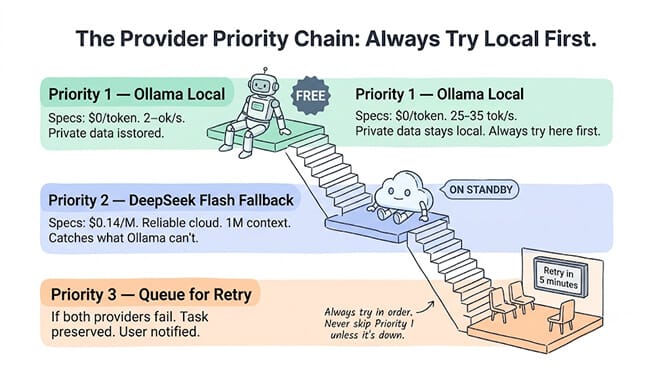
Your fallback needs to be cheap (it only handles overflow) and reliable (it catches what Ollama can't). DeepSeek V4 Flash at $0.14/M is the ideal fallback for classification and extraction tasks. For tasks needing higher quality, MiniMax M3 ($0.60/M) or Sonnet ($3/M). If you're deciding which local model to run in the first place, see our MiniMax M3 vs Qwen local agent setup.
# Example config
PROVIDERS = {
    "primary": {
        "name": "ollama",
        "base_url": "http://localhost:11434/v1",
        "model": "qwen3.6:35b-a3b",
        "timeout": 30,  # seconds for inference
        "health_timeout": 3,  # seconds for health check
    },
    "fallback": {
        "name": "deepseek",
        "base_url": "https://api.deepseek.com/v1",
        "model": "deepseek-chat",
        "api_key": "sk-...",
        "timeout": 60,
    }
}
Step 3: Build the health check
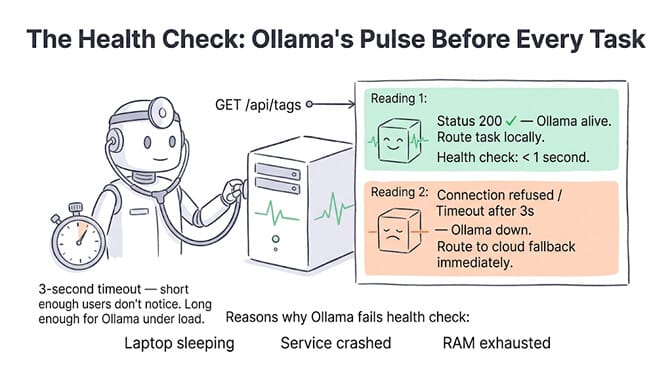
The health check determines whether Ollama is alive and able to serve requests before each task.
import httpx

async def is_ollama_healthy(timeout: float = 3.0) -> bool:
    try:
        async with httpx.AsyncClient(timeout=timeout) as client:
            response = await client.get("http://localhost:11434/api/tags")
            return response.status_code == 200
    except (httpx.ConnectError, httpx.TimeoutException):
        return False
Why 3 seconds? Short enough that users don't notice the delay. Long enough that Ollama has time to respond even under moderate load. If Ollama is down (laptop sleeping, service crashed), the connection will fail instantly, not at the timeout. Provider fallback is a built-in setting on an AI agent builder, so this health-check script is only worth writing if you are committed to running the local path yourself.
Step 4: Add the routing logic
async def route_task(task: str, tools: list = None) -> str:
    # Try primary (Ollama)
    if await is_ollama_healthy():
        try:
            return await call_provider("primary", task, tools)
        except Exception as e:
            print(f"Ollama failed mid-task: {e}")
            # Fall through to cloud

    # Fallback to cloud
    try:
        return await call_provider("fallback", task, tools)
    except Exception as e:
        print(f"Cloud fallback also failed: {e}")
        # Queue for retry
        await queue_for_retry(task, delay=300)
        return "Task queued for retry in 5 minutes."
The 3 failure modes (and how to handle each)
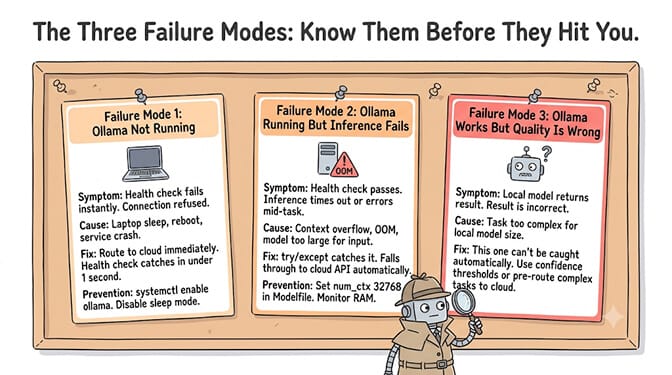
Failure 1: Ollama not running (laptop sleep, reboot, service crash)
Symptom: Health check returns False immediately. curl localhost:11434 returns "connection refused." This is the same Ollama fetch failed / connection refused error you'd hit in the TUI.
Handling: Route to cloud fallback. This is the cleanest failure. The health check catches it in under 1 second. The user never sees a delay.
Prevention: Enable Ollama on boot (systemctl enable ollama). Disable sleep mode on always-on hardware. Use a Mac Mini or dedicated machine instead of a laptop.
Failure 2: Ollama responds but inference fails (OOM, model too large for task)
Symptom: Health check passes (Ollama is running). But the inference call times out or returns an error mid-generation. Common when the input exceeds available RAM or the context window overflows.
Handling: The try/except in the routing logic catches mid-task failures. Falls through to cloud API automatically. The cloud API handles long contexts that Ollama can't (DeepSeek Flash has 1M context vs Qwen 3.6 at 128K).
Prevention: Set conservative context limits in your Modelfile configuration (num_ctx 32768). Monitor RAM usage — out-of-memory crashes are the most common local-inference failure.
Failure 3: Ollama responds but quality is insufficient
Symptom: The local model returns a result, but it's wrong. Classification is incorrect. Tool call hallucinated. Output is garbage.
Handling: This is the hard one. You can't catch quality failures automatically without a quality check layer. Two approaches: (a) Run a confidence check (if the model's classification probability is below 80%, escalate to cloud). (b) Use a model routing strategy that pre-routes complex tasks to cloud before they reach Ollama.
The smartest fallback isn't "Ollama failed, try cloud." It's "this task is too complex for Ollama, send it to cloud proactively." Route by task complexity, not just by availability.
The cost math (why this is worth the setup)
Scenario: 500 daily tasks. Ollama handles 85% (425 tasks). Cloud handles 15% (75 tasks).
Local (425 tasks): $0.
Cloud fallback (75 tasks, DeepSeek Flash): 75 x 5K avg tokens x $0.14/M = $0.05/day.
Monthly total: $1.50. Compare to all-cloud on Sonnet: $56/month.
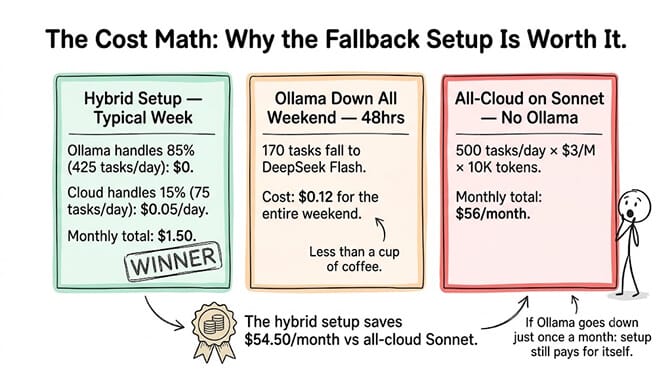
Even with Ollama down for a full weekend (48 hours, ~170 tasks falling to cloud): the cloud fallback costs $0.12 for the weekend. The setup pays for itself if Ollama goes down even once per month.
If building health checks, routing logic, and fallback configurations is more infrastructure than you want to maintain, BetterClaw handles provider fallback at the platform level. Connect your Ollama endpoint AND your cloud API keys. The platform routes automatically. Per-agent cost caps ensure you never overspend on cloud fallback. Free plan with 1 agent and 100 credits a month. $49/month on Pro.
Making it production-ready
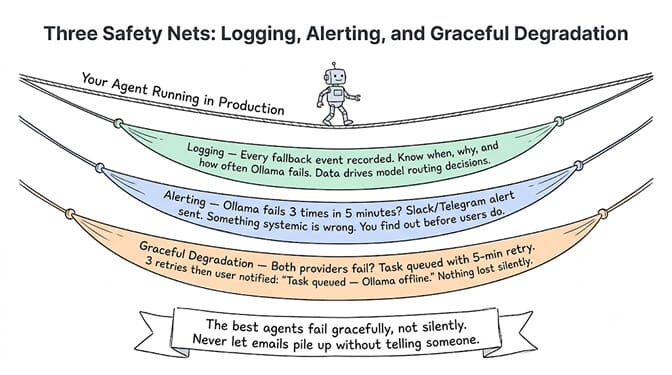
Add logging
Every fallback event should be logged. You need to know how often Ollama fails, what tasks trigger fallbacks, and whether the cloud responses are higher quality than the local ones. Over time, this data tells you which tasks should permanently route to cloud and which are fine on Ollama.
Add alerting
If Ollama fails 3 times in 5 minutes, something systemic is wrong (out of disk, out of memory, service crashed permanently). Send a notification via your agent's Slack or Telegram channel.
Add graceful degradation
If both Ollama AND the cloud fallback fail (DeepSeek outage + laptop sleeping), don't lose the task. Queue it with a 5-minute retry. Three retries, then notify the user: "Task couldn't be completed. Ollama is offline and cloud API returned an error."
The best agent setups fail gracefully, not silently. Your agent should tell you when it can't do something, not pretend everything is fine while emails pile up.
If building health checks and retry logic from scratch feels like too much plumbing for a personal agent, BetterClaw handles provider fallback as a platform feature. Connect your Ollama endpoint and your cloud API key. The platform pings Ollama before each task and routes to cloud automatically when it's down. No custom code. Per-agent cost caps catch runaway cloud spending. Free to start, $49/month for Pro with 5 agents and 12,000 credits a month.
Frequently Asked Questions
How do I set up Ollama with a cloud API fallback for my agent?
Configure two providers: Ollama as primary (localhost:11434/v1) and a cloud API as fallback (e.g., DeepSeek Flash at $0.14/M). Add a health check (ping Ollama's /api/tags endpoint with a 3-second timeout) before each task. If Ollama is healthy, send the task locally. If not, route to cloud. Wrap the Ollama call in a try/except to catch mid-task failures. The cloud handles 10-15% of tasks (when Ollama is down or the task exceeds local capacity).
Which cloud API is best for an Ollama fallback?
DeepSeek V4 Flash ($0.14/M) for classification, extraction, and simple tasks. MiniMax M3 ($0.60/M) for tasks needing multimodal or better quality. Claude Sonnet ($3/M) for complex tool chains and customer-facing output. The fallback should be cheap since it only handles overflow. At 75 fallback tasks per day on Flash: $1.50/month.
How often does Ollama actually go down?
On a dedicated machine (Mac Mini, desktop) with sleep disabled: rarely. Weeks between incidents. On a laptop: every time it sleeps, reboots, or runs out of memory. With systemd auto-restart on Linux, crashes recover in 2-3 seconds. Without auto-restart (macOS Ollama app closed manually, Windows), Ollama stays down until you notice. A cloud fallback catches all of these.
Does the fallback affect response quality?
If the fallback model is the same quality tier (e.g., Qwen 3.6 locally vs DeepSeek Flash on cloud), quality is comparable. If the fallback is a higher-tier model (Sonnet), quality actually improves on fallback tasks. The main quality risk: if you use a much weaker model as fallback to save money (e.g., a tiny model on Groq free tier), quality drops noticeably. Match the fallback quality to your task requirements.
What if both Ollama AND the cloud API are down?
Your routing logic should include a third layer: a task queue with retry. If both providers fail, queue the task with a 5-minute delay and retry up to 3 times. After 3 failures, send a notification ("Task couldn't be completed, both providers unreachable"). Use a simple Redis queue, a SQLite table, or even an in-memory list for personal agents. The key is: never silently drop a task.
Is the health check overhead noticeable?
No. The health check (GET /api/tags) takes 5-50ms when Ollama is running, and fails instantly (connection refused) when it's not. On 500 daily tasks, the total health check overhead is 2.5-25 seconds per day. Imperceptible. The 3-second timeout only matters when Ollama is in a degraded state (partially responding but slow), which is rare.
Skip the health-check plumbing.
Connect Ollama and your cloud key, set a per-agent cost cap, deploy in 60 seconds. The platform handles fallback routing. Free forever, not a trial. Start free →