Half the internet is publishing Ollama commands for Qwen 3.7. None of them work. Here's the honest guide: what you can actually run today, the best config for it, and when 3.7 open weights will arrive.
Run Qwen without managing Ollama.
Connect Qwen via API or your local endpoint, get the visual builder and 200+ verified skills. BYOK, zero markup. Free forever, not a trial. Start free → No credit card · No Docker · No config files
I typed ollama pull qwen3.7 last week. It returned a 404.
Then I searched for GGUF files on HuggingFace. Zero results under the official Qwen organization. I checked ModelScope. Nothing. I tried ollama.com/library/qwen3.7. Page not found.
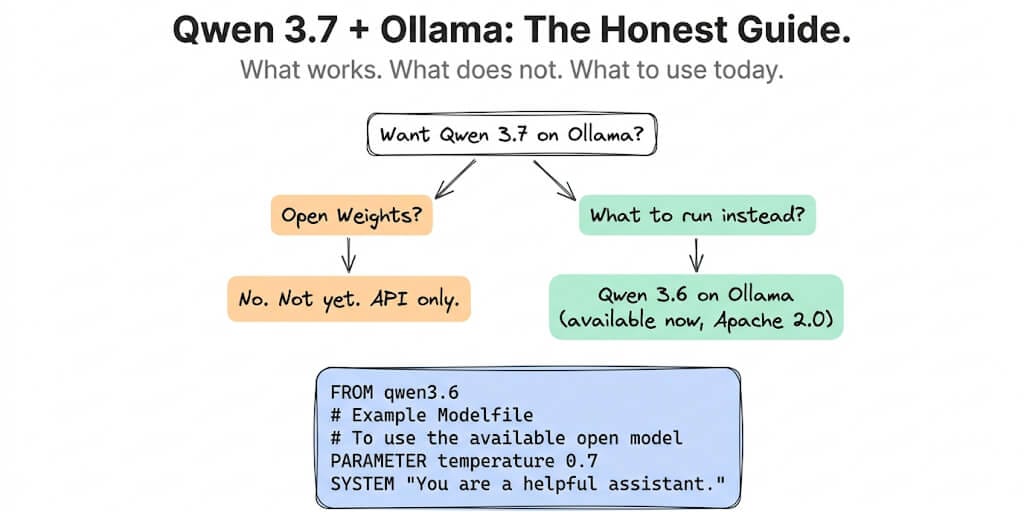
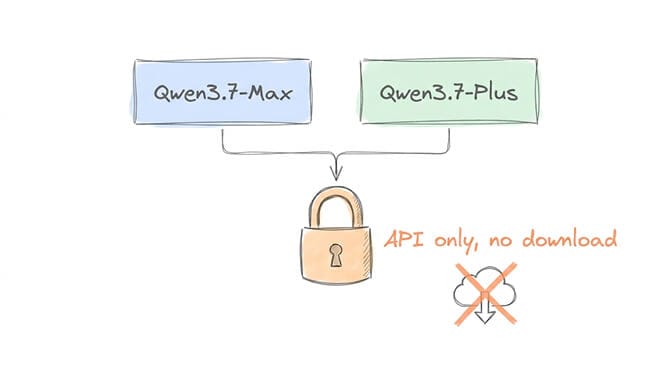
Here's what's actually happening: Qwen 3.7 has no open weights. Both Qwen3.7-Max and Qwen3.7-Plus are closed-weights, API-only models. You cannot pull them on Ollama. You cannot download them from HuggingFace. You cannot run them locally. Not yet.
Every article publishing ollama run qwen3.7 commands is lying to you. The command doesn't work. The model doesn't exist in Ollama's library. As of June 18, 2026, the newest official Qwen model on Ollama is Qwen 3.6.
But here's what you can do. Qwen 3.6 is on Ollama right now. It's Apache 2.0. It's genuinely good at agent tasks. And when 3.7 open weights eventually drop, the setup will be nearly identical, just a different model name. For where Qwen fits among the other zero-cost options, see our guide to the best free model for OpenClaw.
This is the real Qwen 3.7 Ollama guide: what to run today, how to configure it, and what to expect.
What Qwen 3.7 Actually Is (and Why You Can't Run It Locally)
Qwen 3.7 launched as two API-only models on May 20-21, 2026:
Qwen3.7-Max: Text-only flagship. GPQA Diamond 92.4% (beating Opus 4.6). Terminal-Bench 2.0: 69.7%. SWE-Bench Pro 60.6% (highest proprietary). 1M context. Designed for 35-hour autonomous runs with 1,000+ tool calls. $2.50/$7.50/M via Alibaba Cloud.
Qwen3.7-Plus: Multimodal (text + image + video). GUI grounding (ScreenSpot Pro 79.0). 1M context. $0.40/$1.60/M. The budget multimodal agent.
Both are proprietary. No MIT license. No Apache 2.0. No download. Alibaba broke their open-weight pattern with this release.
Will open weights come? Maybe. Alibaba released Qwen 3.6 open weights 3-4 weeks after the API launch. But 3.7 has been API-only for nearly a month with no announcement. This might be the release where Alibaba keeps the crown jewels closed. Don't hold your breath.
What to Run Instead: Qwen 3.6 on Ollama (Right Now)
Qwen 3.6 is the latest open-weight Qwen on Ollama. Apache 2.0. Two variants. Both excellent for agent work.
Install and first run
# Install Ollama
brew install ollama           # Mac
# curl -fsSL https://ollama.com/install.sh | sh  # Linux

# Pull Qwen 3.6 (35B MoE, only 3B active)
ollama pull qwen3.6:35b-a3b

# Test with a real prompt, not "hello world"
ollama run qwen3.6:35b-a3b "Parse this git log and summarize the last 3 commits: feat: add OAuth flow, fix: resolve token expiry bug, chore: update dependencies"
That's it. The model downloads, loads, and responds. No Docker. No Python environment. No YAML config.
Hardware: What You Actually Need
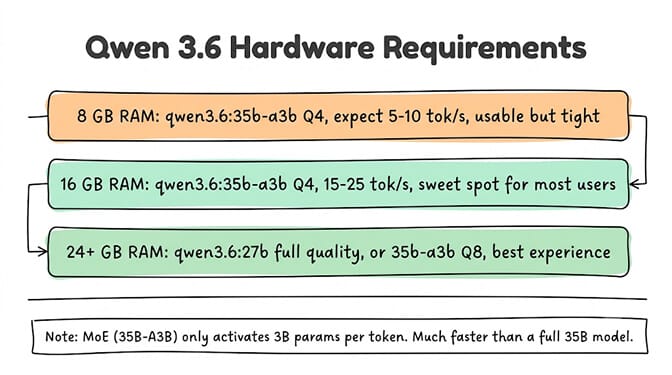
8 GB RAM (tight but works). Pull qwen3.6:35b-a3b with Q4 quantization. The MoE architecture only activates 3B parameters per token, so memory usage is far lower than a dense 35B model. Expect 5-10 tok/s. Usable for testing. Not comfortable for sustained agent work.
16 GB RAM (the sweet spot). Same model, same quant. 15-25 tok/s on Apple Silicon. Comfortable for development, agent testing, and moderate production workloads. This is where most developers land. An M2/M3/M4 MacBook Pro with 16 GB handles this well.
24+ GB RAM (full quality). Two options: qwen3.6:27b (dense, 27B parameters, needs all 24 GB) for maximum capability, or qwen3.6:35b-a3b at Q8 quantization for higher quality MoE inference. The 27B dense variant scores 77.2% on SWE-bench, tying GPT-5 mini on coding tasks.
GPU vs CPU. With a discrete GPU (RTX 3060+, RTX 4090), generation speed roughly doubles. Ollama auto-detects and offloads layers to GPU. On Apple Silicon, Metal acceleration is automatic. On CPU-only machines, expect 3-5x slower inference. Check GPU offload with ollama ps. For a fuller picture of what the hardware tiers buy you, see our local model hardware guide.
The Modelfile Config That Actually Matters
Create a file called Modelfile with this content:
FROM qwen3.6:35b-a3b
PARAMETER num_ctx 32768
PARAMETER num_predict 4096
PARAMETER temperature 0.7
PARAMETER top_p 0.9
PARAMETER repeat_penalty 1.1
Then build it:
ollama create qwen-agent -f Modelfile
ollama run qwen-agent
What each parameter does:
num_ctx 32768: Context window size. Default is often 2048 or 4096, which silently truncates long conversations. 32768 is the minimum for agent tasks that involve tool responses, conversation history, and system prompts. Qwen 3.6 supports up to 131K but higher values consume more VRAM.
num_predict 4096: Maximum output tokens per response. Default is often 256 or 512, which cuts off long code blocks and detailed analyses. 4096 gives the model room to generate complete outputs.
temperature 0.7: Controls randomness. For agent tasks: 0.0-0.3 for classification, extraction, and tool calling (deterministic). 0.5-0.7 for drafting and summarization (balanced). 0.8-1.0 for creative writing (more variation). 0.7 is the general-purpose default.
top_p 0.9: Nucleus sampling. 0.9 is the standard for quality output without excessive randomness.
repeat_penalty 1.1: Prevents the model from repeating itself in long outputs. Critical for agent tasks where the model generates multi-step plans.
The #1 reason agents produce garbage output from Ollama: the default num_ctx is too small. Your system prompt, tool definitions, and conversation history exceed the default, and the model silently truncates. Set it to 32768 minimum. 65536 if you have the VRAM.
For more on context window configuration and why truncation kills agents, we wrote a dedicated guide.
Thinking Mode vs Non-Thinking Mode
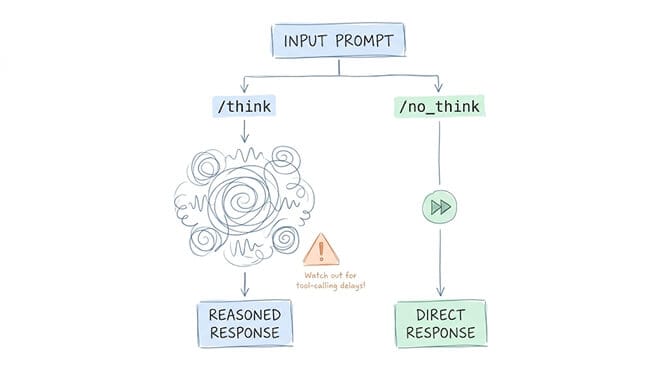
Qwen 3.6 supports a thinking toggle, inherited from the Qwen 3.5 architecture. This is the same concept that Qwen 3.7 extends with its "High" and "Max" modes.
Thinking mode (/think): The model generates internal reasoning tokens before responding. Better accuracy on complex tasks. Higher token consumption. Slower.
Non-thinking mode (/no_think): The model responds directly without internal reasoning. Faster. Cheaper. Fine for simple tasks.
The gotcha that trips everyone up: If you're using thinking mode with tool calling, the model may "think about" calling a tool instead of actually calling it. Your agent will appear to reason about the tool but never execute the call. Disable thinking mode for tool-calling tasks by writing --chat-template-kwargs '{"enable_thinking":false}' in your config (no space after the colon).
For classification and extraction: non-thinking mode. For multi-step reasoning and planning: thinking mode. For tool calling: always non-thinking mode until this interaction is fixed. If you run agents on OpenClaw, our OpenClaw thinking mode guide covers the eight levels and how each provider maps them.
What Qwen 3.6 Is Genuinely Good At (Honest Rankings)
Coding and tool calling: Excellent. Arguably best in class at this parameter size. SWE-bench 77.2% on the 27B dense variant. Native function calling support. Strong at structured code generation from natural language specs.
Structured output and JSON: Very strong. Follows JSON schemas reliably. Low hallucination on field names. Good for extraction workflows where consistent formatting matters.
Agent tasks with multi-step reasoning: Strong. The MoE architecture maintains coherence across 10-20 step plans. Thinking mode improves accuracy on complex chains.
Math and logic: Strong. The Qwen family has historically excelled on AIME and GPQA benchmarks.
Non-English (Chinese): Excellent. Native training advantage. For agents serving Chinese-speaking users, Qwen is the obvious choice.
Creative writing: Decent, not its strength. Sonnet 4.6 and Gemma 4 produce more natural prose. Qwen output tends toward functional over expressive.
Summarization: Good, but Gemma 4 12B edges it on English prose summaries. Qwen is better at structured summaries (tables, bullet points, key metrics).
What It's NOT Good At (This Builds Trust)
Long creative generation. After 2,000+ words of creative content, Qwen 3.6 gets repetitive. Sentence structures loop. Vocabulary narrows. If your agent generates long-form content, break it into sections.
Nuanced tone matching. "Write in the voice of a reassuring customer success manager" produces competent but generic output. Sonnet 4.6 and Gemma 4 are measurably better at tone calibration.
Anything where "vibes" matter more than precision. Marketing copy, brand voice, empathetic responses. If your agent's output needs to feel right (not just be right), consider routing those tasks to a different model.
Quick Comparison: Qwen 3.6 vs the Other Local Options
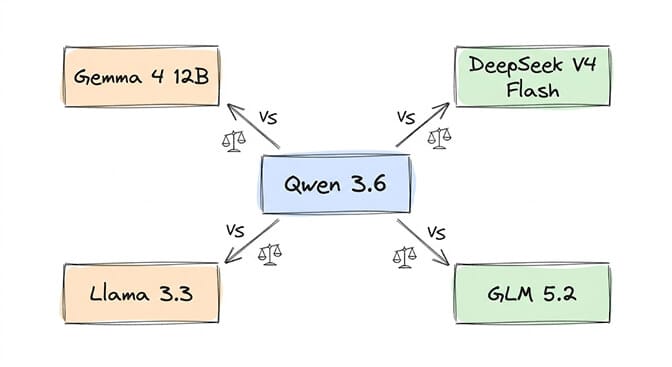
vs Gemma 4 12B: Qwen wins on code and tool calling. Gemma wins on creative chat, multimodal (audio, video), and English prose. Qwen is larger (35B total, 3B active) but not necessarily slower thanks to MoE efficiency. Choose Qwen for agent work, Gemma for conversational AI. We go deeper in the Gemma 4 12B vs Qwen 3.5 9B breakdown.
vs DeepSeek V4 Flash (local via GGUF): Qwen is faster and lighter on VRAM. DeepSeek is better on data analysis and long-context reasoning. For a local agent backend, Qwen 3.6 35B-A3B is the more practical choice on consumer hardware.
vs Llama 3.3: Qwen has better tool calling support and stronger coding benchmarks. Llama has broader community tooling and more quantization options. For agent-specific work, Qwen 3.6 has the edge.
vs GLM 5.2 (via Ollama): GLM 5.2 is a 753B MoE with 40B active. Significantly larger and more capable. But also significantly more VRAM-hungry. If your hardware can run it, GLM 5.2 is the stronger local option. If you're on 16 GB, Qwen 3.6 is the realistic choice.
Connecting Qwen 3.6 to Agent Frameworks
Qwen 3.6 + Ollama + OpenClaw/Hermes:
openclaw launch openclaw --model qwen3.6:35b-a3b
Configure in your agent's model settings: http://127.0.0.1:11434/v1 as the base URL. For the full local-model walkthrough, see our OpenClaw Ollama guide.
Qwen 3.6 + Ollama + n8n: Point n8n's Ollama node at http://localhost:11434. Select qwen3.6:35b-a3b as the model. Works with n8n's AI Agent node directly.
Qwen via BetterClaw BYOK: Connect your Alibaba Cloud or OpenRouter API key. Access Qwen 3.7 (API) and Qwen 3.6 (via compatible endpoints) through the visual builder. No Ollama to manage. Free plan with 1 agent and 500 credits a month. $49/month on Pro.
Common Errors and Fixes
"model not found": Either you typed the model name wrong (qwen3.7 doesn't exist on Ollama, use qwen3.6) or your Ollama version is outdated. Run ollama --version and update if below 0.17.
"out of memory": You pulled a quant that's too large for your RAM. On 8-16 GB, use qwen3.6:35b-a3b (MoE, 3B active). The 27B dense variant needs 24+ GB.
"slow generation": Ollama fell back to CPU. Check GPU offload with ollama ps. If GPU% shows 0%, your GPU isn't being used. On Mac, check Metal is enabled. On Linux, check CUDA/ROCm drivers.
Context window silently truncating: The default num_ctx is too small. Your system prompt + tool definitions + conversation history exceeds it. Set num_ctx 32768 in your Modelfile. Signs of truncation: agent forgets earlier instructions, tool calls reference wrong tools, responses ignore context from earlier in the conversation.
The model landscape moves fast. By the time you read this, Qwen 3.7 open weights might have dropped. Or they might not come at all. The honest truth: Qwen 3.6 on Ollama is genuinely production-capable for agent work today. It's not the flashiest model. It's the one you can actually run.
Build your agent on what exists, not on what's announced.
Give BetterClaw a look if you want Qwen (API or local) without managing Ollama infrastructure. Free plan with 1 agent and 500 credits a month. $49/month for Pro. 28+ providers via BYOK. We handle the model plumbing. You handle the agent logic.
Frequently Asked Questions
How much RAM does Qwen 3.7 need on Ollama?
Qwen 3.7 is not available on Ollama as of June 18, 2026. No open weights exist for either Qwen3.7-Max or Qwen3.7-Plus. The closest available model is Qwen 3.6, which needs 8 GB minimum for the 35B-A3B MoE variant (Q4 quantization, 3B active parameters) and 24+ GB for the 27B dense variant. The 16 GB sweet spot runs the MoE variant at 15-25 tok/s on Apple Silicon.
Is Qwen 3.7 better than Gemma 4 for coding?
Based on API benchmarks, Qwen 3.7 Max scores 60.6% on SWE-Bench Pro vs Gemma 4 12B's ~58% area. For local inference, the comparison is Qwen 3.6 vs Gemma 4 12B: Qwen 3.6 27B scores 77.2% on SWE-bench (higher) but needs more VRAM (24+ GB vs 6.6 GB for Gemma). Gemma 4 12B adds native audio and video input. For pure coding on constrained hardware, Gemma 4 12B wins on accessibility. For maximum local coding capability, Qwen 3.6 27B wins on benchmarks.
How do I increase Qwen 3.7 context window in Ollama?
For Qwen 3.6 on Ollama (Qwen 3.7 is not available), create a Modelfile with PARAMETER num_ctx 32768 (or higher, up to 131072). Build with ollama create qwen-agent -f Modelfile. The default context is often 2048-4096 which silently truncates agent conversations. Set 32768 minimum for agent work. Higher values consume more VRAM: 65536 is comfortable on 24+ GB.
Does Qwen 3.7 support tool calling?
Qwen 3.7 Max supports native tool calling via API (MCP-Atlas 76.4, BFCL-V4 75.0). Locally on Ollama, Qwen 3.6 supports tool calling with one critical gotcha: disable thinking mode when using tools (enable_thinking: false), or the model will reason about tool calls instead of executing them. This silent failure wastes hours of debugging. For reliable local tool calling, use non-thinking mode.
When will Qwen 3.7 open weights be available?
Unknown. Alibaba hasn't announced a date. The historical pattern (3.6 open weights arrived 3-4 weeks after API) suggested June 2026, but it's now past that window with no announcement. Qwen 3.7 may be the release where Alibaba keeps the weights proprietary. For local agent work today, Qwen 3.6 (35B-A3B or 27B dense) is the best Qwen option on Ollama, with Gemma 4 12B and GLM 5.2 as alternatives.
Skip the Ollama setup entirely.
Connect Qwen by API or your own endpoint, deploy a managed agent in 60 seconds. BYOK across 28+ providers, zero markup. Free forever, not a trial. Start free →