

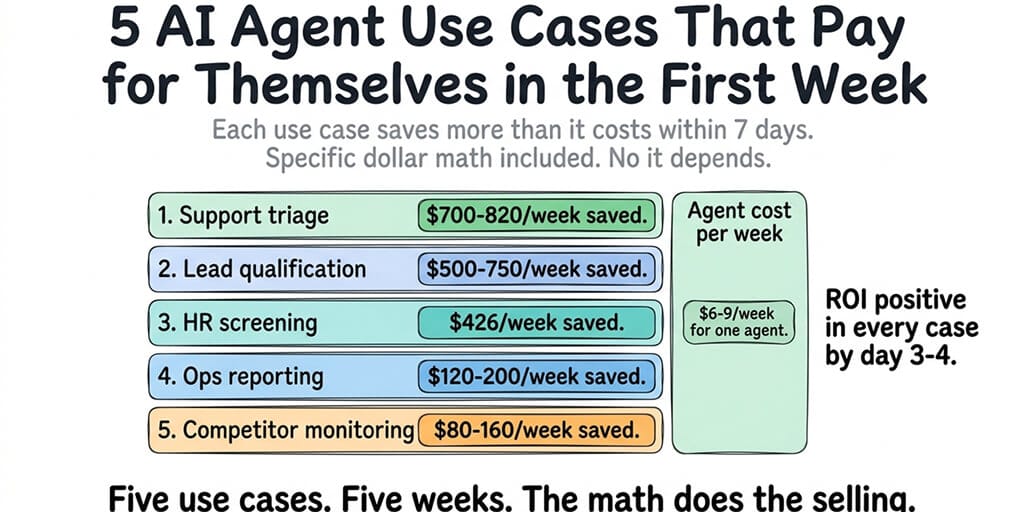
Each use case saves more than it costs within 7 days. Specific dollar math included. No "it depends."
Our first customer support agent answered 847 messages in its first week. The messages came in on WhatsApp between 6 PM and 8 AM, the hours nobody on the team wanted to cover. Before the agent, those messages sat unanswered until morning. Average response time: 11 hours. After the agent: 45 seconds.
The agent cost $61/month ($49/month platform + $12/month API). The part-time support person it replaced cost $600/week. The agent paid for itself by Tuesday.
Not every AI agent use case has this kind of math. Some are experimental. Some are "interesting but unproven." These five aren't. They're the use cases where the ROI is obvious, measurable, and visible in the first week.
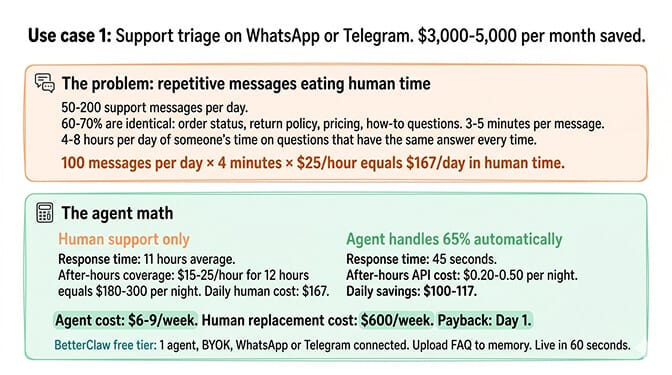
Use case 1: Support triage on WhatsApp or Telegram ($3,000-5,000/month saved)
The problem it solves
Your team gets 50-200 support messages per day. 60-70% are repetitive: order status, return policy, pricing questions, how-to-use-feature-X. A human answers each one individually. It takes 3-5 minutes per message. That's 4-8 hours per day of someone's time on questions that have the same answer every time.
How the agent works
The agent connects to WhatsApp (or Telegram, Slack, Discord, or any of 15+ channels). It reads incoming messages, matches them against your knowledge base (product docs, FAQ, return policy), and responds instantly. Messages it can't handle get routed to a human with context attached.
The math: 100 messages/day × 4 minutes average × $25/hour support cost = $167/day in human time. The agent handles 60-70% automatically. That's $100-117/day saved. $700-820/week. The agent costs $4-6/week. Payback: day 1.
For companies with after-hours support needs, the value is even higher. An after-hours support person costs $15-25/hour for 12 hours of coverage ($180-300/night). The agent covers the same hours for $0.20-0.50/night in API costs.
For the complete list of channels and integrations BetterClaw supports, our use cases page covers which platforms work best for each scenario.
Deploy this agent free
BetterClaw free tier: 1 agent, BYOK, WhatsApp or Telegram connected. Upload your FAQ and product docs to the agent's memory. Set the SOUL.md to handle support queries and route complex issues to your team's Slack channel. Live in 60 seconds.
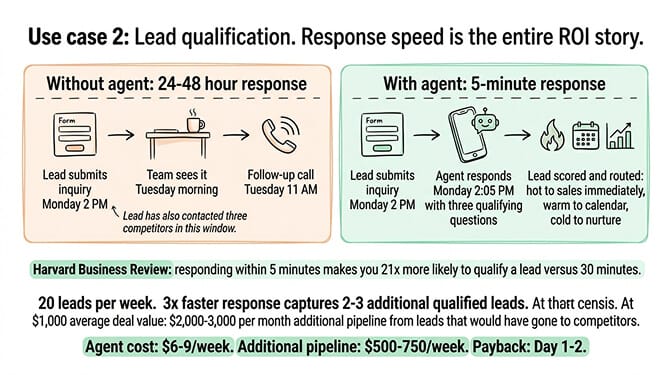
Use case 2: Lead qualification on your website or messaging ($2,000-3,600/month saved)
The problem it solves
Inbound leads arrive at all hours. Your sales team follows up the next business day. By then, the lead has also contacted three competitors. Harvard Business Review research shows that responding within 5 minutes makes you 21x more likely to qualify a lead compared to responding after 30 minutes. Most teams respond in 24-48 hours.
How the agent works
The agent receives inbound inquiries (via website chat, WhatsApp, or email forwarding). It asks three qualifying questions: budget range, timeline, and specific need. Based on the answers, it scores the lead as hot (route to sales immediately via Slack notification), warm (schedule a call via calendar integration), or cold (send resources, add to nurture sequence).
The math: 20 inbound leads/week × 15 minutes of SDR time per qualification call = 5 hours/week. At $30/hour SDR cost = $150/week in qualification time. But the real savings are in speed: 3x faster response means 2-3 additional qualified leads per week. At $1,000+ average deal value, that's $2,000-3,000/month in additional pipeline from leads that would have gone to competitors.
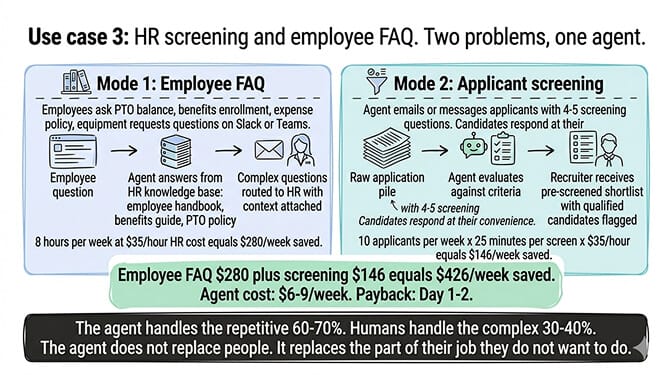
Use case 3: HR screening and employee FAQ ($1,600-3,200/month saved)
The problem it solves
Two problems, one agent. First: HR teams spend 5-10 hours per week answering the same employee questions (PTO balance, benefits enrollment, expense policy, equipment requests). Second: for every open role, someone spends 20-30 minutes per applicant on initial screening calls that filter 70% of candidates out based on basic criteria (experience, location, salary expectations).
How the agent works
Employee FAQ mode: The agent connects to your team's Slack or Teams channel. Employees ask questions. The agent answers from your HR knowledge base (employee handbook, benefits guide, PTO policy). Questions it can't answer get routed to HR with context.
Screening mode: The agent emails or messages applicants with 4-5 screening questions. Candidates respond at their convenience. The agent evaluates responses against your criteria and flags qualified candidates for the recruiter. The recruiter starts with a pre-screened shortlist instead of a raw application pile.
The math: Employee FAQ: 8 hours/week at $35/hour HR cost = $280/week saved. Screening: 10 applicants/week × 25 minutes per screen × $35/hour = $146/week saved. Combined: $426/week. Agent cost: $4-6/week. Payback: day 1.
The pattern across all five use cases: the agent handles the repetitive 60-70% automatically. Humans handle the complex 30-40%. The agent doesn't replace people. It replaces the part of their job they don't want to do anyway. See our HR screening use case for example SOUL.md configurations.
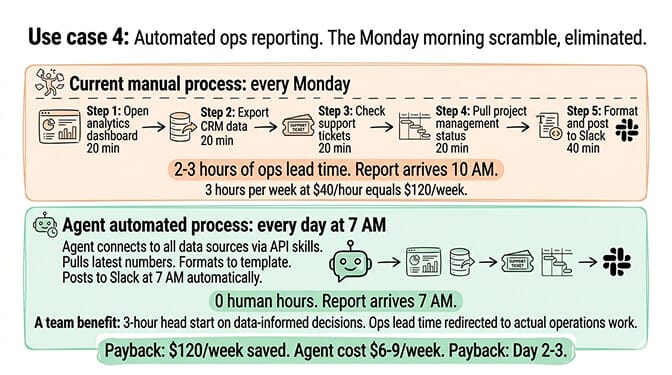
Use case 4: Automated ops reporting ($1,000-2,000/month saved)
The problem it solves
Every Monday morning, someone spends 2-3 hours pulling numbers from five different tools (analytics dashboard, CRM, support ticketing, project management, financial tracking), formatting them into a report, and posting it to Slack or email. The report is the same format every week. The data sources are the same. The human's job is copy-paste-format-post. It is the archetypal case for an agent you build without writing code, because the logic never changes and only the numbers do.
How the agent works
The agent connects to your data sources via API skills (Google Sheets, Airtable, CRM webhooks, analytics APIs). On a schedule (daily, weekly, or triggered by a Slack command), the agent pulls the latest numbers, formats them according to your template, and posts the report to your team's Slack channel or sends it via email.
The math: 3 hours/week at $40/hour ops lead cost = $120/week. Over a month: $480. Over a quarter with the time saved redirected to actual operations work: $1,000-2,000/month in productivity recovered. The report also arrives at 7 AM instead of 10 AM, giving the team a 3-hour head start on data-informed decisions.
If configuring data source connections, API skills, and report templates sounds like exactly the kind of agent workflow you want without the infrastructure management, BetterClaw handles the platform layer so you focus on the agent configuration. Free tier with 1 agent and BYOK. $49/month for Pro. 60-second deploy. Multi-channel support from a single agent. See the operations use case for sample report templates.
Use case 5: Competitor monitoring ($800-1,600/month saved)
The problem it solves
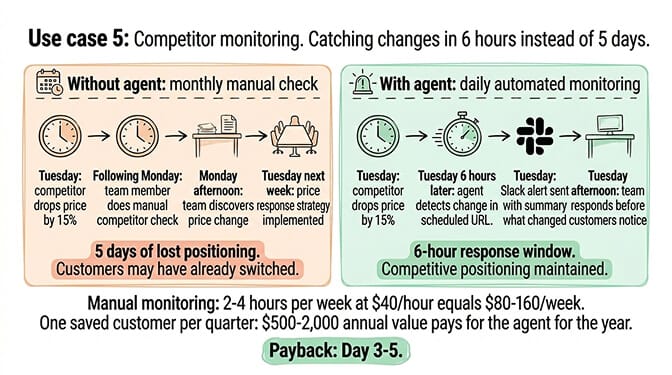
Someone on your team manually checks competitor websites, pricing pages, and social media accounts on a weekly or monthly cycle. Changes get caught late. A competitor drops their price on Tuesday. Your team discovers it the following Monday. Five days of lost positioning.
How the agent works
The agent checks specified URLs on a schedule (daily or more frequently). It compares the current page content against the previous snapshot. When something changes (new pricing, new feature announced, new blog post, updated messaging), it sends an alert to Slack with a summary of what changed.
The math: Manual competitor monitoring: 2-4 hours/week at $40/hour = $80-160/week. But the real value is in speed. Catching a competitor's price change in 6 hours instead of 5 days means you can respond before customers notice. One saved customer ($500-2,000 annual value) per quarter pays for the agent for the year.
For the best practices for configuring agent workflows, our guide covers the SOUL.md patterns and skill configurations that work best for monitoring-style agents.
The ROI summary (specific numbers, not estimates)
| Use Case | Weekly Savings | Agent Cost/Week | Payback |
|---|---|---|---|
| Support triage | $700-820 | $4-6 | Day 1 |
| Lead qualification | $500-750 | $4-6 | Day 1-2 |
| HR screening + FAQ | $426 | $4-6 | Day 1-2 |
| Ops reporting | $120-200 | $4-6 | Day 2-3 |
| Competitor monitoring | $80-160 | $4-6 | Day 3-5 |
Combined: $1,826-2,356/week saved. Agent cost: $18-29/week (one $49/month Pro plan covers all five agents, plus BYOK LLM usage). Net savings in week 1: $1,797-2,338.
The five agents together cost less than a single day of one employee's time. They run 24/7. They don't take PTO. They respond in 45 seconds, not 11 hours.
The use cases that work aren't the flashy ones. They're the boring ones. The questions that get asked 50 times a day. The reports that get built every Monday. The leads that wait 48 hours for a response. The screening calls that filter out 70% of candidates. The competitor pages nobody checks until the quarterly review.
AI agents are at their best when the task is repetitive, the pattern is predictable, and the human doing it would rather be doing something else.
If any of these use cases match what your team is doing manually, give BetterClaw a try. Free tier with 1 agent and BYOK. $49/month for Pro. Pick the use case with the highest savings. Deploy it. Test it for a week. The math proves itself or it doesn't. Either way, you know in 7 days for $0.
Frequently Asked Questions
What are the best AI agent use cases for business?
The five use cases with the fastest ROI: customer support triage (60-70% of messages handled automatically, saving $3,000-5,000/month), lead qualification (3x faster response, 2-3 additional qualified leads/week), HR screening and employee FAQ ($1,600-3,200/month saved), automated ops reporting ($1,000-2,000/month in productivity), and competitor monitoring (changes caught in hours, not weeks). All five pay for themselves within the first week.
How much does an AI agent for customer support cost?
On BetterClaw: $49/month for Pro (which covers up to 5 agents) + $5-15/month API costs (BYOK, you pay your provider directly). Total: $54-64/month. A part-time support person covering the same hours costs $2,400-4,800/month. The agent handles 60-70% of repetitive queries automatically and routes complex issues to humans. ROI is positive by day 1 for teams handling 50+ messages per day.
Can AI agents actually replace customer support staff?
Not replace. Redirect. The agent handles the repetitive 60-70% (order status, policy questions, how-to queries). Humans handle the complex 30-40% (complaints, edge cases, emotional situations). The result: same team size, but humans spend time on the work that requires human judgment instead of copy-pasting the return policy for the 47th time today.
How long does it take to deploy an AI agent for business?
On a managed platform like BetterClaw: 60 seconds for deployment, plus 30-60 minutes for SOUL.md configuration, knowledge base upload, and channel connection. A working support triage agent can be live on WhatsApp within an hour. Testing internally for a week before production use is recommended. No Docker setup, no server configuration, no infrastructure planning required.
Are AI agents reliable enough for customer-facing use?
With proper configuration, yes. The key is clear scope: define exactly what the agent handles and what gets routed to humans. Agents with well-defined scope (FAQ answers, lead qualification questions, screening criteria) perform reliably. Agents with vague scope ("handle everything") fail. BetterClaw includes health monitoring with auto-pause on anomalies, which catches unexpected behavior before it reaches customers.