A practical, step by step playbook for solopreneurs and startup founders to ship a real AI agent without a single dollar on the table.
It's 11:47 PM on a Sunday. You have three browser tabs open. One shows your bank account, which is doing what bank accounts do for solo founders. The second shows a Stripe pricing page for some AI agent platform asking $97 a month before you've shipped a single thing. The third shows your competitor's homepage, where a chat bubble in the corner just answered a customer question while they presumably slept.
You close the laptop. You open it again. You think, there has to be a way to do this for zero dollars.
This article is that way.
Not a trial. Not a fake free tier that locks the actual useful features. Not a freemium honeypot that explodes into a credit card form the moment you connect anything real. An actual functioning AI agent. Running. Doing work. Costing you zero rupees, zero dollars, zero anything.
I'm going to walk you through exactly how to build it in the next 45 minutes. Then I'll tell you the part most articles skip, which is when it stops being free and what to do then.
Why "free AI agent builder" stopped being a joke in 2026
Two years ago, free meant "you can read the docs". Today it means something genuinely useful.
Three things changed. First, the no-code platforms grew up. The visual builders matured to the point where you can configure an agent without writing a line of Python. Second, the LLM providers started competing on free access. Google, Groq, OpenRouter, and others give you free model access without a credit card, because they want you in their ecosystem before you start paying. Google's Gemini API free tier covers its current Gemini 3.8 Flash with no credit card and no expiration. Third, the agent infrastructure problem got solved by people who weren't you. Containers, secrets management, monitoring, scheduling, all the boring stuff that used to require a DevOps weekend now sits invisible inside the platform.
So when I say a free ai agent builder can give you a real working agent at zero cost, I don't mean it as marketing. I mean the math has actually flipped.
You bring two things. A platform with a real free plan. A free LLM provider key. The rest is configuration.
Here's the weird part. Most solopreneurs still don't believe this. They sign up for some bloated SaaS, hand over a card, get charged $79 in month two because their "free trial" expired, and then conclude AI agents are expensive. They're not. The tools just got really good at hiding the path.
What "free" actually means, because the word gets abused
Let me define this clearly so we're not having different conversations.
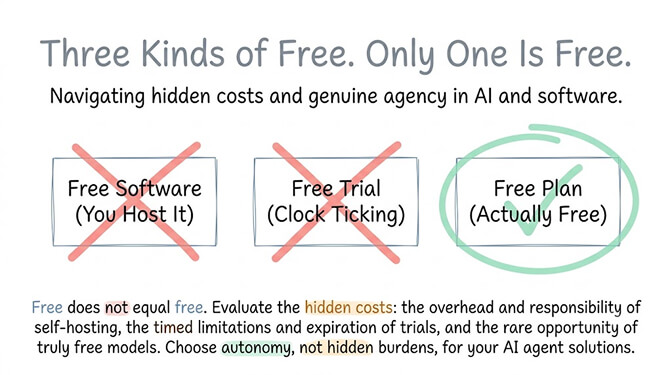
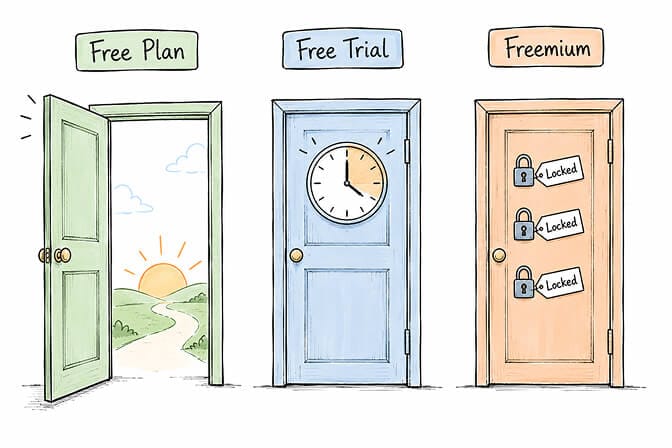
A free plan is permanent. No expiration. No "your trial ends in 14 days" emails. It might have usage limits, but you can use it forever without paying.
A free trial is a 7 or 14 or 30 day window where you get to feel the dopamine of a paid product before the bill arrives.
A freemium with feature gates is the worst version. The free tier exists, but it's missing the three features you actually need. You can have OAuth integrations but not scheduling. Or scheduling but not memory. Or memory but not multi-channel. The whole thing is designed to push you to upgrade.
The only configuration of "free" that matters for a solo founder is the first one. Permanent free plan, 1 agent, 100 credits a month, no credit card. Anything else is just a sales funnel with extra steps.
The $0 stack, exactly as I'd build it today
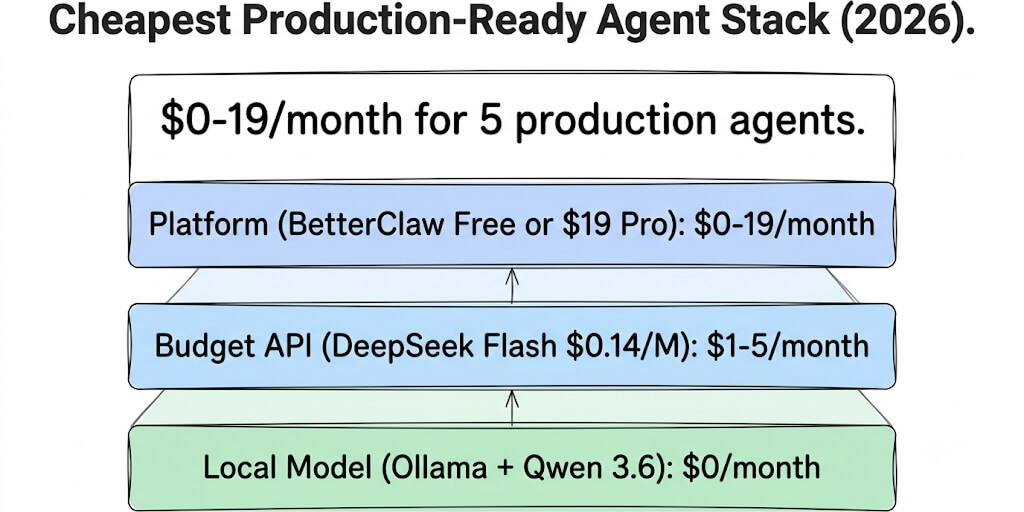
Here is the actual setup. No fluff. Just the components.
Layer one. The platform. BetterClaw free plan. One agent. No credit card. Free forever rather than a trial, which is the part that actually matters. 100 credits a month, 3 connectors on a single account, 7-day memory, and the basic skill set. Credits meter your agent's work (task runs, connector calls) and reset every month. (If you want the bigger picture, see how the no-code AI agent builder works.)
Layer two. The model. This is where most people overthink. You have three solid free options in 2026. Pick one based on what you're optimizing for.
| Free LLM option | Best free models | Free limits (Sept 2026) | Best for |
|---|---|---|---|
| Google AI Studio (Gemini API) | Gemini 3.8 Flash, 3.5 Flash-Lite, 3.1 Flash-Lite, 2.5 Pro | Per-project limits, shown in AI Studio | Best overall quality, long context, multimodal |
| Groq | gpt-oss-120b, gpt-oss-20b, Qwen 3.8 27B | 30 requests/minute, 1,000 requests/day, 200K tokens/day per model | Speed-critical agents, real-time chat |
| OpenRouter | Models tagged :free | 20 requests/minute; 50/day, or 1,000/day once you've bought $10 of credits | Model variety, fallback chains |
A few things to know before you pick, all from each provider's own docs. Google's pricing page lists Gemini 3.8 Flash as "free of charge" on the free tier (Gemini 3.1 Pro Preview isn't), but Google no longer publishes fixed per-model free quotas; you see your project's limits in AI Studio. Free-tier prompts can also be used to improve Google's products, so don't route sensitive customer data through it. Groq's free plan now centres on the open gpt-oss models; the Llama models older guides recommend are no longer on it. OpenRouter caps free models at 20 requests per minute and 50 per day until you've bought at least 10 credits, and free models can be removed without notice.
My honest pick for most solo founders? Google AI Studio with Gemini 3.8 Flash. Best free quality, a huge context window, and Flash is genuinely good enough for most agent tasks. Use Groq when you need it to respond fast like a real-time assistant. Use OpenRouter when you want the option to swap models without changing platforms.
Layer three. The channel. Free Telegram bot. Or free Slack workspace. Both cost nothing and give your agent a place to live where you can talk to it.
That's it. Three layers. Three free tiers stacked. One working agent.
The actual step by step, doing it right now
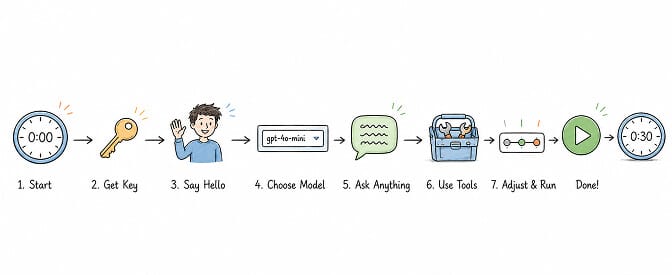
Open a new tab. Follow along. The whole thing takes 30 to 45 minutes if you've never done it. Less if you have.
Step 1. Get your free LLM key. Go to Google AI Studio, sign in with a Google account, click "Get API key", create a new project, copy the key. No credit card screen anywhere. Total time: 2 minutes.
Step 2. Sign up for the platform. Sign up for the BetterClaw free plan. No credit card. You land on a dashboard. There's a button that says "New Agent". Click it. (Want the full step-by-step with screenshots of the configuration flow? See our how to create an AI agent guide.)
Step 3. Connect the model. In the agent setup, select Google Gemini and pick Gemini 3.8 Flash. Paste your API key into the BYOK field. We never mark up your inference. You pay Google. Google charges you zero because you're on their free tier. Net cost: still zero.
Step 4. Tell the agent who it is. A text box opens. Write in plain English what you want. For a first agent, I'd start simple: "You're my personal morning briefing assistant. Every weekday at 7 AM, check my Gmail inbox for emails received overnight that look urgent or important. Summarize them in three lines each. Skip newsletters and promotional emails. Send the briefing to my Telegram."
Step 5. Add skills. Open the verified skills library. You'll see Gmail, Google Calendar, Telegram, Notion, and a long list of others. There's a 4-layer security audit that rejects malicious skills, which matters because the skill marketplace is where most agent platforms get compromised. Click Gmail. One-tap OAuth. Click Telegram. Paste your bot token (which you get for free by talking to Telegram's BotFather, takes 90 seconds).
Step 6. Pick the trust level. This is the part nobody else has. Three settings. Intern (asks before every action). Specialist (asks before risky ones). Lead (acts on its own, you have a kill switch). For a first agent, start at Intern. You can move to Specialist after a week once you've watched it work.
Step 7. Hit deploy. Sixty seconds. Your agent is live. Isolated container. Monitored. Cost-capped. It will run your morning briefing every weekday at 7 AM until you tell it to stop.
Total spend: zero. Total time: about thirty minutes if you've never done this before. The hardest part is deciding what you want the agent to do.
What the free plan is genuinely best for
Be honest with yourself. The free plan is not a production customer support system. It's not going to handle 50,000 lead lookups a month. The 100-credit budget will get hit quickly if you point it at something high volume.
Here's what it's perfect for.
Personal AI assistant. Morning briefings, calendar prep, email triage, document lookups, meeting note summaries. Anything that runs a few times a day and saves you ten minutes each time.
Email triage for solo founders. An agent that reads your inbox at 8 AM and tells you which three emails actually need a reply today. That's one or two short runs per day, which fits inside the free plan's credit budget.
Lead qualification on inbound. When someone fills out your contact form, an agent that enriches the lead, scores them on your ICP fit, and drops them into the right Notion table or HubSpot pipeline. If you're getting 10 leads a week, that's 40 tasks a month.
Content monitoring. An agent that watches a few key sources, flags new posts that match your criteria, and Slacks you a summary. Daily run, well within limits.
Testing before scaling. This is the underrated one. Build the agent on the free plan. Watch it work for two weeks. Once you trust it and want to add three more, that's when you upgrade. The free plan is your validation environment.
The pattern I'd avoid: don't try to use the free plan for anything genuinely high-frequency. You'll burn through the credit budget and start rationing. That's the platform telling you you've outgrown free, and that's fine. That's what Pro is for.
A subtle thing worth saying here
If the morning briefing example sounded useful and you're sitting there thinking I could actually build that tonight, that's exactly the response we designed for. Start free, no credit card, 1 agent, 100 credits a month, BYOK. When you outgrow it, Pro is $49 per month with 5 agents, 12,000 credits, and hourly scheduling. See the full pricing breakdown if you want the comparison. The first agent really does deploy in about 60 seconds once you've signed up.
Back to the article.
The honest part: when to upgrade and why
I'd be lying if I said the free plan is enough forever. For most solo founders it is. For some of you, it won't be. Here are the four signals.
Signal one. You want more than one agent. The free plan gives you one. That's deliberate. One agent is enough to validate that this works. Once you've shipped it and want to build a second one (say, a sales follow-up agent alongside your morning briefing), you've outgrown free. Pro gives you five, and Business gives you 25.
Signal two. You need more connections. Free includes 3 connectors on a single account. If your agent needs Gmail, Calendar, Slack and a CRM, or two Gmail accounts, you've outgrown it. Basic ($19/month, still 1 agent) raises that to 10 connectors, and Pro gives you unlimited connectors with multi-account support.
Signal three. You're burning through credits. 100 credits a month covers a personal agent running a short task once or twice a day. If the use case is genuinely high frequency, you're going to hit the wall by mid-month. Basic raises that to 500 credits, Pro to 12,000 credits a month, and on Pro 1,000-credit packs are $5 each if you still run short.
Signal four. You need memory longer than 7 days. Free plan agents remember 7 days of context. Good enough for personal assistants and short-running workflows. Not enough for sales nurturing, long-running customer support threads, or anything where the agent needs to remember a conversation from three weeks ago.
If none of these apply, stay free. Genuinely. We don't make money pushing you to Pro before you need it. Solo founders who upgrade too early and churn are worse for us than ones who stay free for six months and convert when they actually need it.
The competitors I won't pretend don't exist
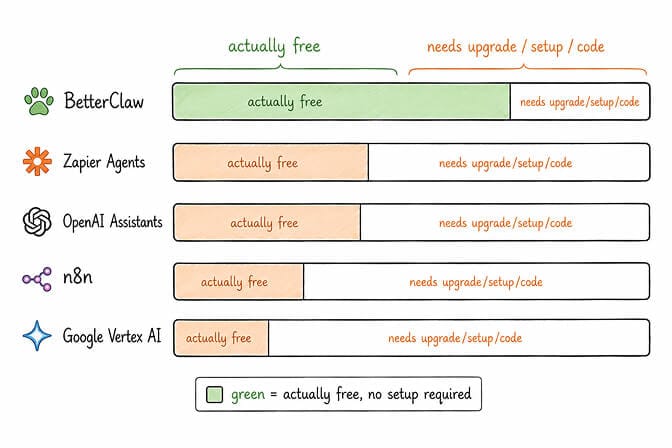
This is where most articles get dishonest. They list their own product and call it the best. Let me give you the actual landscape. (For the deeper side-by-side, see our 12 best AI agent builders comparison.)
Lindy no longer has a free plan. Its pricing page offers a 7-day free trial, then Plus at $29.99 per user per month. Good agent product; not free.
Gumloop is also trial-only now: a 14-day free trial, then Pro from $37 a month. It's enterprise-focused and the pricing reflects that.
n8n Cloud offers a free trial, not a free plan. n8n self-hosted (the Community Edition) is technically free. It's open-source workflow automation. But you need to host it somewhere, manage updates, handle credentials, and write some JavaScript to glue things together. If you're a technical operator, great. If you're a solopreneur who'd rather build your business than babysit a workflow engine, this is a tax on your time, not free.
CrewAI is a code-first Python framework. Free if you can write Python and host the agents yourself. It's open-source and competitive at every tier. But "open source and free" includes paying for the VPS, the monitoring, the time to debug your YAML. For non-developers, this isn't really an option.
Pickaxe, Vapi, Flowise and a few others each have free or open-source options with different trade-offs, from usage caps to self-hosting. Check whether "free" means a permanent plan or a trial before you build on it. The closest comparison platform on the BetterClaw homepage lays out the full feature list. For a GCP-native enterprise alternative, see our BetterClaw vs Vertex AI Agent Builder breakdown.
The honest summary: the free AI agent builder space has a lot of options, but very few of them are actually free in the way a solo founder needs them to be. If you're coming from Google Cloud, note that Vertex AI (now Gemini Enterprise Agent Platform) has free monthly allowances and a $300 new-customer credit but no free plan; our Vertex AI pricing guide breaks that down.
The mistake that costs solo founders money
I'll tell you the one trap I see solo founders fall into over and over.
They build the agent. It works. They get excited. They immediately try to scale it to ten times the volume on day three. The free LLM tier rate limits. The platform task limit hits. The whole thing breaks. They conclude AI agents don't work and go back to doing everything manually.
Don't do this.
The right pattern is boring. Build one agent. Let it run for two weeks. Watch what it does. Notice what it gets wrong. Tweak the instructions. Add one skill. Let it run for two more weeks. Now you actually know what this agent is good for, and you can confidently upgrade to handle more volume.
The free plan isn't a limitation. It's a forced patience mechanism. Use it.
The closing thought
Here's what I keep coming back to.
The reason most solopreneurs don't have an AI agent isn't budget. It's friction. Every blog post tells them to "just install Docker" or "spin up a Python environment" or "configure a Kubernetes cluster" before they've even decided what the agent should do. By the time they've worked through that setup, the original idea has died of boredom.
A free plan eliminates that friction completely. There's no decision to make. No card to enter. No "is this worth it" calculation. You just sign up and build the thing.
The only question left is whether you'll spend the next 45 minutes shipping a working agent or watching another YouTube tutorial about why AI agents are the future.
If any of this resonated, give BetterClaw a try. Free plan with 1 agent and 100 credits a month. $49 per month for Pro (5 agents) when you outgrow it. Your first deploy takes about 60 seconds. We handle the infrastructure. You handle the interesting part.
Frequently Asked Questions
What is a free AI agent builder?
A free AI agent builder is a no-code platform where you can create and deploy an autonomous AI agent at zero cost, with no credit card and no trial expiration. The genuine ones offer a permanent free plan (BetterClaw's includes 1 agent and 100 credits a month), not a 7- or 14-day trial or a freemium with feature gates. You bring your own free LLM provider key (like Google's Gemini API free tier) and the platform handles hosting, security, and execution at no charge.
How does a free AI agent builder compare to paying for a platform like Lindy or Gumloop?
The main difference is whether there's a free plan at all. As of September 2026, Lindy and Gumloop offer free trials (7 and 14 days) rather than free plans, with paid plans from $29.99 and $37 a month. A true free AI agent builder gets a working agent running end to end at $0 with no end date. The trade-off is that free plans typically limit you to one agent and a capped monthly credit budget, which is enough for personal assistants and validation but not for high-volume production use. You upgrade when you outgrow it, not before.
How do I build an AI agent for free in 2026?
Sign up for a free AI agent builder like BetterClaw, get a free LLM key from Google AI Studio or Groq, connect them via BYOK, configure the agent in plain English with the skills it needs (Gmail, Telegram, Slack), set a trust level, and deploy. Total time is about 30 to 45 minutes for your first agent, and total cost is $0 if you stay within free tier limits on both the platform (100 credits per month) and the LLM provider (Gemini 3.8 Flash is free on Google's free tier, within the per-project limits shown in AI Studio).
Is the free plan on an AI agent builder actually worth using or just a sales funnel?
It depends on the platform. A real free plan has no credit card requirement and no trial expiration. BetterClaw's free plan gives you 1 agent, 100 credits per month, 3 connectors, basic skills, 7-day memory, and trust levels at $0 forever. It's genuinely useful for personal use cases like morning briefings or email triage. Most competitor "free" tiers either expire, require a card, or strip out the features that matter.
Is a free AI agent secure enough for personal or solo founder use?
Yes, if the platform takes security seriously. Look for isolated Docker containers per agent (so one agent can't affect another), encrypted credentials with auto-purge from agent memory after a short window, a verified skills marketplace that audits and rejects malicious skills, real-time monitoring with auto-pause on anomalies, and trust levels that require approval before risky actions. BetterClaw's free plan includes all of these, which is a stronger security posture than most teams could build themselves from scratch.