Your agent runs 24/7. But "running" doesn't mean "working." WhatsApp can unpair silently. API keys can expire. Token costs can spiral. A model provider outage can leave your agent sending empty replies. Here are the five monitoring layers you need, and the auto-pause capability OpenClaw still doesn't have.
OpenClaw News put it perfectly: "You have installed OpenClaw. You have configured your skills, connected your messaging platforms, and set it loose on your daily workflows. But here is the question that keeps nagging at the back of your mind: What is it actually doing right now?"
If you can't answer that instantly, you're flying blind with an autonomous system that has access to your email, files, and APIs.
GitHub issue #41924 says it directly: "OpenClaw agents (especially long-running main agents) lack self-monitoring and auto-healing capabilities. When the agent encounters errors or resource exhaustion, it may degrade silently or require manual restart."
Degrade silently. That's the terrifying part. Not a crash. Not an error message. A quiet decline in performance that you only notice when a customer says "your bot stopped responding three days ago."
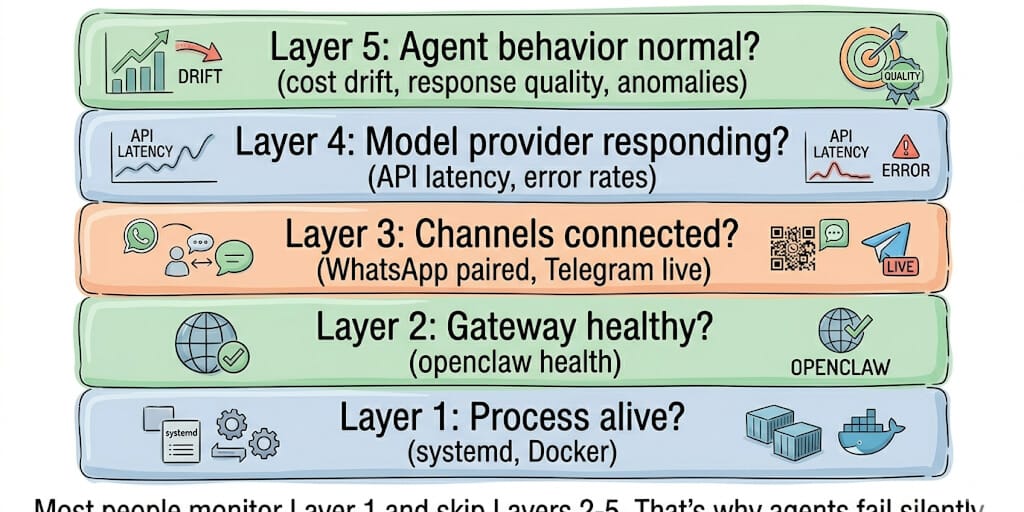
Here are the five monitoring layers, from basic to advanced, with the exact commands and tools for each.
Layer 1: Is the process even alive? (the bare minimum)
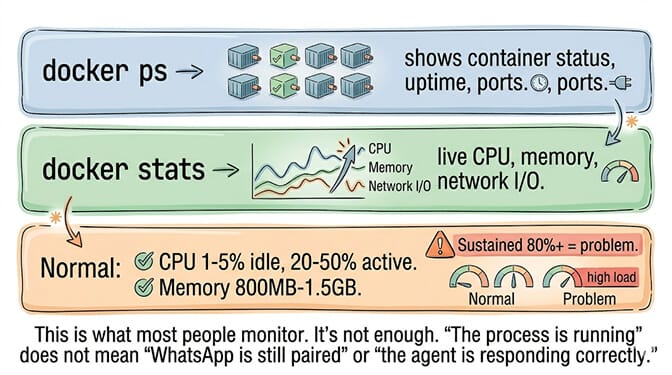
docker ps shows if the container is running. docker stats shows CPU, memory, and network I/O.
Normal baselines: CPU 1-5% idle, spikes to 20-50% during active processing. Memory 800MB-1.5GB depending on loaded skills. Sustained 80%+ on either metric indicates a problem.
The trap: "Container is running" ≠ "agent is working." The process can be alive while WhatsApp is unpaired, the API key expired, or the gateway is stuck in a reconnect loop. Layer 1 catches crashes. It misses everything else.
Layer 2: Is the gateway healthy? (the official health endpoint)
OpenClaw exposes a health endpoint on port 18789 (the Gateway/Control UI port). The openclaw health command queries it.
openclaw health returns a cached snapshot. openclaw health --verbose forces a live probe.
The health snapshot includes: ok (boolean), timestamp, probe duration, per-channel status, agent availability, and session-store summary.
Set up automated checks: Add Uptime Kuma (open-source, runs alongside OpenClaw in Docker) or Healthchecks.io (hosted, free tier with 20 checks). Ping the health endpoint every minute. Alert on non-200 responses.
For the complete OpenClaw gateway troubleshooting guide, our OpenClaw best practices post covers gateway-specific diagnostics.
The gap: The health endpoint tells you the gateway is reachable. It doesn't tell you if the agent is burning $50/day on runaway tool calls or sending incorrect responses to customers.
Layer 3: Are your channels actually connected? (the silent failure layer)
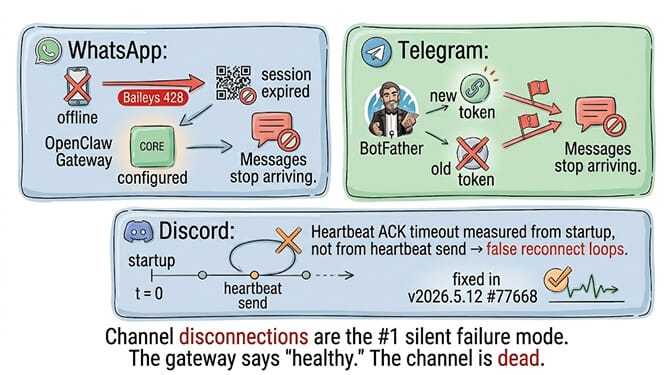
Here's what nobody tells you about channel monitoring.
WhatsApp can unpair silently. The phone goes offline. The QR code session expires. Baileys disconnects with a 428 error. The agent is "running" but no messages are flowing. LumaDock's monitoring guide warns: "A provider can reconnect and show healthy channel status before any new session row is materialized."
Telegram can lose its bot token. If you regenerate the token in BotFather, the old token fails silently. The gateway shows the channel as configured. Messages just stop arriving.
Discord heartbeat ACK timeouts were being measured from gateway startup, not from the actual heartbeat send. v2026.5.12 fixed this (#77668), but older versions had false reconnect loops.
The fix: Check per-channel status, not just overall health:
openclaw channels status shows each channel's connection state.
/status sent as a message in WhatsApp/WebChat returns a status reply without invoking the agent.
Schedule channel-specific checks via cron. If WhatsApp status returns anything other than "connected," alert immediately.
Layer 4: Is the model provider responding? (the cost and quality layer)
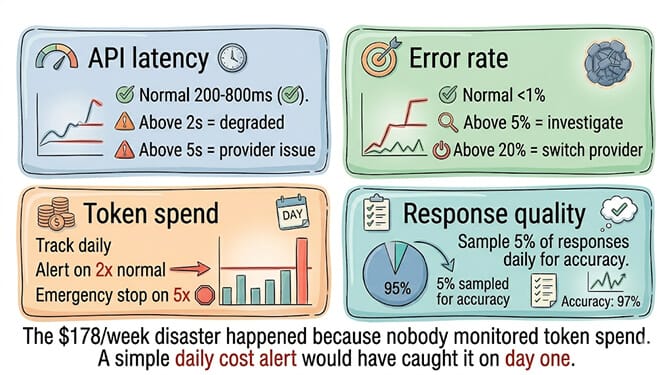
Token spend drift is the most expensive silent failure. The "$178/week" viral post happened because token costs spiraled unmonitored. A daily cost check against your provider dashboard catches this.
API latency degradation means your agent responds slowly. Users notice 2-second delays. At 5+ seconds, they assume the agent is broken.
Error rate spikes indicate provider issues. OpenAI rate limits. Anthropic outages. DeepSeek regional availability. Monitor the error rate per provider and configure fallbacks.
The monitoring script pattern (from Remote OpenClaw):
Check the health endpoint. If non-200, alert via Telegram. Check disk usage. If above 80%, alert. Check memory usage. If above 80%, alert. Run this via cron every minute.
If building a monitoring stack with Uptime Kuma, custom health check scripts, per-channel status polls, cron-based alerting, provider latency tracking, and cost drift detection sounds like operating a small SaaS platform instead of running an AI agent, BetterClaw includes real-time health monitoring and auto-pause on anomalies as built-in platform features. No Uptime Kuma setup. No monitoring scripts. No cron jobs. The platform detects anomalies (cost spikes, error rate surges, channel disconnections) and auto-pauses the agent before damage occurs. Free tier with 1 agent and BYOK. $49/month for Pro.
Layer 5: Auto-pause on anomalies (the layer OpenClaw doesn't have)
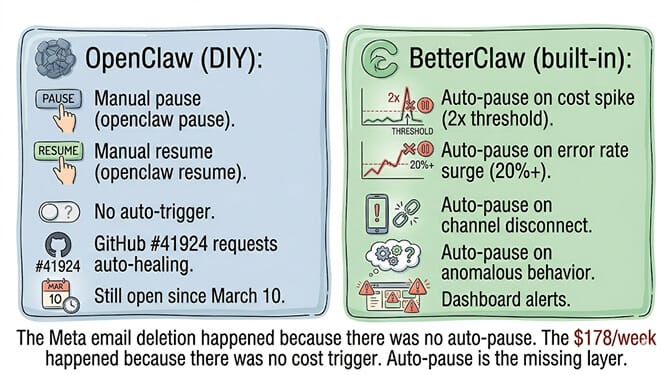
Here's the gap.
GitHub issue #41924 is still open. It requests "a Health Monitoring and Self-Healing subsystem" with automatic detection of errors and resource exhaustion, exponential backoff for repeated failures, and auto-restart capabilities. The issue has been open since March 10, 2026.
OpenClaw can pause and resume manually: openclaw pause and openclaw resume. But there's no built-in auto-pause triggered by cost spikes, error rates, or anomalous behavior.
Why this matters: The Meta email deletion incident (200+ emails deleted while ignoring stop commands) happened because there was no auto-pause. The $178/week cost spiral happened because there was no spending limit trigger. The 500K+ exposed instances exist partly because there's no anomaly detection alerting operators to unusual access patterns.
The DIY approach: Build a wrapper script that checks health, cost, and error metrics every minute. If any metric exceeds a threshold, run openclaw pause automatically. This requires: a monitoring script, threshold configuration, the pause/resume mechanism, alerting, and logging. It's effectively building your own auto-pause system from scratch.
For the comparison of monitoring capabilities across managed platforms, our OpenClaw alternatives breakdown covers which platforms include built-in monitoring versus requiring DIY setup.
The monitoring checklist (the practical version)
Minimum viable monitoring (set up in 30 minutes):
Add Uptime Kuma to your Docker Compose. Point it at http://localhost:18789/health. Set alert interval to 1 minute. Configure Telegram/Slack/email notifications.
Production monitoring (set up in 2-4 hours):
Add per-channel status checks via cron. Add the disk/memory/cost monitoring script. Configure daily cost reports from your API provider dashboard. Set up log rotation (OpenClaw logs grow indefinitely without it). Add a "dead man's switch" via Healthchecks.io.
Enterprise monitoring (or skip all of the above):
Either build the full stack (Prometheus + Grafana + custom exporters + alerting rules + runbooks + on-call rotation) or use a managed platform where monitoring is built in.
The LumaDock observation that captures it: "If you run OpenClaw on a VPS it stops being 'a tool you open sometimes' and turns into a small service you depend on. That changes what 'working fine' means."
That's the honest truth. Running an always-on agent is running a service. Services need monitoring. Monitoring needs configuration. Configuration needs maintenance. Every layer you add is more ops work that isn't agent work.
If you want the agent capabilities with monitoring, auto-pause, anomaly detection, and health dashboards built into the platform, give BetterClaw a try. Free tier with 1 agent and BYOK. $49/month for Pro. Real-time health monitoring. Auto-pause on anomalies. Channel reconnection handled automatically. Cost tracking in the dashboard. The monitoring is ours. The agent conversations are yours.
Frequently Asked Questions
How do I check if my OpenClaw agent is healthy?
Run openclaw health for a cached gateway snapshot or openclaw health --verbose for a live probe. The health endpoint runs on port 18789 (the Gateway/Control UI port). It returns ok status, per-channel connection state, session-store summary, and probe duration. For continuous monitoring, add Uptime Kuma or Healthchecks.io to ping the endpoint every minute.
Does OpenClaw have auto-pause for runaway agents?
Not yet. GitHub issue #41924 (March 10, 2026) requests a "Health Monitoring and Self-Healing subsystem" but remains open. OpenClaw supports manual pause (openclaw pause) and resume (openclaw resume), but there's no built-in auto-pause triggered by cost spikes, error rates, or anomalies. BetterClaw includes auto-pause on anomalies as a built-in platform feature.
What should I monitor on a production OpenClaw agent?
Five layers: process health (Docker status), gateway health (openclaw health endpoint), channel connectivity (per-channel status for WhatsApp, Telegram, Discord), model provider performance (API latency, error rate, token spend), and agent behavior (response quality, cost drift, anomalies). Most failures are in layers 3-5 (channels and providers), not layer 1 (process).
How much does OpenClaw monitoring setup cost?
The monitoring tools are free (Uptime Kuma open-source, Healthchecks.io free tier). The setup time is 30 minutes for basic, 2-4 hours for production-grade. The ongoing maintenance is 1-2 hours/week for log rotation, alert tuning, and threshold adjustments. BetterClaw includes all monitoring at $0 (free plan) or $49/month (Pro) with zero setup time.
Can I monitor my OpenClaw agent from my phone?
Yes, through several approaches: Uptime Kuma has a mobile-responsive web interface. Telegram/Slack alerts push to your phone. The OpenClaw Control UI (port 18789) works in mobile browsers. For full desktop-level access, tools like StarDesk provide remote desktop connections to your VPS from iOS/Android.